
Hi all, As an absolute beginner, when using a workspace, most of the times I don't know the type of the value returned by a piece of code or its methods. So I have to select the value, right-click on it, from the menu (BTW is there a name for this menu?), select "Explore" and then select "Browse Class" or "Browse Full". Is there a shortcut to this functionality? TIA, -- Bahman Movaqar (http://BahmanM.com) ERP Evaluation, Implementation & Deployment Consultant PGP Key ID: 0x6AB5BD68 (keyserver2.pgp.com)

If you select a class name in the workspace, you can do Cmd+b/ctrl+b to browse it. Otherwise you can send browse to any object to browse its class :) Ben On 05 Nov 2013, at 06:55, Bahman Movaqar <Bahman@BahmanM.com> wrote:
Hi all,
As an absolute beginner, when using a workspace, most of the times I don't know the type of the value returned by a piece of code or its methods. So I have to select the value, right-click on it, from the menu (BTW is there a name for this menu?), select "Explore" and then select "Browse Class" or "Browse Full". Is there a shortcut to this functionality?
TIA,
-- Bahman Movaqar (http://BahmanM.com)
ERP Evaluation, Implementation & Deployment Consultant PGP Key ID: 0x6AB5BD68 (keyserver2.pgp.com)

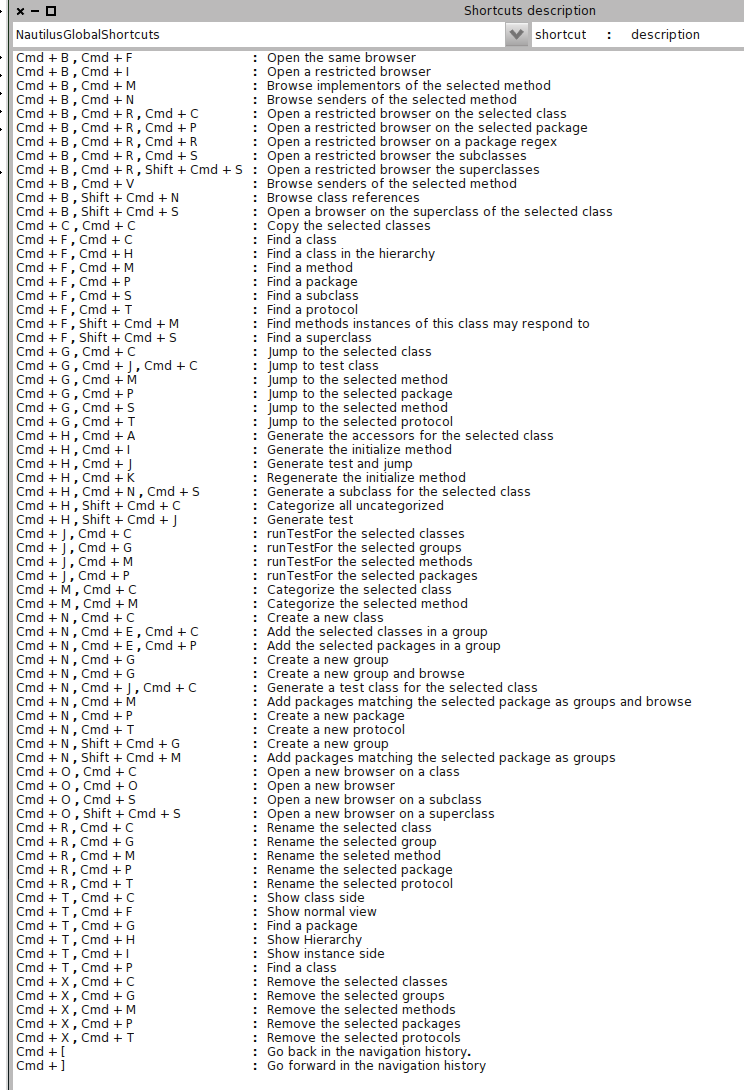
OSX: Cmd-DoubleClick on the name Win: Select the name, Ctrl-Enter Both: Cmd-b / Alt-b (the letters on the right of the menu entries are the shortcuts (screenshot attached for Pharo2.0, there have been changes in 3.0) Also: OSX: Cmd-n Cmd-m / Win: Alt-n Alt-m (Senders of it, Implentors of it) Also have a look at the downward pointing triangle at the top right of the browser (Nautilus) and check the shortcuts list in the menu. Phil [image: Inline image 1] On Tue, Nov 5, 2013 at 6:55 AM, Bahman Movaqar <Bahman@bahmanm.com> wrote:
Hi all,
As an absolute beginner, when using a workspace, most of the times I don't know the type of the value returned by a piece of code or its methods. So I have to select the value, right-click on it, from the menu (BTW is there a name for this menu?), select "Explore" and then select "Browse Class" or "Browse Full". Is there a shortcut to this functionality?
TIA,
-- Bahman Movaqar (http://BahmanM.com)
ERP Evaluation, Implementation & Deployment Consultant PGP Key ID: 0x6AB5BD68 (keyserver2.pgp.com)

Am 05.11.2013 um 09:11 schrieb "phil@highoctane.be" <phil@highoctane.be>:
OSX: Cmd-DoubleClick on the name
For me it works with a single click Norbert
Win: Select the name, Ctrl-Enter
Both: Cmd-b / Alt-b (the letters on the right of the menu entries are the shortcuts (screenshot attached for Pharo2.0, there have been changes in 3.0)
Also: OSX: Cmd-n Cmd-m / Win: Alt-n Alt-m (Senders of it, Implentors of it)
Also have a look at the downward pointing triangle at the top right of the browser (Nautilus) and check the shortcuts list in the menu.
Phil
<05-11-13 09-09-50.png>
On Tue, Nov 5, 2013 at 6:55 AM, Bahman Movaqar <Bahman@bahmanm.com> wrote: Hi all,
As an absolute beginner, when using a workspace, most of the times I don't know the type of the value returned by a piece of code or its methods. So I have to select the value, right-click on it, from the menu (BTW is there a name for this menu?), select "Explore" and then select "Browse Class" or "Browse Full". Is there a shortcut to this functionality?
TIA,
-- Bahman Movaqar (http://BahmanM.com)
ERP Evaluation, Implementation & Deployment Consultant PGP Key ID: 0x6AB5BD68 (keyserver2.pgp.com)
participants (4)
-
 Bahman Movaqar
 -
 Benjamin
 -
 Norbert Hartl
 -
 phil@highoctane.be