Why calypso inverse the hierarchy?

Hi denis Calypso asked me where I want to install a method. And I do not really appreciate that I get the inheritance tree reserved. To me it will destroy students. On my own code which is super stupid I had to think twice. I cannot image students. Then when working on code that is not ours it is be super difficult to understand anything. How can I set that superclass should be higher than subclasses? Stef
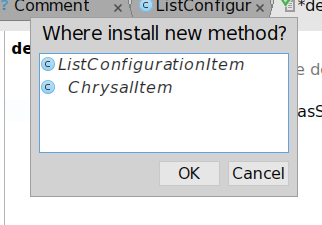
And by the way I do not understand why calypso asks me where I want to define a method, when I selected already the class in which I'm coding. On Tue, Mar 27, 2018 at 11:11 PM, Stephane Ducasse <stepharo.self@gmail.com> wrote:
Hi denis
Calypso asked me where I want to install a method. And I do not really appreciate that I get the inheritance tree reserved. To me it will destroy students. On my own code which is super stupid I had to think twice. I cannot image students.
Then when working on code that is not ours it is be super difficult to understand anything.
How can I set that superclass should be higher than subclasses?
Stef

Hi Stef 2018-03-27 23:11 GMT+02:00 Stephane Ducasse <stepharo.self@gmail.com>:
Hi denis
Calypso asked me where I want to install a method.
Normally this dialog appears when you edit a method which class is not selected in the browser. For example if you enable superclass method visibility and edit one of inherited methods. But give me your scenario.
And I do not really appreciate that I get the inheritance tree reserved.
There is setting for this. And I am not against to change default value or hardcode this part. Originally it was simple list with selected class at the bottom. Then there was issue The currently edited class should be the first option when overriding methods <https://github.com/dionisiydk/Calypso/issues/163>. Idea that first item should be the most common case which is selected class. At the end I realized that I can easily show hierarchy which I though is better than simple list. And I reused existing hierarchy from method visibility list. So there are two points for this dialog: - do we want selected class to be first? - do we want hierarchical view? Best regards, Denis To me it will destroy students.
On my own code which is super stupid I had to think twice. I cannot image students.
Then when working on code that is not ours it is be super difficult to understand anything.
How can I set that superclass should be higher than subclasses?
Stef
Hi denis having the selected class or the hiearchy in the other way is both ok for me. On Tue, Mar 27, 2018 at 11:44 PM, Denis Kudriashov <dionisiydk@gmail.com> wrote:
Hi Stef
2018-03-27 23:11 GMT+02:00 Stephane Ducasse <stepharo.self@gmail.com>:
Hi denis
Calypso asked me where I want to install a method.
Normally this dialog appears when you edit a method which class is not selected in the browser. For example if you enable superclass method visibility and edit one of inherited methods. But give me your scenario.
And I do not really appreciate that I get the inheritance tree reserved.
There is setting for this. And I am not against to change default value or hardcode this part.
Originally it was simple list with selected class at the bottom. Then there was issue The currently edited class should be the first option when overriding methods. Idea that first item should be the most common case which is selected class. At the end I realized that I can easily show hierarchy which I though is better than simple list. And I reused existing hierarchy from method visibility list.
So there are two points for this dialog: - do we want selected class to be first? - do we want hierarchical view?
Best regards, Denis
To me it will destroy students. On my own code which is super stupid I had to think twice. I cannot image students.
Then when working on code that is not ours it is be super difficult to understand anything.
How can I set that superclass should be higher than subclasses?
Stef
participants (2)
-
 Denis Kudriashov
 -
 Stephane Ducasse