[Pharo-project] Russification

Hi all! I'm trying to "localize" Pharo to be able to see and to type in russian letters. After (already many) hours I have no progress. Here details go... What I use: SmalltalkImage current vmVersion 'Squeak3.9 of 7 November 2006 [latest update: #7067]' "About Squeak on Win32" 'Squeak 3.10.6 (release) from Aug 30 2007' Size of Squeak.exe is 985600 bytes... pharo0.1-10193dev08.12.2.image bunch of DLLs new VM including freetype6.dl So far I see windows fonts in preferences. Now I try Locale switchToID: (LocaleID isoLanguage: 'ru'). This throws an exception in StrikeFont class >> setupDefaultFallbackFont (no #Accuat #Accujen #Accula etc. in the system). I just comment that out and go on. An exception in PainBoxMorph class >> localeChanged. The same 'decision'. So far, locale seems to be russian... Then I change fonts to one from windows (I tried Arial, Courier New, Times New Roman). After that I open workspace (having font there changed) and 'print it': file := MultiByteFileStream fileNamed: 'c:\Home\chaetal\Work\Pharo\russian\russian.txt'. [file contents] ensure: [file close]. (where russian.txt is UTF-8 file with russian text). This gives me a bunch of question marks... :( Switching on 'useLocale' preference gives a bit different locale id ('ru-RU') but the test with russian file still fails. I also tried to start Pharo with '-encoding UTF-8 -textenc UTF-8' keys. Than it simply hangs... Advices at http://wiki.squeak.org/squeak/5773 don't help either... Thank you for help in advance... I've heard there's new VM? Where can I get it? -- Dennis Schetinin

Dennis hi Unfortunately I do not have enough time to look at this deeply, but anyway - see below... 2008/12/15 Dennis Schetinin <chaetal@gmail.com>
Hi all!
I'm trying to "localize" Pharo to be able to see and to type in russian letters. After (already many) hours I have no progress.
Here details go...
What I use:
SmalltalkImage current vmVersion 'Squeak3.9 of 7 November 2006 [latest update: #7067]' "About Squeak on Win32" 'Squeak 3.10.6 (release) from Aug 30 2007' Size of Squeak.exe is 985600 bytes...
This VM is fine. I'm using it on windows xp with russian support enabled.
pharo0.1-10193dev08.12.2.image bunch of DLLs new VM including freetype6.dl
So far I see windows fonts in preferences.
Now I try Locale switchToID: (LocaleID isoLanguage: 'ru').
This throws an exception in StrikeFont class >> setupDefaultFallbackFont (no #Accuat #Accujen #Accula etc. in the system). I just comment that out and go on.
An exception in PainBoxMorph class >> localeChanged. The same 'decision'.
So far, locale seems to be russian...
I assume these workarounds are also fine, if you are able to enter Russian text. However I don't see UTFClipboardInterpeter in Pharo, so you should have a problem with copy/paste. You can fileout it from squeak 3.9 though.
Then I change fonts to one from windows (I tried Arial, Courier New, Times New Roman).
After that I open workspace (having font there changed) and 'print it':
file := MultiByteFileStream fileNamed: 'c:\Home\chaetal\Work\Pharo\russian\russian.txt'. [file contents] ensure: [file close].
MultiByteFileStream doesn't know the encoding of the file and it uses system encoding as its best guess. 'TextConverter defaultSystemConverter' should yield ->an UTF8TextConverter in your case. If it does not - you may try to set an instance of UTF8TextConverter as a converter for MultiByteFileStream (instance side API).
(where russian.txt is UTF-8 file with russian text).
This gives me a bunch of question marks... :(
Now these marks. To display Russian text you have to enable unicode font in places where you'd like to see it. For panes it is probably 'default text font' which needs to be set. You did it, right? Do you see, let's say, text rendered with Arial font in newly created workspaces? regards, Danil
Switching on 'useLocale' preference gives a bit different locale id ('ru-RU') but the test with russian file still fails.
I also tried to start Pharo with '-encoding UTF-8 -textenc UTF-8' keys. Than it simply hangs...
Advices at http://wiki.squeak.org/squeak/5773 don't help either...
Thank you for help in advance...
I've heard there's new VM? Where can I get it?
-- Dennis Schetinin
_______________________________________________ Pharo-project mailing list Pharo-project@lists.gforge.inria.fr http://lists.gforge.inria.fr/cgi-bin/mailman/listinfo/pharo-project
SmalltalkImage current vmVersion 'Squeak3.9 of 7 November 2006
[latest update: #7067]' "About Squeak on Win32" 'Squeak 3.10.6 (release) from Aug 30 2007' Size of Squeak.exe is 985600 bytes...
This VM is fine. I'm using it on windows xp with russian support enabled.
I forgot to mention --- I use Window Vista... if it matters
Now I try Locale switchToID: (LocaleID isoLanguage: 'ru').
This throws an exception in StrikeFont class >> setupDefaultFallbackFont (no #Accuat #Accujen #Accula etc. in the system). I just comment that out and go on.
An exception in PainBoxMorph class >> localeChanged. The same 'decision'.
So far, locale seems to be russian...
I assume these workarounds are also fine, if you are able to enter Russian text.
I take it I'm not. Russian input maps to 'usual' symbols... And I just understood the function: russian 'a' maps to '0', the next ('б') to 1 etc... However I don't see UTFClipboardInterpeter in Pharo, so you should have a
problem with copy/paste. You can fileout it from squeak 3.9 though.
It's the problem to be solved hereafter...
Then I change fonts to one from windows (I tried Arial, Courier New, Times
New Roman).
After that I open workspace (having font there changed) and 'print it':
file := MultiByteFileStream fileNamed: 'c:\Home\chaetal\Work\Pharo\russian\russian.txt'. [file contents] ensure: [file close].
MultiByteFileStream doesn't know the encoding of the file and it uses system encoding as its best guess. 'TextConverter defaultSystemConverter' should yield ->an UTF8TextConverter in your case. If it does not - you may try to set an instance of UTF8TextConverter as a converter for MultiByteFileStream (instance side API).
Ivar 'converter' in the stream is set to 'an UTF8TextConverter', so it's ok here.
(where russian.txt is UTF-8 file with russian text).
This gives me a bunch of question marks... :(
Now these marks. To display Russian text you have to enable unicode font in places where you'd like to see it. For panes it is probably 'default text font' which needs to be set. You did it, right? Do you see, let's say, text rendered with Arial font in newly created workspaces?
Yes, I open new Workspace after selecting default text font and see it correctly... but russian symbols from the file (btw, latin symbols from that files are ok). ...I debugged the process of reading file (file contents) and discovered there is no LanguageEnvironment for russian in the image. So Unicode class
value: give probably incorrect result. Is that the actual problem?
-- Dennis Schetinin

This is strange since I do not remember that we remove it. I would really to see how we can harvest the change related to unicode support done in Etoy40. Now I do not have expertise in that area. Stef
What I use:
SmalltalkImage current vmVersion 'Squeak3.9 of 7 November 2006 [latest update: #7067]' "About Squeak on Win32" 'Squeak 3.10.6 (release) from Aug 30 2007' Size of Squeak.exe is 985600 bytes...
This VM is fine. I'm using it on windows xp with russian support enabled.
pharo0.1-10193dev08.12.2.image bunch of DLLs new VM including freetype6.dl
So far I see windows fonts in preferences.
Now I try Locale switchToID: (LocaleID isoLanguage: 'ru').
This throws an exception in StrikeFont class >> setupDefaultFallbackFont (no #Accuat #Accujen #Accula etc. in the system). I just comment that out and go on. An exception in PainBoxMorph class >> localeChanged. The same 'decision'. So far, locale seems to be russian...
I assume these workarounds are also fine, if you are able to enter Russian text. However I don't see UTFClipboardInterpeter in Pharo, so you should have a problem with copy/paste. You can fileout it from squeak 3.9 though.
Then I change fonts to one from windows (I tried Arial, Courier New, Times New Roman).
After that I open workspace (having font there changed) and 'print it':
file := MultiByteFileStream fileNamed: 'c:\Home\chaetal\Work\Pharo \russian\russian.txt'. [file contents] ensure: [file close].
MultiByteFileStream doesn't know the encoding of the file and it uses system encoding as its best guess. 'TextConverter defaultSystemConverter' should yield ->an UTF8TextConverter in your case. If it does not - you may try to set an instance of UTF8TextConverter as a converter for MultiByteFileStream (instance side API).
(where russian.txt is UTF-8 file with russian text).
This gives me a bunch of question marks... :(
Now these marks. To display Russian text you have to enable unicode font in places where you'd like to see it. For panes it is probably 'default text font' which needs to be set. You did it, right? Do you see, let's say, text rendered with Arial font in newly created workspaces?
regards, Danil
Switching on 'useLocale' preference gives a bit different locale id ('ru-RU') but the test with russian file still fails.
I also tried to start Pharo with '-encoding UTF-8 -textenc UTF-8' keys. Than it simply hangs...
Advices at http://wiki.squeak.org/squeak/5773 don't help either...
Thank you for help in advance...
I've heard there's new VM? Where can I get it?
-- Dennis Schetinin
_______________________________________________ Pharo-project mailing list Pharo-project@lists.gforge.inria.fr http://lists.gforge.inria.fr/cgi-bin/mailman/listinfo/pharo-project
_______________________________________________ Pharo-project mailing list Pharo-project@lists.gforge.inria.fr http://lists.gforge.inria.fr/cgi-bin/mailman/listinfo/pharo-project
I forgot to mention --- I use Window Vista... if it matters
Yes, I open new Workspace after selecting default text font and see it correctly... but russian symbols from the file (btw, latin symbols from that files are ok).
...I debugged the process of reading file (file contents) and discovered there is no LanguageEnvironment for russian in the image. So Unicode class >> value: give probably incorrect result. Is that the actual problem?
Yes, this is definetely a problem - the mcz is not loaded correctly. Here is what I did (basically the same steps you described): 0) downloaded pharo0.1core-10191 1) commented out #setupDefaultFallbackFont and #localeChanged as you did ( _prior_ to the loading of mcz) 2) Performed a doIt: MczInstaller installStream: (HTTPSocket httpGet: 'http://www.squeaksource.com/RussianSupport/RussianSupport-dao.13.mcz' ). Locale switchToID: (LocaleID isoLanguage: 'ru'). It executed cleanly - no walkbacks. 3) Set default and code fonts to arial 4) Opened workspace - and checked if I can enter Russian there (yes, I can). Copy/paste is not working yet - as I said before. 5) Saved a file with a short test string using a russian text as its filename 6) Opened it in workspace using your expression (I had to use CP1251 converter, because notepad happens to save text in this encoding on WindowsXP) So, I'm not going to say it is flawless, but I could make it work. (See the attached screenshot) RussianEnvironment was not part of the base image (or etoys image or any other), because I was not sure that the underlying infrastructure is stable. At this moment I think I can take another look at it and send a package which could be included into a base distribution (if I get it right that LanguageEnvironments are distributed with a base system). regards, Danil
-- Dennis Schetinin
_______________________________________________ Pharo-project mailing list Pharo-project@lists.gforge.inria.fr http://lists.gforge.inria.fr/cgi-bin/mailman/listinfo/pharo-project
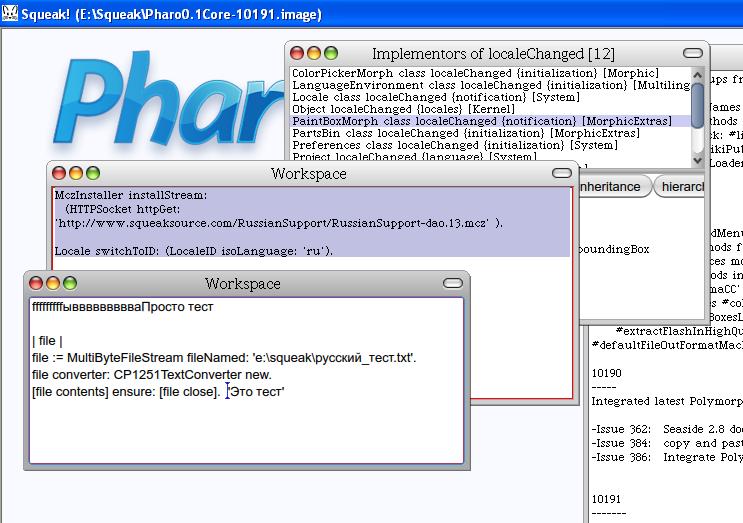
Yes, Danil. It works your way !
...I debugged the process of reading file (file contents) and discovered there is no LanguageEnvironment for russian in the image. So Unicode class
value: give probably incorrect result. Is that the actual problem?
Yes, this is definetely a problem - the mcz is not loaded correctly. Here is what I did (basically the same steps you described):
MczInstaller installStream: (HTTPSocket httpGet: 'http://www.squeaksource.com/RussianSupport/RussianSupport-dao.13.mcz' ).
Seems like this packages was the key I missed. Locale switchToID: (LocaleID isoLanguage: 'ru').
It executed cleanly - no walkbacks.
RussianEnvironment was not part of the base image (or etoys image or any other), because I was not sure that the underlying infrastructure is stable. At this moment I think I can take another look at it and send a package which could be included into a base distribution (if I get it right that LanguageEnvironments are distributed with a base system).
Thank you very much for your help work and help. I think it would be nice to add support for default system locale (as preference 'useLocale' in 'general' category allows to do). My Vista gives me locale with isoLanguage 'ru' and isoCountry 'RU' followed by some unknown symbol... Right now I have no time to solve the problem but I believe I'll consider it in few days. -- Dennis Schetinin
participants (3)
-
 danil osipchuk
 -
 Dennis Schetinin
 -
 Stéphane Ducasse