
Hi, Sorry, but I am person 237 trying to contribute to Pharo 7 the new way. I was following https://github.com/guillep/PharoIntegrationProcess/wiki/Contribute-a-fix-to-... and I got stuck just before step 3, after trying to do "That will calculate the differences between the checked-out branch and your image, show you the tree with the differences and let you commit (and push)". Specifically, the 'and push' fails. $ sw_vers ProductName: Mac OS X ProductVersion: 10.13 BuildVersion: 17A405 $ curl get.pharo.org/70+vm | bash ... $ ./pharo-ui Pharo.image I now have the following setup, which is correct I think. I can commit on my local branch (left button), but when I try to do the 'and Push' (right button), things hang after I enter my credentials. Locally, I see $ git status On branch 20613-Improve-some-UUID-comments nothing to commit, working tree clean with the new code already committed $ cat src/Network-UUID.package/UUID.class/class/new.st instance creation new "Create and return a new UUID" "self new" ^ (self new: 16) What did I do wrong ? How do I proceed ? Sven

Sven Van Caekenberghe-2 wrote
I can commit on my local branch (left button), but when I try to do the 'and Push' (right button), things hang after I enter my credentials.
I authenticate via ssh-agent/keychain and it "just works". ----- Cheers, Sean -- Sent from: http://forum.world.st/Pharo-Smalltalk-Developers-f1294837.html
On 30 Oct 2017, at 21:16, Sean P. DeNigris <sean@clipperadams.com> wrote:
Sven Van Caekenberghe-2 wrote
I can commit on my local branch (left button), but when I try to do the 'and Push' (right button), things hang after I enter my credentials.
I authenticate via ssh-agent/keychain and it "just works".
Well, that is what I also do on the command line, AFAIK. I always do 2 ssh-add's of 2 keys, known by GitHub, and I never have to enter username/password credentials. So how do I get IceBerg to use them ? Just by not entering them or something else ?
----- Cheers, Sean -- Sent from: http://forum.world.st/Pharo-Smalltalk-Developers-f1294837.html

hi, thing is, you should not use https authentication (and the guide should not point to it) Using SSH mode works out of the box. Using HTTPS there is currently a bug and the workaround is to introduce your credentials *before* trying to commit (in settings) Esteban
On 30 Oct 2017, at 20:33, Sven Van Caekenberghe <sven@stfx.eu> wrote:
Hi,
Sorry, but I am person 237 trying to contribute to Pharo 7 the new way.
I was following https://github.com/guillep/PharoIntegrationProcess/wiki/Contribute-a-fix-to-... <https://github.com/guillep/PharoIntegrationProcess/wiki/Contribute-a-fix-to-...> and I got stuck just before step 3, after trying to do "That will calculate the differences between the checked-out branch and your image, show you the tree with the differences and let you commit (and push)". Specifically, the 'and push' fails.
$ sw_vers ProductName: Mac OS X ProductVersion: 10.13 BuildVersion: 17A405
$ curl get.pharo.org/70+vm <http://get.pharo.org/70+vm> | bash ...
$ ./pharo-ui Pharo.image
I now have the following setup, which is correct I think.
<Screen Shot 2017-10-30 at 20.28.05.png>
I can commit on my local branch (left button), but when I try to do the 'and Push' (right button), things hang after I enter my credentials.
Locally, I see
$ git status On branch 20613-Improve-some-UUID-comments nothing to commit, working tree clean
with the new code already committed
$ cat src/Network-UUID.package/UUID.class/class/new.st <http://new.st/> instance creation new "Create and return a new UUID"
"self new"
^ (self new: 16)
What did I do wrong ? How do I proceed ?
Sven
On 30 Oct 2017, at 21:42, Esteban Lorenzano <estebanlm@gmail.com> wrote:
hi,
thing is, you should not use https authentication (and the guide should not point to it) Using SSH mode works out of the box. Using HTTPS there is currently a bug and the workaround is to introduce your credentials *before* trying to commit (in settings)
Well, after entering my username/password in Settings > Tools > Software Configuration Management > Iceberg > Plaintext Credentials I am one step further - I managed to 'Commit & Push'. Thanks !
Esteban
On 30 Oct 2017, at 20:33, Sven Van Caekenberghe <sven@stfx.eu> wrote:
Hi,
Sorry, but I am person 237 trying to contribute to Pharo 7 the new way.
I was following https://github.com/guillep/PharoIntegrationProcess/wiki/Contribute-a-fix-to-... and I got stuck just before step 3, after trying to do "That will calculate the differences between the checked-out branch and your image, show you the tree with the differences and let you commit (and push)". Specifically, the 'and push' fails.
$ sw_vers ProductName: Mac OS X ProductVersion: 10.13 BuildVersion: 17A405
$ curl get.pharo.org/70+vm | bash ...
$ ./pharo-ui Pharo.image
I now have the following setup, which is correct I think.
<Screen Shot 2017-10-30 at 20.28.05.png>
I can commit on my local branch (left button), but when I try to do the 'and Push' (right button), things hang after I enter my credentials.
Locally, I see
$ git status On branch 20613-Improve-some-UUID-comments nothing to commit, working tree clean
with the new code already committed
$ cat src/Network-UUID.package/UUID.class/class/new.st instance creation new "Create and return a new UUID"
"self new"
^ (self new: 16)
What did I do wrong ? How do I proceed ?
Sven
I think I succeeded: https://pharo.fogbugz.com/f/cases/20613/Improve-some-UUID-comments https://github.com/pharo-project/pharo/pull/420 It does contain 4 identical commits due to my troubles earlier on. I also did not see a confirmation by way of an #inform: after the pull request in Iceberg.
On 30 Oct 2017, at 21:50, Sven Van Caekenberghe <sven@stfx.eu> wrote:
On 30 Oct 2017, at 21:42, Esteban Lorenzano <estebanlm@gmail.com> wrote:
hi,
thing is, you should not use https authentication (and the guide should not point to it) Using SSH mode works out of the box. Using HTTPS there is currently a bug and the workaround is to introduce your credentials *before* trying to commit (in settings)
Well, after entering my username/password in Settings > Tools > Software Configuration Management > Iceberg > Plaintext Credentials I am one step further - I managed to 'Commit & Push'.
Thanks !
Esteban
On 30 Oct 2017, at 20:33, Sven Van Caekenberghe <sven@stfx.eu> wrote:
Hi,
Sorry, but I am person 237 trying to contribute to Pharo 7 the new way.
I was following https://github.com/guillep/PharoIntegrationProcess/wiki/Contribute-a-fix-to-... and I got stuck just before step 3, after trying to do "That will calculate the differences between the checked-out branch and your image, show you the tree with the differences and let you commit (and push)". Specifically, the 'and push' fails.
$ sw_vers ProductName: Mac OS X ProductVersion: 10.13 BuildVersion: 17A405
$ curl get.pharo.org/70+vm | bash ...
$ ./pharo-ui Pharo.image
I now have the following setup, which is correct I think.
<Screen Shot 2017-10-30 at 20.28.05.png>
I can commit on my local branch (left button), but when I try to do the 'and Push' (right button), things hang after I enter my credentials.
Locally, I see
$ git status On branch 20613-Improve-some-UUID-comments nothing to commit, working tree clean
with the new code already committed
$ cat src/Network-UUID.package/UUID.class/class/new.st instance creation new "Create and return a new UUID"
"self new"
^ (self new: 16)
What did I do wrong ? How do I proceed ?
Sven

If you give me precise instructions I can update the post :) On Mon, Oct 30, 2017 at 10:03 PM, Sven Van Caekenberghe <sven@stfx.eu> wrote:
I think I succeeded:
https://pharo.fogbugz.com/f/cases/20613/Improve-some-UUID-comments https://github.com/pharo-project/pharo/pull/420
It does contain 4 identical commits due to my troubles earlier on. I also did not see a confirmation by way of an #inform: after the pull request in Iceberg.
On 30 Oct 2017, at 21:50, Sven Van Caekenberghe <sven@stfx.eu> wrote:
On 30 Oct 2017, at 21:42, Esteban Lorenzano <estebanlm@gmail.com> wrote:
hi,
thing is, you should not use https authentication (and the guide should not point to it) Using SSH mode works out of the box. Using HTTPS there is currently a bug and the workaround is to introduce your credentials *before* trying to commit (in settings)
Well, after entering my username/password in Settings > Tools > Software Configuration Management > Iceberg > Plaintext Credentials I am one step further - I managed to 'Commit & Push'.
Thanks !
Esteban
On 30 Oct 2017, at 20:33, Sven Van Caekenberghe <sven@stfx.eu> wrote:
Hi,
Sorry, but I am person 237 trying to contribute to Pharo 7 the new way.
I was following https://github.com/guillep/ PharoIntegrationProcess/wiki/Contribute-a-fix-to-Pharo and I got stuck just before step 3, after trying to do "That will calculate the differences between the checked-out branch and your image, show you the tree with the differences and let you commit (and push)". Specifically, the 'and push' fails.
$ sw_vers ProductName: Mac OS X ProductVersion: 10.13 BuildVersion: 17A405
$ curl get.pharo.org/70+vm | bash ...
$ ./pharo-ui Pharo.image
I now have the following setup, which is correct I think.
<Screen Shot 2017-10-30 at 20.28.05.png>
I can commit on my local branch (left button), but when I try to do the 'and Push' (right button), things hang after I enter my credentials.
Locally, I see
$ git status On branch 20613-Improve-some-UUID-comments nothing to commit, working tree clean
with the new code already committed
$ cat src/Network-UUID.package/UUID.class/class/new.st instance creation new "Create and return a new UUID"
"self new"
^ (self new: 16)
What did I do wrong ? How do I proceed ?
Sven
-- Guille Polito Research Engineer Centre de Recherche en Informatique, Signal et Automatique de Lille CRIStAL - UMR 9189 French National Center for Scientific Research - *http://www.cnrs.fr <http://www.cnrs.fr>* *Web:* *http://guillep.github.io* <http://guillep.github.io> *Phone: *+33 06 52 70 66 13
On 31 Oct 2017, at 10:37, Guillermo Polito <guillermopolito@gmail.com> wrote:
If you give me precise instructions I can update the post :)
I am still learning, trying to understand all aspects, I am hardly ready to tell others what to do. Another question: after doing a full cycle (contributing a pull request), how does one continue ? Throw away everything and start over ? Or is it possible to update and sync everything so that one is ready to do another contribution ?
On Mon, Oct 30, 2017 at 10:03 PM, Sven Van Caekenberghe <sven@stfx.eu> wrote: I think I succeeded:
https://pharo.fogbugz.com/f/cases/20613/Improve-some-UUID-comments https://github.com/pharo-project/pharo/pull/420
It does contain 4 identical commits due to my troubles earlier on. I also did not see a confirmation by way of an #inform: after the pull request in Iceberg.
On 30 Oct 2017, at 21:50, Sven Van Caekenberghe <sven@stfx.eu> wrote:
On 30 Oct 2017, at 21:42, Esteban Lorenzano <estebanlm@gmail.com> wrote:
hi,
thing is, you should not use https authentication (and the guide should not point to it) Using SSH mode works out of the box. Using HTTPS there is currently a bug and the workaround is to introduce your credentials *before* trying to commit (in settings)
Well, after entering my username/password in Settings > Tools > Software Configuration Management > Iceberg > Plaintext Credentials I am one step further - I managed to 'Commit & Push'.
Thanks !
Esteban
On 30 Oct 2017, at 20:33, Sven Van Caekenberghe <sven@stfx.eu> wrote:
Hi,
Sorry, but I am person 237 trying to contribute to Pharo 7 the new way.
I was following https://github.com/guillep/PharoIntegrationProcess/wiki/Contribute-a-fix-to-... and I got stuck just before step 3, after trying to do "That will calculate the differences between the checked-out branch and your image, show you the tree with the differences and let you commit (and push)". Specifically, the 'and push' fails.
$ sw_vers ProductName: Mac OS X ProductVersion: 10.13 BuildVersion: 17A405
$ curl get.pharo.org/70+vm | bash ...
$ ./pharo-ui Pharo.image
I now have the following setup, which is correct I think.
<Screen Shot 2017-10-30 at 20.28.05.png>
I can commit on my local branch (left button), but when I try to do the 'and Push' (right button), things hang after I enter my credentials.
Locally, I see
$ git status On branch 20613-Improve-some-UUID-comments nothing to commit, working tree clean
with the new code already committed
$ cat src/Network-UUID.package/UUID.class/class/new.st instance creation new "Create and return a new UUID"
"self new"
^ (self new: 16)
What did I do wrong ? How do I proceed ?
Sven
--
Guille Polito Research Engineer
Centre de Recherche en Informatique, Signal et Automatique de Lille CRIStAL - UMR 9189 French National Center for Scientific Research - http://www.cnrs.fr
Web: http://guillep.github.io Phone: +33 06 52 70 66 13
On 31 Oct 2017, at 10:37, Guillermo Polito <guillermopolito@gmail.com> wrote:
If you give me precise instructions I can update the post :)
precise instructions is: - do not use https, use ssh - if you do not follow our recommendation and you insist on use https, add your credentials before doing any commit.
On Mon, Oct 30, 2017 at 10:03 PM, Sven Van Caekenberghe <sven@stfx.eu <mailto:sven@stfx.eu>> wrote: I think I succeeded:
https://pharo.fogbugz.com/f/cases/20613/Improve-some-UUID-comments <https://pharo.fogbugz.com/f/cases/20613/Improve-some-UUID-comments> https://github.com/pharo-project/pharo/pull/420 <https://github.com/pharo-project/pharo/pull/420>
It does contain 4 identical commits due to my troubles earlier on. I also did not see a confirmation by way of an #inform: after the pull request in Iceberg.
On 30 Oct 2017, at 21:50, Sven Van Caekenberghe <sven@stfx.eu <mailto:sven@stfx.eu>> wrote:
On 30 Oct 2017, at 21:42, Esteban Lorenzano <estebanlm@gmail.com <mailto:estebanlm@gmail.com>> wrote:
hi,
thing is, you should not use https authentication (and the guide should not point to it) Using SSH mode works out of the box. Using HTTPS there is currently a bug and the workaround is to introduce your credentials *before* trying to commit (in settings)
Well, after entering my username/password in Settings > Tools > Software Configuration Management > Iceberg > Plaintext Credentials I am one step further - I managed to 'Commit & Push'.
Thanks !
Esteban
On 30 Oct 2017, at 20:33, Sven Van Caekenberghe <sven@stfx.eu <mailto:sven@stfx.eu>> wrote:
Hi,
Sorry, but I am person 237 trying to contribute to Pharo 7 the new way.
I was following https://github.com/guillep/PharoIntegrationProcess/wiki/Contribute-a-fix-to-... <https://github.com/guillep/PharoIntegrationProcess/wiki/Contribute-a-fix-to-...> and I got stuck just before step 3, after trying to do "That will calculate the differences between the checked-out branch and your image, show you the tree with the differences and let you commit (and push)". Specifically, the 'and push' fails.
$ sw_vers ProductName: Mac OS X ProductVersion: 10.13 BuildVersion: 17A405
$ curl get.pharo.org/70+vm <http://get.pharo.org/70+vm> | bash ...
$ ./pharo-ui Pharo.image
I now have the following setup, which is correct I think.
<Screen Shot 2017-10-30 at 20.28.05.png>
I can commit on my local branch (left button), but when I try to do the 'and Push' (right button), things hang after I enter my credentials.
Locally, I see
$ git status On branch 20613-Improve-some-UUID-comments nothing to commit, working tree clean
with the new code already committed
$ cat src/Network-UUID.package/UUID.class/class/new.st <http://new.st/> instance creation new "Create and return a new UUID"
"self new"
^ (self new: 16)
What did I do wrong ? How do I proceed ?
Sven
--
Guille Polito Research Engineer
Centre de Recherche en Informatique, Signal et Automatique de Lille CRIStAL - UMR 9189 French National Center for Scientific Research - http://www.cnrs.fr <http://www.cnrs.fr/>
Web: http://guillep.github.io <http://guillep.github.io/> Phone: +33 06 52 70 66 13

Sven have a look at the TipsAndTricks new booklet available at http://books.pharo.org. There is a configuration for iceberg that sets and reduce the pain for me. Stef On Tue, Oct 31, 2017 at 10:51 AM, Esteban Lorenzano <estebanlm@gmail.com> wrote:
On 31 Oct 2017, at 10:37, Guillermo Polito <guillermopolito@gmail.com> wrote:
If you give me precise instructions I can update the post :)
precise instructions is: - do not use https, use ssh - if you do not follow our recommendation and you insist on use https, add your credentials before doing any commit.
On Mon, Oct 30, 2017 at 10:03 PM, Sven Van Caekenberghe <sven@stfx.eu> wrote:
I think I succeeded:
https://pharo.fogbugz.com/f/cases/20613/Improve-some-UUID-comments https://github.com/pharo-project/pharo/pull/420
It does contain 4 identical commits due to my troubles earlier on. I also did not see a confirmation by way of an #inform: after the pull request in Iceberg.
On 30 Oct 2017, at 21:50, Sven Van Caekenberghe <sven@stfx.eu> wrote:
On 30 Oct 2017, at 21:42, Esteban Lorenzano <estebanlm@gmail.com> wrote:
hi,
thing is, you should not use https authentication (and the guide should not point to it) Using SSH mode works out of the box. Using HTTPS there is currently a bug and the workaround is to introduce your credentials *before* trying to commit (in settings)
Well, after entering my username/password in Settings > Tools > Software Configuration Management > Iceberg > Plaintext Credentials I am one step further - I managed to 'Commit & Push'.
Thanks !
Esteban
On 30 Oct 2017, at 20:33, Sven Van Caekenberghe <sven@stfx.eu> wrote:
Hi,
Sorry, but I am person 237 trying to contribute to Pharo 7 the new way.
I was following https://github.com/guillep/Pha roIntegrationProcess/wiki/Contribute-a-fix-to-Pharo and I got stuck just before step 3, after trying to do "That will calculate the differences between the checked-out branch and your image, show you the tree with the differences and let you commit (and push)". Specifically, the 'and push' fails.
$ sw_vers ProductName: Mac OS X ProductVersion: 10.13 BuildVersion: 17A405
$ curl get.pharo.org/70+vm | bash ...
$ ./pharo-ui Pharo.image
I now have the following setup, which is correct I think.
<Screen Shot 2017-10-30 at 20.28.05.png>
I can commit on my local branch (left button), but when I try to do the 'and Push' (right button), things hang after I enter my credentials.
Locally, I see
$ git status On branch 20613-Improve-some-UUID-comments nothing to commit, working tree clean
with the new code already committed
$ cat src/Network-UUID.package/UUID.class/class/new.st instance creation new "Create and return a new UUID"
"self new"
^ (self new: 16)
What did I do wrong ? How do I proceed ?
Sven
--
Guille Polito Research Engineer
Centre de Recherche en Informatique, Signal et Automatique de Lille CRIStAL - UMR 9189 French National Center for Scientific Research - *http://www.cnrs.fr <http://www.cnrs.fr/>*
*Web:* *http://guillep.github.io* <http://guillep.github.io/> *Phone: *+33 06 52 70 66 13 <+33%206%2052%2070%2066%2013>
On 31 Oct 2017, at 11:52, Stephane Ducasse <stepharo.self@gmail.com> wrote:
Sven
have a look at the TipsAndTricks new booklet available at http://books.pharo.org. There is a configuration for iceberg that sets and reduce the pain for me.
Ah, OK, found it. Thanks. Nice document BTW ;-)
Stef
On Tue, Oct 31, 2017 at 10:51 AM, Esteban Lorenzano <estebanlm@gmail.com> wrote:
On 31 Oct 2017, at 10:37, Guillermo Polito <guillermopolito@gmail.com> wrote:
If you give me precise instructions I can update the post :)
precise instructions is: - do not use https, use ssh - if you do not follow our recommendation and you insist on use https, add your credentials before doing any commit.
On Mon, Oct 30, 2017 at 10:03 PM, Sven Van Caekenberghe <sven@stfx.eu> wrote: I think I succeeded:
https://pharo.fogbugz.com/f/cases/20613/Improve-some-UUID-comments https://github.com/pharo-project/pharo/pull/420
It does contain 4 identical commits due to my troubles earlier on. I also did not see a confirmation by way of an #inform: after the pull request in Iceberg.
On 30 Oct 2017, at 21:50, Sven Van Caekenberghe <sven@stfx.eu> wrote:
On 30 Oct 2017, at 21:42, Esteban Lorenzano <estebanlm@gmail.com> wrote:
hi,
thing is, you should not use https authentication (and the guide should not point to it) Using SSH mode works out of the box. Using HTTPS there is currently a bug and the workaround is to introduce your credentials *before* trying to commit (in settings)
Well, after entering my username/password in Settings > Tools > Software Configuration Management > Iceberg > Plaintext Credentials I am one step further - I managed to 'Commit & Push'.
Thanks !
Esteban
On 30 Oct 2017, at 20:33, Sven Van Caekenberghe <sven@stfx.eu> wrote:
Hi,
Sorry, but I am person 237 trying to contribute to Pharo 7 the new way.
I was following https://github.com/guillep/PharoIntegrationProcess/wiki/Contribute-a-fix-to-... and I got stuck just before step 3, after trying to do "That will calculate the differences between the checked-out branch and your image, show you the tree with the differences and let you commit (and push)". Specifically, the 'and push' fails.
$ sw_vers ProductName: Mac OS X ProductVersion: 10.13 BuildVersion: 17A405
$ curl get.pharo.org/70+vm | bash ...
$ ./pharo-ui Pharo.image
I now have the following setup, which is correct I think.
<Screen Shot 2017-10-30 at 20.28.05.png>
I can commit on my local branch (left button), but when I try to do the 'and Push' (right button), things hang after I enter my credentials.
Locally, I see
$ git status On branch 20613-Improve-some-UUID-comments nothing to commit, working tree clean
with the new code already committed
$ cat src/Network-UUID.package/UUID.class/class/new.st instance creation new "Create and return a new UUID"
"self new"
^ (self new: 16)
What did I do wrong ? How do I proceed ?
Sven
--
Guille Polito Research Engineer
Centre de Recherche en Informatique, Signal et Automatique de Lille CRIStAL - UMR 9189 French National Center for Scientific Research - http://www.cnrs.fr
Web: http://guillep.github.io Phone: +33 06 52 70 66 13
I'm in the process to push out of the cliff all the material I have written and not released over the year. On Tue, Oct 31, 2017 at 12:27 PM, Sven Van Caekenberghe <sven@stfx.eu> wrote:
On 31 Oct 2017, at 11:52, Stephane Ducasse <stepharo.self@gmail.com> wrote:
Sven
have a look at the TipsAndTricks new booklet available at http://books.pharo.org. There is a configuration for iceberg that sets and reduce the pain for me.
Ah, OK, found it. Thanks.
Nice document BTW ;-)
Stef
On Tue, Oct 31, 2017 at 10:51 AM, Esteban Lorenzano <estebanlm@gmail.com> wrote:
On 31 Oct 2017, at 10:37, Guillermo Polito <guillermopolito@gmail.com> wrote:
If you give me precise instructions I can update the post :)
precise instructions is: - do not use https, use ssh - if you do not follow our recommendation and you insist on use https, add your credentials before doing any commit.
On Mon, Oct 30, 2017 at 10:03 PM, Sven Van Caekenberghe <sven@stfx.eu> wrote: I think I succeeded:
https://pharo.fogbugz.com/f/cases/20613/Improve-some-UUID-comments https://github.com/pharo-project/pharo/pull/420
It does contain 4 identical commits due to my troubles earlier on. I also did not see a confirmation by way of an #inform: after the pull request in Iceberg.
On 30 Oct 2017, at 21:50, Sven Van Caekenberghe <sven@stfx.eu> wrote:
On 30 Oct 2017, at 21:42, Esteban Lorenzano <estebanlm@gmail.com> wrote:
hi,
thing is, you should not use https authentication (and the guide should not point to it) Using SSH mode works out of the box. Using HTTPS there is currently a bug and the workaround is to introduce your credentials *before* trying to commit (in settings)
Well, after entering my username/password in Settings > Tools > Software Configuration Management > Iceberg > Plaintext Credentials I am one step further - I managed to 'Commit & Push'.
Thanks !
Esteban
On 30 Oct 2017, at 20:33, Sven Van Caekenberghe <sven@stfx.eu> wrote:
Hi,
Sorry, but I am person 237 trying to contribute to Pharo 7 the new way.
I was following https://github.com/guillep/PharoIntegrationProcess/wiki/Contribute-a-fix-to-... and I got stuck just before step 3, after trying to do "That will calculate the differences between the checked-out branch and your image, show you the tree with the differences and let you commit (and push)". Specifically, the 'and push' fails.
$ sw_vers ProductName: Mac OS X ProductVersion: 10.13 BuildVersion: 17A405
$ curl get.pharo.org/70+vm | bash ...
$ ./pharo-ui Pharo.image
I now have the following setup, which is correct I think.
<Screen Shot 2017-10-30 at 20.28.05.png>
I can commit on my local branch (left button), but when I try to do the 'and Push' (right button), things hang after I enter my credentials.
Locally, I see
$ git status On branch 20613-Improve-some-UUID-comments nothing to commit, working tree clean
with the new code already committed
$ cat src/Network-UUID.package/UUID.class/class/new.st instance creation new "Create and return a new UUID"
"self new"
^ (self new: 16)
What did I do wrong ? How do I proceed ?
Sven
--
Guille Polito Research Engineer
Centre de Recherche en Informatique, Signal et Automatique de Lille CRIStAL - UMR 9189 French National Center for Scientific Research - http://www.cnrs.fr
Web: http://guillep.github.io Phone: +33 06 52 70 66 13

Just to add a positive note to this discussion: After cloning the pharo repository, adding my fork as a remote and using Guille's scripts from earlier this year to configure the repositories in image, I was able to: - Create new branch from Fogbugz issue... - Make the changes - Push the changes up to my fork (Synchronise repository) - Create pull request... - Make some more changes - Push changes to my fork All from within the image, without any problems. There's still plenty that is manual and outside the image, and it would be nice to have a GUI that guided you through the process (at the moment you need to know what steps to do and in what order), but we have a good solid basis for moving forward. Cheers, Alistair On 31 October 2017 at 12:27, Sven Van Caekenberghe <sven@stfx.eu> wrote:
On 31 Oct 2017, at 11:52, Stephane Ducasse <stepharo.self@gmail.com> wrote:
Sven
have a look at the TipsAndTricks new booklet available at http://books.pharo.org. There is a configuration for iceberg that sets and reduce the pain for me.
Ah, OK, found it. Thanks.
Nice document BTW ;-)
Stef
On Tue, Oct 31, 2017 at 10:51 AM, Esteban Lorenzano <estebanlm@gmail.com> wrote:
On 31 Oct 2017, at 10:37, Guillermo Polito <guillermopolito@gmail.com> wrote:
If you give me precise instructions I can update the post :)
precise instructions is: - do not use https, use ssh - if you do not follow our recommendation and you insist on use https, add your credentials before doing any commit.
On Mon, Oct 30, 2017 at 10:03 PM, Sven Van Caekenberghe <sven@stfx.eu> wrote: I think I succeeded:
https://pharo.fogbugz.com/f/cases/20613/Improve-some-UUID-comments https://github.com/pharo-project/pharo/pull/420
It does contain 4 identical commits due to my troubles earlier on. I also did not see a confirmation by way of an #inform: after the pull request in Iceberg.
On 30 Oct 2017, at 21:50, Sven Van Caekenberghe <sven@stfx.eu> wrote:
On 30 Oct 2017, at 21:42, Esteban Lorenzano <estebanlm@gmail.com> wrote:
hi,
thing is, you should not use https authentication (and the guide should not point to it) Using SSH mode works out of the box. Using HTTPS there is currently a bug and the workaround is to introduce your credentials *before* trying to commit (in settings)
Well, after entering my username/password in Settings > Tools > Software Configuration Management > Iceberg > Plaintext Credentials I am one step further - I managed to 'Commit & Push'.
Thanks !
Esteban
On 30 Oct 2017, at 20:33, Sven Van Caekenberghe <sven@stfx.eu> wrote:
Hi,
Sorry, but I am person 237 trying to contribute to Pharo 7 the new way.
I was following https://github.com/guillep/PharoIntegrationProcess/wiki/Contribute-a-fix-to-... and I got stuck just before step 3, after trying to do "That will calculate the differences between the checked-out branch and your image, show you the tree with the differences and let you commit (and push)". Specifically, the 'and push' fails.
$ sw_vers ProductName: Mac OS X ProductVersion: 10.13 BuildVersion: 17A405
$ curl get.pharo.org/70+vm | bash ...
$ ./pharo-ui Pharo.image
I now have the following setup, which is correct I think.
<Screen Shot 2017-10-30 at 20.28.05.png>
I can commit on my local branch (left button), but when I try to do the 'and Push' (right button), things hang after I enter my credentials.
Locally, I see
$ git status On branch 20613-Improve-some-UUID-comments nothing to commit, working tree clean
with the new code already committed
$ cat src/Network-UUID.package/UUID.class/class/new.st instance creation new "Create and return a new UUID"
"self new"
^ (self new: 16)
What did I do wrong ? How do I proceed ?
Sven
--
Guille Polito Research Engineer
Centre de Recherche en Informatique, Signal et Automatique de Lille CRIStAL - UMR 9189 French National Center for Scientific Research - http://www.cnrs.fr
Web: http://guillep.github.io Phone: +33 06 52 70 66 13
Yes, it is working for me too now, and it is actually pretty nice. I wonder though what the best way is to keep your personal fork up to date ? I managed to do it with a PR from the fork to the origin (or is it the reverse ?), like this https://github.com/svenvc/pharo/pull/1 but it felt a bit weird because obviously the diff is large and I had the impression that the CI process than had to process all this. Maybe there is a better/easier/more correct way ?
On 15 Nov 2017, at 20:08, Alistair Grant <akgrant0710@gmail.com> wrote:
Just to add a positive note to this discussion:
After cloning the pharo repository, adding my fork as a remote and using Guille's scripts from earlier this year to configure the repositories in image, I was able to:
- Create new branch from Fogbugz issue... - Make the changes - Push the changes up to my fork (Synchronise repository) - Create pull request... - Make some more changes - Push changes to my fork
All from within the image, without any problems.
There's still plenty that is manual and outside the image, and it would be nice to have a GUI that guided you through the process (at the moment you need to know what steps to do and in what order), but we have a good solid basis for moving forward.
Cheers, Alistair
On 31 October 2017 at 12:27, Sven Van Caekenberghe <sven@stfx.eu> wrote:
On 31 Oct 2017, at 11:52, Stephane Ducasse <stepharo.self@gmail.com> wrote:
Sven
have a look at the TipsAndTricks new booklet available at http://books.pharo.org. There is a configuration for iceberg that sets and reduce the pain for me.
Ah, OK, found it. Thanks.
Nice document BTW ;-)
Stef
On Tue, Oct 31, 2017 at 10:51 AM, Esteban Lorenzano <estebanlm@gmail.com> wrote:
On 31 Oct 2017, at 10:37, Guillermo Polito <guillermopolito@gmail.com> wrote:
If you give me precise instructions I can update the post :)
precise instructions is: - do not use https, use ssh - if you do not follow our recommendation and you insist on use https, add your credentials before doing any commit.
On Mon, Oct 30, 2017 at 10:03 PM, Sven Van Caekenberghe <sven@stfx.eu> wrote: I think I succeeded:
https://pharo.fogbugz.com/f/cases/20613/Improve-some-UUID-comments https://github.com/pharo-project/pharo/pull/420
It does contain 4 identical commits due to my troubles earlier on. I also did not see a confirmation by way of an #inform: after the pull request in Iceberg.
On 30 Oct 2017, at 21:50, Sven Van Caekenberghe <sven@stfx.eu> wrote:
On 30 Oct 2017, at 21:42, Esteban Lorenzano <estebanlm@gmail.com> wrote:
hi,
thing is, you should not use https authentication (and the guide should not point to it) Using SSH mode works out of the box. Using HTTPS there is currently a bug and the workaround is to introduce your credentials *before* trying to commit (in settings)
Well, after entering my username/password in Settings > Tools > Software Configuration Management > Iceberg > Plaintext Credentials I am one step further - I managed to 'Commit & Push'.
Thanks !
Esteban
On 30 Oct 2017, at 20:33, Sven Van Caekenberghe <sven@stfx.eu> wrote:
Hi,
Sorry, but I am person 237 trying to contribute to Pharo 7 the new way.
I was following https://github.com/guillep/PharoIntegrationProcess/wiki/Contribute-a-fix-to-... and I got stuck just before step 3, after trying to do "That will calculate the differences between the checked-out branch and your image, show you the tree with the differences and let you commit (and push)". Specifically, the 'and push' fails.
$ sw_vers ProductName: Mac OS X ProductVersion: 10.13 BuildVersion: 17A405
$ curl get.pharo.org/70+vm | bash ...
$ ./pharo-ui Pharo.image
I now have the following setup, which is correct I think.
<Screen Shot 2017-10-30 at 20.28.05.png>
I can commit on my local branch (left button), but when I try to do the 'and Push' (right button), things hang after I enter my credentials.
Locally, I see
$ git status On branch 20613-Improve-some-UUID-comments nothing to commit, working tree clean
with the new code already committed
$ cat src/Network-UUID.package/UUID.class/class/new.st instance creation new "Create and return a new UUID"
"self new"
^ (self new: 16)
What did I do wrong ? How do I proceed ?
Sven
--
Guille Polito Research Engineer
Centre de Recherche en Informatique, Signal et Automatique de Lille CRIStAL - UMR 9189 French National Center for Scientific Research - http://www.cnrs.fr
Web: http://guillep.github.io Phone: +33 06 52 70 66 13

I use something like this: pharoRepository := IceRepository registry detect: [ :each | each name = 'pharo' ]. pharoRepository checkoutBranch: 'development'. pharoRepository backend pullFrom: pharoRepository origin. pharoRepository push. Beware, it switches the branch and you can loose non-committed work. It supposes origin to be pharo-project/pharo and your fork to be set as default push remote. -- Pavel 2017-11-15 20:44 GMT+01:00 Sven Van Caekenberghe <sven@stfx.eu>:
Yes, it is working for me too now, and it is actually pretty nice.
I wonder though what the best way is to keep your personal fork up to date ?
I managed to do it with a PR from the fork to the origin (or is it the reverse ?), like this
https://github.com/svenvc/pharo/pull/1
but it felt a bit weird because obviously the diff is large and I had the impression that the CI process than had to process all this.
Maybe there is a better/easier/more correct way ?
On 15 Nov 2017, at 20:08, Alistair Grant <akgrant0710@gmail.com> wrote:
Just to add a positive note to this discussion:
After cloning the pharo repository, adding my fork as a remote and using Guille's scripts from earlier this year to configure the repositories in image, I was able to:
- Create new branch from Fogbugz issue... - Make the changes - Push the changes up to my fork (Synchronise repository) - Create pull request... - Make some more changes - Push changes to my fork
All from within the image, without any problems.
There's still plenty that is manual and outside the image, and it would be nice to have a GUI that guided you through the process (at the moment you need to know what steps to do and in what order), but we have a good solid basis for moving forward.
Cheers, Alistair
On 31 October 2017 at 12:27, Sven Van Caekenberghe <sven@stfx.eu> wrote:
On 31 Oct 2017, at 11:52, Stephane Ducasse <stepharo.self@gmail.com>
wrote:
Sven
have a look at the TipsAndTricks new booklet available at
http://books.pharo.org. There is a configuration for iceberg that sets and reduce
the pain for me.
Ah, OK, found it. Thanks.
Nice document BTW ;-)
Stef
On Tue, Oct 31, 2017 at 10:51 AM, Esteban Lorenzano < estebanlm@gmail.com> wrote:
On 31 Oct 2017, at 10:37, Guillermo Polito <guillermopolito@gmail.com> wrote:
If you give me precise instructions I can update the post :)
precise instructions is: - do not use https, use ssh - if you do not follow our recommendation and you insist on use https, add your credentials before doing any commit.
On Mon, Oct 30, 2017 at 10:03 PM, Sven Van Caekenberghe <sven@stfx.eu>
wrote:
I think I succeeded:
https://pharo.fogbugz.com/f/cases/20613/Improve-some-UUID-comments https://github.com/pharo-project/pharo/pull/420
It does contain 4 identical commits due to my troubles earlier on. I also did not see a confirmation by way of an #inform: after the pull request in Iceberg.
On 30 Oct 2017, at 21:50, Sven Van Caekenberghe <sven@stfx.eu> wrote:
On 30 Oct 2017, at 21:42, Esteban Lorenzano <estebanlm@gmail.com> wrote:
hi,
thing is, you should not use https authentication (and the guide should not point to it) Using SSH mode works out of the box. Using HTTPS there is currently a bug and the workaround is to introduce your credentials *before* trying to commit (in settings)
Well, after entering my username/password in Settings > Tools > Software Configuration Management > Iceberg > Plaintext Credentials I am one step further - I managed to 'Commit & Push'.
Thanks !
Esteban
On 30 Oct 2017, at 20:33, Sven Van Caekenberghe <sven@stfx.eu> wrote:
Hi,
Sorry, but I am person 237 trying to contribute to Pharo 7 the new way.
I was following https://github.com/guillep/ PharoIntegrationProcess/wiki/Contribute-a-fix-to-Pharo and I got stuck just before step 3, after trying to do "That will calculate the differences between the checked-out branch and your image, show you the tree with the differences and let you commit (and push)". Specifically, the 'and push' fails.
$ sw_vers ProductName: Mac OS X ProductVersion: 10.13 BuildVersion: 17A405
$ curl get.pharo.org/70+vm | bash ...
$ ./pharo-ui Pharo.image
I now have the following setup, which is correct I think.
<Screen Shot 2017-10-30 at 20.28.05.png>
I can commit on my local branch (left button), but when I try to do the 'and Push' (right button), things hang after I enter my credentials.
Locally, I see
$ git status On branch 20613-Improve-some-UUID-comments nothing to commit, working tree clean
with the new code already committed
$ cat src/Network-UUID.package/UUID.class/class/new.st instance creation new "Create and return a new UUID"
"self new"
^ (self new: 16)
What did I do wrong ? How do I proceed ?
Sven
--
Guille Polito Research Engineer
Centre de Recherche en Informatique, Signal et Automatique de Lille CRIStAL - UMR 9189 French National Center for Scientific Research - http://www.cnrs.fr
Web: http://guillep.github.io Phone: +33 06 52 70 66 13
Hi Sven, On 15 November 2017 at 20:44, Sven Van Caekenberghe <sven@stfx.eu> wrote:
Yes, it is working for me too now, and it is actually pretty nice.
I wonder though what the best way is to keep your personal fork up to date ?
I managed to do it with a PR from the fork to the origin (or is it the reverse ?), like this
https://github.com/svenvc/pharo/pull/1
but it felt a bit weird because obviously the diff is large and I had the impression that the CI process than had to process all this.
Maybe there is a better/easier/more correct way ?
I only update my fork when I'm starting from a fresh image - my understanding is that upgrading an image is not supported at the moment. Set up the repository: cd emptydirectory wget 'the latest 7.0 image' git clone git@github.com:pharo-project/pharo.git pharo-core cd pharo-core git remote add $username git@github.com:$username/pharo.git cd .. Once the repository has been set up, the following script: 1. Configures Iceberg to show system repositories 2. Finds the pharo repository. 3. Finds the two remotes (origin and $username, from above) 4. Configures Iceberg to pull from origin and push to $username by default. 5. Checks out the development branch and finally does what you were asking about, updating the fork from the origin 6. Pull from origin 7. Push to fork ($username) 8, Checkout the images commit 9. Reloads modified packages | location username pharoRepository origin myfork | location := 'pharo-core'. username := 'myusername'. Iceberg showSystemRepositories: true. pharoRepository := IceRepository registry detect: [ :each | each name = 'pharo' ]. pharoRepository location: location asFileReference. origin := pharoRepository remotes detect: [ :each | each remoteName = 'origin' ]. myfork := pharoRepository remotes detect: [ :each | each remoteName = username ]. pharoRepository pushRemote: myfork. pharoRepository pullRemote: origin. pharoRepository checkoutBranch: 'development'. pharoRepository backend pullFrom: origin. pharoRepository push. pharoRepository checkoutBranch: (SystemVersion current commitHash). [(pharoRepository savedPackages select: [:aPackage | aPackage isLoaded and: [ aPackage isModified ]]) do: #reload ] on: MCMergeOrLoadWarning do: [ :warning | warning resume: true ]. 'Loaded pharo-core' inspect. I always have OSSubprocess loaded, so it would actually be easy to automate the cloning and configuration of the repository. I might do that next week. Cheers, Alistair
On 15 Nov 2017, at 20:08, Alistair Grant <akgrant0710@gmail.com> wrote:
Just to add a positive note to this discussion:
After cloning the pharo repository, adding my fork as a remote and using Guille's scripts from earlier this year to configure the repositories in image, I was able to:
- Create new branch from Fogbugz issue... - Make the changes - Push the changes up to my fork (Synchronise repository) - Create pull request... - Make some more changes - Push changes to my fork
All from within the image, without any problems.
There's still plenty that is manual and outside the image, and it would be nice to have a GUI that guided you through the process (at the moment you need to know what steps to do and in what order), but we have a good solid basis for moving forward.
Cheers, Alistair
On 31 October 2017 at 12:27, Sven Van Caekenberghe <sven@stfx.eu> wrote:
On 31 Oct 2017, at 11:52, Stephane Ducasse <stepharo.self@gmail.com> wrote:
Sven
have a look at the TipsAndTricks new booklet available at http://books.pharo.org. There is a configuration for iceberg that sets and reduce the pain for me.
Ah, OK, found it. Thanks.
Nice document BTW ;-)
Stef
On Tue, Oct 31, 2017 at 10:51 AM, Esteban Lorenzano <estebanlm@gmail.com> wrote:
On 31 Oct 2017, at 10:37, Guillermo Polito <guillermopolito@gmail.com> wrote:
If you give me precise instructions I can update the post :)
precise instructions is: - do not use https, use ssh - if you do not follow our recommendation and you insist on use https, add your credentials before doing any commit.
On Mon, Oct 30, 2017 at 10:03 PM, Sven Van Caekenberghe <sven@stfx.eu> wrote: I think I succeeded:
https://pharo.fogbugz.com/f/cases/20613/Improve-some-UUID-comments https://github.com/pharo-project/pharo/pull/420
It does contain 4 identical commits due to my troubles earlier on. I also did not see a confirmation by way of an #inform: after the pull request in Iceberg.
On 30 Oct 2017, at 21:50, Sven Van Caekenberghe <sven@stfx.eu> wrote:
On 30 Oct 2017, at 21:42, Esteban Lorenzano <estebanlm@gmail.com> wrote:
hi,
thing is, you should not use https authentication (and the guide should not point to it) Using SSH mode works out of the box. Using HTTPS there is currently a bug and the workaround is to introduce your credentials *before* trying to commit (in settings)
Well, after entering my username/password in Settings > Tools > Software Configuration Management > Iceberg > Plaintext Credentials I am one step further - I managed to 'Commit & Push'.
Thanks !
Esteban
On 30 Oct 2017, at 20:33, Sven Van Caekenberghe <sven@stfx.eu> wrote:
Hi,
Sorry, but I am person 237 trying to contribute to Pharo 7 the new way.
I was following https://github.com/guillep/PharoIntegrationProcess/wiki/Contribute-a-fix-to-... and I got stuck just before step 3, after trying to do "That will calculate the differences between the checked-out branch and your image, show you the tree with the differences and let you commit (and push)". Specifically, the 'and push' fails.
$ sw_vers ProductName: Mac OS X ProductVersion: 10.13 BuildVersion: 17A405
$ curl get.pharo.org/70+vm | bash ...
$ ./pharo-ui Pharo.image
I now have the following setup, which is correct I think.
<Screen Shot 2017-10-30 at 20.28.05.png>
I can commit on my local branch (left button), but when I try to do the 'and Push' (right button), things hang after I enter my credentials.
Locally, I see
$ git status On branch 20613-Improve-some-UUID-comments nothing to commit, working tree clean
with the new code already committed
$ cat src/Network-UUID.package/UUID.class/class/new.st instance creation new "Create and return a new UUID"
"self new"
^ (self new: 16)
What did I do wrong ? How do I proceed ?
Sven
--
Guille Polito Research Engineer
Centre de Recherche en Informatique, Signal et Automatique de Lille CRIStAL - UMR 9189 French National Center for Scientific Research - http://www.cnrs.fr
Web: http://guillep.github.io Phone: +33 06 52 70 66 13
Alistair, Are steps 8 & 9 needed, since the latest image should be in sync with the latest dev version, no ? Sven @Pavel, thanks as well. A lot seems possible with the API. I hope to be able to try later tonight.
On 15 Nov 2017, at 21:53, Alistair Grant <akgrant0710@gmail.com> wrote:
Hi Sven,
On 15 November 2017 at 20:44, Sven Van Caekenberghe <sven@stfx.eu> wrote:
Yes, it is working for me too now, and it is actually pretty nice.
I wonder though what the best way is to keep your personal fork up to date ?
I managed to do it with a PR from the fork to the origin (or is it the reverse ?), like this
https://github.com/svenvc/pharo/pull/1
but it felt a bit weird because obviously the diff is large and I had the impression that the CI process than had to process all this.
Maybe there is a better/easier/more correct way ?
I only update my fork when I'm starting from a fresh image - my understanding is that upgrading an image is not supported at the moment.
Set up the repository:
cd emptydirectory wget 'the latest 7.0 image' git clone git@github.com:pharo-project/pharo.git pharo-core cd pharo-core git remote add $username git@github.com:$username/pharo.git cd ..
Once the repository has been set up, the following script:
1. Configures Iceberg to show system repositories 2. Finds the pharo repository. 3. Finds the two remotes (origin and $username, from above) 4. Configures Iceberg to pull from origin and push to $username by default. 5. Checks out the development branch
and finally does what you were asking about, updating the fork from the origin
6. Pull from origin 7. Push to fork ($username) 8, Checkout the images commit 9. Reloads modified packages
| location username pharoRepository origin myfork |
location := 'pharo-core'. username := 'myusername'.
Iceberg showSystemRepositories: true. pharoRepository := IceRepository registry detect: [ :each | each name = 'pharo' ]. pharoRepository location: location asFileReference. origin := pharoRepository remotes detect: [ :each | each remoteName = 'origin' ]. myfork := pharoRepository remotes detect: [ :each | each remoteName = username ]. pharoRepository pushRemote: myfork. pharoRepository pullRemote: origin. pharoRepository checkoutBranch: 'development'. pharoRepository backend pullFrom: origin. pharoRepository push. pharoRepository checkoutBranch: (SystemVersion current commitHash). [(pharoRepository savedPackages select: [:aPackage | aPackage isLoaded and: [ aPackage isModified ]]) do: #reload ] on: MCMergeOrLoadWarning do: [ :warning | warning resume: true ].
'Loaded pharo-core' inspect.
I always have OSSubprocess loaded, so it would actually be easy to automate the cloning and configuration of the repository. I might do that next week.
Cheers, Alistair
On 15 Nov 2017, at 20:08, Alistair Grant <akgrant0710@gmail.com> wrote:
Just to add a positive note to this discussion:
After cloning the pharo repository, adding my fork as a remote and using Guille's scripts from earlier this year to configure the repositories in image, I was able to:
- Create new branch from Fogbugz issue... - Make the changes - Push the changes up to my fork (Synchronise repository) - Create pull request... - Make some more changes - Push changes to my fork
All from within the image, without any problems.
There's still plenty that is manual and outside the image, and it would be nice to have a GUI that guided you through the process (at the moment you need to know what steps to do and in what order), but we have a good solid basis for moving forward.
Cheers, Alistair
On 31 October 2017 at 12:27, Sven Van Caekenberghe <sven@stfx.eu> wrote:
On 31 Oct 2017, at 11:52, Stephane Ducasse <stepharo.self@gmail.com> wrote:
Sven
have a look at the TipsAndTricks new booklet available at http://books.pharo.org. There is a configuration for iceberg that sets and reduce the pain for me.
Ah, OK, found it. Thanks.
Nice document BTW ;-)
Stef
On Tue, Oct 31, 2017 at 10:51 AM, Esteban Lorenzano <estebanlm@gmail.com> wrote:
On 31 Oct 2017, at 10:37, Guillermo Polito <guillermopolito@gmail.com> wrote:
If you give me precise instructions I can update the post :)
precise instructions is: - do not use https, use ssh - if you do not follow our recommendation and you insist on use https, add your credentials before doing any commit.
On Mon, Oct 30, 2017 at 10:03 PM, Sven Van Caekenberghe <sven@stfx.eu> wrote: I think I succeeded:
https://pharo.fogbugz.com/f/cases/20613/Improve-some-UUID-comments https://github.com/pharo-project/pharo/pull/420
It does contain 4 identical commits due to my troubles earlier on. I also did not see a confirmation by way of an #inform: after the pull request in Iceberg.
On 30 Oct 2017, at 21:50, Sven Van Caekenberghe <sven@stfx.eu> wrote:
On 30 Oct 2017, at 21:42, Esteban Lorenzano <estebanlm@gmail.com> wrote:
hi,
thing is, you should not use https authentication (and the guide should not point to it) Using SSH mode works out of the box. Using HTTPS there is currently a bug and the workaround is to introduce your credentials *before* trying to commit (in settings)
Well, after entering my username/password in Settings > Tools > Software Configuration Management > Iceberg > Plaintext Credentials I am one step further - I managed to 'Commit & Push'.
Thanks !
Esteban
On 30 Oct 2017, at 20:33, Sven Van Caekenberghe <sven@stfx.eu> wrote:
Hi,
Sorry, but I am person 237 trying to contribute to Pharo 7 the new way.
I was following https://github.com/guillep/PharoIntegrationProcess/wiki/Contribute-a-fix-to-... and I got stuck just before step 3, after trying to do "That will calculate the differences between the checked-out branch and your image, show you the tree with the differences and let you commit (and push)". Specifically, the 'and push' fails.
$ sw_vers ProductName: Mac OS X ProductVersion: 10.13 BuildVersion: 17A405
$ curl get.pharo.org/70+vm | bash ...
$ ./pharo-ui Pharo.image
I now have the following setup, which is correct I think.
<Screen Shot 2017-10-30 at 20.28.05.png>
I can commit on my local branch (left button), but when I try to do the 'and Push' (right button), things hang after I enter my credentials.
Locally, I see
$ git status On branch 20613-Improve-some-UUID-comments nothing to commit, working tree clean
with the new code already committed
$ cat src/Network-UUID.package/UUID.class/class/new.st instance creation new "Create and return a new UUID"
"self new"
^ (self new: 16)
What did I do wrong ? How do I proceed ?
Sven
--
Guille Polito Research Engineer
Centre de Recherche en Informatique, Signal et Automatique de Lille CRIStAL - UMR 9189 French National Center for Scientific Research - http://www.cnrs.fr
Web: http://guillep.github.io Phone: +33 06 52 70 66 13
Hi Sven, On 15 November 2017 at 22:27, Sven Van Caekenberghe <sven@stfx.eu> wrote:
Alistair,
Are steps 8 & 9 needed, since the latest image should be in sync with the latest dev version, no ?
Until the next commit is made :-) Step 8 is not strictly needed, but if it is omitted the code in the image may not match the code in the repository, and loading / saving core packages may result in an inconsistent state. Step 9 was added because at one point the image had some packages marked as dirty. I'm not sure if that is still the case. Cheers, Alistair
Sven
@Pavel, thanks as well. A lot seems possible with the API.
I hope to be able to try later tonight.
On 15 Nov 2017, at 21:53, Alistair Grant <akgrant0710@gmail.com> wrote:
Hi Sven,
On 15 November 2017 at 20:44, Sven Van Caekenberghe <sven@stfx.eu> wrote:
Yes, it is working for me too now, and it is actually pretty nice.
I wonder though what the best way is to keep your personal fork up to date ?
I managed to do it with a PR from the fork to the origin (or is it the reverse ?), like this
https://github.com/svenvc/pharo/pull/1
but it felt a bit weird because obviously the diff is large and I had the impression that the CI process than had to process all this.
Maybe there is a better/easier/more correct way ?
I only update my fork when I'm starting from a fresh image - my understanding is that upgrading an image is not supported at the moment.
Set up the repository:
cd emptydirectory wget 'the latest 7.0 image' git clone git@github.com:pharo-project/pharo.git pharo-core cd pharo-core git remote add $username git@github.com:$username/pharo.git cd ..
Once the repository has been set up, the following script:
1. Configures Iceberg to show system repositories 2. Finds the pharo repository. 3. Finds the two remotes (origin and $username, from above) 4. Configures Iceberg to pull from origin and push to $username by default. 5. Checks out the development branch
and finally does what you were asking about, updating the fork from the origin
6. Pull from origin 7. Push to fork ($username) 8, Checkout the images commit 9. Reloads modified packages
| location username pharoRepository origin myfork |
location := 'pharo-core'. username := 'myusername'.
Iceberg showSystemRepositories: true. pharoRepository := IceRepository registry detect: [ :each | each name = 'pharo' ]. pharoRepository location: location asFileReference. origin := pharoRepository remotes detect: [ :each | each remoteName = 'origin' ]. myfork := pharoRepository remotes detect: [ :each | each remoteName = username ]. pharoRepository pushRemote: myfork. pharoRepository pullRemote: origin. pharoRepository checkoutBranch: 'development'. pharoRepository backend pullFrom: origin. pharoRepository push. pharoRepository checkoutBranch: (SystemVersion current commitHash). [(pharoRepository savedPackages select: [:aPackage | aPackage isLoaded and: [ aPackage isModified ]]) do: #reload ] on: MCMergeOrLoadWarning do: [ :warning | warning resume: true ].
'Loaded pharo-core' inspect.
I always have OSSubprocess loaded, so it would actually be easy to automate the cloning and configuration of the repository. I might do that next week.
Cheers, Alistair
On 15 Nov 2017, at 20:08, Alistair Grant <akgrant0710@gmail.com> wrote:
Just to add a positive note to this discussion:
After cloning the pharo repository, adding my fork as a remote and using Guille's scripts from earlier this year to configure the repositories in image, I was able to:
- Create new branch from Fogbugz issue... - Make the changes - Push the changes up to my fork (Synchronise repository) - Create pull request... - Make some more changes - Push changes to my fork
All from within the image, without any problems.
There's still plenty that is manual and outside the image, and it would be nice to have a GUI that guided you through the process (at the moment you need to know what steps to do and in what order), but we have a good solid basis for moving forward.
Cheers, Alistair
On 31 October 2017 at 12:27, Sven Van Caekenberghe <sven@stfx.eu> wrote:
On 31 Oct 2017, at 11:52, Stephane Ducasse <stepharo.self@gmail.com> wrote:
Sven
have a look at the TipsAndTricks new booklet available at http://books.pharo.org. There is a configuration for iceberg that sets and reduce the pain for me.
Ah, OK, found it. Thanks.
Nice document BTW ;-)
Stef
On Tue, Oct 31, 2017 at 10:51 AM, Esteban Lorenzano <estebanlm@gmail.com> wrote:
On 31 Oct 2017, at 10:37, Guillermo Polito <guillermopolito@gmail.com> wrote:
If you give me precise instructions I can update the post :)
precise instructions is: - do not use https, use ssh - if you do not follow our recommendation and you insist on use https, add your credentials before doing any commit.
On Mon, Oct 30, 2017 at 10:03 PM, Sven Van Caekenberghe <sven@stfx.eu> wrote: I think I succeeded:
https://pharo.fogbugz.com/f/cases/20613/Improve-some-UUID-comments https://github.com/pharo-project/pharo/pull/420
It does contain 4 identical commits due to my troubles earlier on. I also did not see a confirmation by way of an #inform: after the pull request in Iceberg.
On 30 Oct 2017, at 21:50, Sven Van Caekenberghe <sven@stfx.eu> wrote:
On 30 Oct 2017, at 21:42, Esteban Lorenzano <estebanlm@gmail.com> wrote:
hi,
thing is, you should not use https authentication (and the guide should not point to it) Using SSH mode works out of the box. Using HTTPS there is currently a bug and the workaround is to introduce your credentials *before* trying to commit (in settings)
Well, after entering my username/password in Settings > Tools > Software Configuration Management > Iceberg > Plaintext Credentials I am one step further - I managed to 'Commit & Push'.
Thanks !
Esteban
On 30 Oct 2017, at 20:33, Sven Van Caekenberghe <sven@stfx.eu> wrote:
Hi,
Sorry, but I am person 237 trying to contribute to Pharo 7 the new way.
I was following https://github.com/guillep/PharoIntegrationProcess/wiki/Contribute-a-fix-to-... and I got stuck just before step 3, after trying to do "That will calculate the differences between the checked-out branch and your image, show you the tree with the differences and let you commit (and push)". Specifically, the 'and push' fails.
$ sw_vers ProductName: Mac OS X ProductVersion: 10.13 BuildVersion: 17A405
$ curl get.pharo.org/70+vm | bash ...
$ ./pharo-ui Pharo.image
I now have the following setup, which is correct I think.
<Screen Shot 2017-10-30 at 20.28.05.png>
I can commit on my local branch (left button), but when I try to do the 'and Push' (right button), things hang after I enter my credentials.
Locally, I see
$ git status On branch 20613-Improve-some-UUID-comments nothing to commit, working tree clean
with the new code already committed
$ cat src/Network-UUID.package/UUID.class/class/new.st instance creation new "Create and return a new UUID"
"self new"
^ (self new: 16)
What did I do wrong ? How do I proceed ?
Sven
--
Guille Polito Research Engineer
Centre de Recherche en Informatique, Signal et Automatique de Lille CRIStAL - UMR 9189 French National Center for Scientific Research - http://www.cnrs.fr
Web: http://guillep.github.io Phone: +33 06 52 70 66 13
2017-11-15 22:46 GMT+01:00 Alistair Grant <akgrant0710@gmail.com>:
Hi Sven,
On 15 November 2017 at 22:27, Sven Van Caekenberghe <sven@stfx.eu> wrote:
Alistair,
Are steps 8 & 9 needed, since the latest image should be in sync with the latest dev version, no ?
Until the next commit is made :-)
Step 8 is not strictly needed, but if it is omitted the code in the image may not match the code in the repository, and loading / saving core packages may result in an inconsistent state.
Step 9 was added because at one point the image had some packages marked as dirty. I'm not sure if that is still the case.
It is not. I sometimes use modified version of these lines to reaload all packages to make them in sync with a particular branch after switching to it because if you reload all packages from the Iceberg UI, it may require clicking on a lot of confirmation windows. -- Pavel
Cheers, Alistair
Sven
@Pavel, thanks as well. A lot seems possible with the API.
I hope to be able to try later tonight.
On 15 Nov 2017, at 21:53, Alistair Grant <akgrant0710@gmail.com> wrote:
Hi Sven,
On 15 November 2017 at 20:44, Sven Van Caekenberghe <sven@stfx.eu> wrote:
Yes, it is working for me too now, and it is actually pretty nice.
I wonder though what the best way is to keep your personal fork up to date ?
I managed to do it with a PR from the fork to the origin (or is it the reverse ?), like this
https://github.com/svenvc/pharo/pull/1
but it felt a bit weird because obviously the diff is large and I had the impression that the CI process than had to process all this.
Maybe there is a better/easier/more correct way ?
I only update my fork when I'm starting from a fresh image - my understanding is that upgrading an image is not supported at the moment.
Set up the repository:
cd emptydirectory wget 'the latest 7.0 image' git clone git@github.com:pharo-project/pharo.git pharo-core cd pharo-core git remote add $username git@github.com:$username/pharo.git cd ..
Once the repository has been set up, the following script:
1. Configures Iceberg to show system repositories 2. Finds the pharo repository. 3. Finds the two remotes (origin and $username, from above) 4. Configures Iceberg to pull from origin and push to $username by default. 5. Checks out the development branch
and finally does what you were asking about, updating the fork from the origin
6. Pull from origin 7. Push to fork ($username) 8, Checkout the images commit 9. Reloads modified packages
| location username pharoRepository origin myfork |
location := 'pharo-core'. username := 'myusername'.
Iceberg showSystemRepositories: true. pharoRepository := IceRepository registry detect: [ :each | each name = 'pharo' ]. pharoRepository location: location asFileReference. origin := pharoRepository remotes detect: [ :each | each remoteName = 'origin' ]. myfork := pharoRepository remotes detect: [ :each | each remoteName = username ]. pharoRepository pushRemote: myfork. pharoRepository pullRemote: origin. pharoRepository checkoutBranch: 'development'. pharoRepository backend pullFrom: origin. pharoRepository push. pharoRepository checkoutBranch: (SystemVersion current commitHash). [(pharoRepository savedPackages select: [:aPackage | aPackage isLoaded and: [ aPackage isModified ]]) do: #reload ] on: MCMergeOrLoadWarning do: [ :warning | warning resume: true ].
'Loaded pharo-core' inspect.
I always have OSSubprocess loaded, so it would actually be easy to automate the cloning and configuration of the repository. I might do that next week.
Cheers, Alistair
On 15 Nov 2017, at 20:08, Alistair Grant <akgrant0710@gmail.com> wrote:
Just to add a positive note to this discussion:
After cloning the pharo repository, adding my fork as a remote and using Guille's scripts from earlier this year to configure the repositories in image, I was able to:
- Create new branch from Fogbugz issue... - Make the changes - Push the changes up to my fork (Synchronise repository) - Create pull request... - Make some more changes - Push changes to my fork
All from within the image, without any problems.
There's still plenty that is manual and outside the image, and it would be nice to have a GUI that guided you through the process (at the moment you need to know what steps to do and in what order), but we have a good solid basis for moving forward.
Cheers, Alistair
On 31 October 2017 at 12:27, Sven Van Caekenberghe <sven@stfx.eu> wrote:
On 31 Oct 2017, at 11:52, Stephane Ducasse <stepharo.self@gmail.com>
wrote:
Sven
have a look at the TipsAndTricks new booklet available at
http://books.pharo.org. There is a configuration for iceberg that sets and reduce
the pain for me.
Ah, OK, found it. Thanks.
Nice document BTW ;-)
Stef
On Tue, Oct 31, 2017 at 10:51 AM, Esteban Lorenzano < estebanlm@gmail.com> wrote:
On 31 Oct 2017, at 10:37, Guillermo Polito < guillermopolito@gmail.com> wrote:
If you give me precise instructions I can update the post :)
precise instructions is: - do not use https, use ssh - if you do not follow our recommendation and you insist on use https, add your credentials before doing any commit.
On Mon, Oct 30, 2017 at 10:03 PM, Sven Van Caekenberghe <
sven@stfx.eu> wrote:
I think I succeeded:
https://pharo.fogbugz.com/f/cases/20613/Improve-some-UUID-comments https://github.com/pharo-project/pharo/pull/420
It does contain 4 identical commits due to my troubles earlier on. I also did not see a confirmation by way of an #inform: after the pull request in Iceberg.
On 30 Oct 2017, at 21:50, Sven Van Caekenberghe <sven@stfx.eu> wrote:
On 30 Oct 2017, at 21:42, Esteban Lorenzano <estebanlm@gmail.com> wrote:
hi,
thing is, you should not use https authentication (and the guide should not point to it) Using SSH mode works out of the box. Using HTTPS there is currently a bug and the workaround is to introduce your credentials *before* trying to commit (in settings)
Well, after entering my username/password in Settings > Tools > Software Configuration Management > Iceberg > Plaintext Credentials I am one step further - I managed to 'Commit & Push'.
Thanks !
Esteban
On 30 Oct 2017, at 20:33, Sven Van Caekenberghe <sven@stfx.eu> wrote:
Hi,
Sorry, but I am person 237 trying to contribute to Pharo 7 the new way.
I was following https://github.com/guillep/ PharoIntegrationProcess/wiki/Contribute-a-fix-to-Pharo and I got stuck just before step 3, after trying to do "That will calculate the differences between the checked-out branch and your image, show you the tree with the differences and let you commit (and push)". Specifically, the 'and push' fails.
$ sw_vers ProductName: Mac OS X ProductVersion: 10.13 BuildVersion: 17A405
$ curl get.pharo.org/70+vm | bash ...
$ ./pharo-ui Pharo.image
I now have the following setup, which is correct I think.
<Screen Shot 2017-10-30 at 20.28.05.png>
I can commit on my local branch (left button), but when I try to do the 'and Push' (right button), things hang after I enter my credentials.
Locally, I see
$ git status On branch 20613-Improve-some-UUID-comments nothing to commit, working tree clean
with the new code already committed
$ cat src/Network-UUID.package/UUID.class/class/new.st instance creation new "Create and return a new UUID"
"self new"
^ (self new: 16)
What did I do wrong ? How do I proceed ?
Sven
--
Guille Polito Research Engineer
Centre de Recherche en Informatique, Signal et Automatique de Lille CRIStAL - UMR 9189 French National Center for Scientific Research - http://www.cnrs.fr
Web: http://guillep.github.io Phone: +33 06 52 70 66 13
2017-11-15 22:27 GMT+01:00 Sven Van Caekenberghe <sven@stfx.eu>:
Alistair,
Are steps 8 & 9 needed, since the latest image should be in sync with the latest dev version, no ?
8) the latest build may not be created from the latest merged commit. This step is not necessary because Iceberg can handle such situations and moreover it can do cherry-picking during commits. However personally I use it because it reduces probability of troubles. As always, it is good to execute it only if you know what you are doing and what you want. 9) is not needed anymore BTW, Guille wrote a very nice document about your fork synchronization https://github.com/guillep/PharoIntegrationProcess/wiki/Keep-your-repo -in-sync -- Pavel
Sven
@Pavel, thanks as well. A lot seems possible with the API.
I hope to be able to try later tonight.
On 15 Nov 2017, at 21:53, Alistair Grant <akgrant0710@gmail.com> wrote:
Hi Sven,
On 15 November 2017 at 20:44, Sven Van Caekenberghe <sven@stfx.eu> wrote:
Yes, it is working for me too now, and it is actually pretty nice.
I wonder though what the best way is to keep your personal fork up to date ?
I managed to do it with a PR from the fork to the origin (or is it the reverse ?), like this
https://github.com/svenvc/pharo/pull/1
but it felt a bit weird because obviously the diff is large and I had the impression that the CI process than had to process all this.
Maybe there is a better/easier/more correct way ?
I only update my fork when I'm starting from a fresh image - my understanding is that upgrading an image is not supported at the moment.
Set up the repository:
cd emptydirectory wget 'the latest 7.0 image' git clone git@github.com:pharo-project/pharo.git pharo-core cd pharo-core git remote add $username git@github.com:$username/pharo.git cd ..
Once the repository has been set up, the following script:
1. Configures Iceberg to show system repositories 2. Finds the pharo repository. 3. Finds the two remotes (origin and $username, from above) 4. Configures Iceberg to pull from origin and push to $username by default. 5. Checks out the development branch
and finally does what you were asking about, updating the fork from the origin
6. Pull from origin 7. Push to fork ($username) 8, Checkout the images commit 9. Reloads modified packages
| location username pharoRepository origin myfork |
location := 'pharo-core'. username := 'myusername'.
Iceberg showSystemRepositories: true. pharoRepository := IceRepository registry detect: [ :each | each name = 'pharo' ]. pharoRepository location: location asFileReference. origin := pharoRepository remotes detect: [ :each | each remoteName = 'origin' ]. myfork := pharoRepository remotes detect: [ :each | each remoteName = username ]. pharoRepository pushRemote: myfork. pharoRepository pullRemote: origin. pharoRepository checkoutBranch: 'development'. pharoRepository backend pullFrom: origin. pharoRepository push. pharoRepository checkoutBranch: (SystemVersion current commitHash). [(pharoRepository savedPackages select: [:aPackage | aPackage isLoaded and: [ aPackage isModified ]]) do: #reload ] on: MCMergeOrLoadWarning do: [ :warning | warning resume: true ].
'Loaded pharo-core' inspect.
I always have OSSubprocess loaded, so it would actually be easy to automate the cloning and configuration of the repository. I might do that next week.
Cheers, Alistair
On 15 Nov 2017, at 20:08, Alistair Grant <akgrant0710@gmail.com> wrote:
Just to add a positive note to this discussion:
After cloning the pharo repository, adding my fork as a remote and using Guille's scripts from earlier this year to configure the repositories in image, I was able to:
- Create new branch from Fogbugz issue... - Make the changes - Push the changes up to my fork (Synchronise repository) - Create pull request... - Make some more changes - Push changes to my fork
All from within the image, without any problems.
There's still plenty that is manual and outside the image, and it would be nice to have a GUI that guided you through the process (at the moment you need to know what steps to do and in what order), but we have a good solid basis for moving forward.
Cheers, Alistair
On 31 October 2017 at 12:27, Sven Van Caekenberghe <sven@stfx.eu> wrote:
On 31 Oct 2017, at 11:52, Stephane Ducasse <stepharo.self@gmail.com>
wrote:
Sven
have a look at the TipsAndTricks new booklet available at
http://books.pharo.org. There is a configuration for iceberg that sets and reduce
the pain for me.
Ah, OK, found it. Thanks.
Nice document BTW ;-)
Stef
On Tue, Oct 31, 2017 at 10:51 AM, Esteban Lorenzano < estebanlm@gmail.com> wrote:
On 31 Oct 2017, at 10:37, Guillermo Polito < guillermopolito@gmail.com> wrote:
If you give me precise instructions I can update the post :)
precise instructions is: - do not use https, use ssh - if you do not follow our recommendation and you insist on use https, add your credentials before doing any commit.
On Mon, Oct 30, 2017 at 10:03 PM, Sven Van Caekenberghe <
sven@stfx.eu> wrote:
I think I succeeded:
https://pharo.fogbugz.com/f/cases/20613/Improve-some-UUID-comments https://github.com/pharo-project/pharo/pull/420
It does contain 4 identical commits due to my troubles earlier on. I also did not see a confirmation by way of an #inform: after the pull request in Iceberg.
On 30 Oct 2017, at 21:50, Sven Van Caekenberghe <sven@stfx.eu> wrote:
On 30 Oct 2017, at 21:42, Esteban Lorenzano <estebanlm@gmail.com> wrote:
hi,
thing is, you should not use https authentication (and the guide should not point to it) Using SSH mode works out of the box. Using HTTPS there is currently a bug and the workaround is to introduce your credentials *before* trying to commit (in settings)
Well, after entering my username/password in Settings > Tools > Software Configuration Management > Iceberg > Plaintext Credentials I am one step further - I managed to 'Commit & Push'.
Thanks !
Esteban
On 30 Oct 2017, at 20:33, Sven Van Caekenberghe <sven@stfx.eu> wrote:
Hi,
Sorry, but I am person 237 trying to contribute to Pharo 7 the new way.
I was following https://github.com/guillep/ PharoIntegrationProcess/wiki/Contribute-a-fix-to-Pharo and I got stuck just before step 3, after trying to do "That will calculate the differences between the checked-out branch and your image, show you the tree with the differences and let you commit (and push)". Specifically, the 'and push' fails.
$ sw_vers ProductName: Mac OS X ProductVersion: 10.13 BuildVersion: 17A405
$ curl get.pharo.org/70+vm | bash ...
$ ./pharo-ui Pharo.image
I now have the following setup, which is correct I think.
<Screen Shot 2017-10-30 at 20.28.05.png>
I can commit on my local branch (left button), but when I try to do the 'and Push' (right button), things hang after I enter my credentials.
Locally, I see
$ git status On branch 20613-Improve-some-UUID-comments nothing to commit, working tree clean
with the new code already committed
$ cat src/Network-UUID.package/UUID.class/class/new.st instance creation new "Create and return a new UUID"
"self new"
^ (self new: 16)
What did I do wrong ? How do I proceed ?
Sven
--
Guille Polito Research Engineer
Centre de Recherche en Informatique, Signal et Automatique de Lille CRIStAL - UMR 9189 French National Center for Scientific Research - http://www.cnrs.fr
Web: http://guillep.github.io Phone: +33 06 52 70 66 13
On 15 Nov 2017, at 22:47, Pavel Krivanek <pavel.krivanek@gmail.com> wrote:
2017-11-15 22:27 GMT+01:00 Sven Van Caekenberghe <sven@stfx.eu>: Alistair,
Are steps 8 & 9 needed, since the latest image should be in sync with the latest dev version, no ?
8) the latest build may not be created from the latest merged commit. This step is not necessary because Iceberg can handle such situations and moreover it can do cherry-picking during commits. However personally I use it because it reduces probability of troubles. As always, it is good to execute it only if you know what you are doing and what you want.
9) is not needed anymore
BTW, Guille wrote a very nice document about your fork synchronization https://github.com/guillep/PharoIntegrationProcess/wiki/Keep-your-repo-in-sy...
I ended up using those instructions $ git checkout development $ git pull https://github.com/pharo-project/pharo.git development $ git push https://github.com/svenvc/pharo.git development I guess that is exactly what the Pharo code does. This feels better. Thx!
-- Pavel
Sven
@Pavel, thanks as well. A lot seems possible with the API.
I hope to be able to try later tonight.
On 15 Nov 2017, at 21:53, Alistair Grant <akgrant0710@gmail.com> wrote:
Hi Sven,
On 15 November 2017 at 20:44, Sven Van Caekenberghe <sven@stfx.eu> wrote:
Yes, it is working for me too now, and it is actually pretty nice.
I wonder though what the best way is to keep your personal fork up to date ?
I managed to do it with a PR from the fork to the origin (or is it the reverse ?), like this
https://github.com/svenvc/pharo/pull/1
but it felt a bit weird because obviously the diff is large and I had the impression that the CI process than had to process all this.
Maybe there is a better/easier/more correct way ?
I only update my fork when I'm starting from a fresh image - my understanding is that upgrading an image is not supported at the moment.
Set up the repository:
cd emptydirectory wget 'the latest 7.0 image' git clone git@github.com:pharo-project/pharo.git pharo-core cd pharo-core git remote add $username git@github.com:$username/pharo.git cd ..
Once the repository has been set up, the following script:
1. Configures Iceberg to show system repositories 2. Finds the pharo repository. 3. Finds the two remotes (origin and $username, from above) 4. Configures Iceberg to pull from origin and push to $username by default. 5. Checks out the development branch
and finally does what you were asking about, updating the fork from the origin
6. Pull from origin 7. Push to fork ($username) 8, Checkout the images commit 9. Reloads modified packages
| location username pharoRepository origin myfork |
location := 'pharo-core'. username := 'myusername'.
Iceberg showSystemRepositories: true. pharoRepository := IceRepository registry detect: [ :each | each name = 'pharo' ]. pharoRepository location: location asFileReference. origin := pharoRepository remotes detect: [ :each | each remoteName = 'origin' ]. myfork := pharoRepository remotes detect: [ :each | each remoteName = username ]. pharoRepository pushRemote: myfork. pharoRepository pullRemote: origin. pharoRepository checkoutBranch: 'development'. pharoRepository backend pullFrom: origin. pharoRepository push. pharoRepository checkoutBranch: (SystemVersion current commitHash). [(pharoRepository savedPackages select: [:aPackage | aPackage isLoaded and: [ aPackage isModified ]]) do: #reload ] on: MCMergeOrLoadWarning do: [ :warning | warning resume: true ].
'Loaded pharo-core' inspect.
I always have OSSubprocess loaded, so it would actually be easy to automate the cloning and configuration of the repository. I might do that next week.
Cheers, Alistair
On 15 Nov 2017, at 20:08, Alistair Grant <akgrant0710@gmail.com> wrote:
Just to add a positive note to this discussion:
After cloning the pharo repository, adding my fork as a remote and using Guille's scripts from earlier this year to configure the repositories in image, I was able to:
- Create new branch from Fogbugz issue... - Make the changes - Push the changes up to my fork (Synchronise repository) - Create pull request... - Make some more changes - Push changes to my fork
All from within the image, without any problems.
There's still plenty that is manual and outside the image, and it would be nice to have a GUI that guided you through the process (at the moment you need to know what steps to do and in what order), but we have a good solid basis for moving forward.
Cheers, Alistair
On 31 October 2017 at 12:27, Sven Van Caekenberghe <sven@stfx.eu> wrote:
On 31 Oct 2017, at 11:52, Stephane Ducasse <stepharo.self@gmail.com> wrote:
Sven
have a look at the TipsAndTricks new booklet available at http://books.pharo.org. There is a configuration for iceberg that sets and reduce the pain for me.
Ah, OK, found it. Thanks.
Nice document BTW ;-)
Stef
On Tue, Oct 31, 2017 at 10:51 AM, Esteban Lorenzano <estebanlm@gmail.com> wrote:
On 31 Oct 2017, at 10:37, Guillermo Polito <guillermopolito@gmail.com> wrote:
If you give me precise instructions I can update the post :)
precise instructions is: - do not use https, use ssh - if you do not follow our recommendation and you insist on use https, add your credentials before doing any commit.
On Mon, Oct 30, 2017 at 10:03 PM, Sven Van Caekenberghe <sven@stfx.eu> wrote: I think I succeeded:
https://pharo.fogbugz.com/f/cases/20613/Improve-some-UUID-comments https://github.com/pharo-project/pharo/pull/420
It does contain 4 identical commits due to my troubles earlier on. I also did not see a confirmation by way of an #inform: after the pull request in Iceberg.
On 30 Oct 2017, at 21:50, Sven Van Caekenberghe <sven@stfx.eu> wrote:
On 30 Oct 2017, at 21:42, Esteban Lorenzano <estebanlm@gmail.com> wrote:
hi,
thing is, you should not use https authentication (and the guide should not point to it) Using SSH mode works out of the box. Using HTTPS there is currently a bug and the workaround is to introduce your credentials *before* trying to commit (in settings)
Well, after entering my username/password in Settings > Tools > Software Configuration Management > Iceberg > Plaintext Credentials I am one step further - I managed to 'Commit & Push'.
Thanks !
Esteban
On 30 Oct 2017, at 20:33, Sven Van Caekenberghe <sven@stfx.eu> wrote:
Hi,
Sorry, but I am person 237 trying to contribute to Pharo 7 the new way.
I was following https://github.com/guillep/PharoIntegrationProcess/wiki/Contribute-a-fix-to-... and I got stuck just before step 3, after trying to do "That will calculate the differences between the checked-out branch and your image, show you the tree with the differences and let you commit (and push)". Specifically, the 'and push' fails.
$ sw_vers ProductName: Mac OS X ProductVersion: 10.13 BuildVersion: 17A405
$ curl get.pharo.org/70+vm | bash ...
$ ./pharo-ui Pharo.image
I now have the following setup, which is correct I think.
<Screen Shot 2017-10-30 at 20.28.05.png>
I can commit on my local branch (left button), but when I try to do the 'and Push' (right button), things hang after I enter my credentials.
Locally, I see
$ git status On branch 20613-Improve-some-UUID-comments nothing to commit, working tree clean
with the new code already committed
$ cat src/Network-UUID.package/UUID.class/class/new.st instance creation new "Create and return a new UUID"
"self new"
^ (self new: 16)
What did I do wrong ? How do I proceed ?
Sven
--
Guille Polito Research Engineer
Centre de Recherche en Informatique, Signal et Automatique de Lille CRIStAL - UMR 9189 French National Center for Scientific Research - http://www.cnrs.fr
Web: http://guillep.github.io Phone: +33 06 52 70 66 13

Hi Sven,

if you like you can try: https://github.com/astares/pharo-contributor

Easy to use:

   - clone this project
   - run download.sh to download and run latest P7 image, this will also
load
     a help tutorial explaining how you can easily contribute and keep
your fork up to date

There is a tool inside that downloads your fork or helps you staying up
to date. All is explained
and if you do not care on bandwidth there is also a "clean.sh" (to
cleanup) so you can start fresh again with
"download.sh" afterwards.

There is a also a "start.sh" (to just start the image when it should be
reused).

Hope this helps a little bit.

Thanks
T.


Am 16.11.2017 um 00:21 schrieb Sven Van Caekenberghe:
>
>> On 15 Nov 2017, at 22:47, Pavel Krivanek <pavel.krivanek@gmail.com> wrote:
>>
>>
>>
>> 2017-11-15 22:27 GMT+01:00 Sven Van Caekenberghe <sven@stfx.eu>:
>> Alistair,
>>
>> Are steps 8 & 9 needed, since the latest image should be in sync with the latest dev version, no ?
>>
>> 8) the latest build may not be created from the latest merged commit. This step is not necessary because Iceberg can handle such situations and moreover it can do cherry-picking during commits. However personally I use it because it reduces probability of troubles. As always, it is good to execute it only if you know what you are doing and what you want.
>>
>> 9) is not needed anymore
>>
>> BTW, Guille wrote a very nice document about your fork synchronization
>> https://github.com/guillep/PharoIntegrationProcess/wiki/Keep-your-repo-in-sync
> I ended up using those instructions
>
> $ git checkout development
> $ git pull https://github.com/pharo-project/pharo.git development
> $ git push https://github.com/svenvc/pharo.git development
>
> I guess that is exactly what the Pharo code does.
>
> This feels better.
>
> Thx!
>
>> -- Pavel
>>
>>
>> Sven
>>
>> @Pavel, thanks as well. A lot seems possible with the API.
>>
>> I hope to be able to try later tonight.
>>
>>> On 15 Nov 2017, at 21:53, Alistair Grant <akgrant0710@gmail.com> wrote:
>>>
>>> Hi Sven,
>>>
>>> On 15 November 2017 at 20:44, Sven Van Caekenberghe <sven@stfx.eu> wrote:
>>>> Yes, it is working for me too now, and it is actually pretty nice.
>>>>
>>>> I wonder though what the best way is to keep your personal fork up to date ?
>>>>
>>>> I managed to do it with a PR from the fork to the origin (or is it the reverse ?), like this
>>>>
>>>> https://github.com/svenvc/pharo/pull/1
>>>>
>>>> but it felt a bit weird because obviously the diff is large and I had the impression that the CI process than had to process all this.
>>>>
>>>> Maybe there is a better/easier/more correct way ?
>>> I only update my fork when I'm starting from a fresh image - my
>>> understanding is that upgrading an image is not supported at the
>>> moment.
>>>
>>> Set up the repository:
>>>
>>> cd emptydirectory
>>> wget 'the latest 7.0 image'
>>> git clone git@github.com:pharo-project/pharo.git pharo-core
>>> cd pharo-core
>>> git remote add $username git@github.com:$username/pharo.git
>>> cd ..
>>>
>>> Once the repository has been set up, the following script:
>>>
>>> 1. Configures Iceberg to show system repositories
>>> 2. Finds the pharo repository.
>>> 3. Finds the two remotes (origin and $username, from above)
>>> 4. Configures Iceberg to pull from origin and push to $username by default.
>>> 5. Checks out the development branch
>>>
>>> and finally does what you were asking about, updating the fork from the origin
>>>
>>> 6. Pull from origin
>>> 7. Push to fork ($username)
>>> 8, Checkout the images commit
>>> 9. Reloads modified packages
>>>
>>>
>>> | location username pharoRepository origin myfork |
>>>
>>> location := 'pharo-core'.
>>> username := 'myusername'.
>>>
>>> Iceberg showSystemRepositories: true.
>>> pharoRepository := IceRepository registry detect: [ :each | each name
>>> = 'pharo' ].
>>> pharoRepository location: location asFileReference.
>>> origin := pharoRepository remotes detect: [ :each | each remoteName =
>>> 'origin' ].
>>> myfork := pharoRepository remotes detect: [ :each | each remoteName =
>>> username ].
>>> pharoRepository pushRemote: myfork.
>>> pharoRepository pullRemote: origin.
>>> pharoRepository checkoutBranch: 'development'.
>>> pharoRepository backend pullFrom: origin.
>>> pharoRepository push.
>>> pharoRepository checkoutBranch: (SystemVersion current commitHash).
>>> [(pharoRepository savedPackages select: [:aPackage | aPackage isLoaded
>>> and: [ aPackage  isModified ]]) do: #reload ] on: MCMergeOrLoadWarning
>>> do: [ :warning | warning resume: true ].
>>>
>>> 'Loaded pharo-core' inspect.
>>>
>>>
>>> I always have OSSubprocess loaded, so it would actually be easy to
>>> automate the cloning and configuration of the repository.  I might do
>>> that next week.
>>>
>>> Cheers,
>>> Alistair
>>>
>>>
>>>
>>>>> On 15 Nov 2017, at 20:08, Alistair Grant <akgrant0710@gmail.com> wrote:
>>>>>
>>>>> Just to add a positive note to this discussion:
>>>>>
>>>>> After cloning the pharo repository, adding my fork as a remote and
>>>>> using Guille's scripts from earlier this year to configure the
>>>>> repositories in image, I was able to:
>>>>>
>>>>> - Create new branch from Fogbugz issue...
>>>>> - Make the changes
>>>>> - Push the changes up to my fork (Synchronise repository)
>>>>> - Create pull request...
>>>>> - Make some more changes
>>>>> - Push changes to my fork
>>>>>
>>>>> All from within the image, without any problems.
>>>>>
>>>>> There's still plenty that is manual and outside the image, and it
>>>>> would be nice to have a GUI that guided you through the process (at
>>>>> the moment you need to know what steps to do and in what order), but
>>>>> we have a good solid basis for moving forward.
>>>>>
>>>>> Cheers,
>>>>> Alistair
>>>>>
>>>>>
>>>>>
>>>>> On 31 October 2017 at 12:27, Sven Van Caekenberghe <sven@stfx.eu> wrote:
>>>>>>
>>>>>>> On 31 Oct 2017, at 11:52, Stephane Ducasse <stepharo.self@gmail.com> wrote:
>>>>>>>
>>>>>>> Sven
>>>>>>>
>>>>>>> have a look at the TipsAndTricks new booklet available at http://books.pharo.org. There is a configuration for iceberg that sets and reduce
>>>>>>> the pain for me.
>>>>>> Ah, OK, found it. Thanks.
>>>>>>
>>>>>> Nice document BTW ;-)
>>>>>>
>>>>>>> Stef
>>>>>>>
>>>>>>>
>>>>>>> On Tue, Oct 31, 2017 at 10:51 AM, Esteban Lorenzano <estebanlm@gmail.com> wrote:
>>>>>>>
>>>>>>>
>>>>>>>> On 31 Oct 2017, at 10:37, Guillermo Polito <guillermopolito@gmail.com> wrote:
>>>>>>>>
>>>>>>>> If you give me precise instructions I can update the post :)
>>>>>>> precise instructions is:
>>>>>>> - do not use https, use ssh
>>>>>>> - if you do not follow our recommendation and you insist on use https, add your credentials before doing any commit.
>>>>>>>
>>>>>>>> On Mon, Oct 30, 2017 at 10:03 PM, Sven Van Caekenberghe <sven@stfx.eu> wrote:
>>>>>>>> I think I succeeded:
>>>>>>>>
>>>>>>>> https://pharo.fogbugz.com/f/cases/20613/Improve-some-UUID-comments
>>>>>>>> https://github.com/pharo-project/pharo/pull/420
>>>>>>>>
>>>>>>>> It does contain 4 identical commits due to my troubles earlier on.
>>>>>>>> I also did not see a confirmation by way of an #inform: after the pull request in Iceberg.
>>>>>>>>
>>>>>>>>> On 30 Oct 2017, at 21:50, Sven Van Caekenberghe <sven@stfx.eu> wrote:
>>>>>>>>>
>>>>>>>>>
>>>>>>>>>
>>>>>>>>>> On 30 Oct 2017, at 21:42, Esteban Lorenzano <estebanlm@gmail.com> wrote:
>>>>>>>>>>
>>>>>>>>>> hi,
>>>>>>>>>>
>>>>>>>>>> thing is, you should not use https authentication (and the guide should not point to it)
>>>>>>>>>> Using SSH mode works out of the box.
>>>>>>>>>> Using HTTPS there is currently a bug and the workaround is to introduce your credentials *before* trying to commit (in settings)
>>>>>>>>> Well, after entering my username/password in Settings > Tools > Software Configuration Management > Iceberg > Plaintext Credentials I am one step further - I managed to 'Commit & Push'.
>>>>>>>>>
>>>>>>>>> Thanks !
>>>>>>>>>
>>>>>>>>>> Esteban
>>>>>>>>>>
>>>>>>>>>>> On 30 Oct 2017, at 20:33, Sven Van Caekenberghe <sven@stfx.eu> wrote:
>>>>>>>>>>>
>>>>>>>>>>> Hi,
>>>>>>>>>>>
>>>>>>>>>>> Sorry, but I am person 237 trying to contribute to Pharo 7 the new way.
>>>>>>>>>>>
>>>>>>>>>>> I was following https://github.com/guillep/PharoIntegrationProcess/wiki/Contribute-a-fix-to-Pharo and I got stuck just before step 3, after trying to do "That will calculate the differences between the checked-out branch and your image, show you the tree with the differences and let you commit (and push)". Specifically, the 'and push' fails.
>>>>>>>>>>>
>>>>>>>>>>> $ sw_vers
>>>>>>>>>>> ProductName:        Mac OS X
>>>>>>>>>>> ProductVersion:     10.13
>>>>>>>>>>> BuildVersion:       17A405
>>>>>>>>>>>
>>>>>>>>>>> $ curl get.pharo.org/70+vm | bash
>>>>>>>>>>> ...
>>>>>>>>>>>
>>>>>>>>>>> $ ./pharo-ui Pharo.image
>>>>>>>>>>>
>>>>>>>>>>> I now have the following setup, which is correct I think.
>>>>>>>>>>>
>>>>>>>>>>> <Screen Shot 2017-10-30 at 20.28.05.png>
>>>>>>>>>>>
>>>>>>>>>>> I can commit on my local branch (left button), but when I try to do the 'and Push' (right button), things hang after I enter my credentials.
>>>>>>>>>>>
>>>>>>>>>>> Locally, I see
>>>>>>>>>>>
>>>>>>>>>>> $ git status
>>>>>>>>>>> On branch 20613-Improve-some-UUID-comments
>>>>>>>>>>> nothing to commit, working tree clean
>>>>>>>>>>>
>>>>>>>>>>> with the new code already committed
>>>>>>>>>>>
>>>>>>>>>>> $ cat src/Network-UUID.package/UUID.class/class/new.st
>>>>>>>>>>> instance creation
>>>>>>>>>>> new
>>>>>>>>>>>    "Create and return a new UUID"
>>>>>>>>>>>
>>>>>>>>>>>    "self new"
>>>>>>>>>>>
>>>>>>>>>>>    ^ (self new: 16)
>>>>>>>>>>>
>>>>>>>>>>> What did I do wrong ? How do I proceed ?
>>>>>>>>>>>
>>>>>>>>>>> Sven
>>>>>>>>>>>
>>>>>>>>
>>>>>>>>
>>>>>>>>
>>>>>>>>
>>>>>>>> --
>>>>>>>>
>>>>>>>> Guille Polito
>>>>>>>> Research Engineer
>>>>>>>>
>>>>>>>> Centre de Recherche en Informatique, Signal et Automatique de Lille
>>>>>>>> CRIStAL - UMR 9189
>>>>>>>> French National Center for Scientific Research - http://www.cnrs.fr
>>>>>>>>
>>>>>>>> Web: http://guillep.github.io
>>>>>>>> Phone: +33 06 52 70 66 13
>>
>>
>
Thanks Torsten, I already knew about it, I might try it next time, to see what you did.

> On 16 Nov 2017, at 14:24, Torsten Bergmann <astares@gmx.de> wrote:
>
> Hi Sven,
>
> if you like you can try: https://github.com/astares/pharo-contributor
>
> Easy to use:
>
>   - clone this project
>   - run download.sh to download and run latest P7 image, this will also load
>     a help tutorial explaining how you can easily contribute and keep your fork up to date
>
> There is a tool inside that downloads your fork or helps you staying up to date. All is explained
> and if you do not care on bandwidth there is also a "clean.sh" (to cleanup) so you can start fresh again with
> "download.sh" afterwards.
>
> There is a also a "start.sh" (to just start the image when it should be reused).
>
> Hope this helps a little bit.
>
> Thanks
> T.
>
>
>
> Am 16.11.2017 um 00:21 schrieb Sven Van Caekenberghe:
>>
>>> On 15 Nov 2017, at 22:47, Pavel Krivanek <pavel.krivanek@gmail.com> wrote:
>>>
>>>
>>>
>>> 2017-11-15 22:27 GMT+01:00 Sven Van Caekenberghe <sven@stfx.eu>:
>>> Alistair,
>>>
>>> Are steps 8 & 9 needed, since the latest image should be in sync with the latest dev version, no ?
>>>
>>> 8) the latest build may not be created from the latest merged commit. This step is not necessary because Iceberg can handle such situations and moreover it can do cherry-picking during commits. However personally I use it because it reduces probability of troubles. As always, it is good to execute it only if you know what you are doing and what you want.
>>>
>>> 9) is not needed anymore
>>>
>>> BTW, Guille wrote a very nice document about your fork synchronization
>>> https://github.com/guillep/PharoIntegrationProcess/wiki/Keep-your-repo-in-sync
>> I ended up using those instructions
>>
>> $ git checkout development
>> $ git pull https://github.com/pharo-project/pharo.git development
>> $ git push https://github.com/svenvc/pharo.git development
>>
>> I guess that is exactly what the Pharo code does.
>>
>> This feels better.
>>
>> Thx!
>>
>>> -- Pavel
>>>
>>>
>>> Sven
>>>
>>> @Pavel, thanks as well. A lot seems possible with the API.
>>>
>>> I hope to be able to try later tonight.
>>>
>>>> On 15 Nov 2017, at 21:53, Alistair Grant <akgrant0710@gmail.com> wrote:
>>>>
>>>> Hi Sven,
>>>>
>>>> On 15 November 2017 at 20:44, Sven Van Caekenberghe <sven@stfx.eu> wrote:
>>>>> Yes, it is working for me too now, and it is actually pretty nice.
>>>>>
>>>>> I wonder though what the best way is to keep your personal fork up to date ?
>>>>>
>>>>> I managed to do it with a PR from the fork to the origin (or is it the reverse ?), like this
>>>>>
>>>>> https://github.com/svenvc/pharo/pull/1
>>>>>
>>>>> but it felt a bit weird because obviously the diff is large and I had the impression that the CI process than had to process all this.
>>>>>
>>>>> Maybe there is a better/easier/more correct way ?
>>>> I only update my fork when I'm starting from a fresh image - my
>>>> understanding is that upgrading an image is not supported at the
>>>> moment.
>>>>
>>>> Set up the repository:
>>>>
>>>> cd emptydirectory
>>>> wget 'the latest 7.0 image'
>>>> git clone git@github.com:pharo-project/pharo.git pharo-core
>>>> cd pharo-core
>>>> git remote add $username git@github.com:$username/pharo.git
>>>> cd ..
>>>>
>>>> Once the repository has been set up, the following script:
>>>>
>>>> 1. Configures Iceberg to show system repositories
>>>> 2. Finds the pharo repository.
>>>> 3. Finds the two remotes (origin and $username, from above)
>>>> 4. Configures Iceberg to pull from origin and push to $username by default.
>>>> 5. Checks out the development branch
>>>>
>>>> and finally does what you were asking about, updating the fork from the origin
>>>>
>>>> 6. Pull from origin
>>>> 7. Push to fork ($username)
>>>> 8, Checkout the images commit
>>>> 9. Reloads modified packages
>>>>
>>>>
>>>> | location username pharoRepository origin myfork |
>>>>
>>>> location := 'pharo-core'.
>>>> username := 'myusername'.
>>>>
>>>> Iceberg showSystemRepositories: true.
>>>> pharoRepository := IceRepository registry detect: [ :each | each name
>>>> = 'pharo' ].
>>>> pharoRepository location: location asFileReference.
>>>> origin := pharoRepository remotes detect: [ :each | each remoteName =
>>>> 'origin' ].
>>>> myfork := pharoRepository remotes detect: [ :each | each remoteName =
>>>> username ].
>>>> pharoRepository pushRemote: myfork.
>>>> pharoRepository pullRemote: origin.
>>>> pharoRepository checkoutBranch: 'development'.
>>>> pharoRepository backend pullFrom: origin.
>>>> pharoRepository push.
>>>> pharoRepository checkoutBranch: (SystemVersion current commitHash).
>>>> [(pharoRepository savedPackages select: [:aPackage | aPackage isLoaded
>>>> and: [ aPackage  isModified ]]) do: #reload ] on: MCMergeOrLoadWarning
>>>> do: [ :warning | warning resume: true ].
>>>>
>>>> 'Loaded pharo-core' inspect.
>>>>
>>>>
>>>> I always have OSSubprocess loaded, so it would actually be easy to
>>>> automate the cloning and configuration of the repository.  I might do
>>>> that next week.
>>>>
>>>> Cheers,
>>>> Alistair
>>>>
>>>>
>>>>
>>>>>> On 15 Nov 2017, at 20:08, Alistair Grant <akgrant0710@gmail.com> wrote:
>>>>>>
>>>>>> Just to add a positive note to this discussion:
>>>>>>
>>>>>> After cloning the pharo repository, adding my fork as a remote and
>>>>>> using Guille's scripts from earlier this year to configure the
>>>>>> repositories in image, I was able to:
>>>>>>
>>>>>> - Create new branch from Fogbugz issue...
>>>>>> - Make the changes
>>>>>> - Push the changes up to my fork (Synchronise repository)
>>>>>> - Create pull request...
>>>>>> - Make some more changes
>>>>>> - Push changes to my fork
>>>>>>
>>>>>> All from within the image, without any problems.
>>>>>>
>>>>>> There's still plenty that is manual and outside the image, and it
>>>>>> would be nice to have a GUI that guided you through the process (at
>>>>>> the moment you need to know what steps to do and in what order), but
>>>>>> we have a good solid basis for moving forward.
>>>>>>
>>>>>> Cheers,
>>>>>> Alistair
>>>>>>
>>>>>>
>>>>>>
>>>>>> On 31 October 2017 at 12:27, Sven Van Caekenberghe <sven@stfx.eu> wrote:
>>>>>>>
>>>>>>>> On 31 Oct 2017, at 11:52, Stephane Ducasse <stepharo.self@gmail.com> wrote:
>>>>>>>>
>>>>>>>> Sven
>>>>>>>>
>>>>>>>> have a look at the TipsAndTricks new booklet available at http://books.pharo.org. There is a configuration for iceberg that sets and reduce
>>>>>>>> the pain for me.
>>>>>>> Ah, OK, found it. Thanks.
>>>>>>>
>>>>>>> Nice document BTW ;-)
>>>>>>>
>>>>>>>> Stef
>>>>>>>>
>>>>>>>>
>>>>>>>> On Tue, Oct 31, 2017 at 10:51 AM, Esteban Lorenzano <estebanlm@gmail.com> wrote:
>>>>>>>>
>>>>>>>>
>>>>>>>>> On 31 Oct 2017, at 10:37, Guillermo Polito <guillermopolito@gmail.com> wrote:
>>>>>>>>>
>>>>>>>>> If you give me precise instructions I can update the post :)
>>>>>>>> precise instructions is:
>>>>>>>> - do not use https, use ssh
>>>>>>>> - if you do not follow our recommendation and you insist on use https, add your credentials before doing any commit.
>>>>>>>>
>>>>>>>>> On Mon, Oct 30, 2017 at 10:03 PM, Sven Van Caekenberghe <sven@stfx.eu> wrote:
>>>>>>>>> I think I succeeded:
>>>>>>>>>
>>>>>>>>> https://pharo.fogbugz.com/f/cases/20613/Improve-some-UUID-comments
>>>>>>>>> https://github.com/pharo-project/pharo/pull/420
>>>>>>>>>
>>>>>>>>> It does contain 4 identical commits due to my troubles earlier on.
>>>>>>>>> I also did not see a confirmation by way of an #inform: after the pull request in Iceberg.
>>>>>>>>>
>>>>>>>>>> On 30 Oct 2017, at 21:50, Sven Van Caekenberghe <sven@stfx.eu> wrote:
>>>>>>>>>>
>>>>>>>>>>
>>>>>>>>>>
>>>>>>>>>>> On 30 Oct 2017, at 21:42, Esteban Lorenzano <estebanlm@gmail.com> wrote:
>>>>>>>>>>>
>>>>>>>>>>> hi,
>>>>>>>>>>>
>>>>>>>>>>> thing is, you should not use https authentication (and the guide should not point to it)
>>>>>>>>>>> Using SSH mode works out of the box.
>>>>>>>>>>> Using HTTPS there is currently a bug and the workaround is to introduce your credentials *before* trying to commit (in settings)
>>>>>>>>>> Well, after entering my username/password in Settings > Tools > Software Configuration Management > Iceberg > Plaintext Credentials I am one step further - I managed to 'Commit & Push'.
>>>>>>>>>>
>>>>>>>>>> Thanks !
>>>>>>>>>>
>>>>>>>>>>> Esteban
>>>>>>>>>>>
>>>>>>>>>>>> On 30 Oct 2017, at 20:33, Sven Van Caekenberghe <sven@stfx.eu> wrote:
>>>>>>>>>>>>
>>>>>>>>>>>> Hi,
>>>>>>>>>>>>
>>>>>>>>>>>> Sorry, but I am person 237 trying to contribute to Pharo 7 the new way.
>>>>>>>>>>>>
>>>>>>>>>>>> I was following https://github.com/guillep/PharoIntegrationProcess/wiki/Contribute-a-fix-to-Pharo and I got stuck just before step 3, after trying to do "That will calculate the differences between the checked-out branch and your image, show you the tree with the differences and let you commit (and push)". Specifically, the 'and push' fails.
>>>>>>>>>>>>
>>>>>>>>>>>> $ sw_vers
>>>>>>>>>>>> ProductName:        Mac OS X
>>>>>>>>>>>> ProductVersion:     10.13
>>>>>>>>>>>> BuildVersion:       17A405
>>>>>>>>>>>>
>>>>>>>>>>>> $ curl get.pharo.org/70+vm | bash
>>>>>>>>>>>> ...
>>>>>>>>>>>>
>>>>>>>>>>>> $ ./pharo-ui Pharo.image
>>>>>>>>>>>>
>>>>>>>>>>>> I now have the following setup, which is correct I think.
>>>>>>>>>>>>
>>>>>>>>>>>> <Screen Shot 2017-10-30 at 20.28.05.png>
>>>>>>>>>>>>
>>>>>>>>>>>> I can commit on my local branch (left button), but when I try to do the 'and Push' (right button), things hang after I enter my credentials.
>>>>>>>>>>>>
>>>>>>>>>>>> Locally, I see
>>>>>>>>>>>>
>>>>>>>>>>>> $ git status
>>>>>>>>>>>> On branch 20613-Improve-some-UUID-comments
>>>>>>>>>>>> nothing to commit, working tree clean
>>>>>>>>>>>>
>>>>>>>>>>>> with the new code already committed
>>>>>>>>>>>>
>>>>>>>>>>>> $ cat src/Network-UUID.package/UUID.class/class/new.st
>>>>>>>>>>>> instance creation
>>>>>>>>>>>> new
>>>>>>>>>>>>   "Create and return a new UUID"
>>>>>>>>>>>>
>>>>>>>>>>>>   "self new"
>>>>>>>>>>>>
>>>>>>>>>>>>   ^ (self new: 16)
>>>>>>>>>>>>
>>>>>>>>>>>> What did I do wrong ? How do I proceed ?
>>>>>>>>>>>>
>>>>>>>>>>>> Sven
>>>>>>>>>>>>
>>>>>>>>>
>>>>>>>>>
>>>>>>>>>
>>>>>>>>>
>>>>>>>>> --
>>>>>>>>>
>>>>>>>>> Guille Polito
>>>>>>>>> Research Engineer
>>>>>>>>>
>>>>>>>>> Centre de Recherche en Informatique, Signal et Automatique de Lille
>>>>>>>>> CRIStAL - UMR 9189
>>>>>>>>> French National Center for Scientific Research - http://www.cnrs.fr
>>>>>>>>>
>>>>>>>>> Web: http://guillep.github.io
>>>>>>>>> Phone: +33 06 52 70 66 13
>>>
>>>
>>
>
>

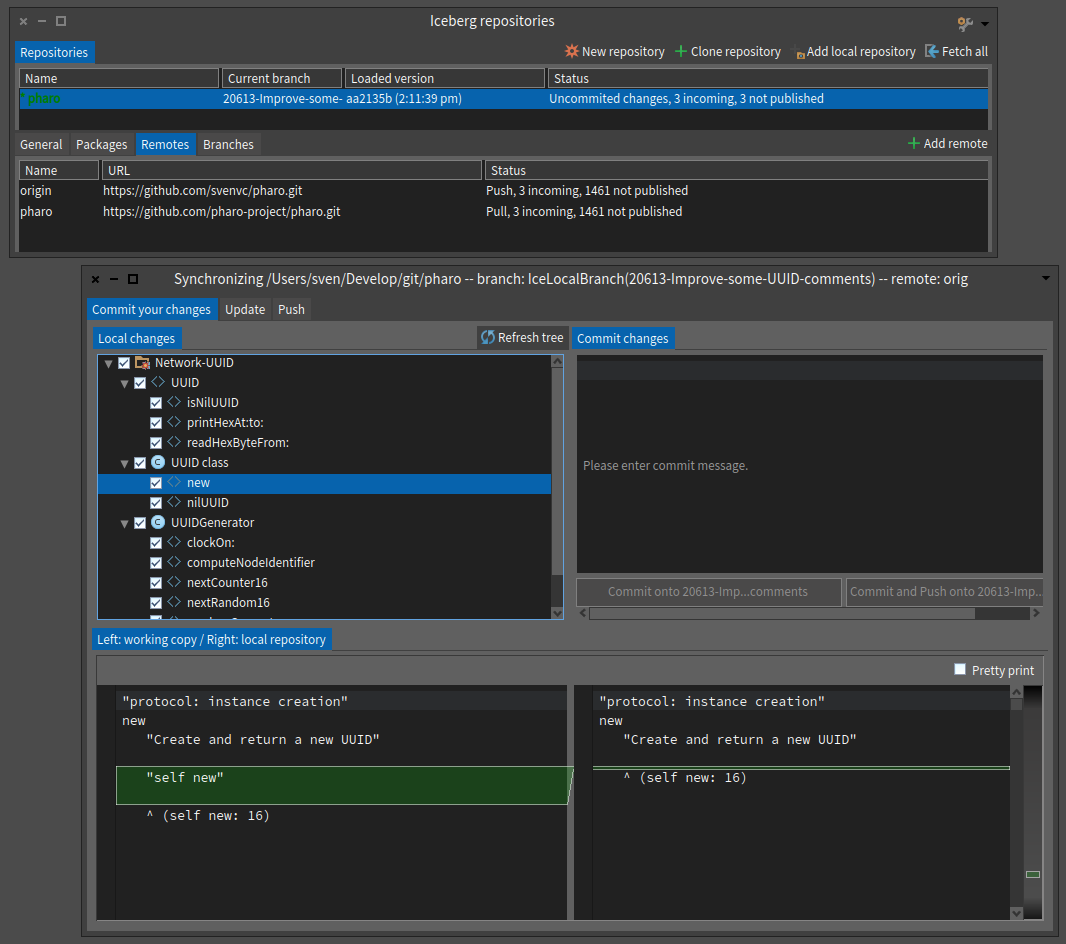
participants (9)
-
 Alistair Grant
 -
 Esteban Lorenzano
 -
 Guillermo Polito
 -
 Pavel Krivanek
 -
 Sean P. DeNigris
 -
 Stephan Eggermont
 -
 Stephane Ducasse
 -
 Sven Van Caekenberghe
 -
 Torsten Bergmann