
I have been told that there are some problem with gitfiletree that make it not recommended for public consumption and recommendation to newcomers. I have been using not gitfiletree but filetree alone for the past week for my project Ephestos, because I am ok commiting to git via terminal/ https://github.com/kilon/phEphestos I have to congratulate people behind filetree it has been a smooth ride so far.I had no problems with it at all and I am using git in terminal for doing all the git commits and push etc. filetree also has been very succesful at some major refactoring I have done to Ephestos, I had to change the name of an entire class and I had to change methods to other classes . Filetree did an excellent job not just with the export to st file but actually git was able to see which files were deleted and which were renamed. That meant I did not have to do any git rm . However I do need to git add every time I add a new method or filetree creates a new file. Usually that is not a problem because I can see what files are not tracked by git with git status and copy paste their paths to git add. So I will say overall my commits have been a process of saving in monticello , git add, git commit and git push which exactly the same process I have used for when I was and still coding in python. So thank you for this tool , I got fed up with the slow downs of Smalltalkhub and all its problems and it feels great to be back at using github :) I will keep testing for a couple a months and then completely move to github . The only thing I noticed is that sometimes monticello slows down but that may well be a problem with Pharo 4.

On Fri, Sep 19, 2014 at 11:32 AM, kilon alios <kilon.alios@gmail.com> wrote:
I have been told that there are some problem with gitfiletree that make it not recommended for public consumption and recommendation to newcomers.
I have been using not gitfiletree but filetree alone for the past week for my project Ephestos, because I am ok commiting to git via terminal/
https://github.com/kilon/phEphestos
I have to congratulate people behind filetree it has been a smooth ride so far.I had no problems with it at all and I am using git in terminal for doing all the git commits and push etc.
filetree also has been very succesful at some major refactoring I have done to Ephestos, I had to change the name of an entire class and I had to change methods to other classes . Filetree did an excellent job not just with the export to st file but actually git was able to see which files were deleted and which were renamed.
That meant I did not have to do any git rm .
However I do need to git add every time I add a new method or filetree creates a new file. Usually that is not a problem because I can see what files are not tracked by git with git status and copy paste their paths to git add.
So I will say overall my commits have been a process of saving in monticello , git add, git commit and git push which exactly the same process I have used for when I was and still coding in python.
So thank you for this tool , I got fed up with the slow downs of Smalltalkhub and all its problems and it feels great to be back at using github :)
I'd agree to that thing. Took me a while but now the Git based workflow just feels better. Also useful is storing snippets as gists. Git has won, let's embrace that. This doesn't mean that STH is not useful as a project repository. MCZs are still the main artifact.
I will keep testing for a couple a months and then completely move to github . The only thing I noticed is that sometimes monticello slows down but that may well be a problem with Pharo 4.
yeap I actually had to use gist to backup an method because smalltalkhub freaked out to me once more. For a strange reason I keep using pastebin even though I have gist account because I keep forgetting about it :D STH is not useless and most of the time works and get the job done. Also is simpler to learn for people that are unfamiliar with version control. Git is simple enough. The problem with STH is when it has a mental breakdown and of course when you want to commit and STH is not working. So I cannot recommend STHUB personally. Besides git and github being more reliable and more powerful, I really like its design, its simple , efficient and powerful. Also github gives a lot more visibility to projects and that means more visibility to Pharo. Its definetly a win - win situation at least for me. On Fri, Sep 19, 2014 at 1:08 PM, phil@highoctane.be <phil@highoctane.be> wrote:
On Fri, Sep 19, 2014 at 11:32 AM, kilon alios <kilon.alios@gmail.com> wrote:
I have been told that there are some problem with gitfiletree that make it not recommended for public consumption and recommendation to newcomers.
I have been using not gitfiletree but filetree alone for the past week for my project Ephestos, because I am ok commiting to git via terminal/
https://github.com/kilon/phEphestos
I have to congratulate people behind filetree it has been a smooth ride so far.I had no problems with it at all and I am using git in terminal for doing all the git commits and push etc.
filetree also has been very succesful at some major refactoring I have done to Ephestos, I had to change the name of an entire class and I had to change methods to other classes . Filetree did an excellent job not just with the export to st file but actually git was able to see which files were deleted and which were renamed.
That meant I did not have to do any git rm .
However I do need to git add every time I add a new method or filetree creates a new file. Usually that is not a problem because I can see what files are not tracked by git with git status and copy paste their paths to git add.
So I will say overall my commits have been a process of saving in monticello , git add, git commit and git push which exactly the same process I have used for when I was and still coding in python.
So thank you for this tool , I got fed up with the slow downs of Smalltalkhub and all its problems and it feels great to be back at using github :)
I'd agree to that thing. Took me a while but now the Git based workflow just feels better. Also useful is storing snippets as gists. Git has won, let's embrace that. This doesn't mean that STH is not useful as a project repository. MCZs are still the main artifact.
I will keep testing for a couple a months and then completely move to github . The only thing I noticed is that sometimes monticello slows down but that may well be a problem with Pharo 4.

On Sep 19, 2014, at 7:08 AM, phil@highoctane.be wrote:
it feels great to be back at using github :)
I'd agree to that thing. Took me a while but now the Git based workflow just feels better. Also useful is storing snippets as gists. Git has won, let's embrace that.
Years ago :) But yeah, Iâm also want to express gratitude to Thierryâs work and all the people behind the effort of allowing a smooth transition from a lovely past which Iâm also very grateful, to this git present

On 09/19/2014 02:32 AM, kilon alios wrote:
I have been using not gitfiletree but filetree alone for the past week for my project Ephestos, because I am ok commiting to git via terminal/
https://github.com/kilon/phEphestos
I have to congratulate people behind filetree it has been a smooth ride so far.I had no problems with it at all and I am using git in terminal for doing all the git commits and push etc.
I've also been using filetree and manually using git (and github) for the past two years. It works really well for me.
filetree also has been very succesful at some major refactoring I have done to Ephestos, I had to change the name of an entire class and I had to change methods to other classes . Filetree did an excellent job not just with the export to st file but actually git was able to see which files were deleted and which were renamed.
That meant I did not have to do any git rm .
However I do need to git add every time I add a new method or filetree creates a new file. Usually that is not a problem because I can see what files are not tracked by git with git status and copy paste their paths to git add.
After I save in Monticello to my Filetree local filesystem, I just do git add -A then I'm ready to commit. The -A (different from -a) picks up all changed, added, and removed files automatically.
So I will say overall my commits have been a process of saving in monticello , git add, git commit and git push which exactly the same process I have used for when I was and still coding in python.
That's my workflow as well. I also do work towards a particular bugfix or feature out on a Git branch, then merge that branch into the master whenever I'm done with that particular issue. Basically, normal Git workflow, which makes tracking things very easy.
So thank you for this tool , I got fed up with the slow downs of Smalltalkhub and all its problems and it feels great to be back at using github :)
I will keep testing for a couple a months and then completely move to github . The only thing I noticed is that sometimes monticello slows down but that may well be a problem with Pharo 4.
I haven't noticed this, but I'm still on Pharo 3 for most of my project work. Regards, -Martin

Le 20/09/2014 12:19, Martin McClure a écrit :
On 09/19/2014 02:32 AM, kilon alios wrote:
I have been using not gitfiletree but filetree alone for the past week for my project Ephestos, because I am ok commiting to git via terminal/
https://github.com/kilon/phEphestos
I have to congratulate people behind filetree it has been a smooth ride so far.I had no problems with it at all and I am using git in terminal for doing all the git commits and push etc.
I've also been using filetree and manually using git (and github) for the past two years. It works really well for me.
I have done that for a year too, with Pharo 1.4. Then I wrote GitFileTree :) I've used that forever since, on 2.0, 3.0 and 4.0.
filetree also has been very succesful at some major refactoring I have done to Ephestos, I had to change the name of an entire class and I had to change methods to other classes . Filetree did an excellent job not just with the export to st file but actually git was able to see which files were deleted and which were renamed.
That meant I did not have to do any git rm .
However I do need to git add every time I add a new method or filetree creates a new file. Usually that is not a problem because I can see what files are not tracked by git with git status and copy paste their paths to git add.
After I save in Monticello to my Filetree local filesystem, I just do
git add -A
then I'm ready to commit. The -A (different from -a) picks up all changed, added, and removed files automatically.
I had a few issues with doing git commands by hand (forgot do it a few times, had conflicts with removed method reapparing with squeak) so this is why I automatized it. Then I got a few benefits, like having access to any version of a package in a git repository without checkouts, and even access to all the versions of a method (even up to one or two years old). And a reminder in the GUI that I need to "push".
So I will say overall my commits have been a process of saving in monticello , git add, git commit and git push which exactly the same process I have used for when I was and still coding in python.
That's my workflow as well. I also do work towards a particular bugfix or feature out on a Git branch, then merge that branch into the master whenever I'm done with that particular issue. Basically, normal Git workflow, which makes tracking things very easy.
If you often merge, consider using the GitFileTree-MergeDriver; installation is a bit complex, but it may really help if you're merging by reducing conflicts a lot. I do need to finish writing that part in the PharoForTheEnterprise book ;) Thierry
So thank you for this tool , I got fed up with the slow downs of Smalltalkhub and all its problems and it feels great to be back at using github :)
I will keep testing for a couple a months and then completely move to github . The only thing I noticed is that sometimes monticello slows down but that may well be a problem with Pharo 4.
I haven't noticed this, but I'm still on Pharo 3 for most of my project work.
Regards,
-Martin
Le 20 sept. 2014 13:47, "Thierry Goubier" <thierry.goubier@gmail.com> a écrit :
Le 20/09/2014 12:19, Martin McClure a écrit :
On 09/19/2014 02:32 AM, kilon alios wrote:
I have been using not gitfiletree but filetree alone for the past week for my project Ephestos, because I am ok commiting to git via terminal/
https://github.com/kilon/phEphestos
I have to congratulate people behind filetree it has been a smooth ride so far.I had no problems with it at all and I am using git in terminal for doing all the git commits and push etc.
I've also been using filetree and manually using git (and github) for the past two years. It works really well for me.
I have done that for a year too, with Pharo 1.4. Then I wrote GitFileTree
:) I've used that forever since, on 2.0, 3.0 and 4.0.
filetree also has been very succesful at some major refactoring I have done to Ephestos, I had to change the name of an entire class and I had to change methods to other classes . Filetree did an excellent job not just with the export to st file but actually git was able to see which files were deleted and which were renamed.
That meant I did not have to do any git rm .
However I do need to git add every time I add a new method or filetree creates a new file. Usually that is not a problem because I can see what files are not tracked by git with git status and copy paste their paths to git add.
After I save in Monticello to my Filetree local filesystem, I just do
git add -A
then I'm ready to commit. The -A (different from -a) picks up all changed, added, and removed files automatically.
I had a few issues with doing git commands by hand (forgot do it a few
times, had conflicts with removed method reapparing with squeak) so this is why I automatized it.
Then I got a few benefits, like having access to any version of a package
in a git repository without checkouts, and even access to all the versions of a method (even up to one or two years old). And a reminder in the GUI that I need to "push".
So I will say overall my commits have been a process of saving in monticello , git add, git commit and git push which exactly the same process I have used for when I was and still coding in python.
That's my workflow as well. I also do work towards a particular bugfix or feature out on a Git branch, then merge that branch into the master whenever I'm done with that particular issue. Basically, normal Git workflow, which makes tracking things very easy.
If you often merge, consider using the GitFileTree-MergeDriver;
installation is a bit complex, but it may really help if you're merging by reducing conflicts a lot.
I do need to finish writing that part in the PharoForTheEnterprise book ;)
One thing for me is that I do have other stuff that Pharo code. So filetree keeps all together in commits/pushes. Now history of methods is indeed super nice. Phil
Thierry
So thank you for this tool , I got fed up with the slow downs of Smalltalkhub and all its problems and it feels great to be back at using github :)
I will keep testing for a couple a months and then completely move to github . The only thing I noticed is that sometimes monticello slows down but that may well be a problem with Pharo 4.
I haven't noticed this, but I'm still on Pharo 3 for most of my project work.
Regards,
-Martin
Le 20/09/2014 14:24, phil@highoctane.be a écrit :
One thing for me is that I do have other stuff that Pharo code.
Me as well.
So filetree keeps all together in commits/pushes.
You synchronize the commits over the Pharo packages and the 'other' code and resources?
Now history of methods is indeed super nice.
It is :) Thierry
Le 20/09/2014 16:46, Ben Coman a écrit :
Thierry Goubier wrote:
Le 20/09/2014 14:24, phil@highoctane.be a écrit :
Now history of methods is indeed super nice.
It is :)
Thierry
Is that just from the command line? I guess with libgit integration we might get this with in-Image "versions" ?
I have it in image for one or two years. On the command line, it can be a bit more powerful. Thierry

Thierry Goubier wrote:
Le 20/09/2014 16:46, Ben Coman a écrit :
Thierry Goubier wrote:
Le 20/09/2014 14:24, phil@highoctane.be a écrit :
Now history of methods is indeed super nice.
It is :)
Thierry
Is that just from the command line? I guess with libgit integration we might get this with in-Image "versions" ?
I have it in image for one or two years. On the command line, it can be a bit more powerful.
Thierry
Very cool. It would make a good vid to see it in action. cheers -ben
Le 20/09/2014 17:19, Ben Coman a écrit :
Thierry Goubier wrote:
Le 20/09/2014 16:46, Ben Coman a écrit :
Thierry Goubier wrote:
Le 20/09/2014 14:24, phil@highoctane.be a écrit :
Now history of methods is indeed super nice.
It is :)
Thierry
Is that just from the command line? I guess with libgit integration we might get this with in-Image "versions" ?
I have it in image for one or two years. On the command line, it can be a bit more powerful.
Thierry
Very cool. It would make a good vid to see it in action.
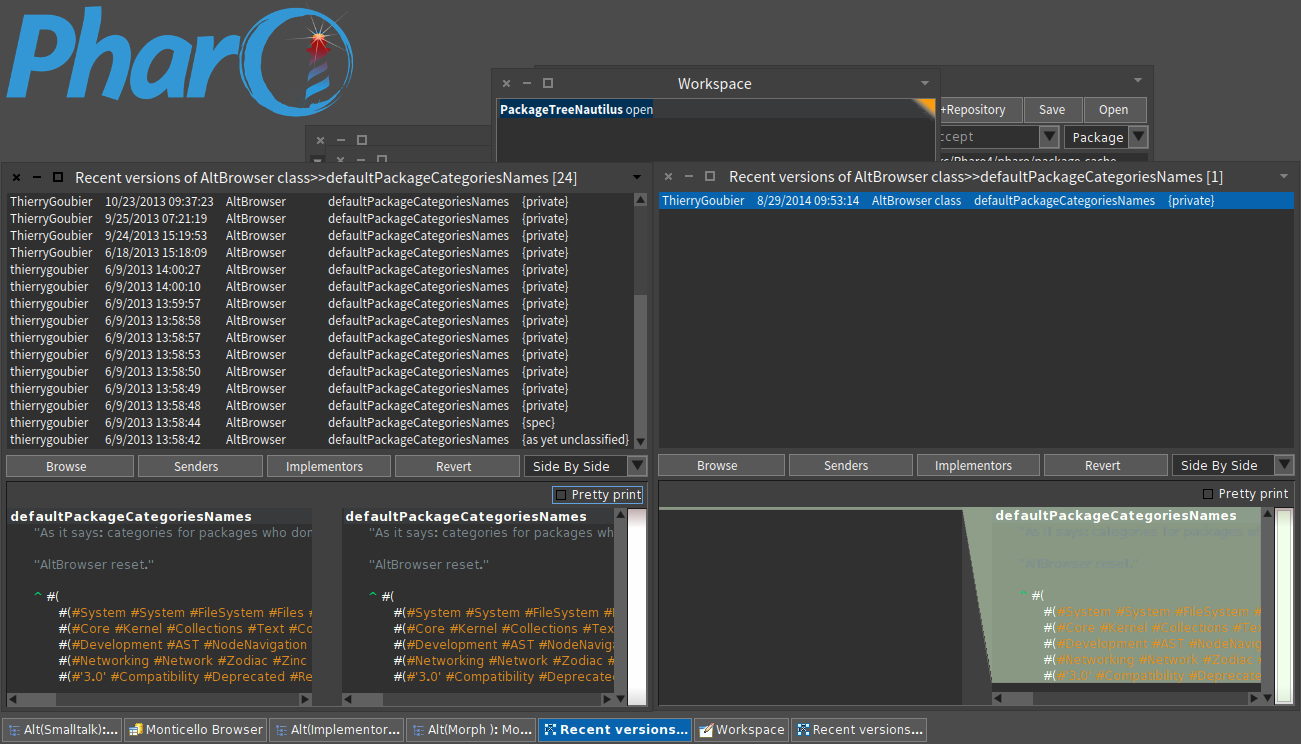
In stills, it gives that (left with git, right with only the changeset). Both versions lists are called via the versions menu item on the method (left, from AltBrowser, right, from Nautilus). The git version does, to fill the list, a git log query on the method file, then it queries all the versions one by one to retrieve the source code for each. It was an attempt to show it could be done :) Dale, I believe, is able to do it on full classes. Thierry
cheers -ben
participants (6)
-
 Ben Coman
 -
 kilon alios
 -
 Martin McClure
 -
 phil@highoctane.be
 -
 Sebastian Sastre
 -
 Thierry Goubier