[Pharo-project] Problem with Pharo 1.3 in Windows

Marcus wrote
This situation with the thousands of different VMs is *impossible*. We need >to fix that.
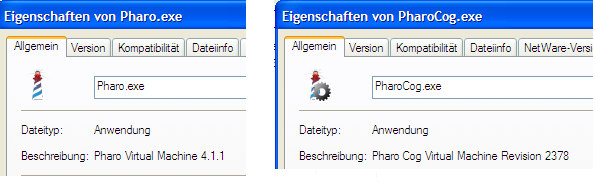
If on Windows you should really use the installer for Pharo 1.2.2. from the download page. This will give you the two VM's: standard and Cog and you can use them to start all images from your HD. Since both have a different icon (also for the Pharo window) you always know which one you start/running on. Just give it a try, its simple. Since the Pharo.exe and PharoCog.exe also have the version number in the resource section you can right click on it in explorer and check which code version/revision they have (see attached screenshot). Bye T. -- NEU: FreePhone - kostenlos mobil telefonieren und surfen! Jetzt informieren: http://www.gmx.net/de/go/freephone

On 19 May 2011 08:43, Torsten Bergmann <astares@gmx.de> wrote:
Marcus wrote
This situation with the thousands of different VMs is *impossible*. We need >to fix that.
If on Windows you should really use the installer for Pharo 1.2.2. from the download page. This will give you the two VM's: standard and Cog and you can use them to start all images from your HD.
Since both have a different icon (also for the Pharo window) you always know which one you start/running on.
Just give it a try, its simple.
Since the Pharo.exe and PharoCog.exe also have the version number in the resource section you can right click on it in explorer and check which code version/revision they have (see attached screenshot).
Torsten, can you please document somewhere, how you chaging the version info? I really can't understand how today's VMs are versioned, and what version we could use for Pharo-branded VMs. Probably with 'P' suffix?
Bye T.
-- NEU: FreePhone - kostenlos mobil telefonieren und surfen! Jetzt informieren: http://www.gmx.net/de/go/freephone
-- Best regards, Igor Stasenko AKA sig.

On 19.05.2011 09:16, Igor Stasenko wrote:
On 19 May 2011 08:43, Torsten Bergmann<astares@gmx.de> wrote:
Marcus wrote
This situation with the thousands of different VMs is *impossible*. We need>to fix that. If on Windows you should really use the installer for Pharo 1.2.2. from the download page. This will give you the two VM's: standard and Cog and you can use them to start all images from your HD.
Since both have a different icon (also for the Pharo window) you always know which one you start/running on.
Just give it a try, its simple.
Since the Pharo.exe and PharoCog.exe also have the version number in the resource section you can right click on it in explorer and check which code version/revision they have (see attached screenshot).
Torsten, can you please document somewhere, how you chaging the version info? Here's how we do it for our application:
rc myApp.rc ResHacker.exe -addoverwrite myApp.exe, myApp.exe, myApp.res, versioninfo,1, where myApp.rc is the attached, actual values defined in config.h. So it's not much magic needed :) rc can be found as part of Visual Studio, and reshacker is freeware, there's a beta with 64bit exe support. Cheers, Henry
On 19 May 2011 09:39, Henrik Sperre Johansen <henrik.s.johansen@veloxit.no> wrote:
On 19.05.2011 09:16, Igor Stasenko wrote:
On 19 May 2011 08:43, Torsten Bergmann<astares@gmx.de> Â wrote:
Marcus wrote
This situation with the thousands of different VMs is *impossible*. We need>to fix that.
If on Windows you should really use the installer for Pharo 1.2.2. from the download page. This will give you the two VM's: standard and Cog and you can use them to start all images from your HD.
Since both have a different icon (also for the Pharo window) you always know which one you start/running on.
Just give it a try, its simple.
Since the Pharo.exe and PharoCog.exe also have the version number in the resource section you can right click on it in explorer and check which code version/revision they have (see attached screenshot).
Torsten, can you please document somewhere, how you chaging the version info?
Here's how we do it for our application:
rc myApp.rc ResHacker.exe -addoverwrite myApp.exe, Â myApp.exe, Â myApp.res, versioninfo,1,
where myApp.rc is the attached, actual values defined in config.h. So it's not much magic needed :)
even less magic. Because we don't need to hack existing .exe files since we can reliably build them from scratch.
rc can be found as part of Visual Studio, and reshacker is freeware, there's a beta with 64bit exe support.
Cheers, Henry
-- Best regards, Igor Stasenko AKA sig.
participants (3)
-
 Henrik Sperre Johansen
 -
 Igor Stasenko
 -
 Torsten Bergmann