[Pharo-project] Which Keymaps/Shortcuts do we want to have?

Which shortcuts would you like to have, and how should they be launched? We can choose combinations such as (ctrl + a, ctrl + b) Close window - ctrl + w? Minimize window - ctrl + ??? Maximize window - ctrl + ??? Open browser - ctrl + ? Open Monticello browser ? Go to next window? My idea is to: - get an idea of what kind of keymaps do we want - build them using Keymapping, so I can test it well with a nice set of shortcuts - gradually replace hardcoded shortcuts with Keymappings (at least to have an extension to load to do this) Merry christmas :) (Here is 9 pm yet, hehe) Guille

On Dec 25, 2010, at 1:18 AM, Guillermo Polito wrote:
Which shortcuts would you like to have, and how should they be launched? We can choose combinations such as (ctrl + a, ctrl + b)
It would be good to have several maps on mac apple-w for closing windows I would love to have a map with ctrle ctrla like in emacs
Close window - ctrl + w? Minimize window - ctrl + ??? Maximize window - ctrl + ???
Open browser - ctrl + ? Open Monticello browser ?
Go to next window?
My idea is to:
- get an idea of what kind of keymaps do we want - build them using Keymapping, so I can test it well with a nice set of shortcuts - gradually replace hardcoded shortcuts with Keymappings (at least to have an extension to load to do this)
Merry christmas :) (Here is 9 pm yet, hehe)
Guille

This is wonderful, thank you! I second the request for Emacs-like keybindings (ctrl-a for beginning of line, ctrl-e for end), and also would really like to add: * (Non-emacs related -- the emacs way would be Ctrl-X + B + Enter) Ctrl-Tab to switch to a previous editor window (or just previous window in general, if the previous one was a workspace) within Pharo. (And, Ctrl-Shift-Tab to switch back). Dmitri Zagidulin On Sat, Dec 25, 2010 at 4:30 AM, Stéphane Ducasse <stephane.ducasse@inria.fr> wrote:
On Dec 25, 2010, at 1:18 AM, Guillermo Polito wrote:
Which shortcuts would you like to have, and how should they be launched? Â We can choose combinations such as (ctrl + a, ctrl + b)
It would be good to have several maps
on mac apple-w for closing windows
I would love to have a map with     ctrle     ctrla     like in emacs
Close window - ctrl + w? Minimize window - ctrl + ??? Maximize window - ctrl + ???
Open browser - ctrl + ? Open Monticello browser ?
Go to next window?
My idea is to:
- get an idea of what kind of keymaps do we want - build them using Keymapping, so I can test it well with a nice set of shortcuts - gradually replace hardcoded shortcuts with Keymappings (at least to have an extension to load to do this)
Merry christmas :) (Here is 9 pm yet, hehe)
Guille
On Sat, Dec 25, 2010 at 6:30 AM, Stéphane Ducasse <stephane.ducasse@inria.fr
wrote:
On Dec 25, 2010, at 1:18 AM, Guillermo Polito wrote:
Which shortcuts would you like to have, and how should they be launched? We can choose combinations such as (ctrl + a, ctrl + b)
It would be good to have several maps
on mac apple-w for closing windows
Mmm, today keymapping does not support platform specific shortcuts... Maybe I can write it down in my wishlist, but I don't think it is not critical. What do you think?
I would love to have a map with ctrle ctrla like in emacs
Ah, thats already supported :D.
Close window - ctrl + w? Minimize window - ctrl + ??? Maximize window - ctrl + ???
Open browser - ctrl + ? Open Monticello browser ?
Go to next window?
My idea is to:
- get an idea of what kind of keymaps do we want - build them using Keymapping, so I can test it well with a nice set of
shortcuts
- gradually replace hardcoded shortcuts with Keymappings (at least to have an extension to load to do this)
Merry christmas :) (Here is 9 pm yet, hehe)
Guille
On Sat, Dec 25, 2010 at 6:30 AM, Stéphane Ducasse <stephane.ducasse@inria.fr> wrote:
On Dec 25, 2010, at 1:18 AM, Guillermo Polito wrote:
Which shortcuts would you like to have, and how should they be launched? We can choose combinations such as (ctrl + a, ctrl + b)
It would be good to have several maps
on mac apple-w for closing windows
Mmm, today keymapping does not support platform specific shortcuts... Maybe I can write it down in my wishlist, but I don't think it is not critical. What do you think?
this can be managed by setting different maps and merging them and using the OSPlatform class
I would love to have a map with ctrle ctrla like in emacs
Ah, thats already supported :D.
rahhhhhhhh lovely (Gotlieb reference for the belgium school comics reader).
Close window - ctrl + w? Minimize window - ctrl + ??? Maximize window - ctrl + ???
Open browser - ctrl + ? Open Monticello browser ?
Go to next window?
My idea is to:
- get an idea of what kind of keymaps do we want - build them using Keymapping, so I can test it well with a nice set of shortcuts - gradually replace hardcoded shortcuts with Keymappings (at least to have an extension to load to do this)
Merry christmas :) (Here is 9 pm yet, hehe)
Guille

On Sat, Dec 25, 2010 at 10:30 AM, Stéphane Ducasse < stephane.ducasse@inria.fr> wrote:
On Dec 25, 2010, at 1:18 AM, Guillermo Polito wrote:
Which shortcuts would you like to have, and how should they be launched? We can choose combinations such as (ctrl + a, ctrl + b)
It would be good to have several maps
on mac apple-w for closing windows
isnt this the case? cmd + b closes the windows for me
I would love to have a map with ctrle ctrla like in emacs
Close window - ctrl + w? Minimize window - ctrl + ??? Maximize window - ctrl + ???
Open browser - ctrl + ? Open Monticello browser ?
Go to next window?
My idea is to:
- get an idea of what kind of keymaps do we want - build them using Keymapping, so I can test it well with a nice set of
shortcuts
- gradually replace hardcoded shortcuts with Keymappings (at least to have an extension to load to do this)
Merry christmas :) (Here is 9 pm yet, hehe)
Guille
On Dec 25, 2010, at 6:36 PM, Mariano Martinez Peck wrote:
On Sat, Dec 25, 2010 at 10:30 AM, Stéphane Ducasse <stephane.ducasse@inria.fr> wrote:
On Dec 25, 2010, at 1:18 AM, Guillermo Polito wrote:
Which shortcuts would you like to have, and how should they be launched? We can choose combinations such as (ctrl + a, ctrl + b)
It would be good to have several maps
on mac apple-w for closing windows
isnt this the case? cmd + b closes the windows for me
yes I was just saying that this one is important to keep :)
I would love to have a map with ctrle ctrla like in emacs
Close window - ctrl + w? Minimize window - ctrl + ??? Maximize window - ctrl + ???
Open browser - ctrl + ? Open Monticello browser ?
Go to next window?
My idea is to:
- get an idea of what kind of keymaps do we want - build them using Keymapping, so I can test it well with a nice set of shortcuts - gradually replace hardcoded shortcuts with Keymappings (at least to have an extension to load to do this)
Merry christmas :) (Here is 9 pm yet, hehe)
Guille
Hi Guille. I would like: - a shortcut to bring up the wolrd menu. Not sure which shortcut. - use ctrl + tab to switch between windows instead of cmd + arrows - a shortcut for what it is (hidden) now with cmd + shift + click (list of opened windows) - Shortcuts for opening standard tools: Workspace, Transcript, TestRunner, etc. - Shortcut for duplicating a windows - a shortcut for saving the image (cmd+ shoft + s ?) Ok, that's so far my wishlist ;) Cheers mariano On Sat, Dec 25, 2010 at 1:18 AM, Guillermo Polito <guillermopolito@gmail.com
wrote:
Which shortcuts would you like to have, and how should they be launched? We can choose combinations such as (ctrl + a, ctrl + b)
Close window - ctrl + w? Minimize window - ctrl + ??? Maximize window - ctrl + ???
Open browser - ctrl + ? Open Monticello browser ?
Go to next window?
My idea is to:
- get an idea of what kind of keymaps do we want - build them using Keymapping, so I can test it well with a nice set of shortcuts - gradually replace hardcoded shortcuts with Keymappings (at least to have an extension to load to do this)
Merry christmas :) (Here is 9 pm yet, hehe)
Guille

my wishlist: - a shortcut to see all available shortcuts and change them On 26 December 2010 21:46, Mariano Martinez Peck <marianopeck@gmail.com> wrote:
Hi Guille. I would like:
- a shortcut to bring up the wolrd menu. Not sure which shortcut. - use ctrl + tab to switch between windows instead of cmd + arrows - a shortcut for what it is (hidden) now with cmd + shift + click (list of opened windows) - Shortcuts for opening standard tools: Workspace, Transcript, TestRunner, etc. - Shortcut for duplicating a windows - a shortcut for saving the image (cmd+ shoft + s ?)
Ok, that's so far my wishlist ;)
Cheers
mariano
On Sat, Dec 25, 2010 at 1:18 AM, Guillermo Polito <guillermopolito@gmail.com> wrote:
Which shortcuts would you like to have, and how should they be launched? We can choose combinations such as (ctrl + a, ctrl + b)
Close window - ctrl + w? Minimize window - ctrl + ??? Maximize window - ctrl + ???
Open browser - ctrl + ? Open Monticello browser ?
Go to next window?
My idea is to:
- get an idea of what kind of keymaps do we want - build them using Keymapping, so I can test it well with a nice set of shortcuts - gradually replace hardcoded shortcuts with Keymappings (at least to have an extension to load to do this)
Merry christmas :) (Here is 9 pm yet, hehe)
Guille
-- Best regards, Igor Stasenko AKA sig.
On Sun, Dec 26, 2010 at 10:13 PM, Igor Stasenko <siguctua@gmail.com> wrote:
my wishlist:
- a shortcut to see all available shortcuts and change them
for me the shortcut is not necessary, but a UI to list them and modify yes! Maybe a Settings integration ? cheers mariano
On 26 December 2010 21:46, Mariano Martinez Peck <marianopeck@gmail.com> wrote:
Hi Guille. I would like:
- a shortcut to bring up the wolrd menu. Not sure which shortcut. - use ctrl + tab to switch between windows instead of cmd + arrows - a shortcut for what it is (hidden) now with cmd + shift + click (list of opened windows) - Shortcuts for opening standard tools: Workspace, Transcript, TestRunner, etc. - Shortcut for duplicating a windows - a shortcut for saving the image (cmd+ shoft + s ?)
Ok, that's so far my wishlist ;)
Cheers
mariano
On Sat, Dec 25, 2010 at 1:18 AM, Guillermo Polito <guillermopolito@gmail.com> wrote:
Which shortcuts would you like to have, and how should they be launched? We can choose combinations such as (ctrl + a, ctrl + b)
Close window - ctrl + w? Minimize window - ctrl + ??? Maximize window - ctrl + ???
Open browser - ctrl + ? Open Monticello browser ?
Go to next window?
My idea is to:
- get an idea of what kind of keymaps do we want - build them using Keymapping, so I can test it well with a nice set of shortcuts - gradually replace hardcoded shortcuts with Keymappings (at least to
have
an extension to load to do this)
Merry christmas :) (Here is 9 pm yet, hehe)
Guille
-- Best regards, Igor Stasenko AKA sig.
On 26 December 2010 22:32, Mariano Martinez Peck <marianopeck@gmail.com> wrote:
On Sun, Dec 26, 2010 at 10:13 PM, Igor Stasenko <siguctua@gmail.com> wrote:
my wishlist:
- a shortcut to see all available shortcuts and change them
for me the shortcut is not necessary, but a UI to list them and modify yes! Maybe a Settings integration ?
NO. i want to change a shortcut which opens a window where i can change a shortcut to open a window to change a shortcut to open a window to change a shortcut ... :) yeah.. sure i can live without such shortcut.. but not without UI :)
cheers
mariano
-- Best regards, Igor Stasenko AKA sig.

On Sun, Dec 26, 2010 at 1:13 PM, Igor Stasenko <siguctua@gmail.com> wrote:
my wishlist:
- a shortcut to see all available shortcuts and change them
+ a lot
On 26 December 2010 21:46, Mariano Martinez Peck <marianopeck@gmail.com> wrote:
Hi Guille. I would like:
- a shortcut to bring up the wolrd menu. Not sure which shortcut. - use ctrl + tab to switch between windows instead of cmd + arrows - a shortcut for what it is (hidden) now with cmd + shift + click (list of opened windows) - Shortcuts for opening standard tools: Workspace, Transcript, TestRunner, etc. - Shortcut for duplicating a windows - a shortcut for saving the image (cmd+ shoft + s ?)
Ok, that's so far my wishlist ;)
Cheers
mariano
On Sat, Dec 25, 2010 at 1:18 AM, Guillermo Polito <guillermopolito@gmail.com> wrote:
Which shortcuts would you like to have, and how should they be launched? We can choose combinations such as (ctrl + a, ctrl + b)
Close window - ctrl + w? Minimize window - ctrl + ??? Maximize window - ctrl + ???
Open browser - ctrl + ? Open Monticello browser ?
Go to next window?
My idea is to:
- get an idea of what kind of keymaps do we want - build them using Keymapping, so I can test it well with a nice set of shortcuts - gradually replace hardcoded shortcuts with Keymappings (at least to
have
an extension to load to do this)
Merry christmas :) (Here is 9 pm yet, hehe)
Guille
-- Best regards, Igor Stasenko AKA sig.
Wow, haha, this is wonderful! So, putting some order: 1) shortcuts published as settings with a default? Will that be ok? This make me think the following: - how to share shortcuts. Files? Keymapping used to use SIXX, but maybe it is not suitable for a light solution (I don't know much about SIXX) - downloading a new image (or a new version of a package with shortcuts) could make us lose our own-defined shortcuts. 2) support for the following shortcuts: - a shortcut to bring up the wolrd menu. Not sure which shortcut. - use ctrl + tab to switch between windows instead of cmd + arrows - a shortcut for what it is (hidden) now with cmd + shift + click (list of opened windows) - Shortcuts for opening standard tools: Workspace, Transcript, TestRunner, etc. - Shortcut for duplicating a windows - a shortcut for saving the image (cmd+ shoft + s ?) - a shortcut for quitting the image with and without saving - a shortcut to see a list of shortcuts I would like to add some more items to #2, and to define the keys that triggers them. #1 seems to be of some work :). I'll work on it ASAP. Step by step, as Stef and Mostaza Merlo says :). Cheers! Guille On Sun, Dec 26, 2010 at 7:18 PM, Stéphane Ducasse <stephane.ducasse@inria.fr
wrote:
+ 1 :) And save them as configuration
On Sun, Dec 26, 2010 at 1:13 PM, Igor Stasenko <siguctua@gmail.com> wrote: my wishlist:
- a shortcut to see all available shortcuts and change them
+ a lot
What about something like the attach? On Sun, Dec 26, 2010 at 7:45 PM, Guillermo Polito <guillermopolito@gmail.com
wrote:
Wow, haha, this is wonderful! So, putting some order:
1) shortcuts published as settings with a default? Will that be ok? This make me think the following: - how to share shortcuts. Files? Keymapping used to use SIXX, but maybe it is not suitable for a light solution (I don't know much about SIXX) - downloading a new image (or a new version of a package with shortcuts) could make us lose our own-defined shortcuts.
2) support for the following shortcuts:
- a shortcut to bring up the wolrd menu. Not sure which shortcut. - use ctrl + tab to switch between windows instead of cmd + arrows - a shortcut for what it is (hidden) now with cmd + shift + click (list of opened windows) - Shortcuts for opening standard tools: Workspace, Transcript, TestRunner, etc. - Shortcut for duplicating a windows - a shortcut for saving the image (cmd+ shoft + s ?) - a shortcut for quitting the image with and without saving - a shortcut to see a list of shortcuts
I would like to add some more items to #2, and to define the keys that triggers them. #1 seems to be of some work :). I'll work on it ASAP.
Step by step, as Stef and Mostaza Merlo says :).
Cheers! Guille
On Sun, Dec 26, 2010 at 7:18 PM, Stéphane Ducasse < stephane.ducasse@inria.fr> wrote:
+ 1 :) And save them as configuration
On Sun, Dec 26, 2010 at 1:13 PM, Igor Stasenko <siguctua@gmail.com> wrote: my wishlist:
- a shortcut to see all available shortcuts and change them
+ a lot
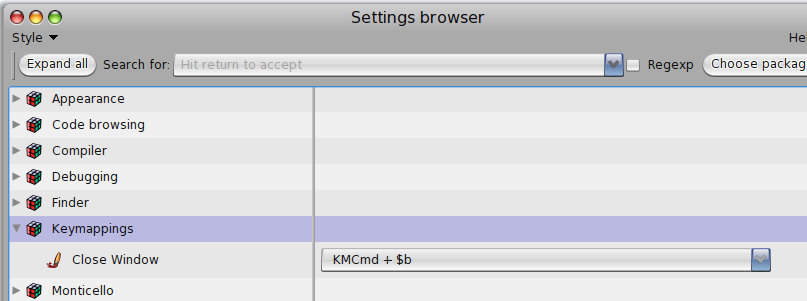
I suggest that you define lists = simple eamcs bindings = ctral a ctrle Windows manipulation cmd W ... Your special binding Then you should have contexts World TextMorph Editor only (of course some list will only be able to be attached to a given object programmatically example: for botsinc I wanted specific binding to that morph class only -- but you do not care) then a config is (lists, lists) context (mybinding, lists, lists) context where , make sure that mybinding take precedence Does it make sense? Stef On Dec 27, 2010, at 2:37 AM, Guillermo Polito wrote:
What about something like the attach?
On Sun, Dec 26, 2010 at 7:45 PM, Guillermo Polito <guillermopolito@gmail.com> wrote: Wow, haha, this is wonderful! So, putting some order:
1) shortcuts published as settings with a default? Will that be ok? This make me think the following: - how to share shortcuts. Files? Keymapping used to use SIXX, but maybe it is not suitable for a light solution (I don't know much about SIXX) - downloading a new image (or a new version of a package with shortcuts) could make us lose our own-defined shortcuts.
2) support for the following shortcuts:
- a shortcut to bring up the wolrd menu. Not sure which shortcut. - use ctrl + tab to switch between windows instead of cmd + arrows - a shortcut for what it is (hidden) now with cmd + shift + click (list of opened windows) - Shortcuts for opening standard tools: Workspace, Transcript, TestRunner, etc. - Shortcut for duplicating a windows - a shortcut for saving the image (cmd+ shoft + s ?) - a shortcut for quitting the image with and without saving - a shortcut to see a list of shortcuts
I would like to add some more items to #2, and to define the keys that triggers them. #1 seems to be of some work :). I'll work on it ASAP.
Step by step, as Stef and Mostaza Merlo says :).
Cheers! Guille
On Sun, Dec 26, 2010 at 7:18 PM, Stéphane Ducasse <stephane.ducasse@inria.fr> wrote: + 1 :) And save them as configuration
On Sun, Dec 26, 2010 at 1:13 PM, Igor Stasenko <siguctua@gmail.com> wrote: my wishlist:
- a shortcut to see all available shortcuts and change them
+ a lot
<PharoScreenshot.2.png>

I also would like a cmd+f: search anything... but that needs also an application (like algernon, which I'm currently not supporting anymore due time issues), not just a command :( well, at least a cmd+f: search class would be fine :) El 27/12/2010, a las 5:38a.m., Stéphane Ducasse escribió:
I suggest that you define lists =
simple eamcs bindings = ctral a ctrle
Windows manipulation cmd W ...
Your special binding
Then you should have contexts World TextMorph Editor only
(of course some list will only be able to be attached to a given object programmatically example: for botsinc I wanted specific binding to that morph class only -- but you do not care)
then a config is
(lists, lists) context (mybinding, lists, lists) context
where , make sure that mybinding take precedence
Does it make sense?
Stef
On Dec 27, 2010, at 2:37 AM, Guillermo Polito wrote:
What about something like the attach?
On Sun, Dec 26, 2010 at 7:45 PM, Guillermo Polito <guillermopolito@gmail.com> wrote: Wow, haha, this is wonderful! So, putting some order:
1) shortcuts published as settings with a default? Will that be ok? This make me think the following: - how to share shortcuts. Files? Keymapping used to use SIXX, but maybe it is not suitable for a light solution (I don't know much about SIXX) - downloading a new image (or a new version of a package with shortcuts) could make us lose our own-defined shortcuts.
2) support for the following shortcuts:
- a shortcut to bring up the wolrd menu. Not sure which shortcut. - use ctrl + tab to switch between windows instead of cmd + arrows - a shortcut for what it is (hidden) now with cmd + shift + click (list of opened windows) - Shortcuts for opening standard tools: Workspace, Transcript, TestRunner, etc. - Shortcut for duplicating a windows - a shortcut for saving the image (cmd+ shoft + s ?) - a shortcut for quitting the image with and without saving - a shortcut to see a list of shortcuts
I would like to add some more items to #2, and to define the keys that triggers them. #1 seems to be of some work :). I'll work on it ASAP.
Step by step, as Stef and Mostaza Merlo says :).
Cheers! Guille
On Sun, Dec 26, 2010 at 7:18 PM, Stéphane Ducasse <stephane.ducasse@inria.fr> wrote: + 1 :) And save them as configuration
On Sun, Dec 26, 2010 at 1:13 PM, Igor Stasenko <siguctua@gmail.com> wrote: my wishlist:
- a shortcut to see all available shortcuts and change them
+ a lot
<PharoScreenshot.2.png>
On Mon, Dec 27, 2010 at 12:35 PM, Esteban Lorenzano <estebanlm@gmail.com>wrote:
I also would like a cmd+f: search anything... but that needs also an application (like algernon, which I'm currently not supporting anymore due time issues), not just a command :( well, at least a cmd+f: search class would be fine :)
+1 It sound like a good project for someone with time and wanting to learn :)
El 27/12/2010, a las 5:38a.m., Stéphane Ducasse escribió:
I suggest that you define lists =
simple eamcs bindings = ctral a ctrle
Windows manipulation cmd W ...
Your special binding
Then you should have contexts World TextMorph Editor only
(of course some list will only be able to be attached to a given object programmatically example: for botsinc I wanted specific binding to that morph class only -- but you do not care)
then a config is
(lists, lists) context (mybinding, lists, lists) context
where , make sure that mybinding take precedence
Does it make sense?
Stef
On Dec 27, 2010, at 2:37 AM, Guillermo Polito wrote:
What about something like the attach?
On Sun, Dec 26, 2010 at 7:45 PM, Guillermo Polito < guillermopolito@gmail.com> wrote: Wow, haha, this is wonderful! So, putting some order:
1) shortcuts published as settings with a default? Will that be ok? This make me think the following: - how to share shortcuts. Files? Keymapping used to use SIXX, but maybe it is not suitable for a light solution (I don't know much about SIXX) - downloading a new image (or a new version of a package with shortcuts) could make us lose our own-defined shortcuts.
2) support for the following shortcuts:
- a shortcut to bring up the wolrd menu. Not sure which shortcut. - use ctrl + tab to switch between windows instead of cmd + arrows - a shortcut for what it is (hidden) now with cmd + shift + click (list of opened windows) - Shortcuts for opening standard tools: Workspace, Transcript, TestRunner, etc. - Shortcut for duplicating a windows - a shortcut for saving the image (cmd+ shoft + s ?) - a shortcut for quitting the image with and without saving - a shortcut to see a list of shortcuts
I would like to add some more items to #2, and to define the keys that triggers them. #1 seems to be of some work :). I'll work on it ASAP.
Step by step, as Stef and Mostaza Merlo says :).
Cheers! Guille
On Sun, Dec 26, 2010 at 7:18 PM, Stéphane Ducasse < stephane.ducasse@inria.fr> wrote: + 1 :) And save them as configuration
On Sun, Dec 26, 2010 at 1:13 PM, Igor Stasenko <siguctua@gmail.com> wrote: my wishlist:
- a shortcut to see all available shortcuts and change them
+ a lot
<PharoScreenshot.2.png>
On Dec 26, 2010, at 11:45 PM, Guillermo Polito wrote:
Wow, haha, this is wonderful! So, putting some order:
1) shortcuts published as settings with a default? Will that be ok? This make me think the following: - how to share shortcuts. Files? Keymapping used to use SIXX, but maybe it is not suitable for a light solution (I don't know much about SIXX)
No XML please Use storeOn methods for a named list of shortcuts + application of named list to a context (all textMorph, the complete environments....)
- downloading a new image (or a new version of a package with shortcuts) could make us lose our own-defined shortcuts.
But you reload your configuration and hop nothing lost
2) support for the following shortcuts: - a shortcut to bring up the wolrd menu. Not sure which shortcut. - use ctrl + tab to switch between windows instead of cmd + arrows - a shortcut for what it is (hidden) now with cmd + shift + click (list of opened windows) - Shortcuts for opening standard tools: Workspace, Transcript, TestRunner, etc. - Shortcut for duplicating a windows - a shortcut for saving the image (cmd+ shoft + s ?) - a shortcut for quitting the image with and without saving - a shortcut to see a list of shortcuts
I would like to add some more items to #2, and to define the keys that triggers them. #1 seems to be of some work :). I'll work on it ASAP.
Step by step, as Stef and Mostaza Merlo says :).
Cheers! Guille
On Sun, Dec 26, 2010 at 7:18 PM, Stéphane Ducasse <stephane.ducasse@inria.fr> wrote: + 1 :) And save them as configuration
On Sun, Dec 26, 2010 at 1:13 PM, Igor Stasenko <siguctua@gmail.com> wrote: my wishlist:
- a shortcut to see all available shortcuts and change them
+ a lot
participants (7)
-
 Dmitri Zagidulin
 -
 Eliot Miranda
 -
 Esteban Lorenzano
 -
 Guillermo Polito
 -
 Igor Stasenko
 -
 Mariano Martinez Peck
 -
 Stéphane Ducasse