[Pharo-project] Do you want the option to copy a stacktrace to clipboard?

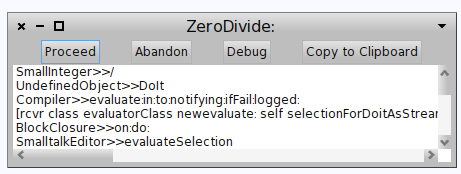
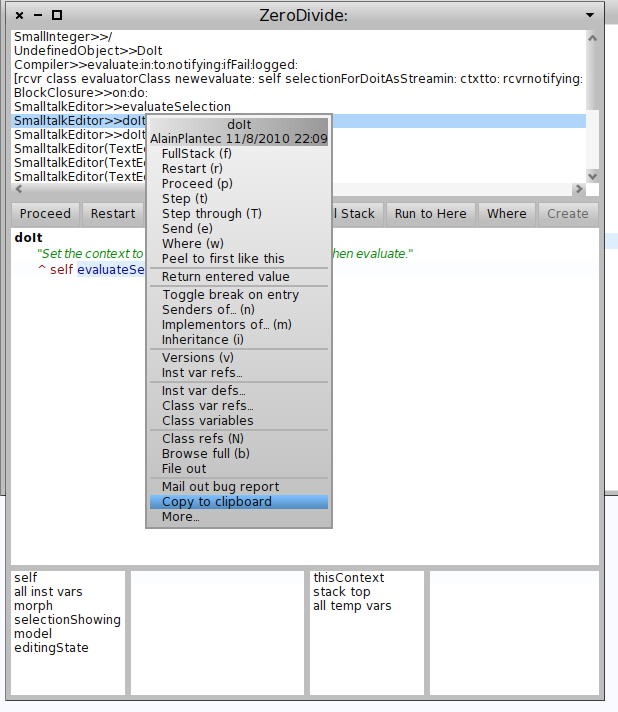
Hi guys...with just 2 little methods, I am able to add a button to the debuger and a button to the context of the debugger, to copy the stakctrace to clipboard. Going to PharoDebug.log is anoying: 1) I never know where my image is, so I first need to do print Smalltlak imagePharo 2) then I need to go to such folder, and open the PharoDebug.log 3) most of the times, PharoDebug has appended a lot of other (un) issues so it is quite confusing to use such file for a bug report. Hence I need to: 4) remove PharoDebug.log and 5) Reproduce my problem again, so that to generate a new PharoDebug.log 6) finally search it again, open, and do the copy paste :) So....I think it should be muuuch easier from the debugger. So I added two possibilities 1) copy to clipboard from the "pre debugger windows" See attached screenshot. 2) copy to clipboard from the debugger context menu. See attached screenshot. So...do you like it? which one do you want of them ? both ? Cheers -- Mariano http://marianopeck.wordpress.com

+1 :) This solves my needs of putting the stack trace into the transcript :P. On Tue, Apr 26, 2011 at 4:59 PM, Mariano Martinez Peck < marianopeck@gmail.com> wrote:
Hi guys...with just 2 little methods, I am able to add a button to the debuger and a button to the context of the debugger, to copy the stakctrace to clipboard. Going to PharoDebug.log is anoying:
1) I never know where my image is, so I first need to do print Smalltlak imagePharo 2) then I need to go to such folder, and open the PharoDebug.log 3) most of the times, PharoDebug has appended a lot of other (un) issues so it is quite confusing to use such file for a bug report. Hence I need to: 4) remove PharoDebug.log and 5) Reproduce my problem again, so that to generate a new PharoDebug.log 6) finally search it again, open, and do the copy paste :)
So....I think it should be muuuch easier from the debugger. So I added two possibilities
1) copy to clipboard from the "pre debugger windows" See attached screenshot.
2) copy to clipboard from the debugger context menu. See attached screenshot.
So...do you like it? which one do you want of them ? both ?
Cheers
-- Mariano http://marianopeck.wordpress.com

But is it linking the debugger to host whatever? On Apr 26, 2011, at 9:59 PM, Mariano Martinez Peck wrote:
Hi guys...with just 2 little methods, I am able to add a button to the debuger and a button to the context of the debugger, to copy the stakctrace to clipboard. Going to PharoDebug.log is anoying:
1) I never know where my image is, so I first need to do print Smalltlak imagePharo 2) then I need to go to such folder, and open the PharoDebug.log 3) most of the times, PharoDebug has appended a lot of other (un) issues so it is quite confusing to use such file for a bug report. Hence I need to: 4) remove PharoDebug.log and 5) Reproduce my problem again, so that to generate a new PharoDebug.log 6) finally search it again, open, and do the copy paste :)
So....I think it should be muuuch easier from the debugger. So I added two possibilities
1) copy to clipboard from the "pre debugger windows" See attached screenshot.
2) copy to clipboard from the debugger context menu. See attached screenshot.
So...do you like it? which one do you want of them ? both ?
Cheers
-- Mariano http://marianopeck.wordpress.com
<pre debugger .png><debugger context menu.png>
On Tue, Apr 26, 2011 at 10:07 PM, Stéphane Ducasse < stephane.ducasse@inria.fr> wrote:
But is it linking the debugger to host whatever?
No...it just copy past the text which was written in a stream. Look the changeset
On Apr 26, 2011, at 9:59 PM, Mariano Martinez Peck wrote:
Hi guys...with just 2 little methods, I am able to add a button to the debuger and a button to the context of the debugger, to copy the stakctrace to clipboard. Going to PharoDebug.log is anoying:
1) I never know where my image is, so I first need to do print Smalltlak imagePharo 2) then I need to go to such folder, and open the PharoDebug.log 3) most of the times, PharoDebug has appended a lot of other (un) issues so it is quite confusing to use such file for a bug report. Hence I need to: 4) remove PharoDebug.log and 5) Reproduce my problem again, so that to generate a new PharoDebug.log 6) finally search it again, open, and do the copy paste :)
So....I think it should be muuuch easier from the debugger. So I added two possibilities
1) copy to clipboard from the "pre debugger windows" See attached screenshot.
2) copy to clipboard from the debugger context menu. See attached screenshot.
So...do you like it? which one do you want of them ? both ?
Cheers
-- Mariano http://marianopeck.wordpress.com
<pre debugger .png><debugger context menu.png>
-- Mariano http://marianopeck.wordpress.com

I support the idea. However, I am not sure I want this from the PreDebugger. Alexandre On 26 Apr 2011, at 15:59, Mariano Martinez Peck wrote:
Hi guys...with just 2 little methods, I am able to add a button to the debuger and a button to the context of the debugger, to copy the stakctrace to clipboard. Going to PharoDebug.log is anoying:
1) I never know where my image is, so I first need to do print Smalltlak imagePharo 2) then I need to go to such folder, and open the PharoDebug.log 3) most of the times, PharoDebug has appended a lot of other (un) issues so it is quite confusing to use such file for a bug report. Hence I need to: 4) remove PharoDebug.log and 5) Reproduce my problem again, so that to generate a new PharoDebug.log 6) finally search it again, open, and do the copy paste :)
So....I think it should be muuuch easier from the debugger. So I added two possibilities
1) copy to clipboard from the "pre debugger windows" See attached screenshot.
2) copy to clipboard from the debugger context menu. See attached screenshot.
So...do you like it? which one do you want of them ? both ?
Cheers
-- Mariano http://marianopeck.wordpress.com
<pre debugger .png><debugger context menu.png>
-- _,.;:~^~:;._,.;:~^~:;._,.;:~^~:;._,.;:~^~:;._,.;: Alexandre Bergel http://www.bergel.eu ^~:;._,.;:~^~:;._,.;:~^~:;._,.;:~^~:;._,.;:~^~:;.
On Tue, Apr 26, 2011 at 11:10 PM, Alexandre Bergel <alexandre.bergel@me.com>wrote:
I support the idea. However, I am not sure I want this from the PreDebugger.
Yes, exactly. For the context menu I am sure I want it :) The question is in the pre debugger...and I am not quite sure...
Alexandre
On 26 Apr 2011, at 15:59, Mariano Martinez Peck wrote:
Hi guys...with just 2 little methods, I am able to add a button to the debuger and a button to the context of the debugger, to copy the stakctrace to clipboard. Going to PharoDebug.log is anoying:
1) I never know where my image is, so I first need to do print Smalltlak imagePharo 2) then I need to go to such folder, and open the PharoDebug.log 3) most of the times, PharoDebug has appended a lot of other (un) issues so it is quite confusing to use such file for a bug report. Hence I need to: 4) remove PharoDebug.log and 5) Reproduce my problem again, so that to generate a new PharoDebug.log 6) finally search it again, open, and do the copy paste :)
So....I think it should be muuuch easier from the debugger. So I added two possibilities
1) copy to clipboard from the "pre debugger windows" See attached screenshot.
2) copy to clipboard from the debugger context menu. See attached screenshot.
So...do you like it? which one do you want of them ? both ?
Cheers
-- Mariano http://marianopeck.wordpress.com
<pre debugger .png><debugger context menu.png>
-- _,.;:~^~:;._,.;:~^~:;._,.;:~^~:;._,.;:~^~:;._,.;: Alexandre Bergel http://www.bergel.eu ^~:;._,.;:~^~:;._,.;:~^~:;._,.;:~^~:;._,.;:~^~:;.
-- Mariano http://marianopeck.wordpress.com
So...I only let the option from the context menu: http://code.google.com/p/pharo/issues/detail?id=4125 ready to review and integrate On Tue, Apr 26, 2011 at 10:11 PM, Mariano Martinez Peck < marianopeck@gmail.com> wrote:
On Tue, Apr 26, 2011 at 11:10 PM, Alexandre Bergel < alexandre.bergel@me.com> wrote:
I support the idea. However, I am not sure I want this from the PreDebugger.
Yes, exactly. For the context menu I am sure I want it :) The question is in the pre debugger...and I am not quite sure...
Alexandre
On 26 Apr 2011, at 15:59, Mariano Martinez Peck wrote:
Hi guys...with just 2 little methods, I am able to add a button to the debuger and a button to the context of the debugger, to copy the stakctrace to clipboard. Going to PharoDebug.log is anoying:
1) I never know where my image is, so I first need to do print Smalltlak imagePharo 2) then I need to go to such folder, and open the PharoDebug.log 3) most of the times, PharoDebug has appended a lot of other (un) issues so it is quite confusing to use such file for a bug report. Hence I need to: 4) remove PharoDebug.log and 5) Reproduce my problem again, so that to generate a new PharoDebug.log 6) finally search it again, open, and do the copy paste :)
So....I think it should be muuuch easier from the debugger. So I added two possibilities
1) copy to clipboard from the "pre debugger windows" See attached screenshot.
2) copy to clipboard from the debugger context menu. See attached screenshot.
So...do you like it? which one do you want of them ? both ?
Cheers
-- Mariano http://marianopeck.wordpress.com
<pre debugger .png><debugger context menu.png>
-- _,.;:~^~:;._,.;:~^~:;._,.;:~^~:;._,.;:~^~:;._,.;: Alexandre Bergel http://www.bergel.eu ^~:;._,.;:~^~:;._,.;:~^~:;._,.;:~^~:;._,.;:~^~:;.
-- Mariano http://marianopeck.wordpress.com
-- Mariano http://marianopeck.wordpress.com
participants (4)
-
 Alexandre Bergel
 -
 Guillermo Polito
 -
 Mariano Martinez Peck
 -
 Stéphane Ducasse