[ANN] Launching Pharo on Ubuntu

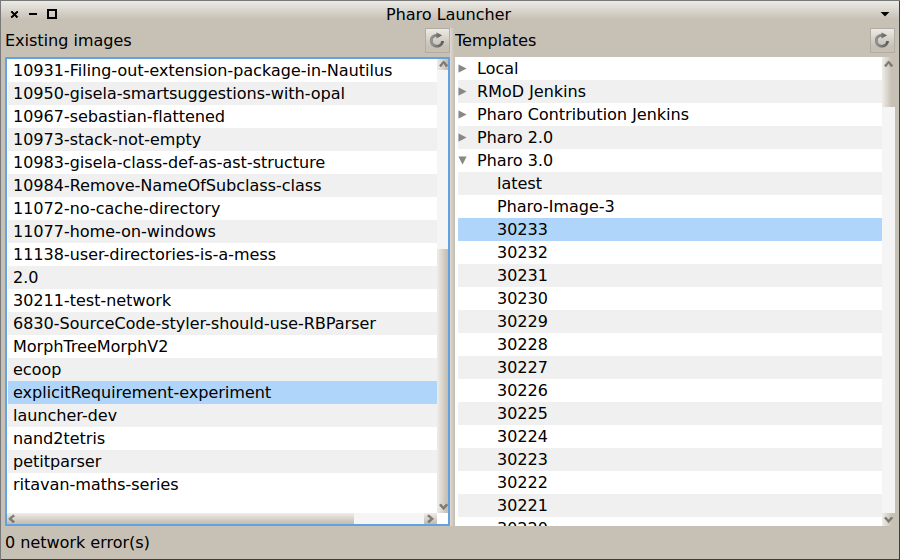
For Ubuntu users who are using my PPA (https://launchpad.net/~pharo/+archive/stable/), you can now launch Pharo from either the Ubuntu Dashboard or the terminal (just type 'pharo'). In both cases, you will see the Pharo Launcher from which you can create new images from templates on the web and launch existing images. http://www.smalltalkhub.com/#!/~Pharo/PharoLauncher No need for manual download of zip files, unpacking, and directory management. The launcher does everything for you. Have fun -- Damien Cassou http://damiencassou.seasidehosting.st "Success is the ability to go from one failure to another without losing enthusiasm." Winston Churchill

good work! On 2013-09-23, at 09:13, Damien Cassou <damien.cassou@gmail.com> wrote:
For Ubuntu users who are using my PPA (https://launchpad.net/~pharo/+archive/stable/), you can now launch Pharo from either the Ubuntu Dashboard or the terminal (just type 'pharo').
In both cases, you will see the Pharo Launcher from which you can create new images from templates on the web and launch existing images. http://www.smalltalkhub.com/#!/~Pharo/PharoLauncher
No need for manual download of zip files, unpacking, and directory management. The launcher does everything for you.
Have fun
-- Damien Cassou http://damiencassou.seasidehosting.st
"Success is the ability to go from one failure to another without losing enthusiasm." Winston Churchill <pharo-launcher-screenshot.png>

Thanks :) 2013/9/23 Camillo Bruni <camillobruni@gmail.com>
good work!
On 2013-09-23, at 09:13, Damien Cassou <damien.cassou@gmail.com> wrote:
For Ubuntu users who are using my PPA (https://launchpad.net/~pharo/+archive/stable/), you can now launch Pharo from either the Ubuntu Dashboard or the terminal (just type 'pharo').
In both cases, you will see the Pharo Launcher from which you can create new images from templates on the web and launch existing images. http://www.smalltalkhub.com/#!/~Pharo/PharoLauncher
No need for manual download of zip files, unpacking, and directory management. The launcher does everything for you.
Have fun
-- Damien Cassou http://damiencassou.seasidehosting.st
"Success is the ability to go from one failure to another without losing enthusiasm." Winston Churchill <pharo-launcher-screenshot.png>
-- Best regards, Douaille Erwan <douaille.erwan@gmail.com>

Very nice. Works on Mint, too. Could use more feedback, maybe: It's not always clear when it's doing something when you create an image. On Mon, Sep 23, 2013 at 5:56 AM, Erwan Douaille <douailleerwan@gmail.com>wrote:
Thanks :)
2013/9/23 Camillo Bruni <camillobruni@gmail.com>
good work!
On 2013-09-23, at 09:13, Damien Cassou <damien.cassou@gmail.com> wrote:
For Ubuntu users who are using my PPA (https://launchpad.net/~pharo/+archive/stable/), you can now launch Pharo from either the Ubuntu Dashboard or the terminal (just type 'pharo').
In both cases, you will see the Pharo Launcher from which you can create new images from templates on the web and launch existing images. http://www.smalltalkhub.com/#!/~Pharo/PharoLauncher
No need for manual download of zip files, unpacking, and directory management. The launcher does everything for you.
Have fun
-- Damien Cassou http://damiencassou.seasidehosting.st
"Success is the ability to go from one failure to another without losing enthusiasm." Winston Churchill <pharo-launcher-screenshot.png>
-- Best regards,
Douaille Erwan <douaille.erwan@gmail.com>
On Mon, Sep 23, 2013 at 6:33 PM, blake <dsblakewatson@gmail.com> wrote:
Very nice. Works on Mint, too. Could use more feedback, maybe: It's not always clear when it's doing something when you create an image.
I know :-(. If you have an idea, please tell me. Also, I would appreciate some help. -- Damien Cassou http://damiencassou.seasidehosting.st "Success is the ability to go from one failure to another without losing enthusiasm." Winston Churchill

is adding a progress bar , hard to do ? -- View this message in context: http://forum.world.st/ANN-Launching-Pharo-on-Ubuntu-tp4709757p4710015.html Sent from the Pharo Smalltalk Developers mailing list archive at Nabble.com.
On Tue, Sep 24, 2013 at 12:46 PM, kilon <thekilon@yahoo.co.uk> wrote:
is adding a progress bar , hard to do ?
don't know. Do you want to try? -- Damien Cassou http://damiencassou.seasidehosting.st "Success is the ability to go from one failure to another without losing enthusiasm." Winston Churchill
yeah I will give it a try, don't know how long will take me but I like what you have done with Pharo Launcher. I will create an enhancement issue when I have it working as I want and report back. Esteban has granted me commit right to pharo 3 inbox too so I will commit there. Or do you want me to contribute directly to smalltalk hub repo ? I am new with pharo and morphic so please bare with me :) -- View this message in context: http://forum.world.st/ANN-Launching-Pharo-on-Ubuntu-tp4709757p4710020.html Sent from the Pharo Smalltalk Developers mailing list archive at Nabble.com.
On Tue, Sep 24, 2013 at 1:21 PM, kilon <thekilon@yahoo.co.uk> wrote:
yeah I will give it a try, don't know how long will take me but I like what you have done with Pharo Launcher. I will create an enhancement issue when I have it working as I want and report back. Esteban has granted me commit right to pharo 3 inbox too so I will commit there. Or do you want me to contribute directly to smalltalk hub repo ?
I am new with pharo and morphic so please bare with me :)
the Pharo3Inbox is only for code integrated in Pharo itself. The launcher won't be integrated in Pharo. I added you to the project http://www.smalltalkhub.com/#!/~Pharo/PharoLauncher -- Damien Cassou http://damiencassou.seasidehosting.st "Success is the ability to go from one failure to another without losing enthusiasm." Winston Churchill
ah yes of course. Ok thanks for adding me. I took a look at the code, it points back to Zinc , it look like I would need to override ZnClient >> withProgressDo: , no Idea how to do this currently but will continue looking into . I also found how monticello uses progress bars when downloading repos but it does not seem to use Zinc at all. So yeah this will take me quite some time to implement. Its Fun none the less ;) Damien Cassou wrote
On Tue, Sep 24, 2013 at 1:21 PM, kilon <
thekilon@.co
> wrote:
yeah I will give it a try, don't know how long will take me but I like what you have done with Pharo Launcher. I will create an enhancement issue when I have it working as I want and report back. Esteban has granted me commit right to pharo 3 inbox too so I will commit there. Or do you want me to contribute directly to smalltalk hub repo ?
I am new with pharo and morphic so please bare with me :)
the Pharo3Inbox is only for code integrated in Pharo itself. The launcher won't be integrated in Pharo. I added you to the project http://www.smalltalkhub.com/#!/~Pharo/PharoLauncher
-- Damien Cassou http://damiencassou.seasidehosting.st
"Success is the ability to go from one failure to another without losing enthusiasm." Winston Churchill
-- View this message in context: http://forum.world.st/ANN-Launching-Pharo-on-Ubuntu-tp4709757p4710044.html Sent from the Pharo Smalltalk Developers mailing list archive at Nabble.com.
On Tue, Sep 24, 2013 at 3:18 PM, kilon <thekilon@yahoo.co.uk> wrote:
I took a look at the code, it points back to Zinc , it look like I would need to override ZnClient >> withProgressDo: , no Idea how to do this currently but will continue looking into . I also found how monticello uses progress bars when downloading repos but it does not seem to use Zinc at all. So yeah this will take me quite some time to implement.
you may want to open a new question on stackoverflow or pharo-users and forward to Sven -- Damien Cassou http://damiencassou.seasidehosting.st "Success is the ability to go from one failure to another without losing enthusiasm." Winston Churchill

On 24 Sep 2013, at 15:18, kilon <thekilon@yahoo.co.uk> wrote:
ah yes of course. Ok thanks for adding me.
I took a look at the code, it points back to Zinc , it look like I would need to override ZnClient >> withProgressDo: , no Idea how to do this currently but will continue looking into . I also found how monticello uses progress bars when downloading repos but it does not seem to use Zinc at all. So yeah this will take me quite some time to implement.
Progress is indicated by HTTPProgress Notification that are being signalled by the underlying code. You have to catch them and do something with them. Have a look at ZnClientTests>>#testProgress Although the example in the comment does no longer seem to work...
Its Fun none the less ;)
Damien Cassou wrote
On Tue, Sep 24, 2013 at 1:21 PM, kilon <
thekilon@.co
> wrote:
yeah I will give it a try, don't know how long will take me but I like what you have done with Pharo Launcher. I will create an enhancement issue when I have it working as I want and report back. Esteban has granted me commit right to pharo 3 inbox too so I will commit there. Or do you want me to contribute directly to smalltalk hub repo ?
I am new with pharo and morphic so please bare with me :)
the Pharo3Inbox is only for code integrated in Pharo itself. The launcher won't be integrated in Pharo. I added you to the project http://www.smalltalkhub.com/#!/~Pharo/PharoLauncher
-- Damien Cassou http://damiencassou.seasidehosting.st
"Success is the ability to go from one failure to another without losing enthusiasm." Winston Churchill
-- View this message in context: http://forum.world.st/ANN-Launching-Pharo-on-Ubuntu-tp4709757p4710044.html Sent from the Pharo Smalltalk Developers mailing list archive at Nabble.com.
Actually it works its just that is not meant to create a progress bar. To create a progressbar I created a new test testProgressBar UIManager default informUserDuring: [ :bar | [ ^ ZnClient new signalProgress: true; get: 'http://zn.stfx.eu/echo?delay=2' ] on: HTTPProgress do: [ :progress | bar label: progress printString. progress isEmpty ifFalse: [ bar current: progress percentage ]. progress resume ] ] it displays the progressbar , but it displays no progress (blue bar thing) and it close as soon as it finish the get. I tried to implement that in createImageFromTemplate | name | name := UIManager default request: 'Image name?'. self showDownloadInProgress. [UIManager default informUserDuring: [ :bar | [ imageGroup extractTemplate: self selectedTemplate to: name] on: HTTPProgress do: [ :progress | bar label: progress printString. progress isEmpty ifFalse: [ bar current: progress percentage ]. progress resume ] ]] on: PhLDownloadError do: [ :err | UIManager default alert: err longDescription. ^ self ]. self updateAll. I assume that code is deeply flawed , hence why it does not display me any progressbar at all. Looks like I have a lot to learn. First I am not sure if ZnClient downloads in packets and if it reports progress per packet . If its progress is upon success of download then it does not help at all , because in that case there will be only one stage of progress upon success of download. I want multiple stages of progress so the download bar increases from 0% to 100%(preferably per kb ). IF that is the cace then probably I will be better using the HTTP client of monticello to download the images which I know it works that way. Is there a particular reason why we should stick to Zinc ? I am open to suggestions :) Sven Van Caekenberghe-2 wrote
On 24 Sep 2013, at 15:18, kilon <
thekilon@.co
> wrote:
ah yes of course. Ok thanks for adding me.
I took a look at the code, it points back to Zinc , it look like I would need to override ZnClient >> withProgressDo: , no Idea how to do this currently but will continue looking into . I also found how monticello uses progress bars when downloading repos but it does not seem to use Zinc at all. So yeah this will take me quite some time to implement.
Progress is indicated by HTTPProgress Notification that are being signalled by the underlying code. You have to catch them and do something with them.
Have a look at ZnClientTests>>#testProgress
Although the example in the comment does no longer seem to work...
Its Fun none the less ;)
Damien Cassou wrote
On Tue, Sep 24, 2013 at 1:21 PM, kilon <
thekilon@.co
> wrote:
yeah I will give it a try, don't know how long will take me but I like what you have done with Pharo Launcher. I will create an enhancement issue when I have it working as I want and report back. Esteban has granted me commit right to pharo 3 inbox too so I will commit there. Or do you want me to contribute directly to smalltalk hub repo ?
I am new with pharo and morphic so please bare with me :)
the Pharo3Inbox is only for code integrated in Pharo itself. The launcher won't be integrated in Pharo. I added you to the project http://www.smalltalkhub.com/#!/~Pharo/PharoLauncher
-- Damien Cassou http://damiencassou.seasidehosting.st
"Success is the ability to go from one failure to another without losing enthusiasm." Winston Churchill
-- View this message in context: http://forum.world.st/ANN-Launching-Pharo-on-Ubuntu-tp4709757p4710044.html Sent from the Pharo Smalltalk Developers mailing list archive at Nabble.com.
-- View this message in context: http://forum.world.st/ANN-Launching-Pharo-on-Ubuntu-tp4709757p4710146.html Sent from the Pharo Smalltalk Developers mailing list archive at Nabble.com.
On 24 Sep 2013, at 22:23, kilon <thekilon@yahoo.co.uk> wrote:
Actually it works its just that is not meant to create a progress bar.
To create a progressbar I created a new test
testProgressBar UIManager default informUserDuring: [ :bar | [ ^ ZnClient new signalProgress: true; get: 'http://zn.stfx.eu/echo?delay=2' ] on: HTTPProgress do: [ :progress | bar label: progress printString. progress isEmpty ifFalse: [ bar current: progress percentage ]. progress resume ] ]
it displays the progressbar , but it displays no progress (blue bar thing) and it close as soon as it finish the get. I tried to implement that in
createImageFromTemplate | name | name := UIManager default request: 'Image name?'. self showDownloadInProgress. [UIManager default informUserDuring: [ :bar | [ imageGroup extractTemplate: self selectedTemplate to: name] on: HTTPProgress do: [ :progress | bar label: progress printString. progress isEmpty ifFalse: [ bar current: progress percentage ]. progress resume ] ]] on: PhLDownloadError do: [ :err | UIManager default alert: err longDescription. ^ self ].
self updateAll.
I assume that code is deeply flawed , hence why it does not display me any progressbar at all. Looks like I have a lot to learn.
First I am not sure if ZnClient downloads in packets and if it reports progress per packet . If its progress is upon success of download then it does not help at all , because in that case there will be only one stage of progress upon success of download. I want multiple stages of progress so the download bar increases from 0% to 100%(preferably per kb ). IF that is the cace then probably I will be better using the HTTP client of monticello to download the images which I know it works that way.
Is there a particular reason why we should stick to Zinc ?
The HTTP client of Monticello _is_ ZnClient, see MCHttpRepository>>#httpClient ;-) Now, for performance reasons, progress in only signalled every ZnUtils class>>#streamingBufferSize which is currently 16K. Apart from that, the download might go that fast that there is little to show. I am certainly not claiming that the HTTPProgress stuff is perfect, but it seems to work.
I am open to suggestions :)
Sven Van Caekenberghe-2 wrote
On 24 Sep 2013, at 15:18, kilon <
thekilon@.co
> wrote:
ah yes of course. Ok thanks for adding me.
I took a look at the code, it points back to Zinc , it look like I would need to override ZnClient >> withProgressDo: , no Idea how to do this currently but will continue looking into . I also found how monticello uses progress bars when downloading repos but it does not seem to use Zinc at all. So yeah this will take me quite some time to implement.
Progress is indicated by HTTPProgress Notification that are being signalled by the underlying code. You have to catch them and do something with them.
Have a look at ZnClientTests>>#testProgress
Although the example in the comment does no longer seem to work...
Its Fun none the less ;)
Damien Cassou wrote
On Tue, Sep 24, 2013 at 1:21 PM, kilon <
thekilon@.co
> wrote:
yeah I will give it a try, don't know how long will take me but I like what you have done with Pharo Launcher. I will create an enhancement issue when I have it working as I want and report back. Esteban has granted me commit right to pharo 3 inbox too so I will commit there. Or do you want me to contribute directly to smalltalk hub repo ?
I am new with pharo and morphic so please bare with me :)
the Pharo3Inbox is only for code integrated in Pharo itself. The launcher won't be integrated in Pharo. I added you to the project http://www.smalltalkhub.com/#!/~Pharo/PharoLauncher
-- Damien Cassou http://damiencassou.seasidehosting.st
"Success is the ability to go from one failure to another without losing enthusiasm." Winston Churchill
-- View this message in context: http://forum.world.st/ANN-Launching-Pharo-on-Ubuntu-tp4709757p4710044.html Sent from the Pharo Smalltalk Developers mailing list archive at Nabble.com.
-- View this message in context: http://forum.world.st/ANN-Launching-Pharo-on-Ubuntu-tp4709757p4710146.html Sent from the Pharo Smalltalk Developers mailing list archive at Nabble.com.
On 2013-09-24, at 17:43, Sven Van Caekenberghe <sven@stfx.eu> wrote:
On 24 Sep 2013, at 22:23, kilon <thekilon@yahoo.co.uk> wrote:
Actually it works its just that is not meant to create a progress bar.
To create a progressbar I created a new test
testProgressBar UIManager default informUserDuring: [ :bar | [ ^ ZnClient new signalProgress: true; get: 'http://zn.stfx.eu/echo?delay=2' ] on: HTTPProgress do: [ :progress | bar label: progress printString. progress isEmpty ifFalse: [ bar current: progress percentage ]. progress resume ] ]
it displays the progressbar , but it displays no progress (blue bar thing) and it close as soon as it finish the get. I tried to implement that in
createImageFromTemplate | name | name := UIManager default request: 'Image name?'. self showDownloadInProgress. [UIManager default informUserDuring: [ :bar | [ imageGroup extractTemplate: self selectedTemplate to: name] on: HTTPProgress do: [ :progress | bar label: progress printString. progress isEmpty ifFalse: [ bar current: progress percentage ]. progress resume ] ]] on: PhLDownloadError do: [ :err | UIManager default alert: err longDescription. ^ self ].
self updateAll.
I assume that code is deeply flawed , hence why it does not display me any progressbar at all. Looks like I have a lot to learn.
First I am not sure if ZnClient downloads in packets and if it reports progress per packet . If its progress is upon success of download then it does not help at all , because in that case there will be only one stage of progress upon success of download. I want multiple stages of progress so the download bar increases from 0% to 100%(preferably per kb ). IF that is the cace then probably I will be better using the HTTP client of monticello to download the images which I know it works that way.
Is there a particular reason why we should stick to Zinc ?
The HTTP client of Monticello _is_ ZnClient, see MCHttpRepository>>#httpClient ;-)
Now, for performance reasons, progress in only signalled every ZnUtils class>>#streamingBufferSize which is currently 16K.
Apart from that, the download might go that fast that there is little to show.
I am certainly not claiming that the HTTPProgress stuff is perfect, but it seems to work.
... and the progress bar certainly much further away from that goal :)
The confusion of the noob, I saw a method though it was a class, did not see "self" in front of it. Yeap its definitely Zinc , its staring me in the face with that blank look :D Ok then its certainly my lack of understanding. I will take my time learning how Zinc works and how progress bar works. Will take a deeper look into how Monticello uses it. Thanks for the help, I should be able to figure this out. If not you will know it by the deep sounds I make when I hit my head against the wall. Sven Van Caekenberghe-2 wrote
On 24 Sep 2013, at 22:23, kilon <
thekilon@.co
> wrote:
Actually it works its just that is not meant to create a progress bar.
To create a progressbar I created a new test
testProgressBar UIManager default informUserDuring: [ :bar | [ ^ ZnClient new signalProgress: true; get: 'http://zn.stfx.eu/echo?delay=2' ] on: HTTPProgress do: [ :progress | bar label: progress printString. progress isEmpty ifFalse: [ bar current: progress percentage ]. progress resume ] ]
it displays the progressbar , but it displays no progress (blue bar thing) and it close as soon as it finish the get. I tried to implement that in
createImageFromTemplate | name | name := UIManager default request: 'Image name?'. self showDownloadInProgress. [UIManager default informUserDuring: [ :bar | [ imageGroup extractTemplate: self selectedTemplate to: name] on: HTTPProgress do: [ :progress | bar label: progress printString. progress isEmpty ifFalse: [ bar current: progress percentage ]. progress resume ] ]] on: PhLDownloadError do: [ :err | UIManager default alert: err longDescription. ^ self ].
self updateAll.
I assume that code is deeply flawed , hence why it does not display me any progressbar at all. Looks like I have a lot to learn.
First I am not sure if ZnClient downloads in packets and if it reports progress per packet . If its progress is upon success of download then it does not help at all , because in that case there will be only one stage of progress upon success of download. I want multiple stages of progress so the download bar increases from 0% to 100%(preferably per kb ). IF that is the cace then probably I will be better using the HTTP client of monticello to download the images which I know it works that way.
Is there a particular reason why we should stick to Zinc ?
The HTTP client of Monticello _is_ ZnClient, see MCHttpRepository>>#httpClient ;-)
Now, for performance reasons, progress in only signalled every ZnUtils class>>#streamingBufferSize which is currently 16K.
Apart from that, the download might go that fast that there is little to show.
I am certainly not claiming that the HTTPProgress stuff is perfect, but it seems to work.
I am open to suggestions :)
Sven Van Caekenberghe-2 wrote
On 24 Sep 2013, at 15:18, kilon <
thekilon@.co
> wrote:
ah yes of course. Ok thanks for adding me.
I took a look at the code, it points back to Zinc , it look like I would need to override ZnClient >> withProgressDo: , no Idea how to do this currently but will continue looking into . I also found how monticello uses progress bars when downloading repos but it does not seem to use Zinc at all. So yeah this will take me quite some time to implement.
Progress is indicated by HTTPProgress Notification that are being signalled by the underlying code. You have to catch them and do something with them.
Have a look at ZnClientTests>>#testProgress
Although the example in the comment does no longer seem to work...
Its Fun none the less ;)
Damien Cassou wrote
On Tue, Sep 24, 2013 at 1:21 PM, kilon <
thekilon@.co
> wrote:
yeah I will give it a try, don't know how long will take me but I like what you have done with Pharo Launcher. I will create an enhancement issue when I have it working as I want and report back. Esteban has granted me commit right to pharo 3 inbox too so I will commit there. Or do you want me to contribute directly to smalltalk hub repo ?
I am new with pharo and morphic so please bare with me :)
the Pharo3Inbox is only for code integrated in Pharo itself. The launcher won't be integrated in Pharo. I added you to the project http://www.smalltalkhub.com/#!/~Pharo/PharoLauncher
-- Damien Cassou http://damiencassou.seasidehosting.st
"Success is the ability to go from one failure to another without losing enthusiasm." Winston Churchill
-- View this message in context: http://forum.world.st/ANN-Launching-Pharo-on-Ubuntu-tp4709757p4710044.html Sent from the Pharo Smalltalk Developers mailing list archive at Nabble.com.
-- View this message in context: http://forum.world.st/ANN-Launching-Pharo-on-Ubuntu-tp4709757p4710146.html Sent from the Pharo Smalltalk Developers mailing list archive at Nabble.com.
-- View this message in context: http://forum.world.st/ANN-Launching-Pharo-on-Ubuntu-tp4709757p4710159.html Sent from the Pharo Smalltalk Developers mailing list archive at Nabble.com.
Kilon, Here is another example: OrderedCollection streamContents: [ :out | [ ZnClient new signalProgress: true; url: 'http://stfx.eu/PharoV20.sources'; downloadTo: '/tmp' ] on: HTTPProgress do: [ :notification | out nextPut: notification. notification resume ] ]. The resulting collection has more than 1000 elements. So from the standpoint of Zn it works. What is then done with the notifications is another thing. Regards, Sven On 24 Sep 2013, at 22:53, kilon <thekilon@yahoo.co.uk> wrote:
The confusion of the noob, I saw a method though it was a class, did not see "self" in front of it. Yeap its definitely Zinc , its staring me in the face with that blank look :D
Ok then its certainly my lack of understanding. I will take my time learning how Zinc works and how progress bar works. Will take a deeper look into how Monticello uses it. Thanks for the help, I should be able to figure this out. If not you will know it by the deep sounds I make when I hit my head against the wall.
Sven Van Caekenberghe-2 wrote
On 24 Sep 2013, at 22:23, kilon <
thekilon@.co
> wrote:
Actually it works its just that is not meant to create a progress bar.
To create a progressbar I created a new test
testProgressBar UIManager default informUserDuring: [ :bar | [ ^ ZnClient new signalProgress: true; get: 'http://zn.stfx.eu/echo?delay=2' ] on: HTTPProgress do: [ :progress | bar label: progress printString. progress isEmpty ifFalse: [ bar current: progress percentage ]. progress resume ] ]
it displays the progressbar , but it displays no progress (blue bar thing) and it close as soon as it finish the get. I tried to implement that in
createImageFromTemplate | name | name := UIManager default request: 'Image name?'. self showDownloadInProgress. [UIManager default informUserDuring: [ :bar | [ imageGroup extractTemplate: self selectedTemplate to: name] on: HTTPProgress do: [ :progress | bar label: progress printString. progress isEmpty ifFalse: [ bar current: progress percentage ]. progress resume ] ]] on: PhLDownloadError do: [ :err | UIManager default alert: err longDescription. ^ self ].
self updateAll.
I assume that code is deeply flawed , hence why it does not display me any progressbar at all. Looks like I have a lot to learn.
First I am not sure if ZnClient downloads in packets and if it reports progress per packet . If its progress is upon success of download then it does not help at all , because in that case there will be only one stage of progress upon success of download. I want multiple stages of progress so the download bar increases from 0% to 100%(preferably per kb ). IF that is the cace then probably I will be better using the HTTP client of monticello to download the images which I know it works that way.
Is there a particular reason why we should stick to Zinc ?
The HTTP client of Monticello _is_ ZnClient, see MCHttpRepository>>#httpClient ;-)
Now, for performance reasons, progress in only signalled every ZnUtils class>>#streamingBufferSize which is currently 16K.
Apart from that, the download might go that fast that there is little to show.
I am certainly not claiming that the HTTPProgress stuff is perfect, but it seems to work.
I am open to suggestions :)
Sven Van Caekenberghe-2 wrote
On 24 Sep 2013, at 15:18, kilon <
thekilon@.co
> wrote:
ah yes of course. Ok thanks for adding me.
I took a look at the code, it points back to Zinc , it look like I would need to override ZnClient >> withProgressDo: , no Idea how to do this currently but will continue looking into . I also found how monticello uses progress bars when downloading repos but it does not seem to use Zinc at all. So yeah this will take me quite some time to implement.
Progress is indicated by HTTPProgress Notification that are being signalled by the underlying code. You have to catch them and do something with them.
Have a look at ZnClientTests>>#testProgress
Although the example in the comment does no longer seem to work...
Its Fun none the less ;)
Damien Cassou wrote
On Tue, Sep 24, 2013 at 1:21 PM, kilon <
thekilon@.co
> wrote:
yeah I will give it a try, don't know how long will take me but I like what you have done with Pharo Launcher. I will create an enhancement issue when I have it working as I want and report back. Esteban has granted me commit right to pharo 3 inbox too so I will commit there. Or do you want me to contribute directly to smalltalk hub repo ?
I am new with pharo and morphic so please bare with me :)
the Pharo3Inbox is only for code integrated in Pharo itself. The launcher won't be integrated in Pharo. I added you to the project http://www.smalltalkhub.com/#!/~Pharo/PharoLauncher
-- Damien Cassou http://damiencassou.seasidehosting.st
"Success is the ability to go from one failure to another without losing enthusiasm." Winston Churchill
-- View this message in context: http://forum.world.st/ANN-Launching-Pharo-on-Ubuntu-tp4709757p4710044.html Sent from the Pharo Smalltalk Developers mailing list archive at Nabble.com.
-- View this message in context: http://forum.world.st/ANN-Launching-Pharo-on-Ubuntu-tp4709757p4710146.html Sent from the Pharo Smalltalk Developers mailing list archive at Nabble.com.
-- View this message in context: http://forum.world.st/ANN-Launching-Pharo-on-Ubuntu-tp4709757p4710159.html Sent from the Pharo Smalltalk Developers mailing list archive at Nabble.com.
thank you again. Ok that shows clearly that ZnClient can perfectly stream its contents. I know it can do it, afterall Monticello is doing it, as soon as I figure out how Monticello is doing this , its should be a piece of cake. Assuming that there is such thing as "piece of cake" in coding :D Sven Van Caekenberghe-2 wrote
Kilon,
Here is another example:
OrderedCollection streamContents: [ :out | [ ZnClient new signalProgress: true; url: 'http://stfx.eu/PharoV20.sources'; downloadTo: '/tmp' ] on: HTTPProgress do: [ :notification | out nextPut: notification. notification resume ] ].
The resulting collection has more than 1000 elements. So from the standpoint of Zn it works. What is then done with the notifications is another thing.
Regards,
Sven
On 24 Sep 2013, at 22:53, kilon <
thekilon@.co
> wrote:
The confusion of the noob, I saw a method though it was a class, did not see "self" in front of it. Yeap its definitely Zinc , its staring me in the face with that blank look :D
Ok then its certainly my lack of understanding. I will take my time learning how Zinc works and how progress bar works. Will take a deeper look into how Monticello uses it. Thanks for the help, I should be able to figure this out. If not you will know it by the deep sounds I make when I hit my head against the wall.
Sven Van Caekenberghe-2 wrote
On 24 Sep 2013, at 22:23, kilon <
thekilon@.co
> wrote:
Actually it works its just that is not meant to create a progress bar.
To create a progressbar I created a new test
testProgressBar UIManager default informUserDuring: [ :bar | [ ^ ZnClient new signalProgress: true; get: 'http://zn.stfx.eu/echo?delay=2' ] on: HTTPProgress do: [ :progress | bar label: progress printString. progress isEmpty ifFalse: [ bar current: progress percentage ]. progress resume ] ]
it displays the progressbar , but it displays no progress (blue bar thing) and it close as soon as it finish the get. I tried to implement that in
createImageFromTemplate | name | name := UIManager default request: 'Image name?'. self showDownloadInProgress. [UIManager default informUserDuring: [ :bar | [ imageGroup extractTemplate: self selectedTemplate to: name] on: HTTPProgress do: [ :progress | bar label: progress printString. progress isEmpty ifFalse: [ bar current: progress percentage ]. progress resume ] ]] on: PhLDownloadError do: [ :err | UIManager default alert: err longDescription. ^ self ].
self updateAll.
I assume that code is deeply flawed , hence why it does not display me any progressbar at all. Looks like I have a lot to learn.
First I am not sure if ZnClient downloads in packets and if it reports progress per packet . If its progress is upon success of download then it does not help at all , because in that case there will be only one stage of progress upon success of download. I want multiple stages of progress so the download bar increases from 0% to 100%(preferably per kb ). IF that is the cace then probably I will be better using the HTTP client of monticello to download the images which I know it works that way.
Is there a particular reason why we should stick to Zinc ?
The HTTP client of Monticello _is_ ZnClient, see MCHttpRepository>>#httpClient ;-)
Now, for performance reasons, progress in only signalled every ZnUtils class>>#streamingBufferSize which is currently 16K.
Apart from that, the download might go that fast that there is little to show.
I am certainly not claiming that the HTTPProgress stuff is perfect, but it seems to work.
I am open to suggestions :)
Sven Van Caekenberghe-2 wrote
On 24 Sep 2013, at 15:18, kilon <
thekilon@.co
> wrote:
ah yes of course. Ok thanks for adding me.
I took a look at the code, it points back to Zinc , it look like I would need to override ZnClient >> withProgressDo: , no Idea how to do this currently but will continue looking into . I also found how monticello uses progress bars when downloading repos but it does not seem to use Zinc at all. So yeah this will take me quite some time to implement.
Progress is indicated by HTTPProgress Notification that are being signalled by the underlying code. You have to catch them and do something with them.
Have a look at ZnClientTests>>#testProgress
Although the example in the comment does no longer seem to work...
Its Fun none the less ;)
Damien Cassou wrote
On Tue, Sep 24, 2013 at 1:21 PM, kilon <
thekilon@.co
> wrote:
yeah I will give it a try, don't know how long will take me but I like what you have done with Pharo Launcher. I will create an enhancement issue when I have it working as I want and report back. Esteban has granted me commit right to pharo 3 inbox too so I will commit there. Or do you want me to contribute directly to smalltalk hub repo ?
I am new with pharo and morphic so please bare with me :)
the Pharo3Inbox is only for code integrated in Pharo itself. The launcher won't be integrated in Pharo. I added you to the project http://www.smalltalkhub.com/#!/~Pharo/PharoLauncher
-- Damien Cassou http://damiencassou.seasidehosting.st
"Success is the ability to go from one failure to another without losing enthusiasm." Winston Churchill
-- View this message in context: http://forum.world.st/ANN-Launching-Pharo-on-Ubuntu-tp4709757p4710044.html Sent from the Pharo Smalltalk Developers mailing list archive at Nabble.com.
-- View this message in context: http://forum.world.st/ANN-Launching-Pharo-on-Ubuntu-tp4709757p4710146.html Sent from the Pharo Smalltalk Developers mailing list archive at Nabble.com.
-- View this message in context: http://forum.world.st/ANN-Launching-Pharo-on-Ubuntu-tp4709757p4710159.html Sent from the Pharo Smalltalk Developers mailing list archive at Nabble.com.
-- View this message in context: http://forum.world.st/ANN-Launching-Pharo-on-Ubuntu-tp4709757p4710324.html Sent from the Pharo Smalltalk Developers mailing list archive at Nabble.com.
YEAH I DID IT !!! HAHAHAHA I am one of you now :D I Implemented the progress bar. Well it displays 2 progress bars. I assume the first one is for unzipping the file though it does not progress , could be something else. But the second one works like a charm , even displays the percentage of download and progress with each 1%. Beautiful and way way way easier than I expected , I just copied a method from monticello and had to add signalProgress: True to PHDownloader method that downloads the file via Zinc. So happy :D So now I am off to improve it, see if I can add progress also for unzipping the file and further improve the GUI. Ready or not here I come :D Thanks Sven for helping me out. I committed to the smalltalkhub repo, I have not added it to the Configuration because I want you guys to test it first to make sure I dont mess things up though I should not since I have not touched the existing methods apart from adding that simple message. So I dont know if you get the enhancement if you simply download the image. So go to monticello and get latest commit, you should see my name in there. Dammien , Sven if you have any advice as always I am open to suggestions :) -- View this message in context: http://forum.world.st/ANN-Launching-Pharo-on-Ubuntu-tp4709757p4710415.html Sent from the Pharo Smalltalk Developers mailing list archive at Nabble.com.

great to see your enthusiasm :) :) cheers -ben kilon wrote:
YEAH I DID IT !!! HAHAHAHA
I am one of you now :D
I Implemented the progress bar. Well it displays 2 progress bars. I assume the first one is for unzipping the file though it does not progress , could be something else. But the second one works like a charm , even displays the percentage of download and progress with each 1%. Beautiful and way way way easier than I expected , I just copied a method from monticello and had to add signalProgress: True to PHDownloader method that downloads the file via Zinc.
So happy :D
So now I am off to improve it, see if I can add progress also for unzipping the file and further improve the GUI. Ready or not here I come :D
Thanks Sven for helping me out. I committed to the smalltalkhub repo, I have not added it to the Configuration because I want you guys to test it first to make sure I dont mess things up though I should not since I have not touched the existing methods apart from adding that simple message. So I dont know if you get the enhancement if you simply download the image. So go to monticello and get latest commit, you should see my name in there.
Dammien , Sven if you have any advice as always I am open to suggestions :)
-- View this message in context: http://forum.world.st/ANN-Launching-Pharo-on-Ubuntu-tp4709757p4710415.html Sent from the Pharo Smalltalk Developers mailing list archive at Nabble.com.
yeap definetly excited. I love python, but really missed such an IDE as pharo. But now I can say I found the tool I was always looking for. :) Ok tried , latest PharoLauncher on windows. Brogress bars work well, it even displays a third one for unziping the files. But I found a bug, it cant launch the image. Does not understand in ExternalWindowProcess >> value , nextPutAll:. There is however a comment inside the method that says : "FIXME: Close the initial pipe handles. For now, I have not implemented passing these to the child, and there is no support yet for nonblocking Windows OS pipes. Once those are available, this method needs to change to support." Is this why image launching fails, or is it unrelated ? btc wrote
great to see your enthusiasm :) :)
cheers -ben
kilon wrote:
YEAH I DID IT !!! HAHAHAHA
I am one of you now :D
I Implemented the progress bar. Well it displays 2 progress bars. I assume the first one is for unzipping the file though it does not progress , could be something else. But the second one works like a charm , even displays the percentage of download and progress with each 1%. Beautiful and way way way easier than I expected , I just copied a method from monticello and had to add signalProgress: True to PHDownloader method that downloads the file via Zinc.
So happy :D
So now I am off to improve it, see if I can add progress also for unzipping the file and further improve the GUI. Ready or not here I come :D
Thanks Sven for helping me out. I committed to the smalltalkhub repo, I have not added it to the Configuration because I want you guys to test it first to make sure I dont mess things up though I should not since I have not touched the existing methods apart from adding that simple message. So I dont know if you get the enhancement if you simply download the image. So go to monticello and get latest commit, you should see my name in there.
Dammien , Sven if you have any advice as always I am open to suggestions :)
-- View this message in context: http://forum.world.st/ANN-Launching-Pharo-on-Ubuntu-tp4709757p4710415.html Sent from the Pharo Smalltalk Developers mailing list archive at Nabble.com.
-- View this message in context: http://forum.world.st/ANN-Launching-Pharo-on-Ubuntu-tp4709757p4710524.html Sent from the Pharo Smalltalk Developers mailing list archive at Nabble.com.
On Thu, Sep 26, 2013 at 2:04 PM, kilon <thekilon@yahoo.co.uk> wrote:
Is this why image launching fails, or is it unrelated ?
open a new thread about that please. -- Damien Cassou http://damiencassou.seasidehosting.st "Success is the ability to go from one failure to another without losing enthusiasm." Winston Churchill

Hi Demian, I've been using your ppa for a while, but I could have the last update working. This is the information I've got: npasserini@pablitar-xps:~/Downloads$ sudo apt-get install pharo-launcher:i386 Reading package lists... Done Building dependency tree Reading state information... Done The following NEW packages will be installed: pharo-launcher:i386 0 upgraded, 1 newly installed, 0 to remove and 193 not upgraded. Need to get 0 B/15.3 MB of archives. After this operation, 48.0 MB of additional disk space will be used. (Reading database ... 552696 files and directories currently installed.) Unpacking pharo-launcher:i386 (from .../pharo-launcher_2013.09.27-1~ppa1~precise1_i386.deb) ... dpkg: error processing /var/cache/apt/archives/pharo-launcher_2013.09.27-1~ppa1~precise1_i386.deb (--unpack): trying to overwrite '/usr/share/man/man1/pharo.1.gz', which is also in package pharo-vm-core:i386 2013.06.12-1~ppa1~precise1 Processing triggers for desktop-file-utils ... Processing triggers for man-db ... Errors were encountered while processing: /var/cache/apt/archives/pharo-launcher_2013.09.27-1~ppa1~precise1_i386.deb E: Sub-process /usr/bin/dpkg returned an error code (1) Any clue? Is there any information else, that I could give you to help find out the problem? On Thu, Sep 26, 2013 at 10:58 AM, Damien Cassou <damien.cassou@gmail.com>wrote:
On Thu, Sep 26, 2013 at 2:04 PM, kilon <thekilon@yahoo.co.uk> wrote:
Is this why image launching fails, or is it unrelated ?
open a new thread about that please.
-- Damien Cassou http://damiencassou.seasidehosting.st
"Success is the ability to go from one failure to another without losing enthusiasm." Winston Churchill
On Tue, Oct 1, 2013 at 4:55 PM, Nicolas Passerini <npasserini@gmail.com> wrote:
Any clue? Is there any information else, that I could give you to help find out the problem?
can you please try $ sudo apt-get update $ sudo apt-get upgrade $ sudo apt-get install pharo-launcher:i386 if it does not work, try the following: $ sudo apt-get purge pharo-vm-core pharo-vm-desktop $ sudo apt-get install pharo-launcher:i386 -- Damien Cassou http://damiencassou.seasidehosting.st "Success is the ability to go from one failure to another without losing enthusiasm." Winston Churchill
On Mon, Sep 23, 2013 at 6:33 PM, blake <dsblakewatson@gmail.com> wrote:
Very nice. Works on Mint, too. Could use more feedback, maybe: It's not always clear when it's doing something when you create an image.
that has been fixed by a joint work of Kilon and Ben Coman. Thanks to both. -- Damien Cassou http://damiencassou.seasidehosting.st "Success is the ability to go from one failure to another without losing enthusiasm." Winston Churchill
participants (8)
-
 blake
blake -
 btc@openinworld.com
 -
 Camillo Bruni
 -
 Damien Cassou
 -
 Erwan Douaille
 -
 kilon
kilon -
 Nicolas Passerini
 -
 Sven Van Caekenberghe