[Pharo-project] Question: How can I add a items to System Browser Window menu?

Hello! I want to add an item to the menu that appears when you right click on a category in the System Browser window. I think that menu is built here: Morph>>buildMetaMenu: evt But I don't want to touch that method, not SystemWindow>>buildMetaMenu: evt either, because that option would have to be visible only if my project has been loaded. Is there a way to do that? Thanks! Carla

On Aug 7, 2010, at 12:22 PM, Carla F. Griggio wrote:
Hello!
I want to add an item to the menu that appears when you right click on a category in the System Browser window.
I think that menu is built here:
Morph>>buildMetaMenu: evt
But I don't want to touch that method, not SystemWindow>>buildMetaMenu: evt either, because that option would have to be visible only if my project has been loaded.
exactly nobody should change the core methods just declare intention.
Is there a way to do that?
sure. you should use a pragma <menu> here is for example how this is done for ScriptLoader menuCommandOn: aBuilder <worldMenu> (aBuilder item: #'Integrator Menu') order: 1.5; precondition: [self currentlyIntegratingChanges]; parent: #System; action: [ScriptLoader releaseMenu]
Thanks! Carla _______________________________________________ Pharo-project mailing list Pharo-project@lists.gforge.inria.fr http://lists.gforge.inria.fr/cgi-bin/mailman/listinfo/pharo-project

I think Car meant the context menu when you right-clic a category in the System Browser. I don't know how, but maybe my screenshot help someone to help you :). On Sat, Aug 7, 2010 at 8:11 AM, Stéphane Ducasse <stephane.ducasse@inria.fr>wrote:
On Aug 7, 2010, at 12:22 PM, Carla F. Griggio wrote:
Hello!
I want to add an item to the menu that appears when you right click on a category in the System Browser window.
I think that menu is built here:
Morph>>buildMetaMenu: evt
But I don't want to touch that method, not SystemWindow>>buildMetaMenu: evt either, because that option would have to be visible only if my project has been loaded.
exactly nobody should change the core methods just declare intention.
Is there a way to do that?
sure. you should use a pragma <menu>
here is for example how this is done for ScriptLoader
menuCommandOn: aBuilder <worldMenu>
(aBuilder item: #'Integrator Menu') order: 1.5; precondition: [self currentlyIntegratingChanges]; parent: #System; action: [ScriptLoader releaseMenu]
Thanks! Carla _______________________________________________ Pharo-project mailing list Pharo-project@lists.gforge.inria.fr http://lists.gforge.inria.fr/cgi-bin/mailman/listinfo/pharo-project
_______________________________________________ Pharo-project mailing list Pharo-project@lists.gforge.inria.fr http://lists.gforge.inria.fr/cgi-bin/mailman/listinfo/pharo-project
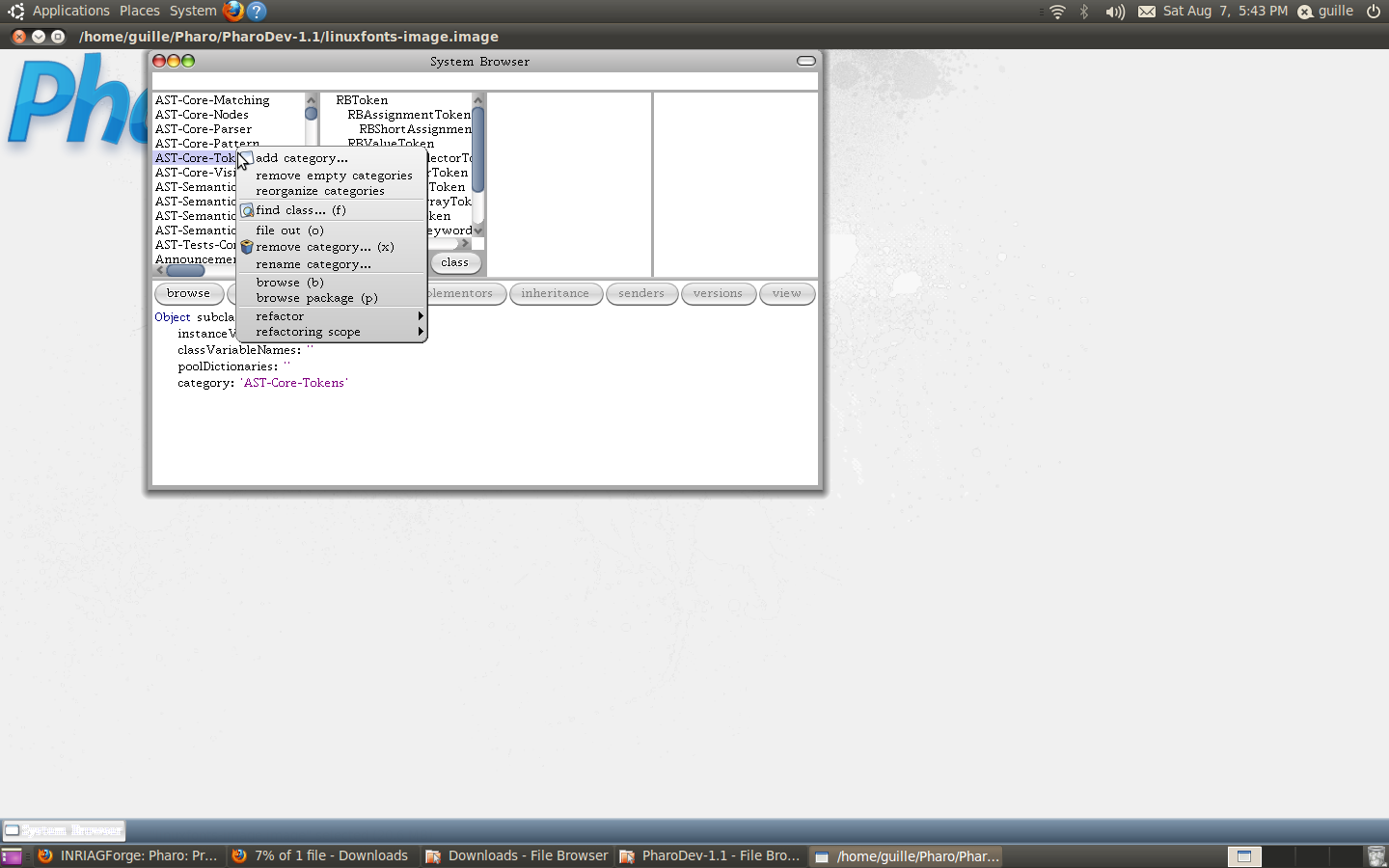
Yes! I looked for other examples with the pragma, but they were for the World menu (thanks anyway!). I meant the menu that Guille captured. 2010/8/7 Guillermo Polito <guillermopolito@gmail.com>
I think Car meant the context menu when you right-clic a category in the System Browser. I don't know how, but maybe my screenshot help someone to help you :).
On Sat, Aug 7, 2010 at 8:11 AM, Stéphane Ducasse < stephane.ducasse@inria.fr> wrote:
On Aug 7, 2010, at 12:22 PM, Carla F. Griggio wrote:
Hello!
I want to add an item to the menu that appears when you right click on a category in the System Browser window.
I think that menu is built here:
Morph>>buildMetaMenu: evt
But I don't want to touch that method, not SystemWindow>>buildMetaMenu: evt either, because that option would have to be visible only if my project has been loaded.
exactly nobody should change the core methods just declare intention.
Is there a way to do that?
sure. you should use a pragma <menu>
here is for example how this is done for ScriptLoader
menuCommandOn: aBuilder <worldMenu>
(aBuilder item: #'Integrator Menu') order: 1.5; precondition: [self currentlyIntegratingChanges]; parent: #System; action: [ScriptLoader releaseMenu]
Thanks! Carla _______________________________________________ Pharo-project mailing list Pharo-project@lists.gforge.inria.fr http://lists.gforge.inria.fr/cgi-bin/mailman/listinfo/pharo-project
_______________________________________________ Pharo-project mailing list Pharo-project@lists.gforge.inria.fr http://lists.gforge.inria.fr/cgi-bin/mailman/listinfo/pharo-project
_______________________________________________ Pharo-project mailing list Pharo-project@lists.gforge.inria.fr http://lists.gforge.inria.fr/cgi-bin/mailman/listinfo/pharo-project

Hi Carla, 2010/8/7 Carla F. Griggio <carla.griggio@gmail.com>:
Hello!
I want to add an item to the menu that appears when you right click on a category in the System Browser window.
System Browser or OmniBrowser on system categories? Hernán
Exactly what Guille captured in the image he attached. When I open that window from the World menu it says 'System Browser', although it could actually be an OmniBrowser on the system categories internally... Are they two different things? If they are, how can I open both? (Because until now I thought they were the same thing). I might be interested in customizing both :P On Sat, Aug 7, 2010 at 9:13 PM, Hernán Morales Durand < hernan.morales@gmail.com> wrote:
Hi Carla,
2010/8/7 Carla F. Griggio <carla.griggio@gmail.com>:
Hello!
I want to add an item to the menu that appears when you right click on a category in the System Browser window.
System Browser or OmniBrowser on system categories?
Hernán
_______________________________________________ Pharo-project mailing list Pharo-project@lists.gforge.inria.fr http://lists.gforge.inria.fr/cgi-bin/mailman/listinfo/pharo-project
2010/8/9 Carla F. Griggio <carla.griggio@gmail.com>:
Exactly what Guille captured in the image he attached. When I open that window from the World menu it says 'System Browser', although it could actually be an OmniBrowser on the system categories internally... Are they two different things?
I don't know which image you are using, some Pharo images includes the OmniBrowser package already loaded and this is what you're probably opening from the World menu. It isn't clear from the world menu which browser (System or Omni) you're going to open. You might want to use both or more system browsers (there are other system browsers) at the same time. I use both tools often. The System Browser is the "classic" browser in Squeak, you may open it evaluating Browser open The OmniBrowser System Browser is a browser based on the OmniBrowser framework and it is opened evaluating OBSystemBrowser open I strongly suggest to choose the OmniBrowser way, it is a really good framework, nicely supported and there is some documentation in PDF format out there. The only drawback I saw is it is hard to develop a browser to browse other things which are not "code". Cheers, Hernán
If they are, how can I open both? (Because until now I thought they were the same thing). I might be interested in customizing both :P
On Sat, Aug 7, 2010 at 9:13 PM, Hernán Morales Durand <hernan.morales@gmail.com> wrote:
Hi Carla,
2010/8/7 Carla F. Griggio <carla.griggio@gmail.com>:
Hello!
I want to add an item to the menu that appears when you right click on a category in the System Browser window.
System Browser or OmniBrowser on system categories?
Hernán
_______________________________________________ Pharo-project mailing list Pharo-project@lists.gforge.inria.fr http://lists.gforge.inria.fr/cgi-bin/mailman/listinfo/pharo-project
_______________________________________________ Pharo-project mailing list Pharo-project@lists.gforge.inria.fr http://lists.gforge.inria.fr/cgi-bin/mailman/listinfo/pharo-project
Ohh, I understand now. I was using the OmniBrowser System Browser. Either case, I don't know how I can customize the menu that appears when I right click on a category *without* changing the original code :( I want to "extend" that, not *change* it, just add a new comand option. Do you know if it's possible? I can change it adding an option in Morph>>buildMetaMenu: evt, but I wanted to keep that code clean... On Tue, Aug 10, 2010 at 12:25 AM, Hernán Morales Durand < hernan.morales@gmail.com> wrote:
2010/8/9 Carla F. Griggio <carla.griggio@gmail.com>:
Exactly what Guille captured in the image he attached. When I open that window from the World menu it says 'System Browser', although it could actually be an OmniBrowser on the system categories internally... Are they two different things?
I don't know which image you are using, some Pharo images includes the OmniBrowser package already loaded and this is what you're probably opening from the World menu.
It isn't clear from the world menu which browser (System or Omni) you're going to open. You might want to use both or more system browsers (there are other system browsers) at the same time. I use both tools often.
The System Browser is the "classic" browser in Squeak, you may open it evaluating
Browser open
The OmniBrowser System Browser is a browser based on the OmniBrowser framework and it is opened evaluating
OBSystemBrowser open
I strongly suggest to choose the OmniBrowser way, it is a really good framework, nicely supported and there is some documentation in PDF format out there. The only drawback I saw is it is hard to develop a browser to browse other things which are not "code".
Cheers,
Hernán
If they are, how can I open both? (Because until now I thought they were the same thing). I might be interested in customizing both :P
On Sat, Aug 7, 2010 at 9:13 PM, Hernán Morales Durand <hernan.morales@gmail.com> wrote:
Hi Carla,
2010/8/7 Carla F. Griggio <carla.griggio@gmail.com>:
Hello!
I want to add an item to the menu that appears when you right click on
a
category in the System Browser window.
System Browser or OmniBrowser on system categories?
Hernán
_______________________________________________ Pharo-project mailing list Pharo-project@lists.gforge.inria.fr http://lists.gforge.inria.fr/cgi-bin/mailman/listinfo/pharo-project
_______________________________________________ Pharo-project mailing list Pharo-project@lists.gforge.inria.fr http://lists.gforge.inria.fr/cgi-bin/mailman/listinfo/pharo-project
_______________________________________________ Pharo-project mailing list Pharo-project@lists.gforge.inria.fr http://lists.gforge.inria.fr/cgi-bin/mailman/listinfo/pharo-project
By the way, if that method only has sense when right clicking on a System Window category list, why is it defined in the class Morph? On Tue, Aug 10, 2010 at 1:13 AM, Carla F. Griggio <carla.griggio@gmail.com>wrote:
Ohh, I understand now. I was using the OmniBrowser System Browser.
Either case, I don't know how I can customize the menu that appears when I right click on a category *without* changing the original code :( I want to "extend" that, not *change* it, just add a new comand option. Do you know if it's possible?
I can change it adding an option in Morph>>buildMetaMenu: evt, but I wanted to keep that code clean...
On Tue, Aug 10, 2010 at 12:25 AM, Hernán Morales Durand < hernan.morales@gmail.com> wrote:
2010/8/9 Carla F. Griggio <carla.griggio@gmail.com>:
Exactly what Guille captured in the image he attached. When I open that window from the World menu it says 'System Browser', although it could actually be an OmniBrowser on the system categories internally... Are they two different things?
I don't know which image you are using, some Pharo images includes the OmniBrowser package already loaded and this is what you're probably opening from the World menu.
It isn't clear from the world menu which browser (System or Omni) you're going to open. You might want to use both or more system browsers (there are other system browsers) at the same time. I use both tools often.
The System Browser is the "classic" browser in Squeak, you may open it evaluating
Browser open
The OmniBrowser System Browser is a browser based on the OmniBrowser framework and it is opened evaluating
OBSystemBrowser open
I strongly suggest to choose the OmniBrowser way, it is a really good framework, nicely supported and there is some documentation in PDF format out there. The only drawback I saw is it is hard to develop a browser to browse other things which are not "code".
Cheers,
Hernán
If they are, how can I open both? (Because until now I thought they were the same thing). I might be interested in customizing both :P
On Sat, Aug 7, 2010 at 9:13 PM, Hernán Morales Durand <hernan.morales@gmail.com> wrote:
Hi Carla,
2010/8/7 Carla F. Griggio <carla.griggio@gmail.com>:
Hello!
I want to add an item to the menu that appears when you right click
on a
category in the System Browser window.
System Browser or OmniBrowser on system categories?
Hernán
_______________________________________________ Pharo-project mailing list Pharo-project@lists.gforge.inria.fr http://lists.gforge.inria.fr/cgi-bin/mailman/listinfo/pharo-project
_______________________________________________ Pharo-project mailing list Pharo-project@lists.gforge.inria.fr http://lists.gforge.inria.fr/cgi-bin/mailman/listinfo/pharo-project
_______________________________________________ Pharo-project mailing list Pharo-project@lists.gforge.inria.fr http://lists.gforge.inria.fr/cgi-bin/mailman/listinfo/pharo-project

2010/8/10 Carla F. Griggio <carla.griggio@gmail.com>
Ohh, I understand now. I was using the OmniBrowser System Browser.
Either case, I don't know how I can customize the menu that appears when I right click on a category *without* changing the original code :( I want to "extend" that, not *change* it, just add a new comand option. Do you know if it's possible?
You need to create a subclass of OBCommand which define these methods: execute: what to do when clicking on it group: answers a symbol to know in which group it will be displayed in isActive: answers if the item is enabled/disabled keystroke: answers the char for shortcut label: answers the label order: answers the position example: OBCommand subclass: #OBCmdRunAutotest instanceVariableNames: '' classVariableNames: '' poolDictionaries: '' category: 'OB-Autotest' execute |method| method := target theClass >> target selector. OBWaitRequest block: [ AutotestDashboard default triggerAutotestOn: method ]. group ^ #testing isActive ^ (requestor isSelected: target) and: [target isKindOf: OBMethodNode ] keystroke ^ $T label ^ 'trigger autotest' order ^ '3' Look at OBCommand subclasses for more examples. Cheers, Laurent Laffont http://pharocasts.blogspot.com/ http://magaloma.blogspot.com/
I can change it adding an option in Morph>>buildMetaMenu: evt, but I wanted to keep that code clean...
On Tue, Aug 10, 2010 at 12:25 AM, Hernán Morales Durand < hernan.morales@gmail.com> wrote:
2010/8/9 Carla F. Griggio <carla.griggio@gmail.com>:
Exactly what Guille captured in the image he attached. When I open that window from the World menu it says 'System Browser', although it could actually be an OmniBrowser on the system categories internally... Are they two different things?
I don't know which image you are using, some Pharo images includes the OmniBrowser package already loaded and this is what you're probably opening from the World menu.
It isn't clear from the world menu which browser (System or Omni) you're going to open. You might want to use both or more system browsers (there are other system browsers) at the same time. I use both tools often.
The System Browser is the "classic" browser in Squeak, you may open it evaluating
Browser open
The OmniBrowser System Browser is a browser based on the OmniBrowser framework and it is opened evaluating
OBSystemBrowser open
I strongly suggest to choose the OmniBrowser way, it is a really good framework, nicely supported and there is some documentation in PDF format out there. The only drawback I saw is it is hard to develop a browser to browse other things which are not "code".
Cheers,
Hernán
If they are, how can I open both? (Because until now I thought they were the same thing). I might be interested in customizing both :P
On Sat, Aug 7, 2010 at 9:13 PM, Hernán Morales Durand <hernan.morales@gmail.com> wrote:
Hi Carla,
2010/8/7 Carla F. Griggio <carla.griggio@gmail.com>:
Hello!
I want to add an item to the menu that appears when you right click
on a
category in the System Browser window.
System Browser or OmniBrowser on system categories?
Hernán
_______________________________________________ Pharo-project mailing list Pharo-project@lists.gforge.inria.fr http://lists.gforge.inria.fr/cgi-bin/mailman/listinfo/pharo-project
_______________________________________________ Pharo-project mailing list Pharo-project@lists.gforge.inria.fr http://lists.gforge.inria.fr/cgi-bin/mailman/listinfo/pharo-project
_______________________________________________ Pharo-project mailing list Pharo-project@lists.gforge.inria.fr http://lists.gforge.inria.fr/cgi-bin/mailman/listinfo/pharo-project
_______________________________________________ Pharo-project mailing list Pharo-project@lists.gforge.inria.fr http://lists.gforge.inria.fr/cgi-bin/mailman/listinfo/pharo-project
Thanks!!! I'll try that! :D 2010/8/10 laurent laffont <laurent.laffont@gmail.com>
2010/8/10 Carla F. Griggio <carla.griggio@gmail.com>
Ohh, I understand now.
I was using the OmniBrowser System Browser.
Either case, I don't know how I can customize the menu that appears when I right click on a category *without* changing the original code :( I want to "extend" that, not *change* it, just add a new comand option. Do you know if it's possible?
You need to create a subclass of OBCommand which define these methods: execute: what to do when clicking on it group: answers a symbol to know in which group it will be displayed in isActive: answers if the item is enabled/disabled keystroke: answers the char for shortcut label: answers the label order: answers the position
example:
OBCommand subclass: #OBCmdRunAutotest instanceVariableNames: '' classVariableNames: '' poolDictionaries: '' category: 'OB-Autotest'
execute |method| method := target theClass >> target selector. OBWaitRequest block: [ AutotestDashboard default triggerAutotestOn: method ].
group ^ #testing
isActive ^ (requestor isSelected: target) and: [target isKindOf: OBMethodNode ]
keystroke ^ $T
label ^ 'trigger autotest'
order ^ '3'
Look at OBCommand subclasses for more examples.
Cheers,
Laurent Laffont
http://pharocasts.blogspot.com/ http://magaloma.blogspot.com/
I can change it adding an option in Morph>>buildMetaMenu: evt, but I wanted to keep that code clean...
On Tue, Aug 10, 2010 at 12:25 AM, Hernán Morales Durand < hernan.morales@gmail.com> wrote:
2010/8/9 Carla F. Griggio <carla.griggio@gmail.com>:
Exactly what Guille captured in the image he attached. When I open that window from the World menu it says 'System Browser', although it could actually be an OmniBrowser on the system categories internally... Are they two different things?
I don't know which image you are using, some Pharo images includes the OmniBrowser package already loaded and this is what you're probably opening from the World menu.
It isn't clear from the world menu which browser (System or Omni) you're going to open. You might want to use both or more system browsers (there are other system browsers) at the same time. I use both tools often.
The System Browser is the "classic" browser in Squeak, you may open it evaluating
Browser open
The OmniBrowser System Browser is a browser based on the OmniBrowser framework and it is opened evaluating
OBSystemBrowser open
I strongly suggest to choose the OmniBrowser way, it is a really good framework, nicely supported and there is some documentation in PDF format out there. The only drawback I saw is it is hard to develop a browser to browse other things which are not "code".
Cheers,
Hernán
If they are, how can I open both? (Because until now I thought they were the same thing). I might be interested in customizing both :P
On Sat, Aug 7, 2010 at 9:13 PM, Hernán Morales Durand <hernan.morales@gmail.com> wrote:
Hi Carla,
2010/8/7 Carla F. Griggio <carla.griggio@gmail.com>:
Hello!
I want to add an item to the menu that appears when you right click
on a
category in the System Browser window.
System Browser or OmniBrowser on system categories?
Hernán
_______________________________________________ Pharo-project mailing list Pharo-project@lists.gforge.inria.fr http://lists.gforge.inria.fr/cgi-bin/mailman/listinfo/pharo-project
_______________________________________________ Pharo-project mailing list Pharo-project@lists.gforge.inria.fr http://lists.gforge.inria.fr/cgi-bin/mailman/listinfo/pharo-project
_______________________________________________ Pharo-project mailing list Pharo-project@lists.gforge.inria.fr http://lists.gforge.inria.fr/cgi-bin/mailman/listinfo/pharo-project
_______________________________________________ Pharo-project mailing list Pharo-project@lists.gforge.inria.fr http://lists.gforge.inria.fr/cgi-bin/mailman/listinfo/pharo-project
_______________________________________________ Pharo-project mailing list Pharo-project@lists.gforge.inria.fr http://lists.gforge.inria.fr/cgi-bin/mailman/listinfo/pharo-project

what would be create is to step by step make all menus easily extenesible. Like nowadays with the world menu and pragmas Carla, once I had a similar problem and the only solution was to override that method with a *MyPackage in that method, and add there the menu entried I wanted...this is completly wrong and sucks...but was the only thing I found cheers 2010/8/10 Carla F. Griggio <carla.griggio@gmail.com>
Thanks!!! I'll try that! :D
2010/8/10 laurent laffont <laurent.laffont@gmail.com>
2010/8/10 Carla F. Griggio <carla.griggio@gmail.com>
Ohh, I understand now.
I was using the OmniBrowser System Browser.
Either case, I don't know how I can customize the menu that appears when I right click on a category *without* changing the original code :( I want to "extend" that, not *change* it, just add a new comand option. Do you know if it's possible?
You need to create a subclass of OBCommand which define these methods: execute: what to do when clicking on it group: answers a symbol to know in which group it will be displayed in isActive: answers if the item is enabled/disabled keystroke: answers the char for shortcut label: answers the label order: answers the position
example:
OBCommand subclass: #OBCmdRunAutotest instanceVariableNames: '' classVariableNames: '' poolDictionaries: '' category: 'OB-Autotest'
execute |method| method := target theClass >> target selector. OBWaitRequest block: [ AutotestDashboard default triggerAutotestOn: method ].
group ^ #testing
isActive ^ (requestor isSelected: target) and: [target isKindOf: OBMethodNode ]
keystroke ^ $T
label ^ 'trigger autotest'
order ^ '3'
Look at OBCommand subclasses for more examples.
Cheers,
Laurent Laffont
http://pharocasts.blogspot.com/ http://magaloma.blogspot.com/
I can change it adding an option in Morph>>buildMetaMenu: evt, but I wanted to keep that code clean...
On Tue, Aug 10, 2010 at 12:25 AM, Hernán Morales Durand < hernan.morales@gmail.com> wrote:
2010/8/9 Carla F. Griggio <carla.griggio@gmail.com>:
Exactly what Guille captured in the image he attached. When I open that window from the World menu it says 'System Browser', although it could actually be an OmniBrowser on the system categories internally... Are they two different things?
I don't know which image you are using, some Pharo images includes the OmniBrowser package already loaded and this is what you're probably opening from the World menu.
It isn't clear from the world menu which browser (System or Omni) you're going to open. You might want to use both or more system browsers (there are other system browsers) at the same time. I use both tools often.
The System Browser is the "classic" browser in Squeak, you may open it evaluating
Browser open
The OmniBrowser System Browser is a browser based on the OmniBrowser framework and it is opened evaluating
OBSystemBrowser open
I strongly suggest to choose the OmniBrowser way, it is a really good framework, nicely supported and there is some documentation in PDF format out there. The only drawback I saw is it is hard to develop a browser to browse other things which are not "code".
Cheers,
Hernán
If they are, how can I open both? (Because until now I thought they were the same thing). I might be interested in customizing both :P
On Sat, Aug 7, 2010 at 9:13 PM, Hernán Morales Durand <hernan.morales@gmail.com> wrote:
Hi Carla,
2010/8/7 Carla F. Griggio <carla.griggio@gmail.com>:
Hello!
I want to add an item to the menu that appears when you right click
on a
category in the System Browser window.
System Browser or OmniBrowser on system categories?
Hernán
_______________________________________________ Pharo-project mailing list Pharo-project@lists.gforge.inria.fr http://lists.gforge.inria.fr/cgi-bin/mailman/listinfo/pharo-project
_______________________________________________ Pharo-project mailing list Pharo-project@lists.gforge.inria.fr http://lists.gforge.inria.fr/cgi-bin/mailman/listinfo/pharo-project
_______________________________________________ Pharo-project mailing list Pharo-project@lists.gforge.inria.fr http://lists.gforge.inria.fr/cgi-bin/mailman/listinfo/pharo-project
_______________________________________________ Pharo-project mailing list Pharo-project@lists.gforge.inria.fr http://lists.gforge.inria.fr/cgi-bin/mailman/listinfo/pharo-project
_______________________________________________ Pharo-project mailing list Pharo-project@lists.gforge.inria.fr http://lists.gforge.inria.fr/cgi-bin/mailman/listinfo/pharo-project
_______________________________________________ Pharo-project mailing list Pharo-project@lists.gforge.inria.fr http://lists.gforge.inria.fr/cgi-bin/mailman/listinfo/pharo-project
Yes!!! We should move step by step and fix all the points one by one. And since it takes time we should make priority. :)
what would be create is to step by step make all menus easily extenesible. Like nowadays with the world menu and pragmas
Carla, once I had a similar problem and the only solution was to override that method with a *MyPackage in that method, and add there the menu entried I wanted...this is completly wrong and sucks...but was the only thing I found
cheers

But in OB that should be easy. You can add, remove and change any command without the need for an override. The only exception is the code pane which gets its is commands from the Paragraph editor. Lukas On Tuesday, August 10, 2010, Mariano Martinez Peck <marianopeck@gmail.com> wrote:
what would be create is to step by step make all menus easily extenesible. Like nowadays with the world menu and pragmas
Carla, once I had a similar problem and the only solution was to override that method with a *MyPackage in that method, and add there the menu entried I wanted...this is completly wrong and sucks...but was the only thing I found
cheers
2010/8/10 Carla F. Griggio <carla.griggio@gmail.com>
Thanks!!! I'll try that! :D
2010/8/10 laurent laffont <laurent.laffont@gmail.com>
2010/8/10 Carla F. Griggio <carla.griggio@gmail.com>
Ohh, I understand now. I was using the OmniBrowser System Browser.
Either case, I don't know how I can customize the menu that appears when I right click on a category without changing the original code :( I want to "extend" that, not change it, just add a new comand option. Do you know if it's possible?
You need to create a subclass of OBCommand which define these methods:execute: what to do when clicking on itgroup: answers a symbol to know in which group it will be displayed in
isActive: answers if the item is enabled/disabledkeystroke: answers the char for shortcutlabel: answers the labelorder: answers the position example:
OBCommand subclass: #OBCmdRunAutotest instanceVariableNames: '' classVariableNames: ''
poolDictionaries: '' category: 'OB-Autotest'
execute |method| method := target theClass >> target selector.
OBWaitRequest block: [ Â AutotestDashboard default triggerAutotestOn: method ]. group ^ #testing
isActive ^ (requestor isSelected: target) and: [target isKindOf: OBMethodNode ] keystroke
^ $T label ^ 'trigger autotest'
order ^ '3'
Look at OBCommand subclasses for more examples.
Cheers, Laurent Laffont
http://pharocasts.blogspot.com/ http://magaloma.blogspot.com/
 I can change it adding an option in Morph>>buildMetaMenu: evt, but I wanted to keep that code clean...
On Tue, Aug 10, 2010 at 12:25 AM, Hernán Morales Durand <hernan.morales@gmail.com> wrote: 2010/8/9 Carla F. Griggio <carla.griggio@gmail.com>:
Exactly what Guille captured in the image he attached. When I open that window from the World menu it says 'System Browser', although it could actually be an OmniBrowser on the system categories internally... Are they two different things?
I don't know which image you are using, some Pharo images includes the OmniBrowser package already loaded and this is what you're probably opening from the World menu.
It isn't clear from the world menu which browser (System or Omni) you're going to open. You mi
-- Lukas Renggli www.lukas-renggli.ch
participants (7)
-
 Carla F. Griggio
 -
 Guillermo Polito
 -
 Hernán Morales Durand
 -
 laurent laffont
 -
 Lukas Renggli
 -
 Mariano Martinez Peck
 -
 Stéphane Ducasse