
Hi i introduced a loop (yes totally stupid) in menu morph icon :) so I had to quit my image. I thought that epicea would show me all the changes and I could not find how to do it. I do not know how to invoke the old recover lost changes... so so far I lost 40 min of dev :( I have no idea what is monitor vs log set in Epicea. And log set is just with the changes I'm doing :( not the ones I lost :( In cutting alpha image it would be good to make sure that we cannot lose our work :( Stef
even better Smalltalk tools changeList browseRecentLog does not show any changes :) So I redownloaded the latest version of tried - changes something - exist without saving - reopening the image And I could not reproduce the bug.... Shit. So I lost my time. Stef
Hi
i introduced a loop (yes totally stupid) in menu morph icon :) so I had to quit my image. I thought that epicea would show me all the changes and I could not find how to do it. I do not know how to invoke the old recover lost changes... so so far I lost 40 min of dev :(
I have no idea what is monitor vs log set in Epicea. And log set is just with the changes I'm doing :( not the ones I lost :(
In cutting alpha image it would be good to make sure that we cannot lose our work :( Stef
Hi Stef, âNo idea why Epicea didn't log your changes. About "monitor vs. log set"... the two new entries in World Menu > Tools > Epicea... I'd like user opinions to improve naming and UI. I can tell some things introduced in the latest integration. - The Log Set As you know, Epicea Monitor logs code changes (and some IDE events such as MC load/save and refactorings). Such data is placed in .ombu files in a local directory. Each time a Pharo image opens, Epicea Monitor logs code changes into a new ombu file. Those ombu files in the local directory is what is currently called "Log Set". - The Monitor UI shows the code changes since Epicea started to log. ===> This means it shows changes placed in potentially several ombu files. - The Log Set UI shows: -- all the logs in the local directory on the left panel, and -- the content of the selected log in the right panel. ===> This UI visually connects the logs to help user to understand how the ombu files are related. Note that the code changes displayed on the right panel belong to only one log (different than in the Monitor UI, that might show changes in several logs). Cheers, Martin On Tue, Sep 20, 2016 at 4:57 PM, stepharo <stepharo@free.fr> wrote:
even better
Smalltalk tools changeList browseRecentLog
does not show any changes :)
So I redownloaded the latest version of tried
- changes something
- exist without saving
- reopening the image
And I could not reproduce the bug.... Shit.
So I lost my time.
Stef
Hi
i introduced a loop (yes totally stupid) in menu morph icon :) so I had to quit my image. I thought that epicea would show me all the changes and I could not find how to do it. I do not know how to invoke the old recover lost changes... so so far I lost 40 min of dev :(
I have no idea what is monitor vs log set in Epicea. And log set is just with the changes I'm doing :( not the ones I lost :(
In cutting alpha image it would be good to make sure that we cannot lose our work :( Stef
Le 21/9/16 à 06:50, Martin Dias a écrit :
Hi Stef, âNo idea why Epicea didn't log your changes.
Me neither I tried to reproduce it and I could not. Still I lost 40 min deep hacking.
About "monitor vs. log set"... the two new entries in World Menu > Tools > Epicea... I'd like user opinions to improve naming and UI. I can tell some things introduced in the latest integration.
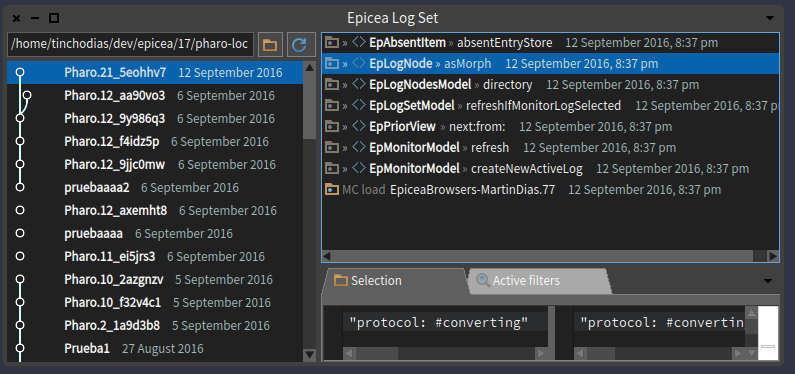
- The Log Set As you know, Epicea Monitor logs code changes (and some IDE events such as MC load/save and refactorings). Such data is placed in .ombu files in a local directory. Each time a Pharo image opens, Epicea Monitor logs code changes into a new ombu file. Those ombu files in the local directory is what is currently called "Log Set".
Session Set
- The Monitor UI shows the code changes since Epicea started to log. ===> This means it shows changes placed in potentially several ombu files.
Full Log Set
- The Log Set UI shows: -- all the logs in the local directory on the left panel, and -- the content of the selected log in the right panel. ===> This UI visually connects the logs to help user to understand how the ombu files are related. Note that the code changes displayed on the right panel belong to only one log (different than in the Monitor UI, that might show changes in several logs).
Cheers, Martin
On Tue, Sep 20, 2016 at 4:57 PM, stepharo <stepharo@free.fr <mailto:stepharo@free.fr>> wrote:
even better
Smalltalk tools changeList browseRecentLog
does not show any changes :)
So I redownloaded the latest version of tried
- changes something
- exist without saving
- reopening the image
And I could not reproduce the bug.... Shit.
So I lost my time.
Stef
Hi
i introduced a loop (yes totally stupid) in menu morph icon :) so I had to quit my image. I thought that epicea would show me all the changes and I could not find how to do it. I do not know how to invoke the old recover lost changes... so so far I lost 40 min of dev :(
I have no idea what is monitor vs log set in Epicea. And log set is just with the changes I'm doing :( not the ones I lost :(
In cutting alpha image it would be good to make sure that we cannot lose our work :( Stef

Am 21.09.2016 um 08:02 schrieb stepharo <stepharo@free.fr>:
Le 21/9/16 à 06:50, Martin Dias a écrit : Hi Stef, âNo idea why Epicea didn't log your changes.
Me neither I tried to reproduce it and I could not. Still I lost 40 min deep hacking.
About "monitor vs. log set"... the two new entries in World Menu > Tools > Epicea... I'd like user opinions to improve naming and UI. I can tell some things introduced in the latest integration.
- The Log Set As you know, Epicea Monitor logs code changes (and some IDE events such as MC load/save and refactorings). Such data is placed in .ombu files in a local directory. Each time a Pharo image opens, Epicea Monitor logs code changes into a new ombu file. Those ombu files in the local directory is what is currently called "Log Set".
Session Set
Session changes or Last session changes It is in the text. It writes changes since image start (=session)
- The Monitor UI shows the code changes since Epicea started to log. ===> This means it shows changes placed in potentially several ombu files.
Full Log Set
All changes Why so complicated names? Why so different to before? Norbert
- The Log Set UI shows: -- all the logs in the local directory on the left panel, and -- the content of the selected log in the right panel. ===> This UI visually connects the logs to help user to understand how the ombu files are related. Note that the code changes displayed on the right panel belong to only one log (different than in the Monitor UI, that might show changes in several logs).
Cheers, Martin
On Tue, Sep 20, 2016 at 4:57 PM, stepharo <stepharo@free.fr> wrote: even better
Smalltalk tools changeList browseRecentLog
does not show any changes :)
So I redownloaded the latest version of tried
- changes something
- exist without saving
- reopening the image
And I could not reproduce the bug.... Shit.
So I lost my time.
Stef
Hi
i introduced a loop (yes totally stupid) in menu morph icon :) so I had to quit my image. I thought that epicea would show me all the changes and I could not find how to do it. I do not know how to invoke the old recover lost changes... so so far I lost 40 min of dev :(
I have no idea what is monitor vs log set in Epicea. And log set is just with the changes I'm doing :( not the ones I lost :(
In cutting alpha image it would be good to make sure that we cannot lose our work :( Stef
Hi norbert I like your names better than mine. It took me some times to understand the monitor and others. Stef Le 21/9/16 à 09:51, Norbert Hartl a écrit :
Am 21.09.2016 um 08:02 schrieb stepharo <stepharo@free.fr <mailto:stepharo@free.fr>>:
Le 21/9/16 à 06:50, Martin Dias a écrit :
Hi Stef, âNo idea why Epicea didn't log your changes.
Me neither I tried to reproduce it and I could not. Still I lost 40 min deep hacking.
About "monitor vs. log set"... the two new entries in World Menu > Tools > Epicea... I'd like user opinions to improve naming and UI. I can tell some things introduced in the latest integration.
- The Log Set As you know, Epicea Monitor logs code changes (and some IDE events such as MC load/save and refactorings). Such data is placed in .ombu files in a local directory. Each time a Pharo image opens, Epicea Monitor logs code changes into a new ombu file. Those ombu files in the local directory is what is currently called "Log Set".
Session Set
Session changes or Last session changes
It is in the text. It writes changes since image start (=session)
- The Monitor UI shows the code changes since Epicea started to log. ===> This means it shows changes placed in potentially several ombu files.
Full Log Set
All changes
Why so complicated names? Why so different to before?
Norbert
- The Log Set UI shows: -- all the logs in the local directory on the left panel, and -- the content of the selected log in the right panel. ===> This UI visually connects the logs to help user to understand how the ombu files are related. Note that the code changes displayed on the right panel belong to only one log (different than in the Monitor UI, that might show changes in several logs).
Cheers, Martin
On Tue, Sep 20, 2016 at 4:57 PM, stepharo <stepharo@free.fr <mailto:stepharo@free.fr>> wrote:
even better
Smalltalk tools changeList browseRecentLog
does not show any changes :)
So I redownloaded the latest version of tried
- changes something
- exist without saving
- reopening the image
And I could not reproduce the bug.... Shit.
So I lost my time.
Stef
Hi
i introduced a loop (yes totally stupid) in menu morph icon :) so I had to quit my image. I thought that epicea would show me all the changes and I could not find how to do it. I do not know how to invoke the old recover lost changes... so so far I lost 40 min of dev :(
I have no idea what is monitor vs log set in Epicea. And log set is just with the changes I'm doing :( not the ones I lost :(
In cutting alpha image it would be good to make sure that we cannot lose our work :( Stef

Thank you for this clear explanation, Martin. People will always have trouble using any tool/UI if they do not understand the underlying model. It helped me. Needless to say, such high level documentation needs to go somewhere.
On 21 Sep 2016, at 06:50, Martin Dias <tinchodias@gmail.com> wrote:
Hi Stef, âNo idea why Epicea didn't log your changes.
About "monitor vs. log set"... the two new entries in World Menu > Tools > Epicea... I'd like user opinions to improve naming and UI. I can tell some things introduced in the latest integration.
- The Log Set As you know, Epicea Monitor logs code changes (and some IDE events such as MC load/save and refactorings). Such data is placed in .ombu files in a local directory. Each time a Pharo image opens, Epicea Monitor logs code changes into a new ombu file. Those ombu files in the local directory is what is currently called "Log Set".
- The Monitor UI shows the code changes since Epicea started to log. ===> This means it shows changes placed in potentially several ombu files.
- The Log Set UI shows: -- all the logs in the local directory on the left panel, and -- the content of the selected log in the right panel. ===> This UI visually connects the logs to help user to understand how the ombu files are related. Note that the code changes displayed on the right panel belong to only one log (different than in the Monitor UI, that might show changes in several logs).
Cheers, Martin
On Tue, Sep 20, 2016 at 4:57 PM, stepharo <stepharo@free.fr> wrote: even better
Smalltalk tools changeList browseRecentLog
does not show any changes :)
So I redownloaded the latest version of tried
- changes something
- exist without saving
- reopening the image
And I could not reproduce the bug.... Shit.
So I lost my time.
Stef
Hi
i introduced a loop (yes totally stupid) in menu morph icon :) so I had to quit my image. I thought that epicea would show me all the changes and I could not find how to do it. I do not know how to invoke the old recover lost changes... so so far I lost 40 min of dev :(
I have no idea what is monitor vs log set in Epicea. And log set is just with the changes I'm doing :( not the ones I lost :(
In cutting alpha image it would be good to make sure that we cannot lose our work :( Stef
<epiceaLogSet.jpg>
:) I'm trying to remember if we have fly by help on menu item because this descriptions would fit nicely there. Martin the names proposed by Norbert are cool. Stef Le 21/9/16 à 13:00, Sven Van Caekenberghe a écrit :
Thank you for this clear explanation, Martin. People will always have trouble using any tool/UI if they do not understand the underlying model. It helped me. Needless to say, such high level documentation needs to go somewhere.
On 21 Sep 2016, at 06:50, Martin Dias <tinchodias@gmail.com> wrote:
Hi Stef, âNo idea why Epicea didn't log your changes.
About "monitor vs. log set"... the two new entries in World Menu > Tools > Epicea... I'd like user opinions to improve naming and UI. I can tell some things introduced in the latest integration.
- The Log Set As you know, Epicea Monitor logs code changes (and some IDE events such as MC load/save and refactorings). Such data is placed in .ombu files in a local directory. Each time a Pharo image opens, Epicea Monitor logs code changes into a new ombu file. Those ombu files in the local directory is what is currently called "Log Set".
- The Monitor UI shows the code changes since Epicea started to log. ===> This means it shows changes placed in potentially several ombu files.
- The Log Set UI shows: -- all the logs in the local directory on the left panel, and -- the content of the selected log in the right panel. ===> This UI visually connects the logs to help user to understand how the ombu files are related. Note that the code changes displayed on the right panel belong to only one log (different than in the Monitor UI, that might show changes in several logs).
Cheers, Martin
On Tue, Sep 20, 2016 at 4:57 PM, stepharo <stepharo@free.fr> wrote: even better
Smalltalk tools changeList browseRecentLog
does not show any changes :)
So I redownloaded the latest version of tried
- changes something
- exist without saving
- reopening the image
And I could not reproduce the bug.... Shit.
So I lost my time.
Stef
Hi
i introduced a loop (yes totally stupid) in menu morph icon :) so I had to quit my image. I thought that epicea would show me all the changes and I could not find how to do it. I do not know how to invoke the old recover lost changes... so so far I lost 40 min of dev :(
I have no idea what is monitor vs log set in Epicea. And log set is just with the changes I'm doing :( not the ones I lost :(
In cutting alpha image it would be good to make sure that we cannot lose our work :( Stef
<epiceaLogSet.jpg>
I'm back! Thanks for your feedback. I also didn't like the names... I was experimenting with new names that communicate better tools' meaning. In the middle of this experimentation I had release 8.0.2 with bug fixes, and those experimental names became public. Then, in this thread I understood that what was missing is explaining (or improving) the logs (ombu files) model... not finding super tool names. The new version of Epicea is waiting for integration: https://pharo.fogbugz.com/f/cases/19165/Integrate-Epicea-8-0-3 This version has the tool names proposed by Norbert and agreed by Stef, reported as: https://pharo.fogbugz.com/f/cases/19163/Improve-Epicea-tool-names and has a CustomHelp with the high-level documentation as proposed by Sven, reported in: https://pharo.fogbugz.com/f/cases/19164/Add-help-to-Epicea-project I also added "fly by help" in some buttons and didn't had an explanation yet. Stef, I didn't investigate if menu entries can have fly by help. The next Epicea version should have some improvement on this issue: https://pharo.fogbugz.com/f/cases/edit/19125/Epicea-Log-writing-is-very-slow Cheers Martin On Thu, Sep 22, 2016 at 2:25 PM, stepharo <stepharo@free.fr> wrote:
:)
I'm trying to remember if we have fly by help on menu item because this descriptions would fit nicely there.
Martin the names proposed by Norbert are cool.
Stef
Le 21/9/16 à 13:00, Sven Van Caekenberghe a écrit :
Thank you for this clear explanation, Martin. People will always have
trouble using any tool/UI if they do not understand the underlying model. It helped me. Needless to say, such high level documentation needs to go somewhere.
On 21 Sep 2016, at 06:50, Martin Dias <tinchodias@gmail.com> wrote:
Hi Stef, âNo idea why Epicea didn't log your changes.
About "monitor vs. log set"... the two new entries in World Menu > Tools
Epicea... I'd like user opinions to improve naming and UI. I can tell some things introduced in the latest integration.
- The Log Set As you know, Epicea Monitor logs code changes (and some IDE events such as MC load/save and refactorings). Such data is placed in .ombu files in a local directory. Each time a Pharo image opens, Epicea Monitor logs code changes into a new ombu file. Those ombu files in the local directory is what is currently called "Log Set".
- The Monitor UI shows the code changes since Epicea started to log. ===> This means it shows changes placed in potentially several ombu files.
- The Log Set UI shows: -- all the logs in the local directory on the left panel, and -- the content of the selected log in the right panel. ===> This UI visually connects the logs to help user to understand how the ombu files are related. Note that the code changes displayed on the right panel belong to only one log (different than in the Monitor UI, that might show changes in several logs).
Cheers, Martin
On Tue, Sep 20, 2016 at 4:57 PM, stepharo <stepharo@free.fr> wrote: even better
Smalltalk tools changeList browseRecentLog
does not show any changes :)
So I redownloaded the latest version of tried
- changes something
- exist without saving
- reopening the image
And I could not reproduce the bug.... Shit.
So I lost my time.
Stef
Hi
i introduced a loop (yes totally stupid) in menu morph icon :) so I had to quit my image. I thought that epicea would show me all the changes and I could not find how to do it. I do not know how to invoke the old recover lost changes... so so far I lost 40 min of dev :(
I have no idea what is monitor vs log set in Epicea. And log set is just with the changes I'm doing :( not the ones I lost :(
In cutting alpha image it would be good to make sure that we cannot lose our work :( Stef
<epiceaLogSet.jpg>
super cool I love such mail :) Le 2/10/16 à 00:39, Martin Dias a écrit :
I'm back!
Thanks for your feedback. I also didn't like the names... I was experimenting with new names that communicate better tools' meaning. In the middle of this experimentation I had release 8.0.2 with bug fixes, and those experimental names became public. Then, in this thread I understood that what was missing is explaining (or improving) the logs (ombu files) model... not finding super tool names.
The new version of Epicea is waiting for integration:
https://pharo.fogbugz.com/f/cases/19165/Integrate-Epicea-8-0-3
This version has the tool names proposed by Norbert and agreed by Stef, reported as:
https://pharo.fogbugz.com/f/cases/19163/Improve-Epicea-tool-names
and has a CustomHelp with the high-level documentation as proposed by Sven, reported in:
https://pharo.fogbugz.com/f/cases/19164/Add-help-to-Epicea-project
I also added "fly by help" in some buttons and didn't had an explanation yet. Stef, I didn't investigate if menu entries can have fly by help.
The next Epicea version should have some improvement on this issue:
https://pharo.fogbugz.com/f/cases/edit/19125/Epicea-Log-writing-is-very-slow
Cheers Martin
On Thu, Sep 22, 2016 at 2:25 PM, stepharo <stepharo@free.fr <mailto:stepharo@free.fr>> wrote:
:)
I'm trying to remember if we have fly by help on menu item because this descriptions would fit nicely there.
Martin the names proposed by Norbert are cool.
Stef
Le 21/9/16 à 13:00, Sven Van Caekenberghe a écrit :
Thank you for this clear explanation, Martin. People will always have trouble using any tool/UI if they do not understand the underlying model. It helped me. Needless to say, such high level documentation needs to go somewhere.
On 21 Sep 2016, at 06:50, Martin Dias <tinchodias@gmail.com <mailto:tinchodias@gmail.com>> wrote:
Hi Stef, âNo idea why Epicea didn't log your changes.
About "monitor vs. log set"... the two new entries in World Menu > Tools > Epicea... I'd like user opinions to improve naming and UI. I can tell some things introduced in the latest integration.
- The Log Set As you know, Epicea Monitor logs code changes (and some IDE events such as MC load/save and refactorings). Such data is placed in .ombu files in a local directory. Each time a Pharo image opens, Epicea Monitor logs code changes into a new ombu file. Those ombu files in the local directory is what is currently called "Log Set".
- The Monitor UI shows the code changes since Epicea started to log. ===> This means it shows changes placed in potentially several ombu files.
- The Log Set UI shows: -- all the logs in the local directory on the left panel, and -- the content of the selected log in the right panel. ===> This UI visually connects the logs to help user to understand how the ombu files are related. Note that the code changes displayed on the right panel belong to only one log (different than in the Monitor UI, that might show changes in several logs).
Cheers, Martin
On Tue, Sep 20, 2016 at 4:57 PM, stepharo <stepharo@free.fr <mailto:stepharo@free.fr>> wrote: even better
Smalltalk tools changeList browseRecentLog
does not show any changes :)
So I redownloaded the latest version of tried
- changes something
- exist without saving
- reopening the image
And I could not reproduce the bug.... Shit.
So I lost my time.
Stef
Hi
i introduced a loop (yes totally stupid) in menu morph icon :) so I had to quit my image. I thought that epicea would show me all the changes and I could not find how to do it. I do not know how to invoke the old recover lost changes... so so far I lost 40 min of dev :(
I have no idea what is monitor vs log set in Epicea. And log set is just with the changes I'm doing :( not the ones I lost :(
In cutting alpha image it would be good to make sure that we cannot lose our work :( Stef
<epiceaLogSet.jpg>
participants (4)
-
 Martin Dias
 -
 Norbert Hartl
 -
 stepharo
 -
 Sven Van Caekenberghe