I love the Pharo 3 Dark Theme

Hi, I have been using the new Pharo 3 Dark Theme since it was announced on May 1st. In my specific case, I am using the FreeType fonts Open Sans Regular 11 and Source Code Pro Regular 11 on a MacBookAir, both on the 13 inch 1440x900 built in screen and on a 23 inch 1920x1024 external monitor. Every day there is a moment that I think: this looks so nice, this is so pleasant to use. Really Esteban, I don't know how you did it, but the color palette is really well chosen, plain beautiful. Let's make this either a permanent part of Pharo or an easy to load extension, real soon. Thank you ! Sven -- Sven Van Caekenberghe Proudly supporting Pharo http://pharo.org http://association.pharo.org http://consortium.pharo.org

On Wed, May 14, 2014 at 10:39 AM, Sven Van Caekenberghe <sven@stfx.eu>wrote:
Hi,
I have been using the new Pharo 3 Dark Theme since it was announced on May 1st. In my specific case, I am using the FreeType fonts Open Sans Regular 11 and Source Code Pro Regular 11 on a MacBookAir, both on the 13 inch 1440x900 built in screen and on a 23 inch 1920x1024 external monitor.
Every day there is a moment that I think: this looks so nice, this is so pleasant to use. Really Esteban, I don't know how you did it, but the color palette is really well chosen, plain beautiful. Let's make this either a permanent part of Pharo or an easy to load extension, real soon.
Same feel here. Now, I am using the DawnTheme from Sebastian who made a warmer version (SublimeText like) and put in some changes of mine. Yeah, this has changed the whole experience for the best. Laptop and big screen are both supernice to work with.
Thank you !
+1000! (that's a factorial) Phil
Sven
-- Sven Van Caekenberghe Proudly supporting Pharo http://pharo.org http://association.pharo.org http://consortium.pharo.org

I want to join and also say that Dark theme is amazing. Despite the fact that it looks nice, it also does good for my eyes. At work Iâm using apple cinema display (the older one which is LCD), and white colours on it are too intensive for my eyes, but with dark theme everything is cool. Thank you once more Esteban, I also champion it to be the part of Pharo Uko On 14 May 2014, at 10:39, Sven Van Caekenberghe <sven@stfx.eu> wrote:
Hi,
I have been using the new Pharo 3 Dark Theme since it was announced on May 1st. In my specific case, I am using the FreeType fonts Open Sans Regular 11 and Source Code Pro Regular 11 on a MacBookAir, both on the 13 inch 1440x900 built in screen and on a 23 inch 1920x1024 external monitor.
Every day there is a moment that I think: this looks so nice, this is so pleasant to use. Really Esteban, I don't know how you did it, but the color palette is really well chosen, plain beautiful. Let's make this either a permanent part of Pharo or an easy to load extension, real soon.
Thank you !
Sven
-- Sven Van Caekenberghe Proudly supporting Pharo http://pharo.org http://association.pharo.org http://consortium.pharo.org

I agree 100% with you guys and I will add another factor, the GUI at large looks much more modern with the dark theme. The reason being the fact that the GUI uses flat colors, White as flat color is not really that good, because it over-saturates all other colors around it. With the dark theme now all colors stand out and the GUI is not so much in your face, making text stand out more and other gui elements. I don't disagree with a white theme, but you need to have more contrast with other colors to make things more clear. As it is the GUI is very much over-saturated. On Wed, May 14, 2014 at 11:47 AM, Yuriy Tymchuk <yuriy.tymchuk@me.com>wrote:
I want to join and also say that Dark theme is amazing. Despite the fact that it looks nice, it also does good for my eyes. At work Iâm using apple cinema display (the older one which is LCD), and white colours on it are too intensive for my eyes, but with dark theme everything is cool.
Thank you once more Esteban, I also champion it to be the part of Pharo
Uko
On 14 May 2014, at 10:39, Sven Van Caekenberghe <sven@stfx.eu> wrote:
Hi,
I have been using the new Pharo 3 Dark Theme since it was announced on May 1st. In my specific case, I am using the FreeType fonts Open Sans Regular 11 and Source Code Pro Regular 11 on a MacBookAir, both on the 13 inch 1440x900 built in screen and on a 23 inch 1920x1024 external monitor.
Every day there is a moment that I think: this looks so nice, this is so pleasant to use. Really Esteban, I don't know how you did it, but the color palette is really well chosen, plain beautiful. Let's make this either a permanent part of Pharo or an easy to load extension, real soon.
Thank you !
Sven
-- Sven Van Caekenberghe Proudly supporting Pharo http://pharo.org http://association.pharo.org http://consortium.pharo.org
On Wed, May 14, 2014 at 10:51 AM, kilon alios <kilon.alios@gmail.com> wrote:
I agree 100% with you guys and I will add another factor, the GUI at large looks much more modern with the dark theme. The reason being the fact that the GUI uses flat colors, White as flat color is not really that good, because it over-saturates all other colors around it. With the dark theme now all colors stand out and the GUI is not so much in your face, making text stand out more and other gui elements.
I don't disagree with a white theme, but you need to have more contrast with other colors to make things more clear. As it is the GUI is very much over-saturated.
This is the thing running on my linux box now, using the updated PharoDawnTheme from Sebastian. Can't go back. [image: Inline image 1] For an added touch, opening the File Browser and picking up a jpg file, right clicking and selection "add as background" adds a pretty cool touch too. As in https://www.google.be/search?q=giger+alien Phil
On Wed, May 14, 2014 at 11:47 AM, Yuriy Tymchuk <yuriy.tymchuk@me.com>wrote:
I want to join and also say that Dark theme is amazing. Despite the fact that it looks nice, it also does good for my eyes. At work Iâm using apple cinema display (the older one which is LCD), and white colours on it are too intensive for my eyes, but with dark theme everything is cool.
Thank you once more Esteban, I also champion it to be the part of Pharo
Uko
On 14 May 2014, at 10:39, Sven Van Caekenberghe <sven@stfx.eu> wrote:
Hi,
I have been using the new Pharo 3 Dark Theme since it was announced on May 1st. In my specific case, I am using the FreeType fonts Open Sans Regular 11 and Source Code Pro Regular 11 on a MacBookAir, both on the 13 inch 1440x900 built in screen and on a 23 inch 1920x1024 external monitor.
Every day there is a moment that I think: this looks so nice, this is so pleasant to use. Really Esteban, I don't know how you did it, but the color palette is really well chosen, plain beautiful. Let's make this either a permanent part of Pharo or an easy to load extension, real soon.
Thank you !
Sven
-- Sven Van Caekenberghe Proudly supporting Pharo http://pharo.org http://association.pharo.org http://consortium.pharo.org
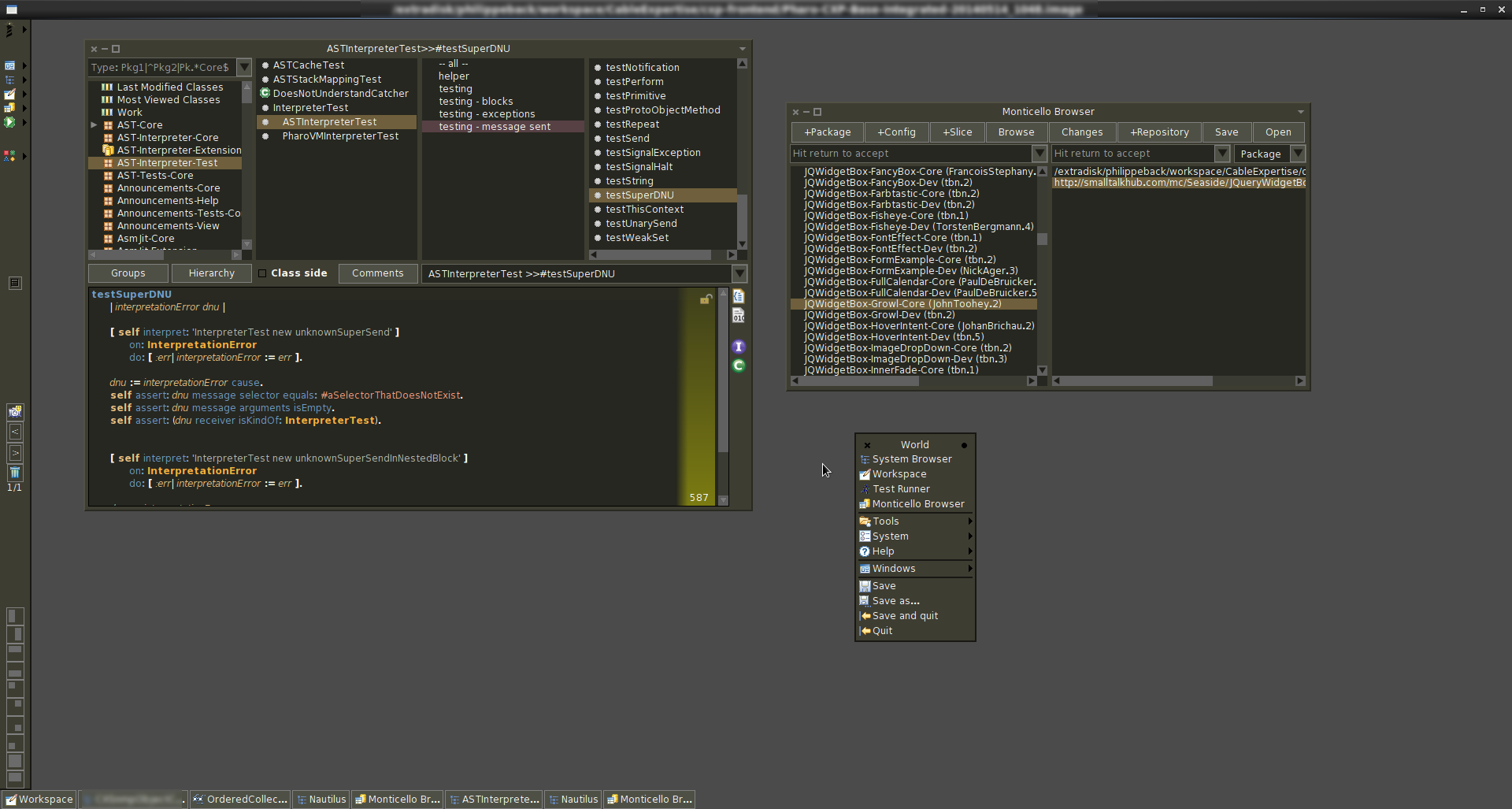

Really looks pro. On day we may see this on a sci-fi movie, some time not well know UI are used in such movies :) Hilaire Le 14/05/2014 11:30, phil@highoctane.be a écrit :
This is the thing running on my linux box now, using the updated PharoDawnTheme from Sebastian.
-- Dr. Geo http://drgeo.eu

On 14 May 2014, at 11:48, Hilaire Fernandes <hilaire.fernandes@gmail.com> wrote:
Really looks pro.
On day we may see this on a sci-fi movie, some time not well know UI are used in such movies :)
The Oblivion UI mocks where really fun: http://work.gmunk.com/OBLIVION-GFX https://vimeo.com/64377100
Hilaire
Le 14/05/2014 11:30, phil@highoctane.be a écrit :
This is the thing running on my linux box now, using the updated PharoDawnTheme from Sebastian.
-- Dr. Geo http://drgeo.eu

2014-05-14 5:39 GMT-03:00 Sven Van Caekenberghe <sven@stfx.eu>:
Hi,
I have been using the new Pharo 3 Dark Theme since it was announced on May 1st. In my specific case, I am using the FreeType fonts Open Sans Regular 11 and Source Code Pro Regular 11 on a MacBookAir, both on the 13 inch 1440x900 built in screen and on a 23 inch 1920x1024 external monitor.
Every day there is a moment that I think: this looks so nice, this is so pleasant to use. Really Esteban, I don't know how you did it, but the color palette is really well chosen, plain beautiful. Let's make this either a permanent part of Pharo or an easy to load extension, real soon.
I want to say thanks too. I'm using it since day one, it's easier for my eyes. And even got somebody attention, who asked me what I was using... I vote to make it permanent. Regards! ps: I'm using the default "DejaVu" fonts, how do you set the TTF font programatically? Esteban A. Maringolo
On 14 May 2014, at 14:36, Esteban A. Maringolo <emaringolo@gmail.com> wrote:
2014-05-14 5:39 GMT-03:00 Sven Van Caekenberghe <sven@stfx.eu>:
Hi,
I have been using the new Pharo 3 Dark Theme since it was announced on May 1st. In my specific case, I am using the FreeType fonts Open Sans Regular 11 and Source Code Pro Regular 11 on a MacBookAir, both on the 13 inch 1440x900 built in screen and on a 23 inch 1920x1024 external monitor.
Every day there is a moment that I think: this looks so nice, this is so pleasant to use. Really Esteban, I don't know how you did it, but the color palette is really well chosen, plain beautiful. Let's make this either a permanent part of Pharo or an easy to load extension, real soon.
I want to say thanks too.
I'm using it since day one, it's easier for my eyes.
And even got somebody attention, who asked me what I was using...
I vote to make it permanent.
Regards!
ps: I'm using the default "DejaVu" fonts, how do you set the TTF font programatically?
This script should help you https://gist.github.com/Uko/7672537#file-fonts-st. Yes, Iâm using mac-style fonts, but you can get and idea how to handle all together. Uko
Esteban A. Maringolo

Le 14/05/2014 14:36, Esteban A. Maringolo a écrit :
2014-05-14 5:39 GMT-03:00 Sven Van Caekenberghe <sven@stfx.eu>:
Hi,
I have been using the new Pharo 3 Dark Theme since it was announced on May 1st. In my specific case, I am using the FreeType fonts Open Sans Regular 11 and Source Code Pro Regular 11 on a MacBookAir, both on the 13 inch 1440x900 built in screen and on a 23 inch 1920x1024 external monitor.
Every day there is a moment that I think: this looks so nice, this is so pleasant to use. Really Esteban, I don't know how you did it, but the color palette is really well chosen, plain beautiful. Let's make this either a permanent part of Pharo or an easy to load extension, real soon.
I want to say thanks too.
I'm using it since day one, it's easier for my eyes.
And even got somebody attention, who asked me what I was using...
I vote to make it permanent.
Regards!
ps: I'm using the default "DejaVu" fonts, how do you set the TTF font programatically?
I do it in the settings... and export them; However, when I rebuilt an image, I need to execute: FreeTypeFontProvider current updateFromSystem For the settings to apply. Thierry
Esteban A. Maringolo
-- Thierry Goubier CEA list Laboratoire des Fondations des Systèmes Temps Réel Embarqués 91191 Gif sur Yvette Cedex France Phone/Fax: +33 (0) 1 69 08 32 92 / 83 95

thanks for the nice comments. yes, Iâm working on making it something better that a hack (I will probably finish it next week). Then, we think on including it in a future update on Pharo 3. now⦠it will be available, but I do not think it will be the default theme. But it will be there for choosing it. Also, I think theme it-self still need some care, let me know your findings and I will fix it as soon as possible :) for programatically, I have added a fonts.st fonts to the autoconfiguration of pharo StartupLoader default executeAtomicItems: { StartupAction name: 'Fonts 3.0' code: [ | pointSize fontName codeFontName | FreeTypeSystemSettings loadFt2Library: true. FreeTypeFontProvider current updateFromSystem. pointSize := 10. fontName := 'Source Sans Pro'. codeFontName := 'Source Code Pro'. StandardFonts setAllStandardFontsTo: (LogicalFont familyName: fontName pointSize: pointSize); haloFont: (LogicalFont familyName: fontName pointSize: pointSize - 1); balloonFont: (LogicalFont familyName: fontName pointSize: pointSize - 1); windowTitleFont: (LogicalFont familyName: fontName pointSize: pointSize + 1); listFont: (LogicalFont familyName: fontName pointSize: pointSize); menuFont: (LogicalFont familyName: fontName pointSize: pointSize); codeFont: (LogicalFont familyName: codeFontName pointSize: pointSize) ] runOnce: true. }. this is usually in: OSX: ~/Library/Preferences/pharo/3.0 Linux: ~/.config/pharo/3.0 (Iâm not sure, but somewhere there) Windows: no idea :) cheers, Esteban On 14 May 2014, at 14:48, Goubier Thierry <thierry.goubier@cea.fr> wrote:
Le 14/05/2014 14:36, Esteban A. Maringolo a écrit :
2014-05-14 5:39 GMT-03:00 Sven Van Caekenberghe <sven@stfx.eu>:
Hi,
I have been using the new Pharo 3 Dark Theme since it was announced on May 1st. In my specific case, I am using the FreeType fonts Open Sans Regular 11 and Source Code Pro Regular 11 on a MacBookAir, both on the 13 inch 1440x900 built in screen and on a 23 inch 1920x1024 external monitor.
Every day there is a moment that I think: this looks so nice, this is so pleasant to use. Really Esteban, I don't know how you did it, but the color palette is really well chosen, plain beautiful. Let's make this either a permanent part of Pharo or an easy to load extension, real soon.
I want to say thanks too.
I'm using it since day one, it's easier for my eyes.
And even got somebody attention, who asked me what I was using...
I vote to make it permanent.
Regards!
ps: I'm using the default "DejaVu" fonts, how do you set the TTF font programatically?
I do it in the settings... and export them; However, when I rebuilt an image, I need to execute:
FreeTypeFontProvider current updateFromSystem
For the settings to apply.
Thierry
Esteban A. Maringolo
-- Thierry Goubier CEA list Laboratoire des Fondations des Systèmes Temps Réel Embarqués 91191 Gif sur Yvette Cedex France Phone/Fax: +33 (0) 1 69 08 32 92 / 83 95
Thanks for the snippets. Is the "Source Pro" family available for Ubuntu Linux 13.04? Regards! Esteban A. Maringolo 2014-05-14 10:01 GMT-03:00 Esteban Lorenzano <estebanlm@gmail.com>:
thanks for the nice comments. yes, Iâm working on making it something better that a hack (I will probably finish it next week). Then, we think on including it in a future update on Pharo 3. now⦠it will be available, but I do not think it will be the default theme. But it will be there for choosing it. Also, I think theme it-self still need some care, let me know your findings and I will fix it as soon as possible :)
for programatically, I have added a fonts.st fonts to the autoconfiguration of pharo
StartupLoader default executeAtomicItems: { StartupAction name: 'Fonts 3.0' code: [ | pointSize fontName codeFontName |
FreeTypeSystemSettings loadFt2Library: true. FreeTypeFontProvider current updateFromSystem.
pointSize := 10. fontName := 'Source Sans Pro'. codeFontName := 'Source Code Pro'. StandardFonts setAllStandardFontsTo: (LogicalFont familyName: fontName pointSize: pointSize); haloFont: (LogicalFont familyName: fontName pointSize: pointSize - 1); balloonFont: (LogicalFont familyName: fontName pointSize: pointSize - 1); windowTitleFont: (LogicalFont familyName: fontName pointSize: pointSize + 1); listFont: (LogicalFont familyName: fontName pointSize: pointSize); menuFont: (LogicalFont familyName: fontName pointSize: pointSize); codeFont: (LogicalFont familyName: codeFontName pointSize: pointSize) ] runOnce: true. }.
this is usually in:
OSX: ~/Library/Preferences/pharo/3.0 Linux: ~/.config/pharo/3.0 (Iâm not sure, but somewhere there) Windows: no idea :)
cheers, Esteban
On 14 May 2014, at 14:48, Goubier Thierry <thierry.goubier@cea.fr> wrote:
Le 14/05/2014 14:36, Esteban A. Maringolo a écrit :
2014-05-14 5:39 GMT-03:00 Sven Van Caekenberghe <sven@stfx.eu>:
Hi,
I have been using the new Pharo 3 Dark Theme since it was announced on May 1st. In my specific case, I am using the FreeType fonts Open Sans Regular 11 and Source Code Pro Regular 11 on a MacBookAir, both on the 13 inch 1440x900 built in screen and on a 23 inch 1920x1024 external monitor.
Every day there is a moment that I think: this looks so nice, this is so pleasant to use. Really Esteban, I don't know how you did it, but the color palette is really well chosen, plain beautiful. Let's make this either a permanent part of Pharo or an easy to load extension, real soon.
I want to say thanks too.
I'm using it since day one, it's easier for my eyes.
And even got somebody attention, who asked me what I was using...
I vote to make it permanent.
Regards!
ps: I'm using the default "DejaVu" fonts, how do you set the TTF font programatically?
I do it in the settings... and export them; However, when I rebuilt an image, I need to execute:
FreeTypeFontProvider current updateFromSystem
For the settings to apply.
Thierry
Esteban A. Maringolo
-- Thierry Goubier CEA list Laboratoire des Fondations des Systèmes Temps Réel Embarqués 91191 Gif sur Yvette Cedex France Phone/Fax: +33 (0) 1 69 08 32 92 / 83 95
no idea⦠but they are free and easy to install :) On 14 May 2014, at 15:08, Esteban A. Maringolo <emaringolo@gmail.com> wrote:
Thanks for the snippets.
Is the "Source Pro" family available for Ubuntu Linux 13.04?
Regards! Esteban A. Maringolo
2014-05-14 10:01 GMT-03:00 Esteban Lorenzano <estebanlm@gmail.com>:
thanks for the nice comments. yes, Iâm working on making it something better that a hack (I will probably finish it next week). Then, we think on including it in a future update on Pharo 3. now⦠it will be available, but I do not think it will be the default theme. But it will be there for choosing it. Also, I think theme it-self still need some care, let me know your findings and I will fix it as soon as possible :)
for programatically, I have added a fonts.st fonts to the autoconfiguration of pharo
StartupLoader default executeAtomicItems: { StartupAction name: 'Fonts 3.0' code: [ | pointSize fontName codeFontName |
FreeTypeSystemSettings loadFt2Library: true. FreeTypeFontProvider current updateFromSystem.
pointSize := 10. fontName := 'Source Sans Pro'. codeFontName := 'Source Code Pro'. StandardFonts setAllStandardFontsTo: (LogicalFont familyName: fontName pointSize: pointSize); haloFont: (LogicalFont familyName: fontName pointSize: pointSize - 1); balloonFont: (LogicalFont familyName: fontName pointSize: pointSize - 1); windowTitleFont: (LogicalFont familyName: fontName pointSize: pointSize + 1); listFont: (LogicalFont familyName: fontName pointSize: pointSize); menuFont: (LogicalFont familyName: fontName pointSize: pointSize); codeFont: (LogicalFont familyName: codeFontName pointSize: pointSize) ] runOnce: true. }.
this is usually in:
OSX: ~/Library/Preferences/pharo/3.0 Linux: ~/.config/pharo/3.0 (Iâm not sure, but somewhere there) Windows: no idea :)
cheers, Esteban
On 14 May 2014, at 14:48, Goubier Thierry <thierry.goubier@cea.fr> wrote:
Le 14/05/2014 14:36, Esteban A. Maringolo a écrit :
2014-05-14 5:39 GMT-03:00 Sven Van Caekenberghe <sven@stfx.eu>:
Hi,
I have been using the new Pharo 3 Dark Theme since it was announced on May 1st. In my specific case, I am using the FreeType fonts Open Sans Regular 11 and Source Code Pro Regular 11 on a MacBookAir, both on the 13 inch 1440x900 built in screen and on a 23 inch 1920x1024 external monitor.
Every day there is a moment that I think: this looks so nice, this is so pleasant to use. Really Esteban, I don't know how you did it, but the color palette is really well chosen, plain beautiful. Let's make this either a permanent part of Pharo or an easy to load extension, real soon.
I want to say thanks too.
I'm using it since day one, it's easier for my eyes.
And even got somebody attention, who asked me what I was using...
I vote to make it permanent.
Regards!
ps: I'm using the default "DejaVu" fonts, how do you set the TTF font programatically?
I do it in the settings... and export them; However, when I rebuilt an image, I need to execute:
FreeTypeFontProvider current updateFromSystem
For the settings to apply.
Thierry
Esteban A. Maringolo
-- Thierry Goubier CEA list Laboratoire des Fondations des Systèmes Temps Réel Embarqués 91191 Gif sur Yvette Cedex France Phone/Fax: +33 (0) 1 69 08 32 92 / 83 95
The file is named: SourceCodePro_FontsOnly-1.017.zip In the TTF folder you have: $ ls SourceCodePro-Black.ttf SourceCodePro-Medium.ttf SourceCodePro-Bold.ttf SourceCodePro-Regular.ttf SourceCodePro-ExtraLight.ttf SourceCodePro-Semibold.ttf SourceCodePro-Light.ttf Must click on each to install the font via font manager. Other automated black magic welcome. Phil â
05-14 10:42 GMT-03:00 phil@highoctane.be <phil@highoctane.be>:
The file is named:
SourceCodePro_FontsOnly-1.017.zip
In the TTF folder you have:
$ ls SourceCodePro-Black.ttf SourceCodePro-Medium.ttf SourceCodePro-Bold.ttf SourceCodePro-Regular.ttf SourceCodePro-ExtraLight.ttf SourceCodePro-Semibold.ttf SourceCodePro-Light.ttf
Must click on each to install the font via font manager. Other automated black magic welcome.
I copied .otf files to ~/.fonts/ directory, and were picked-up by Ubuntu immediately. Regards, Esteban A. Maringolo
On Wed, May 14, 2014 at 3:45 PM, Esteban A. Maringolo <emaringolo@gmail.com>wrote:
05-14 10:42 GMT-03:00 phil@highoctane.be <phil@highoctane.be>:
The file is named:
SourceCodePro_FontsOnly-1.017.zip
In the TTF folder you have:
$ ls SourceCodePro-Black.ttf SourceCodePro-Medium.ttf SourceCodePro-Bold.ttf SourceCodePro-Regular.ttf SourceCodePro-ExtraLight.ttf SourceCodePro-Semibold.ttf SourceCodePro-Light.ttf
Must click on each to install the font via font manager. Other automated black magic welcome.
I copied .otf files to ~/.fonts/ directory, and were picked-up by Ubuntu immediately.
Is it possible to do that for all users at once?
Regards,
Esteban A. Maringolo
2014-05-14 10:53 GMT-03:00 phil@highoctane.be <phil@highoctane.be>:
On Wed, May 14, 2014 at 3:45 PM, Esteban A. Maringolo <emaringolo@gmail.com> wrote:
I copied .otf files to ~/.fonts/ directory, and were picked-up by Ubuntu immediately.
Is it possible to do that for all users at once?
Yes, put the files in: /usr/share/fonts Or any other directory specified in /etc/fonts/fonts.conf Regards!
Le 14/05/2014 15:53, phil@highoctane.be a écrit :
On Wed, May 14, 2014 at 3:45 PM, Esteban A. Maringolo <emaringolo@gmail.com <mailto:emaringolo@gmail.com>> wrote:
05-14 10:42 GMT-03:00 phil@highoctane.be <mailto:phil@highoctane.be> <phil@highoctane.be <mailto:phil@highoctane.be>>: > The file is named: > > SourceCodePro_FontsOnly-1.017.zip > > In the TTF folder you have: > > $ ls > SourceCodePro-Black.ttf SourceCodePro-Medium.ttf > SourceCodePro-Bold.ttf SourceCodePro-Regular.ttf > SourceCodePro-ExtraLight.ttf SourceCodePro-Semibold.ttf > SourceCodePro-Light.ttf > > Must click on each to install the font via font manager. Other automated > black magic welcome.
I copied .otf files to ~/.fonts/ directory, and were picked-up by Ubuntu immediately.
Is it possible to do that for all users at once?
Yes, by copying in one of the system font folders. There is probably a /usr/local/ ... /fonts something for a clean add. Thierry -- Thierry Goubier CEA list Laboratoire des Fondations des Systèmes Temps Réel Embarqués 91191 Gif sur Yvette Cedex France Phone/Fax: +33 (0) 1 69 08 32 92 / 83 95

It would be easier to simply load these fonts in the image: #('SourceCodeProRegular' 'SourceCodeProBold' 'SourceSansProRegular' 'SourceSansProBold') do: [ :each | each asSymbol asClassIfAbsent: [ Gofer new smalltalkhubUser: 'girba' project: 'FreeFonts'; package: each; load ]. FreeTypeFontProvider registerFont: (Smalltalk at: each asSymbol) ]. FreeTypeSystemSettings loadFt2Library: true. FreeTypeFontProvider current updateFromSystem You can see more details here: http://www.tudorgirba.com/blog/free-font-collection-for-pharo Doru On Wed, May 14, 2014 at 4:01 PM, Goubier Thierry <thierry.goubier@cea.fr>wrote:
Le 14/05/2014 15:53, phil@highoctane.be a écrit :
On Wed, May 14, 2014 at 3:45 PM, Esteban A. Maringolo <emaringolo@gmail.com <mailto:emaringolo@gmail.com>> wrote:
05-14 10:42 GMT-03:00 phil@highoctane.be <mailto:phil@highoctane.be> <phil@highoctane.be <mailto:phil@highoctane.be>>:
> The file is named: > > SourceCodePro_FontsOnly-1.017.zip > > In the TTF folder you have: > > $ ls > SourceCodePro-Black.ttf SourceCodePro-Medium.ttf > SourceCodePro-Bold.ttf SourceCodePro-Regular.ttf > SourceCodePro-ExtraLight.ttf SourceCodePro-Semibold.ttf > SourceCodePro-Light.ttf > > Must click on each to install the font via font manager. Other automated > black magic welcome.
I copied .otf files to ~/.fonts/ directory, and were picked-up by Ubuntu immediately.
Is it possible to do that for all users at once?
Yes, by copying in one of the system font folders. There is probably a /usr/local/ ... /fonts something for a clean add.
Thierry
-- Thierry Goubier CEA list Laboratoire des Fondations des Systèmes Temps Réel Embarqués 91191 Gif sur Yvette Cedex France Phone/Fax: +33 (0) 1 69 08 32 92 / 83 95
-- www.tudorgirba.com "Every thing has its own flow"
Le 14/05/2014 15:08, Esteban A. Maringolo a écrit :
Thanks for the snippets.
Is the "Source Pro" family available for Ubuntu Linux 13.04?
You will have to install them yourselves. I have the instructions somewhere... Yes: I have SourceCodePro_FontsOnly-1.017.zip SourceSansPro_FontsOnly-1.038.zip Downloaded somewhere (sourceforge, I guess) Oh, from there: http://askubuntu.com/questions/193072/how-to-use-the-new-adobe-source-code-p... I also know Doru has a package for Pharo somewhere. Thierry
Regards! Esteban A. Maringolo
2014-05-14 10:01 GMT-03:00 Esteban Lorenzano <estebanlm@gmail.com>:
thanks for the nice comments. yes, Iâm working on making it something better that a hack (I will probably finish it next week). Then, we think on including it in a future update on Pharo 3. now⦠it will be available, but I do not think it will be the default theme. But it will be there for choosing it. Also, I think theme it-self still need some care, let me know your findings and I will fix it as soon as possible :)
for programatically, I have added a fonts.st fonts to the autoconfiguration of pharo
StartupLoader default executeAtomicItems: { StartupAction name: 'Fonts 3.0' code: [ | pointSize fontName codeFontName |
FreeTypeSystemSettings loadFt2Library: true. FreeTypeFontProvider current updateFromSystem.
pointSize := 10. fontName := 'Source Sans Pro'. codeFontName := 'Source Code Pro'. StandardFonts setAllStandardFontsTo: (LogicalFont familyName: fontName pointSize: pointSize); haloFont: (LogicalFont familyName: fontName pointSize: pointSize - 1); balloonFont: (LogicalFont familyName: fontName pointSize: pointSize - 1); windowTitleFont: (LogicalFont familyName: fontName pointSize: pointSize + 1); listFont: (LogicalFont familyName: fontName pointSize: pointSize); menuFont: (LogicalFont familyName: fontName pointSize: pointSize); codeFont: (LogicalFont familyName: codeFontName pointSize: pointSize) ] runOnce: true. }.
this is usually in:
OSX: ~/Library/Preferences/pharo/3.0 Linux: ~/.config/pharo/3.0 (Iâm not sure, but somewhere there) Windows: no idea :)
cheers, Esteban
On 14 May 2014, at 14:48, Goubier Thierry <thierry.goubier@cea.fr> wrote:
Le 14/05/2014 14:36, Esteban A. Maringolo a écrit :
2014-05-14 5:39 GMT-03:00 Sven Van Caekenberghe <sven@stfx.eu>:
Hi,
I have been using the new Pharo 3 Dark Theme since it was announced on May 1st. In my specific case, I am using the FreeType fonts Open Sans Regular 11 and Source Code Pro Regular 11 on a MacBookAir, both on the 13 inch 1440x900 built in screen and on a 23 inch 1920x1024 external monitor.
Every day there is a moment that I think: this looks so nice, this is so pleasant to use. Really Esteban, I don't know how you did it, but the color palette is really well chosen, plain beautiful. Let's make this either a permanent part of Pharo or an easy to load extension, real soon.
I want to say thanks too.
I'm using it since day one, it's easier for my eyes.
And even got somebody attention, who asked me what I was using...
I vote to make it permanent.
Regards!
ps: I'm using the default "DejaVu" fonts, how do you set the TTF font programatically?
I do it in the settings... and export them; However, when I rebuilt an image, I need to execute:
FreeTypeFontProvider current updateFromSystem
For the settings to apply.
Thierry
Esteban A. Maringolo
-- Thierry Goubier CEA list Laboratoire des Fondations des Systèmes Temps Réel Embarqués 91191 Gif sur Yvette Cedex France Phone/Fax: +33 (0) 1 69 08 32 92 / 83 95
-- Thierry Goubier CEA list Laboratoire des Fondations des Systèmes Temps Réel Embarqués 91191 Gif sur Yvette Cedex France Phone/Fax: +33 (0) 1 69 08 32 92 / 83 95
Thank you Goubier, I also found that link of AskUbuntu. Apparently it is not prepackaged in a .deb file :) Best regards!

Maybe it is not such bad idea to have it as default theme for Pharo 4, at least at the start. It's the best way to force people to report bugs in theming ;-) -- Pavel 2014-05-14 15:01 GMT+02:00 Esteban Lorenzano <estebanlm@gmail.com>:
thanks for the nice comments. yes, Iâm working on making it something better that a hack (I will probably finish it next week). Then, we think on including it in a future update on Pharo 3. now⦠it will be available, but I do not think it will be the default theme. But it will be there for choosing it. Also, I think theme it-self still need some care, let me know your findings and I will fix it as soon as possible :)
for programatically, I have added a fonts.st fonts to the autoconfiguration of pharo
StartupLoader default executeAtomicItems: { StartupAction name: 'Fonts 3.0' code: [ | pointSize fontName codeFontName |
FreeTypeSystemSettings loadFt2Library: true. FreeTypeFontProvider current updateFromSystem.
pointSize := 10. fontName := 'Source Sans Pro'. codeFontName := 'Source Code Pro'. StandardFonts setAllStandardFontsTo: (LogicalFont familyName: fontName pointSize: pointSize); haloFont: (LogicalFont familyName: fontName pointSize: pointSize - 1); balloonFont: (LogicalFont familyName: fontName pointSize: pointSize - 1); windowTitleFont: (LogicalFont familyName: fontName pointSize: pointSize + 1); listFont: (LogicalFont familyName: fontName pointSize: pointSize); menuFont: (LogicalFont familyName: fontName pointSize: pointSize); codeFont: (LogicalFont familyName: codeFontName pointSize: pointSize) ] runOnce: true. }.
this is usually in:
OSX: ~/Library/Preferences/pharo/3.0 Linux: ~/.config/pharo/3.0 (Iâm not sure, but somewhere there) Windows: no idea :)
cheers, Esteban
On 14 May 2014, at 14:48, Goubier Thierry <thierry.goubier@cea.fr> wrote:
Le 14/05/2014 14:36, Esteban A. Maringolo a écrit :
2014-05-14 5:39 GMT-03:00 Sven Van Caekenberghe <sven@stfx.eu>:
Hi,
I have been using the new Pharo 3 Dark Theme since it was announced on May 1st. In my specific case, I am using the FreeType fonts Open Sans Regular 11 and Source Code Pro Regular 11 on a MacBookAir, both on the 13 inch 1440x900 built in screen and on a 23 inch 1920x1024 external monitor.
Every day there is a moment that I think: this looks so nice, this is so pleasant to use. Really Esteban, I don't know how you did it, but the color palette is really well chosen, plain beautiful. Let's make this either a permanent part of Pharo or an easy to load extension, real soon.
I want to say thanks too.
I'm using it since day one, it's easier for my eyes.
And even got somebody attention, who asked me what I was using...
I vote to make it permanent.
Regards!
ps: I'm using the default "DejaVu" fonts, how do you set the TTF font programatically?
I do it in the settings... and export them; However, when I rebuilt an image, I need to execute:
FreeTypeFontProvider current updateFromSystem
For the settings to apply.
Thierry
Esteban A. Maringolo
-- Thierry Goubier CEA list Laboratoire des Fondations des Systèmes Temps Réel Embarqués 91191 Gif sur Yvette Cedex France Phone/Fax: +33 (0) 1 69 08 32 92 / 83 95
On 14 May 2014, at 15:22, Pavel Krivanek <pavel.krivanek@gmail.com> wrote:
Maybe it is not such bad idea to have it as default theme for Pharo 4, at least at the start. It's the best way to force people to report bugs in theming ;-)
I am sure the dark theme has enough fans and thus users to help out
On 14 May 2014, at 15:22, Pavel Krivanek <pavel.krivanek@gmail.com> wrote:
Maybe it is not such bad idea to have it as default theme for Pharo 4, at least at the start. It's the best way to force people to report bugs in theming ;-)
thatâs the idea (and in part they are already). Problem is that there is an annoying bug around that prevent us to take them into account :) but yes, for Pharo4 they will be there. Esteban
-- Pavel
2014-05-14 15:01 GMT+02:00 Esteban Lorenzano <estebanlm@gmail.com>: thanks for the nice comments. yes, Iâm working on making it something better that a hack (I will probably finish it next week). Then, we think on including it in a future update on Pharo 3. now⦠it will be available, but I do not think it will be the default theme. But it will be there for choosing it. Also, I think theme it-self still need some care, let me know your findings and I will fix it as soon as possible :)
for programatically, I have added a fonts.st fonts to the autoconfiguration of pharo
StartupLoader default executeAtomicItems: { StartupAction name: 'Fonts 3.0' code: [ | pointSize fontName codeFontName |
FreeTypeSystemSettings loadFt2Library: true. FreeTypeFontProvider current updateFromSystem.
pointSize := 10. fontName := 'Source Sans Pro'. codeFontName := 'Source Code Pro'. StandardFonts setAllStandardFontsTo: (LogicalFont familyName: fontName pointSize: pointSize); haloFont: (LogicalFont familyName: fontName pointSize: pointSize - 1); balloonFont: (LogicalFont familyName: fontName pointSize: pointSize - 1); windowTitleFont: (LogicalFont familyName: fontName pointSize: pointSize + 1); listFont: (LogicalFont familyName: fontName pointSize: pointSize); menuFont: (LogicalFont familyName: fontName pointSize: pointSize); codeFont: (LogicalFont familyName: codeFontName pointSize: pointSize) ] runOnce: true. }.
this is usually in:
OSX: ~/Library/Preferences/pharo/3.0 Linux: ~/.config/pharo/3.0 (Iâm not sure, but somewhere there) Windows: no idea :)
cheers, Esteban
On 14 May 2014, at 14:48, Goubier Thierry <thierry.goubier@cea.fr> wrote:
Le 14/05/2014 14:36, Esteban A. Maringolo a écrit :
2014-05-14 5:39 GMT-03:00 Sven Van Caekenberghe <sven@stfx.eu>:
Hi,
I have been using the new Pharo 3 Dark Theme since it was announced on May 1st. In my specific case, I am using the FreeType fonts Open Sans Regular 11 and Source Code Pro Regular 11 on a MacBookAir, both on the 13 inch 1440x900 built in screen and on a 23 inch 1920x1024 external monitor.
Every day there is a moment that I think: this looks so nice, this is so pleasant to use. Really Esteban, I don't know how you did it, but the color palette is really well chosen, plain beautiful. Let's make this either a permanent part of Pharo or an easy to load extension, real soon.
I want to say thanks too.
I'm using it since day one, it's easier for my eyes.
And even got somebody attention, who asked me what I was using...
I vote to make it permanent.
Regards!
ps: I'm using the default "DejaVu" fonts, how do you set the TTF font programatically?
I do it in the settings... and export them; However, when I rebuilt an image, I need to execute:
FreeTypeFontProvider current updateFromSystem
For the settings to apply.
Thierry
Esteban A. Maringolo
-- Thierry Goubier CEA list Laboratoire des Fondations des Systèmes Temps Réel Embarqués 91191 Gif sur Yvette Cedex France Phone/Fax: +33 (0) 1 69 08 32 92 / 83 95
On 14 May 2014, at 17:33, Esteban Lorenzano <estebanlm@gmail.com> wrote:
On 14 May 2014, at 15:22, Pavel Krivanek <pavel.krivanek@gmail.com> wrote:
Maybe it is not such bad idea to have it as default theme for Pharo 4, at least at the start. It's the best way to force people to report bugs in theming ;-)
thatâs the idea (and in part they are already). Problem is that there is an annoying bug around that prevent us to take them into account :) but yes, for Pharo4 they will be there.
oops⦠I misread (the problems of multitasking): I thought you were talking about the fonts (they will be there). So far, not the theme or the fonts are meant to be defaults, just to be available. Esteban
Esteban
-- Pavel
2014-05-14 15:01 GMT+02:00 Esteban Lorenzano <estebanlm@gmail.com>: thanks for the nice comments. yes, Iâm working on making it something better that a hack (I will probably finish it next week). Then, we think on including it in a future update on Pharo 3. now⦠it will be available, but I do not think it will be the default theme. But it will be there for choosing it. Also, I think theme it-self still need some care, let me know your findings and I will fix it as soon as possible :)
for programatically, I have added a fonts.st fonts to the autoconfiguration of pharo
StartupLoader default executeAtomicItems: { StartupAction name: 'Fonts 3.0' code: [ | pointSize fontName codeFontName |
FreeTypeSystemSettings loadFt2Library: true. FreeTypeFontProvider current updateFromSystem.
pointSize := 10. fontName := 'Source Sans Pro'. codeFontName := 'Source Code Pro'. StandardFonts setAllStandardFontsTo: (LogicalFont familyName: fontName pointSize: pointSize); haloFont: (LogicalFont familyName: fontName pointSize: pointSize - 1); balloonFont: (LogicalFont familyName: fontName pointSize: pointSize - 1); windowTitleFont: (LogicalFont familyName: fontName pointSize: pointSize + 1); listFont: (LogicalFont familyName: fontName pointSize: pointSize); menuFont: (LogicalFont familyName: fontName pointSize: pointSize); codeFont: (LogicalFont familyName: codeFontName pointSize: pointSize) ] runOnce: true. }.
this is usually in:
OSX: ~/Library/Preferences/pharo/3.0 Linux: ~/.config/pharo/3.0 (Iâm not sure, but somewhere there) Windows: no idea :)
cheers, Esteban
On 14 May 2014, at 14:48, Goubier Thierry <thierry.goubier@cea.fr> wrote:
Le 14/05/2014 14:36, Esteban A. Maringolo a écrit :
2014-05-14 5:39 GMT-03:00 Sven Van Caekenberghe <sven@stfx.eu>:
Hi,
I have been using the new Pharo 3 Dark Theme since it was announced on May 1st. In my specific case, I am using the FreeType fonts Open Sans Regular 11 and Source Code Pro Regular 11 on a MacBookAir, both on the 13 inch 1440x900 built in screen and on a 23 inch 1920x1024 external monitor.
Every day there is a moment that I think: this looks so nice, this is so pleasant to use. Really Esteban, I don't know how you did it, but the color palette is really well chosen, plain beautiful. Let's make this either a permanent part of Pharo or an easy to load extension, real soon.
I want to say thanks too.
I'm using it since day one, it's easier for my eyes.
And even got somebody attention, who asked me what I was using...
I vote to make it permanent.
Regards!
ps: I'm using the default "DejaVu" fonts, how do you set the TTF font programatically?
I do it in the settings... and export them; However, when I rebuilt an image, I need to execute:
FreeTypeFontProvider current updateFromSystem
For the settings to apply.
Thierry
Esteban A. Maringolo
-- Thierry Goubier CEA list Laboratoire des Fondations des Systèmes Temps Réel Embarqués 91191 Gif sur Yvette Cedex France Phone/Fax: +33 (0) 1 69 08 32 92 / 83 95
Le 14/05/2014 15:01, Esteban Lorenzano a écrit :
thanks for the nice comments. yes, Iâm working on making it something better that a hack (I will probably finish it next week). Then, we think on including it in a future update on Pharo 3.
Cool. I want that! I'm still using the old Pharo theme, mostly because the Dark theme merge takes ages, particularly on my home machine...
now⦠it will be available, but I do not think it will be the default theme. But it will be there for choosing it. Also, I think theme it-self still need some care, let me know your findings and I will fix it as soon as possible :)
There you go: grabing or clicking the scrollbar gives you no feedback (same as the default Pharo 3 theme before philippe corrected it). Thierry -- Thierry Goubier CEA list Laboratoire des Fondations des Systèmes Temps Réel Embarqués 91191 Gif sur Yvette Cedex France Phone/Fax: +33 (0) 1 69 08 32 92 / 83 95
The values can be found with: StartupPreferencesLoader preferencesGeneralFolder StartupPreferencesLoader preferencesVersionFolder Windows 8.1 File @ C:\Users\<User>\AppData\Roaming\pharo File @ C:\Users\User\AppData\Roaming\pharo\3.0 Linux File @ /home/philippeback/.config/pharo File @ /home/philippeback/.config/pharo/3.0 Phil On Wed, May 14, 2014 at 3:01 PM, Esteban Lorenzano <estebanlm@gmail.com>wrote:
thanks for the nice comments. yes, Iâm working on making it something better that a hack (I will probably finish it next week). Then, we think on including it in a future update on Pharo 3. now⦠it will be available, but I do not think it will be the default theme. But it will be there for choosing it. Also, I think theme it-self still need some care, let me know your findings and I will fix it as soon as possible :)
for programatically, I have added a fonts.st fonts to the autoconfiguration of pharo
StartupLoader default executeAtomicItems: { StartupAction name: 'Fonts 3.0' code: [ | pointSize fontName codeFontName |
FreeTypeSystemSettings loadFt2Library: true. FreeTypeFontProvider current updateFromSystem.
pointSize := 10. fontName := 'Source Sans Pro'. codeFontName := 'Source Code Pro'. StandardFonts setAllStandardFontsTo: (LogicalFont familyName: fontName pointSize: pointSize); haloFont: (LogicalFont familyName: fontName pointSize: pointSize - 1); balloonFont: (LogicalFont familyName: fontName pointSize: pointSize - 1); windowTitleFont: (LogicalFont familyName: fontName pointSize: pointSize + 1); listFont: (LogicalFont familyName: fontName pointSize: pointSize); menuFont: (LogicalFont familyName: fontName pointSize: pointSize); codeFont: (LogicalFont familyName: codeFontName pointSize: pointSize) ] runOnce: true. }.
this is usually in:
OSX: ~/Library/Preferences/pharo/3.0 Linux: ~/.config/pharo/3.0 (Iâm not sure, but somewhere there) Windows: no idea :)
cheers, Esteban
On 14 May 2014, at 14:48, Goubier Thierry <thierry.goubier@cea.fr> wrote:
Le 14/05/2014 14:36, Esteban A. Maringolo a écrit :
2014-05-14 5:39 GMT-03:00 Sven Van Caekenberghe <sven@stfx.eu>:
Hi,
I have been using the new Pharo 3 Dark Theme since it was announced on May 1st. In my specific case, I am using the FreeType fonts Open Sans Regular 11 and Source Code Pro Regular 11 on a MacBookAir, both on the 13 inch 1440x900 built in screen and on a 23 inch 1920x1024 external monitor.
Every day there is a moment that I think: this looks so nice, this is so pleasant to use. Really Esteban, I don't know how you did it, but the color palette is really well chosen, plain beautiful. Let's make this either a permanent part of Pharo or an easy to load extension, real soon.
I want to say thanks too.
I'm using it since day one, it's easier for my eyes.
And even got somebody attention, who asked me what I was using...
I vote to make it permanent.
Regards!
ps: I'm using the default "DejaVu" fonts, how do you set the TTF font programatically?
I do it in the settings... and export them; However, when I rebuilt an image, I need to execute:
FreeTypeFontProvider current updateFromSystem
For the settings to apply.
Thierry
Esteban A. Maringolo
-- Thierry Goubier CEA list Laboratoire des Fondations des Systèmes Temps Réel Embarqués 91191 Gif sur Yvette Cedex France Phone/Fax: +33 (0) 1 69 08 32 92 / 83 95
participants (11)
-
 Esteban A. Maringolo
 -
 Esteban Lorenzano
 -
 Goubier Thierry
 -
 Hilaire Fernandes
 -
 kilon alios
 -
 Marcus Denker
 -
 Pavel Krivanek
 -
 phil@highoctane.be
 -
 Sven Van Caekenberghe
 -
 Tudor Girba
 -
 Yuriy Tymchuk