[Pharo-project] Setting package test

Hi all, Preference is now renamed as Setting. Please, can you can load these two packages and play with the settings. 'SettingTree open' open the browser. Examples of setting are located in the Setting-SandBox category. You can use <pharo> or <setting> as pragma. the pragma list the browser is able to recognize is now a parameter. (see SettingCollector class side). as an example, It will be possible for an application to use its own pragma symbol. Thus, the browser will be able to show application specific settings. I will add 'saving', 'saving as', choose, open, and 'filtering' features (by package or by setting name as available in current preference browser). If you have more ideas or needs, please let me know. Cheers alain
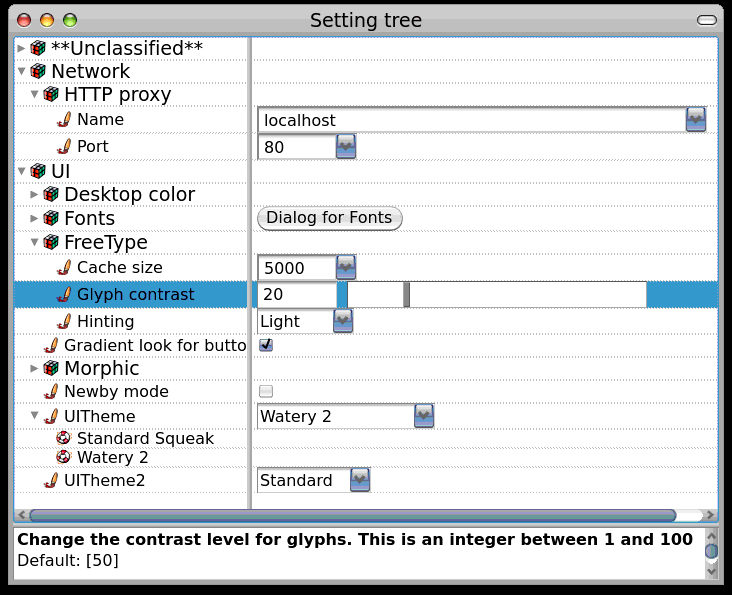

I know the Mac, Windows, and even OS/2 style prefers ellipses to indicate that command button will not immediately perform an action but will instead open a dialog box. That is, prefer Fonts... to Dialog for Fonts On Fri, Mar 13, 2009 at 7:38 PM, Alain Plantec <alain.plantec@free.fr> wrote:
Hi all, Preference is now renamed as Setting. Please, can you can load these two packages and play with the settings. 'SettingTree open' open  the browser. Examples of setting are located in the Setting-SandBox category. You can use <pharo> or <setting> as pragma. the pragma list the browser is able to recognize is now a parameter. (see SettingCollector class side). as an example, It will be possible for an application to use its own pragma symbol. Thus, the browser will be able to show application specific settings. I will add 'saving', 'saving as', choose, open,  and 'filtering' features (by package or by setting name as available in current preference browser). If you have more ideas or needs, please let me know.
Cheers alain
_______________________________________________ Pharo-project mailing list Pharo-project@lists.gforge.inria.fr http://lists.gforge.inria.fr/cgi-bin/mailman/listinfo/pharo-project

sound good. I really like the idiom to have a class var on a package this is really a nice way to let the dev think that a preference is not a system global variable (aka old preference) but a local to the package references. This way we will be able to slowly arrive to have preference as a top layer :) Stef On Mar 14, 2009, at 1:38 AM, Alain Plantec wrote:
Hi all, Preference is now renamed as Setting. Please, can you can load these two packages and play with the settings. 'SettingTree open' open the browser. Examples of setting are located in the Setting-SandBox category. You can use <pharo> or <setting> as pragma. the pragma list the browser is able to recognize is now a parameter. (see SettingCollector class side). as an example, It will be possible for an application to use its own pragma symbol. Thus, the browser will be able to show application specific settings. I will add 'saving', 'saving as', choose, open, and 'filtering' features (by package or by setting name as available in current preference browser). If you have more ideas or needs, please let me know.
Cheers alain
<Setting-alain_plantec.1.mcz><SettingSupport-alain_plantec. 1.mcz><Setting tree.gif>_______________________________________________ Pharo-project mailing list Pharo-project@lists.gforge.inria.fr http://lists.gforge.inria.fr/cgi-bin/mailman/listinfo/pharo-project

Hi Alain, Nice to see you making progress! I've taken a quick look at the GUI and the code. Here some feedback: - When I change a value, why do I get a red border (for me this indicates that the change is invalid)? - Set to default doesn't do anything - Dropdown lists are displayed at the wrong position on the screen (I'm using the default theme, Watery2) - At first I didn't recognize the slider control (glyph contrast setting) - Instead of using the old change notification mechanism, you could use Announcements - The method #domainValues: looks a bit fishy with the isKindOf: checks - The method #maxNameWidthForFont: can be simplified by using #detectMax: A search/filter would certainly be useful. Cheers, Adrian ___________________ http://www.adrian-lienhard.ch/ On Mar 14, 2009, at 01:38 , Alain Plantec wrote:
Hi all, Preference is now renamed as Setting. Please, can you can load these two packages and play with the settings. 'SettingTree open' open the browser. Examples of setting are located in the Setting-SandBox category. You can use <pharo> or <setting> as pragma. the pragma list the browser is able to recognize is now a parameter. (see SettingCollector class side). as an example, It will be possible for an application to use its own pragma symbol. Thus, the browser will be able to show application specific settings. I will add 'saving', 'saving as', choose, open, and 'filtering' features (by package or by setting name as available in current preference browser). If you have more ideas or needs, please let me know.
Cheers alain
<Setting-alain_plantec.1.mcz><SettingSupport-alain_plantec. 1.mcz><Setting tree.gif>_______________________________________________ Pharo-project mailing list Pharo-project@lists.gforge.inria.fr http://lists.gforge.inria.fr/cgi-bin/mailman/listinfo/pharo-project

----- Original Message ----- From: "Adrian Lienhard" <adi@netstyle.ch> To: "Pharo Development" <Pharo-project@lists.gforge.inria.fr> Sent: Saturday, March 14, 2009 12:48 PM Subject: Re: [Pharo-project] Setting package test
Hi Alain,
Nice to see you making progress!
I've taken a quick look at the GUI and the code. Here some feedback:
- When I change a value, why do I get a red border (for me this indicates that the change is invalid)?
The red border is what eveyone apparently still wanted for an "edited" text field (until "accepted"). If you don't like that there is a preference (old-style) showTextEditingState.
- Set to default doesn't do anything - Dropdown lists are displayed at the wrong position on the screen (I'm using the default theme, Watery2) - At first I didn't recognize the slider control (glyph contrast setting)
- Instead of using the old change notification mechanism, you could use Announcements - The method #domainValues: looks a bit fishy with the isKindOf: checks - The method #maxNameWidthForFont: can be simplified by using #detectMax:
A search/filter would certainly be useful.
Cheers, Adrian ___________________ http://www.adrian-lienhard.ch/
On Mar 14, 2009, at 01:38 , Alain Plantec wrote:
Hi all, Preference is now renamed as Setting. Please, can you can load these two packages and play with the settings. 'SettingTree open' open the browser. Examples of setting are located in the Setting-SandBox category. You can use <pharo> or <setting> as pragma. the pragma list the browser is able to recognize is now a parameter. (see SettingCollector class side). as an example, It will be possible for an application to use its own pragma symbol. Thus, the browser will be able to show application specific settings. I will add 'saving', 'saving as', choose, open, and 'filtering' features (by package or by setting name as available in current preference browser). If you have more ideas or needs, please let me know.
Cheers alain
<Setting-alain_plantec.1.mcz><SettingSupport-alain_plantec. 1.mcz><Setting tree.gif>_______________________________________________ Pharo-project mailing list Pharo-project@lists.gforge.inria.fr http://lists.gforge.inria.fr/cgi-bin/mailman/listinfo/pharo-project
_______________________________________________ Pharo-project mailing list Pharo-project@lists.gforge.inria.fr http://lists.gforge.inria.fr/cgi-bin/mailman/listinfo/pharo-project
Adrian Lienhard a écrit :
Hi Alain,
Nice to see you making progress!
thank you Adrian
I've taken a quick look at the GUI and the code. Here some feedback:
- When I change a value, why do I get a red border (for me this indicates that the change is invalid)?
no, there is no control over what is typed except with range and multiple value. The red border can be seen when you leave a widget. it indicates that you have entered something. You need to explicitly accept your input with cmd-s or return. With a simple TextEntry, one can use autoAccept: in order to avoid the red border (the text is accepted while you are typing). But here, I'm using editable drop lists (very useful for old values retrieval), and one have to explicitly accept what is entered in order to indicate to the drop list that an input has to be recorded. This is exactly the same when you edit some code in a browser. You have to accept it to compile it (red border arises if you leave an unaccepted code pane)
- Set to default doesn't do anything
It works here: try to create a setting somewhere. As an example UISettings>>smartUpdating <setting> ^ SmartUpdating ifNil: [SmartUpdating := SettingValue new name: 'Smart updating'; parent: #uiSettingNode; default: true] you should see the new setting with a checked checkbox. another example: MorphicSettings>>haloTheme <setting> ^ HaloTheme ifNil: [HaloTheme := MultipleSettingValue new name: 'Theme'; parent: #haloEnabled ; default: #Classic; domainValues: #(#Iconic #Classic #Custom)] you should see a drop list with #Classic as the current value. here, if you don't specify a default, then the default is automatically set to the first domain value (#Iconic here). You can always come back to the default value with cmd-s or from the tree popup menu. is it ok ?
- Dropdown lists are displayed at the wrong position on the screen (I'm using the default theme, Watery2)
yes, it has been fixed by 10252.
- At first I didn't recognize the slider control (glyph contrast setting)
I think I will set the bakground to lightgray in order to make them easily viewed.
- Instead of using the old change notification mechanism, you could use Announcements
ah, yes, I would like but old change notification is used by morphic and Polymorph. I have to use it in order to make fields well updated.
- The method #domainValues: looks a bit fishy with the isKindOf: checks
yes, I agree, I use isKindOf: in several places but all these bad codes will be improved when the framework will be stable.
- The method #maxNameWidthForFont: can be simplified by using #detectMax:
I didn't know it, thanks.
A search/filter would certainly be useful.
it will be implemented. thanks for your remarks, nice to have feedbacks. Cheers Alain
Cheers, Adrian ___________________ http://www.adrian-lienhard.ch/
On Mar 14, 2009, at 01:38 , Alain Plantec wrote:
Hi all, Preference is now renamed as Setting. Please, can you can load these two packages and play with the settings. 'SettingTree open' open the browser. Examples of setting are located in the Setting-SandBox category. You can use <pharo> or <setting> as pragma. the pragma list the browser is able to recognize is now a parameter. (see SettingCollector class side). as an example, It will be possible for an application to use its own pragma symbol. Thus, the browser will be able to show application specific settings. I will add 'saving', 'saving as', choose, open, and 'filtering' features (by package or by setting name as available in current preference browser). If you have more ideas or needs, please let me know.
Cheers alain
<Setting-alain_plantec.1.mcz><SettingSupport-alain_plantec. 1.mcz><Setting tree.gif>_______________________________________________ Pharo-project mailing list Pharo-project@lists.gforge.inria.fr http://lists.gforge.inria.fr/cgi-bin/mailman/listinfo/pharo-project
_______________________________________________ Pharo-project mailing list Pharo-project@lists.gforge.inria.fr http://lists.gforge.inria.fr/cgi-bin/mailman/listinfo/pharo-project
My usability problem was that I didn't understood that I need to "accept" changes in text fields. Somehow I didn't make the connection to method source panes (for which I think the feedback whether a method was saved is important). Therefore, also reverting to the default value did not work because this action does not override currently unsaved content. So everything works; just some usability issues that may be improved... (a simple text like "Save text fields with ctrl-s" might even be enough). Cheers, Adrian On Mar 14, 2009, at 17:00 , Alain Plantec wrote:
Adrian Lienhard a écrit :
Hi Alain,
Nice to see you making progress!
thank you Adrian
I've taken a quick look at the GUI and the code. Here some feedback:
- When I change a value, why do I get a red border (for me this indicates that the change is invalid)?
no, there is no control over what is typed except with range and multiple value. The red border can be seen when you leave a widget. it indicates that you have entered something. You need to explicitly accept your input with cmd-s or return. With a simple TextEntry, one can use autoAccept: in order to avoid the red border (the text is accepted while you are typing). But here, I'm using editable drop lists (very useful for old values retrieval), and one have to explicitly accept what is entered in order to indicate to the drop list that an input has to be recorded. This is exactly the same when you edit some code in a browser. You have to accept it to compile it (red border arises if you leave an unaccepted code pane)
- Set to default doesn't do anything
It works here: try to create a setting somewhere. As an example UISettings>>smartUpdating <setting> ^ SmartUpdating ifNil: [SmartUpdating := SettingValue new name: 'Smart updating'; parent: #uiSettingNode; default: true]
you should see the new setting with a checked checkbox.
another example: MorphicSettings>>haloTheme <setting> ^ HaloTheme ifNil: [HaloTheme := MultipleSettingValue new name: 'Theme'; parent: #haloEnabled ; default: #Classic; domainValues: #(#Iconic #Classic #Custom)]
you should see a drop list with #Classic as the current value. here, if you don't specify a default, then the default is automatically set to the first domain value (#Iconic here).
You can always come back to the default value with cmd-s or from the tree popup menu.
is it ok ?
- Dropdown lists are displayed at the wrong position on the screen (I'm using the default theme, Watery2)
yes, it has been fixed by 10252.
- At first I didn't recognize the slider control (glyph contrast setting)
I think I will set the bakground to lightgray in order to make them easily viewed.
- Instead of using the old change notification mechanism, you could use Announcements
ah, yes, I would like but old change notification is used by morphic and Polymorph. I have to use it in order to make fields well updated.
- The method #domainValues: looks a bit fishy with the isKindOf: checks
yes, I agree, I use isKindOf: in several places but all these bad codes will be improved when the framework will be stable.
- The method #maxNameWidthForFont: can be simplified by using #detectMax:
I didn't know it, thanks.
A search/filter would certainly be useful.
it will be implemented.
thanks for your remarks, nice to have feedbacks.
Cheers Alain
Cheers, Adrian ___________________ http://www.adrian-lienhard.ch/
On Mar 14, 2009, at 01:38 , Alain Plantec wrote:
Hi all, Preference is now renamed as Setting. Please, can you can load these two packages and play with the settings. 'SettingTree open' open the browser. Examples of setting are located in the Setting-SandBox category. You can use <pharo> or <setting> as pragma. the pragma list the browser is able to recognize is now a parameter. (see SettingCollector class side). as an example, It will be possible for an application to use its own pragma symbol. Thus, the browser will be able to show application specific settings. I will add 'saving', 'saving as', choose, open, and 'filtering' features (by package or by setting name as available in current preference browser). If you have more ideas or needs, please let me know.
Cheers alain
<Setting-alain_plantec.1.mcz><SettingSupport-alain_plantec. 1.mcz><Setting tree.gif>_______________________________________________ Pharo-project mailing list Pharo-project@lists.gforge.inria.fr http://lists.gforge.inria.fr/cgi-bin/mailman/listinfo/pharo-project
_______________________________________________ Pharo-project mailing list Pharo-project@lists.gforge.inria.fr http://lists.gforge.inria.fr/cgi-bin/mailman/listinfo/pharo-project
_______________________________________________ Pharo-project mailing list Pharo-project@lists.gforge.inria.fr http://lists.gforge.inria.fr/cgi-bin/mailman/listinfo/pharo-project
participants (5)
-
 Adrian Lienhard
 -
 Alain Plantec
 -
 David Mitchell
 -
 Gary Chambers
 -
 Stéphane Ducasse