Epicea user experience report

1. Created fresh Pharo image (build 60269) 2. Opened World > Tools > Epicea > All changes Points for discussion... a. How many submenu items are expected for Epicea? Can we push the current ones up so the Tools menu remains a flat menu. b. Do we need the two current menu items? "Current session" is encompassed by "All changes"? What expectations do people have of how often they'll use the former rather than the latter? c. When people move from Pharo 5 to Pharo 6 and in a panic want to "recover changes" for a crashed image, they'll be looking for that familiar feature name, not a new app name. Could the app name be left out or placed in brackets "Changes (Epicea)". btw, the interface looks really slick! nice work. 3. Opened World > System Browser. 4. Added package AAA All Changes window - no dynamic change. On <refresh>, still no change, i.e. no sessions #New All Changes window - not visible, no sessions. 5. Added class AA. All Changes window - no dynamic change. On <refresh>, shows new session with AAA & AA. 5. Added method... AA>a ^'something' Prompted for author, entered 'BenComan' All Changes window with session selected - dynamic update showing AA>>a. 6. Added package BBB. All Changes window - no dynamic update. On <refresh>, BBB still not visible in session. 7. Added class A to package AAA. All Changes window - dynamic update showing A. On <refresh>, BBB still not visible in session. 8. Added class BB to package BBB. All Changes window - dynamic update showing BBB & BB. a. Package creation event seems not handled properly, being only pushed through when a class is created in it. b. Since there is a dynamic update for class and method modifications, could the session creation also dynamically update it UI. ----------- 9. Killed the vm from command line $ ps -ef | grep pharo $ kill 29349 Restarted Pharo image 10. World > Tools > Epica > All changes. Authorship is inconsistent: * AAA and AA have blank author * AA>>a, A, BBB, B have author 'BenComan'. a. I understand this follows on from Author not being requested until the first method was defined. Did the old changes track the author of packages and classes at all? b. Since Epicea can track package and class authors, can we trigger the author prompt earlier for them? 11. Selected all previous changes AAA, AA, AA>>a, A, BBB, BB and did <Apply Changes>. Prompted for author. Entered 'DrWho' Existing All Changes window - no change New All Changes window - shows new session with all six changes. Authorship is a little inconsistent: * AAA and AA have author 'Unknown'. * AA>>a, A, BBB, B have blank author. 12. Killed the vm from command line $ ps -ef | grep pharo $ kill 30696 Restarted Pharo image 13. World > Tools > Epica > All changes. Authorship is a little inconsistent: First session * AAA and AA have blank author * AA>>a, A, BBB, B have author 'BenComan'. Second session * AAA and AA have blank author * AA>>a, A, BBB, B have author 'DrWho'. a. Epicea changes are reapplied as the current author. This seems a semantic change from Pharo 5 where changes were reapplied as their original author. Is this accidental or by design? Can we have some community discussion on this point (I don't remember seeing any)? cheers -ben P.S. I'll wait to see what arises out of discussion before creating any issues.

Hello Ben, About discussion points in 2 (a, b and c): I agree with your arguments... somebody that just moved from Pharo 5 to 6 and crashed an image will look for a "Recover lost changes" in the menu and can have a problem to discover it the replacement in a World->Tools->Epicea->... entry. Then, as a first step we could flatten the 2 menu entries and then at least anybody will easily find an entry related to changes in World->Tools. Second, we could try to merge both Epicea GUIs into one (suggestions are welcome). I still have to read more in detail the remaining of your report to answer. Anyway, thanks a lot for it. Cheers, Martin On Sat, Oct 29, 2016 at 5:22 AM, Ben Coman <btc@openinworld.com> wrote:
1. Created fresh Pharo image (build 60269)
2. Opened World > Tools > Epicea > All changes
Points for discussion...
a. How many submenu items are expected for Epicea? Can we push the current ones up so the Tools menu remains a flat menu.
b. Do we need the two current menu items? "Current session" is encompassed by "All changes"? What expectations do people have of how often they'll use the former rather than the latter?
c. When people move from Pharo 5 to Pharo 6 and in a panic want to "recover changes" for a crashed image, they'll be looking for that familiar feature name, not a new app name. Could the app name be left out or placed in brackets "Changes (Epicea)".
btw, the interface looks really slick! nice work.
3. Opened World > System Browser.
4. Added package AAA All Changes window - no dynamic change. On <refresh>, still no change, i.e. no sessions #New All Changes window - not visible, no sessions.
5. Added class AA. All Changes window - no dynamic change. On <refresh>, shows new session with AAA & AA.
5. Added method... AA>a ^'something' Prompted for author, entered 'BenComan' All Changes window with session selected - dynamic update showing AA>>a.
6. Added package BBB. All Changes window - no dynamic update. On <refresh>, BBB still not visible in session.
7. Added class A to package AAA. All Changes window - dynamic update showing A. On <refresh>, BBB still not visible in session.
8. Added class BB to package BBB. All Changes window - dynamic update showing BBB & BB.
a. Package creation event seems not handled properly, being only pushed through when a class is created in it.
b. Since there is a dynamic update for class and method modifications, could the session creation also dynamically update it UI.
----------- 9. Killed the vm from command line $ ps -ef | grep pharo $ kill 29349 Restarted Pharo image
10. World > Tools > Epica > All changes. Authorship is inconsistent: * AAA and AA have blank author * AA>>a, A, BBB, B have author 'BenComan'.
a. I understand this follows on from Author not being requested until the first method was defined. Did the old changes track the author of packages and classes at all?
b. Since Epicea can track package and class authors, can we trigger the author prompt earlier for them?
11. Selected all previous changes AAA, AA, AA>>a, A, BBB, BB and did <Apply Changes>. Prompted for author. Entered 'DrWho' Existing All Changes window - no change New All Changes window - shows new session with all six changes. Authorship is a little inconsistent: * AAA and AA have author 'Unknown'. * AA>>a, A, BBB, B have blank author.
12. Killed the vm from command line $ ps -ef | grep pharo $ kill 30696 Restarted Pharo image
13. World > Tools > Epica > All changes. Authorship is a little inconsistent: First session * AAA and AA have blank author * AA>>a, A, BBB, B have author 'BenComan'. Second session * AAA and AA have blank author * AA>>a, A, BBB, B have author 'DrWho'.
a. Epicea changes are reapplied as the current author. This seems a semantic change from Pharo 5 where changes were reapplied as their original author. Is this accidental or by design? Can we have some community discussion on this point (I don't remember seeing any)?
cheers -ben
P.S. I'll wait to see what arises out of discussion before creating any issues.
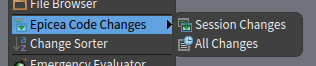
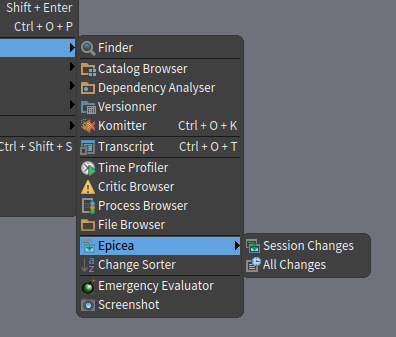
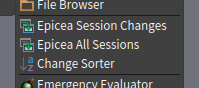
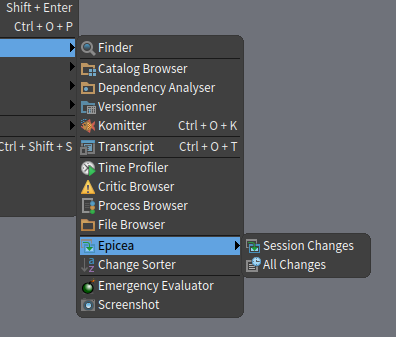
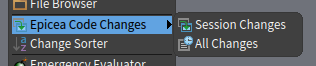
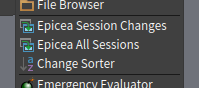
Hi all, One point of Ben's feedback is how Epicea code changes tool is presented in the World Menu. Below you can see the current state + 3 options to discuss it. 1. "Epicea" main entry > "Session Changes" + "All Changes" children [current state] 2. Attach purpose to the name: "Epicea Code Changes" 3. Just "Code Changes" + rephrase children: â â 4. Flatten â Reminder: In World Menu > Help > Help Browser > Epicea you can find a description of the tool and it's model. Cheers. Martin On Mon, Oct 31, 2016 at 1:02 AM, Martin Dias <tinchodias@gmail.com> wrote:
Hello Ben,
About discussion points in 2 (a, b and c): I agree with your arguments... somebody that just moved from Pharo 5 to 6 and crashed an image will look for a "Recover lost changes" in the menu and can have a problem to discover it the replacement in a World->Tools->Epicea->... entry.
Then, as a first step we could flatten the 2 menu entries and then at least anybody will easily find an entry related to changes in World->Tools.
Second, we could try to merge both Epicea GUIs into one (suggestions are welcome).
I still have to read more in detail the remaining of your report to answer. Anyway, thanks a lot for it.
Cheers, Martin
On Sat, Oct 29, 2016 at 5:22 AM, Ben Coman <btc@openinworld.com> wrote:
1. Created fresh Pharo image (build 60269)
2. Opened World > Tools > Epicea > All changes
Points for discussion...
a. How many submenu items are expected for Epicea? Can we push the current ones up so the Tools menu remains a flat menu.
b. Do we need the two current menu items? "Current session" is encompassed by "All changes"? What expectations do people have of how often they'll use the former rather than the latter?
c. When people move from Pharo 5 to Pharo 6 and in a panic want to "recover changes" for a crashed image, they'll be looking for that familiar feature name, not a new app name. Could the app name be left out or placed in brackets "Changes (Epicea)".
btw, the interface looks really slick! nice work.
3. Opened World > System Browser.
4. Added package AAA All Changes window - no dynamic change. On <refresh>, still no change, i.e. no sessions #New All Changes window - not visible, no sessions.
5. Added class AA. All Changes window - no dynamic change. On <refresh>, shows new session with AAA & AA.
5. Added method... AA>a ^'something' Prompted for author, entered 'BenComan' All Changes window with session selected - dynamic update showing AA>>a.
6. Added package BBB. All Changes window - no dynamic update. On <refresh>, BBB still not visible in session.
7. Added class A to package AAA. All Changes window - dynamic update showing A. On <refresh>, BBB still not visible in session.
8. Added class BB to package BBB. All Changes window - dynamic update showing BBB & BB.
a. Package creation event seems not handled properly, being only pushed through when a class is created in it.
b. Since there is a dynamic update for class and method modifications, could the session creation also dynamically update it UI.
----------- 9. Killed the vm from command line $ ps -ef | grep pharo $ kill 29349 Restarted Pharo image
10. World > Tools > Epica > All changes. Authorship is inconsistent: * AAA and AA have blank author * AA>>a, A, BBB, B have author 'BenComan'.
a. I understand this follows on from Author not being requested until the first method was defined. Did the old changes track the author of packages and classes at all?
b. Since Epicea can track package and class authors, can we trigger the author prompt earlier for them?
11. Selected all previous changes AAA, AA, AA>>a, A, BBB, BB and did <Apply Changes>. Prompted for author. Entered 'DrWho' Existing All Changes window - no change New All Changes window - shows new session with all six changes. Authorship is a little inconsistent: * AAA and AA have author 'Unknown'. * AA>>a, A, BBB, B have blank author.
12. Killed the vm from command line $ ps -ef | grep pharo $ kill 30696 Restarted Pharo image
13. World > Tools > Epica > All changes. Authorship is a little inconsistent: First session * AAA and AA have blank author * AA>>a, A, BBB, B have author 'BenComan'. Second session * AAA and AA have blank author * AA>>a, A, BBB, B have author 'DrWho'.
a. Epicea changes are reapplied as the current author. This seems a semantic change from Pharo 5 where changes were reapplied as their original author. Is this accidental or by design? Can we have some community discussion on this point (I don't remember seeing any)?
cheers -ben
P.S. I'll wait to see what arises out of discussion before creating any issues.



Marcus Denker-4 wrote
3. Just "Code Changes" + rephrase children: I like that most. It is the easiest to understand for newcomers.
+1 ----- Cheers, Sean -- View this message in context: http://forum.world.st/Epicea-user-experience-report-tp4920653p4927604.html Sent from the Pharo Smalltalk Developers mailing list archive at Nabble.com.

I like the second because it associates the name with the function. Stef
Hi all,
One point of Ben's feedback is how Epicea code changes tool is presented in the World Menu. Below you can see the current state + 3 options to discuss it.
1. "Epicea" main entry > "Session Changes" + "All Changes" children [current state]
2. Attach purpose to the name: "Epicea Code Changes"
3. Just "Code Changes" + rephrase children:
â â
4. Flatten
â
Reminder: In World Menu > Help > Help Browser > Epicea you can find a description of the tool and it's model.
Cheers. Martin
On Mon, Oct 31, 2016 at 1:02 AM, Martin Dias <tinchodias@gmail.com> wrote:
Hello Ben,
About discussion points in 2 (a, b and c): I agree with your arguments... somebody that just moved from Pharo 5 to 6 and crashed an image will look for a "Recover lost changes" in the menu >>and can have a problem to discover it the replacement in a World->Tools->Epicea->... entry.
Then, as a first step we could flatten the 2 menu entries and then at least anybody will easily find an entry related to changes in World->Tools. Second, we could try to merge both Epicea GUIs into one (suggestions are welcome).
I still have to read more in detail the remaining of your report to answer. Anyway, thanks a lot for it.
Cheers, Martin
On Sat, Oct 29, 2016 at 5:22 AM, Ben Coman <btc@openinworld.com> wrote:
1. Created fresh Pharo image (build 60269)
2. Opened World > Tools > Epicea > All changes
Points for discussion...
a. How many submenu items are expected for Epicea? Can we push the current ones up so the Tools menu remains a flat menu.
b. Do we need the two current menu items? "Current session" is encompassed by "All changes"? What expectations do people have of how often they'll use the former rather than the latter?
c. When people move from Pharo 5 to Pharo 6 and in a panic want to "recover changes" for a crashed image, they'll be looking for that familiar feature name, not a new app name. Could the app name be left out or placed in brackets "Changes (Epicea)".
btw, the interface looks really slick! nice work.
3. Opened World > System Browser.
4. Added package AAA All Changes window - no dynamic change. On <refresh>, still no change, i.e. no sessions #New All Changes window - not visible, no sessions.
5. Added class AA. All Changes window - no dynamic change. On <refresh>, shows new session with AAA & AA.
5. Added method... AA>a ^'something' Prompted for author, entered 'BenComan' All Changes window with session selected - dynamic update showing AA>>a.
6. Added package BBB. All Changes window - no dynamic update. On <refresh>, BBB still not visible in session.
7. Added class A to package AAA. All Changes window - dynamic update showing A. On <refresh>, BBB still not visible in session.
8. Added class BB to package BBB. All Changes window - dynamic update showing BBB & BB.
a. Package creation event seems not handled properly, being only pushed through when a class is created in it.
b. Since there is a dynamic update for class and method modifications, could the session creation also dynamically update it UI.
----------- 9. Killed the vm from command line $ ps -ef | grep pharo $ kill 29349 Restarted Pharo image
10. World > Tools > Epica > All changes. Authorship is inconsistent: * AAA and AA have blank author * AA>>a, A, BBB, B have author 'BenComan'.
a. I understand this follows on from Author not being requested until the first method was defined. Did the old changes track the author of packages and classes at all?
b. Since Epicea can track package and class authors, can we trigger the author prompt earlier for them?
11. Selected all previous changes AAA, AA, AA>>a, A, BBB, BB and did <Apply Changes>. Prompted for author. Entered 'DrWho' Existing All Changes window - no change New All Changes window - shows new session with all six changes. Authorship is a little inconsistent: * AAA and AA have author 'Unknown'. * AA>>a, A, BBB, B have blank author.
12. Killed the vm from command line $ ps -ef | grep pharo $ kill 30696 Restarted Pharo image
13. World > Tools > Epica > All changes. Authorship is a little inconsistent: First session * AAA and AA have blank author * AA>>a, A, BBB, B have author 'BenComan'. Second session * AAA and AA have blank author * AA>>a, A, BBB, B have author 'DrWho'.
a. Epicea changes are reapplied as the current author. This seems a semantic change from Pharo 5 where changes were reapplied as their original author. Is this accidental or by design? Can we have some community discussion on this point (I don't remember seeing any)?
cheers -ben
P.S. I'll wait to see what arises out of discussion before creating any issues.
-- Using Opera's mail client: http://www.opera.com/mail/


Hi, I think I would prefer to not have to think about this choice at all when in the world menu level. The user interface from the Epicea window already allows me to switch between current session and all sessions, and usually the decision of what to look at is based on whether I find what I am looking for or not. So, rather then asking the user to think about it upfront, I would prefer to have one command that opens the Epicea window on the current session and allow the user to dive deeper. This would also imply that we would have only one command in the menu item. What do you think? Cheers, Doru
On Dec 20, 2016, at 10:16 PM, stepharong <stepharong@free.fr> wrote:
I like the second because it associates the name with the function.
Stef
Hi all,
One point of Ben's feedback is how Epicea code changes tool is presented in the World Menu. Below you can see the current state + 3 options to discuss it.
1. "Epicea" main entry > "Session Changes" + "All Changes" children [current state]
<Mail Attachment.png>
2. Attach purpose to the name: "Epicea Code Changes"
<Mail Attachment.png>
3. Just "Code Changes" + rephrase children:
â<Mail Attachment.png> â
4. Flatten
<Mail Attachment.png> â
Reminder: In World Menu > Help > Help Browser > Epicea you can find a description of the tool and it's model.
Cheers. Martin
On Mon, Oct 31, 2016 at 1:02 AM, Martin Dias <tinchodias@gmail.com> wrote: Hello Ben,
About discussion points in 2 (a, b and c): I agree with your arguments... somebody that just moved from Pharo 5 to 6 and crashed an image will look for a "Recover lost changes" in the menu and can have a problem to discover it the replacement in a World->Tools->Epicea->... entry.
Then, as a first step we could flatten the 2 menu entries and then at least anybody will easily find an entry related to changes in World->Tools.
Second, we could try to merge both Epicea GUIs into one (suggestions are welcome).
I still have to read more in detail the remaining of your report to answer. Anyway, thanks a lot for it.
Cheers, Martin
On Sat, Oct 29, 2016 at 5:22 AM, Ben Coman <btc@openinworld.com> wrote: 1. Created fresh Pharo image (build 60269)
2. Opened World > Tools > Epicea > All changes
Points for discussion...
a. How many submenu items are expected for Epicea? Can we push the current ones up so the Tools menu remains a flat menu.
b. Do we need the two current menu items? "Current session" is encompassed by "All changes"? What expectations do people have of how often they'll use the former rather than the latter?
c. When people move from Pharo 5 to Pharo 6 and in a panic want to "recover changes" for a crashed image, they'll be looking for that familiar feature name, not a new app name. Could the app name be left out or placed in brackets "Changes (Epicea)".
btw, the interface looks really slick! nice work.
3. Opened World > System Browser.
4. Added package AAA All Changes window - no dynamic change. On <refresh>, still no change, i.e. no sessions #New All Changes window - not visible, no sessions.
5. Added class AA. All Changes window - no dynamic change. On <refresh>, shows new session with AAA & AA.
5. Added method... AA>a ^'something' Prompted for author, entered 'BenComan' All Changes window with session selected - dynamic update showing AA>>a.
6. Added package BBB. All Changes window - no dynamic update. On <refresh>, BBB still not visible in session.
7. Added class A to package AAA. All Changes window - dynamic update showing A. On <refresh>, BBB still not visible in session.
8. Added class BB to package BBB. All Changes window - dynamic update showing BBB & BB.
a. Package creation event seems not handled properly, being only pushed through when a class is created in it.
b. Since there is a dynamic update for class and method modifications, could the session creation also dynamically update it UI.
----------- 9. Killed the vm from command line $ ps -ef | grep pharo $ kill 29349 Restarted Pharo image
10. World > Tools > Epica > All changes. Authorship is inconsistent: * AAA and AA have blank author * AA>>a, A, BBB, B have author 'BenComan'.
a. I understand this follows on from Author not being requested until the first method was defined. Did the old changes track the author of packages and classes at all?
b. Since Epicea can track package and class authors, can we trigger the author prompt earlier for them?
11. Selected all previous changes AAA, AA, AA>>a, A, BBB, BB and did <Apply Changes>. Prompted for author. Entered 'DrWho' Existing All Changes window - no change New All Changes window - shows new session with all six changes. Authorship is a little inconsistent: * AAA and AA have author 'Unknown'. * AA>>a, A, BBB, B have blank author.
12. Killed the vm from command line $ ps -ef | grep pharo $ kill 30696 Restarted Pharo image
13. World > Tools > Epica > All changes. Authorship is a little inconsistent: First session * AAA and AA have blank author * AA>>a, A, BBB, B have author 'BenComan'. Second session * AAA and AA have blank author * AA>>a, A, BBB, B have author 'DrWho'.
a. Epicea changes are reapplied as the current author. This seems a semantic change from Pharo 5 where changes were reapplied as their original author. Is this accidental or by design? Can we have some community discussion on this point (I don't remember seeing any)?
cheers -ben
P.S. I'll wait to see what arises out of discussion before creating any issues.
-- Using Opera's mail client: http://www.opera.com/mail/
-- www.tudorgirba.com www.feenk.com "In a world where everything is moving ever faster, one might have better chances to win by moving slower."

2016-12-21 8:03 GMT+01:00 Tudor Girba <tudor@tudorgirba.com>:
Hi,
I think I would prefer to not have to think about this choice at all when in the world menu level. The user interface from the Epicea window already allows me to switch between current session and all sessions, and usually the decision of what to look at is based on whether I find what I am looking for or not. So, rather then asking the user to think about it upfront, I would prefer to have one command that opens the Epicea window on the current session and allow the user to dive deeper. This would also imply that we would have only one command in the menu item. What do you think?
+1
On Wed, Dec 21, 2016 at 3:03 PM, Tudor Girba <tudor@tudorgirba.com> wrote:
Hi,
I think I would prefer to not have to think about this choice at all when in the world menu level. The user interface from the Epicea window already allows me to switch between current session and all sessions, and usually the decision of what to look at is based on whether I find what I am looking for or not. So, rather then asking the user to think about it upfront, I would prefer to have one command that opens the Epicea window on the current session and allow the user to dive deeper. This would also imply that we would have only one command in the menu item. What do you think?
Good point. I had a similar thought earlier. The individual Session Changes window is almost completely embedded in the All Sessions window, so the former seems superfluous. The <Monitor> and <+> buttons would need to be added to the All Sessions window, probably above the "sesssion" pane. Two additional things I think are required to facilitate this... 1. The left-pane of the All Sessions windows needs to update when a new session is created - per <+> button. 2. It would be useful if a new session was created "when the image opened" rather than when a change is made, so that it can be preselected in the left-side pane when a fresh image is opened. But the file shouldn't be created until the first change, for the case like a web service image being invoked multiple times a second. Also one other request, That the current-session be tagged "Current" rather than just "Today". I can log issues if they all sound reasonable. cheers -ben
On Dec 20, 2016, at 10:16 PM, stepharong <stepharong@free.fr> wrote:
I like the second because it associates the name with the function.
Stef
Hi all,
One point of Ben's feedback is how Epicea code changes tool is presented in the World Menu. Below you can see the current state + 3 options to discuss it.
1. "Epicea" main entry > "Session Changes" + "All Changes" children [current state]
<Mail Attachment.png>
2. Attach purpose to the name: "Epicea Code Changes"
<Mail Attachment.png>
3. Just "Code Changes" + rephrase children:
<Mail Attachment.png>
4. Flatten
<Mail Attachment.png>
Reminder: In World Menu > Help > Help Browser > Epicea you can find a description of the tool and it's model.
Cheers. Martin
On Mon, Oct 31, 2016 at 1:02 AM, Martin Dias <tinchodias@gmail.com> wrote: Hello Ben,
About discussion points in 2 (a, b and c): I agree with your arguments... somebody that just moved from Pharo 5 to 6 and crashed an image will look for a "Recover lost changes" in the menu and can have a problem to discover it the replacement in a World->Tools->Epicea->... entry.
Then, as a first step we could flatten the 2 menu entries and then at least anybody will easily find an entry related to changes in World->Tools.
Second, we could try to merge both Epicea GUIs into one (suggestions are welcome).
I still have to read more in detail the remaining of your report to answer. Anyway, thanks a lot for it.
Cheers, Martin
On Sat, Oct 29, 2016 at 5:22 AM, Ben Coman <btc@openinworld.com> wrote: 1. Created fresh Pharo image (build 60269)
2. Opened World > Tools > Epicea > All changes
Points for discussion...
a. How many submenu items are expected for Epicea? Can we push the current ones up so the Tools menu remains a flat menu.
b. Do we need the two current menu items? "Current session" is encompassed by "All changes"? What expectations do people have of how often they'll use the former rather than the latter?
c. When people move from Pharo 5 to Pharo 6 and in a panic want to "recover changes" for a crashed image, they'll be looking for that familiar feature name, not a new app name. Could the app name be left out or placed in brackets "Changes (Epicea)".
btw, the interface looks really slick! nice work.
3. Opened World > System Browser.
4. Added package AAA All Changes window - no dynamic change. On <refresh>, still no change, i.e. no sessions #New All Changes window - not visible, no sessions.
5. Added class AA. All Changes window - no dynamic change. On <refresh>, shows new session with AAA & AA.
5. Added method... AA>a ^'something' Prompted for author, entered 'BenComan' All Changes window with session selected - dynamic update showing AA>>a.
6. Added package BBB. All Changes window - no dynamic update. On <refresh>, BBB still not visible in session.
7. Added class A to package AAA. All Changes window - dynamic update showing A. On <refresh>, BBB still not visible in session.
8. Added class BB to package BBB. All Changes window - dynamic update showing BBB & BB.
a. Package creation event seems not handled properly, being only pushed through when a class is created in it.
b. Since there is a dynamic update for class and method modifications, could the session creation also dynamically update it UI.
----------- 9. Killed the vm from command line $ ps -ef | grep pharo $ kill 29349 Restarted Pharo image
10. World > Tools > Epica > All changes. Authorship is inconsistent: * AAA and AA have blank author * AA>>a, A, BBB, B have author 'BenComan'.
a. I understand this follows on from Author not being requested until the first method was defined. Did the old changes track the author of packages and classes at all?
b. Since Epicea can track package and class authors, can we trigger the author prompt earlier for them?
11. Selected all previous changes AAA, AA, AA>>a, A, BBB, BB and did <Apply Changes>. Prompted for author. Entered 'DrWho' Existing All Changes window - no change New All Changes window - shows new session with all six changes. Authorship is a little inconsistent: * AAA and AA have author 'Unknown'. * AA>>a, A, BBB, B have blank author.
12. Killed the vm from command line $ ps -ef | grep pharo $ kill 30696 Restarted Pharo image
13. World > Tools > Epica > All changes. Authorship is a little inconsistent: First session * AAA and AA have blank author * AA>>a, A, BBB, B have author 'BenComan'. Second session * AAA and AA have blank author * AA>>a, A, BBB, B have author 'DrWho'.
a. Epicea changes are reapplied as the current author. This seems a semantic change from Pharo 5 where changes were reapplied as their original author. Is this accidental or by design? Can we have some community discussion on this point (I don't remember seeing any)?
cheers -ben
P.S. I'll wait to see what arises out of discussion before creating any issues.
-- Using Opera's mail client: http://www.opera.com/mail/
-- www.tudorgirba.com www.feenk.com
"In a world where everything is moving ever faster, one might have better chances to win by moving slower."
Ben, yes, please create the issues if you want, and I will try to implement them soon. I guess if they are mostly UI changes and categorized to "first impression count" or something like that, they can still be included in Pharo 6, no? One thing to discuss: what do you think about the fact that... - the "Session changes" displays the changes of multiple log files in the same list widget (silently concatenated), versus - the "All changes" way of displaying, where the changes of each log file are separated. That was my main reason to keep two windows by separate. I had the impression that in some cases - the user wants to see all changes together and he/she doesn't care in which log file the changes are written, while in other cases - the user wants to know the log files and see how are they connected, because they have some meaning What do you think of this? BTW I don't like the file names... hints are welcome to improve it Martin On Wed, Dec 21, 2016 at 9:19 AM, Ben Coman <btc@openinworld.com> wrote:
On Wed, Dec 21, 2016 at 3:03 PM, Tudor Girba <tudor@tudorgirba.com> wrote:
Hi,
I think I would prefer to not have to think about this choice at all when in the world menu level. The user interface from the Epicea window already allows me to switch between current session and all sessions, and usually the decision of what to look at is based on whether I find what I am looking for or not. So, rather then asking the user to think about it upfront, I would prefer to have one command that opens the Epicea window on the current session and allow the user to dive deeper. This would also imply that we would have only one command in the menu item. What do you think?
Good point. I had a similar thought earlier. The individual Session Changes window is almost completely embedded in the All Sessions window, so the former seems superfluous. The <Monitor> and <+> buttons would need to be added to the All Sessions window, probably above the "sesssion" pane.
Two additional things I think are required to facilitate this... 1. The left-pane of the All Sessions windows needs to update when a new session is created - per <+> button. 2. It would be useful if a new session was created "when the image opened" rather than when a change is made, so that it can be preselected in the left-side pane when a fresh image is opened. But the file shouldn't be created until the first change, for the case like a web service image being invoked multiple times a second.
Also one other request, That the current-session be tagged "Current" rather than just "Today".
I can log issues if they all sound reasonable.
cheers -ben
On Dec 20, 2016, at 10:16 PM, stepharong <stepharong@free.fr> wrote:
I like the second because it associates the name with the function.
Stef
Hi all,
One point of Ben's feedback is how Epicea code changes tool is
presented in the World Menu. Below you can see the current state + 3 options to discuss it.
1. "Epicea" main entry > "Session Changes" + "All Changes" children
[current state]
<Mail Attachment.png>
2. Attach purpose to the name: "Epicea Code Changes"
<Mail Attachment.png>
3. Just "Code Changes" + rephrase children:
<Mail Attachment.png>
4. Flatten
<Mail Attachment.png>
Reminder: In World Menu > Help > Help Browser > Epicea you can find a
description of the tool and it's model.
Cheers. Martin
On Mon, Oct 31, 2016 at 1:02 AM, Martin Dias <tinchodias@gmail.com>
wrote:
Hello Ben,
About discussion points in 2 (a, b and c): I agree with your arguments... somebody that just moved from Pharo 5 to 6 and crashed an image will look for a "Recover lost changes" in the menu and can have a problem to discover it the replacement in a World->Tools->Epicea->... entry.
Then, as a first step we could flatten the 2 menu entries and then at least anybody will easily find an entry related to changes in World->Tools.
Second, we could try to merge both Epicea GUIs into one (suggestions are welcome).
I still have to read more in detail the remaining of your report to answer. Anyway, thanks a lot for it.
Cheers, Martin
On Sat, Oct 29, 2016 at 5:22 AM, Ben Coman <btc@openinworld.com> wrote: 1. Created fresh Pharo image (build 60269)
2. Opened World > Tools > Epicea > All changes
Points for discussion...
a. How many submenu items are expected for Epicea? Can we push the current ones up so the Tools menu remains a flat menu.
b. Do we need the two current menu items? "Current session" is encompassed by "All changes"? What expectations do people have of how often they'll use the former rather than the latter?
c. When people move from Pharo 5 to Pharo 6 and in a panic want to "recover changes" for a crashed image, they'll be looking for that familiar feature name, not a new app name. Could the app name be left out or placed in brackets "Changes (Epicea)".
btw, the interface looks really slick! nice work.
3. Opened World > System Browser.
4. Added package AAA All Changes window - no dynamic change. On <refresh>, still no change, i.e. no sessions #New All Changes window - not visible, no sessions.
5. Added class AA. All Changes window - no dynamic change. On <refresh>, shows new session with AAA & AA.
5. Added method... AA>a ^'something' Prompted for author, entered 'BenComan' All Changes window with session selected - dynamic update showing AA>>a.
6. Added package BBB. All Changes window - no dynamic update. On <refresh>, BBB still not visible in session.
7. Added class A to package AAA. All Changes window - dynamic update showing A. On <refresh>, BBB still not visible in session.
8. Added class BB to package BBB. All Changes window - dynamic update showing BBB & BB.
a. Package creation event seems not handled properly, being only pushed through when a class is created in it.
b. Since there is a dynamic update for class and method modifications, could the session creation also dynamically update it UI.
----------- 9. Killed the vm from command line $ ps -ef | grep pharo $ kill 29349 Restarted Pharo image
10. World > Tools > Epica > All changes. Authorship is inconsistent: * AAA and AA have blank author * AA>>a, A, BBB, B have author 'BenComan'.
a. I understand this follows on from Author not being requested until the first method was defined. Did the old changes track the author of packages and classes at all?
b. Since Epicea can track package and class authors, can we trigger the author prompt earlier for them?
11. Selected all previous changes AAA, AA, AA>>a, A, BBB, BB and did <Apply Changes>. Prompted for author. Entered 'DrWho' Existing All Changes window - no change New All Changes window - shows new session with all six changes. Authorship is a little inconsistent: * AAA and AA have author 'Unknown'. * AA>>a, A, BBB, B have blank author.
12. Killed the vm from command line $ ps -ef | grep pharo $ kill 30696 Restarted Pharo image
13. World > Tools > Epica > All changes. Authorship is a little inconsistent: First session * AAA and AA have blank author * AA>>a, A, BBB, B have author 'BenComan'. Second session * AAA and AA have blank author * AA>>a, A, BBB, B have author 'DrWho'.
a. Epicea changes are reapplied as the current author. This seems a semantic change from Pharo 5 where changes were reapplied as their original author. Is this accidental or by design? Can we have some community discussion on this point (I don't remember seeing any)?
cheers -ben
P.S. I'll wait to see what arises out of discussion before creating any issues.
-- Using Opera's mail client: http://www.opera.com/mail/
-- www.tudorgirba.com www.feenk.com
"In a world where everything is moving ever faster, one might have better chances to win by moving slower."
On Sat, Dec 24, 2016 at 2:46 AM, Martin Dias <tinchodias@gmail.com> wrote:
Ben, yes, please create the issues if you want, and I will try to implement them soon. I guess if they are mostly UI changes and categorized to "first impression count" or something like that, they can still be included in Pharo 6, no?
One thing to discuss: what do you think about the fact that... - the "Session changes" displays the changes of multiple log files in the same list widget (silently concatenated), versus
Well the biggest thing is probably that I did not realise it did this. So this is a problem for intuitive use of the tool. Actually it seems adverse to show multiple sessions where "Session Changes" implies "This Session".
- the "All changes" way of displaying, where the changes of each log file are separated.
That was my main reason to keep two windows by separate. I had the impression that in some cases - the user wants to see all changes together and he/she doesn't care in which log file the changes are written, while in other cases - the user wants to know the log files and see how are they connected, because they have some meaning What do you think of this?
You are right, that is useful feature. But I keep "intuitively wanting**" to do this is to multi-select sessions in the "All changes" window. My use case is yesterday playing with sockets, the image froze half way through saving (hung at blank white window). So after killing the pharo process, the Image would not open. So before recreating the Image in PharoLauncher, I copied the ombu-sessions folder and copied into a fresh Image folder and selected each session in turn. (So btw that was a nice benefit of epicea versus the changes file needing to be kept more in sync with image file.) I only had half a dozen sessions so it wasn't too much trouble. But potentially there could be a lot more sessions and being able to do them all at once would be useful. ** i.e. I didn't learn the first time I tried this and it didn't work, and found I accidentally tried doing it a few more times after that.
BTW I don't like the file names... hints are welcome to improve it
Which file names do you mean? cheers -ben
Martin
On Wed, Dec 21, 2016 at 9:19 AM, Ben Coman <btc@openinworld.com> wrote:
On Wed, Dec 21, 2016 at 3:03 PM, Tudor Girba <tudor@tudorgirba.com> wrote:
Hi,
I think I would prefer to not have to think about this choice at all when in the world menu level. The user interface from the Epicea window already allows me to switch between current session and all sessions, and usually the decision of what to look at is based on whether I find what I am looking for or not. So, rather then asking the user to think about it upfront, I would prefer to have one command that opens the Epicea window on the current session and allow the user to dive deeper. This would also imply that we would have only one command in the menu item. What do you think?
Good point. I had a similar thought earlier. The individual Session Changes window is almost completely embedded in the All Sessions window, so the former seems superfluous. The <Monitor> and <+> buttons would need to be added to the All Sessions window, probably above the "sesssion" pane.
Two additional things I think are required to facilitate this... 1. The left-pane of the All Sessions windows needs to update when a new session is created - per <+> button. 2. It would be useful if a new session was created "when the image opened" rather than when a change is made, so that it can be preselected in the left-side pane when a fresh image is opened. But the file shouldn't be created until the first change, for the case like a web service image being invoked multiple times a second.
Also one other request, That the current-session be tagged "Current" rather than just "Today".
I can log issues if they all sound reasonable.
cheers -ben
On Dec 20, 2016, at 10:16 PM, stepharong <stepharong@free.fr> wrote:
I like the second because it associates the name with the function.
Stef
Hi all,
One point of Ben's feedback is how Epicea code changes tool is presented in the World Menu. Below you can see the current state + 3 options to discuss it.
1. "Epicea" main entry > "Session Changes" + "All Changes" children [current state]
<Mail Attachment.png>
2. Attach purpose to the name: "Epicea Code Changes"
<Mail Attachment.png>
3. Just "Code Changes" + rephrase children:
<Mail Attachment.png>
4. Flatten
<Mail Attachment.png>
Reminder: In World Menu > Help > Help Browser > Epicea you can find a description of the tool and it's model.
Cheers. Martin
On Mon, Oct 31, 2016 at 1:02 AM, Martin Dias <tinchodias@gmail.com> wrote: Hello Ben,
About discussion points in 2 (a, b and c): I agree with your arguments... somebody that just moved from Pharo 5 to 6 and crashed an image will look for a "Recover lost changes" in the menu and can have a problem to discover it the replacement in a World->Tools->Epicea->... entry.
Then, as a first step we could flatten the 2 menu entries and then at least anybody will easily find an entry related to changes in World->Tools.
Second, we could try to merge both Epicea GUIs into one (suggestions are welcome).
I still have to read more in detail the remaining of your report to answer. Anyway, thanks a lot for it.
Cheers, Martin
On Sat, Oct 29, 2016 at 5:22 AM, Ben Coman <btc@openinworld.com> wrote: 1. Created fresh Pharo image (build 60269)
2. Opened World > Tools > Epicea > All changes
Points for discussion...
a. How many submenu items are expected for Epicea? Can we push the current ones up so the Tools menu remains a flat menu.
b. Do we need the two current menu items? "Current session" is encompassed by "All changes"? What expectations do people have of how often they'll use the former rather than the latter?
c. When people move from Pharo 5 to Pharo 6 and in a panic want to "recover changes" for a crashed image, they'll be looking for that familiar feature name, not a new app name. Could the app name be left out or placed in brackets "Changes (Epicea)".
btw, the interface looks really slick! nice work.
3. Opened World > System Browser.
4. Added package AAA All Changes window - no dynamic change. On <refresh>, still no change, i.e. no sessions #New All Changes window - not visible, no sessions.
5. Added class AA. All Changes window - no dynamic change. On <refresh>, shows new session with AAA & AA.
5. Added method... AA>a ^'something' Prompted for author, entered 'BenComan' All Changes window with session selected - dynamic update showing AA>>a.
6. Added package BBB. All Changes window - no dynamic update. On <refresh>, BBB still not visible in session.
7. Added class A to package AAA. All Changes window - dynamic update showing A. On <refresh>, BBB still not visible in session.
8. Added class BB to package BBB. All Changes window - dynamic update showing BBB & BB.
a. Package creation event seems not handled properly, being only pushed through when a class is created in it.
b. Since there is a dynamic update for class and method modifications, could the session creation also dynamically update it UI.
----------- 9. Killed the vm from command line $ ps -ef | grep pharo $ kill 29349 Restarted Pharo image
10. World > Tools > Epica > All changes. Authorship is inconsistent: * AAA and AA have blank author * AA>>a, A, BBB, B have author 'BenComan'.
a. I understand this follows on from Author not being requested until the first method was defined. Did the old changes track the author of packages and classes at all?
b. Since Epicea can track package and class authors, can we trigger the author prompt earlier for them?
11. Selected all previous changes AAA, AA, AA>>a, A, BBB, BB and did <Apply Changes>. Prompted for author. Entered 'DrWho' Existing All Changes window - no change New All Changes window - shows new session with all six changes. Authorship is a little inconsistent: * AAA and AA have author 'Unknown'. * AA>>a, A, BBB, B have blank author.
12. Killed the vm from command line $ ps -ef | grep pharo $ kill 30696 Restarted Pharo image
13. World > Tools > Epica > All changes. Authorship is a little inconsistent: First session * AAA and AA have blank author * AA>>a, A, BBB, B have author 'BenComan'. Second session * AAA and AA have blank author * AA>>a, A, BBB, B have author 'DrWho'.
a. Epicea changes are reapplied as the current author. This seems a semantic change from Pharo 5 where changes were reapplied as their original author. Is this accidental or by design? Can we have some community discussion on this point (I don't remember seeing any)?
cheers -ben
P.S. I'll wait to see what arises out of discussion before creating any issues.
-- Using Opera's mail client: http://www.opera.com/mail/
-- www.tudorgirba.com www.feenk.com
"In a world where everything is moving ever faster, one might have better chances to win by moving slower."
On Fri, 23 Dec 2016 19:46:34 +0100, Martin Dias <tinchodias@gmail.com> wrote:
Ben, yes, please create the issues if you want, and I will try to implement them soon. I guess if they are mostly UI changes and categorized to "first impression count" or something like that, they
can still be included in Pharo 6, no?
yes
One thing to discuss: what do you think about the fact that...- the "Session changes" displays the changes of multiple log files in the same list widget (silently concatenated), versus- the "All changes" way of displaying, where the changes of each log file are separated. That was my main reason to keep two windows by separate. I had the impression that in some cases- the user wants to see all changes together and he/she doesn't care in which log file the changes are written, while in other cases - the user wants to know the log files and see how are they connected, because they have some meaning What do you think of this? BTW I don't like the file names... hints are welcome to improve it
Martin
On Wed, Dec 21, 2016 at 9:19 AM, Ben Coman <btc@openinworld.com> wrote:
On Wed, Dec 21, 2016 at 3:03 PM, Tudor Girba <tudor@tudorgirba.com> wrote:
Hi,
I think I would prefer to not have to think about this choice at all when in the world menu level. The user interface from the Epicea window already allows me to switch between current >>session and all sessions, and usually the decision of what to look at is based on whether I find what I am looking for or not. So, rather then asking the user to think about it upfront, I would >>prefer to have one command that opens the Epicea window on the current session and allow the user to dive deeper. This would also imply that we would have only one command in the >>menu item. What do you think?
Good point. I had a similar thought earlier. The individual Session Changes window is almost completely embedded in the All Sessions window, so the former seems superfluous. The <Monitor> and <+> buttons would need to be added to the All Sessions window, probably above the "sesssion" pane.
Two additional things I think are required to facilitate this... 1. The left-pane of the All Sessions windows needs to update when a new session is created - per <+> button. 2. It would be useful if a new session was created "when the image opened" rather than when a change is made, so that it can be preselected in the left-side pane when a fresh image is opened. But the file shouldn't be created until the first change, for the case like a web service image being invoked multiple times a second.
Also one other request, That the current-session be tagged "Current" rather than just "Today".
I can log issues if they all sound reasonable.
cheers -ben
On Dec 20, 2016, at 10:16 PM, stepharong <stepharong@free.fr> wrote:
I like the second because it associates the name with the function.
Stef
Hi all,
One point of Ben's feedback is how Epicea code changes tool is presented in the World Menu. Below you can see the current state + 3 options to discuss it.
1. "Epicea" main entry > "Session Changes" + "All Changes" children [current state]
<Mail Attachment.png>
2. Attach purpose to the name: "Epicea Code Changes"
<Mail Attachment.png>
3. Just "Code Changes" + rephrase children:
<Mail Attachment.png>
4. Flatten
<Mail Attachment.png>
Reminder: In World Menu > Help > Help Browser > Epicea you can find a description of the tool and it's model.
Cheers. Martin
On Mon, Oct 31, 2016 at 1:02 AM, Martin Dias <tinchodias@gmail.com> wrote: Hello Ben,
About discussion points in 2 (a, b and c): I agree with your arguments... somebody that just moved from Pharo 5 to 6 and crashed an image will look for a "Recover lost changes" in the >>menu and can have a problem to discover it the replacement in a World->Tools->Epicea->... entry.
Then, as a first step we could flatten the 2 menu entries and then at least anybody will easily find an entry related to changes in World->Tools.
Second, we could try to merge both Epicea GUIs into one (suggestions are welcome).
I still have to read more in detail the remaining of your report to answer. Anyway, thanks a lot for it.
Cheers, Martin
On Sat, Oct 29, 2016 at 5:22 AM, Ben Coman <btc@openinworld.com> wrote: 1. Created fresh Pharo image (build 60269)
2. Opened World > Tools > Epicea > All changes
Points for discussion...
a. How many submenu items are expected for Epicea? Can we push the current ones up so the Tools menu remains a flat menu.
b. Do we need the two current menu items? "Current session" is encompassed by "All changes"? What expectations do people have of how often they'll use the former rather than the latter?
c. When people move from Pharo 5 to Pharo 6 and in a panic want to "recover changes" for a crashed image, they'll be looking for that familiar feature name, not a new app name. Could the app name be left out or placed in brackets "Changes (Epicea)".
btw, the interface looks really slick! nice work.
3. Opened World > System Browser.
4. Added package AAA All Changes window - no dynamic change. On <refresh>, still no change, i.e. no sessions #New All Changes window - not visible, no sessions.
5. Added class AA. All Changes window - no dynamic change. On <refresh>, shows new session with AAA & AA.
5. Added method... AA>a ^'something' Prompted for author, entered 'BenComan' All Changes window with session selected - dynamic update showing AA>>a.
6. Added package BBB. All Changes window - no dynamic update. On <refresh>, BBB still not visible in session.
7. Added class A to package AAA. All Changes window - dynamic update showing A. On <refresh>, BBB still not visible in session.
8. Added class BB to package BBB. All Changes window - dynamic update showing BBB & BB.
a. Package creation event seems not handled properly, being only pushed through when a class is created in it.
b. Since there is a dynamic update for class and method modifications, could the session creation also dynamically update it UI.
----------- 9. Killed the vm from command line $ ps -ef | grep pharo $ kill 29349 Restarted Pharo image
10. World > Tools > Epica > All changes. Authorship is inconsistent: * AAA and AA have blank author * AA>>a, A, BBB, B have author 'BenComan'.
a. I understand this follows on from Author not being requested until the first method was defined. Did the old changes track the author of packages and classes at all?
b. Since Epicea can track package and class authors, can we trigger the author prompt earlier for them?
11. Selected all previous changes AAA, AA, AA>>a, A, BBB, BB and did <Apply Changes>. Prompted for author. Entered 'DrWho' Existing All Changes window - no change New All Changes window - shows new session with all six changes. Authorship is a little inconsistent: * AAA and AA have author 'Unknown'. * AA>>a, A, BBB, B have blank author.
12. Killed the vm from command line $ ps -ef | grep pharo $ kill 30696 Restarted Pharo image
13. World > Tools > Epica > All changes. Authorship is a little inconsistent: First session * AAA and AA have blank author * AA>>a, A, BBB, B have author 'BenComan'. Second session * AAA and AA have blank author * AA>>a, A, BBB, B have author 'DrWho'.
a. Epicea changes are reapplied as the current author. This seems a semantic change from Pharo 5 where changes were reapplied as their original author. Is this accidental or by design? Can we have some community discussion on this point (I don't remember seeing any)?
cheers -ben
P.S. I'll wait to see what arises out of discussion before creating any issues.
-- Using Opera's mail client: http://www.opera.com/mail/
-- www.tudorgirba.com www.feenk.com
"In a world where everything is moving ever faster, one might have better chances to win by moving slower."
-- Using Opera's mail client: http://www.opera.com/mail/

I prefer option 2 because Epicea name is not really important and means nothing for the beginner. What is really important in then world menu is the function. Envoyé de mon iPhone
Le 24 déc. 2016 à 09:35, stepharong <stepharong@free.fr> a écrit :
On Fri, 23 Dec 2016 19:46:34 +0100, Martin Dias <tinchodias@gmail.com> wrote:
Ben, yes, please create the issues if you want, and I will try to implement them soon. I guess if they are mostly UI changes and categorized to "first impression count" or something like that, they can still be included in Pharo 6, no?
yes
One thing to discuss: what do you think about the fact that... - the "Session changes" displays the changes of multiple log files in the same list widget (silently concatenated), versus - the "All changes" way of displaying, where the changes of each log file are separated.
That was my main reason to keep two windows by separate. I had the impression that in some cases - the user wants to see all changes together and he/she doesn't care in which log file the changes are written, while in other cases - the user wants to know the log files and see how are they connected, because they have some meaning What do you think of this? BTW I don't like the file names... hints are welcome to improve it
Martin
On Wed, Dec 21, 2016 at 9:19 AM, Ben Coman <btc@openinworld.com> wrote: On Wed, Dec 21, 2016 at 3:03 PM, Tudor Girba <tudor@tudorgirba.com> wrote:
Hi,
I think I would prefer to not have to think about this choice at all when in the world menu level. The user interface from the Epicea window already allows me to switch between current session and all sessions, and usually the decision of what to look at is based on whether I find what I am looking for or not. So, rather then asking the user to think about it upfront, I would prefer to have one command that opens the Epicea window on the current session and allow the user to dive deeper. This would also imply that we would have only one command in the menu item. What do you think?
Good point. I had a similar thought earlier. The individual Session Changes window is almost completely embedded in the All Sessions window, so the former seems superfluous. The <Monitor> and <+> buttons would need to be added to the All Sessions window, probably above the "sesssion" pane.
Two additional things I think are required to facilitate this... 1. The left-pane of the All Sessions windows needs to update when a new session is created - per <+> button. 2. It would be useful if a new session was created "when the image opened" rather than when a change is made, so that it can be preselected in the left-side pane when a fresh image is opened. But the file shouldn't be created until the first change, for the case like a web service image being invoked multiple times a second.
Also one other request, That the current-session be tagged "Current" rather than just "Today".
I can log issues if they all sound reasonable.
cheers -ben
On Dec 20, 2016, at 10:16 PM, stepharong <stepharong@free.fr> wrote:
I like the second because it associates the name with the function.
Stef
Hi all,
One point of Ben's feedback is how Epicea code changes tool is presented in the World Menu. Below you can see the current state + 3 options to discuss it.
1. "Epicea" main entry > "Session Changes" + "All Changes" children [current state]
<Mail Attachment.png>
2. Attach purpose to the name: "Epicea Code Changes"
<Mail Attachment.png>
3. Just "Code Changes" + rephrase children:
<Mail Attachment.png>
4. Flatten
<Mail Attachment.png>
Reminder: In World Menu > Help > Help Browser > Epicea you can find a description of the tool and it's model.
Cheers. Martin
On Mon, Oct 31, 2016 at 1:02 AM, Martin Dias <tinchodias@gmail.com> wrote: Hello Ben,
About discussion points in 2 (a, b and c): I agree with your arguments... somebody that just moved from Pharo 5 to 6 and crashed an image will look for a "Recover lost changes" in the menu and can have a problem to discover it the replacement in a World->Tools->Epicea->... entry.
Then, as a first step we could flatten the 2 menu entries and then at least anybody will easily find an entry related to changes in World->Tools.
Second, we could try to merge both Epicea GUIs into one (suggestions are welcome).
I still have to read more in detail the remaining of your report to answer. Anyway, thanks a lot for it.
Cheers, Martin
On Sat, Oct 29, 2016 at 5:22 AM, Ben Coman <btc@openinworld.com> wrote: 1. Created fresh Pharo image (build 60269)
2. Opened World > Tools > Epicea > All changes
Points for discussion...
a. How many submenu items are expected for Epicea? Can we push the current ones up so the Tools menu remains a flat menu.
b. Do we need the two current menu items? "Current session" is encompassed by "All changes"? What expectations do people have of how often they'll use the former rather than the latter?
c. When people move from Pharo 5 to Pharo 6 and in a panic want to "recover changes" for a crashed image, they'll be looking for that familiar feature name, not a new app name. Could the app name be left out or placed in brackets "Changes (Epicea)".
btw, the interface looks really slick! nice work.
3. Opened World > System Browser.
4. Added package AAA All Changes window - no dynamic change. On <refresh>, still no change, i.e. no sessions #New All Changes window - not visible, no sessions.
5. Added class AA. All Changes window - no dynamic change. On <refresh>, shows new session with AAA & AA.
5. Added method... AA>a ^'something' Prompted for author, entered 'BenComan' All Changes window with session selected - dynamic update showing AA>>a.
6. Added package BBB. All Changes window - no dynamic update. On <refresh>, BBB still not visible in session.
7. Added class A to package AAA. All Changes window - dynamic update showing A. On <refresh>, BBB still not visible in session.
8. Added class BB to package BBB. All Changes window - dynamic update showing BBB & BB.
a. Package creation event seems not handled properly, being only pushed through when a class is created in it.
b. Since there is a dynamic update for class and method modifications, could the session creation also dynamically update it UI.
----------- 9. Killed the vm from command line $ ps -ef | grep pharo $ kill 29349 Restarted Pharo image
10. World > Tools > Epica > All changes. Authorship is inconsistent: * AAA and AA have blank author * AA>>a, A, BBB, B have author 'BenComan'.
a. I understand this follows on from Author not being requested until the first method was defined. Did the old changes track the author of packages and classes at all?
b. Since Epicea can track package and class authors, can we trigger the author prompt earlier for them?
11. Selected all previous changes AAA, AA, AA>>a, A, BBB, BB and did <Apply Changes>. Prompted for author. Entered 'DrWho' Existing All Changes window - no change New All Changes window - shows new session with all six changes. Authorship is a little inconsistent: * AAA and AA have author 'Unknown'. * AA>>a, A, BBB, B have blank author.
12. Killed the vm from command line $ ps -ef | grep pharo $ kill 30696 Restarted Pharo image
13. World > Tools > Epica > All changes. Authorship is a little inconsistent: First session * AAA and AA have blank author * AA>>a, A, BBB, B have author 'BenComan'. Second session * AAA and AA have blank author * AA>>a, A, BBB, B have author 'DrWho'.
a. Epicea changes are reapplied as the current author. This seems a semantic change from Pharo 5 where changes were reapplied as their original author. Is this accidental or by design? Can we have some community discussion on this point (I don't remember seeing any)?
cheers -ben
P.S. I'll wait to see what arises out of discussion before creating any issues.
-- Using Opera's mail client: http://www.opera.com/mail/
-- www.tudorgirba.com www.feenk.com
"In a world where everything is moving ever faster, one might have better chances to win by moving slower."
-- Using Opera's mail client: http://www.opera.com/mail/
In summary, we want to change the "Epicea" menu entry to: "Epicea Code Changes" (Option 2) --> Stef, Serge or: "Code Changes" (Option 3) --> Marcus, Sean I do not care a lot. BTW, what about other tools in the same manu such as Komitter and Versionner? Apart from that, many agree on merging Epicea windows in one. --> Doru, Norbert, Denis, Ben Martin On Sat, Dec 24, 2016 at 6:02 AM, <serge.stinckwich@gmail.com> wrote:
I prefer option 2 because Epicea name is not really important and means nothing for the beginner. What is really important in then world menu is the function.
Envoyé de mon iPhone
Le 24 déc. 2016 à 09:35, stepharong <stepharong@free.fr> a écrit :
On Fri, 23 Dec 2016 19:46:34 +0100, Martin Dias <tinchodias@gmail.com> wrote:
Ben, yes, please create the issues if you want, and I will try to implement them soon. I guess if they are mostly UI changes and categorized to "first impression count" or something like that, they can still be included in Pharo 6, no?
yes
One thing to discuss: what do you think about the fact that... - the "Session changes" displays the changes of multiple log files in the same list widget (silently concatenated), versus - the "All changes" way of displaying, where the changes of each log file are separated.
That was my main reason to keep two windows by separate. I had the impression that in some cases - the user wants to see all changes together and he/she doesn't care in which log file the changes are written, while in other cases - the user wants to know the log files and see how are they connected, because they have some meaning What do you think of this? BTW I don't like the file names... hints are welcome to improve it
Martin
On Wed, Dec 21, 2016 at 9:19 AM, Ben Coman <btc@openinworld.com> wrote:
On Wed, Dec 21, 2016 at 3:03 PM, Tudor Girba <tudor@tudorgirba.com> wrote:
Hi,
I think I would prefer to not have to think about this choice at all when in the world menu level. The user interface from the Epicea window already allows me to switch between current session and all sessions, and usually the decision of what to look at is based on whether I find what I am looking for or not. So, rather then asking the user to think about it upfront, I would prefer to have one command that opens the Epicea window on the current session and allow the user to dive deeper. This would also imply that we would have only one command in the menu item. What do you think?
Good point. I had a similar thought earlier. The individual Session Changes window is almost completely embedded in the All Sessions window, so the former seems superfluous. The <Monitor> and <+> buttons would need to be added to the All Sessions window, probably above the "sesssion" pane.
Two additional things I think are required to facilitate this... 1. The left-pane of the All Sessions windows needs to update when a new session is created - per <+> button. 2. It would be useful if a new session was created "when the image opened" rather than when a change is made, so that it can be preselected in the left-side pane when a fresh image is opened. But the file shouldn't be created until the first change, for the case like a web service image being invoked multiple times a second.
Also one other request, That the current-session be tagged "Current" rather than just "Today".
I can log issues if they all sound reasonable.
cheers -ben
On Dec 20, 2016, at 10:16 PM, stepharong <stepharong@free.fr> wrote:
I like the second because it associates the name with the function.
Stef
Hi all,
One point of Ben's feedback is how Epicea code changes tool is
presented in the World Menu. Below you can see the current state + 3 options to discuss it.
1. "Epicea" main entry > "Session Changes" + "All Changes" children
[current state]
<Mail Attachment.png>
2. Attach purpose to the name: "Epicea Code Changes"
<Mail Attachment.png>
3. Just "Code Changes" + rephrase children:
<Mail Attachment.png>
4. Flatten
<Mail Attachment.png>
Reminder: In World Menu > Help > Help Browser > Epicea you can find a
description of the tool and it's model.
Cheers. Martin
On Mon, Oct 31, 2016 at 1:02 AM, Martin Dias <tinchodias@gmail.com>
wrote:
Hello Ben,
About discussion points in 2 (a, b and c): I agree with your arguments... somebody that just moved from Pharo 5 to 6 and crashed an image will look for a "Recover lost changes" in the menu and can have a problem to discover it the replacement in a World->Tools->Epicea->... entry.
Then, as a first step we could flatten the 2 menu entries and then at least anybody will easily find an entry related to changes in World->Tools.
Second, we could try to merge both Epicea GUIs into one (suggestions are welcome).
I still have to read more in detail the remaining of your report to answer. Anyway, thanks a lot for it.
Cheers, Martin
On Sat, Oct 29, 2016 at 5:22 AM, Ben Coman <btc@openinworld.com> wrote: 1. Created fresh Pharo image (build 60269)
2. Opened World > Tools > Epicea > All changes
Points for discussion...
a. How many submenu items are expected for Epicea? Can we push the current ones up so the Tools menu remains a flat menu.
b. Do we need the two current menu items? "Current session" is encompassed by "All changes"? What expectations do people have of how often they'll use the former rather than the latter?
c. When people move from Pharo 5 to Pharo 6 and in a panic want to "recover changes" for a crashed image, they'll be looking for that familiar feature name, not a new app name. Could the app name be left out or placed in brackets "Changes (Epicea)".
btw, the interface looks really slick! nice work.
3. Opened World > System Browser.
4. Added package AAA All Changes window - no dynamic change. On <refresh>, still no change, i.e. no sessions #New All Changes window - not visible, no sessions.
5. Added class AA. All Changes window - no dynamic change. On <refresh>, shows new session with AAA & AA.
5. Added method... AA>a ^'something' Prompted for author, entered 'BenComan' All Changes window with session selected - dynamic update showing AA>>a.
6. Added package BBB. All Changes window - no dynamic update. On <refresh>, BBB still not visible in session.
7. Added class A to package AAA. All Changes window - dynamic update showing A. On <refresh>, BBB still not visible in session.
8. Added class BB to package BBB. All Changes window - dynamic update showing BBB & BB.
a. Package creation event seems not handled properly, being only pushed through when a class is created in it.
b. Since there is a dynamic update for class and method modifications, could the session creation also dynamically update it UI.
----------- 9. Killed the vm from command line $ ps -ef | grep pharo $ kill 29349 Restarted Pharo image
10. World > Tools > Epica > All changes. Authorship is inconsistent: * AAA and AA have blank author * AA>>a, A, BBB, B have author 'BenComan'.
a. I understand this follows on from Author not being requested until the first method was defined. Did the old changes track the author of packages and classes at all?
b. Since Epicea can track package and class authors, can we trigger the author prompt earlier for them?
11. Selected all previous changes AAA, AA, AA>>a, A, BBB, BB and did <Apply Changes>. Prompted for author. Entered 'DrWho' Existing All Changes window - no change New All Changes window - shows new session with all six changes. Authorship is a little inconsistent: * AAA and AA have author 'Unknown'. * AA>>a, A, BBB, B have blank author.
12. Killed the vm from command line $ ps -ef | grep pharo $ kill 30696 Restarted Pharo image
13. World > Tools > Epica > All changes. Authorship is a little inconsistent: First session * AAA and AA have blank author * AA>>a, A, BBB, B have author 'BenComan'. Second session * AAA and AA have blank author * AA>>a, A, BBB, B have author 'DrWho'.
a. Epicea changes are reapplied as the current author. This seems a semantic change from Pharo 5 where changes were reapplied as their original author. Is this accidental or by design? Can we have some community discussion on this point (I don't remember seeing any)?
cheers -ben
P.S. I'll wait to see what arises out of discussion before creating any issues.
-- Using Opera's mail client: http://www.opera.com/mail/
-- www.tudorgirba.com www.feenk.com
"In a world where everything is moving ever faster, one might have better chances to win by moving slower."
-- Using Opera's mail client: http://www.opera.com/mail/

Am 27.12.2016 um 10:49 schrieb Martin Dias <tinchodias@gmail.com>:
I do not care a lot. BTW, what about other tools in the same manu such as Komitter and Versionner?
It has a cool name that describes what it does. Putting Epicea in front of it does not add information only confusion. Versionner and Kommiter carry some meaning in their name. But have a better descriptive/more generic name would be good. Norbert

this is a debate we have with Stef time to time: my side: just descriptive names that explain them selves what they do. Stefâs side: cool fantasy names, that have some âpunchâ. After more than 2 years arguing... both arguments have pros and cons :) for example we can have several browsers then we need to identify them and just call them âclass browserâ is not enough. But of course, a newbie will have a hard time trying to figure out what âNautilusâ means⦠(btw⦠the world many says "system browserâ and not âNautilusâ but then we have âmonticello browserâ and not âSCM package browserâ⦠and later we will have âIcebergâ and not âSCM project browserâ⦠so is not consistent either... also if everything is a browser then nothing is, etc., etc., etc. :) ⦠now, what I would like is a way to find tools both from his fantasy name and function (for example: âEpicea" and "change loggerâ)⦠and a way to list those tools/components in both ways⦠Yeah, Iâm aware this approach âsolvesâ a problem by adopting both solutions instead proposing a synthesis, but well⦠this is the better I was able to elaborate :) Any ideas are welcome, both on whatâs better and how to implement it. Esteban
On 27 Dec 2016, at 11:03, Norbert Hartl <norbert@hartl.name> wrote:
Am 27.12.2016 um 10:49 schrieb Martin Dias <tinchodias@gmail.com>:
I do not care a lot. BTW, what about other tools in the same manu such as Komitter and Versionner?
It has a cool name that describes what it does. Putting Epicea in front of it does not add information only confusion. Versionner and Kommiter carry some meaning in their name. But have a better descriptive/more generic name would be good.
Norbert
Ok I see ;-) Tools can have cool names but items in menus should be understandable by everyone including beginners. Envoyé de mon iPhone
Le 27 déc. 2016 à 11:39, Esteban Lorenzano <estebanlm@gmail.com> a écrit :
this is a debate we have with Stef time to time:
my side: just descriptive names that explain them selves what they do. Stefâs side: cool fantasy names, that have some âpunchâ.
After more than 2 years arguing... both arguments have pros and cons :) for example we can have several browsers then we need to identify them and just call them âclass browserâ is not enough. But of course, a newbie will have a hard time trying to figure out what âNautilusâ means⦠(btw⦠the world many says "system browserâ and not âNautilusâ but then we have âmonticello browserâ and not âSCM package browserâ⦠and later we will have âIcebergâ and not âSCM project browserâ⦠so is not consistent either... also if everything is a browser then nothing is, etc., etc., etc. :)
⦠now, what I would like is a way to find tools both from his fantasy name and function (for example: âEpicea" and "change loggerâ)⦠and a way to list those tools/components in both ways⦠Yeah, Iâm aware this approach âsolvesâ a problem by adopting both solutions instead proposing a synthesis, but well⦠this is the better I was able to elaborate :)
Any ideas are welcome, both on whatâs better and how to implement it.
Esteban
On 27 Dec 2016, at 11:03, Norbert Hartl <norbert@hartl.name> wrote:
Am 27.12.2016 um 10:49 schrieb Martin Dias <tinchodias@gmail.com>:
I do not care a lot. BTW, what about other tools in the same manu such as Komitter and Versionner?
It has a cool name that describes what it does. Putting Epicea in front of it does not add information only confusion. Versionner and Kommiter carry some meaning in their name. But have a better descriptive/more generic name would be good.
Norbert
Sorry I'm for option 3 like Markus or Sean. Envoyé de mon iPhone
Le 27 déc. 2016 à 10:49, Martin Dias <tinchodias@gmail.com> a écrit :
In summary, we want to change the "Epicea" menu entry to:
"Epicea Code Changes" (Option 2) --> Stef, Serge
or:
"Code Changes" (Option 3) --> Marcus, Sean
I do not care a lot. BTW, what about other tools in the same manu such as Komitter and Versionner?
Apart from that, many agree on merging Epicea windows in one. --> Doru, Norbert, Denis, Ben
Martin
On Sat, Dec 24, 2016 at 6:02 AM, <serge.stinckwich@gmail.com> wrote: I prefer option 2 because Epicea name is not really important and means nothing for the beginner. What is really important in then world menu is the function.
Envoyé de mon iPhone
Le 24 déc. 2016 à 09:35, stepharong <stepharong@free.fr> a écrit :
On Fri, 23 Dec 2016 19:46:34 +0100, Martin Dias <tinchodias@gmail.com> wrote:
Ben, yes, please create the issues if you want, and I will try to implement them soon. I guess if they are mostly UI changes and categorized to "first impression count" or something like that, they can still be included in Pharo 6, no?
yes
One thing to discuss: what do you think about the fact that... - the "Session changes" displays the changes of multiple log files in the same list widget (silently concatenated), versus - the "All changes" way of displaying, where the changes of each log file are separated.
That was my main reason to keep two windows by separate. I had the impression that in some cases - the user wants to see all changes together and he/she doesn't care in which log file the changes are written, while in other cases - the user wants to know the log files and see how are they connected, because they have some meaning What do you think of this? BTW I don't like the file names... hints are welcome to improve it
Martin
On Wed, Dec 21, 2016 at 9:19 AM, Ben Coman <btc@openinworld.com> wrote: On Wed, Dec 21, 2016 at 3:03 PM, Tudor Girba <tudor@tudorgirba.com> wrote:
Hi,
I think I would prefer to not have to think about this choice at all when in the world menu level. The user interface from the Epicea window already allows me to switch between current session and all sessions, and usually the decision of what to look at is based on whether I find what I am looking for or not. So, rather then asking the user to think about it upfront, I would prefer to have one command that opens the Epicea window on the current session and allow the user to dive deeper. This would also imply that we would have only one command in the menu item. What do you think?
Good point. I had a similar thought earlier. The individual Session Changes window is almost completely embedded in the All Sessions window, so the former seems superfluous. The <Monitor> and <+> buttons would need to be added to the All Sessions window, probably above the "sesssion" pane.
Two additional things I think are required to facilitate this... 1. The left-pane of the All Sessions windows needs to update when a new session is created - per <+> button. 2. It would be useful if a new session was created "when the image opened" rather than when a change is made, so that it can be preselected in the left-side pane when a fresh image is opened. But the file shouldn't be created until the first change, for the case like a web service image being invoked multiple times a second.
Also one other request, That the current-session be tagged "Current" rather than just "Today".
I can log issues if they all sound reasonable.
cheers -ben
On Dec 20, 2016, at 10:16 PM, stepharong <stepharong@free.fr> wrote:
I like the second because it associates the name with the function.
Stef
Hi all,
One point of Ben's feedback is how Epicea code changes tool is presented in the World Menu. Below you can see the current state + 3 options to discuss it.
1. "Epicea" main entry > "Session Changes" + "All Changes" children [current state]
<Mail Attachment.png>
2. Attach purpose to the name: "Epicea Code Changes"
<Mail Attachment.png>
3. Just "Code Changes" + rephrase children:
<Mail Attachment.png>
4. Flatten
<Mail Attachment.png>
Reminder: In World Menu > Help > Help Browser > Epicea you can find a description of the tool and it's model.
Cheers. Martin
On Mon, Oct 31, 2016 at 1:02 AM, Martin Dias <tinchodias@gmail.com> wrote: Hello Ben,
About discussion points in 2 (a, b and c): I agree with your arguments... somebody that just moved from Pharo 5 to 6 and crashed an image will look for a "Recover lost changes" in the menu and can have a problem to discover it the replacement in a World->Tools->Epicea->... entry.
Then, as a first step we could flatten the 2 menu entries and then at least anybody will easily find an entry related to changes in World->Tools.
Second, we could try to merge both Epicea GUIs into one (suggestions are welcome).
I still have to read more in detail the remaining of your report to answer. Anyway, thanks a lot for it.
Cheers, Martin
On Sat, Oct 29, 2016 at 5:22 AM, Ben Coman <btc@openinworld.com> wrote: 1. Created fresh Pharo image (build 60269)
2. Opened World > Tools > Epicea > All changes
Points for discussion...
a. How many submenu items are expected for Epicea? Can we push the current ones up so the Tools menu remains a flat menu.
b. Do we need the two current menu items? "Current session" is encompassed by "All changes"? What expectations do people have of how often they'll use the former rather than the latter?
c. When people move from Pharo 5 to Pharo 6 and in a panic want to "recover changes" for a crashed image, they'll be looking for that familiar feature name, not a new app name. Could the app name be left out or placed in brackets "Changes (Epicea)".
btw, the interface looks really slick! nice work.
3. Opened World > System Browser.
4. Added package AAA All Changes window - no dynamic change. On <refresh>, still no change, i.e. no sessions #New All Changes window - not visible, no sessions.
5. Added class AA. All Changes window - no dynamic change. On <refresh>, shows new session with AAA & AA.
5. Added method... AA>a ^'something' Prompted for author, entered 'BenComan' All Changes window with session selected - dynamic update showing AA>>a.
6. Added package BBB. All Changes window - no dynamic update. On <refresh>, BBB still not visible in session.
7. Added class A to package AAA. All Changes window - dynamic update showing A. On <refresh>, BBB still not visible in session.
8. Added class BB to package BBB. All Changes window - dynamic update showing BBB & BB.
a. Package creation event seems not handled properly, being only pushed through when a class is created in it.
b. Since there is a dynamic update for class and method modifications, could the session creation also dynamically update it UI.
----------- 9. Killed the vm from command line $ ps -ef | grep pharo $ kill 29349 Restarted Pharo image
10. World > Tools > Epica > All changes. Authorship is inconsistent: * AAA and AA have blank author * AA>>a, A, BBB, B have author 'BenComan'.
a. I understand this follows on from Author not being requested until the first method was defined. Did the old changes track the author of packages and classes at all?
b. Since Epicea can track package and class authors, can we trigger the author prompt earlier for them?
11. Selected all previous changes AAA, AA, AA>>a, A, BBB, BB and did <Apply Changes>. Prompted for author. Entered 'DrWho' Existing All Changes window - no change New All Changes window - shows new session with all six changes. Authorship is a little inconsistent: * AAA and AA have author 'Unknown'. * AA>>a, A, BBB, B have blank author.
12. Killed the vm from command line $ ps -ef | grep pharo $ kill 30696 Restarted Pharo image
13. World > Tools > Epica > All changes. Authorship is a little inconsistent: First session * AAA and AA have blank author * AA>>a, A, BBB, B have author 'BenComan'. Second session * AAA and AA have blank author * AA>>a, A, BBB, B have author 'DrWho'.
a. Epicea changes are reapplied as the current author. This seems a semantic change from Pharo 5 where changes were reapplied as their original author. Is this accidental or by design? Can we have some community discussion on this point (I don't remember seeing any)?
cheers -ben
P.S. I'll wait to see what arises out of discussion before creating any issues.
-- Using Opera's mail client: http://www.opera.com/mail/
-- www.tudorgirba.com www.feenk.com
"In a world where everything is moving ever faster, one might have better chances to win by moving slower."
-- Using Opera's mail client: http://www.opera.com/mail/
On Tue, Dec 27, 2016 at 5:49 PM, Martin Dias <tinchodias@gmail.com> wrote:
In summary, we want to change the "Epicea" menu entry to:
"Epicea Code Changes" (Option 2) --> Stef, Serge
or:
"Code Changes" (Option 3) --> Marcus, Sean
I do not care a lot. BTW, what about other tools in the same manu such as Komitter and Versionner?
Option 3 for me. Komitter and Versionner are new tools so are starting their meme-space from scratch, and also their names reflect their function. Epicea name is replacing an existing tool and also is more abstract. "Epicea" should still appear in the title bar of the window it pops up to identify the tool - similar to what Nautilus does. cheers -ben
Apart from that, many agree on merging Epicea windows in one. --> Doru, Norbert, Denis, Ben
cool. Now since Pharo 6 is the first release of Epicea, and as UI rather than fundamenta change, I hope this can be done as an exception to the feature freeze, so we get it right from the start. And so we will need to pay attention to giving it a good workout leading up to release. cheers -ben
Martin
On Sat, Dec 24, 2016 at 6:02 AM, <serge.stinckwich@gmail.com> wrote:
I prefer option 2 because Epicea name is not really important and means nothing for the beginner. What is really important in then world menu is the function.
P.S. this sounded like support for option 3 :) ?
Envoyé de mon iPhone
Le 24 déc. 2016 à 09:35, stepharong <stepharong@free.fr> a écrit :
On Fri, 23 Dec 2016 19:46:34 +0100, Martin Dias <tinchodias@gmail.com> wrote:
Ben, yes, please create the issues if you want, and I will try to implement them soon. I guess if they are mostly UI changes and categorized to "first impression count" or something like that, they can still be included in Pharo 6, no?
yes
One thing to discuss: what do you think about the fact that... - the "Session changes" displays the changes of multiple log files in the same list widget (silently concatenated), versus - the "All changes" way of displaying, where the changes of each log file are separated.
That was my main reason to keep two windows by separate. I had the impression that in some cases - the user wants to see all changes together and he/she doesn't care in which log file the changes are written, while in other cases - the user wants to know the log files and see how are they connected, because they have some meaning What do you think of this? BTW I don't like the file names... hints are welcome to improve it
Martin
On Wed, Dec 21, 2016 at 9:19 AM, Ben Coman <btc@openinworld.com> wrote:
On Wed, Dec 21, 2016 at 3:03 PM, Tudor Girba <tudor@tudorgirba.com> wrote:
Hi,
I think I would prefer to not have to think about this choice at all when in the world menu level. The user interface from the Epicea window already allows me to switch between current session and all sessions, and usually the decision of what to look at is based on whether I find what I am looking for or not. So, rather then asking the user to think about it upfront, I would prefer to have one command that opens the Epicea window on the current session and allow the user to dive deeper. This would also imply that we would have only one command in the menu item. What do you think?
Good point. I had a similar thought earlier. The individual Session Changes window is almost completely embedded in the All Sessions window, so the former seems superfluous. The <Monitor> and <+> buttons would need to be added to the All Sessions window, probably above the "sesssion" pane.
Two additional things I think are required to facilitate this... 1. The left-pane of the All Sessions windows needs to update when a new session is created - per <+> button. 2. It would be useful if a new session was created "when the image opened" rather than when a change is made, so that it can be preselected in the left-side pane when a fresh image is opened. But the file shouldn't be created until the first change, for the case like a web service image being invoked multiple times a second.
Also one other request, That the current-session be tagged "Current" rather than just "Today".
I can log issues if they all sound reasonable.
cheers -ben
On Dec 20, 2016, at 10:16 PM, stepharong <stepharong@free.fr> wrote:
I like the second because it associates the name with the function.
Stef
Hi all,
One point of Ben's feedback is how Epicea code changes tool is presented in the World Menu. Below you can see the current state + 3 options to discuss it.
1. "Epicea" main entry > "Session Changes" + "All Changes" children [current state]
<Mail Attachment.png>
2. Attach purpose to the name: "Epicea Code Changes"
<Mail Attachment.png>
3. Just "Code Changes" + rephrase children:
<Mail Attachment.png>
4. Flatten
<Mail Attachment.png>
Reminder: In World Menu > Help > Help Browser > Epicea you can find a description of the tool and it's model.
Cheers. Martin
On Mon, Oct 31, 2016 at 1:02 AM, Martin Dias <tinchodias@gmail.com> wrote: Hello Ben,
About discussion points in 2 (a, b and c): I agree with your arguments... somebody that just moved from Pharo 5 to 6 and crashed an image will look for a "Recover lost changes" in the menu and can have a problem to discover it the replacement in a World->Tools->Epicea->... entry.
Then, as a first step we could flatten the 2 menu entries and then at least anybody will easily find an entry related to changes in World->Tools.
Second, we could try to merge both Epicea GUIs into one (suggestions are welcome).
I still have to read more in detail the remaining of your report to answer. Anyway, thanks a lot for it.
Cheers, Martin
On Sat, Oct 29, 2016 at 5:22 AM, Ben Coman <btc@openinworld.com> wrote: 1. Created fresh Pharo image (build 60269)
2. Opened World > Tools > Epicea > All changes
Points for discussion...
a. How many submenu items are expected for Epicea? Can we push the current ones up so the Tools menu remains a flat menu.
b. Do we need the two current menu items? "Current session" is encompassed by "All changes"? What expectations do people have of how often they'll use the former rather than the latter?
c. When people move from Pharo 5 to Pharo 6 and in a panic want to "recover changes" for a crashed image, they'll be looking for that familiar feature name, not a new app name. Could the app name be left out or placed in brackets "Changes (Epicea)".
btw, the interface looks really slick! nice work.
3. Opened World > System Browser.
4. Added package AAA All Changes window - no dynamic change. On <refresh>, still no change, i.e. no sessions #New All Changes window - not visible, no sessions.
5. Added class AA. All Changes window - no dynamic change. On <refresh>, shows new session with AAA & AA.
5. Added method... AA>a ^'something' Prompted for author, entered 'BenComan' All Changes window with session selected - dynamic update showing AA>>a.
6. Added package BBB. All Changes window - no dynamic update. On <refresh>, BBB still not visible in session.
7. Added class A to package AAA. All Changes window - dynamic update showing A. On <refresh>, BBB still not visible in session.
8. Added class BB to package BBB. All Changes window - dynamic update showing BBB & BB.
a. Package creation event seems not handled properly, being only pushed through when a class is created in it.
b. Since there is a dynamic update for class and method modifications, could the session creation also dynamically update it UI.
----------- 9. Killed the vm from command line $ ps -ef | grep pharo $ kill 29349 Restarted Pharo image
10. World > Tools > Epica > All changes. Authorship is inconsistent: * AAA and AA have blank author * AA>>a, A, BBB, B have author 'BenComan'.
a. I understand this follows on from Author not being requested until the first method was defined. Did the old changes track the author of packages and classes at all?
b. Since Epicea can track package and class authors, can we trigger the author prompt earlier for them?
11. Selected all previous changes AAA, AA, AA>>a, A, BBB, BB and did <Apply Changes>. Prompted for author. Entered 'DrWho' Existing All Changes window - no change New All Changes window - shows new session with all six changes. Authorship is a little inconsistent: * AAA and AA have author 'Unknown'. * AA>>a, A, BBB, B have blank author.
12. Killed the vm from command line $ ps -ef | grep pharo $ kill 30696 Restarted Pharo image
13. World > Tools > Epica > All changes. Authorship is a little inconsistent: First session * AAA and AA have blank author * AA>>a, A, BBB, B have author 'BenComan'. Second session * AAA and AA have blank author * AA>>a, A, BBB, B have author 'DrWho'.
a. Epicea changes are reapplied as the current author. This seems a semantic change from Pharo 5 where changes were reapplied as their original author. Is this accidental or by design? Can we have some community discussion on this point (I don't remember seeing any)?
cheers -ben
P.S. I'll wait to see what arises out of discussion before creating any issues.
-- Using Opera's mail client: http://www.opera.com/mail/
-- www.tudorgirba.com www.feenk.com
"In a world where everything is moving ever faster, one might have better chances to win by moving slower."
-- Using Opera's mail client: http://www.opera.com/mail/
I created an entry in fogbugz and had progress: https://pharo.fogbugz.com/f/cases/19534/Unify-Epicea-UIs Cheers, Martin On Tue, Dec 27, 2016 at 11:20 PM, Ben Coman <btc@openinworld.com> wrote:
On Tue, Dec 27, 2016 at 5:49 PM, Martin Dias <tinchodias@gmail.com> wrote:
In summary, we want to change the "Epicea" menu entry to:
"Epicea Code Changes" (Option 2) --> Stef, Serge
or:
"Code Changes" (Option 3) --> Marcus, Sean
I do not care a lot. BTW, what about other tools in the same manu such as Komitter and Versionner?
Option 3 for me. Komitter and Versionner are new tools so are starting their meme-space from scratch, and also their names reflect their function. Epicea name is replacing an existing tool and also is more abstract.
"Epicea" should still appear in the title bar of the window it pops up to identify the tool - similar to what Nautilus does.
cheers -ben
Apart from that, many agree on merging Epicea windows in one. --> Doru, Norbert, Denis, Ben
cool. Now since Pharo 6 is the first release of Epicea, and as UI rather than fundamenta change, I hope this can be done as an exception to the feature freeze, so we get it right from the start. And so we will need to pay attention to giving it a good workout leading up to release.
cheers -ben
Martin
On Sat, Dec 24, 2016 at 6:02 AM, <serge.stinckwich@gmail.com> wrote:
I prefer option 2 because Epicea name is not really important and means nothing for the beginner. What is really important in then world menu
is the
function.
P.S. this sounded like support for option 3 :) ?
Envoyé de mon iPhone
Le 24 déc. 2016 à 09:35, stepharong <stepharong@free.fr> a écrit :
On Fri, 23 Dec 2016 19:46:34 +0100, Martin Dias <tinchodias@gmail.com> wrote:
Ben, yes, please create the issues if you want, and I will try to implement them soon. I guess if they are mostly UI changes and
categorized
to "first impression count" or something like that, they can still be included in Pharo 6, no?
yes
One thing to discuss: what do you think about the fact that... - the "Session changes" displays the changes of multiple log files in the same list widget (silently concatenated), versus - the "All changes" way of displaying, where the changes of each log file are separated.
That was my main reason to keep two windows by separate. I had the impression that in some cases - the user wants to see all changes together and he/she doesn't care in which log file the changes are written, while in other cases - the user wants to know the log files and see how are they connected, because they have some meaning What do you think of this? BTW I don't like the file names... hints are welcome to improve it
Martin
On Wed, Dec 21, 2016 at 9:19 AM, Ben Coman <btc@openinworld.com> wrote:
On Wed, Dec 21, 2016 at 3:03 PM, Tudor Girba <tudor@tudorgirba.com> wrote:
Hi,
I think I would prefer to not have to think about this choice at all when in the world menu level. The user interface from the Epicea
window
already allows me to switch between current session and all sessions, and usually the decision of what to look at is based on whether I find what I am looking for or not. So, rather then asking the user to think about it upfront, I would prefer to have one command that opens the Epicea window on the current session and allow the user to dive deeper. This would also imply that we would have only one command in the menu item. What do you think?
Good point. I had a similar thought earlier. The individual Session Changes window is almost completely embedded in the All Sessions window, so the former seems superfluous. The <Monitor> and <+> buttons would need to be added to the All Sessions window, probably above the "sesssion" pane.
Two additional things I think are required to facilitate this... 1. The left-pane of the All Sessions windows needs to update when a new session is created - per <+> button. 2. It would be useful if a new session was created "when the image opened" rather than when a change is made, so that it can be preselected in the left-side pane when a fresh image is opened. But the file shouldn't be created until the first change, for the case like a web service image being invoked multiple times a second.
Also one other request, That the current-session be tagged "Current" rather than just "Today".
I can log issues if they all sound reasonable.
cheers -ben
On Dec 20, 2016, at 10:16 PM, stepharong <stepharong@free.fr>
wrote:
I like the second because it associates the name with the function.
Stef
Hi all,
One point of Ben's feedback is how Epicea code changes tool is presented in the World Menu. Below you can see the current state +
3 options
to discuss it.
1. "Epicea" main entry > "Session Changes" + "All Changes" children [current state]
<Mail Attachment.png>
2. Attach purpose to the name: "Epicea Code Changes"
<Mail Attachment.png>
3. Just "Code Changes" + rephrase children:
<Mail Attachment.png>
4. Flatten
<Mail Attachment.png>
Reminder: In World Menu > Help > Help Browser > Epicea you can find a description of the tool and it's model.
Cheers. Martin
On Mon, Oct 31, 2016 at 1:02 AM, Martin Dias <tinchodias@gmail.com> wrote: Hello Ben,
About discussion points in 2 (a, b and c): I agree with your arguments... somebody that just moved from Pharo 5 to 6 and crashed an image will look for a "Recover lost changes" in the menu and can have a problem to discover it the replacement in a World->Tools->Epicea->... entry.
Then, as a first step we could flatten the 2 menu entries and then at least anybody will easily find an entry related to changes in World->Tools.
Second, we could try to merge both Epicea GUIs into one (suggestions are welcome).
I still have to read more in detail the remaining of your report to answer. Anyway, thanks a lot for it.
Cheers, Martin
On Sat, Oct 29, 2016 at 5:22 AM, Ben Coman <btc@openinworld.com> wrote: 1. Created fresh Pharo image (build 60269)
2. Opened World > Tools > Epicea > All changes
Points for discussion...
a. How many submenu items are expected for Epicea? Can we push the current ones up so the Tools menu remains a flat menu.
b. Do we need the two current menu items? "Current session" is encompassed by "All changes"? What expectations do people have of how often they'll use the former rather than the latter?
c. When people move from Pharo 5 to Pharo 6 and in a panic want to "recover changes" for a crashed image, they'll be looking for that familiar feature name, not a new app name. Could the app name be left out or placed in brackets "Changes (Epicea)".
btw, the interface looks really slick! nice work.
3. Opened World > System Browser.
4. Added package AAA All Changes window - no dynamic change. On <refresh>, still no change, i.e. no sessions #New All Changes window - not visible, no sessions.
5. Added class AA. All Changes window - no dynamic change. On <refresh>, shows new session with AAA & AA.
5. Added method... AA>a ^'something' Prompted for author, entered 'BenComan' All Changes window with session selected - dynamic update showing AA>>a.
6. Added package BBB. All Changes window - no dynamic update. On <refresh>, BBB still not visible in session.
7. Added class A to package AAA. All Changes window - dynamic update showing A. On <refresh>, BBB still not visible in session.
8. Added class BB to package BBB. All Changes window - dynamic update showing BBB & BB.
a. Package creation event seems not handled properly, being only pushed through when a class is created in it.
b. Since there is a dynamic update for class and method modifications, could the session creation also dynamically update it UI.
----------- 9. Killed the vm from command line $ ps -ef | grep pharo $ kill 29349 Restarted Pharo image
10. World > Tools > Epica > All changes. Authorship is inconsistent: * AAA and AA have blank author * AA>>a, A, BBB, B have author 'BenComan'.
a. I understand this follows on from Author not being requested until the first method was defined. Did the old changes track the author of packages and classes at all?
b. Since Epicea can track package and class authors, can we trigger the author prompt earlier for them?
11. Selected all previous changes AAA, AA, AA>>a, A, BBB, BB and did <Apply Changes>. Prompted for author. Entered 'DrWho' Existing All Changes window - no change New All Changes window - shows new session with all six changes. Authorship is a little inconsistent: * AAA and AA have author 'Unknown'. * AA>>a, A, BBB, B have blank author.
12. Killed the vm from command line $ ps -ef | grep pharo $ kill 30696 Restarted Pharo image
13. World > Tools > Epica > All changes. Authorship is a little inconsistent: First session * AAA and AA have blank author * AA>>a, A, BBB, B have author 'BenComan'. Second session * AAA and AA have blank author * AA>>a, A, BBB, B have author 'DrWho'.
a. Epicea changes are reapplied as the current author. This seems a semantic change from Pharo 5 where changes were reapplied as their original author. Is this accidental or by design? Can we have some community discussion on this point (I don't remember seeing any)?
cheers -ben
P.S. I'll wait to see what arises out of discussion before creating any issues.
-- Using Opera's mail client: http://www.opera.com/mail/
-- www.tudorgirba.com www.feenk.com
"In a world where everything is moving ever faster, one might have better chances to win by moving slower."
-- Using Opera's mail client: http://www.opera.com/mail/
On Wed, Jan 11, 2017 at 3:29 PM, Martin Dias <tinchodias@gmail.com> wrote:
I created an entry in fogbugz and had progress:
https://pharo.fogbugz.com/f/cases/19534/Unify-Epicea-UIs
Cheers, Martin
hi Martin, I like the result - especially when opening a fresh image and directly going World > Tools > Code Changes the current session already exists as an empty session. Watching the file system I see the session file is not created until an edit is made, which is good. However after making the a change so the session file is created, then Save&Quit, then reopening the Image and Epicea, I expected to see two sessions but see only the last session. The current session doesn't show up until a new change is made, which feels like the session hasn't changed so confused me for a while. I'm not seeing my name as author of methods. I can't remember exactly but I thought this was previously visible in the right pane. Its nice having just one World menu item one level higher than before. cheers -ben
On Mon, Jan 23, 2017 at 2:44 PM, Ben Coman <btc@openinworld.com> wrote:
On Wed, Jan 11, 2017 at 3:29 PM, Martin Dias <tinchodias@gmail.com> wrote:
I created an entry in fogbugz and had progress:
https://pharo.fogbugz.com/f/cases/19534/Unify-Epicea-UIs
Cheers, Martin
hi Martin,
hi
I like the result - especially when opening a fresh image and directly going World > Tools > Code Changes the current session already exists as an empty session. Watching the file system I see the session file is not created until an edit is made, which is good.
Good to hear that, thanks. Finally I found the time to do it. Now I would like to pay attention to recording performance improvement... there is something reported about that in fogbugz.
However after making the a change so the session file is created, then Save&Quit, then reopening the Image and Epicea, I expected to see two sessions but see only the last session.
The current session doesn't show up until a new change is made, which feels
like the session hasn't changed so confused me for a while.
Right. I created a fogbugz case and fixed it by adding a registration in the SessionManager as a tool.
I'm not seeing my name as author of methods. I can't remember exactly but I thought this was previously visible in the right pane.
This is a feature :) it may be wrong, of course, but it was on purpose... and this is not recent! More than a one year ago, I felt it was too redundant to see my user name on each change, so made the #asMorph to only show the author when it's not the Author current. It could say 'Me' instead of nothing. Do you sometimes switch Author in your environment? What might be nice is, for example, to show author X when a method is created by loading a MC package. Right now, it considers the author is just the current Author.
Its nice having just one World menu item one level higher than before.
cheers -ben
On Tue, Jan 24, 2017 at 6:43 AM, Martin Dias <tinchodias@gmail.com> wrote:
On Mon, Jan 23, 2017 at 2:44 PM, Ben Coman <btc@openinworld.com> wrote:
On Wed, Jan 11, 2017 at 3:29 PM, Martin Dias <tinchodias@gmail.com> wrote:
I created an entry in fogbugz and had progress:
https://pharo.fogbugz.com/f/cases/19534/Unify-Epicea-UIs
Cheers, Martin
hi Martin,
hi
I like the result - especially when opening a fresh image and directly going World > Tools > Code Changes the current session already exists as an empty session. Watching the file system I see the session file is not created until an edit is made, which is good.
Good to hear that, thanks. Finally I found the time to do it. Now I would like to pay attention to recording performance improvement... there is something reported about that in fogbugz.
However after making the a change so the session file is created, then Save&Quit, then reopening the Image and Epicea, I expected to see two sessions but see only the last session.
The current session doesn't show up until a new change is made, which feels like the session hasn't changed so confused me for a while.
Right. I created a fogbugz case and fixed it by adding a registration in the SessionManager as a tool.
I'm not seeing my name as author of methods. I can't remember exactly but I thought this was previously visible in the right pane.
This is a feature :) it may be wrong, of course, but it was on purpose... and this is not recent! More than a one year ago, I felt it was too redundant to see my user name on each change, so made the #asMorph to only show the author when it's not the Author current.
Makes sense, but the impression is a bug.
It could say 'Me' instead of nothing.
That would be acceptable, even cool. And its nice and short.
Do you sometimes switch Author in your environment?
I don't. But if my first impression is a bug, likely some random sample of other people may feel the same which is a detraction.
What might be nice is, for example, to show author X when a method is created by loading a MC package. Right now, it considers the author is just the current Author.
That is a good idea. It is what I would expect. Now I wonder if its possible to record both, with the original author's modification date as well as date loaded into the Image. It could perhaps be displayed as " Me(OriginalAuthor) LoadedDate(OriginalDate)" ?? I'm not exactly sure how useful it would be, but perhaps you could have discussion with the guys at your end. cheers -ben
On Mon, Jan 23, 2017 at 8:44 PM, Ben Coman <btc@openinworld.com> wrote:
On Tue, Jan 24, 2017 at 6:43 AM, Martin Dias <tinchodias@gmail.com> wrote:
On Mon, Jan 23, 2017 at 2:44 PM, Ben Coman <btc@openinworld.com> wrote:
On Wed, Jan 11, 2017 at 3:29 PM, Martin Dias <tinchodias@gmail.com>
wrote:
I created an entry in fogbugz and had progress:
https://pharo.fogbugz.com/f/cases/19534/Unify-Epicea-UIs
Cheers, Martin
hi Martin,
hi
I like the result - especially when opening a fresh image and directly
going
World > Tools > Code Changes the current session already exists as an empty session. Watching the file system I see the session file is not created until an edit is made, which is good.
Good to hear that, thanks. Finally I found the time to do it. Now I would like to pay attention to recording performance improvement... there is something reported about that in fogbugz.
However after making the a change so the session file is created, then Save&Quit, then reopening the Image and Epicea, I expected to see
two sessions but see only the last session.
The current session doesn't show up until a new change is made, which
feels like the session hasn't changed so confused me for a while.
Right. I created a fogbugz case and fixed it by adding a registration in the SessionManager as a tool.
I'm not seeing my name as author of methods. I can't remember exactly
but I thought this was previously visible in the right pane.
This is a feature :) it may be wrong, of course, but it was on purpose... and this is not recent! More than a one year ago, I felt it was too redundant to see my user name on each change, so made the #asMorph to only show the author when it's not the Author current.
Makes sense, but the impression is a bug.
I see... for the moment we can just never show an author and then it's consistent. BTW, in the latest integrated release it was not ony the unified of the UIs but also I added a new setting: the naming strategy for new log files. There is the Random (the only option before), the Sequential (1, 2, 3...) and the timestamp (a print of the nanoseconds).
It could say 'Me' instead of nothing.
That would be acceptable, even cool. And its nice and short.
Do you sometimes switch Author in your environment?
I don't. But if my first impression is a bug, likely some random sample of other people may feel the same which is a detraction.
What might be nice is, for example, to show author X when a method is
created by loading a MC package. Right now, it considers the author is just the current Author.
That is a good idea. It is what I would expect.
Now I wonder if its possible to record both, with the original author's modification date as well as date loaded into the Image. It could perhaps be displayed as " Me(OriginalAuthor) LoadedDate(OriginalDate)" ?? I'm not exactly sure how useful it would be, but perhaps you could have discussion with the guys at your end.
cheers -ben

Epicea is most valuable jewel i ever wished to have in Pharo.. Martin big thanks for your effort to make such a wonderful piece of software. -- Best regards, Igor Stasenko.
Ehhh... thanks for your generous words Igor! that's too much, but at least I hope it's useful. On Fri, Feb 24, 2017 at 5:30 PM, Igor Stasenko <siguctua@gmail.com> wrote:
Epicea is most valuable jewel i ever wished to have in Pharo.. Martin big thanks for your effort to make such a wonderful piece of software.
-- Best regards, Igor Stasenko.
I don't like the extra menu. I think going three levels in a menu should only be done for thing used rarely. Feels awkward very time. Do we have three cases wirh epicea? - this session meaning all changed since start of the image? - last session/aborted session the last session that did not finished because of unexpected image stop. This should open automatically which does not work in current pharo6 - all other sessions In this situation when the aborted session opens automatically it means I deliberately open epicea through the menu for other reasons. In this case I'm with Doru that it should be a single menu entry which opens epicea and someone can choose there what to see. In case of list display this session will be the top most entry anyway so it can be discussed if it is important to separate this session and the others really. Norbert
Am 20.12.2016 um 17:17 schrieb Martin Dias <tinchodias@gmail.com>:
Hi all,
One point of Ben's feedback is how Epicea code changes tool is presented in the World Menu. Below you can see the current state + 3 options to discuss it.
1. "Epicea" main entry > "Session Changes" + "All Changes" children [current state]
2. Attach purpose to the name: "Epicea Code Changes"
<Epicea Code Changes.png>
3. Just "Code Changes" + rephrase children:
â â
4. Flatten
<Flatten.png> â
Reminder: In World Menu > Help > Help Browser > Epicea you can find a description of the tool and it's model.
Cheers. Martin
On Mon, Oct 31, 2016 at 1:02 AM, Martin Dias <tinchodias@gmail.com> wrote: Hello Ben,
About discussion points in 2 (a, b and c): I agree with your arguments... somebody that just moved from Pharo 5 to 6 and crashed an image will look for a "Recover lost changes" in the menu and can have a problem to discover it the replacement in a World->Tools->Epicea->... entry.
Then, as a first step we could flatten the 2 menu entries and then at least anybody will easily find an entry related to changes in World->Tools.
Second, we could try to merge both Epicea GUIs into one (suggestions are welcome).
I still have to read more in detail the remaining of your report to answer. Anyway, thanks a lot for it.
Cheers, Martin
On Sat, Oct 29, 2016 at 5:22 AM, Ben Coman <btc@openinworld.com> wrote: 1. Created fresh Pharo image (build 60269)
2. Opened World > Tools > Epicea > All changes
Points for discussion...
a. How many submenu items are expected for Epicea? Can we push the current ones up so the Tools menu remains a flat menu.
b. Do we need the two current menu items? "Current session" is encompassed by "All changes"? What expectations do people have of how often they'll use the former rather than the latter?
c. When people move from Pharo 5 to Pharo 6 and in a panic want to "recover changes" for a crashed image, they'll be looking for that familiar feature name, not a new app name. Could the app name be left out or placed in brackets "Changes (Epicea)".
btw, the interface looks really slick! nice work.
3. Opened World > System Browser.
4. Added package AAA All Changes window - no dynamic change. On <refresh>, still no change, i.e. no sessions #New All Changes window - not visible, no sessions.
5. Added class AA. All Changes window - no dynamic change. On <refresh>, shows new session with AAA & AA.
5. Added method... AA>a ^'something' Prompted for author, entered 'BenComan' All Changes window with session selected - dynamic update showing AA>>a.
6. Added package BBB. All Changes window - no dynamic update. On <refresh>, BBB still not visible in session.
7. Added class A to package AAA. All Changes window - dynamic update showing A. On <refresh>, BBB still not visible in session.
8. Added class BB to package BBB. All Changes window - dynamic update showing BBB & BB.
a. Package creation event seems not handled properly, being only pushed through when a class is created in it.
b. Since there is a dynamic update for class and method modifications, could the session creation also dynamically update it UI.
----------- 9. Killed the vm from command line $ ps -ef | grep pharo $ kill 29349 Restarted Pharo image
10. World > Tools > Epica > All changes. Authorship is inconsistent: * AAA and AA have blank author * AA>>a, A, BBB, B have author 'BenComan'.
a. I understand this follows on from Author not being requested until the first method was defined. Did the old changes track the author of packages and classes at all?
b. Since Epicea can track package and class authors, can we trigger the author prompt earlier for them?
11. Selected all previous changes AAA, AA, AA>>a, A, BBB, BB and did <Apply Changes>. Prompted for author. Entered 'DrWho' Existing All Changes window - no change New All Changes window - shows new session with all six changes. Authorship is a little inconsistent: * AAA and AA have author 'Unknown'. * AA>>a, A, BBB, B have blank author.
12. Killed the vm from command line $ ps -ef | grep pharo $ kill 30696 Restarted Pharo image
13. World > Tools > Epica > All changes. Authorship is a little inconsistent: First session * AAA and AA have blank author * AA>>a, A, BBB, B have author 'BenComan'. Second session * AAA and AA have blank author * AA>>a, A, BBB, B have author 'DrWho'.
a. Epicea changes are reapplied as the current author. This seems a semantic change from Pharo 5 where changes were reapplied as their original author. Is this accidental or by design? Can we have some community discussion on this point (I don't remember seeing any)?
cheers -ben
P.S. I'll wait to see what arises out of discussion before creating any issues.
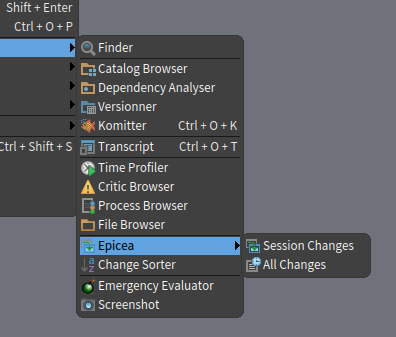

participants (11)
-
 Ben Coman
 -
 Denis Kudriashov
 -
 Esteban Lorenzano
 -
 Igor Stasenko
 -
 Marcus Denker
 -
 Martin Dias
 -
 Norbert Hartl
 -
 Sean P. DeNigris
 -
 serge.stinckwich@gmail.com
 -
 stepharong
 -
 Tudor Girba