New VM promoted to Stable for Pharo 8

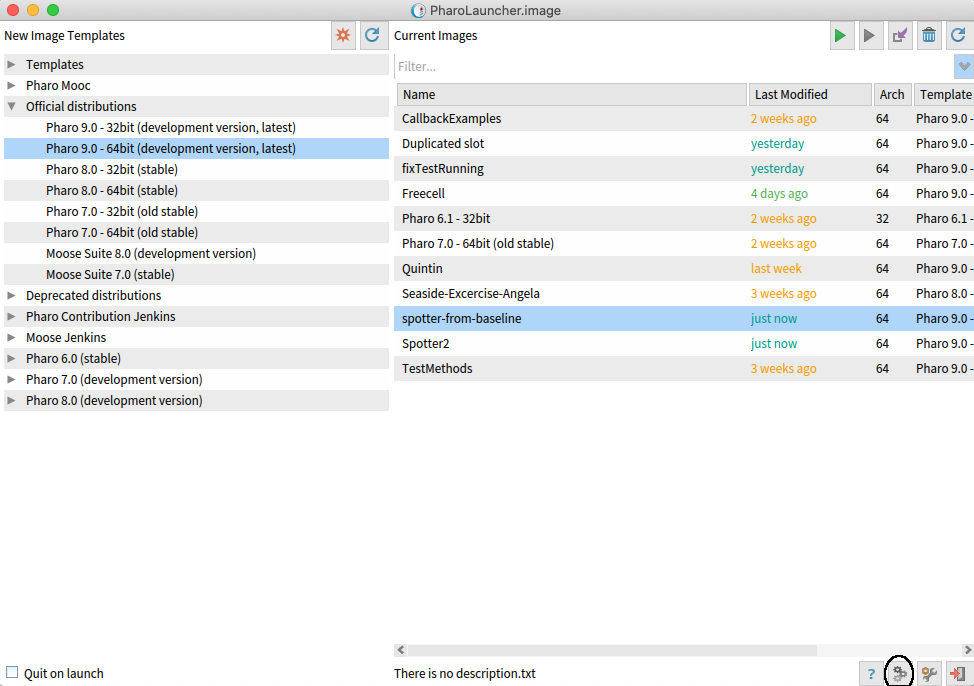
Hi, a new VM has been promoted for Pharo 8. This VM has been used in Pharo 9 during the last 4 weeks without incidents and as the latest one for Pharo 8 during the same period of time. Basically this VM solves the following main issues: - GC memory corruption during saving the image - LibSSH error in Windows. And a couple of small issues. The VM is downloaded directly when using zero conf (http://get.pharo.org). And in new installations of the Pharo Launcher. To update it in older installations you should open the VM manager: [image: lala.png] And then using the update button: [image: lala2.png] The new VM should be from 2020-02-20. Depending of the Pharo Launcher version, maybe the table is not auto-updated :P To check the correct version, close the VM manager window and open it again. Cheers, Pablo -- Pablo Tesone. tesonep@gmail.com
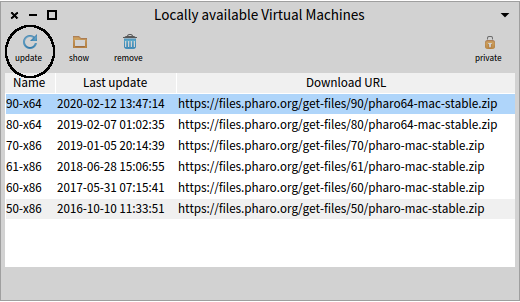

Pablo, does this only affect Macs? I just tried this on a Linux machine, updating/launching a Pharo 8 64-bit image. It still showed the older VM. I tried restarting the VM Manager, restarting Pharo Launcher (1.9.2), and then re-installing Pharo Launcher, then creating a new image, each time trying everything again. But the version of the VM only ever says "2020-02-12", not "2020-02-20". When I tried the same thing for a 32-bit Pharo 8 image, it uses a VM dated "2020-02-06". What am I doing wrong? -- Sent from: http://forum.world.st/Pharo-Smalltalk-Developers-f1294837.html

A side note, VM version strings are an absolute disaster for end users, it is simply impossible to talk about a specific version. $ ./pharo-ui --version 5.0 5.0.201901051900 Mac OS X built on Jan 5 2019 19:11:02 UTC Compiler: 4.2.1 Compatible Apple LLVM 7.3.0 (clang-703.0.31) [Production Spur 64-bit VM] CoInterpreter VMMaker.oscog-eem.2504 uuid: a00b0fad-c04c-47a6-8a11-5dbff110ac11 Jan 5 2019 StackToRegisterMappingCogit VMMaker.oscog-eem.2504 uuid: a00b0fad-c04c-47a6-8a11-5dbff110ac11 Jan 5 2019 VM: 201901051900 https://github.com/OpenSmalltalk/opensmalltalk-vm.git Date: Sat Jan 5 20:00:11 2019 CommitHash: 7a3c6b6 Plugins: 201901051900 https://github.com/OpenSmalltalk/opensmalltalk-vm.git WTH ?
On 3 Mar 2020, at 19:07, tbrunz <wild.ideas@gmail.com> wrote:
Pablo, does this only affect Macs? I just tried this on a Linux machine, updating/launching a Pharo 8 64-bit image.
It still showed the older VM. I tried restarting the VM Manager, restarting Pharo Launcher (1.9.2), and then re-installing Pharo Launcher, then creating a new image, each time trying everything again.
But the version of the VM only ever says "2020-02-12", not "2020-02-20". When I tried the same thing for a 32-bit Pharo 8 image, it uses a VM dated "2020-02-06".
What am I doing wrong?
-- Sent from: http://forum.world.st/Pharo-Smalltalk-Developers-f1294837.html

https://github.com/pharo-project/opensmalltalk-vm/issues/69 <https://github.com/pharo-project/opensmalltalk-vm/issues/69>
El 3 mar 2020, a las 19:11, Sven Van Caekenberghe <sven@stfx.eu> escribió:
A side note, VM version strings are an absolute disaster for end users, it is simply impossible to talk about a specific version.
$ ./pharo-ui --version 5.0 5.0.201901051900 Mac OS X built on Jan 5 2019 19:11:02 UTC Compiler: 4.2.1 Compatible Apple LLVM 7.3.0 (clang-703.0.31) [Production Spur 64-bit VM] CoInterpreter VMMaker.oscog-eem.2504 uuid: a00b0fad-c04c-47a6-8a11-5dbff110ac11 Jan 5 2019 StackToRegisterMappingCogit VMMaker.oscog-eem.2504 uuid: a00b0fad-c04c-47a6-8a11-5dbff110ac11 Jan 5 2019 VM: 201901051900 https://github.com/OpenSmalltalk/opensmalltalk-vm.git Date: Sat Jan 5 20:00:11 2019 CommitHash: 7a3c6b6 Plugins: 201901051900 https://github.com/OpenSmalltalk/opensmalltalk-vm.git
WTH ?
On 3 Mar 2020, at 19:07, tbrunz <wild.ideas@gmail.com> wrote:
Pablo, does this only affect Macs? I just tried this on a Linux machine, updating/launching a Pharo 8 64-bit image.
It still showed the older VM. I tried restarting the VM Manager, restarting Pharo Launcher (1.9.2), and then re-installing Pharo Launcher, then creating a new image, each time trying everything again.
But the version of the VM only ever says "2020-02-12", not "2020-02-20". When I tried the same thing for a 32-bit Pharo 8 image, it uses a VM dated "2020-02-06".
What am I doing wrong?
-- Sent from: http://forum.world.st/Pharo-Smalltalk-Developers-f1294837.html
It is the one of Feb 12th. My error in the mail. On Tue, Mar 3, 2020, 19:08 tbrunz <wild.ideas@gmail.com> wrote:
Pablo, does this only affect Macs? I just tried this on a Linux machine, updating/launching a Pharo 8 64-bit image.
It still showed the older VM. I tried restarting the VM Manager, restarting Pharo Launcher (1.9.2), and then re-installing Pharo Launcher, then creating a new image, each time trying everything again.
But the version of the VM only ever says "2020-02-12", not "2020-02-20". When I tried the same thing for a 32-bit Pharo 8 image, it uses a VM dated "2020-02-06".
What am I doing wrong?
-- Sent from: http://forum.world.st/Pharo-Smalltalk-Developers-f1294837.html
Okay, in that case, it did everything it was supposed to, automatically! -- Sent from: http://forum.world.st/Pharo-Smalltalk-Developers-f1294837.html
participants (4)
-
 Guillermo Polito
 -
 Sven Van Caekenberghe
 -
 tbrunz
 -
 tesonep@gmail.com