Problems trying to install pharo in centos 5.11

Hi all Today I was trying to install pharo, in a Centos release 5.11 (Final), but without success. the error message is with curl curl https://get.pharo.org/64 | bash curl: (51) SSL: certificate subject name 'cluster023.hosting.ovh.net' does not match target host name 'get.pharo.org' with wget, wget -O- https://get.pharo.org/64 | bash --2019-05-07 12:49:11 - https://get.pharo.org/64 Resolving get.pharo.org ... 164.132.235.17, 2001: 41d0: 301 :: 23 Connecting to get.pharo.org | 164.132.235.17 |: 443 ... connected. ERROR: certificate common name `cluster023.hosting.ovh.net 'does not match requested host name` get.pharo.org'. To connect to get.pharo.org insecurely, use `--no-check-certificate '. The SSL connection could not be established. I wonder if this is a known error, or is it a problem with my internet provider. One last question, for 5.xx centos there are prerequisites for installation ?. Any link or reference to install it? best regards Juan M. Diaz Cortez

try it with a trailing slash e.g. curl https://get.pharo.org/64/ | bash Juan-2 wrote
Hi all
Today I was trying to install pharo, in a Centos release 5.11 (Final), but without success. the error message is
with curl
curl https://get.pharo.org/64 | bash
curl: (51) SSL: certificate subject name 'cluster023.hosting.ovh.net' does not match target host name 'get.pharo.org'
with wget,
wget -O- https://get.pharo.org/64 | bash --2019-05-07 12:49:11 - https://get.pharo.org/64 Resolving get.pharo.org ... 164.132.235.17, 2001: 41d0: 301 :: 23 Connecting to get.pharo.org | 164.132.235.17 |: 443 ... connected. ERROR: certificate common name `cluster023.hosting.ovh.net 'does not match requested host name` get.pharo.org'. To connect to get.pharo.org insecurely, use `--no-check-certificate '. The SSL connection could not be established. I wonder if this is a known error, or is it a problem with my internet provider. One last question, for 5.xx centos there are prerequisites for installation ?. Any link or reference to install it?
best regards Juan M. Diaz Cortez
-- Sent from: http://forum.world.st/Pharo-Smalltalk-Developers-f1294837.html
Paul ,thanks for your quicly response, On Tue, May 7, 2019 at 5:17 PM Paul DeBruicker <pdebruic@gmail.com> wrote:
try it with a trailing slash e.g.
curl https://get.pharo.org/64/ | bash
I'm tried this without succes ,y hope that extra information be useful curl -vv -L https://get.pharo.org/64/ | bash * About to connect() to get.pharo.org port 443 * Trying 164.132.235.17... connected * Connected to get.pharo.org (164.132.235.17) port 443 * successfully set certificate verify locations: * CAfile: /etc/pki/tls/certs/ca-bundle.crt CApath: none * SSLv3, TLS handshake, Client hello (1): SSLv3, TLS handshake, Server hello (2): SSLv3, TLS handshake, CERT (11): SSLv3, TLS handshake, Server key exchange (12): SSLv3, TLS handshake, Server finished (14): SSLv3, TLS handshake, Client key exchange (16): SSLv3, TLS change cipher, Client hello (1): SSLv3, TLS handshake, Finished (20): SSLv3, TLS change cipher, Client hello (1): SSLv3, TLS handshake, Finished (20): SSL connection using DHE-RSA-AES128-SHA * Server certificate: * subject: /OU=Domain Control Validated/OU=PositiveSSL/CN= cluster023.hosting.ovh.net * start date: 2018-02-01 00:00:00 GMT * expire date: 2021-01-31 23:59:59 GMT * SSL: certificate subject name 'cluster023.hosting.ovh.net' does not match target host name 'get.pharo.org' * Closing connection #0 * SSLv3, TLS alert, Client hello (1): curl: (51) SSL: certificate subject name 'cluster023.hosting.ovh.net' does not match target host name 'get.pharo.org' best Juan Marcelo Diaz Cortez.
Juan-2 wrote
Hi all
Today I was trying to install pharo, in a Centos release 5.11 (Final), but without success. the error message is
with curl
curl https://get.pharo.org/64 | bash
curl: (51) SSL: certificate subject name 'cluster023.hosting.ovh.net' does not match target host name 'get.pharo.org'
with wget,
wget -O- https://get.pharo.org/64 | bash --2019-05-07 12:49:11 - https://get.pharo.org/64 Resolving get.pharo.org ... 164.132.235.17, 2001: 41d0: 301 :: 23 Connecting to get.pharo.org | 164.132.235.17 |: 443 ... connected. ERROR: certificate common name `cluster023.hosting.ovh.net 'does not match requested host name` get.pharo.org'. To connect to get.pharo.org insecurely, use `--no-check-certificate '. The SSL connection could not be established. I wonder if this is a known error, or is it a problem with my internet provider. One last question, for 5.xx centos there are prerequisites for installation ?. Any link or reference to install it?
best regards Juan M. Diaz Cortez
-- Sent from: http://forum.world.st/Pharo-Smalltalk-Developers-f1294837.html
aditional info https://stackoverflow.com/questions/41377036/how-can-i-resolve-the-error-cer... On Tue, May 7, 2019 at 5:38 PM Juan <smalltalker.marcelo@gmail.com> wrote:
Paul ,thanks for your quicly response, On Tue, May 7, 2019 at 5:17 PM Paul DeBruicker <pdebruic@gmail.com> wrote:
try it with a trailing slash e.g.
curl https://get.pharo.org/64/ | bash
I'm tried this without succes ,y hope that extra information be useful
curl -vv -L https://get.pharo.org/64/ | bash * About to connect() to get.pharo.org port 443 * Trying 164.132.235.17... connected * Connected to get.pharo.org (164.132.235.17) port 443 * successfully set certificate verify locations: * CAfile: /etc/pki/tls/certs/ca-bundle.crt CApath: none * SSLv3, TLS handshake, Client hello (1): SSLv3, TLS handshake, Server hello (2): SSLv3, TLS handshake, CERT (11): SSLv3, TLS handshake, Server key exchange (12): SSLv3, TLS handshake, Server finished (14): SSLv3, TLS handshake, Client key exchange (16): SSLv3, TLS change cipher, Client hello (1): SSLv3, TLS handshake, Finished (20): SSLv3, TLS change cipher, Client hello (1): SSLv3, TLS handshake, Finished (20): SSL connection using DHE-RSA-AES128-SHA * Server certificate: * subject: /OU=Domain Control Validated/OU=PositiveSSL/CN= cluster023.hosting.ovh.net * start date: 2018-02-01 00:00:00 GMT * expire date: 2021-01-31 23:59:59 GMT * SSL: certificate subject name 'cluster023.hosting.ovh.net' does not match target host name 'get.pharo.org' * Closing connection #0 * SSLv3, TLS alert, Client hello (1):
curl: (51) SSL: certificate subject name 'cluster023.hosting.ovh.net' does not match target host name 'get.pharo.org'
best
Juan Marcelo Diaz Cortez.
Juan-2 wrote
Hi all
Today I was trying to install pharo, in a Centos release 5.11 (Final), but without success. the error message is
with curl
curl https://get.pharo.org/64 | bash
curl: (51) SSL: certificate subject name 'cluster023.hosting.ovh.net' does not match target host name 'get.pharo.org'
with wget,
wget -O- https://get.pharo.org/64 | bash --2019-05-07 12:49:11 - https://get.pharo.org/64 Resolving get.pharo.org ... 164.132.235.17, 2001: 41d0: 301 :: 23 Connecting to get.pharo.org | 164.132.235.17 |: 443 ... connected. ERROR: certificate common name `cluster023.hosting.ovh.net 'does not match requested host name` get.pharo.org'. To connect to get.pharo.org insecurely, use `--no-check-certificate '. The SSL connection could not be established. I wonder if this is a known error, or is it a problem with my internet provider. One last question, for 5.xx centos there are prerequisites for installation ?. Any link or reference to install it?
best regards Juan M. Diaz Cortez
-- Sent from: http://forum.world.st/Pharo-Smalltalk-Developers-f1294837.html

from my super slow connection I get ~ » curl https://get.pharo.org/64/ | bash % Total % Received % Xferd Average Speed Time Time Time Current Dload Upload Total Spent Left Speed 100 12695 100 12695 0 0 38713 0 --:--:-- --:--:-- --:--:-- 38704 Downloading the latest 70 Image: http://files.pharo.org/get-files/70/pharo64.zip Pharo.image Downloading the latest pharoVM: http://files.pharo.org/get-files/70/pharo64-mac-stable.zip pharo-vm/Pharo.app/Contents/MacOS/Pharo Creating starter scripts pharo and pharo-ui
On 7 May 2019, at 22:38, Juan <smalltalker.marcelo@gmail.com> wrote:
Paul ,thanks for your quicly response, On Tue, May 7, 2019 at 5:17 PM Paul DeBruicker <pdebruic@gmail.com <mailto:pdebruic@gmail.com>> wrote: try it with a trailing slash e.g.
curl https://get.pharo.org/64/ <https://get.pharo.org/64/> | bash
I'm tried this without succes ,y hope that extra information be useful
curl -vv -L https://get.pharo.org/64/ <https://get.pharo.org/64/> | bash * About to connect() to get.pharo.org <http://get.pharo.org/> port 443 * Trying 164.132.235.17... connected * Connected to get.pharo.org <http://get.pharo.org/> (164.132.235.17) port 443 * successfully set certificate verify locations: * CAfile: /etc/pki/tls/certs/ca-bundle.crt CApath: none * SSLv3, TLS handshake, Client hello (1): SSLv3, TLS handshake, Server hello (2): SSLv3, TLS handshake, CERT (11): SSLv3, TLS handshake, Server key exchange (12): SSLv3, TLS handshake, Server finished (14): SSLv3, TLS handshake, Client key exchange (16): SSLv3, TLS change cipher, Client hello (1): SSLv3, TLS handshake, Finished (20): SSLv3, TLS change cipher, Client hello (1): SSLv3, TLS handshake, Finished (20): SSL connection using DHE-RSA-AES128-SHA * Server certificate: * subject: /OU=Domain Control Validated/OU=PositiveSSL/CN=cluster023.hosting.ovh.net <http://cluster023.hosting.ovh.net/> * start date: 2018-02-01 00:00:00 GMT * expire date: 2021-01-31 23:59:59 GMT * SSL: certificate subject name 'cluster023.hosting.ovh.net <http://cluster023.hosting.ovh.net/>' does not match target host name 'get.pharo.org <http://get.pharo.org/>' * Closing connection #0 * SSLv3, TLS alert, Client hello (1):
curl: (51) SSL: certificate subject name 'cluster023.hosting.ovh.net <http://cluster023.hosting.ovh.net/>' does not match target host name 'get.pharo.org <http://get.pharo.org/>'
best
Juan Marcelo Diaz Cortez.
Juan-2 wrote
Hi all
Today I was trying to install pharo, in a Centos release 5.11 (Final), but without success. the error message is
with curl
curl https://get.pharo.org/64 <https://get.pharo.org/64> | bash
curl: (51) SSL: certificate subject name 'cluster023.hosting.ovh.net <http://cluster023.hosting.ovh.net/>' does not match target host name 'get.pharo.org <http://get.pharo.org/>'
with wget,
wget -O- https://get.pharo.org/64 <https://get.pharo.org/64> | bash --2019-05-07 12:49:11 - https://get.pharo.org/64 <https://get.pharo.org/64> Resolving get.pharo.org <http://get.pharo.org/> ... 164.132.235.17, 2001: 41d0: 301 :: 23 Connecting to get.pharo.org <http://get.pharo.org/> | 164.132.235.17 |: 443 ... connected. ERROR: certificate common name `cluster023.hosting.ovh.net <http://cluster023.hosting.ovh.net/> 'does not match requested host name` get.pharo.org <http://get.pharo.org/>'. To connect to get.pharo.org <http://get.pharo.org/> insecurely, use `--no-check-certificate '. The SSL connection could not be established. I wonder if this is a known error, or is it a problem with my internet provider. One last question, for 5.xx centos there are prerequisites for installation ?. Any link or reference to install it?
best regards Juan M. Diaz Cortez
-- Sent from: http://forum.world.st/Pharo-Smalltalk-Developers-f1294837.html <http://forum.world.st/Pharo-Smalltalk-Developers-f1294837.html>

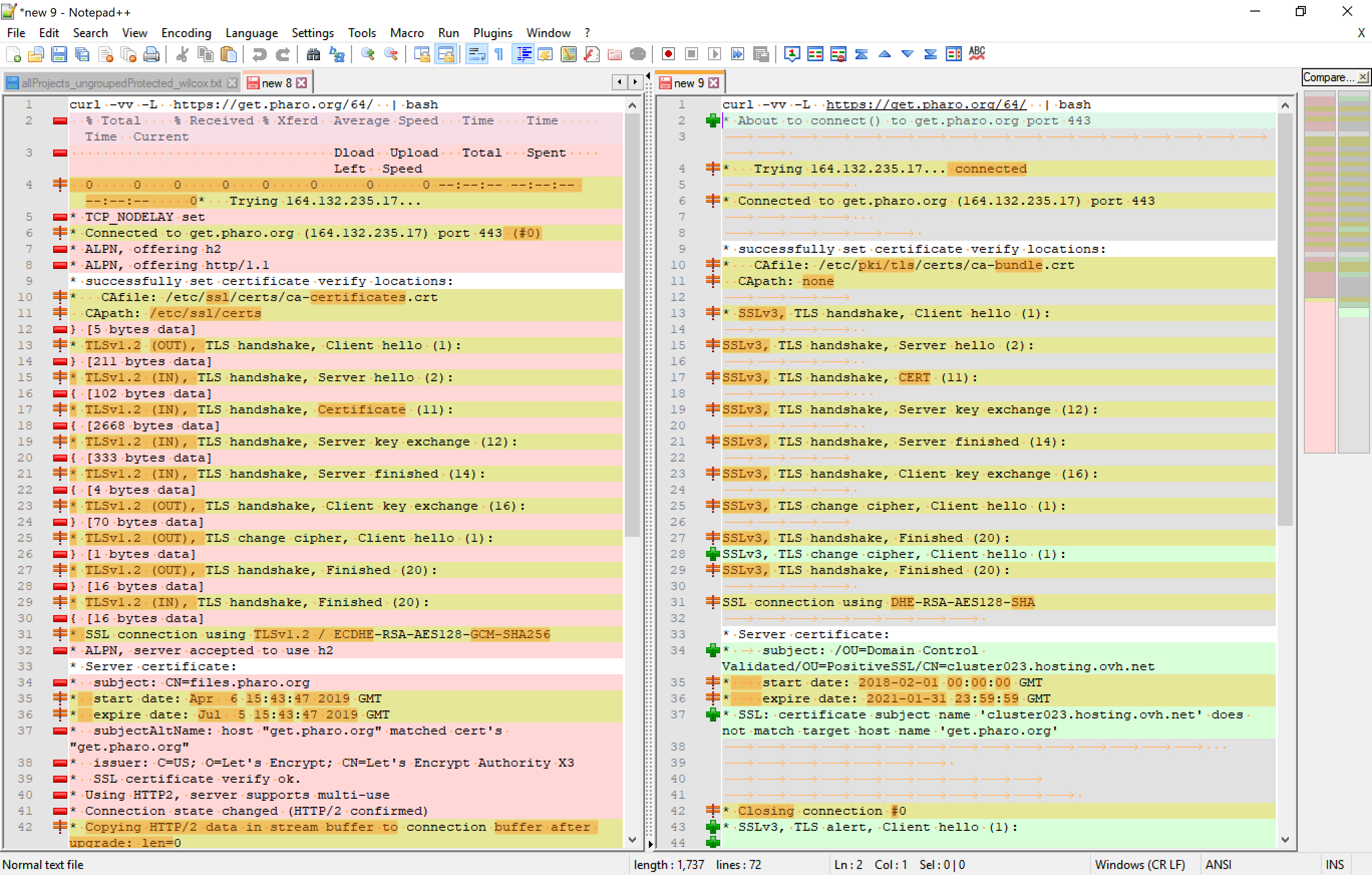
Hello, I did the same command on WSL (Windows 10) Ubuntu 18 and diffed the two results in Notepad++. Here's what it looks like: [image: image.png] Here are the major differences I can see: - On my system there's a 'CApath: /etc/ssl/certs' (line 11) whereas on yours it's 'CApath: none' - The server's certificate 'subject: CN=files.pharo.org' (line 34) is different than yours: 'subject: /OU=Domain Control Validated/OU=PositiveSSL/CN=cluster023.hosting.ovh.net' (line 34). It't not clear to me why you're dealing with cluster023.hosting.ovh.net rather than files.pharo.org, but I'm guessing that is the crux of your problem. They have the same IP (according to my nslookup) so, it's just the hostname that's changing somehow. Hope this helps. On Tue, 7 May 2019 at 22:46, Juan <smalltalker.marcelo@gmail.com> wrote:
Paul ,thanks for your quicly response, On Tue, May 7, 2019 at 5:17 PM Paul DeBruicker <pdebruic@gmail.com> wrote:
try it with a trailing slash e.g.
curl https://get.pharo.org/64/ | bash
I'm tried this without succes ,y hope that extra information be useful
curl -vv -L https://get.pharo.org/64/ | bash * About to connect() to get.pharo.org port 443 * Trying 164.132.235.17... connected * Connected to get.pharo.org (164.132.235.17) port 443 * successfully set certificate verify locations: * CAfile: /etc/pki/tls/certs/ca-bundle.crt CApath: none * SSLv3, TLS handshake, Client hello (1): SSLv3, TLS handshake, Server hello (2): SSLv3, TLS handshake, CERT (11): SSLv3, TLS handshake, Server key exchange (12): SSLv3, TLS handshake, Server finished (14): SSLv3, TLS handshake, Client key exchange (16): SSLv3, TLS change cipher, Client hello (1): SSLv3, TLS handshake, Finished (20): SSLv3, TLS change cipher, Client hello (1): SSLv3, TLS handshake, Finished (20): SSL connection using DHE-RSA-AES128-SHA * Server certificate: * subject: /OU=Domain Control Validated/OU=PositiveSSL/CN= cluster023.hosting.ovh.net * start date: 2018-02-01 00:00:00 GMT * expire date: 2021-01-31 23:59:59 GMT * SSL: certificate subject name 'cluster023.hosting.ovh.net' does not match target host name 'get.pharo.org' * Closing connection #0 * SSLv3, TLS alert, Client hello (1):
curl: (51) SSL: certificate subject name 'cluster023.hosting.ovh.net' does not match target host name 'get.pharo.org'
best
Juan Marcelo Diaz Cortez.
Juan-2 wrote
Hi all
Today I was trying to install pharo, in a Centos release 5.11 (Final), but without success. the error message is
with curl
curl https://get.pharo.org/64 | bash
curl: (51) SSL: certificate subject name 'cluster023.hosting.ovh.net' does not match target host name 'get.pharo.org'
with wget,
wget -O- https://get.pharo.org/64 | bash --2019-05-07 12:49:11 - https://get.pharo.org/64 Resolving get.pharo.org ... 164.132.235.17, 2001: 41d0: 301 :: 23 Connecting to get.pharo.org | 164.132.235.17 |: 443 ... connected. ERROR: certificate common name `cluster023.hosting.ovh.net 'does not match requested host name` get.pharo.org'. To connect to get.pharo.org insecurely, use `--no-check-certificate '. The SSL connection could not be established. I wonder if this is a known error, or is it a problem with my internet provider. One last question, for 5.xx centos there are prerequisites for installation ?. Any link or reference to install it?
best regards Juan M. Diaz Cortez
-- Sent from: http://forum.world.st/Pharo-Smalltalk-Developers-f1294837.html
participants (4)
-
 Christopher Fuhrman
 -
 ducasse
 -
 Juan
Juan -
 Paul DeBruicker