
Hi, Can someone who really knows/understand please describe where to find the necessary Pharo VM's to run on the newly released macOS Sierra (10.12) ? In particular it seems old VM's just stop working and recent VM's that do work either have issues or cannot run older (3.0, 4.0) images. Thanks, Sven PS: I have not yet upgraded, but one of my colleagues did and he got stuck: even after we found a VM that worked, it could only run 5.0 images, not his production 4.0 images. Needless to say, this is not good. PS2: Another really annoying problem is the following: he saved all his (really important) scripts using Script Manager as a FUEL. Moving between 4.0 and 5.0 FUEL stops working (version incompatibility) - this is really not cool, why would a newer FUEL not be able to read older FUEL. He ended up copying string data by opening the binary FUEL file in a text editor.

Sven,
Am 27.09.2016 um 11:15 schrieb Sven Van Caekenberghe <sven@stfx.eu>:
PS2: Another really annoying problem is the following: he saved all his (really important) scripts using Script Manager as a FUEL. Moving between 4.0 and 5.0 FUEL stops working (version incompatibility) - this is really not cool, why would a newer FUEL not be able to read older FUEL. He ended up copying string data by opening the binary FUEL file in a text editor.
it is like that from the beginning. I guess there was the fear keeping everything compatible would be a huge amount of work. But it is indeed an annoying thing. The usual way to deal with it is open pharo4 and materialize the fuel file then upgrade fuel to the version pharo5 uses and save again. Norbert
On 27 Sep 2016, at 11:21, Norbert Hartl <norbert@hartl.name> wrote:
Sven,
Am 27.09.2016 um 11:15 schrieb Sven Van Caekenberghe <sven@stfx.eu>:
PS2: Another really annoying problem is the following: he saved all his (really important) scripts using Script Manager as a FUEL. Moving between 4.0 and 5.0 FUEL stops working (version incompatibility) - this is really not cool, why would a newer FUEL not be able to read older FUEL. He ended up copying string data by opening the binary FUEL file in a text editor.
it is like that from the beginning. I guess there was the fear keeping everything compatible would be a huge amount of work. But it is indeed an annoying thing. The usual way to deal with it is open pharo4 and materialize the fuel file then upgrade fuel to the version pharo5 uses and save again.
Norbert
Yeah, but this is silly: it goes against the principle of a persistence format: to save data for future use. [ I knew this already, I never agreed with this principle ]. Like I described in the email, after upgrading, we were unable to run the old image - catch 22.

Hi Sven, An experimental build of the VM works again on Sierra (Iâve tested this one: https://bintray.com/estebanlm/pharo-vm/build/201609201407#files <https://bintray.com/estebanlm/pharo-vm/build/201609201407#files>). The problem was with the bundle code and a change from Appleâs side to Cocoa. The new VM is a Spur VM of course. If you need a Cog VM, you can try a Squeak VM (e.g. 'Croquet Closure Cog VM [CoInterpreterPrimitives VMMaker.oscog-eem.1095] Squeak Cog 4.0.3282â) or run the current PharoVM in a virtual machine on Linux (as Iâve done). Concerning Fuel: the versioning problem is a known and big issue I have to admit. Which Fuel versions does your problem concern? There were some big changes for Fuel from Pharo 4 to 5, e.g. MethodContext was renamed to Context. Depending on the objects you store however, you may be able to load the file simply by removing the version check in Fuel, as most things should be identical. Cheers, Max
On 27 Sep 2016, at 11:26, Sven Van Caekenberghe <sven@stfx.eu> wrote:
On 27 Sep 2016, at 11:21, Norbert Hartl <norbert@hartl.name> wrote:
Sven,
Am 27.09.2016 um 11:15 schrieb Sven Van Caekenberghe <sven@stfx.eu>:
PS2: Another really annoying problem is the following: he saved all his (really important) scripts using Script Manager as a FUEL. Moving between 4.0 and 5.0 FUEL stops working (version incompatibility) - this is really not cool, why would a newer FUEL not be able to read older FUEL. He ended up copying string data by opening the binary FUEL file in a text editor.
it is like that from the beginning. I guess there was the fear keeping everything compatible would be a huge amount of work. But it is indeed an annoying thing. The usual way to deal with it is open pharo4 and materialize the fuel file then upgrade fuel to the version pharo5 uses and save again.
Norbert
Yeah, but this is silly: it goes against the principle of a persistence format: to save data for future use. [ I knew this already, I never agreed with this principle ].
Like I described in the email, after upgrading, we were unable to run the old image - catch 22.

On Tue, Sep 27, 2016 at 11:43 AM, Max Leske <maxleske@gmail.com> wrote:
Hi Sven,
An experimental build of the VM works again on Sierra (Iâve tested this one: https://bintray.com/estebanlm/pharo-vm/build/201609201407#files). The problem was with the bundle code and a change from Appleâs side to Cocoa. The new VM is a Spur VM of course. If you need a Cog VM, you can try a Squeak VM (e.g. 'Croquet Closure Cog VM [CoInterpreterPrimitives VMMaker.oscog-eem.1095] Squeak Cog 4.0.3282â) or run the current PharoVM in a virtual machine on Linux (as Iâve done).
Concerning Fuel: the versioning problem is a known and big issue I have to admit. Which Fuel versions does your problem concern? There were some big changes for Fuel from Pharo 4 to 5, e.g. MethodContext was renamed to Context. Depending on the objects you store however, you may be able to load the file simply by removing the version check in Fuel, as most things should be identical.
From Pharo 5 to Pharo 6, likely there will be the change from BlockClosure to FullBlockClosure that will have some impact... We'll keep for Pharo 6 the BlockClosure support for migration purpose then.
Cheers, Max
On 27 Sep 2016, at 11:26, Sven Van Caekenberghe <sven@stfx.eu> wrote:
On 27 Sep 2016, at 11:21, Norbert Hartl <norbert@hartl.name> wrote:
Sven,
Am 27.09.2016 um 11:15 schrieb Sven Van Caekenberghe <sven@stfx.eu>:
PS2: Another really annoying problem is the following: he saved all his (really important) scripts using Script Manager as a FUEL. Moving between 4.0 and 5.0 FUEL stops working (version incompatibility) - this is really not cool, why would a newer FUEL not be able to read older FUEL. He ended up copying string data by opening the binary FUEL file in a text editor.
it is like that from the beginning. I guess there was the fear keeping everything compatible would be a huge amount of work. But it is indeed an annoying thing. The usual way to deal with it is open pharo4 and materialize the fuel file then upgrade fuel to the version pharo5 uses and save again.
Norbert
Yeah, but this is silly: it goes against the principle of a persistence format: to save data for future use. [ I knew this already, I never agreed with this principle ].
Like I described in the email, after upgrading, we were unable to run the old image - catch 22.
On 27 Sep 2016, at 13:41, Clément Bera <bera.clement@gmail.com> wrote:
On Tue, Sep 27, 2016 at 11:43 AM, Max Leske <maxleske@gmail.com> wrote: Hi Sven,
An experimental build of the VM works again on Sierra (Iâve tested this one: https://bintray.com/estebanlm/pharo-vm/build/201609201407#files). The problem was with the bundle code and a change from Appleâs side to Cocoa. The new VM is a Spur VM of course. If you need a Cog VM, you can try a Squeak VM (e.g. 'Croquet Closure Cog VM [CoInterpreterPrimitives VMMaker.oscog-eem.1095] Squeak Cog 4.0.3282â) or run the current PharoVM in a virtual machine on Linux (as Iâve done).
Concerning Fuel: the versioning problem is a known and big issue I have to admit. Which Fuel versions does your problem concern? There were some big changes for Fuel from Pharo 4 to 5, e.g. MethodContext was renamed to Context. Depending on the objects you store however, you may be able to load the file simply by removing the version check in Fuel, as most things should be identical.
From Pharo 5 to Pharo 6, likely there will be the change from BlockClosure to FullBlockClosure that will have some impact... We'll keep for Pharo 6 the BlockClosure support for migration purpose then.
The problem is not so much that if there is a change there is an incompatibility, that would be understandable. [ And then supporting some backward compatibility is good ] The problem is that FUEL moves forward in version number, and it refuses to load unless the versions match, even if all you do is, say, safe a collection of strings. It should only fail when it really encounters something that changed.
Cheers, Max
On 27 Sep 2016, at 11:26, Sven Van Caekenberghe <sven@stfx.eu> wrote:
On 27 Sep 2016, at 11:21, Norbert Hartl <norbert@hartl.name> wrote:
Sven,
Am 27.09.2016 um 11:15 schrieb Sven Van Caekenberghe <sven@stfx.eu>:
PS2: Another really annoying problem is the following: he saved all his (really important) scripts using Script Manager as a FUEL. Moving between 4.0 and 5.0 FUEL stops working (version incompatibility) - this is really not cool, why would a newer FUEL not be able to read older FUEL. He ended up copying string data by opening the binary FUEL file in a text editor.
it is like that from the beginning. I guess there was the fear keeping everything compatible would be a huge amount of work. But it is indeed an annoying thing. The usual way to deal with it is open pharo4 and materialize the fuel file then upgrade fuel to the version pharo5 uses and save again.
Norbert
Yeah, but this is silly: it goes against the principle of a persistence format: to save data for future use. [ I knew this already, I never agreed with this principle ].
Like I described in the email, after upgrading, we were unable to run the old image - catch 22.
On 27 Sep 2016, at 13:46, Sven Van Caekenberghe <sven@stfx.eu> wrote:
On 27 Sep 2016, at 13:41, Clément Bera <bera.clement@gmail.com> wrote:
On Tue, Sep 27, 2016 at 11:43 AM, Max Leske <maxleske@gmail.com> wrote: Hi Sven,
An experimental build of the VM works again on Sierra (Iâve tested this one: https://bintray.com/estebanlm/pharo-vm/build/201609201407#files). The problem was with the bundle code and a change from Appleâs side to Cocoa. The new VM is a Spur VM of course. If you need a Cog VM, you can try a Squeak VM (e.g. 'Croquet Closure Cog VM [CoInterpreterPrimitives VMMaker.oscog-eem.1095] Squeak Cog 4.0.3282â) or run the current PharoVM in a virtual machine on Linux (as Iâve done).
Concerning Fuel: the versioning problem is a known and big issue I have to admit. Which Fuel versions does your problem concern? There were some big changes for Fuel from Pharo 4 to 5, e.g. MethodContext was renamed to Context. Depending on the objects you store however, you may be able to load the file simply by removing the version check in Fuel, as most things should be identical.
From Pharo 5 to Pharo 6, likely there will be the change from BlockClosure to FullBlockClosure that will have some impact... We'll keep for Pharo 6 the BlockClosure support for migration purpose then.
The problem is not so much that if there is a change there is an incompatibility, that would be understandable. [ And then supporting some backward compatibility is good ]
The problem is that FUEL moves forward in version number, and it refuses to load unless the versions match, even if all you do is, say, safe a collection of strings. It should only fail when it really encounters something that changed.
I understand that. But as I wrote, try disabling the version check.
Cheers, Max
On 27 Sep 2016, at 11:26, Sven Van Caekenberghe <sven@stfx.eu> wrote:
On 27 Sep 2016, at 11:21, Norbert Hartl <norbert@hartl.name> wrote:
Sven,
Am 27.09.2016 um 11:15 schrieb Sven Van Caekenberghe <sven@stfx.eu>:
PS2: Another really annoying problem is the following: he saved all his (really important) scripts using Script Manager as a FUEL. Moving between 4.0 and 5.0 FUEL stops working (version incompatibility) - this is really not cool, why would a newer FUEL not be able to read older FUEL. He ended up copying string data by opening the binary FUEL file in a text editor.
it is like that from the beginning. I guess there was the fear keeping everything compatible would be a huge amount of work. But it is indeed an annoying thing. The usual way to deal with it is open pharo4 and materialize the fuel file then upgrade fuel to the version pharo5 uses and save again.
Norbert
Yeah, but this is silly: it goes against the principle of a persistence format: to save data for future use. [ I knew this already, I never agreed with this principle ].
Like I described in the email, after upgrading, we were unable to run the old image - catch 22.

Max Leske wrote
on Sierra... If you need a Cog VM
Do we have a Cog VM that works on Sierra yet? I downloaded 547 from https://ci.inria.fr/pharo/view/5.0-VM-Legacy/job/PharoVM/Architecture=32,Sla... . The application window opened, but the contents were all white (e.g. the World never appeared) ----- Cheers, Sean -- View this message in context: http://forum.world.st/macOS-Sierra-support-tp4917181p4922435.html Sent from the Pharo Smalltalk Developers mailing list archive at Nabble.com.

the regular download by zeroconf should give you an usable VM. Those CI jobs are not the official place where to take VMs⦠and they do not build the actual branch for the moment. In fact, I will disable the jobs because there is no point on keep then running atm and people got confused. Esteban
On 10 Nov 2016, at 00:56, Sean P. DeNigris <sean@clipperadams.com> wrote:
Max Leske wrote
on Sierra... If you need a Cog VM
Do we have a Cog VM that works on Sierra yet? I downloaded 547 from https://ci.inria.fr/pharo/view/5.0-VM-Legacy/job/PharoVM/Architecture=32,Sla... . The application window opened, but the contents were all white (e.g. the World never appeared)
----- Cheers, Sean -- View this message in context: http://forum.world.st/macOS-Sierra-support-tp4917181p4922435.html Sent from the Pharo Smalltalk Developers mailing list archive at Nabble.com.
EstebanLM wrote
the regular download by zeroconf should give you an usable VM.
That worked - thanks! EstebanLM wrote
I will disable the jobs because... people got confused.
Great idea :) ----- Cheers, Sean -- View this message in context: http://forum.world.st/macOS-Sierra-support-tp4917181p4922762.html Sent from the Pharo Smalltalk Developers mailing list archive at Nabble.com.

Can someone put a note to the website (http://pharo.org/download)? It is frustrating for users to follow the link to http://files.pharo.org/platform/Pharo5.0-mac.zip from there and get a defunct Pharo installation. Sean P. DeNigris wrote
EstebanLM wrote
the regular download by zeroconf should give you an usable VM. That worked - thanks!
Yes, this VM works well :) -- View this message in context: http://forum.world.st/macOS-Sierra-support-tp4917181p4922891.html Sent from the Pharo Smalltalk Developers mailing list archive at Nabble.com.
On 14 Nov 2016, at 11:01, MartinW <wm@fastmail.fm> wrote:
Can someone put a note to the website (http://pharo.org/download)? It is frustrating for users to follow the link to http://files.pharo.org/platform/Pharo5.0-mac.zip from there and get a defunct Pharo installation.
no, in fact that link should work. ⦠and in fact, it works⦠is just that due the changes in sierra, the bundle needs to be put in /Applications to not be copied into a sandbox, readonly place. Iâm working on have this working in a different way: is time to make PharoLauncher the default download. That way it will be in /Applications naturally and your images will be in a correct place naturally (I also would like a âadd command line toolsâ option to install a pharo and pharo-ui in /usr/local/bin). Esteban
Sean P. DeNigris wrote
EstebanLM wrote
the regular download by zeroconf should give you an usable VM. That worked - thanks!
Yes, this VM works well :)
-- View this message in context: http://forum.world.st/macOS-Sierra-support-tp4917181p4922891.html Sent from the Pharo Smalltalk Developers mailing list archive at Nabble.com.
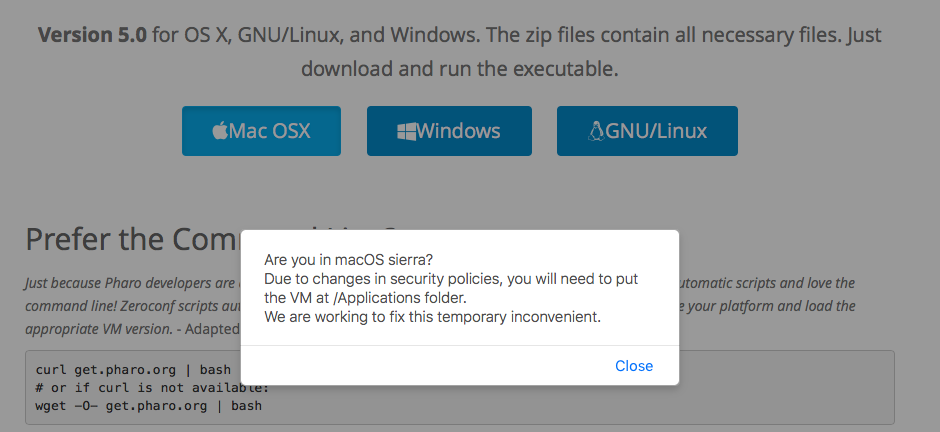
for the moment, I added this nice (?) alert when you press mac download button:
On 14 Nov 2016, at 11:30, Esteban Lorenzano <estebanlm@gmail.com> wrote:
On 14 Nov 2016, at 11:01, MartinW <wm@fastmail.fm> wrote:
Can someone put a note to the website (http://pharo.org/download)? It is frustrating for users to follow the link to http://files.pharo.org/platform/Pharo5.0-mac.zip from there and get a defunct Pharo installation.
no, in fact that link should work. ⦠and in fact, it works⦠is just that due the changes in sierra, the bundle needs to be put in /Applications to not be copied into a sandbox, readonly place.
Iâm working on have this working in a different way: is time to make PharoLauncher the default download. That way it will be in /Applications naturally and your images will be in a correct place naturally (I also would like a âadd command line toolsâ option to install a pharo and pharo-ui in /usr/local/bin).
Esteban
Sean P. DeNigris wrote
EstebanLM wrote
the regular download by zeroconf should give you an usable VM. That worked - thanks!
Yes, this VM works well :)
-- View this message in context: http://forum.world.st/macOS-Sierra-support-tp4917181p4922891.html Sent from the Pharo Smalltalk Developers mailing list archive at Nabble.com.

Hi, Looks good. I would only add explicitly that we are talking about Appleâs security policies. â⦠Due to changes in security policies of MacOS â¦â Cheers, Doru
On Nov 14, 2016, at 11:36 AM, Esteban Lorenzano <estebanlm@gmail.com> wrote:
for the moment, I added this nice (?) alert when you press mac download button:
<Screen Shot 2016-11-14 at 11.35.13.png>
On 14 Nov 2016, at 11:30, Esteban Lorenzano <estebanlm@gmail.com> wrote:
On 14 Nov 2016, at 11:01, MartinW <wm@fastmail.fm> wrote:
Can someone put a note to the website (http://pharo.org/download)? It is frustrating for users to follow the link to http://files.pharo.org/platform/Pharo5.0-mac.zip from there and get a defunct Pharo installation.
no, in fact that link should work. ⦠and in fact, it works⦠is just that due the changes in sierra, the bundle needs to be put in /Applications to not be copied into a sandbox, readonly place.
Iâm working on have this working in a different way: is time to make PharoLauncher the default download. That way it will be in /Applications naturally and your images will be in a correct place naturally (I also would like a âadd command line toolsâ option to install a pharo and pharo-ui in /usr/local/bin).
Esteban
Sean P. DeNigris wrote
EstebanLM wrote
the regular download by zeroconf should give you an usable VM. That worked - thanks!
Yes, this VM works well :)
-- View this message in context: http://forum.world.st/macOS-Sierra-support-tp4917181p4922891.html Sent from the Pharo Smalltalk Developers mailing list archive at Nabble.com.
-- www.tudorgirba.com www.feenk.com "We are all great at making mistakes."
done
On 14 Nov 2016, at 13:46, Tudor Girba <tudor@tudorgirba.com> wrote:
Hi,
Looks good. I would only add explicitly that we are talking about Appleâs security policies.
â⦠Due to changes in security policies of MacOS â¦â
Cheers, Doru
On Nov 14, 2016, at 11:36 AM, Esteban Lorenzano <estebanlm@gmail.com> wrote:
for the moment, I added this nice (?) alert when you press mac download button:
<Screen Shot 2016-11-14 at 11.35.13.png>
On 14 Nov 2016, at 11:30, Esteban Lorenzano <estebanlm@gmail.com> wrote:
On 14 Nov 2016, at 11:01, MartinW <wm@fastmail.fm> wrote:
Can someone put a note to the website (http://pharo.org/download)? It is frustrating for users to follow the link to http://files.pharo.org/platform/Pharo5.0-mac.zip from there and get a defunct Pharo installation.
no, in fact that link should work. ⦠and in fact, it works⦠is just that due the changes in sierra, the bundle needs to be put in /Applications to not be copied into a sandbox, readonly place.
Iâm working on have this working in a different way: is time to make PharoLauncher the default download. That way it will be in /Applications naturally and your images will be in a correct place naturally (I also would like a âadd command line toolsâ option to install a pharo and pharo-ui in /usr/local/bin).
Esteban
Sean P. DeNigris wrote
EstebanLM wrote
the regular download by zeroconf should give you an usable VM. That worked - thanks!
Yes, this VM works well :)
-- View this message in context: http://forum.world.st/macOS-Sierra-support-tp4917181p4922891.html Sent from the Pharo Smalltalk Developers mailing list archive at Nabble.com.
-- www.tudorgirba.com www.feenk.com
"We are all great at making mistakes."

Good Tx Le 14/11/16 à 11:36, Esteban Lorenzano a écrit :
for the moment, I added this nice (?) alert when you press mac download button:
On 14 Nov 2016, at 11:30, Esteban Lorenzano <estebanlm@gmail.com <mailto:estebanlm@gmail.com>> wrote:
On 14 Nov 2016, at 11:01, MartinW <wm@fastmail.fm <mailto:wm@fastmail.fm>> wrote:
Can someone put a note to the website (http://pharo.org/download)? It is frustrating for users to follow the link to http://files.pharo.org/platform/Pharo5.0-mac.zip from there and get a defunct Pharo installation.
no, in fact that link should work. ⦠and in fact, it works⦠is just that due the changes in sierra, the bundle needs to be put in /Applications to not be copied into a sandbox, readonly place.
Iâm working on have this working in a different way: is time to make PharoLauncher the default download. That way it will be in /Applications naturally and your images will be in a correct place naturally (I also would like a âadd command line toolsâ option to install a pharo and pharo-ui in /usr/local/bin).
Esteban
Sean P. DeNigris wrote
EstebanLM wrote
the regular download by zeroconf should give you an usable VM. That worked - thanks!
Yes, this VM works well :)
-- View this message in context: http://forum.world.st/macOS-Sierra-support-tp4917181p4922891.html Sent from the Pharo Smalltalk Developers mailing list archive at Nabble.com <http://Nabble.com>.
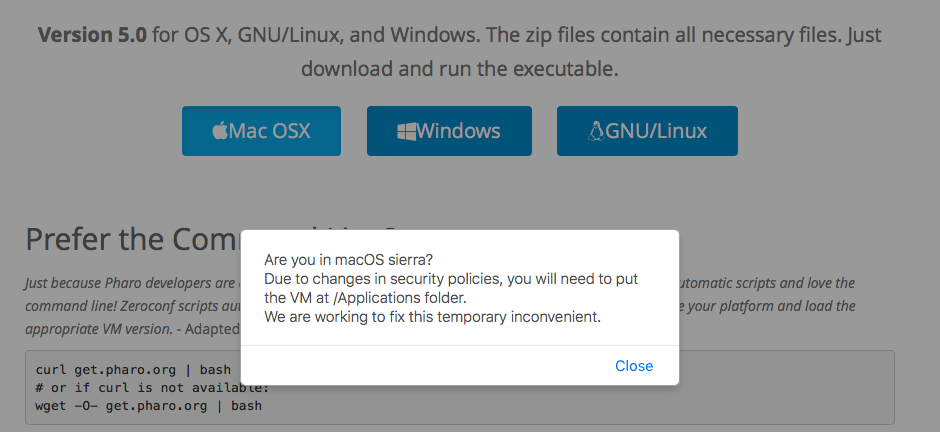

Pharo 6.0 on macOS Sierra (10.12.5)
Are you in macOS sierra? Due to changes in security policies, you will need to put the VM at /Applications folder. We are working to fix this temporary inconvenient.
What needs to be done on macOS Sierra (10.12.5) after download is this: Remove the *com.apple.quarantine* extended attribute from the downloaded zip file, or from the extracted .app directory. For a longer explanation see http://forum.world.st/Squeak-cannot-write-to-the-changes-file-tt4954787.html... . s/Squeak5.1-16549-32bit-201701281910-macOS.zip/Pharo6.0-mac.zip/ s/Squeak5.1-16549-32bit.app/Pharo6.0.app/ Best Regards, Milan -- View this message in context: http://forum.world.st/macOS-Sierra-support-tp4917181p4955005.html Sent from the Pharo Smalltalk Developers mailing list archive at Nabble.com.

This is weird but I have never experienced this "sandbox" thing I have Sierra, updated to the latest and when I download this zip to my downloads folder, I uncompress it and double click the application without moving to the application folder it works without doing anything additionally or complaining about it. I am almost always do this with applications I download because I like to test them before copying them to the application folder. Never had any issues. So apparently my Sierra loves me :D On Mon, Nov 14, 2016 at 12:31 PM Esteban Lorenzano <estebanlm@gmail.com> wrote:
On 14 Nov 2016, at 11:01, MartinW <wm@fastmail.fm> wrote:
Can someone put a note to the website (http://pharo.org/download)? It is frustrating for users to follow the link to http://files.pharo.org/platform/Pharo5.0-mac.zip from there and get a defunct Pharo installation.
no, in fact that link should work. ⦠and in fact, it works⦠is just that due the changes in sierra, the bundle needs to be put in /Applications to not be copied into a sandbox, readonly place.
Iâm working on have this working in a different way: is time to make PharoLauncher the default download. That way it will be in /Applications naturally and your images will be in a correct place naturally (I also would like a âadd command line toolsâ option to install a pharo and pharo-ui in /usr/local/bin).
Esteban
Sean P. DeNigris wrote
EstebanLM wrote
the regular download by zeroconf should give you an usable VM. That worked - thanks!
Yes, this VM works well :)
-- View this message in context:
http://forum.world.st/macOS-Sierra-support-tp4917181p4922891.html
Sent from the Pharo Smalltalk Developers mailing list archive at Nabble.com.
If I try to start the Pharo from the Download page e.g. from my Desktop I get the following information: ----- Pharo cannot write to the changes file named /private/var/folders/9p/h6h_ntqs2gs9kztvdp9mrm1m0000gn/T/AppTranslocation/1CA39D30-C5A9-4599-82F0-8FFA46606D5B/d/Pharo5.0.app/Contents/Resources/Pharo5.0.changes. Please check that you have write permission for this file. You won't be able to save this image correctly until you fix this. ----- And Pharo does not work at all, because it tries to write to changes all the time, of course. The hint on the Website looks good. kilon.alios wrote
This is weird but I have never experienced this "sandbox" thing
I have Sierra, updated to the latest and when I download this zip to my downloads folder, I uncompress it and double click the application without moving to the application folder it works without doing anything additionally or complaining about it.
I am almost always do this with applications I download because I like to test them before copying them to the application folder. Never had any issues.
So apparently my Sierra loves me :D
-- View this message in context: http://forum.world.st/macOS-Sierra-support-tp4917181p4922953.html Sent from the Pharo Smalltalk Developers mailing list archive at Nabble.com.
Am 27.09.2016 um 11:15 schrieb Sven Van Caekenberghe <sven@stfx.eu>:
PS2: Another really annoying problem is the following: he saved all his (really important) scripts using Script Manager as a FUEL. Moving between 4.0 and 5.0 FUEL stops working (version incompatibility) - this is really not cool, why would a newer FUEL not be able to read older FUEL. He ended up copying string data by opening the binary FUEL file in a text editor. it is like that from the beginning. I guess there was the fear keeping everything compatible would be a huge amount of work. But it is indeed an annoying thing. The usual way to deal with it is open pharo4 and materialize the fuel file then upgrade fuel to the version pharo5 uses and save again.
Norbert Yeah, but this is silly: it goes against the principle of a persistence format: to save data for future use. [ I knew this already, I never agreed with this principle ]. Me too - believe but my scenario was not really heard. I think that it would be good to have some strategies to represent different objects representation but fuel will be slower. Mariano was fighting against speed and speed and speed. and he did it well. Like I described in the email, after upgrading, we were unable to run the old image - catch 22.
Hi Sven
Hi,
Can someone who really knows/understand please describe where to find the necessary Pharo VM's to run on the newly released macOS Sierra (10.12) ? I will let Esteban reply. In particular it seems old VM's just stop working and recent VM's that do work either have issues or cannot run older (3.0, 4.0) images. But you see Pharo 50 got all the internal object representation changed. It happens only every 15 years or more. This is not an easy changes. We did not rewrote a new FFI just because we did not know what to do. The new format open so many future opportunities but it has a cost.
Well if mac changes some important low-level entries why the VM would not be impacted. Esteban is working on - 64 bits support - ARM VM - after he should work on the FT plugin Now I think that he is quite efficient as engineers and it means that the community should help or put more money on the table to get more engineers.
Thanks,
Sven
PS: I have not yet upgraded, but one of my colleagues did and he got stuck: even after we found a VM that worked, it could only run 5.0 images, not his production 4.0 images. Needless to say, this is not good.
PS2: Another really annoying problem is the following: he saved all his (really important) scripts using Script Manager as a FUEL. Moving between 4.0 and 5.0 FUEL stops working (version incompatibility) - this is really not cool, why would a newer FUEL not be able to read older FUEL. He ended up copying string data by opening the binary FUEL file in a text editor.
I was really concerned by that since Fuel inception. I agree with you. I think that a serialization format should live over multiple versions. Now this is difficult to achieve when the serializer is drastically optimised and rely on internal representation logic. And manpower of course. What the Script Manager should do is to provide a textual output too like using STON.
On 27 Sep 2016, at 11:15, Sven Van Caekenberghe <sven@stfx.eu> wrote:
Hi,
Can someone who really knows/understand please describe where to find the necessary Pharo VM's to run on the newly released macOS Sierra (10.12) ?
Iâm in the process of producing compatible VMs. Today or tomorrow they will be ready. Esteban ps: in the mean time, you can use this one: cog_macos32x86_pharo.cog.spur_201609231453.tar.gz <https://bintray.com/estebanlm/pharo-vm/download_file?file_path=cog_macos32x8...> (is not yet 100% compatible with Pharo but is working fine⦠just command line â-â vs. â--" is not compatible and some othersâ¦)
In particular it seems old VM's just stop working and recent VM's that do work either have issues or cannot run older (3.0, 4.0) images.
Thanks,
Sven
PS: I have not yet upgraded, but one of my colleagues did and he got stuck: even after we found a VM that worked, it could only run 5.0 images, not his production 4.0 images. Needless to say, this is not good.
PS2: Another really annoying problem is the following: he saved all his (really important) scripts using Script Manager as a FUEL. Moving between 4.0 and 5.0 FUEL stops working (version incompatibility) - this is really not cool, why would a newer FUEL not be able to read older FUEL. He ended up copying string data by opening the binary FUEL file in a text editor.
On 27 Sep 2016, at 12:18, Esteban Lorenzano <estebanlm@gmail.com> wrote:
On 27 Sep 2016, at 11:15, Sven Van Caekenberghe <sven@stfx.eu> wrote:
Hi,
Can someone who really knows/understand please describe where to find the necessary Pharo VM's to run on the newly released macOS Sierra (10.12) ?
Iâm in the process of producing compatible VMs. Today or tomorrow they will be ready.
OK, looking forward to it, we will certainly test.
On 27 Sep 2016, at 13:46, Sven Van Caekenberghe <sven@stfx.eu> wrote:
On 27 Sep 2016, at 12:18, Esteban Lorenzano <estebanlm@gmail.com> wrote:
On 27 Sep 2016, at 11:15, Sven Van Caekenberghe <sven@stfx.eu> wrote:
Hi,
Can someone who really knows/understand please describe where to find the necessary Pharo VM's to run on the newly released macOS Sierra (10.12) ?
Iâm in the process of producing compatible VMs. Today or tomorrow they will be ready.
OK, looking forward to it, we will certainly test.
Any progress ? << Starting today, Apple is making the new macOS Sierra operating system available as an automatic download to customers running OS X El Capitan in order to encourage them to update. Customers who have auto downloads enabled will see macOS Sierra start to download automatically, but it will not install without express user permission. >> Which means many more people will get in trouble.
Pharo runs fine on MacOS Sierra , I did get a blank window with a download I made during El Capitan but re downloading latest vm and image works flawlessly On Tue, Oct 4, 2016 at 11:07 AM Sven Van Caekenberghe <sven@stfx.eu> wrote:
On 27 Sep 2016, at 13:46, Sven Van Caekenberghe <sven@stfx.eu> wrote:
On 27 Sep 2016, at 12:18, Esteban Lorenzano <estebanlm@gmail.com>
wrote:
On 27 Sep 2016, at 11:15, Sven Van Caekenberghe <sven@stfx.eu> wrote:
Hi,
Can someone who really knows/understand please describe where to find
the necessary Pharo VM's to run on the newly released macOS Sierra (10.12) ?
Iâm in the process of producing compatible VMs. Today or tomorrow they will be ready.
OK, looking forward to it, we will certainly test.
Any progress ?
<< Starting today, Apple is making the new macOS Sierra operating system available as an automatic download to customers running OS X El Capitan in order to encourage them to update.
Customers who have auto downloads enabled will see macOS Sierra start to download automatically, but it will not install without express user permission. >>
Which means many more people will get in trouble.
this one: pharo-mac-i386.zip <https://bintray.com/estebanlm/pharo-vm/download_file?file_path=pharo-mac-i38...> should be working fine. Still that âold VMâ message, and some problems related to how the versions string are handled now, but I think is doing ok. Also, still no signing⦠We will do that soon :) Esteban
On 4 Oct 2016, at 10:06, Sven Van Caekenberghe <sven@stfx.eu> wrote:
On 27 Sep 2016, at 13:46, Sven Van Caekenberghe <sven@stfx.eu> wrote:
On 27 Sep 2016, at 12:18, Esteban Lorenzano <estebanlm@gmail.com> wrote:
On 27 Sep 2016, at 11:15, Sven Van Caekenberghe <sven@stfx.eu> wrote:
Hi,
Can someone who really knows/understand please describe where to find the necessary Pharo VM's to run on the newly released macOS Sierra (10.12) ?
Iâm in the process of producing compatible VMs. Today or tomorrow they will be ready.
OK, looking forward to it, we will certainly test.
Any progress ?
<< Starting today, Apple is making the new macOS Sierra operating system available as an automatic download to customers running OS X El Capitan in order to encourage them to update.
Customers who have auto downloads enabled will see macOS Sierra start to download automatically, but it will not install without express user permission. >>
Which means many more people will get in trouble.

Do we use this the CI? Are the downloadable artefacts being build with it?
On 4 Oct 2016, at 11:17, Esteban Lorenzano <estebanlm@gmail.com> wrote:
this one:
pharo-mac-i386.zip <https://bintray.com/estebanlm/pharo-vm/download_file?file_path=pharo-mac-i38...>
should be working fine. Still that âold VMâ message, and some problems related to how the versions string are handled now, but I think is doing ok. Also, still no signing⦠We will do that soon :)
Esteban
On 4 Oct 2016, at 10:06, Sven Van Caekenberghe <sven@stfx.eu <mailto:sven@stfx.eu>> wrote:
On 27 Sep 2016, at 13:46, Sven Van Caekenberghe <sven@stfx.eu <mailto:sven@stfx.eu>> wrote:
On 27 Sep 2016, at 12:18, Esteban Lorenzano <estebanlm@gmail.com <mailto:estebanlm@gmail.com>> wrote:
On 27 Sep 2016, at 11:15, Sven Van Caekenberghe <sven@stfx.eu <mailto:sven@stfx.eu>> wrote:
Hi,
Can someone who really knows/understand please describe where to find the necessary Pharo VM's to run on the newly released macOS Sierra (10.12) ?
Iâm in the process of producing compatible VMs. Today or tomorrow they will be ready.
OK, looking forward to it, we will certainly test.
Any progress ?
<< Starting today, Apple is making the new macOS Sierra operating system available as an automatic download to customers running OS X El Capitan in order to encourage them to update.
Customers who have auto downloads enabled will see macOS Sierra start to download automatically, but it will not install without express user permission. >>
Which means many more people will get in trouble.
estaban may be we should add a message on the web site. Pay attention we are working on it and this vm should be working fine but it is not officially released yet. Le 4/10/16 à 11:17, Esteban Lorenzano a écrit :
this one:
pharo-mac-i386.zip <https://bintray.com/estebanlm/pharo-vm/download_file?file_path=pharo-mac-i38...>
should be working fine. Still that âold VMâ message, and some problems related to how the versions string are handled now, but I think is doing ok. Also, still no signing⦠We will do that soon :)
Esteban
On 4 Oct 2016, at 10:06, Sven Van Caekenberghe <sven@stfx.eu <mailto:sven@stfx.eu>> wrote:
On 27 Sep 2016, at 13:46, Sven Van Caekenberghe <sven@stfx.eu <mailto:sven@stfx.eu>> wrote:
On 27 Sep 2016, at 12:18, Esteban Lorenzano <estebanlm@gmail.com <mailto:estebanlm@gmail.com>> wrote:
On 27 Sep 2016, at 11:15, Sven Van Caekenberghe <sven@stfx.eu <mailto:sven@stfx.eu>> wrote:
Hi,
Can someone who really knows/understand please describe where to find the necessary Pharo VM's to run on the newly released macOS Sierra (10.12) ?
Iâm in the process of producing compatible VMs. Today or tomorrow they will be ready.
OK, looking forward to it, we will certainly test.
Any progress ?
<< Starting today, Apple is making the new macOS Sierra operating system available as an automatic download to customers running OS X El Capitan in order to encourage them to update.
Customers who have auto downloads enabled will see macOS Sierra start to download automatically, but it will not install without express user permission. >>
Which means many more people will get in trouble.
participants (12)
-
 Clément Bera
 -
 Dimitris Chloupis
 -
 Esteban Lorenzano
 -
 Marcus Denker
 -
 MartinW
 -
 Max Leske
 -
 Milan Vavra
 -
 Norbert Hartl
 -
 Sean P. DeNigris
 -
 stepharo
 -
 Sven Van Caekenberghe
 -
 Tudor Girba