Spotter idea - bring existing code windows to front

A quick note on an idea that strikes me, I often find myself with a large number of windows open and I know I have a code window open previously but the task bar is a bit opaque to find it, and its so cheap to open a new code window from Spotter, thats what I do, and open yet another window, making it harder again to find any particular window. You can see the downward spiral here. So apart from more discipline is managing the number of windows I have open a passing idea is that for if an existing code window is open, Spotter brings that to the front rather than opening another window. Optionally, if that code window is dirty, as well as bringing it to the front a fresh code window be opened as well, so that the two are immediately comparable. cheers -ben

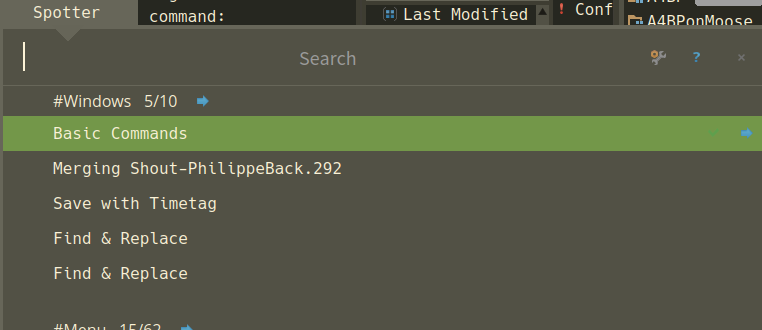
I made a little experiment to get the windows listed in spotter. [image: Inline image 1] I have still an issue with the activation and some weird windows listed but should be able to give you just that in a couple hours. This is a good opportunity for me to jump into spotter extensions, thx for the nudge :-) Phil On Sat, Mar 4, 2017 at 4:19 PM, Ben Coman <btc@openinworld.com> wrote:
A quick note on an idea that strikes me, I often find myself with a large number of windows open and I know I have a code window open previously but the task bar is a bit opaque to find it, and its so cheap to open a new code window from Spotter, thats what I do, and open yet another window, making it harder again to find any particular window. You can see the downward spiral here.
So apart from more discipline is managing the number of windows I have open a passing idea is that for if an existing code window is open, Spotter brings that to the front rather than opening another window. Optionally, if that code window is dirty, as well as bringing it to the front a fresh code window be opened as well, so that the two are immediately comparable.
cheers -ben

Nice one, Phil :) Doru
On Mar 4, 2017, at 7:32 PM, phil@highoctane.be wrote:
I made a little experiment to get the windows listed in spotter.
<image.png>
I have still an issue with the activation and some weird windows listed but should be able to give you just that in a couple hours.
This is a good opportunity for me to jump into spotter extensions, thx for the nudge :-)
Phil
On Sat, Mar 4, 2017 at 4:19 PM, Ben Coman <btc@openinworld.com> wrote: A quick note on an idea that strikes me, I often find myself with a large number of windows open and I know I have a code window open previously but the task bar is a bit opaque to find it, and its so cheap to open a new code window from Spotter, thats what I do, and open yet another window, making it harder again to find any particular window. You can see the downward spiral here.
So apart from more discipline is managing the number of windows I have open a passing idea is that for if an existing code window is open, Spotter brings that to the front rather than opening another window. Optionally, if that code window is dirty, as well as bringing it to the front a fresh code window be opened as well, so that the two are immediately comparable.
cheers -ben
-- www.tudorgirba.com www.feenk.com "Yesterday is a fact. Tomorrow is a possibility. Today is a challenge."
Slice in Pharo60Inbox https://pharo.fogbugz.com/f/cases/19798/Make-Spotter-look-for-open-windows I got it working properly now. [image: Inline image 1] But how is one to package a Spotter extension in a given package without having to touch GTSpotter extensions core? This is indeed easy to understand once gone through the motions and opens a lot of doors for open data exploration with custom spotters. Question: how can I wire several spotters together? Phil On Sun, Mar 5, 2017 at 7:15 PM, Tudor Girba <tudor@tudorgirba.com> wrote:
Nice one, Phil :)
Doru
On Mar 4, 2017, at 7:32 PM, phil@highoctane.be wrote:
I made a little experiment to get the windows listed in spotter.
<image.png>
I have still an issue with the activation and some weird windows listed but should be able to give you just that in a couple hours.
This is a good opportunity for me to jump into spotter extensions, thx for the nudge :-)
Phil
On Sat, Mar 4, 2017 at 4:19 PM, Ben Coman <btc@openinworld.com> wrote: A quick note on an idea that strikes me, I often find myself with a large number of windows open and I know I have a code window open previously but the task bar is a bit opaque to find it, and its so cheap to open a new code window from Spotter, thats what I do, and open yet another window, making it harder again to find any particular window. You can see the downward spiral here.
So apart from more discipline is managing the number of windows I have open a passing idea is that for if an existing code window is open, Spotter brings that to the front rather than opening another window. Optionally, if that code window is dirty, as well as bringing it to the front a fresh code window be opened as well, so that the two are immediately comparable.
cheers -ben
-- www.tudorgirba.com www.feenk.com
"Yesterday is a fact. Tomorrow is a possibility. Today is a challenge."

Nice! On Sun, Mar 5, 2017 at 9:04 PM, phil@highoctane.be <phil@highoctane.be> wrote:
Slice in Pharo60Inbox
https://pharo.fogbugz.com/f/cases/19798/Make-Spotter-look-for-open-windows
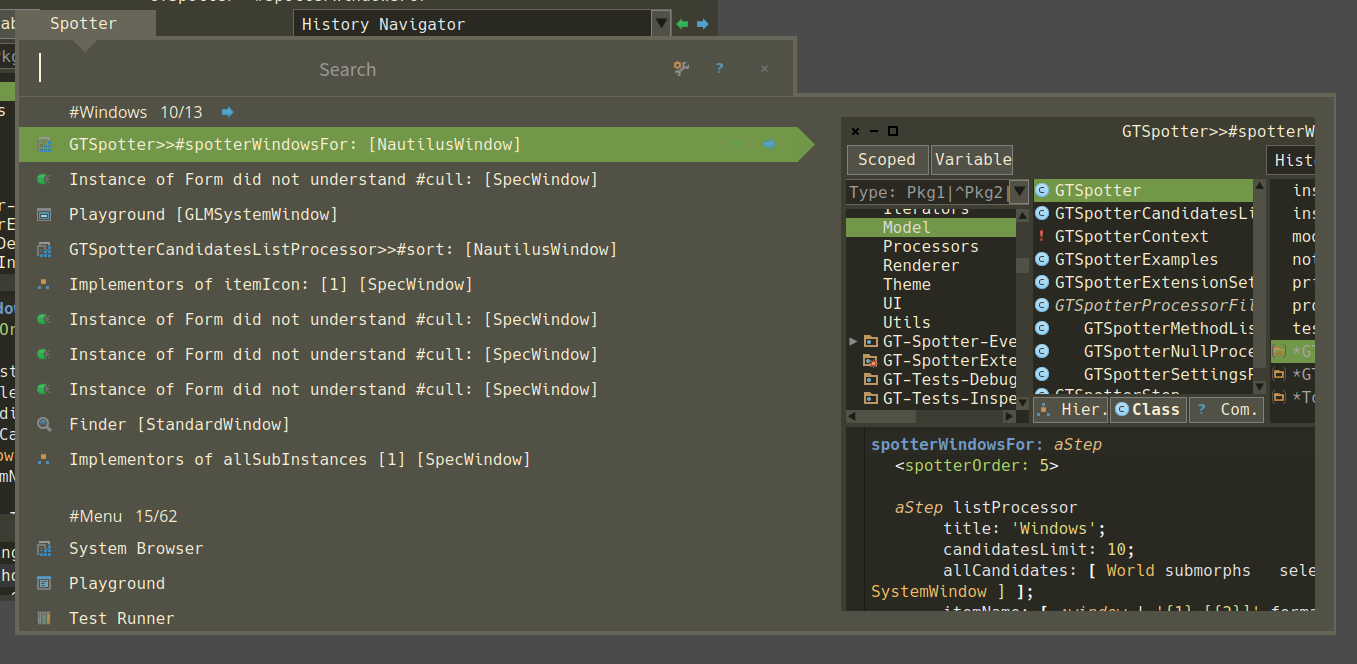
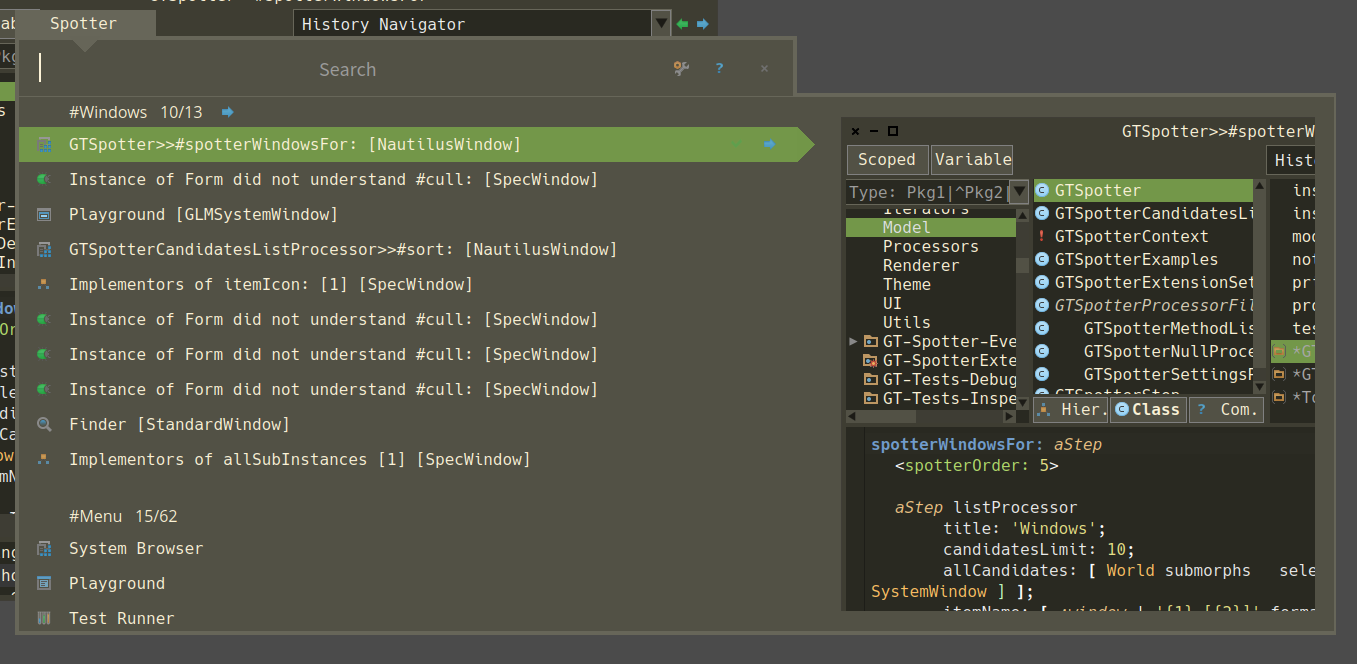
I got it working properly now.
[image: Inline image 1]
Do we want this to come before the search for custom menus? Having another search first would make it more difficult to use Spotter to quickly find items in the world menu.
But how is one to package a Spotter extension in a given package without having to touch GTSpotter extensions core?
We usually package extensions related to the core parts of the IDE in the GT-SpotterExtensions-Core. Otherwise you can create a dedicated package with extensions for a certain project.
This is indeed easy to understand once gone through the motions and opens a lot of doors for open data exploration with custom spotters.
Question: how can I wire several spotters together?
If you click on the arrow to the right of the selected row (or use Meta+ArrowRight) you will trigger the dive-in action that will open Spotter on the selected object. This will load searches specific to that object. For example if you dive in into a window object you will get a search thorough the submorphs and shortcuts associated with the window. They are defined in the Morph class. If you want to add some specific searches that apply to a window you can add them to the SystemWindow class. Cheers, Andrei
Phil
On Sun, Mar 5, 2017 at 7:15 PM, Tudor Girba <tudor@tudorgirba.com> wrote:
Nice one, Phil :)
Doru
On Mar 4, 2017, at 7:32 PM, phil@highoctane.be wrote:
I made a little experiment to get the windows listed in spotter.
<image.png>
I have still an issue with the activation and some weird windows listed but should be able to give you just that in a couple hours.
This is a good opportunity for me to jump into spotter extensions, thx for the nudge :-)
Phil
On Sat, Mar 4, 2017 at 4:19 PM, Ben Coman <btc@openinworld.com> wrote: A quick note on an idea that strikes me, I often find myself with a large number of windows open and I know I have a code window open previously but the task bar is a bit opaque to find it, and its so cheap to open a new code window from Spotter, thats what I do, and open yet another window, making it harder again to find any particular window. You can see the downward spiral here.
So apart from more discipline is managing the number of windows I have open a passing idea is that for if an existing code window is open, Spotter brings that to the front rather than opening another window. Optionally, if that code window is dirty, as well as bringing it to the front a fresh code window be opened as well, so that the two are immediately comparable.
cheers -ben
-- www.tudorgirba.com www.feenk.com
"Yesterday is a fact. Tomorrow is a possibility. Today is a challenge."

Hi Ben. I think it is good strategy for general usage, not only spotter. If user requests browser for item which already shown in existing window then this window should be shown instead of opening new one 2017-03-04 16:19 GMT+01:00 Ben Coman <btc@openinworld.com>:
A quick note on an idea that strikes me, I often find myself with a large number of windows open and I know I have a code window open previously but the task bar is a bit opaque to find it, and its so cheap to open a new code window from Spotter, thats what I do, and open yet another window, making it harder again to find any particular window. You can see the downward spiral here.
So apart from more discipline is managing the number of windows I have open a passing idea is that for if an existing code window is open, Spotter brings that to the front rather than opening another window. Optionally, if that code window is dirty, as well as bringing it to the front a fresh code window be opened as well, so that the two are immediately comparable.
cheers -ben
participants (5)
-
 Andrei Chis
 -
 Ben Coman
 -
 Denis Kudriashov
 -
 phil@highoctane.be
 -
 Tudor Girba