Cannot extract stable VM on Window

Hi, Today I tried to extract the stable windows VM for Pharo 8 64bits on Windows 7 but I get an error saying the file is corrupted. Link: http://files.pharo.org/vm/pharo-spur64/win/stable-20190916.zip Can someone reproduce it? -- Cyril Ferlicot https://ferlicot.fr
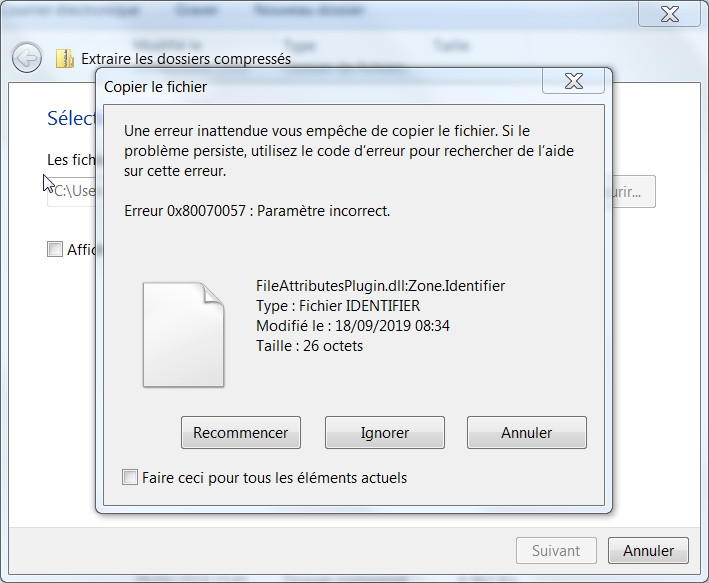
Le 29/09/2019 à 15:53, Cyril Ferlicot D. a écrit :
Hi,
Today I tried to extract the stable windows VM for Pharo 8 64bits on Windows 7 but I get an error saying the file is corrupted.
Link: http://files.pharo.org/vm/pharo-spur64/win/stable-20190916.zip
Can someone reproduce it?
Also, I tried to take the latest VM but when I launch an image, no UI is opening. (And I took the pharo64-win-latest, not the pharo64-win-headless-latest) -- Cyril Ferlicot https://ferlicot.fr

Hi Cyril, I downloaded it and tried it on Win7 Pro 64bit (running in Virtualbox), and was able to open as expected. However, looking in the zip file itself, I noticed about two dozen "*_Zone.Identifier" files that I was not expecting to see. They likely should not be there; they have something to do with IT security inspections on downloaded files, and I delete them as a matter of course whenever I see them (as part of a download). I'm not sure why the Pharo build process would have these. I tried launching Pharo from this zip file before and after I removed these files... It worked in both cases; no corruption reported. However, since your error dialog was reporting one of these 'zone' files, I would trying removing them and see if that helps. -Ted -- Sent from: http://forum.world.st/Pharo-Smalltalk-Developers-f1294837.html
Le 29/09/2019 à 16:35, Brainstorms a écrit :
Hi Cyril,
I downloaded it and tried it on Win7 Pro 64bit (running in Virtualbox), and was able to open as expected.
However, looking in the zip file itself, I noticed about two dozen "*_Zone.Identifier" files that I was not expecting to see. They likely should not be there; they have something to do with IT security inspections on downloaded files, and I delete them as a matter of course whenever I see them (as part of a download). I'm not sure why the Pharo build process would have these.
I tried launching Pharo from this zip file before and after I removed these files... It worked in both cases; no corruption reported. However, since your error dialog was reporting one of these 'zone' files, I would trying removing them and see if that helps.
Thanks! With your comment I succeeded to launch my image. What I needed to do was to open the zip file without extracting it, delete all the .Identifier files and extract it once done. I wonder how the vm zip files end up with those files in them.
-Ted
-- Sent from: http://forum.world.st/Pharo-Smalltalk-Developers-f1294837.html
-- Cyril Ferlicot https://ferlicot.fr
I'm glad it did the trick. And that's a VERY good question... Those files shouldn't be there, and it suggests that the files were downloaded/transferred over a network, then packaged into the zip. Why? (I don't know any other function that creates these, as I've only ever seen them when downloading on a Windows machine. They're not valid filenames (to Windows), which is an additional annoyance.) What I don't like about the look of it is that it has that kind of feel of a "man in the middle" type of attack. Not that this occurred, but it makes me a little uncomfortable. (Enough that I snapshotted my Vbox VM to test it on, so that I can destroy it afterward.) The maintainers might fill us in... -t CyrilFerlicot wrote
Le 29/09/2019 à 16:35, Brainstorms a écrit :
Hi Cyril,
I downloaded it and tried it on Win7 Pro 64bit (running in Virtualbox), and was able to open as expected.
However, looking in the zip file itself, I noticed about two dozen "*_Zone.Identifier" files that I was not expecting to see. They likely should not be there; they have something to do with IT security inspections on downloaded files, and I delete them as a matter of course whenever I see them (as part of a download). I'm not sure why the Pharo build process would have these.
I tried launching Pharo from this zip file before and after I removed these files... It worked in both cases; no corruption reported. However, since your error dialog was reporting one of these 'zone' files, I would trying removing them and see if that helps.
Thanks!
With your comment I succeeded to launch my image. What I needed to do was to open the zip file without extracting it, delete all the .Identifier files and extract it once done.
I wonder how the vm zip files end up with those files in them.
-Ted
-- Sent from: http://forum.world.st/Pharo-Smalltalk-Developers-f1294837.html
-- Cyril Ferlicot https://ferlicot.fr
signature.asc (836 bytes) <http://forum.world.st/attachment/5104673/0/signature.asc>;
-- Sent from: http://forum.world.st/Pharo-Smalltalk-Developers-f1294837.html

On Mon, 30 Sep 2019 at 02:41, Cyril Ferlicot D. <cyril.ferlicot@gmail.com> wrote:
Le 29/09/2019 à 16:35, Brainstorms a écrit :
Hi Cyril,
I downloaded it and tried it on Win7 Pro 64bit (running in Virtualbox), and was able to open as expected.
However, looking in the zip file itself, I noticed about two dozen "*_Zone.Identifier" files that I was not expecting to see. They likely should not be there; they have something to do with IT security inspections on downloaded files, and I delete them as a matter of course whenever I see them (as part of a download). I'm not sure why the Pharo build process would have these.
I tried launching Pharo from this zip file before and after I removed these files... It worked in both cases; no corruption reported. However, since your error dialog was reporting one of these 'zone' files, I would trying removing them and see if that helps.
Thanks!
With your comment I succeeded to launch my image. What I needed to do was to open the zip file without extracting it, delete all the .Identifier files and extract it once done.
I wonder how the vm zip files end up with those files in them.
Looking inside... http://files.pharo.org/vm/pharo-spur64/win/stable-20190916.zip I see filename "FT2Plugin.dll:Zone.Identifier" The colon in the filename is a clue that it was originally an Alternate Data Stream attached to the root file https://www.2brightsparks.com/resources/articles/NTFS-Alternate-Data-Stream-... That ZoneIdentifier ADS wont show in a Opening "FT2Plugin.dll_Zone.Identifier" in Notepad shows it contains... [ZoneTransfer] ZoneId=3 ...which seems like its been tagged by a Windows system function into an untrusted "Internet Zone" http://woshub.com/how-windows-determines-that-the-file-has-been-downloaded-f... So it seems not-malicious, since I'd guess an attacker would be putting it in a "Trusted Zone" Looking in directory... http://files.pharo.org/vm/pharo-spur64/win/ for the following at recent consecutive files, the ones marked "Y" have the ADS N 2019-09-13 22:18 8.1 MB pharo-win-x86_64-201909131927-218e97a.zip N 2019-09-15 00:16 8.1 MB pharo-win-x86_64-201909142122-f5de9a4.zip Y 2019-09-20 11:57 6.8 MB stable-20190916.zip Y 2019-09-20 11:57 6.8 MB pharo-win-x86_64-201909161029-19f5d00.zip N 2019-09-21 21:50 8.1 MB pharo-win-x86_64-201909211859-521c75a.zip N 2019-09-25 19:12 8.1 MB pharo-win-x86_64-201909251551-3023fbc.zip So it seems to be a blip related around the moment that the "stable" zip was created. I note that the 2019-09-20 zips include the following additional files the surrounding zips don't have. SurfacePlugin.dll SqueakSSL.dll libfontconfig-1.dll libexpat-1.dll libbz2 FTPlugin.dll Highly speculative, but one scenario could be that "pharo-win-x86_64-201909161029-19f5d00.zip" was downloaded to someone's machine to add those files and it got tagged by Windows. They then got included when " pharo-win-x86_64-201909161029-19f5d00.zip " was rezipped and also copied to "stable-20190916.zip" ?? It would be good to understand what happened here. A solution might be to exclude ADS when "stable-20190916.zip" is created. btw, The `dir` command is not aware of ADS. This can be used to investigate... https://docs.microsoft.com/en-us/sysinternals/downloads/streams cheers -ben
Good sleuthing, Ben! -- Sent from: http://forum.world.st/Pharo-Smalltalk-Developers-f1294837.html

I reported an intermittent problem with pharo-launcher transferring images that are detected as corrupted on my Windows 10. What happens when you retry? See https://github.com/pharo-project/pharo-launcher/issues/359 On Sun, Sep 29, 2019, 11:03 Cyril Ferlicot D. <cyril.ferlicot@gmail.com> wrote:
Hi,
Today I tried to extract the stable windows VM for Pharo 8 64bits on Windows 7 but I get an error saying the file is corrupted.
Link: http://files.pharo.org/vm/pharo-spur64/win/stable-20190916.zip
Can someone reproduce it? -- Cyril Ferlicot https://ferlicot.fr
Le 29/09/2019 à 18:32, Christopher Fuhrman a écrit :
I reported an intermittent problem with pharo-launcher transferring images that are detected as corrupted on my Windows 10. What happens when you retry?Â
See https://github.com/pharo-project/pharo-launcher/issues/359
I already saw this issue but retrying was not working. I can reproduce it. -- Cyril Ferlicot https://ferlicot.fr
participants (4)
-
 Ben Coman
 -
 Brainstorms
 -
 Christopher Fuhrman
 -
 Cyril Ferlicot D.