
Hi, There are recurring questions about GTSpotter, along the lines of: why Spotter does not work well for 95% of the cases - implement - send - class - class refs? This is in the latest #50591, BTW. Starting with the 3rd one, searching for classes, that has been working well since day one and has benefited from general improvements. 'zncl' gives me ZnClient immediately. Yes, you have to learn how to dive into a result to expand it, but that is not often needed in this case. 'readstream', then first arrow (or cmd-shit-right), then 'co' gives me ZnCodePointReadStream and ZnEncodeReadStream. In both cases, just typing enter browses the class, which is what I want. Both implementers and senders do work well today, you just have to figure out how (learnability is an issue, but not everything can be obvious in this world). 'get: #i' but also, 'get:' + cmd-m gives you all implementors of #get: and spotter automatically expands from a limited set of 5 matches to 100 Enable preview (click outer arrow, or cmd-p) and you see the implementors right there Now, dive in (first arrow or cmd-shit-right), and type 'zn' and I can see ZnClient>>#get: Type enter to open the method in a browser Similar approach for senders, using #s and cmd-n 'join: #s'but also, 'join:' + cmd-n gives you all senders of #join: and spotter automatically expands Enable preview (click outer arrow, or cmd-p) and you see the implementors right there Now, dive in (first arrow or cmd-shit-right), and type 'zn' and I can see ZnDefaultServerDelegate>>#welcomePageCss Type enter to open the method in a browser Class references, I don't know how to do that, but I can't see why it would not fit and it would be a good addition. Spotter adds to the other ways of doing these 4 actions, the old one still work, as does command-click (one of my favourites). Sven PS: I don't wan to narrow down the discussion to just these 4 cases, Spotter and GT are about way more than just this, you can search for many, many things (for example, type 'json' and you can install 3 packages from the catalog), and you can extend these tools yourself. I also know that things must improve further.

Tx sven I will see if I use this scenario for a video to explain my friend Spotter. If you have scenario that I can blindly follow I'm eager to try to produce a video.
Hi,
This is in the latest #50591, BTW.
Starting with the 3rd one, searching for classes, that has been working well since day one and has benefited from general improvements.
'zncl' gives me ZnClient immediately.
Yes, you have to learn how to dive into a result to expand it, but that is not often needed in this case.
'readstream', then first arrow (or cmd-shit-right), then 'co' gives me ZnCodePointReadStream and ZnEncodeReadStream.
In both cases, just typing enter browses the class, which is what I want.
Both implementers and senders do work well today, you just have to figure out how (learnability is an issue, but not everything can be obvious in this world).
'get: #i' but also, 'get:' + cmd-m gives you all implementors of #get: and spotter automatically expands from a limited set of 5 matches to 100
How do I get to see all of them and not just the 100 first. When I click on the arrow I get the same list 100/127 but not all
Enable preview (click outer arrow, or cmd-p) and you see the implementors right there
Now, dive in (first arrow or cmd-shit-right), and type 'zn' and I can see ZnClient>>#get:
Type enter to open the method in a browser
Similar approach for senders, using #s and cmd-n
'join: #s'but also, 'join:' + cmd-n gives you all senders of #join: and spotter automatically expands
Enable preview (click outer arrow, or cmd-p) and you see the implementors right there
Now, dive in (first arrow or cmd-shit-right), and type 'zn' and I can see ZnDefaultServerDelegate>>#welcomePageCss
Type enter to open the method in a browser
Class references, I don't know how to do that, but I can't see why it would not fit and it would be a good addition.
Spotter adds to the other ways of doing these 4 actions, the old one still work, as does command-click (one of my favourites).
Sven
PS: I don't wan to narrow down the discussion to just these 4 cases, Spotter and GT are about way more than just this, you can search for many, many things (for example, type 'json' and you can install 3 packages from the catalog), and you can extend these tools yourself. I also know that things must improve further.
On 20 Feb 2016, at 11:06, stepharo <stepharo@free.fr> wrote:
Tx sven I will see if I use this scenario for a video to explain my friend Spotter. If you have scenario that I can blindly follow I'm eager to try to produce a video.
Yes, that would be good. But even better would be if one starts to use it a bit in day to day routine, only then do you really feel it, and then we can iterate and try to improve (I must say that I learned new stuff while writing this mail ;-) There should be something like on OS X > System Preferences > Trackpad where you have animations and videos explaining thing in the same UI (not jumping to something else). At least, there should be a cookbook explaining really well, high level, for beginners, how to use Spotter (but things have to be stable).
Hi,
This is in the latest #50591, BTW.
Starting with the 3rd one, searching for classes, that has been working well since day one and has benefited from general improvements.
'zncl' gives me ZnClient immediately.
Yes, you have to learn how to dive into a result to expand it, but that is not often needed in this case.
'readstream', then first arrow (or cmd-shit-right), then 'co' gives me ZnCodePointReadStream and ZnEncodeReadStream.
In both cases, just typing enter browses the class, which is what I want.
Both implementers and senders do work well today, you just have to figure out how (learnability is an issue, but not everything can be obvious in this world).
'get: #i' but also, 'get:' + cmd-m gives you all implementors of #get: and spotter automatically expands from a limited set of 5 matches to 100
How do I get to see all of them and not just the 100 first. When I click on the arrow I get the same list 100/127 but not all
Yes, that is true, 100 is probably some arbitrary limit In the past there was just one limit for all categories, maybe it is different now, it could be much large or infinite in some cases The idea is to keep refining the search (like I described below)
Enable preview (click outer arrow, or cmd-p) and you see the implementors right there
Now, dive in (first arrow or cmd-shit-right), and type 'zn' and I can see ZnClient>>#get:
Type enter to open the method in a browser
Similar approach for senders, using #s and cmd-n
'join: #s'but also, 'join:' + cmd-n gives you all senders of #join: and spotter automatically expands
Enable preview (click outer arrow, or cmd-p) and you see the implementors right there
Now, dive in (first arrow or cmd-shit-right), and type 'zn' and I can see ZnDefaultServerDelegate>>#welcomePageCss
Type enter to open the method in a browser
Class references, I don't know how to do that, but I can't see why it would not fit and it would be a good addition.
Spotter adds to the other ways of doing these 4 actions, the old one still work, as does command-click (one of my favourites).
Sven
PS: I don't wan to narrow down the discussion to just these 4 cases, Spotter and GT are about way more than just this, you can search for many, many things (for example, type 'json' and you can install 3 packages from the catalog), and you can extend these tools yourself. I also know that things must improve further.
Sven I'm not against spotter. This is why I will try to do a video assuming that all the bugs are fixed. Now if I have 30 min to do a videos I do not have 5 days to understand how to use and try spotter because when I have few moments to program I need something fully working. Stef Le 20/2/16 11:26, Sven Van Caekenberghe a écrit :
On 20 Feb 2016, at 11:06, stepharo <stepharo@free.fr> wrote:
Tx sven I will see if I use this scenario for a video to explain my friend Spotter. If you have scenario that I can blindly follow I'm eager to try to produce a video. Yes, that would be good.
But even better would be if one starts to use it a bit in day to day routine, only then do you really feel it, and then we can iterate and try to improve (I must say that I learned new stuff while writing this mail ;-)
There should be something like on OS X > System Preferences > Trackpad where you have animations and videos explaining thing in the same UI (not jumping to something else).
At least, there should be a cookbook explaining really well, high level, for beginners, how to use Spotter (but things have to be stable).
Hi,
This is in the latest #50591, BTW.
Starting with the 3rd one, searching for classes, that has been working well since day one and has benefited from general improvements.
'zncl' gives me ZnClient immediately.
Yes, you have to learn how to dive into a result to expand it, but that is not often needed in this case.
'readstream', then first arrow (or cmd-shit-right), then 'co' gives me ZnCodePointReadStream and ZnEncodeReadStream.
In both cases, just typing enter browses the class, which is what I want.
Both implementers and senders do work well today, you just have to figure out how (learnability is an issue, but not everything can be obvious in this world).
'get: #i' but also, 'get:' + cmd-m gives you all implementors of #get: and spotter automatically expands from a limited set of 5 matches to 100 How do I get to see all of them and not just the 100 first. When I click on the arrow I get the same list 100/127 but not all Yes, that is true, 100 is probably some arbitrary limit
In the past there was just one limit for all categories, maybe it is different now, it could be much large or infinite in some cases
The idea is to keep refining the search (like I described below)
Enable preview (click outer arrow, or cmd-p) and you see the implementors right there
Now, dive in (first arrow or cmd-shit-right), and type 'zn' and I can see ZnClient>>#get:
Type enter to open the method in a browser
Similar approach for senders, using #s and cmd-n
'join: #s'but also, 'join:' + cmd-n gives you all senders of #join: and spotter automatically expands
Enable preview (click outer arrow, or cmd-p) and you see the implementors right there
Now, dive in (first arrow or cmd-shit-right), and type 'zn' and I can see ZnDefaultServerDelegate>>#welcomePageCss
Type enter to open the method in a browser
Class references, I don't know how to do that, but I can't see why it would not fit and it would be a good addition.
Spotter adds to the other ways of doing these 4 actions, the old one still work, as does command-click (one of my favourites).
Sven
PS: I don't wan to narrow down the discussion to just these 4 cases, Spotter and GT are about way more than just this, you can search for many, many things (for example, type 'json' and you can install 3 packages from the catalog), and you can extend these tools yourself. I also know that things must improve further.

On Sat, Feb 20, 2016 at 6:41 AM, Sven Van Caekenberghe <sven@stfx.eu> wrote:
Hi,
There are recurring questions about GTSpotter, along the lines of:
why Spotter does not work well for 95% of the cases - implement - send - class - class refs?
This is in the latest #50591, BTW.
Starting with the 3rd one, searching for classes, that has been working well since day one and has benefited from general improvements.
'zncl' gives me ZnClient immediately.
Yes, you have to learn how to dive into a result to expand it, but that is not often needed in this case.
'readstream', then first arrow (or cmd-shit-right), then 'co' gives me ZnCodePointReadStream and ZnEncodeReadStream.
In both cases, just typing enter browses the class, which is what I want.
Both implementers and senders do work well today, you just have to figure out how (learnability is an issue, but not everything can be obvious in this world).
'get: #i' but also, 'get:' + cmd-m gives you all implementors of #get: and spotter automatically expands from a limited set of 5 matches to 100
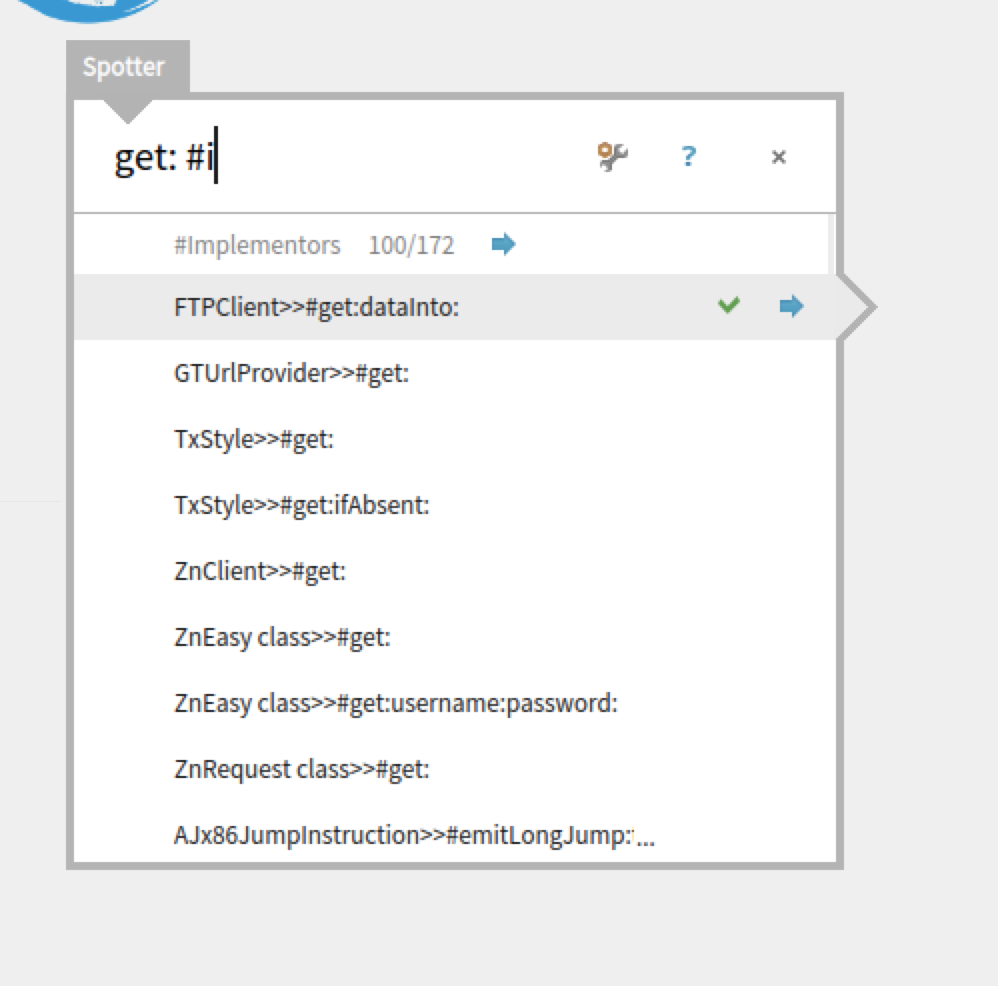
It does not here. Here, using 50594, doing 'get: +i' does not give me all implementors of #get: as you said, but all the implementors MATCHING #get:. In fact, those with #get: (exactly) are not even sorted on top. See attached screenshot.
Enable preview (click outer arrow, or cmd-p) and you see the implementors right there
Now, dive in (first arrow or cmd-shit-right), and type 'zn' and I can see ZnClient>>#get:
Type enter to open the method in a browser
Similar approach for senders, using #s and cmd-n
'join: #s'but also, 'join:' + cmd-n gives you all senders of #join: and spotter automatically expands
Enable preview (click outer arrow, or cmd-p) and you see the implementors right there
Now, dive in (first arrow or cmd-shit-right), and type 'zn' and I can see ZnDefaultServerDelegate>>#welcomePageCss
Type enter to open the method in a browser
Class references, I don't know how to do that, but I can't see why it would not fit and it would be a good addition.
Spotter adds to the other ways of doing these 4 actions, the old one still work, as does command-click (one of my favourites).
Sven
PS: I don't wan to narrow down the discussion to just these 4 cases, Spotter and GT are about way more than just this, you can search for many, many things (for example, type 'json' and you can install 3 packages from the catalog), and you can extend these tools yourself. I also know that things must improve further.
-- Mariano http://marianopeck.wordpress.com

Hi,
On Feb 20, 2016, at 7:45 PM, Mariano Martinez Peck <marianopeck@gmail.com> wrote:
On Sat, Feb 20, 2016 at 6:41 AM, Sven Van Caekenberghe <sven@stfx.eu> wrote: Hi,
There are recurring questions about GTSpotter, along the lines of:
why Spotter does not work well for 95% of the cases - implement - send - class - class refs?
This is in the latest #50591, BTW.
Starting with the 3rd one, searching for classes, that has been working well since day one and has benefited from general improvements.
'zncl' gives me ZnClient immediately.
Yes, you have to learn how to dive into a result to expand it, but that is not often needed in this case.
'readstream', then first arrow (or cmd-shit-right), then 'co' gives me ZnCodePointReadStream and ZnEncodeReadStream.
In both cases, just typing enter browses the class, which is what I want.
Both implementers and senders do work well today, you just have to figure out how (learnability is an issue, but not everything can be obvious in this world).
'get: #i' but also, 'get:' + cmd-m gives you all implementors of #get: and spotter automatically expands from a limited set of 5 matches to 100
It does not here. Here, using 50594, doing 'get: +i' does not give me all implementors of #get: as you said, but all the implementors MATCHING #get:. In fact, those with #get: (exactly) are not even sorted on top. See attached screenshot.
This is caused because of ordering. This is an issue that is open since a long time, and we have a hard time finding the right solution. But, we are still trying. We now made it explicit on the issue tracker: https://pharo.fogbugz.com/f/cases/17656/Spotter-should-sort-search-results Cheers, Doru
Enable preview (click outer arrow, or cmd-p) and you see the implementors right there
Now, dive in (first arrow or cmd-shit-right), and type 'zn' and I can see ZnClient>>#get:
Type enter to open the method in a browser
Similar approach for senders, using #s and cmd-n
'join: #s'but also, 'join:' + cmd-n gives you all senders of #join: and spotter automatically expands
Enable preview (click outer arrow, or cmd-p) and you see the implementors right there
Now, dive in (first arrow or cmd-shit-right), and type 'zn' and I can see ZnDefaultServerDelegate>>#welcomePageCss
Type enter to open the method in a browser
Class references, I don't know how to do that, but I can't see why it would not fit and it would be a good addition.
Spotter adds to the other ways of doing these 4 actions, the old one still work, as does command-click (one of my favourites).
Sven
PS: I don't wan to narrow down the discussion to just these 4 cases, Spotter and GT are about way more than just this, you can search for many, many things (for example, type 'json' and you can install 3 packages from the catalog), and you can extend these tools yourself. I also know that things must improve further.
-- Mariano http://marianopeck.wordpress.com <Screen Shot 2016-02-20 at 3.41.45 PM.png>
-- www.tudorgirba.com www.feenk.com "If you interrupt the barber while he is cutting your hair, you will end up with a messy haircut."
On Sat, Feb 20, 2016 at 5:07 PM, Tudor Girba <tudor@tudorgirba.com> wrote:
Hi,
On Feb 20, 2016, at 7:45 PM, Mariano Martinez Peck < marianopeck@gmail.com> wrote:
On Sat, Feb 20, 2016 at 6:41 AM, Sven Van Caekenberghe <sven@stfx.eu> wrote: Hi,
There are recurring questions about GTSpotter, along the lines of:
why Spotter does not work well for 95% of the cases - implement - send - class - class refs?
This is in the latest #50591, BTW.
Starting with the 3rd one, searching for classes, that has been working well since day one and has benefited from general improvements.
'zncl' gives me ZnClient immediately.
Yes, you have to learn how to dive into a result to expand it, but that is not often needed in this case.
'readstream', then first arrow (or cmd-shit-right), then 'co' gives me ZnCodePointReadStream and ZnEncodeReadStream.
In both cases, just typing enter browses the class, which is what I want.
Both implementers and senders do work well today, you just have to figure out how (learnability is an issue, but not everything can be obvious in this world).
'get: #i' but also, 'get:' + cmd-m gives you all implementors of #get: and spotter automatically expands from a limited set of 5 matches to 100
It does not here. Here, using 50594, doing 'get: +i' does not give me all implementors of #get: as you said, but all the implementors MATCHING #get:. In fact, those with #get: (exactly) are not even sorted on top. See attached screenshot.
This is caused because of ordering. This is an issue that is open since a long time, and we have a hard time finding the right solution. But, we are still trying. We now made it explicit on the issue tracker: https://pharo.fogbugz.com/f/cases/17656/Spotter-should-sort-search-results
Thanks Doru. And how can I get to the list of implementors of #get: in this example? Not to the list of methods matching #get: but to the exact implementors of #get: Sorry if it has been asked in all the other threads/
Cheers, Doru
Enable preview (click outer arrow, or cmd-p) and you see the
implementors right there
Now, dive in (first arrow or cmd-shit-right), and type 'zn' and I can
see ZnClient>>#get:
Type enter to open the method in a browser
Similar approach for senders, using #s and cmd-n
'join: #s'but also, 'join:' + cmd-n gives you all senders of #join: and
spotter automatically expands
Enable preview (click outer arrow, or cmd-p) and you see the
implementors right there
Now, dive in (first arrow or cmd-shit-right), and type 'zn' and I can
see ZnDefaultServerDelegate>>#welcomePageCss
Type enter to open the method in a browser
Class references, I don't know how to do that, but I can't see why it
would not fit and it would be a good addition.
Spotter adds to the other ways of doing these 4 actions, the old one
still work, as does command-click (one of my favourites).
Sven
PS: I don't wan to narrow down the discussion to just these 4 cases,
Spotter and GT are about way more than just this, you can search for many, many things (for example, type 'json' and you can install 3 packages from the catalog), and you can extend these tools yourself. I also know that things must improve further.
-- Mariano http://marianopeck.wordpress.com <Screen Shot 2016-02-20 at 3.41.45 PM.png>
-- www.tudorgirba.com www.feenk.com
"If you interrupt the barber while he is cutting your hair, you will end up with a messy haircut."
-- Mariano http://marianopeck.wordpress.com
Hi, There is no processor for that. Now, if the order would work the current processor would be enough. But, if you want just that message, you can write your own processor. Would you like to try? It would be a useful exercise and I can guide you and we can use your questions to guide the documentation. Cheers, Doru
On Feb 20, 2016, at 9:19 PM, Mariano Martinez Peck <marianopeck@gmail.com> wrote:
On Sat, Feb 20, 2016 at 5:07 PM, Tudor Girba <tudor@tudorgirba.com> wrote: Hi,
On Feb 20, 2016, at 7:45 PM, Mariano Martinez Peck <marianopeck@gmail.com> wrote:
On Sat, Feb 20, 2016 at 6:41 AM, Sven Van Caekenberghe <sven@stfx.eu> wrote: Hi,
There are recurring questions about GTSpotter, along the lines of:
why Spotter does not work well for 95% of the cases - implement - send - class - class refs?
This is in the latest #50591, BTW.
Starting with the 3rd one, searching for classes, that has been working well since day one and has benefited from general improvements.
'zncl' gives me ZnClient immediately.
Yes, you have to learn how to dive into a result to expand it, but that is not often needed in this case.
'readstream', then first arrow (or cmd-shit-right), then 'co' gives me ZnCodePointReadStream and ZnEncodeReadStream.
In both cases, just typing enter browses the class, which is what I want.
Both implementers and senders do work well today, you just have to figure out how (learnability is an issue, but not everything can be obvious in this world).
'get: #i' but also, 'get:' + cmd-m gives you all implementors of #get: and spotter automatically expands from a limited set of 5 matches to 100
It does not here. Here, using 50594, doing 'get: +i' does not give me all implementors of #get: as you said, but all the implementors MATCHING #get:. In fact, those with #get: (exactly) are not even sorted on top. See attached screenshot.
This is caused because of ordering. This is an issue that is open since a long time, and we have a hard time finding the right solution. But, we are still trying. We now made it explicit on the issue tracker: https://pharo.fogbugz.com/f/cases/17656/Spotter-should-sort-search-results
Thanks Doru. And how can I get to the list of implementors of #get: in this example? Not to the list of methods matching #get: but to the exact implementors of #get:
Sorry if it has been asked in all the other threads/
Cheers, Doru
Enable preview (click outer arrow, or cmd-p) and you see the implementors right there
Now, dive in (first arrow or cmd-shit-right), and type 'zn' and I can see ZnClient>>#get:
Type enter to open the method in a browser
Similar approach for senders, using #s and cmd-n
'join: #s'but also, 'join:' + cmd-n gives you all senders of #join: and spotter automatically expands
Enable preview (click outer arrow, or cmd-p) and you see the implementors right there
Now, dive in (first arrow or cmd-shit-right), and type 'zn' and I can see ZnDefaultServerDelegate>>#welcomePageCss
Type enter to open the method in a browser
Class references, I don't know how to do that, but I can't see why it would not fit and it would be a good addition.
Spotter adds to the other ways of doing these 4 actions, the old one still work, as does command-click (one of my favourites).
Sven
PS: I don't wan to narrow down the discussion to just these 4 cases, Spotter and GT are about way more than just this, you can search for many, many things (for example, type 'json' and you can install 3 packages from the catalog), and you can extend these tools yourself. I also know that things must improve further.
-- Mariano http://marianopeck.wordpress.com <Screen Shot 2016-02-20 at 3.41.45 PM.png>
-- www.tudorgirba.com www.feenk.com
"If you interrupt the barber while he is cutting your hair, you will end up with a messy haircut."
-- Mariano http://marianopeck.wordpress.com
-- www.tudorgirba.com www.feenk.com "One cannot do more than one can do."
participants (4)
-
 Mariano Martinez Peck
 -
 stepharo
 -
 Sven Van Caekenberghe
 -
 Tudor Girba