rethinking the print it action in Pharo

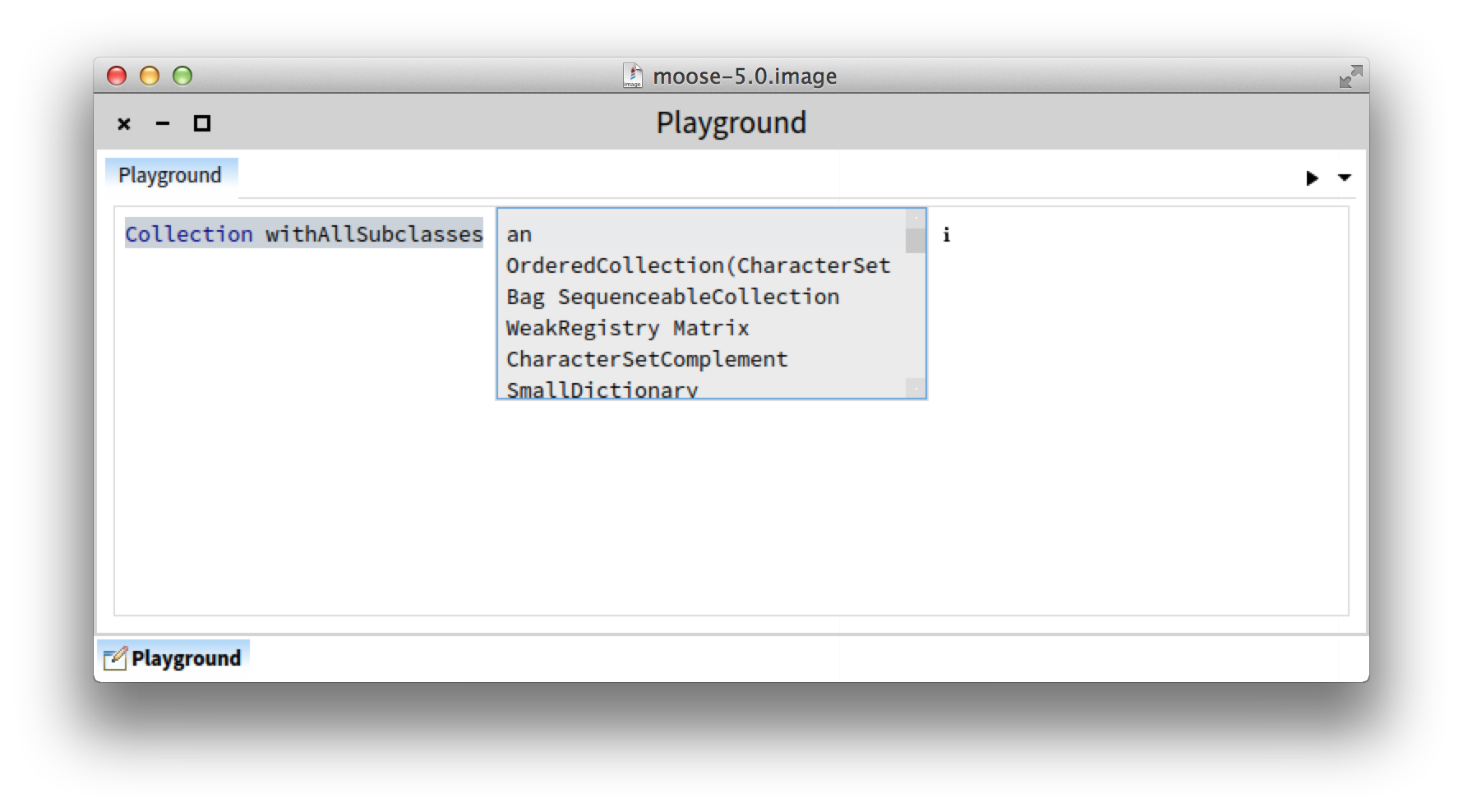
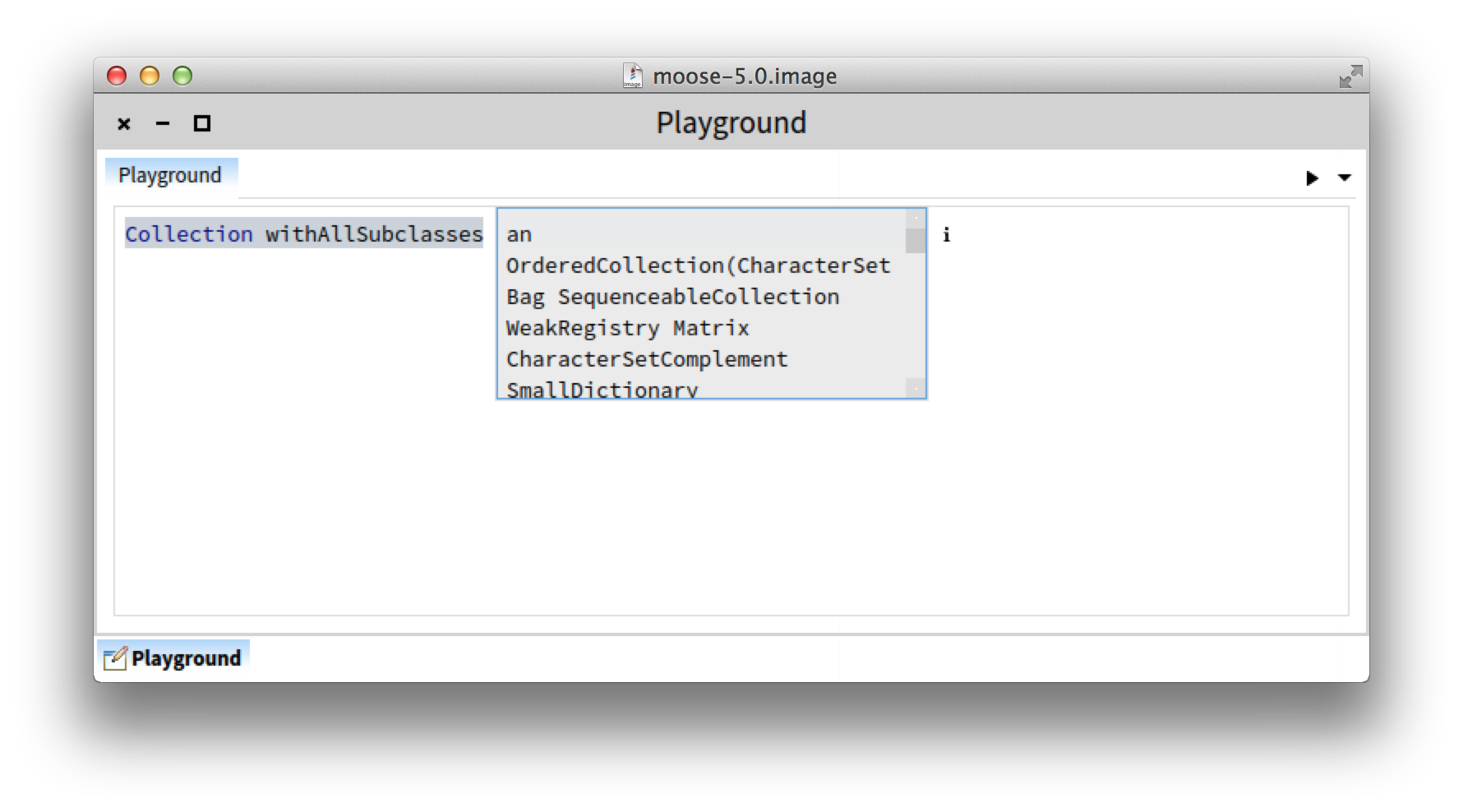
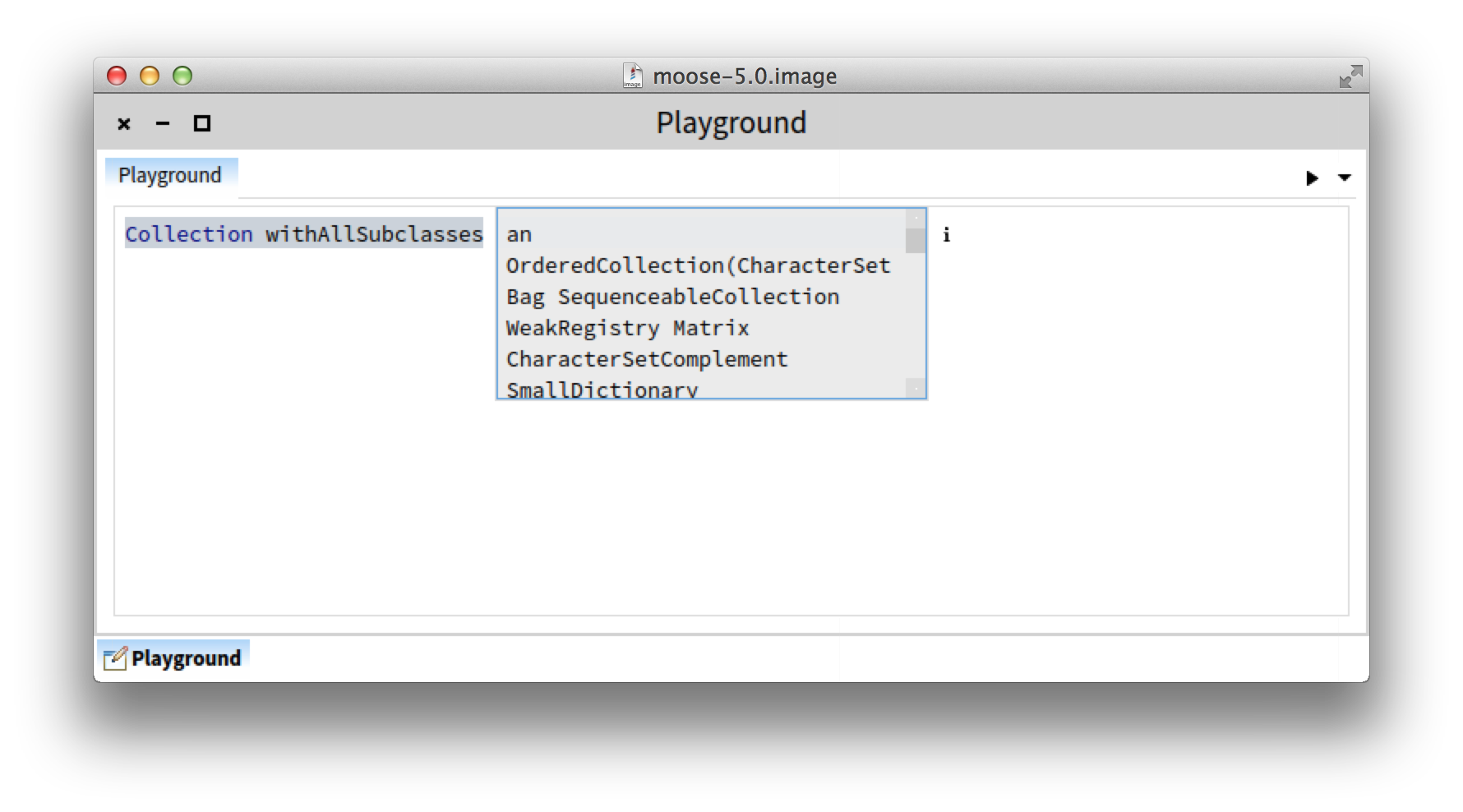
Hi, In the course of revamping the Pharo environment, we stumbled across the print it action and we (Andrei and I) decided to rethink it. [image: Inline image 1] You can find more details here: http://www.humane-assessment.com/blog/rethinking-print-it-in-pharo Let us know what you think. Cheers, Doru -- www.tudorgirba.com "Every thing has its own flow"

So, when do we do the syntax errors in the same way? Thierry Le 28/07/2014 01:33, Tudor Girba a écrit :
Hi,
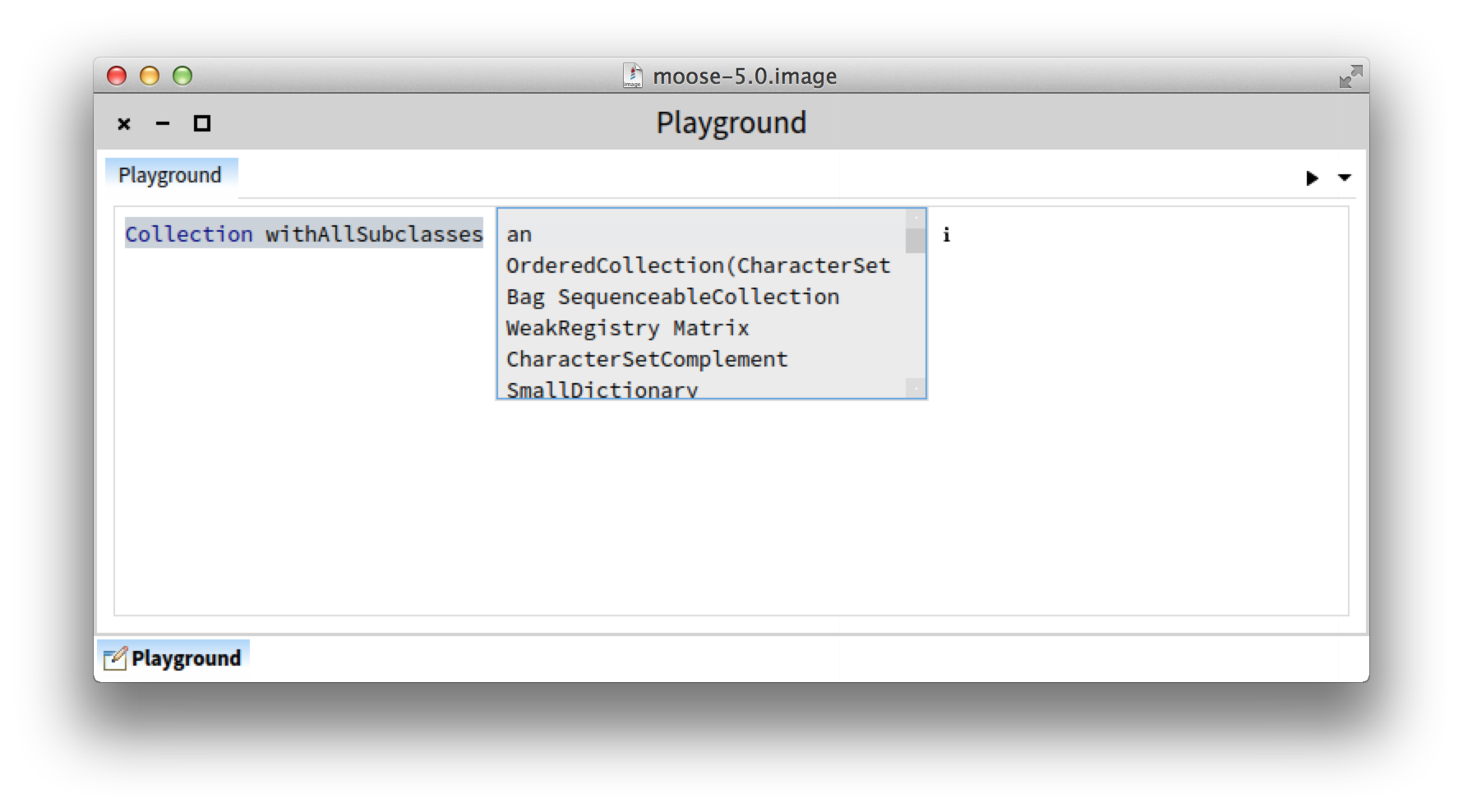
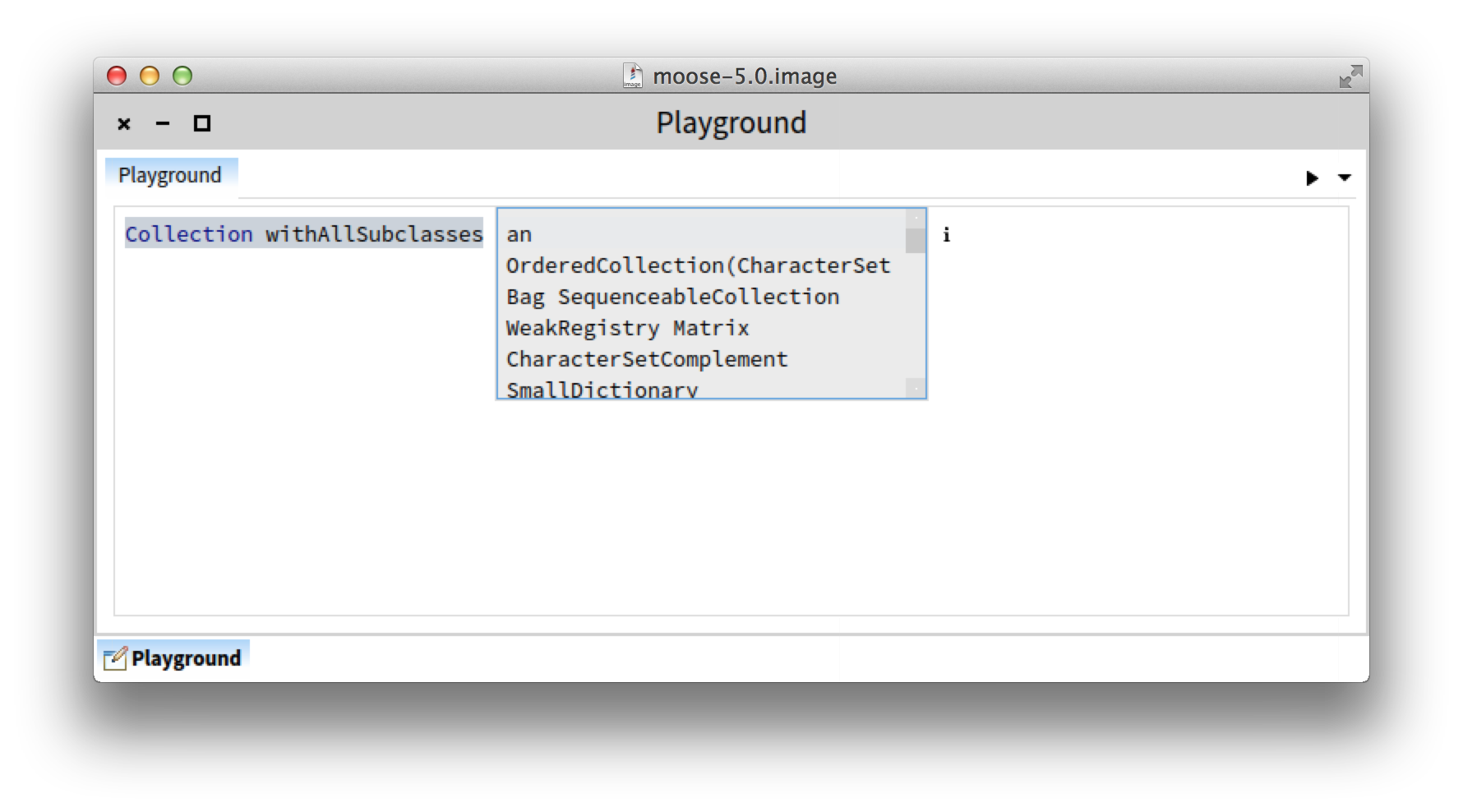
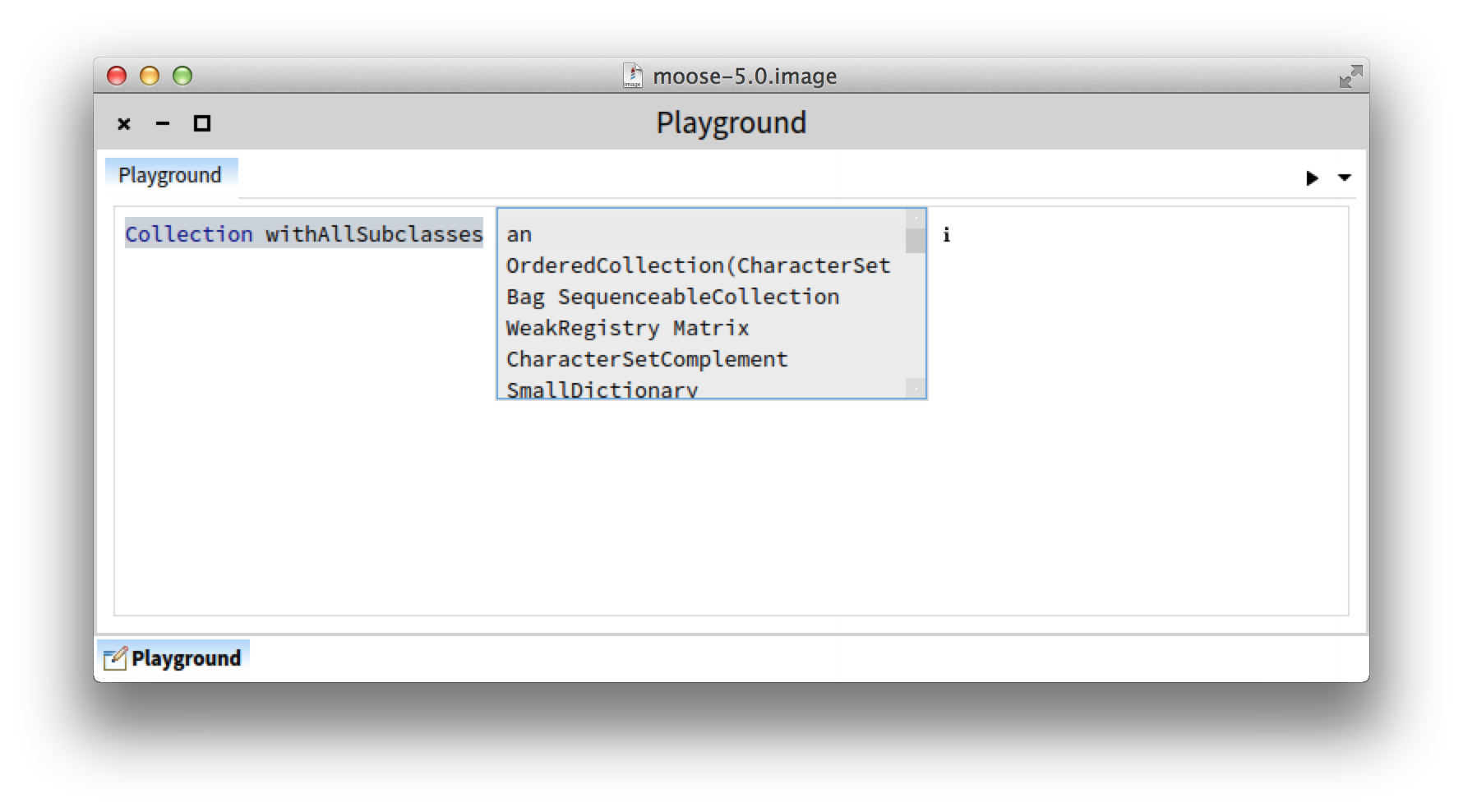
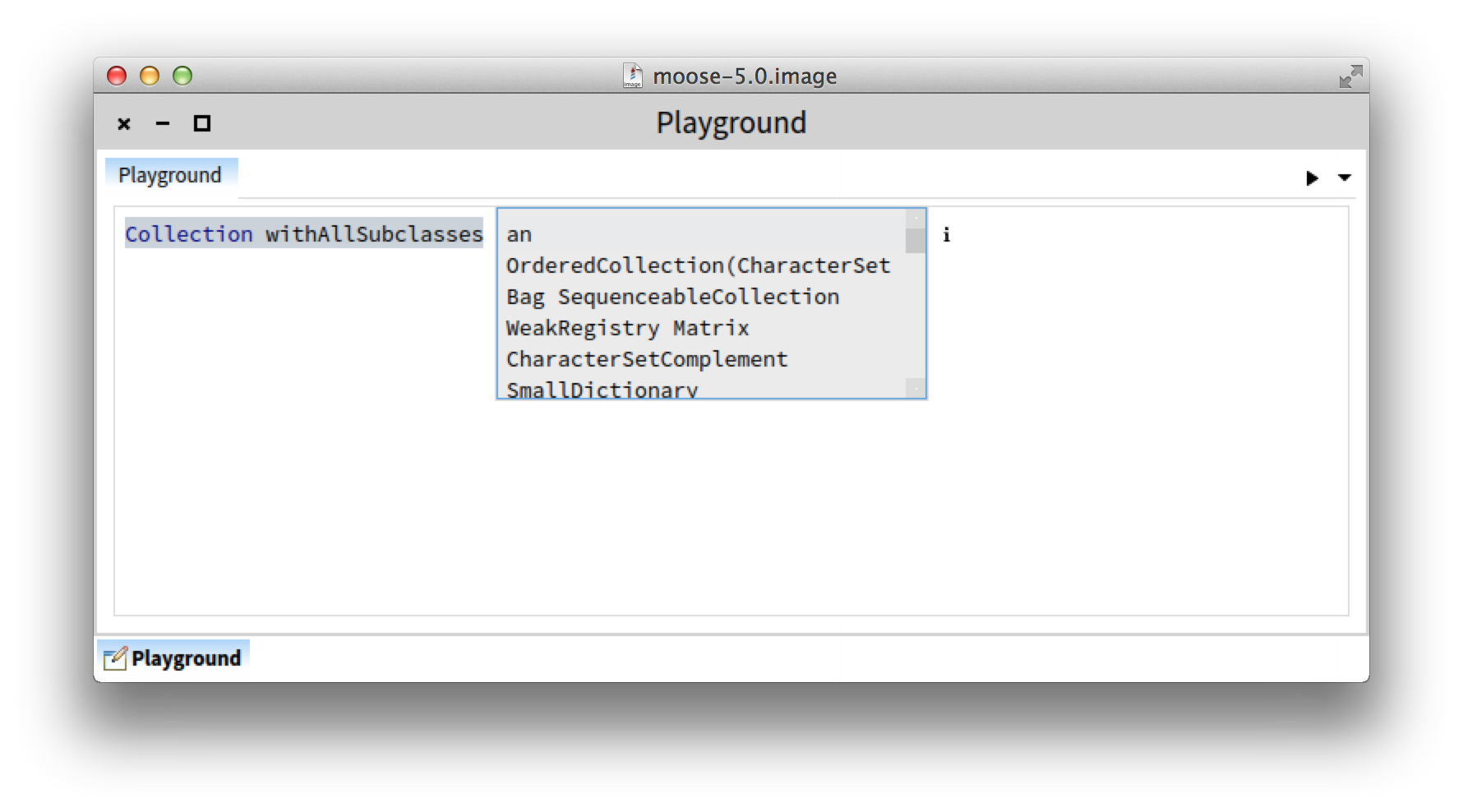
In the course of revamping the Pharo environment, we stumbled across the print it action and we (Andrei and I) decided to rethink it. Inline image 1
You can find more details here: http://www.humane-assessment.com/blog/rethinking-print-it-in-pharo
Let us know what you think.
Cheers, Doru
-- www.tudorgirba.com <http://www.tudorgirba.com>
"Every thing has its own flow"
It will certainly be one of the next steps :) Doru On Mon, Jul 28, 2014 at 10:40 AM, Thierry Goubier <thierry.goubier@gmail.com
wrote:
So,
when do we do the syntax errors in the same way?
Thierry
Le 28/07/2014 01:33, Tudor Girba a écrit :
Hi,
In the course of revamping the Pharo environment, we stumbled across the print it action and we (Andrei and I) decided to rethink it. [image: Inline image 1]
You can find more details here: http://www.humane-assessment.com/blog/rethinking-print-it-in-pharo
Let us know what you think.
Cheers, Doru
-- www.tudorgirba.com
"Every thing has its own flow"
-- www.tudorgirba.com "Every thing has its own flow"

That looks like a cool re-imagining of the print-it ! On Jul 27, 2014, at 7:33 PM, Tudor Girba <tudor@tudorgirba.com> wrote:
Hi,
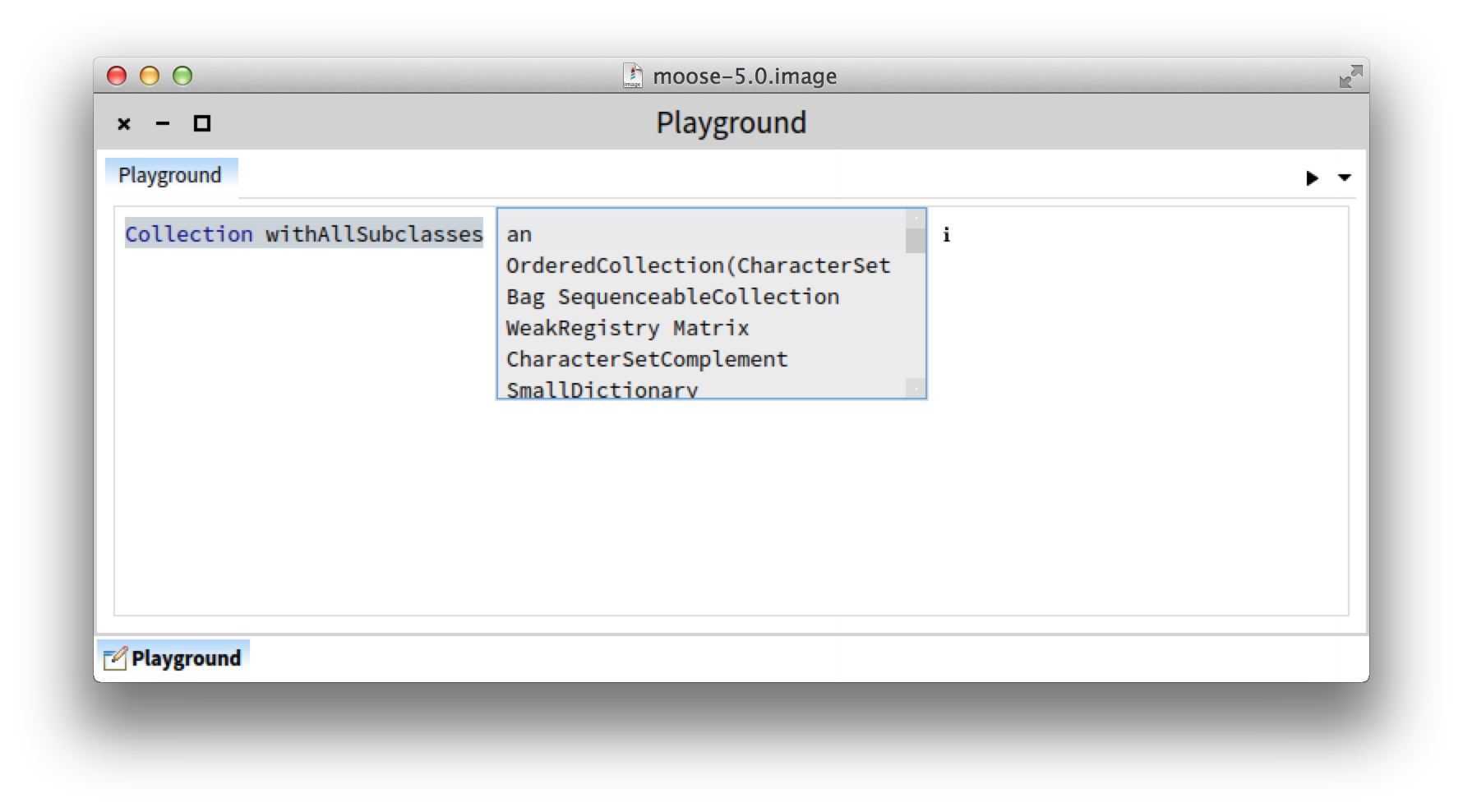
In the course of revamping the Pharo environment, we stumbled across the print it action and we (Andrei and I) decided to rethink it. <new-print-it.png>
You can find more details here: http://www.humane-assessment.com/blog/rethinking-print-it-in-pharo
Let us know what you think.
Cheers, Doru
-- www.tudorgirba.com
"Every thing has its own flow" _______________________________________________ Moose-dev mailing list Moose-dev@iam.unibe.ch https://www.iam.unibe.ch/mailman/listinfo/moose-dev
---> Save our in-boxes! http://emailcharter.org <--- Johan Fabry - http://pleiad.cl/~jfabry PLEIAD lab - Computer Science Department (DCC) - University of Chile
Hi Doru, I tried it and I have some feedback: I have a problem with the i : it's barely visible as a part of the print it float above and gave me the feeling that some text was added to the playground. I also expected the inspector to appear at the right of the playground. Why couldn't I explore the result ? (i.e. why just an i, not i and e) Thierry Le 28/07/2014 01:33, Tudor Girba a écrit :
Hi,
In the course of revamping the Pharo environment, we stumbled across the print it action and we (Andrei and I) decided to rethink it. Inline image 1
You can find more details here: http://www.humane-assessment.com/blog/rethinking-print-it-in-pharo
Let us know what you think.
Cheers, Doru
-- www.tudorgirba.com <http://www.tudorgirba.com>
"Every thing has its own flow"
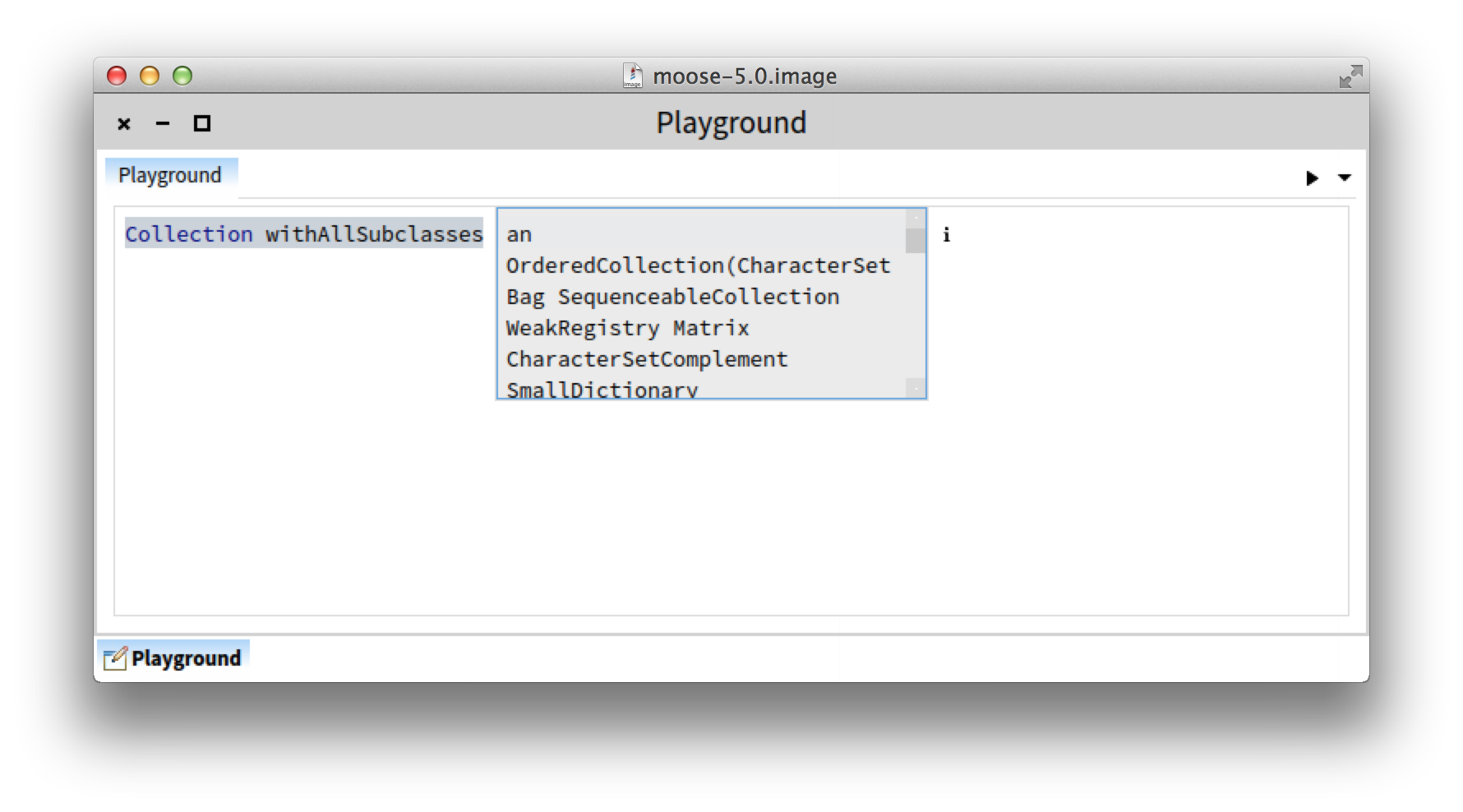
Hi, Thanks. Indeed, the rendering of "i" is not yet satisfying. The "i" is about inspecting which in the GT environment always spawns another inspection session - and at this moment, this maps on a new window. Appearing to the right of the playground, you do "open". I still want this to come, but the thing is that the current behavior is implemented independently of the (gt)playground, and this is why we cannot yet open. But, we will work on this. About "i" and "e", in GT there is no hardcoded explore. There exists only an inspect which leads you to object specific views. Hence, everywhere in the GT environment, you will see either "i" or the triangle for "open". Cheers, Doru On Mon, Jul 28, 2014 at 9:57 PM, Thierry Goubier <thierry.goubier@gmail.com> wrote:
Hi Doru,
I tried it and I have some feedback:
I have a problem with the i : it's barely visible as a part of the print it float above and gave me the feeling that some text was added to the playground.
I also expected the inspector to appear at the right of the playground.
Why couldn't I explore the result ? (i.e. why just an i, not i and e)
Thierry
Le 28/07/2014 01:33, Tudor Girba a écrit :
Hi,
In the course of revamping the Pharo environment, we stumbled across the print it action and we (Andrei and I) decided to rethink it. [image: Inline image 1]
You can find more details here: http://www.humane-assessment.com/blog/rethinking-print-it-in-pharo
Let us know what you think.
Cheers, Doru
-- www.tudorgirba.com
"Every thing has its own flow"
-- www.tudorgirba.com "Every thing has its own flow"

Maybe remapping Command+p to inspect would solve it equally? :) Both of the example cases justifying it were that the user pressed the wrong key. UI's should not try to solve problems between the human <--> hardware interface. On Sun, Jul 27, 2014 at 6:33 PM, Tudor Girba <tudor@tudorgirba.com> wrote:
Hi,
In the course of revamping the Pharo environment, we stumbled across the print it action and we (Andrei and I) decided to rethink it. [image: Inline image 1]
You can find more details here: http://www.humane-assessment.com/blog/rethinking-print-it-in-pharo
Let us know what you think.
Cheers, Doru
-- www.tudorgirba.com
"Every thing has its own flow"
On Mon, Jul 28, 2014 at 9:58 PM, Chris Muller <asqueaker@gmail.com> wrote:
Maybe remapping Command+p to inspect would solve it equally? :)
This is a point worth debating (I really love when we allocate time to talk about our UI - this is the one interface that we, in this community, use every day). The goal of "Print it" serves as a quick and light readonly feedback, and I think it has a distinct place that is separate from the inspector which is a place where you interact and manipulate the object. Furthermore, in the current implementation, the "print it" is floating and non intrusive (it goes away easily) while the inspector is at the moment a lasting piece. Of course, we could imagine an inspector that could be embedded in the popper window (in fact, I have that implementation, too :)), but the problem is that in its current form, the inspector is not made to be easily scalable. This might change with the adoption of Athens. In the meantime, one direction I think we could take is to produce several scalable "printouts" that can also be visual.
Both of the example cases justifying it were that the user pressed the wrong key. UI's should not try to solve problems between the human <--> hardware interface.
I am not sure I follow. Could you elaborate please? Cheers, Doru
On Sun, Jul 27, 2014 at 6:33 PM, Tudor Girba <tudor@tudorgirba.com> wrote:
Hi,
In the course of revamping the Pharo environment, we stumbled across the print it action and we (Andrei and I) decided to rethink it. [image: Inline image 1]
You can find more details here: http://www.humane-assessment.com/blog/rethinking-print-it-in-pharo
Let us know what you think.
Cheers, Doru
-- www.tudorgirba.com
"Every thing has its own flow"
-- www.tudorgirba.com "Every thing has its own flow"

Just wanted to chip in, and say that pushing on the UI we use is definitely appreciated (please keep it up). At the UKST meeting last night, we all felt it was an interesting step - and hopefully we might have some time at ESUG to discuss these kinds of things? Maybe a BOF in the bar one night? Another one in the same vein, is toggling between Class/Instance methods (you don't have to do it a lot - but certainly when you first create a class and you are trying to explore how best to express it, it's annoying that you have toggle to create a class method, and then toggle back to say implement an improved #initialise method etc. I'm starting to think more and more, that we should just show all methods but let you sort (class methods at the top, followed by instance methods for example?). Tim -- View this message in context: http://forum.world.st/rethinking-the-print-it-action-in-Pharo-tp4770472p4770... Sent from the Pharo Smalltalk Developers mailing list archive at Nabble.com.

Kind of back to the Future. Why not have a console rectangle scrollable area at the bottom of the workspace window, that can be persistent on clicking on it and gives the result of "print it" accumulating till a clear is called. Setting to clear on every run or retain text can be done. This is a bit like in Eclipse transient window on inspect but simpler and retains the printed text if reqd. On Tue, Jul 29, 2014 at 1:49 AM, Tudor Girba <tudor@tudorgirba.com> wrote:
On Mon, Jul 28, 2014 at 9:58 PM, Chris Muller <asqueaker@gmail.com> wrote:
Maybe remapping Command+p to inspect would solve it equally? :)
This is a point worth debating (I really love when we allocate time to talk about our UI - this is the one interface that we, in this community, use every day).
The goal of "Print it" serves as a quick and light readonly feedback, and I think it has a distinct place that is separate from the inspector which is a place where you interact and manipulate the object. Furthermore, in the current implementation, the "print it" is floating and non intrusive (it goes away easily) while the inspector is at the moment a lasting piece.
Of course, we could imagine an inspector that could be embedded in the popper window (in fact, I have that implementation, too :)), but the problem is that in its current form, the inspector is not made to be easily scalable. This might change with the adoption of Athens.
In the meantime, one direction I think we could take is to produce several scalable "printouts" that can also be visual.
Both of the example cases justifying it were that the user pressed the wrong key. UI's should not try to solve problems between the human <--> hardware interface.
I am not sure I follow. Could you elaborate please?
Cheers, Doru
On Sun, Jul 27, 2014 at 6:33 PM, Tudor Girba <tudor@tudorgirba.com> wrote:
Hi,
In the course of revamping the Pharo environment, we stumbled across the print it action and we (Andrei and I) decided to rethink it. [image: Inline image 1]
You can find more details here: http://www.humane-assessment.com/blog/rethinking-print-it-in-pharo
Let us know what you think.
Cheers, Doru
-- www.tudorgirba.com
"Every thing has its own flow"
-- www.tudorgirba.com
"Every thing has its own flow"
Hi, Interesting. However, the goal of Print It is to get quick feedback. If you need to do anything else with it, it's probably the wrong tool. For example, in the GTPlayground, you can open the object to the right in a full inspector that allows you to manipulate the object in details. Text is useful for quick references, not for manipulation. I would not want to design a dedicated space in the workspace to only show text. Cheers, Doru On Fri, Aug 1, 2014 at 5:25 AM, S Krish <krishnamachari.sudhakar@gmail.com> wrote:
Kind of back to the Future. Why not have a console rectangle scrollable area at the bottom of the workspace window, that can be persistent on clicking on it and gives the result of "print it" accumulating till a clear is called. Setting to clear on every run or retain text can be done. This is a bit like in Eclipse transient window on inspect but simpler and retains the printed text if reqd.
On Tue, Jul 29, 2014 at 1:49 AM, Tudor Girba <tudor@tudorgirba.com> wrote:
On Mon, Jul 28, 2014 at 9:58 PM, Chris Muller <asqueaker@gmail.com> wrote:
Maybe remapping Command+p to inspect would solve it equally? :)
This is a point worth debating (I really love when we allocate time to talk about our UI - this is the one interface that we, in this community, use every day).
The goal of "Print it" serves as a quick and light readonly feedback, and I think it has a distinct place that is separate from the inspector which is a place where you interact and manipulate the object. Furthermore, in the current implementation, the "print it" is floating and non intrusive (it goes away easily) while the inspector is at the moment a lasting piece.
Of course, we could imagine an inspector that could be embedded in the popper window (in fact, I have that implementation, too :)), but the problem is that in its current form, the inspector is not made to be easily scalable. This might change with the adoption of Athens.
In the meantime, one direction I think we could take is to produce several scalable "printouts" that can also be visual.
Both of the example cases justifying it were that the user pressed the wrong key. UI's should not try to solve problems between the human <--> hardware interface.
I am not sure I follow. Could you elaborate please?
Cheers, Doru
On Sun, Jul 27, 2014 at 6:33 PM, Tudor Girba <tudor@tudorgirba.com> wrote:
Hi,
In the course of revamping the Pharo environment, we stumbled across the print it action and we (Andrei and I) decided to rethink it. [image: Inline image 1]
You can find more details here: http://www.humane-assessment.com/blog/rethinking-print-it-in-pharo
Let us know what you think.
Cheers, Doru
-- www.tudorgirba.com
"Every thing has its own flow"
-- www.tudorgirba.com
"Every thing has its own flow"
-- www.tudorgirba.com "Every thing has its own flow"
participants (6)
-
 Chris Muller
 -
 Johan Fabry
 -
 S Krish
 -
 Thierry Goubier
 -
 Tim Mackinnon
 -
 Tudor Girba