
HI, do you know why search behaves like this? I was expecting Object to show up Cheers Uko
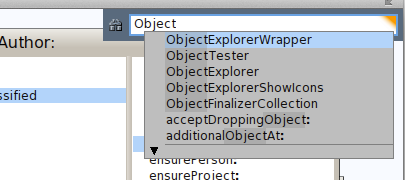

that's not a spotlight problem but an OCompletion one. and in my opinion, a really important problem :( Esteban On Nov 20, 2013, at 1:23 PM, Yuriy Tymchuk <yuriy.tymchuk@me.com> wrote:
HI,
do you know why search behaves like this? I was expecting Object to show up
<Screenshot 2013-11-20 13.20.40.png>
Cheers Uko

What version are you using ? In #30582 it does work: You can always try typing a space after Object⦠Sven On 20 Nov 2013, at 13:23, Yuriy Tymchuk <yuriy.tymchuk@me.com> wrote:
HI,
do you know why search behaves like this? I was expecting Object to show up
<Screenshot 2013-11-20 13.20.40.png>
Cheers Uko
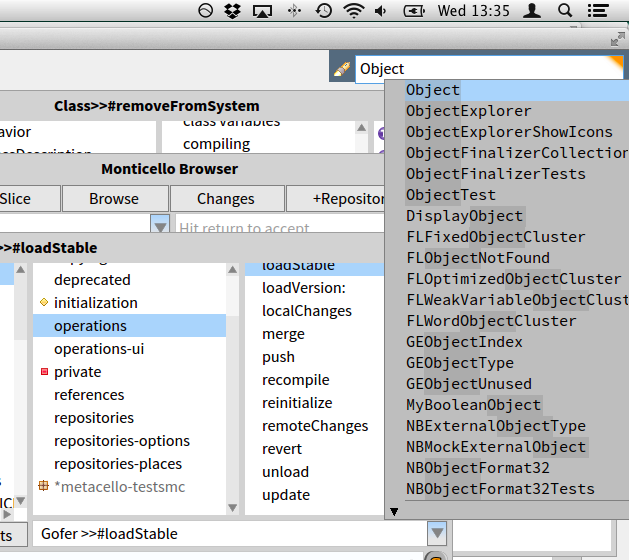

Sven. What version are YOU using? Fonts and windows look so clean an sharp! :) Esteban A. Maringolo 2013/11/20 Sven Van Caekenberghe <sven@stfx.eu>
What version are you using ?
In #30582 it does work:
You can always try typing a space after Objectâ¦
Sven
On 20 Nov 2013, at 13:23, Yuriy Tymchuk <yuriy.tymchuk@me.com> wrote:
HI,
do you know why search behaves like this? I was expecting Object to show up
<Screenshot 2013-11-20 13.20.40.png>
Cheers Uko
On 20 Nov 2013, at 13:46, Esteban A. Maringolo <emaringolo@gmail.com> wrote:
Sven.
What version are YOU using? Fonts and windows look so clean an sharp! :)
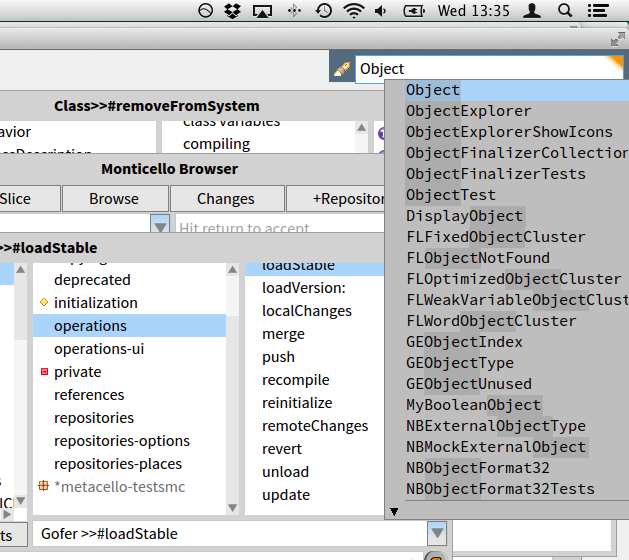
;-) Yes they are. Like I said, Pharo version #30582 defaultFont Source Sans Pro Normal points: 12 height: 21 listFont Source Sans Pro Normal points: 12 height: 21 menuFont Source Sans Pro Normal points: 12 height: 21 windowTitleFont Source Sans Pro Bold points: 12 height: 21 balloonFont Source Sans Pro Normal points: 9 height: 16 codeFont Source Code Pro Normal points: 11 height: 19 buttonFont Source Sans Pro Normal points: 12 height: 21 haloFont Source Sans Pro Normal points: 9 height: 16 Installed with a script from our local look and feel guru, Doru: #('SourceCodeProRegular' 'SourceCodeProBold' 'SourceSansProRegular' 'SourceSansProBoldâ) do: [ :each | Smalltalk globals at: each asSymbol ifAbsent: [ Gofer new smalltalkhubUser: 'girba' project: 'FreeFonts'; package: each; load ]. (Smalltalk at: each asSymbol) new install ]. FreeTypeSystemSettings loadFt2Library: true. FreeTypeFontProvider current updateFromSystem. StandardFonts setAllStandardFontsTo: (LogicalFont familyName: 'Source Sans Pro' pointSize: 12); haloFont: (LogicalFont familyName: 'Source Sans Pro' pointSize: 9); windowTitleFont: (LogicalFont familyName: 'Source Sans Pro Bold' pointSize: 12); balloonFont: (LogicalFont familyName: 'Source Sans Pro' pointSize: 9); codeFont: (LogicalFont familyName: 'Source Code Pro' pointSize: 11). And then I finally make the window font bold, manually. The screenshot was done on Mac OS X 10.9 HTH, Sven
Esteban A. Maringolo
2013/11/20 Sven Van Caekenberghe <sven@stfx.eu> What version are you using ?
In #30582 it does work: <Screen Shot 2013-11-20 at 13.34.46.png>
You can always try typing a space after Objectâ¦
Sven
On 20 Nov 2013, at 13:23, Yuriy Tymchuk <yuriy.tymchuk@me.com> wrote:
HI,
do you know why search behaves like this? I was expecting Object to show up
<Screenshot 2013-11-20 13.20.40.png>
Cheers Uko

yes I can confirm that this work also on windoom 7. Indeed Sven your Pharo looks a bit more sexy than mine. the code you posted works also like a charm for me , thank you. Now If I could get also a dark theme working with pharo that would be awesome. All this white hurts my eyes. But I guess I will have to compromise for the time being :) thank you On Wed, Nov 20, 2013 at 2:58 PM, Sven Van Caekenberghe <sven@stfx.eu> wrote:
On 20 Nov 2013, at 13:46, Esteban A. Maringolo <emaringolo@gmail.com> wrote:
Sven.
What version are YOU using? Fonts and windows look so clean an sharp! :)
;-)
Yes they are.
Like I said, Pharo version #30582
defaultFont Source Sans Pro Normal points: 12 height: 21 listFont Source Sans Pro Normal points: 12 height: 21 menuFont Source Sans Pro Normal points: 12 height: 21 windowTitleFont Source Sans Pro Bold points: 12 height: 21 balloonFont Source Sans Pro Normal points: 9 height: 16 codeFont Source Code Pro Normal points: 11 height: 19 buttonFont Source Sans Pro Normal points: 12 height: 21 haloFont Source Sans Pro Normal points: 9 height: 16
Installed with a script from our local look and feel guru, Doru:
#('SourceCodeProRegular' 'SourceCodeProBold' 'SourceSansProRegular' 'SourceSansProBoldâ) do: [ :each | Smalltalk globals at: each asSymbol ifAbsent: [ Gofer new smalltalkhubUser: 'girba' project: 'FreeFonts'; package: each; load ]. (Smalltalk at: each asSymbol) new install ]. FreeTypeSystemSettings loadFt2Library: true. FreeTypeFontProvider current updateFromSystem.
StandardFonts setAllStandardFontsTo: (LogicalFont familyName: 'Source Sans Pro' pointSize: 12); haloFont: (LogicalFont familyName: 'Source Sans Pro' pointSize: 9); windowTitleFont: (LogicalFont familyName: 'Source Sans Pro Bold' pointSize: 12); balloonFont: (LogicalFont familyName: 'Source Sans Pro' pointSize: 9); codeFont: (LogicalFont familyName: 'Source Code Pro' pointSize: 11).
And then I finally make the window font bold, manually.
The screenshot was done on Mac OS X 10.9
HTH,
Sven
Esteban A. Maringolo
2013/11/20 Sven Van Caekenberghe <sven@stfx.eu> What version are you using ?
In #30582 it does work: <Screen Shot 2013-11-20 at 13.34.46.png>
You can always try typing a space after Objectâ¦
Sven
On 20 Nov 2013, at 13:23, Yuriy Tymchuk <yuriy.tymchuk@me.com> wrote:
HI,
do you know why search behaves like this? I was expecting Object to show up
<Screenshot 2013-11-20 13.20.40.png>
Cheers Uko
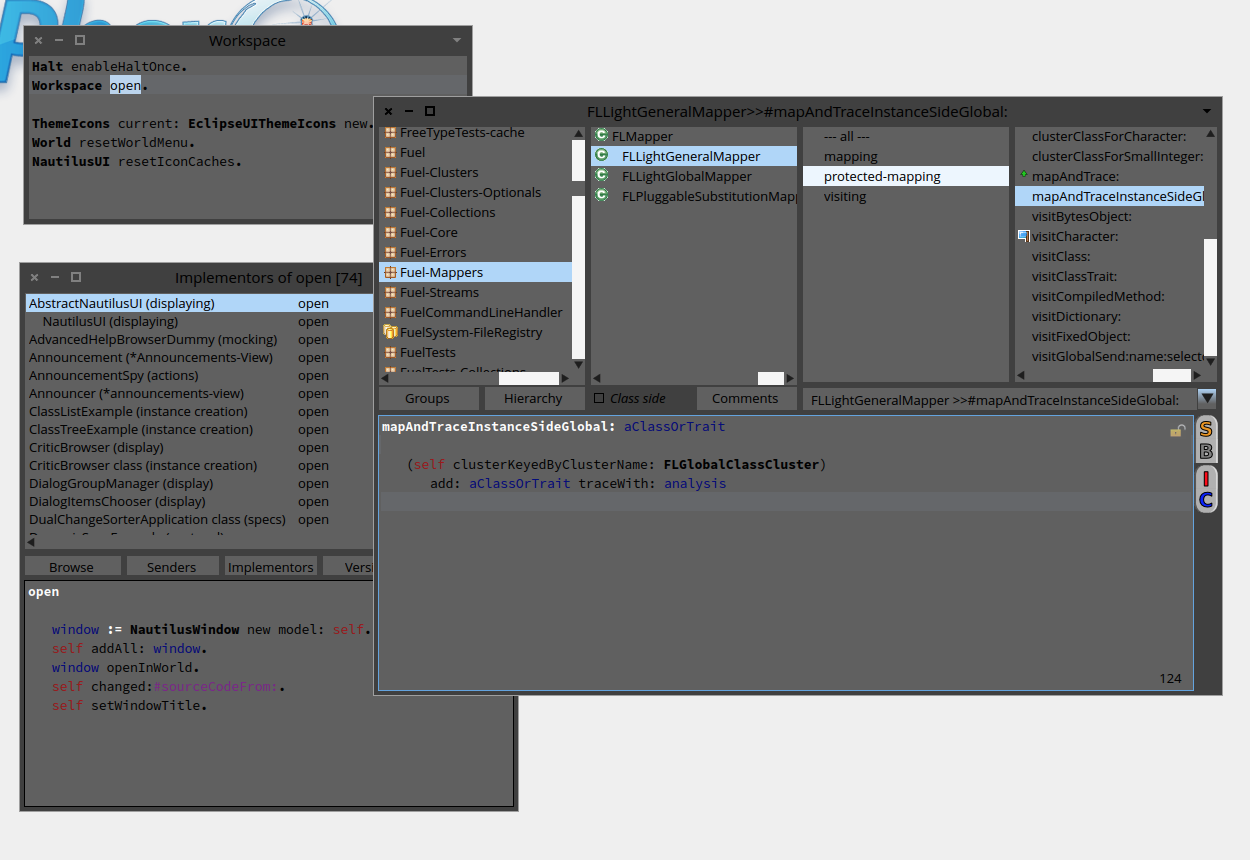
:) I'm slowly working in a darktheme... problem is the INCREDIBLE amount of hardcode colors and silly code. So it will take some time until is ready (also because I work on it when I'm bored and not wanting to do what I should do... like today :P) Esteban On Nov 20, 2013, at 2:34 PM, kilon alios <kilon.alios@gmail.com> wrote:
yes I can confirm that this work also on windoom 7. Indeed Sven your Pharo looks a bit more sexy than mine.
the code you posted works also like a charm for me , thank you. Now If I could get also a dark theme working with pharo that would be awesome. All this white hurts my eyes. But I guess I will have to compromise for the time being :)
thank you
On Wed, Nov 20, 2013 at 2:58 PM, Sven Van Caekenberghe <sven@stfx.eu> wrote:
On 20 Nov 2013, at 13:46, Esteban A. Maringolo <emaringolo@gmail.com> wrote:
Sven.
What version are YOU using? Fonts and windows look so clean an sharp! :)
;-)
Yes they are.
Like I said, Pharo version #30582
defaultFont Source Sans Pro Normal points: 12 height: 21 listFont Source Sans Pro Normal points: 12 height: 21 menuFont Source Sans Pro Normal points: 12 height: 21 windowTitleFont Source Sans Pro Bold points: 12 height: 21 balloonFont Source Sans Pro Normal points: 9 height: 16 codeFont Source Code Pro Normal points: 11 height: 19 buttonFont Source Sans Pro Normal points: 12 height: 21 haloFont Source Sans Pro Normal points: 9 height: 16
Installed with a script from our local look and feel guru, Doru:
#('SourceCodeProRegular' 'SourceCodeProBold' 'SourceSansProRegular' 'SourceSansProBoldâ) do: [ :each | Smalltalk globals at: each asSymbol ifAbsent: [ Gofer new smalltalkhubUser: 'girba' project: 'FreeFonts'; package: each; load ]. (Smalltalk at: each asSymbol) new install ]. FreeTypeSystemSettings loadFt2Library: true. FreeTypeFontProvider current updateFromSystem.
StandardFonts setAllStandardFontsTo: (LogicalFont familyName: 'Source Sans Pro' pointSize: 12); haloFont: (LogicalFont familyName: 'Source Sans Pro' pointSize: 9); windowTitleFont: (LogicalFont familyName: 'Source Sans Pro Bold' pointSize: 12); balloonFont: (LogicalFont familyName: 'Source Sans Pro' pointSize: 9); codeFont: (LogicalFont familyName: 'Source Code Pro' pointSize: 11).
And then I finally make the window font bold, manually.
The screenshot was done on Mac OS X 10.9
HTH,
Sven
Esteban A. Maringolo
2013/11/20 Sven Van Caekenberghe <sven@stfx.eu> What version are you using ?
In #30582 it does work: <Screen Shot 2013-11-20 at 13.34.46.png>
You can always try typing a space after Objectâ¦
Sven
On 20 Nov 2013, at 13:23, Yuriy Tymchuk <yuriy.tymchuk@me.com> wrote:
HI,
do you know why search behaves like this? I was expecting Object to show up
<Screenshot 2013-11-20 13.20.40.png>
Cheers Uko
On 20 Nov 2013, at 14:42, Esteban Lorenzano <estebanlm@gmail.com> wrote:
:)
<Screen Shot 2013-11-20 at 2.40.12 PM.png>
I'm slowly working in a darktheme... problem is the INCREDIBLE amount of hardcode colors and silly code. So it will take some time until is ready (also because I work on it when I'm bored and not wanting to do what I should do... like today :P)
Hey, Esteban, that looks already quite impressive. I am sure there are some people really anxious to try this and help. Is this theme already available somewhere ?
Esteban
On Nov 20, 2013, at 2:34 PM, kilon alios <kilon.alios@gmail.com> wrote:
yes I can confirm that this work also on windoom 7. Indeed Sven your Pharo looks a bit more sexy than mine.
the code you posted works also like a charm for me , thank you. Now If I could get also a dark theme working with pharo that would be awesome. All this white hurts my eyes. But I guess I will have to compromise for the time being :)
thank you
On Wed, Nov 20, 2013 at 2:58 PM, Sven Van Caekenberghe <sven@stfx.eu> wrote:
On 20 Nov 2013, at 13:46, Esteban A. Maringolo <emaringolo@gmail.com> wrote:
Sven.
What version are YOU using? Fonts and windows look so clean an sharp! :)
;-)
Yes they are.
Like I said, Pharo version #30582
defaultFont Source Sans Pro Normal points: 12 height: 21 listFont Source Sans Pro Normal points: 12 height: 21 menuFont Source Sans Pro Normal points: 12 height: 21 windowTitleFont Source Sans Pro Bold points: 12 height: 21 balloonFont Source Sans Pro Normal points: 9 height: 16 codeFont Source Code Pro Normal points: 11 height: 19 buttonFont Source Sans Pro Normal points: 12 height: 21 haloFont Source Sans Pro Normal points: 9 height: 16
Installed with a script from our local look and feel guru, Doru:
#('SourceCodeProRegular' 'SourceCodeProBold' 'SourceSansProRegular' 'SourceSansProBoldâ) do: [ :each | Smalltalk globals at: each asSymbol ifAbsent: [ Gofer new smalltalkhubUser: 'girba' project: 'FreeFonts'; package: each; load ]. (Smalltalk at: each asSymbol) new install ]. FreeTypeSystemSettings loadFt2Library: true. FreeTypeFontProvider current updateFromSystem.
StandardFonts setAllStandardFontsTo: (LogicalFont familyName: 'Source Sans Pro' pointSize: 12); haloFont: (LogicalFont familyName: 'Source Sans Pro' pointSize: 9); windowTitleFont: (LogicalFont familyName: 'Source Sans Pro Bold' pointSize: 12); balloonFont: (LogicalFont familyName: 'Source Sans Pro' pointSize: 9); codeFont: (LogicalFont familyName: 'Source Code Pro' pointSize: 11).
And then I finally make the window font bold, manually.
The screenshot was done on Mac OS X 10.9
HTH,
Sven
Esteban A. Maringolo
2013/11/20 Sven Van Caekenberghe <sven@stfx.eu> What version are you using ?
In #30582 it does work: <Screen Shot 2013-11-20 at 13.34.46.png>
You can always try typing a space after Objectâ¦
Sven
On 20 Nov 2013, at 13:23, Yuriy Tymchuk <yuriy.tymchuk@me.com> wrote:
HI,
do you know why search behaves like this? I was expecting Object to show up
<Screenshot 2013-11-20 13.20.40.png>
Cheers Uko
ok... I will package it and made it available in the course of the day then. more hands means faster results :) Esteban On Nov 20, 2013, at 2:53 PM, Sven Van Caekenberghe <sven@stfx.eu> wrote:
On 20 Nov 2013, at 14:42, Esteban Lorenzano <estebanlm@gmail.com> wrote:
:)
<Screen Shot 2013-11-20 at 2.40.12 PM.png>
I'm slowly working in a darktheme... problem is the INCREDIBLE amount of hardcode colors and silly code. So it will take some time until is ready (also because I work on it when I'm bored and not wanting to do what I should do... like today :P)
Hey, Esteban, that looks already quite impressive. I am sure there are some people really anxious to try this and help. Is this theme already available somewhere ?
Esteban
On Nov 20, 2013, at 2:34 PM, kilon alios <kilon.alios@gmail.com> wrote:
yes I can confirm that this work also on windoom 7. Indeed Sven your Pharo looks a bit more sexy than mine.
the code you posted works also like a charm for me , thank you. Now If I could get also a dark theme working with pharo that would be awesome. All this white hurts my eyes. But I guess I will have to compromise for the time being :)
thank you
On Wed, Nov 20, 2013 at 2:58 PM, Sven Van Caekenberghe <sven@stfx.eu> wrote:
On 20 Nov 2013, at 13:46, Esteban A. Maringolo <emaringolo@gmail.com> wrote:
Sven.
What version are YOU using? Fonts and windows look so clean an sharp! :)
;-)
Yes they are.
Like I said, Pharo version #30582
defaultFont Source Sans Pro Normal points: 12 height: 21 listFont Source Sans Pro Normal points: 12 height: 21 menuFont Source Sans Pro Normal points: 12 height: 21 windowTitleFont Source Sans Pro Bold points: 12 height: 21 balloonFont Source Sans Pro Normal points: 9 height: 16 codeFont Source Code Pro Normal points: 11 height: 19 buttonFont Source Sans Pro Normal points: 12 height: 21 haloFont Source Sans Pro Normal points: 9 height: 16
Installed with a script from our local look and feel guru, Doru:
#('SourceCodeProRegular' 'SourceCodeProBold' 'SourceSansProRegular' 'SourceSansProBoldâ) do: [ :each | Smalltalk globals at: each asSymbol ifAbsent: [ Gofer new smalltalkhubUser: 'girba' project: 'FreeFonts'; package: each; load ]. (Smalltalk at: each asSymbol) new install ]. FreeTypeSystemSettings loadFt2Library: true. FreeTypeFontProvider current updateFromSystem.
StandardFonts setAllStandardFontsTo: (LogicalFont familyName: 'Source Sans Pro' pointSize: 12); haloFont: (LogicalFont familyName: 'Source Sans Pro' pointSize: 9); windowTitleFont: (LogicalFont familyName: 'Source Sans Pro Bold' pointSize: 12); balloonFont: (LogicalFont familyName: 'Source Sans Pro' pointSize: 9); codeFont: (LogicalFont familyName: 'Source Code Pro' pointSize: 11).
And then I finally make the window font bold, manually.
The screenshot was done on Mac OS X 10.9
HTH,
Sven
Esteban A. Maringolo
2013/11/20 Sven Van Caekenberghe <sven@stfx.eu> What version are you using ?
In #30582 it does work: <Screen Shot 2013-11-20 at 13.34.46.png>
You can always try typing a space after Objectâ¦
Sven
On 20 Nov 2013, at 13:23, Yuriy Tymchuk <yuriy.tymchuk@me.com> wrote:
HI,
do you know why search behaves like this? I was expecting Object to show up
<Screenshot 2013-11-20 13.20.40.png>
Cheers Uko
btw... my goal is to achieve this: http://blog.jetbrains.com/blog/2013/06/11/inside-darcula-look-and-feel-an-in... (as Phil suggested some time ago, in a thread which was the reason I started to try a dark theme). Also... my intention is to contribute to clean a bit morphic by removing silly hardcode stuff and creating a separation betweek "skin" and "morph"... and more important, to easy the creation of new skins. but I still do not find a design that satisfy me... we'll see. Esteban On Nov 20, 2013, at 3:18 PM, Esteban Lorenzano <estebanlm@gmail.com> wrote:
ok... I will package it and made it available in the course of the day then. more hands means faster results :)
Esteban
On Nov 20, 2013, at 2:53 PM, Sven Van Caekenberghe <sven@stfx.eu> wrote:
On 20 Nov 2013, at 14:42, Esteban Lorenzano <estebanlm@gmail.com> wrote:
:)
<Screen Shot 2013-11-20 at 2.40.12 PM.png>
I'm slowly working in a darktheme... problem is the INCREDIBLE amount of hardcode colors and silly code. So it will take some time until is ready (also because I work on it when I'm bored and not wanting to do what I should do... like today :P)
Hey, Esteban, that looks already quite impressive. I am sure there are some people really anxious to try this and help. Is this theme already available somewhere ?
Esteban
On Nov 20, 2013, at 2:34 PM, kilon alios <kilon.alios@gmail.com> wrote:
yes I can confirm that this work also on windoom 7. Indeed Sven your Pharo looks a bit more sexy than mine.
the code you posted works also like a charm for me , thank you. Now If I could get also a dark theme working with pharo that would be awesome. All this white hurts my eyes. But I guess I will have to compromise for the time being :)
thank you
On Wed, Nov 20, 2013 at 2:58 PM, Sven Van Caekenberghe <sven@stfx.eu> wrote:
On 20 Nov 2013, at 13:46, Esteban A. Maringolo <emaringolo@gmail.com> wrote:
Sven.
What version are YOU using? Fonts and windows look so clean an sharp! :)
;-)
Yes they are.
Like I said, Pharo version #30582
defaultFont Source Sans Pro Normal points: 12 height: 21 listFont Source Sans Pro Normal points: 12 height: 21 menuFont Source Sans Pro Normal points: 12 height: 21 windowTitleFont Source Sans Pro Bold points: 12 height: 21 balloonFont Source Sans Pro Normal points: 9 height: 16 codeFont Source Code Pro Normal points: 11 height: 19 buttonFont Source Sans Pro Normal points: 12 height: 21 haloFont Source Sans Pro Normal points: 9 height: 16
Installed with a script from our local look and feel guru, Doru:
#('SourceCodeProRegular' 'SourceCodeProBold' 'SourceSansProRegular' 'SourceSansProBoldâ) do: [ :each | Smalltalk globals at: each asSymbol ifAbsent: [ Gofer new smalltalkhubUser: 'girba' project: 'FreeFonts'; package: each; load ]. (Smalltalk at: each asSymbol) new install ]. FreeTypeSystemSettings loadFt2Library: true. FreeTypeFontProvider current updateFromSystem.
StandardFonts setAllStandardFontsTo: (LogicalFont familyName: 'Source Sans Pro' pointSize: 12); haloFont: (LogicalFont familyName: 'Source Sans Pro' pointSize: 9); windowTitleFont: (LogicalFont familyName: 'Source Sans Pro Bold' pointSize: 12); balloonFont: (LogicalFont familyName: 'Source Sans Pro' pointSize: 9); codeFont: (LogicalFont familyName: 'Source Code Pro' pointSize: 11).
And then I finally make the window font bold, manually.
The screenshot was done on Mac OS X 10.9
HTH,
Sven
Esteban A. Maringolo
2013/11/20 Sven Van Caekenberghe <sven@stfx.eu> What version are you using ?
In #30582 it does work: <Screen Shot 2013-11-20 at 13.34.46.png>
You can always try typing a space after Objectâ¦
Sven
On 20 Nov 2013, at 13:23, Yuriy Tymchuk <yuriy.tymchuk@me.com> wrote:
HI,
do you know why search behaves like this? I was expecting Object to show up
<Screenshot 2013-11-20 13.20.40.png>
Cheers Uko
The problem with dark themes is that they require icons prepared for dark backgrounds. And not only in terms of alpha channels, but also in terms of contrast. I like the dark theming of Adobe products, or the "gray" theming of video editing software. But I once read that it was made dark to give prominence to the subject of the editor, in this case pictures and videos. Sublime Text and even Vim can afford this, because they're code pane centric editors. In our case, what should have the prominence? The code pane? the selectors in the browser? Anyhow, I like the fact Pharo looks better and better. I'd only want that no operation other than painting/event dispatching take place in the main (UI?) thread. :) Regards, Esteban A. Maringolo 2013/11/20 Esteban Lorenzano <estebanlm@gmail.com>:
btw... my goal is to achieve this:
http://blog.jetbrains.com/blog/2013/06/11/inside-darcula-look-and-feel-an-in...
(as Phil suggested some time ago, in a thread which was the reason I started to try a dark theme).
Also... my intention is to contribute to clean a bit morphic by removing silly hardcode stuff and creating a separation betweek "skin" and "morph"... and more important, to easy the creation of new skins.
but I still do not find a design that satisfy me... we'll see.
Esteban
On Nov 20, 2013, at 3:18 PM, Esteban Lorenzano <estebanlm@gmail.com> wrote:
ok... I will package it and made it available in the course of the day then. more hands means faster results :)
Esteban
On Nov 20, 2013, at 2:53 PM, Sven Van Caekenberghe <sven@stfx.eu> wrote:
On 20 Nov 2013, at 14:42, Esteban Lorenzano <estebanlm@gmail.com> wrote:
:)
<Screen Shot 2013-11-20 at 2.40.12 PM.png>
I'm slowly working in a darktheme... problem is the INCREDIBLE amount of hardcode colors and silly code. So it will take some time until is ready (also because I work on it when I'm bored and not wanting to do what I should do... like today :P)
Hey, Esteban, that looks already quite impressive. I am sure there are some people really anxious to try this and help. Is this theme already available somewhere ?
Esteban
On Nov 20, 2013, at 2:34 PM, kilon alios <kilon.alios@gmail.com> wrote:
yes I can confirm that this work also on windoom 7. Indeed Sven your Pharo looks a bit more sexy than mine.
the code you posted works also like a charm for me , thank you. Now If I could get also a dark theme working with pharo that would be awesome. All this white hurts my eyes. But I guess I will have to compromise for the time being :)
thank you
On Wed, Nov 20, 2013 at 2:58 PM, Sven Van Caekenberghe <sven@stfx.eu> wrote:
On 20 Nov 2013, at 13:46, Esteban A. Maringolo <emaringolo@gmail.com> wrote:
Sven.
What version are YOU using? Fonts and windows look so clean an sharp! :)
;-)
Yes they are.
Like I said, Pharo version #30582
defaultFont Source Sans Pro Normal points: 12 height: 21 listFont Source Sans Pro Normal points: 12 height: 21 menuFont Source Sans Pro Normal points: 12 height: 21 windowTitleFont Source Sans Pro Bold points: 12 height: 21 balloonFont Source Sans Pro Normal points: 9 height: 16 codeFont Source Code Pro Normal points: 11 height: 19 buttonFont Source Sans Pro Normal points: 12 height: 21 haloFont Source Sans Pro Normal points: 9 height: 16
Installed with a script from our local look and feel guru, Doru:
#('SourceCodeProRegular' 'SourceCodeProBold' 'SourceSansProRegular' 'SourceSansProBoldâ) do: [ :each | Smalltalk globals at: each asSymbol ifAbsent: [ Gofer new smalltalkhubUser: 'girba' project: 'FreeFonts'; package: each; load ]. (Smalltalk at: each asSymbol) new install ]. FreeTypeSystemSettings loadFt2Library: true. FreeTypeFontProvider current updateFromSystem.
StandardFonts setAllStandardFontsTo: (LogicalFont familyName: 'Source Sans Pro' pointSize: 12); haloFont: (LogicalFont familyName: 'Source Sans Pro' pointSize: 9); windowTitleFont: (LogicalFont familyName: 'Source Sans Pro Bold' pointSize: 12); balloonFont: (LogicalFont familyName: 'Source Sans Pro' pointSize: 9); codeFont: (LogicalFont familyName: 'Source Code Pro' pointSize: 11).
And then I finally make the window font bold, manually.
The screenshot was done on Mac OS X 10.9
HTH,
Sven
Esteban A. Maringolo
2013/11/20 Sven Van Caekenberghe <sven@stfx.eu> What version are you using ?
In #30582 it does work: <Screen Shot 2013-11-20 at 13.34.46.png>
You can always try typing a space after Objectâ¦
Sven
On 20 Nov 2013, at 13:23, Yuriy Tymchuk <yuriy.tymchuk@me.com> wrote:
HI,
do you know why search behaves like this? I was expecting Object to show up
<Screenshot 2013-11-20 13.20.40.png>
Cheers Uko
On 20 Nov 2013, at 15:45, Esteban A. Maringolo <emaringolo@gmail.com> wrote:
The problem with dark themes is that they require icons prepared for dark backgrounds. And not only in terms of alpha channels, but also in terms of contrast.
I like the dark theming of Adobe products, or the "gray" theming of video editing software. But I once read that it was made dark to give prominence to the subject of the editor, in this case pictures and videos.
Sublime Text and even Vim can afford this, because they're code pane centric editors. In our case, what should have the prominence? The code pane? the selectors in the browser?
I have no idea, but huge white pane kills my eyes :)
Anyhow, I like the fact Pharo looks better and better. I'd only want that no operation other than painting/event dispatching take place in the main (UI?) thread. :)
Regards, Esteban A. Maringolo
2013/11/20 Esteban Lorenzano <estebanlm@gmail.com>:
btw... my goal is to achieve this:
http://blog.jetbrains.com/blog/2013/06/11/inside-darcula-look-and-feel-an-in...
(as Phil suggested some time ago, in a thread which was the reason I started to try a dark theme).
Also... my intention is to contribute to clean a bit morphic by removing silly hardcode stuff and creating a separation betweek "skin" and "morph"... and more important, to easy the creation of new skins.
but I still do not find a design that satisfy me... we'll see.
Esteban
On Nov 20, 2013, at 3:18 PM, Esteban Lorenzano <estebanlm@gmail.com> wrote:
ok... I will package it and made it available in the course of the day then. more hands means faster results :)
Esteban
On Nov 20, 2013, at 2:53 PM, Sven Van Caekenberghe <sven@stfx.eu> wrote:
On 20 Nov 2013, at 14:42, Esteban Lorenzano <estebanlm@gmail.com> wrote:
:)
<Screen Shot 2013-11-20 at 2.40.12 PM.png>
I'm slowly working in a darktheme... problem is the INCREDIBLE amount of hardcode colors and silly code. So it will take some time until is ready (also because I work on it when I'm bored and not wanting to do what I should do... like today :P)
Hey, Esteban, that looks already quite impressive. I am sure there are some people really anxious to try this and help. Is this theme already available somewhere ?
Esteban
On Nov 20, 2013, at 2:34 PM, kilon alios <kilon.alios@gmail.com> wrote:
yes I can confirm that this work also on windoom 7. Indeed Sven your Pharo looks a bit more sexy than mine.
the code you posted works also like a charm for me , thank you. Now If I could get also a dark theme working with pharo that would be awesome. All this white hurts my eyes. But I guess I will have to compromise for the time being :)
thank you
On Wed, Nov 20, 2013 at 2:58 PM, Sven Van Caekenberghe <sven@stfx.eu> wrote:
On 20 Nov 2013, at 13:46, Esteban A. Maringolo <emaringolo@gmail.com> wrote:
Sven.
What version are YOU using? Fonts and windows look so clean an sharp! :)
;-)
Yes they are.
Like I said, Pharo version #30582
defaultFont Source Sans Pro Normal points: 12 height: 21 listFont Source Sans Pro Normal points: 12 height: 21 menuFont Source Sans Pro Normal points: 12 height: 21 windowTitleFont Source Sans Pro Bold points: 12 height: 21 balloonFont Source Sans Pro Normal points: 9 height: 16 codeFont Source Code Pro Normal points: 11 height: 19 buttonFont Source Sans Pro Normal points: 12 height: 21 haloFont Source Sans Pro Normal points: 9 height: 16
Installed with a script from our local look and feel guru, Doru:
#('SourceCodeProRegular' 'SourceCodeProBold' 'SourceSansProRegular' 'SourceSansProBoldâ) do: [ :each | Smalltalk globals at: each asSymbol ifAbsent: [ Gofer new smalltalkhubUser: 'girba' project: 'FreeFonts'; package: each; load ]. (Smalltalk at: each asSymbol) new install ]. FreeTypeSystemSettings loadFt2Library: true. FreeTypeFontProvider current updateFromSystem.
StandardFonts setAllStandardFontsTo: (LogicalFont familyName: 'Source Sans Pro' pointSize: 12); haloFont: (LogicalFont familyName: 'Source Sans Pro' pointSize: 9); windowTitleFont: (LogicalFont familyName: 'Source Sans Pro Bold' pointSize: 12); balloonFont: (LogicalFont familyName: 'Source Sans Pro' pointSize: 9); codeFont: (LogicalFont familyName: 'Source Code Pro' pointSize: 11).
And then I finally make the window font bold, manually.
The screenshot was done on Mac OS X 10.9
HTH,
Sven
Esteban A. Maringolo
2013/11/20 Sven Van Caekenberghe <sven@stfx.eu> What version are you using ?
In #30582 it does work: <Screen Shot 2013-11-20 at 13.34.46.png>
You can always try typing a space after Objectâ¦
Sven
On 20 Nov 2013, at 13:23, Yuriy Tymchuk <yuriy.tymchuk@me.com> wrote:
HI,
do you know why search behaves like this? I was expecting Object to show up
<Screenshot 2013-11-20 13.20.40.png>
Cheers Uko
so... here you have it: http://smalltalkhub.com/#!/~estebanlm/Pharo3DarkTheme Esteban On Nov 20, 2013, at 4:29 PM, Yuriy Tymchuk <yuriy.tymchuk@me.com> wrote:
On 20 Nov 2013, at 15:45, Esteban A. Maringolo <emaringolo@gmail.com> wrote:
The problem with dark themes is that they require icons prepared for dark backgrounds. And not only in terms of alpha channels, but also in terms of contrast.
I like the dark theming of Adobe products, or the "gray" theming of video editing software. But I once read that it was made dark to give prominence to the subject of the editor, in this case pictures and videos.
Sublime Text and even Vim can afford this, because they're code pane centric editors. In our case, what should have the prominence? The code pane? the selectors in the browser?
I have no idea, but huge white pane kills my eyes :)
Anyhow, I like the fact Pharo looks better and better. I'd only want that no operation other than painting/event dispatching take place in the main (UI?) thread. :)
Regards, Esteban A. Maringolo
2013/11/20 Esteban Lorenzano <estebanlm@gmail.com>:
btw... my goal is to achieve this:
http://blog.jetbrains.com/blog/2013/06/11/inside-darcula-look-and-feel-an-in...
(as Phil suggested some time ago, in a thread which was the reason I started to try a dark theme).
Also... my intention is to contribute to clean a bit morphic by removing silly hardcode stuff and creating a separation betweek "skin" and "morph"... and more important, to easy the creation of new skins.
but I still do not find a design that satisfy me... we'll see.
Esteban
On Nov 20, 2013, at 3:18 PM, Esteban Lorenzano <estebanlm@gmail.com> wrote:
ok... I will package it and made it available in the course of the day then. more hands means faster results :)
Esteban
On Nov 20, 2013, at 2:53 PM, Sven Van Caekenberghe <sven@stfx.eu> wrote:
On 20 Nov 2013, at 14:42, Esteban Lorenzano <estebanlm@gmail.com> wrote:
:)
<Screen Shot 2013-11-20 at 2.40.12 PM.png>
I'm slowly working in a darktheme... problem is the INCREDIBLE amount of hardcode colors and silly code. So it will take some time until is ready (also because I work on it when I'm bored and not wanting to do what I should do... like today :P)
Hey, Esteban, that looks already quite impressive. I am sure there are some people really anxious to try this and help. Is this theme already available somewhere ?
Esteban
On Nov 20, 2013, at 2:34 PM, kilon alios <kilon.alios@gmail.com> wrote:
yes I can confirm that this work also on windoom 7. Indeed Sven your Pharo looks a bit more sexy than mine.
the code you posted works also like a charm for me , thank you. Now If I could get also a dark theme working with pharo that would be awesome. All this white hurts my eyes. But I guess I will have to compromise for the time being :)
thank you
On Wed, Nov 20, 2013 at 2:58 PM, Sven Van Caekenberghe <sven@stfx.eu> wrote:
On 20 Nov 2013, at 13:46, Esteban A. Maringolo <emaringolo@gmail.com> wrote:
Sven.
What version are YOU using? Fonts and windows look so clean an sharp! :)
;-)
Yes they are.
Like I said, Pharo version #30582
defaultFont Source Sans Pro Normal points: 12 height: 21 listFont Source Sans Pro Normal points: 12 height: 21 menuFont Source Sans Pro Normal points: 12 height: 21 windowTitleFont Source Sans Pro Bold points: 12 height: 21 balloonFont Source Sans Pro Normal points: 9 height: 16 codeFont Source Code Pro Normal points: 11 height: 19 buttonFont Source Sans Pro Normal points: 12 height: 21 haloFont Source Sans Pro Normal points: 9 height: 16
Installed with a script from our local look and feel guru, Doru:
#('SourceCodeProRegular' 'SourceCodeProBold' 'SourceSansProRegular' 'SourceSansProBoldâ) do: [ :each | Smalltalk globals at: each asSymbol ifAbsent: [ Gofer new smalltalkhubUser: 'girba' project: 'FreeFonts'; package: each; load ]. (Smalltalk at: each asSymbol) new install ]. FreeTypeSystemSettings loadFt2Library: true. FreeTypeFontProvider current updateFromSystem.
StandardFonts setAllStandardFontsTo: (LogicalFont familyName: 'Source Sans Pro' pointSize: 12); haloFont: (LogicalFont familyName: 'Source Sans Pro' pointSize: 9); windowTitleFont: (LogicalFont familyName: 'Source Sans Pro Bold' pointSize: 12); balloonFont: (LogicalFont familyName: 'Source Sans Pro' pointSize: 9); codeFont: (LogicalFont familyName: 'Source Code Pro' pointSize: 11).
And then I finally make the window font bold, manually.
The screenshot was done on Mac OS X 10.9
HTH,
Sven
Esteban A. Maringolo
2013/11/20 Sven Van Caekenberghe <sven@stfx.eu> What version are you using ?
In #30582 it does work: <Screen Shot 2013-11-20 at 13.34.46.png>
You can always try typing a space after Objectâ¦
Sven
On 20 Nov 2013, at 13:23, Yuriy Tymchuk <yuriy.tymchuk@me.com> wrote:
HI,
do you know why search behaves like this? I was expecting Object to show up
<Screenshot 2013-11-20 13.20.40.png>
Cheers Uko
Esteban thats look great to me, I would have gone as far as turing the background of text editor to pitch black but even this theme is more than fine for me. So yes it will be wise to post your code to smalltalkhub and let us help you out with this. I am most certainly be interested to contribute , dark themes are essential to my coding workflow. Sven its not so much about brightness, I find white as color, tiresome , especially when I read text. The curios thing is that my eyes get strained only with the white on screen and not on paper, I always have my brightness at lowest level. But in the end, black is my color. A drak theme is better because its not just a lower lightness thing its also the correct contast at least for my eyes. About icons its a valid concern, but not a big deal for me right now. Pharo needs a good theme support, my project will hopefully bring this to the table but it will take me a lot of time to get there. On Wed, Nov 20, 2013 at 4:25 PM, Esteban Lorenzano <estebanlm@gmail.com>wrote:
btw... my goal is to achieve this:
http://blog.jetbrains.com/blog/2013/06/11/inside-darcula-look-and-feel-an-in...
(as Phil suggested some time ago, in a thread which was the reason I started to try a dark theme).
Also... my intention is to contribute to clean a bit morphic by removing silly hardcode stuff and creating a separation betweek "skin" and "morph"... and more important, to easy the creation of new skins.
but I still do not find a design that satisfy me... we'll see.
Esteban
On Nov 20, 2013, at 3:18 PM, Esteban Lorenzano <estebanlm@gmail.com> wrote:
ok... I will package it and made it available in the course of the day then. more hands means faster results :)
Esteban
On Nov 20, 2013, at 2:53 PM, Sven Van Caekenberghe <sven@stfx.eu> wrote:
On 20 Nov 2013, at 14:42, Esteban Lorenzano <estebanlm@gmail.com>
wrote:
:)
<Screen Shot 2013-11-20 at 2.40.12 PM.png>
I'm slowly working in a darktheme... problem is the INCREDIBLE amount
of hardcode colors and silly code.
So it will take some time until is ready (also because I work on it when I'm bored and not wanting to do what I should do... like today :P)
Hey, Esteban, that looks already quite impressive. I am sure there are some people really anxious to try this and help. Is this theme already available somewhere ?
Esteban
On Nov 20, 2013, at 2:34 PM, kilon alios <kilon.alios@gmail.com> wrote:
yes I can confirm that this work also on windoom 7. Indeed Sven your Pharo looks a bit more sexy than mine.
the code you posted works also like a charm for me , thank you. Now If I could get also a dark theme working with pharo that would be awesome. All this white hurts my eyes. But I guess I will have to compromise for the time being :)
thank you
On Wed, Nov 20, 2013 at 2:58 PM, Sven Van Caekenberghe <sven@stfx.eu> wrote:
On 20 Nov 2013, at 13:46, Esteban A. Maringolo <emaringolo@gmail.com> wrote:
Sven.
What version are YOU using? Fonts and windows look so clean an sharp! :)
;-)
Yes they are.
Like I said, Pharo version #30582
defaultFont Source Sans Pro Normal points: 12 height: 21 listFont Source Sans Pro Normal points: 12 height: 21 menuFont Source Sans Pro Normal points: 12 height: 21 windowTitleFont Source Sans Pro Bold points: 12 height: 21 balloonFont Source Sans Pro Normal points: 9 height: 16 codeFont Source Code Pro Normal points: 11 height: 19 buttonFont Source Sans Pro Normal points: 12 height: 21 haloFont Source Sans Pro Normal points: 9 height: 16
Installed with a script from our local look and feel guru, Doru:
#('SourceCodeProRegular' 'SourceCodeProBold' 'SourceSansProRegular' 'SourceSansProBoldâ) do: [ :each | Smalltalk globals at: each asSymbol ifAbsent: [ Gofer new smalltalkhubUser: 'girba' project: 'FreeFonts'; package: each; load ]. (Smalltalk at: each asSymbol) new install ]. FreeTypeSystemSettings loadFt2Library: true. FreeTypeFontProvider current updateFromSystem.
StandardFonts setAllStandardFontsTo: (LogicalFont familyName: 'Source Sans Pro' pointSize: 12); haloFont: (LogicalFont familyName: 'Source Sans Pro' pointSize: 9); windowTitleFont: (LogicalFont familyName: 'Source Sans Pro Bold' pointSize: 12); balloonFont: (LogicalFont familyName: 'Source Sans Pro' pointSize: 9); codeFont: (LogicalFont familyName: 'Source Code Pro' pointSize: 11).
And then I finally make the window font bold, manually.
The screenshot was done on Mac OS X 10.9
HTH,
Sven
Esteban A. Maringolo
2013/11/20 Sven Van Caekenberghe <sven@stfx.eu> What version are you using ?
In #30582 it does work: <Screen Shot 2013-11-20 at 13.34.46.png>
You can always try typing a space after Objectâ¦
Sven
On 20 Nov 2013, at 13:23, Yuriy Tymchuk <yuriy.tymchuk@me.com> wrote:
HI,
do you know why search behaves like this? I was expecting Object to show up
<Screenshot 2013-11-20 13.20.40.png>
Cheers Uko
oh and Sven just installed flux and tried it, brilliant thanks for the recommendation. Still does not beats dark themes, but certainly helps :) Halogen setting makes it easier to my eyes. On Wed, Nov 20, 2013 at 5:15 PM, kilon alios <kilon.alios@gmail.com> wrote:
Esteban thats look great to me, I would have gone as far as turing the background of text editor to pitch black but even this theme is more than fine for me. So yes it will be wise to post your code to smalltalkhub and let us help you out with this. I am most certainly be interested to contribute , dark themes are essential to my coding workflow.
Sven its not so much about brightness, I find white as color, tiresome , especially when I read text. The curios thing is that my eyes get strained only with the white on screen and not on paper, I always have my brightness at lowest level. But in the end, black is my color. A drak theme is better because its not just a lower lightness thing its also the correct contast at least for my eyes.
About icons its a valid concern, but not a big deal for me right now. Pharo needs a good theme support, my project will hopefully bring this to the table but it will take me a lot of time to get there.
On Wed, Nov 20, 2013 at 4:25 PM, Esteban Lorenzano <estebanlm@gmail.com>wrote:
btw... my goal is to achieve this:
http://blog.jetbrains.com/blog/2013/06/11/inside-darcula-look-and-feel-an-in...
(as Phil suggested some time ago, in a thread which was the reason I started to try a dark theme).
Also... my intention is to contribute to clean a bit morphic by removing silly hardcode stuff and creating a separation betweek "skin" and "morph"... and more important, to easy the creation of new skins.
but I still do not find a design that satisfy me... we'll see.
Esteban
On Nov 20, 2013, at 3:18 PM, Esteban Lorenzano <estebanlm@gmail.com> wrote:
ok... I will package it and made it available in the course of the day then. more hands means faster results :)
Esteban
On Nov 20, 2013, at 2:53 PM, Sven Van Caekenberghe <sven@stfx.eu> wrote:
On 20 Nov 2013, at 14:42, Esteban Lorenzano <estebanlm@gmail.com>
wrote:
:)
<Screen Shot 2013-11-20 at 2.40.12 PM.png>
I'm slowly working in a darktheme... problem is the INCREDIBLE amount
of hardcode colors and silly code.
So it will take some time until is ready (also because I work on it when I'm bored and not wanting to do what I should do... like today :P)
Hey, Esteban, that looks already quite impressive. I am sure there are some people really anxious to try this and help. Is this theme already available somewhere ?
Esteban
On Nov 20, 2013, at 2:34 PM, kilon alios <kilon.alios@gmail.com> wrote:
yes I can confirm that this work also on windoom 7. Indeed Sven your Pharo looks a bit more sexy than mine.
the code you posted works also like a charm for me , thank you. Now If I could get also a dark theme working with pharo that would be awesome. All this white hurts my eyes. But I guess I will have to compromise for the time being :)
thank you
On Wed, Nov 20, 2013 at 2:58 PM, Sven Van Caekenberghe <sven@stfx.eu> wrote:
On 20 Nov 2013, at 13:46, Esteban A. Maringolo <emaringolo@gmail.com> wrote:
Sven.
What version are YOU using? Fonts and windows look so clean an sharp! :)
;-)
Yes they are.
Like I said, Pharo version #30582
defaultFont Source Sans Pro Normal points: 12 height: 21 listFont Source Sans Pro Normal points: 12 height: 21 menuFont Source Sans Pro Normal points: 12 height: 21 windowTitleFont Source Sans Pro Bold points: 12 height: 21 balloonFont Source Sans Pro Normal points: 9 height: 16 codeFont Source Code Pro Normal points: 11 height: 19 buttonFont Source Sans Pro Normal points: 12 height: 21 haloFont Source Sans Pro Normal points: 9 height: 16
Installed with a script from our local look and feel guru, Doru:
#('SourceCodeProRegular' 'SourceCodeProBold' 'SourceSansProRegular' 'SourceSansProBoldâ) do: [ :each | Smalltalk globals at: each asSymbol ifAbsent: [ Gofer new smalltalkhubUser: 'girba' project: 'FreeFonts'; package: each; load ]. (Smalltalk at: each asSymbol) new install ]. FreeTypeSystemSettings loadFt2Library: true. FreeTypeFontProvider current updateFromSystem.
StandardFonts setAllStandardFontsTo: (LogicalFont familyName: 'Source Sans Pro' pointSize: 12); haloFont: (LogicalFont familyName: 'Source Sans Pro' pointSize: 9); windowTitleFont: (LogicalFont familyName: 'Source Sans Pro Bold' pointSize: 12); balloonFont: (LogicalFont familyName: 'Source Sans Pro' pointSize: 9); codeFont: (LogicalFont familyName: 'Source Code Pro' pointSize: 11).
And then I finally make the window font bold, manually.
The screenshot was done on Mac OS X 10.9
HTH,
Sven
Esteban A. Maringolo
2013/11/20 Sven Van Caekenberghe <sven@stfx.eu> What version are you using ?
In #30582 it does work: <Screen Shot 2013-11-20 at 13.34.46.png>
You can always try typing a space after Objectâ¦
Sven
On 20 Nov 2013, at 13:23, Yuriy Tymchuk <yuriy.tymchuk@me.com> wrote:
HI,
do you know why search behaves like this? I was expecting Object to show up
<Screenshot 2013-11-20 13.20.40.png>
Cheers Uko
On 20 Nov 2013, at 15:25, Esteban Lorenzano <estebanlm@gmail.com> wrote:
btw... my goal is to achieve this:
http://blog.jetbrains.com/blog/2013/06/11/inside-darcula-look-and-feel-an-in...
Brilliant, I wanted to do the same
(as Phil suggested some time ago, in a thread which was the reason I started to try a dark theme).
Also... my intention is to contribute to clean a bit morphic by removing silly hardcode stuff and creating a separation betweek "skin" and "morph"... and more important, to easy the creation of new skins.
but I still do not find a design that satisfy me... we'll see.
Esteban
On Nov 20, 2013, at 3:18 PM, Esteban Lorenzano <estebanlm@gmail.com> wrote:
ok... I will package it and made it available in the course of the day then. more hands means faster results :)
Esteban
On Nov 20, 2013, at 2:53 PM, Sven Van Caekenberghe <sven@stfx.eu> wrote:
On 20 Nov 2013, at 14:42, Esteban Lorenzano <estebanlm@gmail.com> wrote:
:)
<Screen Shot 2013-11-20 at 2.40.12 PM.png>
I'm slowly working in a darktheme... problem is the INCREDIBLE amount of hardcode colors and silly code. So it will take some time until is ready (also because I work on it when I'm bored and not wanting to do what I should do... like today :P)
Hey, Esteban, that looks already quite impressive. I am sure there are some people really anxious to try this and help. Is this theme already available somewhere ?
Esteban
On Nov 20, 2013, at 2:34 PM, kilon alios <kilon.alios@gmail.com> wrote:
yes I can confirm that this work also on windoom 7. Indeed Sven your Pharo looks a bit more sexy than mine.
the code you posted works also like a charm for me , thank you. Now If I could get also a dark theme working with pharo that would be awesome. All this white hurts my eyes. But I guess I will have to compromise for the time being :)
thank you
On Wed, Nov 20, 2013 at 2:58 PM, Sven Van Caekenberghe <sven@stfx.eu> wrote:
On 20 Nov 2013, at 13:46, Esteban A. Maringolo <emaringolo@gmail.com> wrote:
Sven.
What version are YOU using? Fonts and windows look so clean an sharp! :)
;-)
Yes they are.
Like I said, Pharo version #30582
defaultFont Source Sans Pro Normal points: 12 height: 21 listFont Source Sans Pro Normal points: 12 height: 21 menuFont Source Sans Pro Normal points: 12 height: 21 windowTitleFont Source Sans Pro Bold points: 12 height: 21 balloonFont Source Sans Pro Normal points: 9 height: 16 codeFont Source Code Pro Normal points: 11 height: 19 buttonFont Source Sans Pro Normal points: 12 height: 21 haloFont Source Sans Pro Normal points: 9 height: 16
Installed with a script from our local look and feel guru, Doru:
#('SourceCodeProRegular' 'SourceCodeProBold' 'SourceSansProRegular' 'SourceSansProBoldâ) do: [ :each | Smalltalk globals at: each asSymbol ifAbsent: [ Gofer new smalltalkhubUser: 'girba' project: 'FreeFonts'; package: each; load ]. (Smalltalk at: each asSymbol) new install ]. FreeTypeSystemSettings loadFt2Library: true. FreeTypeFontProvider current updateFromSystem.
StandardFonts setAllStandardFontsTo: (LogicalFont familyName: 'Source Sans Pro' pointSize: 12); haloFont: (LogicalFont familyName: 'Source Sans Pro' pointSize: 9); windowTitleFont: (LogicalFont familyName: 'Source Sans Pro Bold' pointSize: 12); balloonFont: (LogicalFont familyName: 'Source Sans Pro' pointSize: 9); codeFont: (LogicalFont familyName: 'Source Code Pro' pointSize: 11).
And then I finally make the window font bold, manually.
The screenshot was done on Mac OS X 10.9
HTH,
Sven
Esteban A. Maringolo
2013/11/20 Sven Van Caekenberghe <sven@stfx.eu> What version are you using ?
In #30582 it does work: <Screen Shot 2013-11-20 at 13.34.46.png>
You can always try typing a space after Objectâ¦
Sven
On 20 Nov 2013, at 13:23, Yuriy Tymchuk <yuriy.tymchuk@me.com> wrote:
HI,
do you know why search behaves like this? I was expecting Object to show up
<Screenshot 2013-11-20 13.20.40.png>
Cheers Uko

You can get interesting results when you play a little bit with Color class. It's Smalltalk ;-) -- Pavel 2013/11/20 Esteban Lorenzano <estebanlm@gmail.com>
ok... I will package it and made it available in the course of the day then. more hands means faster results :)
Esteban
On Nov 20, 2013, at 2:53 PM, Sven Van Caekenberghe <sven@stfx.eu> wrote:
On 20 Nov 2013, at 14:42, Esteban Lorenzano <estebanlm@gmail.com> wrote:
:)
<Screen Shot 2013-11-20 at 2.40.12 PM.png>
I'm slowly working in a darktheme... problem is the INCREDIBLE amount
of hardcode colors and silly code.
So it will take some time until is ready (also because I work on it when I'm bored and not wanting to do what I should do... like today :P)
Hey, Esteban, that looks already quite impressive. I am sure there are some people really anxious to try this and help. Is this theme already available somewhere ?
Esteban
On Nov 20, 2013, at 2:34 PM, kilon alios <kilon.alios@gmail.com> wrote:
yes I can confirm that this work also on windoom 7. Indeed Sven your Pharo looks a bit more sexy than mine.
the code you posted works also like a charm for me , thank you. Now If I could get also a dark theme working with pharo that would be awesome. All this white hurts my eyes. But I guess I will have to compromise for the time being :)
thank you
On Wed, Nov 20, 2013 at 2:58 PM, Sven Van Caekenberghe <sven@stfx.eu> wrote:
On 20 Nov 2013, at 13:46, Esteban A. Maringolo <emaringolo@gmail.com> wrote:
Sven.
What version are YOU using? Fonts and windows look so clean an sharp! :)
;-)
Yes they are.
Like I said, Pharo version #30582
defaultFont Source Sans Pro Normal points: 12 height: 21 listFont Source Sans Pro Normal points: 12 height: 21 menuFont Source Sans Pro Normal points: 12 height: 21 windowTitleFont Source Sans Pro Bold points: 12 height: 21 balloonFont Source Sans Pro Normal points: 9 height: 16 codeFont Source Code Pro Normal points: 11 height: 19 buttonFont Source Sans Pro Normal points: 12 height: 21 haloFont Source Sans Pro Normal points: 9 height: 16
Installed with a script from our local look and feel guru, Doru:
#('SourceCodeProRegular' 'SourceCodeProBold' 'SourceSansProRegular' 'SourceSansProBoldâ) do: [ :each | Smalltalk globals at: each asSymbol ifAbsent: [ Gofer new smalltalkhubUser: 'girba' project: 'FreeFonts'; package: each; load ]. (Smalltalk at: each asSymbol) new install ]. FreeTypeSystemSettings loadFt2Library: true. FreeTypeFontProvider current updateFromSystem.
StandardFonts setAllStandardFontsTo: (LogicalFont familyName: 'Source Sans Pro' pointSize: 12); haloFont: (LogicalFont familyName: 'Source Sans Pro' pointSize: 9); windowTitleFont: (LogicalFont familyName: 'Source Sans Pro Bold' pointSize: 12); balloonFont: (LogicalFont familyName: 'Source Sans Pro' pointSize: 9); codeFont: (LogicalFont familyName: 'Source Code Pro' pointSize: 11).
And then I finally make the window font bold, manually.
The screenshot was done on Mac OS X 10.9
HTH,
Sven
Esteban A. Maringolo
2013/11/20 Sven Van Caekenberghe <sven@stfx.eu> What version are you using ?
In #30582 it does work: <Screen Shot 2013-11-20 at 13.34.46.png>
You can always try typing a space after Objectâ¦
Sven
On 20 Nov 2013, at 13:23, Yuriy Tymchuk <yuriy.tymchuk@me.com> wrote:
HI,
do you know why search behaves like this? I was expecting Object to show up
<Screenshot 2013-11-20 13.20.40.png>
Cheers Uko

I agree with Pavel: having a dark theme is easy. In the end it is all Smalltalk, so just evaluate Color black become: Color white  to swap the color objects and then open a new Nautlius. ;) Have fun T. Gesendet: Mittwoch, 20. November 2013 um 15:36 Uhr Von: "Pavel Krivanek" <pavel.krivanek@gmail.com> An: "Pharo Development List" <pharo-dev@lists.pharo.org> Betreff: Re: [Pharo-dev] Spotlight behaviour You can get interesting results when you play a little bit with Color class. It's Smalltalk ;-)  -- Pavel  2013/11/20 Esteban Lorenzano <estebanlm@gmail.com>ok... I will package it and made it available in the course of the day then. more hands means faster results :) Esteban On Nov 20, 2013, at 2:53 PM, Sven Van Caekenberghe <sven@stfx.eu[sven@stfx.eu]> wrote:
On 20 Nov 2013, at 14:42, Esteban Lorenzano <estebanlm@gmail.com[estebanlm@gmail.com]> wrote:
:)
<Screen Shot 2013-11-20 at 2.40.12 PM.png>
I'm slowly working in a darktheme... problem is the INCREDIBLE amount of hardcode colors and silly code. So it will take some time until is ready (also because I work on it when I'm bored and not wanting to do what I should do... like today :P)
Hey, Esteban, that looks already quite impressive. I am sure there are some people really anxious to try this and help. Is this theme already available somewhere ?
Esteban
On Nov 20, 2013, at 2:34 PM, kilon alios <kilon.alios@gmail.com[kilon.alios@gmail.com]> wrote:
yes I can confirm that this work also on windoom 7. Indeed Sven your Pharo looks a bit more sexy than mine.
the code you posted works also like a charm for me , thank you. Now If I could get also a dark theme working with pharo that would be awesome. All this white hurts my eyes. But I guess I will have to compromise for the time being :)
thank you
On Wed, Nov 20, 2013 at 2:58 PM, Sven Van Caekenberghe <sven@stfx.eu[sven@stfx.eu]> wrote:
On 20 Nov 2013, at 13:46, Esteban A. Maringolo <emaringolo@gmail.com[emaringolo@gmail.com]> wrote:
Sven.
What version are YOU using? Fonts and windows look so clean an sharp! :)
;-)
Yes they are.
Like I said, Pharo version #30582
defaultFont Source Sans Pro Normal points: 12 height: 21 listFont Source Sans Pro Normal points: 12 height: 21 menuFont Source Sans Pro Normal points: 12 height: 21 windowTitleFont Source Sans Pro Bold points: 12 height: 21 balloonFont Source Sans Pro Normal points: 9 height: 16 codeFont Source Code Pro Normal points: 11 height: 19 buttonFont Source Sans Pro Normal points: 12 height: 21 haloFont Source Sans Pro Normal points: 9 height: 16
Installed with a script from our local look and feel guru, Doru:
#('SourceCodeProRegular' 'SourceCodeProBold' 'SourceSansProRegular' 'SourceSansProBoldâ)  do: [ :each |   Smalltalk globals    at: each asSymbol    ifAbsent: [     Gofer new      smalltalkhubUser: 'girba' project: 'FreeFonts';      package: each;      load ].   (Smalltalk at: each asSymbol) new install ]. FreeTypeSystemSettings loadFt2Library: true. FreeTypeFontProvider current updateFromSystem.
StandardFonts  setAllStandardFontsTo: (LogicalFont familyName: 'Source Sans Pro' pointSize: 12);  haloFont: (LogicalFont familyName: 'Source Sans Pro' pointSize: 9);  windowTitleFont: (LogicalFont familyName: 'Source Sans Pro Bold' pointSize: 12);  balloonFont: (LogicalFont familyName: 'Source Sans Pro' pointSize: 9);  codeFont: (LogicalFont familyName: 'Source Code Pro' pointSize: 11).
And then I finally make the window font bold, manually.
The screenshot was done on Mac OS X 10.9
HTH,
Sven
Esteban A. Maringolo
2013/11/20 Sven Van Caekenberghe <sven@stfx.eu[sven@stfx.eu]> What version are you using ?
In #30582 it does work: <Screen Shot 2013-11-20 at 13.34.46.png>
You can always try typing a space after Objectâ¦
Sven
On 20 Nov 2013, at 13:23, Yuriy Tymchuk <yuriy.tymchuk@me.com[yuriy.tymchuk@me.com]> wrote:
HI,
do you know why search behaves like this? I was expecting Object to show up
<Screenshot 2013-11-20 13.20.40.png>
Cheers Uko
Â

Does not work with proper font hinting. On Wednesday, November 20, 2013, Torsten Bergmann wrote:
I agree with Pavel: having a dark theme is easy. In the end it is all Smalltalk, so just evaluate
Color black become: Color white
to swap the color objects and then open a new Nautlius. ;)
Have fun T.
Gesendet: Mittwoch, 20. November 2013 um 15:36 Uhr Von: "Pavel Krivanek" <pavel.krivanek@gmail.com <javascript:;>> An: "Pharo Development List" <pharo-dev@lists.pharo.org <javascript:;>> Betreff: Re: [Pharo-dev] Spotlight behaviour
You can get interesting results when you play a little bit with Color class. It's Smalltalk ;-)
-- Pavel
2013/11/20 Esteban Lorenzano <estebanlm@gmail.com <javascript:;>>ok... I will package it and made it available in the course of the day then. more hands means faster results :)
Esteban
On Nov 20, 2013, at 2:53 PM, Sven Van Caekenberghe <sven@stfx.eu<javascript:;> [sven@stfx.eu <javascript:;>]> wrote:
On 20 Nov 2013, at 14:42, Esteban Lorenzano <estebanlm@gmail.com<javascript:;>
[estebanlm@gmail.com <javascript:;>]> wrote:
:)
<Screen Shot 2013-11-20 at 2.40.12 PM.png>
I'm slowly working in a darktheme... problem is the INCREDIBLE amount
of hardcode colors and silly code.
So it will take some time until is ready (also because I work on it when I'm bored and not wanting to do what I should do... like today :P)
Hey, Esteban, that looks already quite impressive. I am sure there are some people really anxious to try this and help. Is this theme already available somewhere ?
Esteban
On Nov 20, 2013, at 2:34 PM, kilon alios <kilon.alios@gmail.com<javascript:;> [kilon.alios@gmail.com <javascript:;>]> wrote:
yes I can confirm that this work also on windoom 7. Indeed Sven your Pharo looks a bit more sexy than mine.
the code you posted works also like a charm for me , thank you. Now If I could get also a dark theme working with pharo that would be awesome. All this white hurts my eyes. But I guess I will have to compromise for the time being :)
thank you
On Wed, Nov 20, 2013 at 2:58 PM, Sven Van Caekenberghe <sven@stfx.eu<javascript:;> [sven@stfx.eu <javascript:;>]> wrote:
On 20 Nov 2013, at 13:46, Esteban A. Maringolo <emaringolo@gmail.com<javascript:;> [emaringolo@gmail.com <javascript:;>]> wrote:
Sven.
What version are YOU using? Fonts and windows look so clean an sharp! :)
;-)
Yes they are.
Like I said, Pharo version #30582
defaultFont Source Sans Pro Normal points: 12 height: 21 listFont Source Sans Pro Normal points: 12 height: 21 menuFont Source Sans Pro Normal points: 12 height: 21 windowTitleFont Source Sans Pro Bold points: 12 height: 21 balloonFont Source Sans Pro Normal points: 9 height: 16 codeFont Source Code Pro Normal points: 11 height: 19 buttonFont Source Sans Pro Normal points: 12 height: 21 haloFont Source Sans Pro Normal points: 9 height: 16
Installed with a script from our local look and feel guru, Doru:
#('SourceCodeProRegular' 'SourceCodeProBold' 'SourceSansProRegular' 'SourceSansProBoldâ) do: [ :each | Smalltalk globals at: each asSymbol ifAbsent: [ Gofer new smalltalkhubUser: 'girba' project: 'FreeFonts'; package: each; load ]. (Smalltalk at: each asSymbol) new install ]. FreeTypeSystemSettings loadFt2Library: true. FreeTypeFontProvider current updateFromSystem.
StandardFonts setAllStandardFontsTo: (LogicalFont familyName: 'Source Sans Pro' pointSize: 12); haloFont: (LogicalFont familyName: 'Source Sans Pro' pointSize: 9); windowTitleFont: (LogicalFont familyName: 'Source Sans Pro Bold' pointSize: 12); balloonFont: (LogicalFont familyName: 'Source Sans Pro' pointSize: 9); codeFont: (LogicalFont familyName: 'Source Code Pro' pointSize: 11).
And then I finally make the window font bold, manually.
The screenshot was done on Mac OS X 10.9
HTH,
Sven
Esteban A. Maringolo
2013/11/20 Sven Van Caekenberghe <sven@stfx.eu <javascript:;>[ sven@stfx.eu <javascript:;>]> What version are you using ?
In #30582 it does work: <Screen Shot 2013-11-20 at 13.34.46.png>
You can always try typing a space after Objectâ¦
Sven
On 20 Nov 2013, at 13:23, Yuriy Tymchuk <yuriy.tymchuk@me.com<javascript:;> [yuriy.tymchuk@me.com <javascript:;>]> wrote:
HI,
do you know why search behaves like this? I was expecting Object to show up
<Screenshot 2013-11-20 13.20.40.png>
Cheers Uko
-- --- Philippe Back Dramatic Performance Improvements Mob: +32(0) 478 650 140 | Fax: +32 (0) 70 408 027 Mail:phil@highoctane.be | Web: http://philippeback.eu Blog: http://philippeback.be | Twitter: @philippeback Youtube: http://www.youtube.com/user/philippeback/videos High Octane SPRL rue cour Boisacq 101 | 1301 Bierges | Belgium Pharo Consortium Member - http://consortium.pharo.org/ Featured on the Software Process and Measurement Cast - http://spamcast.libsyn.com Sparx Systems Enterprise Architect and Ability Engineering EADocX Value Added Reseller
Wow, this is amazing. Where can we get it? Maybe Iâll contribute something :) Uko On 20 Nov 2013, at 14:42, Esteban Lorenzano <estebanlm@gmail.com> wrote:
:)
<Screen Shot 2013-11-20 at 2.40.12 PM.png>
I'm slowly working in a darktheme... problem is the INCREDIBLE amount of hardcode colors and silly code. So it will take some time until is ready (also because I work on it when I'm bored and not wanting to do what I should do... like today :P)
Esteban
On Nov 20, 2013, at 2:34 PM, kilon alios <kilon.alios@gmail.com> wrote:
yes I can confirm that this work also on windoom 7. Indeed Sven your Pharo looks a bit more sexy than mine.
the code you posted works also like a charm for me , thank you. Now If I could get also a dark theme working with pharo that would be awesome. All this white hurts my eyes. But I guess I will have to compromise for the time being :)
thank you
On Wed, Nov 20, 2013 at 2:58 PM, Sven Van Caekenberghe <sven@stfx.eu> wrote:
On 20 Nov 2013, at 13:46, Esteban A. Maringolo <emaringolo@gmail.com> wrote:
Sven.
What version are YOU using? Fonts and windows look so clean an sharp! :)
;-)
Yes they are.
Like I said, Pharo version #30582
defaultFont Source Sans Pro Normal points: 12 height: 21 listFont Source Sans Pro Normal points: 12 height: 21 menuFont Source Sans Pro Normal points: 12 height: 21 windowTitleFont Source Sans Pro Bold points: 12 height: 21 balloonFont Source Sans Pro Normal points: 9 height: 16 codeFont Source Code Pro Normal points: 11 height: 19 buttonFont Source Sans Pro Normal points: 12 height: 21 haloFont Source Sans Pro Normal points: 9 height: 16
Installed with a script from our local look and feel guru, Doru:
#('SourceCodeProRegular' 'SourceCodeProBold' 'SourceSansProRegular' 'SourceSansProBoldâ) do: [ :each | Smalltalk globals at: each asSymbol ifAbsent: [ Gofer new smalltalkhubUser: 'girba' project: 'FreeFonts'; package: each; load ]. (Smalltalk at: each asSymbol) new install ]. FreeTypeSystemSettings loadFt2Library: true. FreeTypeFontProvider current updateFromSystem.
StandardFonts setAllStandardFontsTo: (LogicalFont familyName: 'Source Sans Pro' pointSize: 12); haloFont: (LogicalFont familyName: 'Source Sans Pro' pointSize: 9); windowTitleFont: (LogicalFont familyName: 'Source Sans Pro Bold' pointSize: 12); balloonFont: (LogicalFont familyName: 'Source Sans Pro' pointSize: 9); codeFont: (LogicalFont familyName: 'Source Code Pro' pointSize: 11).
And then I finally make the window font bold, manually.
The screenshot was done on Mac OS X 10.9
HTH,
Sven
Esteban A. Maringolo
2013/11/20 Sven Van Caekenberghe <sven@stfx.eu> What version are you using ?
In #30582 it does work: <Screen Shot 2013-11-20 at 13.34.46.png>
You can always try typing a space after Objectâ¦
Sven
On 20 Nov 2013, at 13:23, Yuriy Tymchuk <yuriy.tymchuk@me.com> wrote:
HI,
do you know why search behaves like this? I was expecting Object to show up
<Screenshot 2013-11-20 13.20.40.png>
Cheers Uko
Oooooohhhh --- Philippe Back Dramatic Performance Improvements Mob: +32(0) 478 650 140 | Fax: +32 (0) 70 408 027 Mail:phil@highoctane.be | Web: http://philippeback.eu Blog: http://philippeback.be | Twitter: @philippeback Youtube: http://www.youtube.com/user/philippeback/videos High Octane SPRL rue cour Boisacq 101 | 1301 Bierges | Belgium Pharo Consortium Member - http://consortium.pharo.org/ Featured on the Software Process and Measurement Cast - http://spamcast.libsyn.com Sparx Systems Enterprise Architect and Ability Engineering EADocX Value Added Reseller On Wed, Nov 20, 2013 at 2:42 PM, Esteban Lorenzano <estebanlm@gmail.com>wrote:
:)
I'm slowly working in a darktheme... problem is the INCREDIBLE amount of hardcode colors and silly code. So it will take some time until is ready (also because I work on it when I'm bored and not wanting to do what I should do... like today :P)
Esteban
On Nov 20, 2013, at 2:34 PM, kilon alios <kilon.alios@gmail.com> wrote:
yes I can confirm that this work also on windoom 7. Indeed Sven your Pharo looks a bit more sexy than mine.
the code you posted works also like a charm for me , thank you. Now If I could get also a dark theme working with pharo that would be awesome. All this white hurts my eyes. But I guess I will have to compromise for the time being :)
thank you
On Wed, Nov 20, 2013 at 2:58 PM, Sven Van Caekenberghe <sven@stfx.eu>wrote:
On 20 Nov 2013, at 13:46, Esteban A. Maringolo <emaringolo@gmail.com> wrote:
Sven.
What version are YOU using? Fonts and windows look so clean an sharp! :)
;-)
Yes they are.
Like I said, Pharo version #30582
defaultFont Source Sans Pro Normal points: 12 height: 21 listFont Source Sans Pro Normal points: 12 height: 21 menuFont Source Sans Pro Normal points: 12 height: 21 windowTitleFont Source Sans Pro Bold points: 12 height: 21 balloonFont Source Sans Pro Normal points: 9 height: 16 codeFont Source Code Pro Normal points: 11 height: 19 buttonFont Source Sans Pro Normal points: 12 height: 21 haloFont Source Sans Pro Normal points: 9 height: 16
Installed with a script from our local look and feel guru, Doru:
#('SourceCodeProRegular' 'SourceCodeProBold' 'SourceSansProRegular' 'SourceSansProBoldâ) do: [ :each | Smalltalk globals at: each asSymbol ifAbsent: [ Gofer new smalltalkhubUser: 'girba' project: 'FreeFonts'; package: each; load ]. (Smalltalk at: each asSymbol) new install ]. FreeTypeSystemSettings loadFt2Library: true. FreeTypeFontProvider current updateFromSystem.
StandardFonts setAllStandardFontsTo: (LogicalFont familyName: 'Source Sans Pro' pointSize: 12); haloFont: (LogicalFont familyName: 'Source Sans Pro' pointSize: 9); windowTitleFont: (LogicalFont familyName: 'Source Sans Pro Bold' pointSize: 12); balloonFont: (LogicalFont familyName: 'Source Sans Pro' pointSize: 9); codeFont: (LogicalFont familyName: 'Source Code Pro' pointSize: 11).
And then I finally make the window font bold, manually.
The screenshot was done on Mac OS X 10.9
HTH,
Sven
Esteban A. Maringolo
2013/11/20 Sven Van Caekenberghe <sven@stfx.eu> What version are you using ?
In #30582 it does work: <Screen Shot 2013-11-20 at 13.34.46.png>
You can always try typing a space after Objectâ¦
Sven
On 20 Nov 2013, at 13:23, Yuriy Tymchuk <yuriy.tymchuk@me.com> wrote:
HI,
do you know why search behaves like this? I was expecting Object to show up
<Screenshot 2013-11-20 13.20.40.png>
Cheers Uko
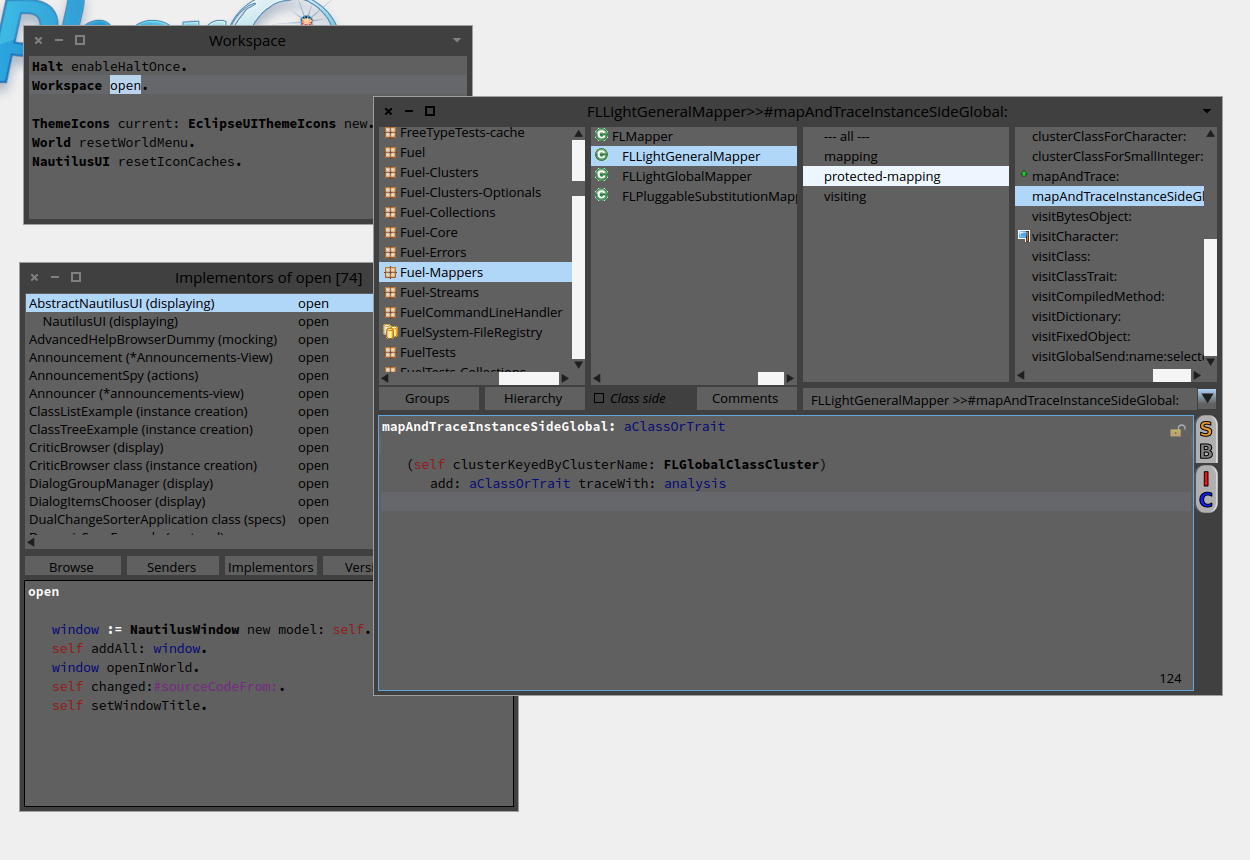

Hi Esteban, This is great! Not the way it looks, but that you are working on all those little details that make theme-ing close to impossible. Do you need help? Cheers, Doru On Wed, Nov 20, 2013 at 2:42 PM, Esteban Lorenzano <estebanlm@gmail.com>wrote:
:)
I'm slowly working in a darktheme... problem is the INCREDIBLE amount of hardcode colors and silly code. So it will take some time until is ready (also because I work on it when I'm bored and not wanting to do what I should do... like today :P)
Esteban
On Nov 20, 2013, at 2:34 PM, kilon alios <kilon.alios@gmail.com> wrote:
yes I can confirm that this work also on windoom 7. Indeed Sven your Pharo looks a bit more sexy than mine.
the code you posted works also like a charm for me , thank you. Now If I could get also a dark theme working with pharo that would be awesome. All this white hurts my eyes. But I guess I will have to compromise for the time being :)
thank you
On Wed, Nov 20, 2013 at 2:58 PM, Sven Van Caekenberghe <sven@stfx.eu>wrote:
On 20 Nov 2013, at 13:46, Esteban A. Maringolo <emaringolo@gmail.com> wrote:
Sven.
What version are YOU using? Fonts and windows look so clean an sharp! :)
;-)
Yes they are.
Like I said, Pharo version #30582
defaultFont Source Sans Pro Normal points: 12 height: 21 listFont Source Sans Pro Normal points: 12 height: 21 menuFont Source Sans Pro Normal points: 12 height: 21 windowTitleFont Source Sans Pro Bold points: 12 height: 21 balloonFont Source Sans Pro Normal points: 9 height: 16 codeFont Source Code Pro Normal points: 11 height: 19 buttonFont Source Sans Pro Normal points: 12 height: 21 haloFont Source Sans Pro Normal points: 9 height: 16
Installed with a script from our local look and feel guru, Doru:
#('SourceCodeProRegular' 'SourceCodeProBold' 'SourceSansProRegular' 'SourceSansProBoldâ) do: [ :each | Smalltalk globals at: each asSymbol ifAbsent: [ Gofer new smalltalkhubUser: 'girba' project: 'FreeFonts'; package: each; load ]. (Smalltalk at: each asSymbol) new install ]. FreeTypeSystemSettings loadFt2Library: true. FreeTypeFontProvider current updateFromSystem.
StandardFonts setAllStandardFontsTo: (LogicalFont familyName: 'Source Sans Pro' pointSize: 12); haloFont: (LogicalFont familyName: 'Source Sans Pro' pointSize: 9); windowTitleFont: (LogicalFont familyName: 'Source Sans Pro Bold' pointSize: 12); balloonFont: (LogicalFont familyName: 'Source Sans Pro' pointSize: 9); codeFont: (LogicalFont familyName: 'Source Code Pro' pointSize: 11).
And then I finally make the window font bold, manually.
The screenshot was done on Mac OS X 10.9
HTH,
Sven
Esteban A. Maringolo
2013/11/20 Sven Van Caekenberghe <sven@stfx.eu> What version are you using ?
In #30582 it does work: <Screen Shot 2013-11-20 at 13.34.46.png>
You can always try typing a space after Objectâ¦
Sven
On 20 Nov 2013, at 13:23, Yuriy Tymchuk <yuriy.tymchuk@me.com> wrote:
HI,
do you know why search behaves like this? I was expecting Object to show up
<Screenshot 2013-11-20 13.20.40.png>
Cheers Uko
-- www.tudorgirba.com "Every thing has its own flow"
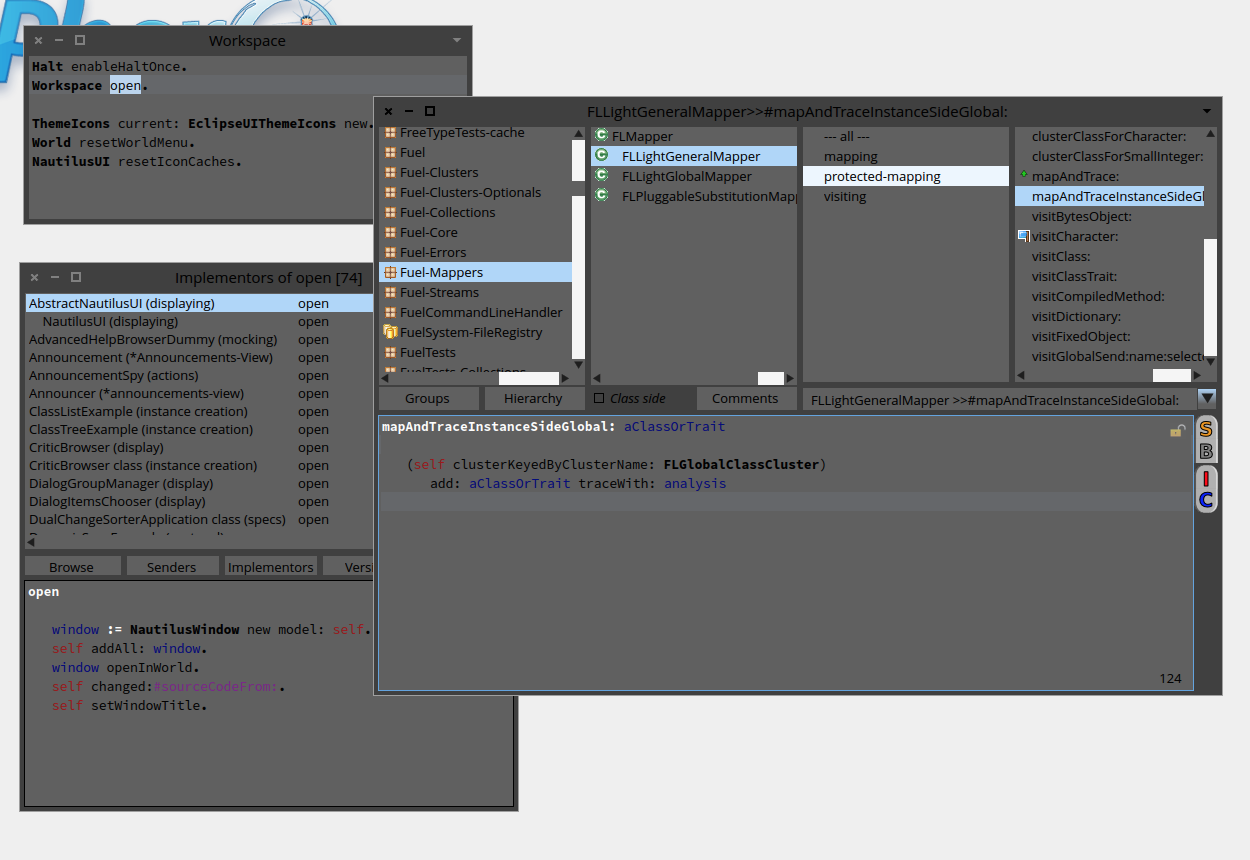
On 20 Nov 2013, at 14:34, kilon alios <kilon.alios@gmail.com> wrote:
All this white hurts my eyes.
One thing you could try is to use a tool like f.lux (http://justgetflux.com). It adjusts the color temperature of your display according to the time of day, so that is bluer/harder when it is daylight and orange/softer when it is night (manipulating gamma). It is pretty cool. Sven
participants (9)
-
 Esteban A. Maringolo
 -
 Esteban Lorenzano
 -
 kilon alios
 -
 Pavel Krivanek
 -
 phil@highoctane.be
 -
 Sven Van Caekenberghe
 -
 Torsten Bergmann
 -
 Tudor Girba
 -
 Yuriy Tymchuk