
Hi, It is amazing to see how fast Pharo progresses and moves closer to release. Therefore it may happen that after a week of absence there is so much new stuff that I just loose track of changes and sometimes old behaviour does not correspond new reality and "nothing works" :) Probably it is my case now. I would like to work on a project hosted on github. I tried iceberg:dev-0.4, iceberg:dev-0.5, iceberg-master but didn't succeed.. Here is what I get when try to clone repository both from Playground or by using "+" clone button in Iceberg both dev-04 and dev-05 [image: Inline images 1] If I try to load Iceberg master in the Image I get this: [image: Inline images 2] I am sure I do something wrong, so I recorded three videos - one for every Iceberg version. â Iceberg-0.4.mov <https://drive.google.com/file/d/0B-bMBVDOi3oTLTZvejdYTkNfaWM/view?usp=drive_...> ââ Iceberg-0.5.mov <https://drive.google.com/file/d/0B-bMBVDOi3oTbDJNZnJMeUJEYk0/view?usp=drive_...> ââ Iceberg-master.mov <https://drive.google.com/file/d/0B-bMBVDOi3oTVzhGQmJOVzN3akU/view?usp=drive_...> â VM: pharo-mac-i386-201705051953-b8db6de Image: 60482 OS: macOS Sierra 10.12.4 P.S. Still getting black screen when open an Image until I click... Cheers, Alex

Yes, there is a bug now in iceberg (I will fix it soon), for now you can go with: IceRepository defaultBackendType: #IceLibgitLocalRepository. Esteban
On 6 May 2017, at 16:41, Aliaksei Syrel <alex.syrel@gmail.com> wrote:
Hi,
It is amazing to see how fast Pharo progresses and moves closer to release. Therefore it may happen that after a week of absence there is so much new stuff that I just loose track of changes and sometimes old behaviour does not correspond new reality and "nothing works" :) Probably it is my case now. I would like to work on a project hosted on github. I tried iceberg:dev-0.4, iceberg:dev-0.5, iceberg-master but didn't succeed..
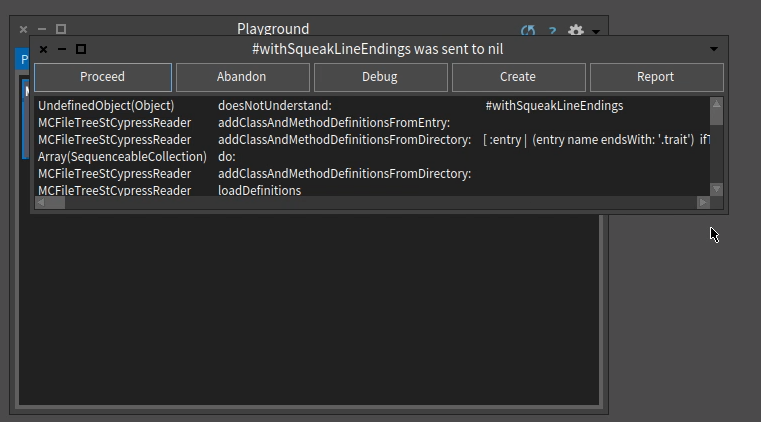
Here is what I get when try to clone repository both from Playground or by using "+" clone button in Iceberg both dev-04 and dev-05
<Screen Shot 2017-05-06 at 16.35.49.png>
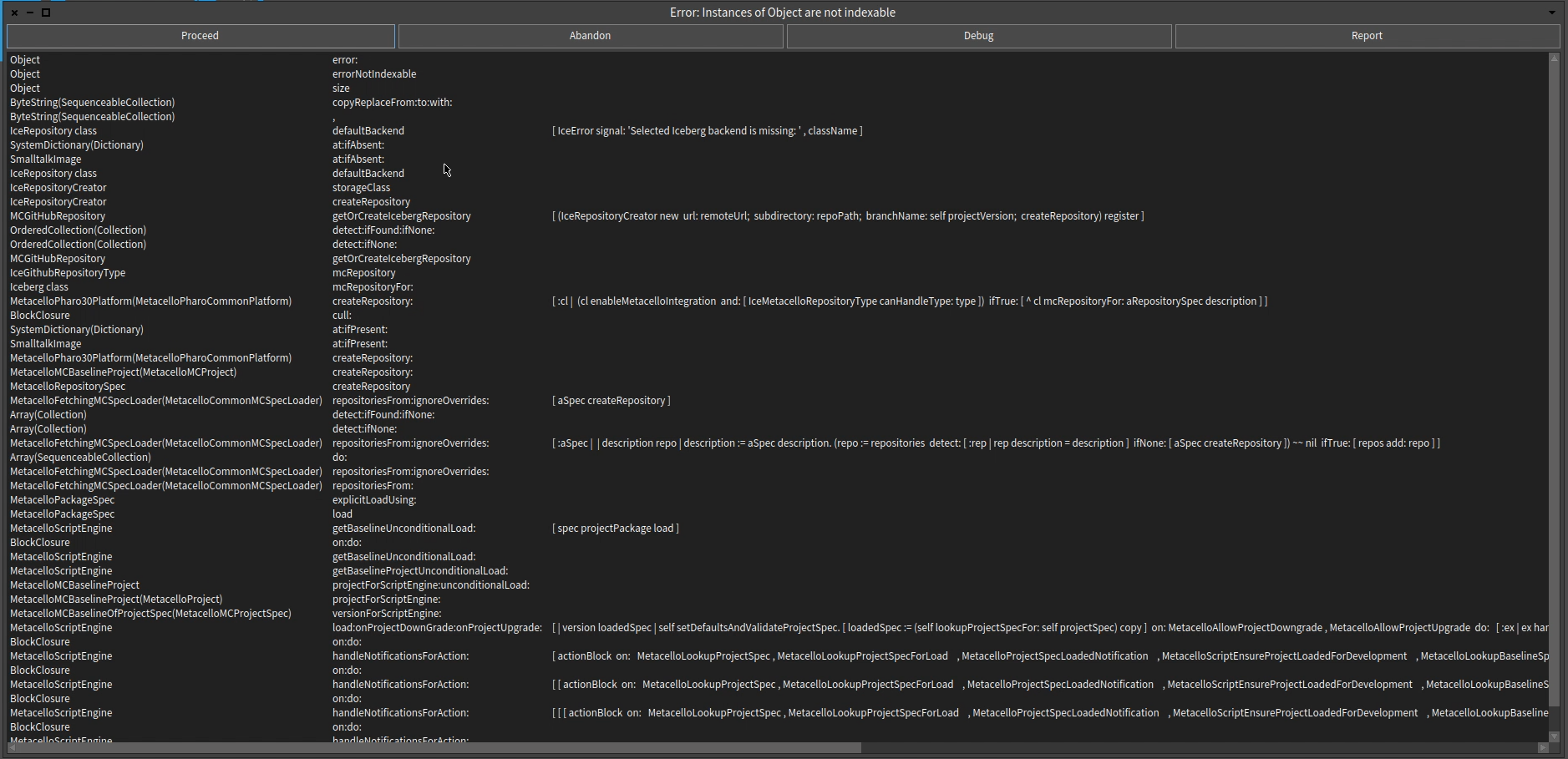
If I try to load Iceberg master in the Image I get this:
<Screen Shot 2017-05-06 at 16.37.28.png>
I am sure I do something wrong, so I recorded three videos - one for every Iceberg version. â Â Iceberg-0.4.mov <https://drive.google.com/file/d/0B-bMBVDOi3oTLTZvejdYTkNfaWM/view?usp=drive_web>ââ Â Iceberg-0.5.mov <https://drive.google.com/file/d/0B-bMBVDOi3oTbDJNZnJMeUJEYk0/view?usp=drive_web>ââ Â Iceberg-master.mov <https://drive.google.com/file/d/0B-bMBVDOi3oTVzhGQmJOVzN3akU/view?usp=drive_web>â VM: pharo-mac-i386-201705051953-b8db6de Image: 60482 OS: macOS Sierra 10.12.4
P.S. Still getting black screen when open an Image until I click...
Cheers, Alex

EstebanLM wrote
Yes, there is a bug now in iceberg (I will fix it soon), for now you can go with:
IceRepository defaultBackendType: #IceLibgitLocalRepository.
This actually causes an Assertion failure, then a total crash: --------------------------- Microsoft Visual C++ Runtime Library --------------------------- Assertion failed! Program: ... File: e:/workspace/PharoVM-spur32/Architecture.../remote.c Line: 430 Expression: out && repo && name For information on how your program can cause an assertion failure, see the Visual C++ documentation on asserts (Press Retry to debug the application - JIT must be enabled) --------------------------- Abort Retry Ignore --------------------------- I am using the image #60480 on a Windows 10 64bits OS -- View this message in context: http://forum.world.st/Iceberg-tp4945776p4945804.html Sent from the Pharo Smalltalk Developers mailing list archive at Nabble.com.

I am also trying to clone a repository and for me the command causes the following error: *LGit_GIT_ERROR: error authenticating: failed connecting agent*. I am using the latest image (60482) on Win 7 (64 bit). On 7 May 2017 at 19:06, Elhamer <abdelkhalekdev@gmail.com> wrote:
EstebanLM wrote
Yes, there is a bug now in iceberg (I will fix it soon), for now you can go with:
IceRepository defaultBackendType: #IceLibgitLocalRepository.
This actually causes an Assertion failure, then a total crash: --------------------------- Microsoft Visual C++ Runtime Library --------------------------- Assertion failed!
Program: ... File: e:/workspace/PharoVM-spur32/Architecture.../remote.c Line: 430
Expression: out && repo && name
For information on how your program can cause an assertion failure, see the Visual C++ documentation on asserts
(Press Retry to debug the application - JIT must be enabled) --------------------------- Abort Retry Ignore ---------------------------
I am using the image #60480 on a Windows 10 64bits OS
-- View this message in context: http://forum.world.st/Iceberg- tp4945776p4945804.html Sent from the Pharo Smalltalk Developers mailing list archive at Nabble.com.
-- РповагоÑ, ÐиÑоÑлава РоманÑк.
are you trying VM latest? because you should use the stable now :) I explain: I updated the latest VM to libgit2 0.25.1. While this works on most of my cases, I spotted this problem too. cheers, Esteban
On 7 May 2017, at 18:40, Myroslava Romaniuk <romaniuk@ucu.edu.ua> wrote:
I am also trying to clone a repository and for me the command causes the following error: LGit_GIT_ERROR: error authenticating: failed connecting agent. I am using the latest image (60482) on Win 7 (64 bit).
On 7 May 2017 at 19:06, Elhamer <abdelkhalekdev@gmail.com <mailto:abdelkhalekdev@gmail.com>> wrote: EstebanLM wrote
Yes, there is a bug now in iceberg (I will fix it soon), for now you can go with:
IceRepository defaultBackendType: #IceLibgitLocalRepository.
This actually causes an Assertion failure, then a total crash: --------------------------- Microsoft Visual C++ Runtime Library --------------------------- Assertion failed!
Program: ... File: e:/workspace/PharoVM-spur32/Architecture.../remote.c Line: 430
Expression: out && repo && name
For information on how your program can cause an assertion failure, see the Visual C++ documentation on asserts
(Press Retry to debug the application - JIT must be enabled) --------------------------- Abort Retry Ignore ---------------------------
I am using the image #60480 on a Windows 10 64bits OS
-- View this message in context: http://forum.world.st/Iceberg-tp4945776p4945804.html <http://forum.world.st/Iceberg-tp4945776p4945804.html> Sent from the Pharo Smalltalk Developers mailing list archive at Nabble.com.
-- РповагоÑ, ÐиÑоÑлава РоманÑк.
Which one is the stable VM then? On 7 May 2017 21:07, "Esteban Lorenzano" <estebanlm@gmail.com> wrote:
are you trying VM latest? because you should use the stable now :)
I explain: I updated the latest VM to libgit2 0.25.1. While this works on most of my cases, I spotted this problem too.
cheers, Esteban
On 7 May 2017, at 18:40, Myroslava Romaniuk <romaniuk@ucu.edu.ua> wrote:
I am also trying to clone a repository and for me the command causes the following error: *LGit_GIT_ERROR: error authenticating: failed connecting agent*. I am using the latest image (60482) on Win 7 (64 bit).
On 7 May 2017 at 19:06, Elhamer <abdelkhalekdev@gmail.com> wrote:
EstebanLM wrote
Yes, there is a bug now in iceberg (I will fix it soon), for now you can go with:
IceRepository defaultBackendType: #IceLibgitLocalRepository.
This actually causes an Assertion failure, then a total crash: --------------------------- Microsoft Visual C++ Runtime Library --------------------------- Assertion failed!
Program: ... File: e:/workspace/PharoVM-spur32/Architecture.../remote.c Line: 430
Expression: out && repo && name
For information on how your program can cause an assertion failure, see the Visual C++ documentation on asserts
(Press Retry to debug the application - JIT must be enabled) --------------------------- Abort Retry Ignore ---------------------------
I am using the image #60480 on a Windows 10 64bits OS
-- View this message in context: http://forum.world.st/Iceberg- tp4945776p4945804.html Sent from the Pharo Smalltalk Developers mailing list archive at Nabble.com.
-- РповагоÑ, ÐиÑоÑлава РоманÑк.

Until recently to work around a bug people were directed to "latest" vm. Now we are back to "stable"... http://files.pharo.org/vm/pharo-spur32/ cheers -ben On Mon, May 8, 2017 at 2:32 AM, Myroslava Romaniuk <romaniuk@ucu.edu.ua> wrote:
Which one is the stable VM then?
On 7 May 2017 21:07, "Esteban Lorenzano" <estebanlm@gmail.com> wrote:
are you trying VM latest? because you should use the stable now :)
I explain: I updated the latest VM to libgit2 0.25.1. While this works on most of my cases, I spotted this problem too.
cheers, Esteban
On 7 May 2017, at 18:40, Myroslava Romaniuk <romaniuk@ucu.edu.ua> wrote:
I am also trying to clone a repository and for me the command causes the following error: LGit_GIT_ERROR: error authenticating: failed connecting agent. I am using the latest image (60482) on Win 7 (64 bit).
On 7 May 2017 at 19:06, Elhamer <abdelkhalekdev@gmail.com> wrote:
EstebanLM wrote
Yes, there is a bug now in iceberg (I will fix it soon), for now you can go with:
IceRepository defaultBackendType: #IceLibgitLocalRepository.
This actually causes an Assertion failure, then a total crash: --------------------------- Microsoft Visual C++ Runtime Library --------------------------- Assertion failed!
Program: ... File: e:/workspace/PharoVM-spur32/Architecture.../remote.c Line: 430
Expression: out && repo && name
For information on how your program can cause an assertion failure, see the Visual C++ documentation on asserts
(Press Retry to debug the application - JIT must be enabled) --------------------------- Abort Retry Ignore ---------------------------
I am using the image #60480 on a Windows 10 64bits OS
-- View this message in context: http://forum.world.st/Iceberg-tp4945776p4945804.html Sent from the Pharo Smalltalk Developers mailing list archive at Nabble.com.
-- РповагоÑ, ÐиÑоÑлава РоманÑк.
On 8 May 2017, at 02:43, Ben Coman <btc@openInWorld.com> wrote:
Until recently to work around a bug people were directed to "latest" vm. Now we are back to "stable"... http://files.pharo.org/vm/pharo-spur32/ <http://files.pharo.org/vm/pharo-spur32/>
yes. and please, people⦠note that using âstableâ should be the regular way. we were using latest because we are so unstable that we needed to (and I cannot ensure we will not have other periods like that). But in general, users not trying to fix something on the edge, need to stay with the stable. cheers! Esteban
cheers -ben
On Mon, May 8, 2017 at 2:32 AM, Myroslava Romaniuk <romaniuk@ucu.edu.ua> wrote:
Which one is the stable VM then?
On 7 May 2017 21:07, "Esteban Lorenzano" <estebanlm@gmail.com> wrote:
are you trying VM latest? because you should use the stable now :)
I explain: I updated the latest VM to libgit2 0.25.1. While this works on most of my cases, I spotted this problem too.
cheers, Esteban
On 7 May 2017, at 18:40, Myroslava Romaniuk <romaniuk@ucu.edu.ua> wrote:
I am also trying to clone a repository and for me the command causes the following error: LGit_GIT_ERROR: error authenticating: failed connecting agent. I am using the latest image (60482) on Win 7 (64 bit).
On 7 May 2017 at 19:06, Elhamer <abdelkhalekdev@gmail.com> wrote:
EstebanLM wrote
Yes, there is a bug now in iceberg (I will fix it soon), for now you can go with:
IceRepository defaultBackendType: #IceLibgitLocalRepository.
This actually causes an Assertion failure, then a total crash: --------------------------- Microsoft Visual C++ Runtime Library --------------------------- Assertion failed!
Program: ... File: e:/workspace/PharoVM-spur32/Architecture.../remote.c Line: 430
Expression: out && repo && name
For information on how your program can cause an assertion failure, see the Visual C++ documentation on asserts
(Press Retry to debug the application - JIT must be enabled) --------------------------- Abort Retry Ignore ---------------------------
I am using the image #60480 on a Windows 10 64bits OS
-- View this message in context: http://forum.world.st/Iceberg-tp4945776p4945804.html Sent from the Pharo Smalltalk Developers mailing list archive at Nabble.com.
-- РповагоÑ, ÐиÑоÑлава РоманÑк.

EstebanLM wrote
we were using latest because we are so unstable that we needed to
I tried to upgrade to latest, but http://files.pharo.org/vm/pharo-spur32/mac/PharoVM-Spur32-mac-latest.zip doesn't even seem to include libgit2 at all! ----- Cheers, Sean -- Sent from: http://forum.world.st/Pharo-Smalltalk-Developers-f1294837.html
Sean P. DeNigris wrote
I tried to upgrade to latest, but http://files.pharo.org/vm/pharo-spur32/mac/PharoVM-Spur32-mac-latest.zip doesn't even seem to include libgit2 at all!
- Prior to the above step, I downloaded the stable Mac VM from Pharo.org but was still getting "This version of Iceberg requires libgit2 0.25.1 to run (you have 0.23.0)." - My third attempt was https://ci.inria.fr/pharo/view/VM/job/PharoVM/ where I found a broken build and "Project disabled" Lastly, I did `curl get.pharo.org/vmLatest70 | bash`. Apparently, the 70 VM is compatible with 60 and I didn't see vmLatest60 listed. Et voila! ----- Cheers, Sean -- Sent from: http://forum.world.st/Pharo-Smalltalk-Developers-f1294837.html

On 19 Sep 2017, at 17:45, Sean P. DeNigris <sean@clipperadams.com> wrote:
Sean P. DeNigris wrote
I tried to upgrade to latest, but http://files.pharo.org/vm/pharo-spur32/mac/PharoVM-Spur32-mac-latest.zip doesn't even seem to include libgit2 at all!
- Prior to the above step, I downloaded the stable Mac VM from Pharo.org but was still getting "This version of Iceberg requires libgit2 0.25.1 to run (you have 0.23.0).â
I personally find it very confusing that http://files.pharo.org/vm/ <http://files.pharo.org/vm/> does not have the current VMsâ¦
- My third attempt was https://ci.inria.fr/pharo/view/VM/job/PharoVM/ where I found a broken build and "Project disabled" Lastly, I did `curl get.pharo.org/vmLatest70 | bash`. Apparently, the 70 VM is compatible with 60 and I didn't see vmLatest60 listed. Et voila!
The up to date files are in http://files.pharo.org/get-files/ <http://files.pharo.org/get-files/> (I did not know that either and used an outdated VM from http://files.pharo.org/vm/ <http://files.pharo.org/vm/> for a looong timeâ¦) Marcus

On 19/09/17 17:52, Marcus Denker wrote:
I personally find it very confusing that http://files.pharo.org/vm/ does not have the current VMsâ¦
Now I am confused. The date seems to suggest they are current? At least on Linux Stephan
participants (8)
-
 Aliaksei Syrel
 -
 Ben Coman
 -
 Elhamer
 -
 Esteban Lorenzano
 -
 Marcus Denker
 -
 Myroslava Romaniuk
 -
 Sean P. DeNigris
 -
 Stephan Eggermont