why is gt playground not saving the code

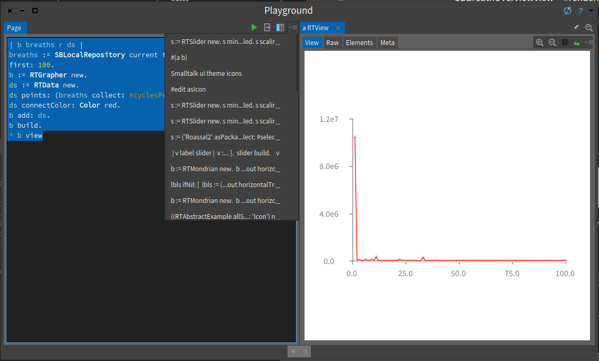
At this point Iâve lost cumulatively hours and hours of work due to Playground not saving the code; so every time I crash I lose. In the picture below the code was demonstrably executed and yet itâs not in the history and if I would crash (which happens several times a day in âstableâ pharo 5) I would lose it. Not to mention that way too often I see duplicate events in the history with identical code⦠Peter

2016-08-31 12:00 GMT+02:00 Peter Uhnák <i.uhnak@gmail.com>:
At this point Iâve lost cumulatively hours and hours of work due to Playground not saving the code; so every time I crash I lose.
In the picture below the code was demonstrably executed and yet itâs not in the history and if I would crash (which happens several times a day in âstableâ pharo 5) I would lose it. Not to mention that way too often I see duplicate events in the history with identical codeâ¦
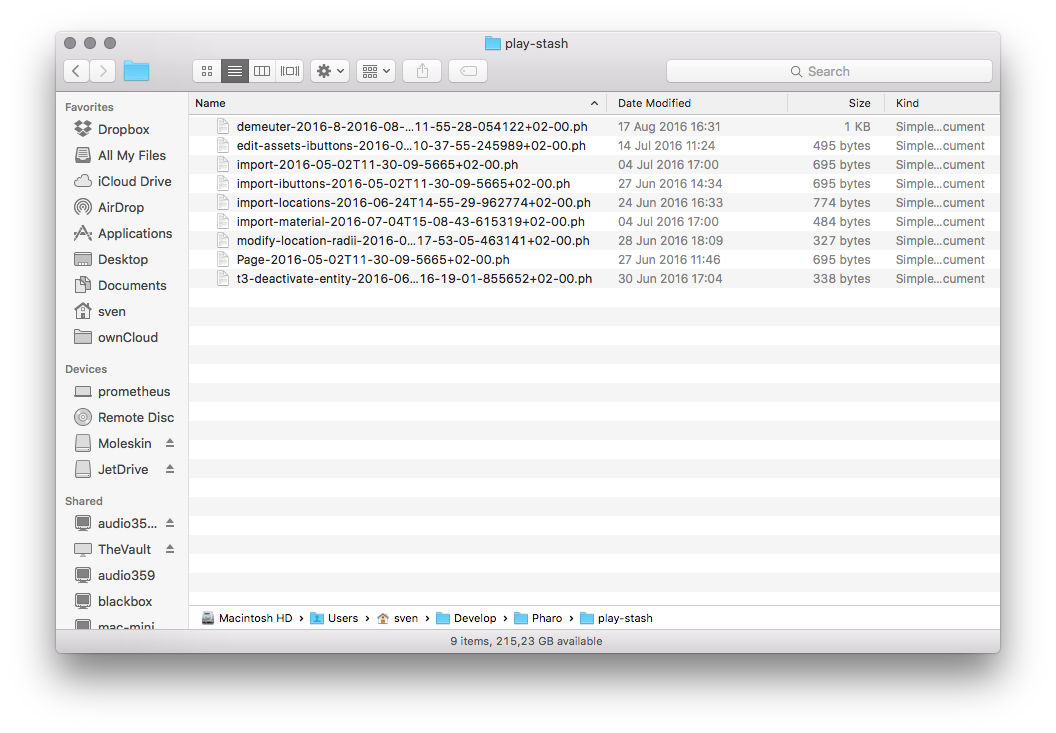
This was discussed a couple of time and we even had some bug-entries. But it is working that way "by-design". I don't understand why, but the current content is not shown in the history, only if you close the current playground window *withouth* deleteing the content. If the content is not shown in the history, it may be still in the play-cache folder.
Peter

On Wed, Aug 31, 2016 at 12:32 PM, Nicolai Hess <nicolaihess@gmail.com> wrote:
2016-08-31 12:00 GMT+02:00 Peter Uhnák <i.uhnak@gmail.com>:
At this point Iâve lost cumulatively hours and hours of work due to Playground not saving the code; so every time I crash I lose.
In the picture below the code was demonstrably executed and yet itâs not in the history and if I would crash (which happens several times a day in âstableâ pharo 5) I would lose it. Not to mention that way too often I see duplicate events in the history with identical codeâ¦
This was discussed a couple of time and we even had some bug-entries. But it is working that way "by-design". I don't understand why, but the current content is not shown in the history, only if you close the current playground window *withouth* deleteing the content.
I do not remember the previous discussion in details but I think we should consider this a bug. I'll open a bug report and try to dig the previous discussion about this topic. Cheers, Andrei
If the content is not shown in the history, it may be still in the play-cache folder.
Peter

Hi, The code should actually be saved on disk every time you type. Please take a look at the files from play-cache. Could you confirm? One bug is that the history is cached and not refreshed, so when you re-open a crashed page the image does not know that there is another file. This has to be changed. As for having the currently opened playgrounds in the dropdown, we chose it like that because when you open the dropdown you typically want to switch to something else than what exists right now in front of view. Thus showing the same entry again would provide little value. I believe that if we would solve the history bug described above, this issue would resolve itself as well. In any case, the dealing with the history of the playground is underdeveloped. So, letâs see if we can identify ways to improve the situation. What do you think? Cheers, Doru
On Aug 31, 2016, at 12:00 PM, Peter Uhnák <i.uhnak@gmail.com> wrote:
At this point Iâve lost cumulatively hours and hours of work due to Playground not saving the code; so every time I crash I lose.
In the picture below the code was demonstrably executed and yet itâs not in the history and if I would crash (which happens several times a day in âstableâ pharo 5) I would lose it. Not to mention that way too often I see duplicate events in the history with identical codeâ¦
<F091EED2725D4C679C390F5BC76E1CE3.png>
Peter <F091EED2725D4C679C390F5BC76E1CE3.png>
-- www.tudorgirba.com www.feenk.com "Speaking louder won't make the point worthier."
On Wed, Aug 31, 2016 at 10:10:21PM +0200, Tudor Girba wrote:
Hi,
The code should actually be saved on disk every time you type. Please take a look at the files from play-cache. Could you confirm?
One bug is that the history is cached and not refreshed, so when you re-open a crashed page the image does not know that there is another file. This has to be changed.
As for having the currently opened playgrounds in the dropdown, we chose it like that because when you open the dropdown you typically want to switch to something else than what exists right now in front of view. Thus showing the same entry again would provide little value. I believe that if we would solve the history bug described above, this issue would resolve itself as well.
In any case, the dealing with the history of the playground is underdeveloped. So, letâs see if we can identify ways to improve the situation.
What do you think?
Thank you both for the answers, I didn't know there was a disk storage that was independent of what was shown to me, so next time I crash I will check. But there were other strange issues going around, or at least confusing. So I'll try to play with it a bit tomorrow. Thanks, Peter

You can also explicitly name your pages (tabs) by double-clicking the title and changing it. Then your pages get copied to play-stash using that name. This gives you more control over what happens.
On 31 Aug 2016, at 22:30, Peter Uhnak <i.uhnak@gmail.com> wrote:
On Wed, Aug 31, 2016 at 10:10:21PM +0200, Tudor Girba wrote:
Hi,
The code should actually be saved on disk every time you type. Please take a look at the files from play-cache. Could you confirm?
One bug is that the history is cached and not refreshed, so when you re-open a crashed page the image does not know that there is another file. This has to be changed.
As for having the currently opened playgrounds in the dropdown, we chose it like that because when you open the dropdown you typically want to switch to something else than what exists right now in front of view. Thus showing the same entry again would provide little value. I believe that if we would solve the history bug described above, this issue would resolve itself as well.
In any case, the dealing with the history of the playground is underdeveloped. So, letâs see if we can identify ways to improve the situation.
What do you think?
Thank you both for the answers, I didn't know there was a disk storage that was independent of what was shown to me, so next time I crash I will check. But there were other strange issues going around, or at least confusing. So I'll try to play with it a bit tomorrow.
Thanks, Peter

One use case that sometimes bites me is when I'm working in the "code" of the Playground (first screen), and then I start going deep with "Evaluate and Go", basically inspecting my objects, and then I close the window thinking I'm dealing with an inspector hence losing the code of the "workspace" in the Playground that started the inspection "workflow", without receiving any warning about "losing" my changes. I'd like an explicit "Save" in the Playground, but since I'm not adding it, I can't complain much. :) Regards. Esteban A. Maringolo Esteban A. Maringolo 2016-08-31 17:10 GMT-03:00 Tudor Girba <tudor@tudorgirba.com>:
Hi,
The code should actually be saved on disk every time you type. Please take a look at the files from play-cache. Could you confirm?
One bug is that the history is cached and not refreshed, so when you re-open a crashed page the image does not know that there is another file. This has to be changed.
As for having the currently opened playgrounds in the dropdown, we chose it like that because when you open the dropdown you typically want to switch to something else than what exists right now in front of view. Thus showing the same entry again would provide little value. I believe that if we would solve the history bug described above, this issue would resolve itself as well.
In any case, the dealing with the history of the playground is underdeveloped. So, letâs see if we can identify ways to improve the situation.
What do you think?
Cheers, Doru
On Aug 31, 2016, at 12:00 PM, Peter Uhnák <i.uhnak@gmail.com> wrote:
At this point Iâve lost cumulatively hours and hours of work due to Playground not saving the code; so every time I crash I lose.
In the picture below the code was demonstrably executed and yet itâs not in the history and if I would crash (which happens several times a day in âstableâ pharo 5) I would lose it. Not to mention that way too often I see duplicate events in the history with identical codeâ¦
<F091EED2725D4C679C390F5BC76E1CE3.png>
Peter <F091EED2725D4C679C390F5BC76E1CE3.png>
-- www.tudorgirba.com www.feenk.com
"Speaking louder won't make the point worthier."
Hi,
On Aug 31, 2016, at 11:39 PM, Esteban A. Maringolo <emaringolo@gmail.com> wrote:
One use case that sometimes bites me is when I'm working in the "code" of the Playground (first screen), and then I start going deep with "Evaluate and Go", basically inspecting my objects, and then I close the window thinking I'm dealing with an inspector hence losing the code of the "workspace" in the Playground that started the inspection "workflow", without receiving any warning about "losing" my changes. I'd like an explicit "Save" in the Playground, but since I'm not adding it, I can't complain much. :)
Thanks for the input. What would the Save do in this case? Should the âsave" save the code from the playground? The code from the playground is actually not lost when you close the Playground, and neither is the code you write in the Raw panes. Or is there a different thing you have in mind? Doru
Regards.
Esteban A. Maringolo Esteban A. Maringolo
2016-08-31 17:10 GMT-03:00 Tudor Girba <tudor@tudorgirba.com>:
Hi,
The code should actually be saved on disk every time you type. Please take a look at the files from play-cache. Could you confirm?
One bug is that the history is cached and not refreshed, so when you re-open a crashed page the image does not know that there is another file. This has to be changed.
As for having the currently opened playgrounds in the dropdown, we chose it like that because when you open the dropdown you typically want to switch to something else than what exists right now in front of view. Thus showing the same entry again would provide little value. I believe that if we would solve the history bug described above, this issue would resolve itself as well.
In any case, the dealing with the history of the playground is underdeveloped. So, letâs see if we can identify ways to improve the situation.
What do you think?
Cheers, Doru
On Aug 31, 2016, at 12:00 PM, Peter Uhnák <i.uhnak@gmail.com> wrote:
At this point Iâve lost cumulatively hours and hours of work due to Playground not saving the code; so every time I crash I lose.
In the picture below the code was demonstrably executed and yet itâs not in the history and if I would crash (which happens several times a day in âstableâ pharo 5) I would lose it. Not to mention that way too often I see duplicate events in the history with identical codeâ¦
<F091EED2725D4C679C390F5BC76E1CE3.png>
Peter <F091EED2725D4C679C390F5BC76E1CE3.png>
-- www.tudorgirba.com www.feenk.com
"Speaking louder won't make the point worthier."
-- www.tudorgirba.com www.feenk.com "Quality cannot be an afterthought."
2016-08-31 18:43 GMT-03:00 Tudor Girba <tudor@tudorgirba.com>:
Hi,
On Aug 31, 2016, at 11:39 PM, Esteban A. Maringolo <emaringolo@gmail.com> wrote:
One use case that sometimes bites me is when I'm working in the "code" of the Playground (first screen), and then I start going deep with "Evaluate and Go", basically inspecting my objects, and then I close the window thinking I'm dealing with an inspector hence losing the code of the "workspace" in the Playground that started the inspection "workflow", without receiving any warning about "losing" my changes. I'd like an explicit "Save" in the Playground, but since I'm not adding it, I can't complain much. :)
Thanks for the input. What would the Save do in this case?
It should let me decide IF and WHEN to store the code contents. Also, if you tests scripts in a workspace and evaluate them "outside" of it (e.g. from the command line) I have to copy/paste the contents back and forth from the Playground to a text editor to save/modify something that in the past I did with the Workspace.
Should the âsave" save the code from the playground?
Yes.
The code from the playground is actually not lost when you close the Playground, and neither is the code you write in the Raw panes. Or is there a different thing you have in mind?
Is not lost, but sometimes I want to reset it (reload) from a previous saved state. Maybe the latest evaluation isn't what I want to recover. Also the menu isn't the best option if you have several expressions that start with the same characters and are indistinguishable from each other. I appreciate the "autosave" like feature (although I'd like to be able to disable it for security paranoid concerns), but I also like to decide when to save. But the use case I pointed wasn't about storing the contents outside of the playground but instead of getting a warning or something when closing the Playground doing inspection. Sometimes I don't want to close the playground, just want to reset everything to the original code pane as if no "Evaluate and Go" was ever ran. Regards! Esteban A. Maringolo

Le 31/8/16 à 22:10, Tudor Girba a écrit :
Hi,
The code should actually be saved on disk every time you type. Please take a look at the files from play-cache. Could you confirm?
One bug is that the history is cached and not refreshed, so when you re-open a crashed page the image does not know that there is another file. This has to be changed.
should protect it with a session check
As for having the currently opened playgrounds in the dropdown, we chose it like that because when you open the dropdown you typically want to switch to something else than what exists right now in front of view. Thus showing the same entry again would provide little value. I believe that if we would solve the history bug described above, this issue would resolve itself as well.
In any case, the dealing with the history of the playground is underdeveloped. So, letâs see if we can identify ways to improve the situation.
What do you think?
Cheers, Doru
On Aug 31, 2016, at 12:00 PM, Peter Uhnák <i.uhnak@gmail.com> wrote:
At this point Iâve lost cumulatively hours and hours of work due to Playground not saving the code; so every time I crash I lose.
In the picture below the code was demonstrably executed and yet itâs not in the history and if I would crash (which happens several times a day in âstableâ pharo 5) I would lose it. Not to mention that way too often I see duplicate events in the history with identical codeâ¦
<F091EED2725D4C679C390F5BC76E1CE3.png>
Peter <F091EED2725D4C679C390F5BC76E1CE3.png> -- www.tudorgirba.com www.feenk.com
"Speaking louder won't make the point worthier."
participants (8)
-
 Andrei Chis
 -
 Esteban A. Maringolo
 -
 Nicolai Hess
 -
 Peter Uhnak
 -
Peter Uhnák
-
 stepharo
 -
 Sven Van Caekenberghe
 -
 Tudor Girba