Weird indenting with #with:

Is this weird indenting after the two #with: normal? :S Cheers, Sergi
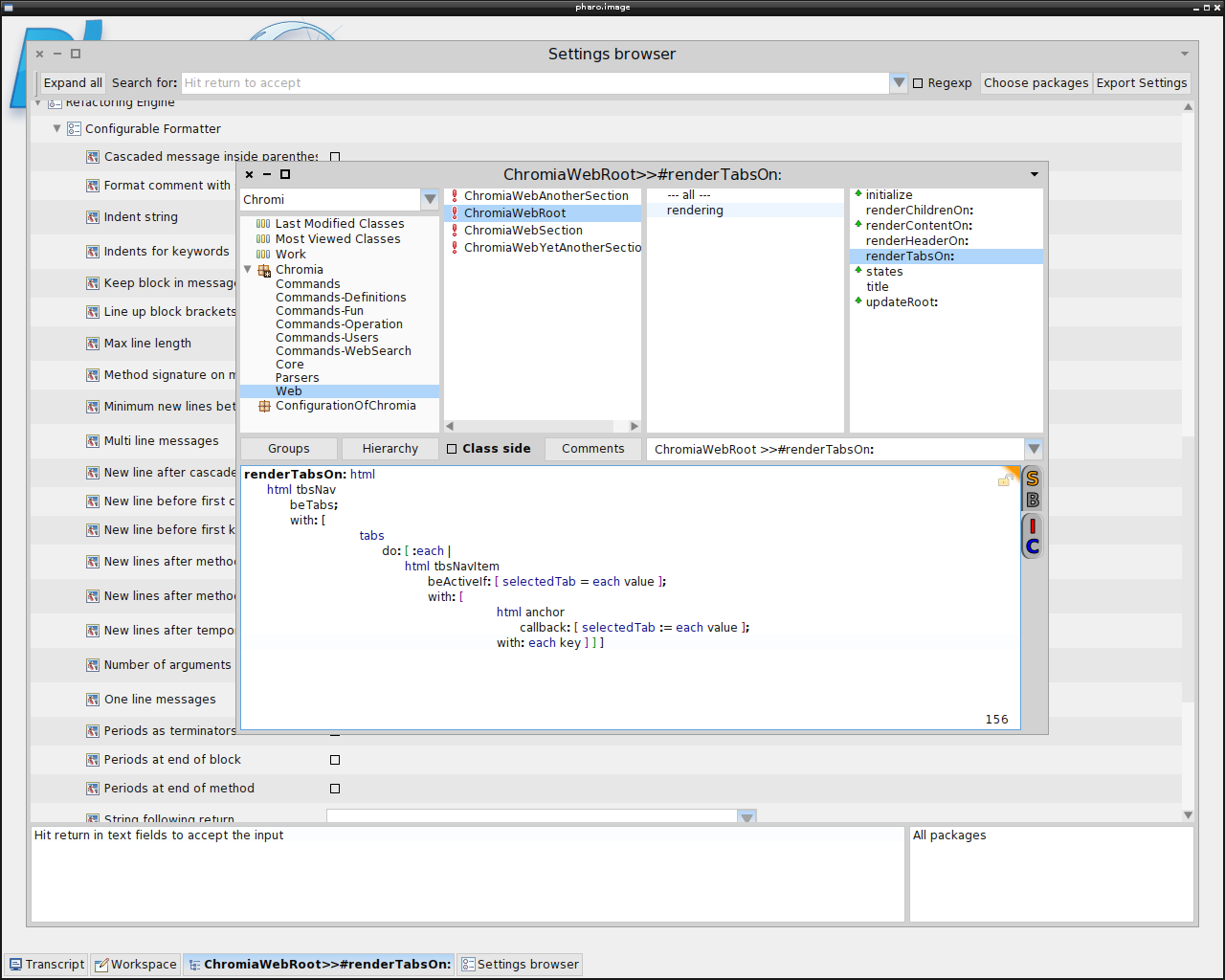

I do not understand what your problem is. If is bad indented, you can always reformat. Source formatting is not pharo responsibility but the programmer (unless you use pretty printer, which is not the case). cheers, Esteban On 20 Mar 2014, at 18:49, Sergi Reyner <sergi.reyner@gmail.com> wrote:
Is this weird indenting after the two #with: normal? :S
Cheers, Sergi <pharo.image_001.png>
2014-03-20 19:23 GMT+00:00 Esteban Lorenzano <estebanlm@gmail.com>:
I do not understand what your problem is. If is bad indented, you can always reformat. Source formatting is not pharo responsibility but the programmer (unless you use pretty printer, which is not the case).
Well, that´s not how *I* formatted the code originally. I typed it and then pressed Ctrl+Shift+F, and that´s what I ended up with. I was expecting just one tab. Now, if you tell me that it´s supposed to be indented like that (with three tabs instead of one) by the formatter, then I´ll say nothing else :) I´m running #30798. Cheers, Sergi
On 20 Mar 2014, at 20:30, Sergi Reyner <sergi.reyner@gmail.com> wrote:
2014-03-20 19:23 GMT+00:00 Esteban Lorenzano <estebanlm@gmail.com>: I do not understand what your problem is. If is bad indented, you can always reformat. Source formatting is not pharo responsibility but the programmer (unless you use pretty printer, which is not the case).
Well, that´s not how *I* formatted the code originally. I typed it and then pressed Ctrl+Shift+F, and that´s what I ended up with. I was expecting just one tab.
Now, if you tell me that it´s supposed to be indented like that (with three tabs instead of one) by the formatter, then I´ll say nothing else :)
nah, you have been a victim of pretty print⦠not the best tool present in the image, IMO⦠there is people who like it. I think the result is a piece of s**t :)
I´m running #30798.
Cheers, Sergi

On 20 mars 2014, at 20:30, Sergi Reyner <sergi.reyner@gmail.com> wrote:
2014-03-20 19:23 GMT+00:00 Esteban Lorenzano <estebanlm@gmail.com>: I do not understand what your problem is. If is bad indented, you can always reformat. Source formatting is not pharo responsibility but the programmer (unless you use pretty printer, which is not the case).
Well, that´s not how *I* formatted the code originally. I typed it and then pressed Ctrl+Shift+F, and that´s what I ended up with. I was expecting just one tab.
Now, if you tell me that it´s supposed to be indented like that (with three tabs instead of one) by the formatter, then I´ll say nothing else :)
No that's definitively a bug. It seems to happen to blocks that are arguments in cascaded messages.
I´m running #30798.
Cheers, Sergi

I have been using the auto formatter with Seaside rendering code too, and I found it weird at times as well. The problem seems to be related to blocks. It is of course hard to argue with something automatic that is quite complex and over which there are many opinions. I have basically given up to worry about it and just accept it. It is either that or manual formatting, but that is hard when doing lots of source code refactorings. On 20 Mar 2014, at 20:30, Sergi Reyner <sergi.reyner@gmail.com> wrote:
2014-03-20 19:23 GMT+00:00 Esteban Lorenzano <estebanlm@gmail.com>: I do not understand what your problem is. If is bad indented, you can always reformat. Source formatting is not pharo responsibility but the programmer (unless you use pretty printer, which is not the case).
Well, that´s not how *I* formatted the code originally. I typed it and then pressed Ctrl+Shift+F, and that´s what I ended up with. I was expecting just one tab.
Now, if you tell me that it´s supposed to be indented like that (with three tabs instead of one) by the formatter, then I´ll say nothing else :)
I´m running #30798.
Cheers, Sergi
2014-03-20 19:38 GMT+00:00 Sven Van Caekenberghe <sven@stfx.eu>:
I have been using the auto formatter with Seaside rendering code too, and I found it weird at times as well. The problem seems to be related to blocks. It is of course hard to argue with something automatic that is quite complex and over which there are many opinions. I have basically given up to worry about it and just accept it. It is either that or manual formatting, but that is hard when doing lots of source code refactorings.
I just found out that adding #with: to the array in the 'Multi line messages' setting reduces the number of tabs to 2, which is somewhat more acceptable. I´m not sure about it breaking some other formatting or not. I guess I will find out it that´s the case :) Cheers, Sergi
Thanks, it makes a difference indeed, but it does not yet quite solve it. I would want the contents of the #with: block to be treated the same as for example inside an #ifTrue:ifFalse: with just one tab (level) more. I just don't understand why it is different. On 20 Mar 2014, at 20:47, Sergi Reyner <sergi.reyner@gmail.com> wrote:
2014-03-20 19:38 GMT+00:00 Sven Van Caekenberghe <sven@stfx.eu>: I have been using the auto formatter with Seaside rendering code too, and I found it weird at times as well. The problem seems to be related to blocks. It is of course hard to argue with something automatic that is quite complex and over which there are many opinions. I have basically given up to worry about it and just accept it. It is either that or manual formatting, but that is hard when doing lots of source code refactorings.
I just found out that adding #with: to the array in the 'Multi line messages' setting reduces the number of tabs to 2, which is somewhat more acceptable. I´m not sure about it breaking some other formatting or not. I guess I will find out it that´s the case :)
Cheers, Sergi
participants (4)
-
 Camille Teruel
 -
 Esteban Lorenzano
 -
 Sergi Reyner
 -
 Sven Van Caekenberghe