
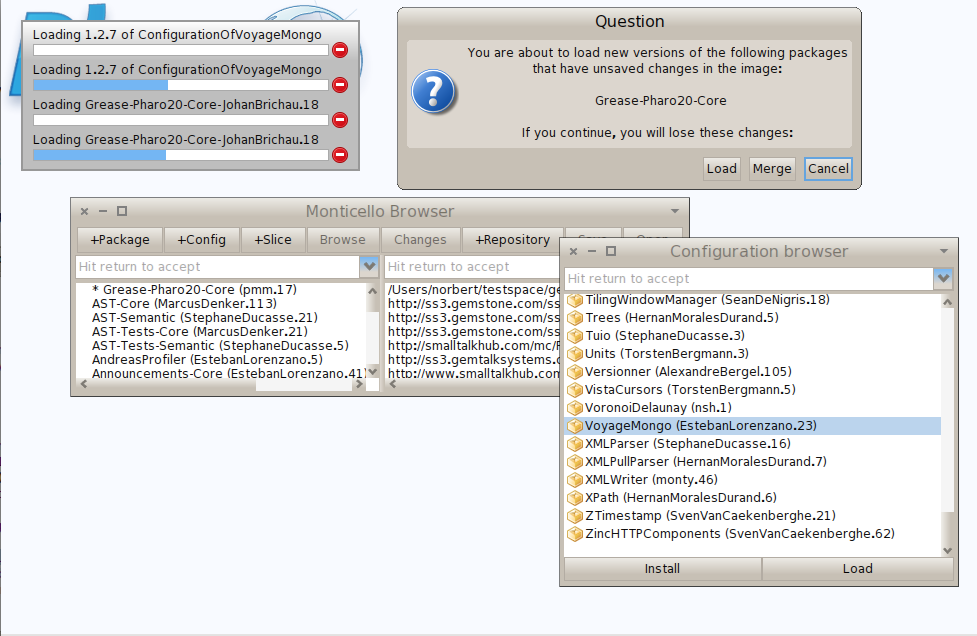
I encountered a strange problem while loading voyage. It seems the configuration for magritte or grease is strange. If I load voyage from the configuration browser I get the following screen Any ideas? Norbert

This is the second report of Grease-Pharo20-Core not loading properly, I believe it might have something to do with an error that was made with a Seaside configuration, see the Seaside mailing list (but there are no details there, apart from the fact that an existing version was changed) On 20 Mar 2014, at 15:47, Norbert Hartl <norbert@hartl.name> wrote:
I encountered a strange problem while loading voyage. It seems the configuration for magritte or grease is strange. If I load voyage from the configuration browser I get the following screen
<Bildschirmfoto 2014-03-20 um 15.43.56.png>
Any ideas?
Norbert

is not a problem of voyage. Is a problem in grease or magritte :P I will check it⦠but this kind of problems arise time to time and Iâm frankly a bit fed up of them :( complex system dependencies are often not well managed and metacello is not really good at deciding versions or reporting incompatibilities⦠so you change the stable in projectB.C and projectA.C reports a problem :( honestly⦠not the best :( anyway, rant apart⦠I will check it as soon as I can spare some minutes. Esteban On 20 Mar 2014, at 15:47, Norbert Hartl <norbert@hartl.name> wrote:
I encountered a strange problem while loading voyage. It seems the configuration for magritte or grease is strange. If I load voyage from the configuration browser I get the following screen
<Bildschirmfoto 2014-03-20 um 15.43.56.png>
Any ideas?
Norbert
Am 20.03.2014 um 16:06 schrieb Esteban Lorenzano <estebanlm@gmail.com>:
is not a problem of voyage. Is a problem in grease or magritte :P
I know. But what do you think is the cheapest way to get your attention? :P
I will check it⦠but this kind of problems arise time to time and Iâm frankly a bit fed up of them :( complex system dependencies are often not well managed and metacello is not really good at deciding versions or reporting incompatibilities⦠so you change the stable in projectB.C and projectA.C reports a problem :(
honestly⦠not the best :(
anyway, rant apart⦠I will check it as soon as I can spare some minutes.
I know. I would wish we would stop having metacello versions that contain dependencies to symbolic versions. A tool like versionner should rewrite every symbolic version to a number version when producing a release. But this is not that kind of problem. Otherwise I wouldnât have that much trouble to find the cause of the problem. I simply donât get it. thanks for your time, Norbert
Esteban
On 20 Mar 2014, at 15:47, Norbert Hartl <norbert@hartl.name> wrote:
I encountered a strange problem while loading voyage. It seems the configuration for magritte or grease is strange. If I load voyage from the configuration browser I get the following screen
<Bildschirmfoto 2014-03-20 um 15.43.56.png>
Any ideas?
Norbert

I know. I would wish we would stop having metacello versions that contain dependencies to symbolic versions. A tool like versionner should rewrite every symbolic version to a number version when producing a release.
Indeed! Christophe is working on that. Release should not be symbolic! Stef

Norbert,
From your screenshot, I see that the Grease package you have loaded in your image is dirty. It is also the package version that gets loaded with Grease 1.1.5. My first question is: why is it dirty? Can you check that?
The package version you are loading is the one that is referenced by Grease 1.1.6 I just tagged Grease 1.1.6 as #stable yesterday. So that probably triggers this. Though I cannot see any reason why this occurs and Seaside 3.1 is loading well here. Johan On 20 Mar 2014, at 15:47, Norbert Hartl <norbert@hartl.name> wrote:
I encountered a strange problem while loading voyage. It seems the configuration for magritte or grease is strange. If I load voyage from the configuration browser I get the following screen
<Bildschirmfoto 2014-03-20 um 15.43.56.png>
Any ideas?
Norbert
Am 20.03.2014 um 16:39 schrieb Johan Brichau <johan@inceptive.be>:
Norbert,
From your screenshot, I see that the Grease package you have loaded in your image is dirty. It is also the package version that gets loaded with Grease 1.1.5. My first question is: why is it dirty? Can you check that?
The package version you are loading is the one that is referenced by Grease 1.1.6
I just tagged Grease 1.1.6 as #stable yesterday. So that probably triggers this.
Though I cannot see any reason why this occurs and Seaside 3.1 is loading well here.
Me neither. The screenshot is from a an image that I downloaded freshly and used the configuration browser to initiate the load. I can see a reference to 1.1.5 grease as well but Iâm not sure where this comes from. Every configuration involved just references grease #stable. Norbert
Johan
On 20 Mar 2014, at 15:47, Norbert Hartl <norbert@hartl.name> wrote:
I encountered a strange problem while loading voyage. It seems the configuration for magritte or grease is strange. If I load voyage from the configuration browser I get the following screen
<Bildschirmfoto 2014-03-20 um 15.43.56.png>
Any ideas?
Norbert
I can reproduce the problem. For some strange reason, first Grease 1.1.5 is loaded and then 1.1.6 is loaded (in the same metacello load of VoyageMongo). The package becomes dirty because some classes changed from the Pharo20 package in 1.1.5 to the Core package in 1.1.6. Because Metacello first loads the Core package, the Pharo20 package becomes dirty. When the new version of the Pharo20 package is loaded, Monticello raises the warning. I have noticed a similar issue when upgrading versions of Zinc in Pharo1.4 because significant package refactorings occurred. So, this is nothing specific to Grease / Magritte / Seaside / ... I wonder if this can be simply fixed by changing the load type to #atomic. At least, that is how I fix those issues when loading Yesplan in Gemstone. But clean builds work perfectly. And I would want to know why first version 1.1.5 is loaded in this load process. Johan On 20 Mar 2014, at 16:39, Johan Brichau <johan@inceptive.be> wrote:
Norbert,
From your screenshot, I see that the Grease package you have loaded in your image is dirty. It is also the package version that gets loaded with Grease 1.1.5. My first question is: why is it dirty? Can you check that?
The package version you are loading is the one that is referenced by Grease 1.1.6
I just tagged Grease 1.1.6 as #stable yesterday. So that probably triggers this.
Though I cannot see any reason why this occurs and Seaside 3.1 is loading well here.
Johan
On 20 Mar 2014, at 15:47, Norbert Hartl <norbert@hartl.name> wrote:
I encountered a strange problem while loading voyage. It seems the configuration for magritte or grease is strange. If I load voyage from the configuration browser I get the following screen
<Bildschirmfoto 2014-03-20 um 15.43.56.png>
Any ideas?
Norbert
Found it: Magritte3 references Grease1.1.5 explicitly MongoTalk references Grease #stable Looks more like a Metacello bug to me... there clearly is a load conflict and Metacello should decide on a version rather than load them both sequentially. But I have not looked any deeper.... Johan On 20 Mar 2014, at 17:02, Johan Brichau <johan@inceptive.be> wrote:
I can reproduce the problem. For some strange reason, first Grease 1.1.5 is loaded and then 1.1.6 is loaded (in the same metacello load of VoyageMongo).
The package becomes dirty because some classes changed from the Pharo20 package in 1.1.5 to the Core package in 1.1.6. Because Metacello first loads the Core package, the Pharo20 package becomes dirty. When the new version of the Pharo20 package is loaded, Monticello raises the warning.
I have noticed a similar issue when upgrading versions of Zinc in Pharo1.4 because significant package refactorings occurred. So, this is nothing specific to Grease / Magritte / Seaside / ...
I wonder if this can be simply fixed by changing the load type to #atomic. At least, that is how I fix those issues when loading Yesplan in Gemstone. But clean builds work perfectly. And I would want to know why first version 1.1.5 is loaded in this load process.
Johan
On 20 Mar 2014, at 16:39, Johan Brichau <johan@inceptive.be> wrote:
Norbert,
From your screenshot, I see that the Grease package you have loaded in your image is dirty. It is also the package version that gets loaded with Grease 1.1.5. My first question is: why is it dirty? Can you check that?
The package version you are loading is the one that is referenced by Grease 1.1.6
I just tagged Grease 1.1.6 as #stable yesterday. So that probably triggers this.
Though I cannot see any reason why this occurs and Seaside 3.1 is loading well here.
Johan
On 20 Mar 2014, at 15:47, Norbert Hartl <norbert@hartl.name> wrote:
I encountered a strange problem while loading voyage. It seems the configuration for magritte or grease is strange. If I load voyage from the configuration browser I get the following screen
<Bildschirmfoto 2014-03-20 um 15.43.56.png>
Any ideas?
Norbert
What should be changed in order to solve it? Norbert Am 20.03.2014 um 17:09 schrieb Johan Brichau <johan@inceptive.be>:
Found it:
Magritte3 references Grease1.1.5 explicitly MongoTalk references Grease #stable
Looks more like a Metacello bug to me... there clearly is a load conflict and Metacello should decide on a version rather than load them both sequentially. But I have not looked any deeper....
Johan
On 20 Mar 2014, at 17:02, Johan Brichau <johan@inceptive.be> wrote:
I can reproduce the problem. For some strange reason, first Grease 1.1.5 is loaded and then 1.1.6 is loaded (in the same metacello load of VoyageMongo).
The package becomes dirty because some classes changed from the Pharo20 package in 1.1.5 to the Core package in 1.1.6. Because Metacello first loads the Core package, the Pharo20 package becomes dirty. When the new version of the Pharo20 package is loaded, Monticello raises the warning.
I have noticed a similar issue when upgrading versions of Zinc in Pharo1.4 because significant package refactorings occurred. So, this is nothing specific to Grease / Magritte / Seaside / ...
I wonder if this can be simply fixed by changing the load type to #atomic. At least, that is how I fix those issues when loading Yesplan in Gemstone. But clean builds work perfectly. And I would want to know why first version 1.1.5 is loaded in this load process.
Johan
On 20 Mar 2014, at 16:39, Johan Brichau <johan@inceptive.be> wrote:
Norbert,
From your screenshot, I see that the Grease package you have loaded in your image is dirty. It is also the package version that gets loaded with Grease 1.1.5. My first question is: why is it dirty? Can you check that?
The package version you are loading is the one that is referenced by Grease 1.1.6
I just tagged Grease 1.1.6 as #stable yesterday. So that probably triggers this.
Though I cannot see any reason why this occurs and Seaside 3.1 is loading well here.
Johan
On 20 Mar 2014, at 15:47, Norbert Hartl <norbert@hartl.name> wrote:
I encountered a strange problem while loading voyage. It seems the configuration for magritte or grease is strange. If I load voyage from the configuration browser I get the following screen
<Bildschirmfoto 2014-03-20 um 15.43.56.png>
Any ideas?
Norbert
If both configurations reference the same Grease version, there will not be a problem. However, this is a more fundamental problem. Metacello first loads 1.1.5 and then loads 1.1.6, which has moved classes between packages, leading to a temporary (i.e. during load) dirty package, leading to the Monticello warning. You can also try to change the metacello loadType to #atomic instead of #linear. Finally, you can also wrap an exception handler around the load statement. Johan Sent from my iPad
On 21 Mar 2014, at 09:20, Norbert Hartl <norbert@hartl.name> wrote:
What should be changed in order to solve it?
Norbert
Am 20.03.2014 um 17:09 schrieb Johan Brichau <johan@inceptive.be>:
Found it:
Magritte3 references Grease1.1.5 explicitly MongoTalk references Grease #stable
Looks more like a Metacello bug to me... there clearly is a load conflict and Metacello should decide on a version rather than load them both sequentially. But I have not looked any deeper....
Johan
On 20 Mar 2014, at 17:02, Johan Brichau <johan@inceptive.be> wrote:
I can reproduce the problem. For some strange reason, first Grease 1.1.5 is loaded and then 1.1.6 is loaded (in the same metacello load of VoyageMongo).
The package becomes dirty because some classes changed from the Pharo20 package in 1.1.5 to the Core package in 1.1.6. Because Metacello first loads the Core package, the Pharo20 package becomes dirty. When the new version of the Pharo20 package is loaded, Monticello raises the warning.
I have noticed a similar issue when upgrading versions of Zinc in Pharo1.4 because significant package refactorings occurred. So, this is nothing specific to Grease / Magritte / Seaside / ...
I wonder if this can be simply fixed by changing the load type to #atomic. At least, that is how I fix those issues when loading Yesplan in Gemstone. But clean builds work perfectly. And I would want to know why first version 1.1.5 is loaded in this load process.
Johan
On 20 Mar 2014, at 16:39, Johan Brichau <johan@inceptive.be> wrote:
Norbert,
From your screenshot, I see that the Grease package you have loaded in your image is dirty. It is also the package version that gets loaded with Grease 1.1.5. My first question is: why is it dirty? Can you check that?
The package version you are loading is the one that is referenced by Grease 1.1.6
I just tagged Grease 1.1.6 as #stable yesterday. So that probably triggers this.
Though I cannot see any reason why this occurs and Seaside 3.1 is loading well here.
Johan
On 20 Mar 2014, at 15:47, Norbert Hartl <norbert@hartl.name> wrote:
I encountered a strange problem while loading voyage. It seems the configuration for magritte or grease is strange. If I load voyage from the configuration browser I get the following screen
<Bildschirmfoto 2014-03-20 um 15.43.56.png>
Any ideas?
Norbert
Am 21.03.2014 um 13:07 schrieb Johan Brichau <johan@inceptive.be>:
If both configurations reference the same Grease version, there will not be a problem.
Can you do that? I donât have commit rights for those repos.
However, this is a more fundamental problem. Metacello first loads 1.1.5 and then loads 1.1.6, which has moved classes between packages, leading to a temporary (i.e. during load) dirty package, leading to the Monticello warning.
You can also try to change the metacello loadType to #atomic instead of #linear. Finally, you can also wrap an exception handler around the load statement.
Yeah, I wanted to do that. But then I changed my workflow to use zero conf scripts and that whole problem handling you loose by using the âmodernâ workflow. Norbert
Johan
Sent from my iPad
On 21 Mar 2014, at 09:20, Norbert Hartl <norbert@hartl.name> wrote:
What should be changed in order to solve it?
Norbert
Am 20.03.2014 um 17:09 schrieb Johan Brichau <johan@inceptive.be>:
Found it:
Magritte3 references Grease1.1.5 explicitly MongoTalk references Grease #stable
Looks more like a Metacello bug to me... there clearly is a load conflict and Metacello should decide on a version rather than load them both sequentially. But I have not looked any deeper....
Johan
On 20 Mar 2014, at 17:02, Johan Brichau <johan@inceptive.be> wrote:
I can reproduce the problem. For some strange reason, first Grease 1.1.5 is loaded and then 1.1.6 is loaded (in the same metacello load of VoyageMongo).
The package becomes dirty because some classes changed from the Pharo20 package in 1.1.5 to the Core package in 1.1.6. Because Metacello first loads the Core package, the Pharo20 package becomes dirty. When the new version of the Pharo20 package is loaded, Monticello raises the warning.
I have noticed a similar issue when upgrading versions of Zinc in Pharo1.4 because significant package refactorings occurred. So, this is nothing specific to Grease / Magritte / Seaside / ...
I wonder if this can be simply fixed by changing the load type to #atomic. At least, that is how I fix those issues when loading Yesplan in Gemstone. But clean builds work perfectly. And I would want to know why first version 1.1.5 is loaded in this load process.
Johan
On 20 Mar 2014, at 16:39, Johan Brichau <johan@inceptive.be> wrote:
Norbert,
From your screenshot, I see that the Grease package you have loaded in your image is dirty. It is also the package version that gets loaded with Grease 1.1.5. My first question is: why is it dirty? Can you check that?
The package version you are loading is the one that is referenced by Grease 1.1.6
I just tagged Grease 1.1.6 as #stable yesterday. So that probably triggers this.
Though I cannot see any reason why this occurs and Seaside 3.1 is loading well here.
Johan
On 20 Mar 2014, at 15:47, Norbert Hartl <norbert@hartl.name> wrote:
I encountered a strange problem while loading voyage. It seems the configuration for magritte or grease is strange. If I load voyage from the configuration browser I get the following screen
<Bildschirmfoto 2014-03-20 um 15.43.56.png>
Any ideas?
Norbert
If both configurations reference the same Grease version, there will not be a problem.
Can you do that? I donât have commit rights for those repos.
No, I am not an author of either projects.... I guess it's best if Magritte references Grease #stable. Though I concur with your remark regarding symbolic versions, it also becomes hell if different projects reference different versions of Grease, just because those were the stable versions when they were created (which is actually the problem here). I'm on iPad only right now, so can't help you any further before tonight.
However, this is a more fundamental problem. Metacello first loads 1.1.5 and then loads 1.1.6, which has moved classes between packages, leading to a temporary (i.e. during load) dirty package, leading to the Monticello warning.
You can also try to change the metacello loadType to #atomic instead of #linear. Finally, you can also wrap an exception handler around the load statement.
Yeah, I wanted to do that. But then I changed my workflow to use zero conf scripts and that whole problem handling you loose by using the âmodernâ workflow.
I also wonder if the Metacello scripting API has a handler for this situation (i.e. suppressing errors)
Norbert
Johan
Sent from my iPad
On 21 Mar 2014, at 09:20, Norbert Hartl <norbert@hartl.name> wrote:
What should be changed in order to solve it?
Norbert
Am 20.03.2014 um 17:09 schrieb Johan Brichau <johan@inceptive.be>:
Found it:
Magritte3 references Grease1.1.5 explicitly MongoTalk references Grease #stable
Looks more like a Metacello bug to me... there clearly is a load conflict and Metacello should decide on a version rather than load them both sequentially. But I have not looked any deeper....
Johan
On 20 Mar 2014, at 17:02, Johan Brichau <johan@inceptive.be> wrote:
I can reproduce the problem. For some strange reason, first Grease 1.1.5 is loaded and then 1.1.6 is loaded (in the same metacello load of VoyageMongo).
The package becomes dirty because some classes changed from the Pharo20 package in 1.1.5 to the Core package in 1.1.6. Because Metacello first loads the Core package, the Pharo20 package becomes dirty. When the new version of the Pharo20 package is loaded, Monticello raises the warning.
I have noticed a similar issue when upgrading versions of Zinc in Pharo1.4 because significant package refactorings occurred. So, this is nothing specific to Grease / Magritte / Seaside / ...
I wonder if this can be simply fixed by changing the load type to #atomic. At least, that is how I fix those issues when loading Yesplan in Gemstone. But clean builds work perfectly. And I would want to know why first version 1.1.5 is loaded in this load process.
Johan
On 20 Mar 2014, at 16:39, Johan Brichau <johan@inceptive.be> wrote:
Norbert,
From your screenshot, I see that the Grease package you have loaded in your image is dirty. It is also the package version that gets loaded with Grease 1.1.5. My first question is: why is it dirty? Can you check that?
The package version you are loading is the one that is referenced by Grease 1.1.6
I just tagged Grease 1.1.6 as #stable yesterday. So that probably triggers this.
Though I cannot see any reason why this occurs and Seaside 3.1 is loading well here.
Johan
On 20 Mar 2014, at 15:47, Norbert Hartl <norbert@hartl.name> wrote:
I encountered a strange problem while loading voyage. It seems the configuration for magritte or grease is strange. If I load voyage from the configuration browser I get the following screen
<Bildschirmfoto 2014-03-20 um 15.43.56.png>
Any ideas?
Norbert
adding: ConfigurationOfGrease>>#stable: spec <symbolicVersion: #'stable'> spec for: #'common' version: '1.1.6'. spec for: #'pharo2.x' version: '1.1.5' makes voyage *and* seaside load fine in pharo2.0. Esteban On 21 Mar 2014, at 13:37, Johan Brichau <johan@inceptive.be> wrote:
If both configurations reference the same Grease version, there will not be a problem.
Can you do that? I donât have commit rights for those repos.
No, I am not an author of either projects.... I guess it's best if Magritte references Grease #stable. Though I concur with your remark regarding symbolic versions, it also becomes hell if different projects reference different versions of Grease, just because those were the stable versions when they were created (which is actually the problem here).
I'm on iPad only right now, so can't help you any further before tonight.
However, this is a more fundamental problem. Metacello first loads 1.1.5 and then loads 1.1.6, which has moved classes between packages, leading to a temporary (i.e. during load) dirty package, leading to the Monticello warning.
You can also try to change the metacello loadType to #atomic instead of #linear. Finally, you can also wrap an exception handler around the load statement.
Yeah, I wanted to do that. But then I changed my workflow to use zero conf scripts and that whole problem handling you loose by using the âmodernâ workflow.
I also wonder if the Metacello scripting API has a handler for this situation (i.e. suppressing errors)
Norbert
Johan
Sent from my iPad
On 21 Mar 2014, at 09:20, Norbert Hartl <norbert@hartl.name> wrote:
What should be changed in order to solve it?
Norbert
Am 20.03.2014 um 17:09 schrieb Johan Brichau <johan@inceptive.be>:
Found it:
Magritte3 references Grease1.1.5 explicitly MongoTalk references Grease #stable
Looks more like a Metacello bug to me... there clearly is a load conflict and Metacello should decide on a version rather than load them both sequentially. But I have not looked any deeper....
Johan
On 20 Mar 2014, at 17:02, Johan Brichau <johan@inceptive.be> wrote:
I can reproduce the problem. For some strange reason, first Grease 1.1.5 is loaded and then 1.1.6 is loaded (in the same metacello load of VoyageMongo).
The package becomes dirty because some classes changed from the Pharo20 package in 1.1.5 to the Core package in 1.1.6. Because Metacello first loads the Core package, the Pharo20 package becomes dirty. When the new version of the Pharo20 package is loaded, Monticello raises the warning.
I have noticed a similar issue when upgrading versions of Zinc in Pharo1.4 because significant package refactorings occurred. So, this is nothing specific to Grease / Magritte / Seaside / ...
I wonder if this can be simply fixed by changing the load type to #atomic. At least, that is how I fix those issues when loading Yesplan in Gemstone. But clean builds work perfectly. And I would want to know why first version 1.1.5 is loaded in this load process.
Johan
On 20 Mar 2014, at 16:39, Johan Brichau <johan@inceptive.be> wrote:
Norbert,
From your screenshot, I see that the Grease package you have loaded in your image is dirty. It is also the package version that gets loaded with Grease 1.1.5. My first question is: why is it dirty? Can you check that?
The package version you are loading is the one that is referenced by Grease 1.1.6
I just tagged Grease 1.1.6 as #stable yesterday. So that probably triggers this.
Though I cannot see any reason why this occurs and Seaside 3.1 is loading well here.
Johan
On 20 Mar 2014, at 15:47, Norbert Hartl <norbert@hartl.name> wrote:
I encountered a strange problem while loading voyage. It seems the configuration for magritte or grease is strange. If I load voyage from the configuration browser I get the following screen
<Bildschirmfoto 2014-03-20 um 15.43.56.png>
Any ideas?
Norbert

Hi all, Recently we had a lot of trouble, because Seaside upgraded its stable version from 2.8 to 3.0. This caused a lot of configurations not to load properly anymore, because #stable was referenced in a lot of release version. In reaction to that, I advocated to replace references to #stable to specific versions. Downstream configurations should not break if a configuration it depends on upgrades its stable version. Not all projects have adopted this policy, so that is the source of the configuration mismatch. We also have a different problem, that we used to solve by using #stable. Minor releases, included bug fixes, should be automatically be pulled over in the configurations downstream. So my solution was probably too much cutting corners. To solve this, I think we should introduce a new symbolic version for projects that are used a lot. For seaside this would mean defining the following versions: #stable28 #stable30 #stable31 These versions should be used when referencing to seaside, as #stable was clear too coarse grained. You do not want a major version upgrade in a dependent configuration, as this can lead to a lot of trouble, but you do want minor changes (patches) pulled in automatically. If people agree this is a good idea, I will add these versions to Seaside and add the versions #stable10 and #stable11 to grease, and update the downstream configurations that I am allowed to changed. I should have time for this somewhere next week. I will also add the versions #stable30 and #stable31 to Magritte3 Regards, Diego On 21 Mar 2014, at 14:32, Esteban Lorenzano <estebanlm@gmail.com> wrote:
adding:
ConfigurationOfGrease>>#stable: spec <symbolicVersion: #'stable'>
spec for: #'common' version: '1.1.6'. spec for: #'pharo2.x' version: '1.1.5'
makes voyage *and* seaside load fine in pharo2.0.
I do not think this is a good idea. The problem is that 2 different references to grease exist. These should all correspond to the same version.

It can be something to try indeed. Though I believe we all need to move on to using the Metacello scripting API too. That allows the end-user to control what happens with version upgrades, conflicts etc.. Though there are issues with it too, I have been using it for over a year already to prevent pulling in inadvertent version upgrades. And, btw, all this would not solve the current problem... Johan
On 21 Mar 2014, at 15:24, Diego Lont <diego.lont@delware.nl> wrote:
Hi all,
Recently we had a lot of trouble, because Seaside upgraded its stable version from 2.8 to 3.0. This caused a lot of configurations not to load properly anymore, because #stable was referenced in a lot of release version.
In reaction to that, I advocated to replace references to #stable to specific versions. Downstream configurations should not break if a configuration it depends on upgrades its stable version. Not all projects have adopted this policy, so that is the source of the configuration mismatch.
We also have a different problem, that we used to solve by using #stable. Minor releases, included bug fixes, should be automatically be pulled over in the configurations downstream. So my solution was probably too much cutting corners.
To solve this, I think we should introduce a new symbolic version for projects that are used a lot. For seaside this would mean defining the following versions: #stable28 #stable30 #stable31 These versions should be used when referencing to seaside, as #stable was clear too coarse grained. You do not want a major version upgrade in a dependent configuration, as this can lead to a lot of trouble, but you do want minor changes (patches) pulled in automatically.
If people agree this is a good idea, I will add these versions to Seaside and add the versions #stable10 and #stable11 to grease, and update the downstream configurations that I am allowed to changed. I should have time for this somewhere next week. I will also add the versions #stable30 and #stable31 to Magritte3
Regards, Diego
On 21 Mar 2014, at 14:32, Esteban Lorenzano <estebanlm@gmail.com> wrote:
adding:
ConfigurationOfGrease>>#stable: spec <symbolicVersion: #'stable'>
spec for: #'common' version: '1.1.6'. spec for: #'pharo2.x' version: '1.1.5'
makes voyage *and* seaside load fine in pharo2.0.
I do not think this is a good idea. The problem is that 2 different references to grease exist. These should all correspond to the same version.
Am 21.03.2014 um 15:57 schrieb Johan Brichau <johan@inceptive.be>:
It can be something to try indeed.
Though I believe we all need to move on to using the Metacello scripting API too. That allows the end-user to control what happens with version upgrades, conflicts etc.. Though there are issues with it too, I have been using it for over a year already to prevent pulling in inadvertent version upgrades.
And, btw, all this would not solve the current problem...
Right. Only atomic loading can solve this. Norbert
Johan
On 21 Mar 2014, at 15:24, Diego Lont <diego.lont@delware.nl> wrote:
Hi all,
Recently we had a lot of trouble, because Seaside upgraded its stable version from 2.8 to 3.0. This caused a lot of configurations not to load properly anymore, because #stable was referenced in a lot of release version.
In reaction to that, I advocated to replace references to #stable to specific versions. Downstream configurations should not break if a configuration it depends on upgrades its stable version. Not all projects have adopted this policy, so that is the source of the configuration mismatch.
We also have a different problem, that we used to solve by using #stable. Minor releases, included bug fixes, should be automatically be pulled over in the configurations downstream. So my solution was probably too much cutting corners.
To solve this, I think we should introduce a new symbolic version for projects that are used a lot. For seaside this would mean defining the following versions: #stable28 #stable30 #stable31 These versions should be used when referencing to seaside, as #stable was clear too coarse grained. You do not want a major version upgrade in a dependent configuration, as this can lead to a lot of trouble, but you do want minor changes (patches) pulled in automatically.
If people agree this is a good idea, I will add these versions to Seaside and add the versions #stable10 and #stable11 to grease, and update the downstream configurations that I am allowed to changed. I should have time for this somewhere next week. I will also add the versions #stable30 and #stable31 to Magritte3
Regards, Diego
On 21 Mar 2014, at 14:32, Esteban Lorenzano <estebanlm@gmail.com> wrote:
adding:
ConfigurationOfGrease>>#stable: spec <symbolicVersion: #'stable'>
spec for: #'common' version: '1.1.6'. spec for: #'pharo2.x' version: '1.1.5'
makes voyage *and* seaside load fine in pharo2.0.
I do not think this is a good idea. The problem is that 2 different references to grease exist. These should all correspond to the same version.
Yes, but that is incorrect and just a workaround to not load the latest version in Pharo 2. 1.1.6 is also intended for Pharo2! Johan
On 21 Mar 2014, at 14:32, Esteban Lorenzano <estebanlm@gmail.com> wrote:
adding:
ConfigurationOfGrease>>#stable: spec <symbolicVersion: #'stable'>
spec for: #'common' version: '1.1.6'. spec for: #'pharo2.x' version: '1.1.5'
makes voyage *and* seaside load fine in pharo2.0.
Esteban
On 21 Mar 2014, at 13:37, Johan Brichau <johan@inceptive.be> wrote:
If both configurations reference the same Grease version, there will not be a problem.
Can you do that? I donât have commit rights for those repos.
No, I am not an author of either projects.... I guess it's best if Magritte references Grease #stable. Though I concur with your remark regarding symbolic versions, it also becomes hell if different projects reference different versions of Grease, just because those were the stable versions when they were created (which is actually the problem here).
I'm on iPad only right now, so can't help you any further before tonight.
However, this is a more fundamental problem. Metacello first loads 1.1.5 and then loads 1.1.6, which has moved classes between packages, leading to a temporary (i.e. during load) dirty package, leading to the Monticello warning.
You can also try to change the metacello loadType to #atomic instead of #linear. Finally, you can also wrap an exception handler around the load statement.
Yeah, I wanted to do that. But then I changed my workflow to use zero conf scripts and that whole problem handling you loose by using the âmodernâ workflow.
I also wonder if the Metacello scripting API has a handler for this situation (i.e. suppressing errors)
Norbert
Johan
Sent from my iPad
On 21 Mar 2014, at 09:20, Norbert Hartl <norbert@hartl.name> wrote:
What should be changed in order to solve it?
Norbert
Am 20.03.2014 um 17:09 schrieb Johan Brichau <johan@inceptive.be>:
Found it:
Magritte3 references Grease1.1.5 explicitly MongoTalk references Grease #stable
Looks more like a Metacello bug to me... there clearly is a load conflict and Metacello should decide on a version rather than load them both sequentially. But I have not looked any deeper....
Johan
On 20 Mar 2014, at 17:02, Johan Brichau <johan@inceptive.be> wrote:
I can reproduce the problem. For some strange reason, first Grease 1.1.5 is loaded and then 1.1.6 is loaded (in the same metacello load of VoyageMongo).
The package becomes dirty because some classes changed from the Pharo20 package in 1.1.5 to the Core package in 1.1.6. Because Metacello first loads the Core package, the Pharo20 package becomes dirty. When the new version of the Pharo20 package is loaded, Monticello raises the warning.
I have noticed a similar issue when upgrading versions of Zinc in Pharo1.4 because significant package refactorings occurred. So, this is nothing specific to Grease / Magritte / Seaside / ...
I wonder if this can be simply fixed by changing the load type to #atomic. At least, that is how I fix those issues when loading Yesplan in Gemstone. But clean builds work perfectly. And I would want to know why first version 1.1.5 is loaded in this load process.
Johan
On 20 Mar 2014, at 16:39, Johan Brichau <johan@inceptive.be> wrote:
Norbert,
From your screenshot, I see that the Grease package you have loaded in your image is dirty. It is also the package version that gets loaded with Grease 1.1.5. My first question is: why is it dirty? Can you check that?
The package version you are loading is the one that is referenced by Grease 1.1.6
I just tagged Grease 1.1.6 as #stable yesterday. So that probably triggers this.
Though I cannot see any reason why this occurs and Seaside 3.1 is loading well here.
Johan
On 20 Mar 2014, at 15:47, Norbert Hartl <norbert@hartl.name> wrote:
I encountered a strange problem while loading voyage. It seems the configuration for magritte or grease is strange. If I load voyage from the configuration browser I get the following screen
<Bildschirmfoto 2014-03-20 um 15.43.56.png>
Any ideas?
Norbert
On 21 Mar 2014, at 15:37, Johan Brichau <johan@inceptive.be> wrote:
Yes, but that is incorrect and just a workaround to not load the latest version in Pharo 2. 1.1.6 is also intended for Pharo2!
why?
Johan
On 21 Mar 2014, at 14:32, Esteban Lorenzano <estebanlm@gmail.com> wrote:
adding:
ConfigurationOfGrease>>#stable: spec <symbolicVersion: #'stable'>
spec for: #'common' version: '1.1.6'. spec for: #'pharo2.x' version: '1.1.5'
makes voyage *and* seaside load fine in pharo2.0.
Esteban
On 21 Mar 2014, at 13:37, Johan Brichau <johan@inceptive.be> wrote:
If both configurations reference the same Grease version, there will not be a problem.
Can you do that? I donât have commit rights for those repos.
No, I am not an author of either projects.... I guess it's best if Magritte references Grease #stable. Though I concur with your remark regarding symbolic versions, it also becomes hell if different projects reference different versions of Grease, just because those were the stable versions when they were created (which is actually the problem here).
I'm on iPad only right now, so can't help you any further before tonight.
However, this is a more fundamental problem. Metacello first loads 1.1.5 and then loads 1.1.6, which has moved classes between packages, leading to a temporary (i.e. during load) dirty package, leading to the Monticello warning.
You can also try to change the metacello loadType to #atomic instead of #linear. Finally, you can also wrap an exception handler around the load statement.
Yeah, I wanted to do that. But then I changed my workflow to use zero conf scripts and that whole problem handling you loose by using the âmodernâ workflow.
I also wonder if the Metacello scripting API has a handler for this situation (i.e. suppressing errors)
Norbert
Johan
Sent from my iPad
On 21 Mar 2014, at 09:20, Norbert Hartl <norbert@hartl.name> wrote:
What should be changed in order to solve it?
Norbert
Am 20.03.2014 um 17:09 schrieb Johan Brichau <johan@inceptive.be>:
Found it:
Magritte3 references Grease1.1.5 explicitly MongoTalk references Grease #stable
Looks more like a Metacello bug to me... there clearly is a load conflict and Metacello should decide on a version rather than load them both sequentially. But I have not looked any deeper....
Johan
On 20 Mar 2014, at 17:02, Johan Brichau <johan@inceptive.be> wrote:
I can reproduce the problem. For some strange reason, first Grease 1.1.5 is loaded and then 1.1.6 is loaded (in the same metacello load of VoyageMongo).
The package becomes dirty because some classes changed from the Pharo20 package in 1.1.5 to the Core package in 1.1.6. Because Metacello first loads the Core package, the Pharo20 package becomes dirty. When the new version of the Pharo20 package is loaded, Monticello raises the warning.
I have noticed a similar issue when upgrading versions of Zinc in Pharo1.4 because significant package refactorings occurred. So, this is nothing specific to Grease / Magritte / Seaside / ...
I wonder if this can be simply fixed by changing the load type to #atomic. At least, that is how I fix those issues when loading Yesplan in Gemstone. But clean builds work perfectly. And I would want to know why first version 1.1.5 is loaded in this load process.
Johan
On 20 Mar 2014, at 16:39, Johan Brichau <johan@inceptive.be> wrote:
Norbert,
From your screenshot, I see that the Grease package you have loaded in your image is dirty. It is also the package version that gets loaded with Grease 1.1.5. My first question is: why is it dirty? Can you check that?
The package version you are loading is the one that is referenced by Grease 1.1.6
I just tagged Grease 1.1.6 as #stable yesterday. So that probably triggers this.
Though I cannot see any reason why this occurs and Seaside 3.1 is loading well here.
Johan
On 20 Mar 2014, at 15:47, Norbert Hartl <norbert@hartl.name> wrote:
I encountered a strange problem while loading voyage. It seems the configuration for magritte or grease is strange. If I load voyage from the configuration browser I get the following screen
<Bildschirmfoto 2014-03-20 um 15.43.56.png>
Any ideas?
Norbert
Ok, so you suggest to leave out latest bug fixes to Grease from Pharo 2? The problem is elsewhere and this is just hacking around that. Johan
On 21 Mar 2014, at 15:41, Esteban Lorenzano <estebanlm@gmail.com> wrote:
On 21 Mar 2014, at 15:37, Johan Brichau <johan@inceptive.be> wrote:
Yes, but that is incorrect and just a workaround to not load the latest version in Pharo 2. 1.1.6 is also intended for Pharo2!
why?
Johan
On 21 Mar 2014, at 14:32, Esteban Lorenzano <estebanlm@gmail.com> wrote:
adding:
ConfigurationOfGrease>>#stable: spec <symbolicVersion: #'stable'>
spec for: #'common' version: '1.1.6'. spec for: #'pharo2.x' version: '1.1.5'
makes voyage *and* seaside load fine in pharo2.0.
Esteban
On 21 Mar 2014, at 13:37, Johan Brichau <johan@inceptive.be> wrote:
If both configurations reference the same Grease version, there will not be a problem.
Can you do that? I donât have commit rights for those repos.
No, I am not an author of either projects.... I guess it's best if Magritte references Grease #stable. Though I concur with your remark regarding symbolic versions, it also becomes hell if different projects reference different versions of Grease, just because those were the stable versions when they were created (which is actually the problem here).
I'm on iPad only right now, so can't help you any further before tonight.
However, this is a more fundamental problem. Metacello first loads 1.1.5 and then loads 1.1.6, which has moved classes between packages, leading to a temporary (i.e. during load) dirty package, leading to the Monticello warning.
You can also try to change the metacello loadType to #atomic instead of #linear. Finally, you can also wrap an exception handler around the load statement.
Yeah, I wanted to do that. But then I changed my workflow to use zero conf scripts and that whole problem handling you loose by using the âmodernâ workflow.
I also wonder if the Metacello scripting API has a handler for this situation (i.e. suppressing errors)
Norbert
Johan
Sent from my iPad
On 21 Mar 2014, at 09:20, Norbert Hartl <norbert@hartl.name> wrote:
What should be changed in order to solve it?
Norbert
Am 20.03.2014 um 17:09 schrieb Johan Brichau <johan@inceptive.be>:
Found it:
Magritte3 references Grease1.1.5 explicitly MongoTalk references Grease #stable
Looks more like a Metacello bug to me... there clearly is a load conflict and Metacello should decide on a version rather than load them both sequentially. But I have not looked any deeper....
Johan
On 20 Mar 2014, at 17:02, Johan Brichau <johan@inceptive.be> wrote:
I can reproduce the problem. For some strange reason, first Grease 1.1.5 is loaded and then 1.1.6 is loaded (in the same metacello load of VoyageMongo).
The package becomes dirty because some classes changed from the Pharo20 package in 1.1.5 to the Core package in 1.1.6. Because Metacello first loads the Core package, the Pharo20 package becomes dirty. When the new version of the Pharo20 package is loaded, Monticello raises the warning.
I have noticed a similar issue when upgrading versions of Zinc in Pharo1.4 because significant package refactorings occurred. So, this is nothing specific to Grease / Magritte / Seaside / ...
I wonder if this can be simply fixed by changing the load type to #atomic. At least, that is how I fix those issues when loading Yesplan in Gemstone. But clean builds work perfectly. And I would want to know why first version 1.1.5 is loaded in this load process.
Johan
On 20 Mar 2014, at 16:39, Johan Brichau <johan@inceptive.be> wrote:
Norbert,
From your screenshot, I see that the Grease package you have loaded in your image is dirty. It is also the package version that gets loaded with Grease 1.1.5. My first question is: why is it dirty? Can you check that?
The package version you are loading is the one that is referenced by Grease 1.1.6
I just tagged Grease 1.1.6 as #stable yesterday. So that probably triggers this.
Though I cannot see any reason why this occurs and Seaside 3.1 is loading well here.
Johan
On 20 Mar 2014, at 15:47, Norbert Hartl <norbert@hartl.name> wrote:
I encountered a strange problem while loading voyage. It seems the configuration for magritte or grease is strange. If I load voyage from the configuration browser I get the following screen
<Bildschirmfoto 2014-03-20 um 15.43.56.png>
Any ideas?
Norbert
Ok, I can load my own project now when I exchange the grease reference from 1.1.5 to stable. After a hint from Stephan Eggermont I changed the mongotalk build to include the right repo for grease. So this mismatch should have been gone. While Iâm able to build my own project I still cannot load voyage in a fresh 2.0 image. Norbert Am 20.03.2014 um 16:39 schrieb Johan Brichau <johan@inceptive.be>:
Norbert,
From your screenshot, I see that the Grease package you have loaded in your image is dirty. It is also the package version that gets loaded with Grease 1.1.5. My first question is: why is it dirty? Can you check that?
The package version you are loading is the one that is referenced by Grease 1.1.6
I just tagged Grease 1.1.6 as #stable yesterday. So that probably triggers this.
Though I cannot see any reason why this occurs and Seaside 3.1 is loading well here.
Johan
On 20 Mar 2014, at 15:47, Norbert Hartl <norbert@hartl.name> wrote:
I encountered a strange problem while loading voyage. It seems the configuration for magritte or grease is strange. If I load voyage from the configuration browser I get the following screen
<Bildschirmfoto 2014-03-20 um 15.43.56.png>
Any ideas?
Norbert
participants (7)
-
 Ben Coman
 -
 Diego Lont
 -
 Esteban Lorenzano
 -
 Johan Brichau
 -
 Norbert Hartl
 -
 Pharo4Stef
 -
 Sven Van Caekenberghe