[Pharo-project] color when editing code

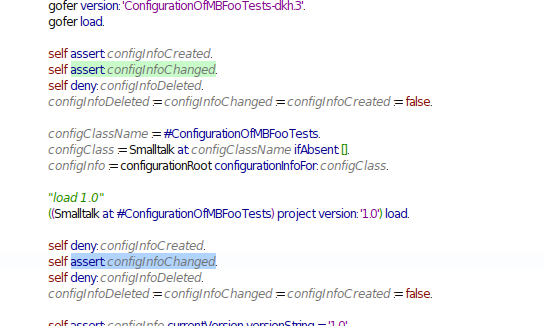
Hi! Just a comment, I obtain the following when opening a debugger: I always have to fiddle a bit to guess where the cursor caret is located. Am I the only one to experience this? Cheers, Alexandre -- _,.;:~^~:;._,.;:~^~:;._,.;:~^~:;._,.;:~^~:;._,.;: Alexandre Bergel http://www.bergel.eu ^~:;._,.;:~^~:;._,.;:~^~:;._,.;:~^~:;._,.;:~^~:;.

no Alexandre, you're not alone :) I see two solutions: - change the selection color - disable globally the secondary selection color. but I think it's an issue. there should be a way to disable the secondary selection locally (here in the debugger). Cheers Alain Le 15/04/2011 18:55, Alexandre Bergel a écrit :
Hi!
Just a comment, I obtain the following when opening a debugger:
I always have to fiddle a bit to guess where the cursor caret is located. Am I the only one to experience this?
Cheers, Alexandre

I found this problem also. I like the secondary color, but we should put another color by default, becase it is true that it is complicated to notice... Any idea which color can be? On Fri, Apr 15, 2011 at 7:26 PM, Alain Plantec <alain.plantec@yahoo.com>wrote:
no Alexandre, you're not alone :) I see two solutions: - change the selection color - disable globally the secondary selection color.
but I think it's an issue. there should be a way to disable the secondary selection locally (here in the debugger). Cheers Alain
Le 15/04/2011 18:55, Alexandre Bergel a écrit :
Hi!
Just a comment, I obtain the following when opening a debugger:
I always have to fiddle a bit to guess where the cursor caret is located. Am I the only one to experience this?
Cheers, Alexandre
-- Mariano http://marianopeck.wordpress.com

Maybe only underlined and not highlighted. El vie, 15-04-2011 a las 21:43 +0200, Mariano Martinez Peck escribió:
I found this problem also. I like the secondary color, but we should put another color by default, becase it is true that it is complicated to notice... Any idea which color can be?
On Fri, Apr 15, 2011 at 7:26 PM, Alain Plantec <alain.plantec@yahoo.com> wrote: no Alexandre, you're not alone :) I see two solutions: - change the selection color - disable globally the secondary selection color.
but I think it's an issue. there should be a way to disable the secondary selection locally (here in the debugger). Cheers Alain
Le 15/04/2011 18:55, Alexandre Bergel a écrit : Hi!
Just a comment, I obtain the following when opening a debugger:
I always have to fiddle a bit to guess where the cursor caret is located. Am I the only one to experience this?
Cheers, Alexandre
-- Mariano http://marianopeck.wordpress.com
-- Miguel Cobá http://twitter.com/MiguelCobaMtz http://miguel.leugim.com.mx

On 04/15/2011 09:55 AM, Alexandre Bergel wrote:
Hi!
Just a comment, I obtain the following when opening a debugger:
I have the same problem and have wasted a fair bit of time misreading the actual location of the cursor:) I like the idea of the highlighting, but the colors used shouln't be so close together... Dale
Le 15/04/2011 20:17, Dale Henrichs a écrit :
On 04/15/2011 09:55 AM, Alexandre Bergel wrote:
Hi!
Just a comment, I obtain the following when opening a debugger:
I have the same problem and have wasted a fair bit of time misreading the actual location of the cursor:)
I like the idea of the highlighting, but the colors used shouln't be so close together... yes, you can change it from the setting browser. Cheers Alain
Dale
On 04/15/2011 12:17 PM, Alain Plantec wrote:
Le 15/04/2011 20:17, Dale Henrichs a écrit :
On 04/15/2011 09:55 AM, Alexandre Bergel wrote:
Hi!
Just a comment, I obtain the following when opening a debugger:
I have the same problem and have wasted a fair bit of time misreading the actual location of the cursor:)
I like the idea of the highlighting, but the colors used shouln't be so close together... yes, you can change it from the setting browser. Cheers
Ah, Good, then I will search for the setting ... Dale
participants (5)
-
 Alain Plantec
 -
 Alexandre Bergel
 -
 Dale Henrichs
 -
 Mariano Martinez Peck
 -
 Miguel Cobá