[Pharo-project] Canvas transform bug when rendering text?

Hi list, I'm writing a little charting morph, and while playing with rotating text for axis labels came across something which I've noted in Morphs text handling a couple of times. If I apply a transform in a drawing operation, rotated text _appears_ to be drawn twice, slightly offset, giving a scrappy bold look. It seems only to do this when drawing on a form canvas that's backed onto the display: if you pick and drag the morph, the text is rendered beautifully. The test morph attached isolates the problem. The transcript logging is an attempt to see what might be happening: looking at the output it appears that there are circumstances in which the during: block is invoked twice. Any thoughts? David ------------------ David Harvey www.teamsandtechnology.com www.cateams.com @david_harvey

On Apr 7, 2010, at 1:45 49PM, David Harvey wrote:
Hi list,
I'm writing a little charting morph, and while playing with rotating text for axis labels came across something which I've noted in Morphs text handling a couple of times.
If I apply a transform in a drawing operation, rotated text _appears_ to be drawn twice, slightly offset, giving a scrappy bold look. It seems only to do this when drawing on a form canvas that's backed onto the display: if you pick and drag the morph, the text is rendered beautifully.
The test morph attached isolates the problem. The transcript logging is an attempt to see what might be happening: looking at the output it appears that there are circumstances in which the during: block is invoked twice.
Any thoughts?
David
http://n4.nabble.com/Problem-with-TransformationMorph-td1691811.html#a169181... Basically, transform doesn't work with depth 32. Workarounds are described in the thread. Cheers, Henry
On 07.04.2010 14:26, Henrik Johansen wrote:
On Apr 7, 2010, at 1:45 49PM, David Harvey wrote:
Hi list,
I'm writing a little charting morph, and while playing with rotating text for axis labels came across something which I've noted in Morphs text handling a couple of times.
If I apply a transform in a drawing operation, rotated text _appears_ to be drawn twice, slightly offset, giving a scrappy bold look. It seems only to do this when drawing on a form canvas that's backed onto the display: if you pick and drag the morph, the text is rendered beautifully.
The test morph attached isolates the problem. The transcript logging is an attempt to see what might be happening: looking at the output it appears that there are circumstances in which the during: block is invoked twice.
Any thoughts?
David
http://n4.nabble.com/Problem-with-TransformationMorph-td1691811.html#a169181...
Basically, transform doesn't work with depth 32. Workarounds are described in the thread.
Cheers, Henry
David, Lukas, whomever else it may concern. Of course I turned out to be (partly) wrong when looking into it. Transform does indeed not work with alpha, but not because of bugs in WarpBlt as I assumed, but because FormCanvas always uses the Paint rule when rotating... Try the attached code, and you should get better results. (you probably want to use smoothing > 1 if displaying text with rotation other than a multiple of 90 degrees). This seems to be more of a generic problem though, looking at the number of places a= 32 ifTrue: [] check is made, I'll try to come up with a more consistent solution for a system-wide patch. (which amongst other things would also fix the black border appearing around a window while zooming back to old position when you drag and drop it outside main window) Cheers, Henry

thanks! PS: I will integrate some other fixes when back to the garage later today.... Got stuck on the highway without gaz :) ... yesterday.
David, Lukas, whomever else it may concern.
Of course I turned out to be (partly) wrong when looking into it. Transform does indeed not work with alpha, but not because of bugs in WarpBlt as I assumed, but because FormCanvas always uses the Paint rule when rotating... Try the attached code, and you should get better results. (you probably want to use smoothing > 1 if displaying text with rotation other than a multiple of 90 degrees).
This seems to be more of a generic problem though, looking at the number of places a= 32 ifTrue: [] check is made, I'll try to come up with a more consistent solution for a system-wide patch. (which amongst other things would also fix the black border appearing around a window while zooming back to old position when you drag and drop it outside main window)
Cheers, Henry <FormCanvas-transformByclippingToduringsmoothing.st>_______________________________________________ Pharo-project mailing list Pharo-project@lists.gforge.inria.fr http://lists.gforge.inria.fr/cgi-bin/mailman/listinfo/pharo-project

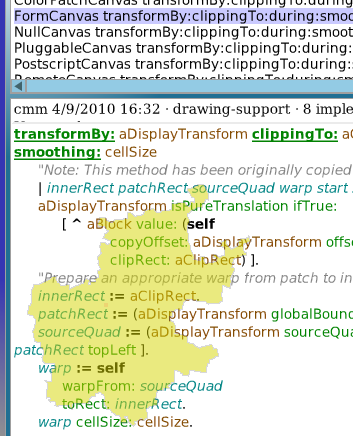
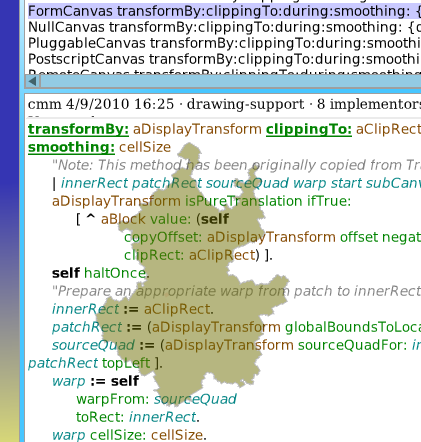
Pay attention there is a #haltOnce in the code. Also there is something wrong with the line endings in the change-set. The change solves the problem with the vertical text in eCompletion, so this is very cool. However it also breaks some window refreshing, see attached screenshot. Lukas On 9 April 2010 08:51, Stéphane Ducasse <stephane.ducasse@inria.fr> wrote:
thanks!
PS: I will integrate some other fixes when back to the garage later today.... Got stuck on the highway without gaz :) ... yesterday.
David, Lukas, whomever else it may concern.
Of course I turned out to be (partly) wrong when looking into it. Transform does indeed not work with alpha, but not because of bugs in WarpBlt as I assumed, but because FormCanvas always uses the Paint rule when rotating... Try the attached code, and you should get better results. (you probably want to use smoothing > 1 if displaying text with rotation other than a multiple of 90 degrees).
This seems to be more of a generic problem though, looking at the number of places a= 32 ifTrue: [] check is made, I'll try to come up with a more consistent solution for a system-wide patch. (which amongst other things would also fix the black border appearing around a window while zooming back to old position when you drag and drop it outside main window)
Cheers, Henry <FormCanvas-transformByclippingToduringsmoothing.st>_______________________________________________ Pharo-project mailing list Pharo-project@lists.gforge.inria.fr http://lists.gforge.inria.fr/cgi-bin/mailman/listinfo/pharo-project
_______________________________________________ Pharo-project mailing list Pharo-project@lists.gforge.inria.fr http://lists.gforge.inria.fr/cgi-bin/mailman/listinfo/pharo-project
-- Lukas Renggli www.lukas-renggli.ch
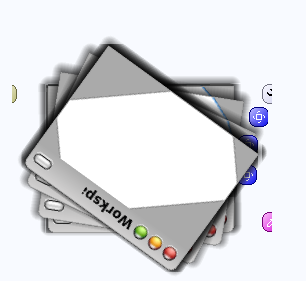
I don't write code like this. Rotating a window is just a good test to see if works, because it calls all kind of different code. If you rotate a more complex window than a workspace, my system hangs btw. So there must be other stuff broken there. Lukas On 9 April 2010 11:20, Stéphane Ducasse <stephane.ducasse@inria.fr> wrote:
funny way to type code.
Stef
_______________________________________________ Pharo-project mailing list Pharo-project@lists.gforge.inria.fr http://lists.gforge.inria.fr/cgi-bin/mailman/listinfo/pharo-project
-- Lukas Renggli www.lukas-renggli.ch
On Apr 9, 2010, at 11:28 AM, Lukas Renggli wrote:
I don't write code like this.
It was a joke :) but I really like the visual effect
Rotating a window is just a good test to see if works, because it calls all kind of different code.
If you rotate a more complex window than a workspace, my system hangs btw. So there must be other stuff broken there.
oops with the fix too?
Lukas
On 9 April 2010 11:20, Stéphane Ducasse <stephane.ducasse@inria.fr> wrote:
funny way to type code.
Stef
_______________________________________________ Pharo-project mailing list Pharo-project@lists.gforge.inria.fr http://lists.gforge.inria.fr/cgi-bin/mailman/listinfo/pharo-project
-- Lukas Renggli www.lukas-renggli.ch
_______________________________________________ Pharo-project mailing list Pharo-project@lists.gforge.inria.fr http://lists.gforge.inria.fr/cgi-bin/mailman/listinfo/pharo-project
On Apr 9, 2010, at 11:40 38AM, Stéphane Ducasse wrote:
On Apr 9, 2010, at 11:28 AM, Lukas Renggli wrote:
I don't write code like this.
It was a joke :) but I really like the visual effect
Rotating a window is just a good test to see if works, because it calls all kind of different code.
If you rotate a more complex window than a workspace, my system hangs btw. So there must be other stuff broken there.
oops with the fix too?
Yes. The fix was for which draw mode is used, and nothing else. The transformBy: method still creates a new Form of extent and depth same as the Tranformation each draw call, so it gives the GC a real workout. Sometimes this manifests as system hangs, others as a constantly higher CPU usage. (depending on how large your transformed morph is) Cheers, Henry
Sorry for responding so late. but... On 09.04.2010 11:14, Lukas Renggli wrote:
Pay attention there is a #haltOnce in the code. Also there is something wrong with the line endings in the change-set.
:( Didn't have time to review it before submission at the time, so some debug code was left in.
However it also breaks some window refreshing, see attached screenshot.
Lukas
Yes, for some reason, 1.0 does not contain TransformMorph >> areasRemainingTofFill: aRectangle ^Array with: aRectangle Which is needed for a proper refresh. As you noticed, at least it's quite visible when not present, so one is forced to determine what the proper return value should be, Basically, areasRemaining...: should denote the non-opaque areas of the morph. This is mostly used in the drawing algorithm, to determine coverage of a morph, and thus which areas remain to be drawn below it. In the case of TransformMorph, the calculation for returning a decent estimate is probably more work than just telling it to draw everything below (ie. return the rectangle as the area that remains to be drawn), so that's what we do. If you have a better default, please suggest it! :D Cheers, Henry
we should release 1.1 much faster :) like that people will be able to get all the fixes.... Stef On Apr 18, 2010, at 2:42 AM, Henrik Sperre Johansen wrote:
Sorry for responding so late. but... On 09.04.2010 11:14, Lukas Renggli wrote:
Pay attention there is a #haltOnce in the code. Also there is something wrong with the line endings in the change-set.
:( Didn't have time to review it before submission at the time, so some debug code was left in.
However it also breaks some window refreshing, see attached screenshot.
Lukas
Yes, for some reason, 1.0 does not contain TransformMorph >> areasRemainingTofFill: aRectangle
^Array with: aRectangle
Which is needed for a proper refresh. As you noticed, at least it's quite visible when not present, so one is forced to determine what the proper return value should be, Basically, areasRemaining...: should denote the non-opaque areas of the morph. This is mostly used in the drawing algorithm, to determine coverage of a morph, and thus which areas remain to be drawn below it. In the case of TransformMorph, the calculation for returning a decent estimate is probably more work than just telling it to draw everything below (ie. return the rectangle as the area that remains to be drawn), so that's what we do. If you have a better default, please suggest it! :D
Cheers, Henry
_______________________________________________ Pharo-project mailing list Pharo-project@lists.gforge.inria.fr http://lists.gforge.inria.fr/cgi-bin/mailman/listinfo/pharo-project

On Sun, Apr 18, 2010 at 8:21 AM, Stéphane Ducasse <stephane.ducasse@inria.fr> wrote:
we should release 1.1 much faster :) like that people will be able to get all the fixes....
yes ;) for tagging fixes for 1.0 maintenance, should we use a milestone 1.0.1 in the tracker? - is this code candidate for 1.0.1? cheers, Mike
On Apr 18, 2010, at 10:32 AM, Michael Roberts wrote:
On Sun, Apr 18, 2010 at 8:21 AM, Stéphane Ducasse <stephane.ducasse@inria.fr> wrote:
we should release 1.1 much faster :) like that people will be able to get all the fixes....
yes ;)
for tagging fixes for 1.0 maintenance, should we use a milestone 1.0.1 in the tracker? - is this code candidate for 1.0.1?
1.0.1 would be better because we really want to not spend too much time on this one since far too many fixes were made in 1.1 Stef
cheers, Mike
_______________________________________________ Pharo-project mailing list Pharo-project@lists.gforge.inria.fr http://lists.gforge.inria.fr/cgi-bin/mailman/listinfo/pharo-project

Yes, please tag important fixes with milestone 1.0.1. I added this milestone as a predefined label (so it will show up in the autocompleter). Adrian On Apr 18, 2010, at 13:12 , Stéphane Ducasse wrote:
On Apr 18, 2010, at 10:32 AM, Michael Roberts wrote:
On Sun, Apr 18, 2010 at 8:21 AM, Stéphane Ducasse <stephane.ducasse@inria.fr> wrote:
we should release 1.1 much faster :) like that people will be able to get all the fixes....
yes ;)
for tagging fixes for 1.0 maintenance, should we use a milestone 1.0.1 in the tracker? - is this code candidate for 1.0.1?
1.0.1 would be better because we really want to not spend too much time on this one since far too many fixes were made in 1.1
Stef
cheers, Mike
_______________________________________________ Pharo-project mailing list Pharo-project@lists.gforge.inria.fr http://lists.gforge.inria.fr/cgi-bin/mailman/listinfo/pharo-project
_______________________________________________ Pharo-project mailing list Pharo-project@lists.gforge.inria.fr http://lists.gforge.inria.fr/cgi-bin/mailman/listinfo/pharo-project

Thank you Henrik, it looks like a huge improvement! The attached screen shots help explain why I only said "improvement" instead of "perfect". Look at the color of my translucent morph when it is upright vs. rotated. The translucency is now preserved, which is great! However, do you know why the color seems to lose so much saturation? 2010/4/8 Henrik Sperre Johansen <henrik.s.johansen@veloxit.no>:
On 07.04.2010 14:26, Henrik Johansen wrote:
On Apr 7, 2010, at 1:45 49PM, David Harvey wrote:
Hi list, I'm writing a little charting morph, and while playing with rotating text for axis labels came across something which I've noted in Morphs text handling a couple of times. If I apply a transform in a drawing operation, rotated text _appears_ to be drawn twice, slightly offset, giving a scrappy bold look. It seems only to do this when drawing on a form canvas that's backed onto the display: if you pick and drag the morph, the text is rendered beautifully. The test morph attached isolates the problem. The transcript logging is an attempt to see what might be happening: looking at the output it appears that there are circumstances in which the during: block is invoked twice. Any thoughts? David
http://n4.nabble.com/Problem-with-TransformationMorph-td1691811.html#a169181... Basically, transform doesn't work with depth 32. Workarounds are described in the thread. Cheers, Henry
David, Lukas, whomever else it may concern.
Of course I turned out to be (partly) wrong when looking into it. Transform does indeed not work with alpha, but not because of bugs in WarpBlt as I assumed, but because FormCanvas always uses the Paint rule when rotating... Try the attached code, and you should get better results. (you probably want to use smoothing > 1 if displaying text with rotation other than a multiple of 90 degrees).
This seems to be more of a generic problem though, looking at the number of places a= 32 ifTrue: [] check is made, I'll try to come up with a more consistent solution for a system-wide patch. (which amongst other things would also fix the black border appearing around a window while zooming back to old position when you drag and drop it outside main window)
Cheers, Henry
_______________________________________________ Pharo-project mailing list Pharo-project@lists.gforge.inria.fr http://lists.gforge.inria.fr/cgi-bin/mailman/listinfo/pharo-project
Not entirely sure sesong as I write this from a phone with no code nearby, but a hunch would be checking the method in question, and try disabling the shadow drawing, Cheers, Henry Den 9. apr. 2010 kl. 23.42 skrev Chris Muller <asqueaker@gmail.com>:
Thank you Henrik, it looks like a huge improvement! The attached screen shots help explain why I only said "improvement" instead of "perfect". Look at the color of my translucent morph when it is upright vs. rotated. The translucency is now preserved, which is great! However, do you know why the color seems to lose so much saturation?
2010/4/8 Henrik Sperre Johansen <henrik.s.johansen@veloxit.no>:
On 07.04.2010 14:26, Henrik Johansen wrote:
On Apr 7, 2010, at 1:45 49PM, David Harvey wrote:
Hi list, I'm writing a little charting morph, and while playing with rotating text for axis labels came across something which I've noted in Morphs text handling a couple of times. If I apply a transform in a drawing operation, rotated text _appears_ to be drawn twice, slightly offset, giving a scrappy bold look. It seems only to do this when drawing on a form canvas that's backed onto the display: if you pick and drag the morph, the text is rendered beautifully. The test morph attached isolates the problem. The transcript logging is an attempt to see what might be happening: looking at the output it appears that there are circumstances in which the during: block is invoked twice. Any thoughts? David
http://n4.nabble.com/Problem-with-TransformationMorph-td1691811.html#a169181... Basically, transform doesn't work with depth 32. Workarounds are described in the thread. Cheers, Henry
David, Lukas, whomever else it may concern.
Of course I turned out to be (partly) wrong when looking into it. Transform does indeed not work with alpha, but not because of bugs in WarpBlt as I assumed, but because FormCanvas always uses the Paint rule when rotating... Try the attached code, and you should get better results. (you probably want to use smoothing > 1 if displaying text with rotation other than a multiple of 90 degrees).
This seems to be more of a generic problem though, looking at the number of places a= 32 ifTrue: [] check is made, I'll try to come up with a more consistent solution for a system-wide patch. (which amongst other things would also fix the black border appearing around a window while zooming back to old position when you drag and drop it outside main window)
Cheers, Henry
_______________________________________________ Pharo-project mailing list Pharo-project@lists.gforge.inria.fr http://lists.gforge.inria.fr/cgi-bin/mailman/listinfo/pharo-project
<upright.png> <rotatedWithFix.png> _______________________________________________ Pharo-project mailing list Pharo-project@lists.gforge.inria.fr http://lists.gforge.inria.fr/cgi-bin/mailman/listinfo/pharo-project

On 4/9/2010 11:42 PM, Chris Muller wrote:
Thank you Henrik, it looks like a huge improvement! The attached screen shots help explain why I only said "improvement" instead of "perfect". Look at the color of my translucent morph when it is upright vs. rotated. The translucency is now preserved, which is
With Freetype now being used for text rendering it might be possible to do it right by performing a transformed rendering instead of rotating a bitmap. Actually a nasty surprise we had in the Sophie project when it turned out that even Tweak only did the bitmap trick, but Rome came to the rescue :-) Michael

Michael Rueger a écrit :
On 4/9/2010 11:42 PM, Chris Muller wrote:
Thank you Henrik, it looks like a huge improvement! The attached screen shots help explain why I only said "improvement" instead of "perfect". Look at the color of my translucent morph when it is upright vs. rotated. The translucency is now preserved, which is
With Freetype now being used for text rendering it might be possible to do it right by performing a transformed rendering instead of rotating a bitmap. Actually a nasty surprise we had in the Sophie project when it turned out that even Tweak only did the bitmap trick, but Rome came to the rescue :-)
Michael
That's interesting. All efforts done in Sophie should not be lost, it would be a pitty. Does Polymoprh based on Rome is something making sense, or is it just non-sense (ie not related). I try to understand what is the value behing Rome. Hilaire
On 4/10/2010 10:02 AM, Hilaire Fernandes wrote:
Does Polymoprh based on Rome is something making sense, or is it just non-sense (ie not related). I try to understand what is the value behing Rome.
Rome (in this case especially Rome Cairo) brings true vector based drawing to Squeak/Pharo allowing for drawing with transformations and lossless scaling. Rome is also a framework to unify drawing using different backends, which right now isn't the case as the different Canvas classes support different protocols. Or even worse implement some calls differently. Most of the drawing code in Morphic would need to be rewritten though, so it isn't that simple a task. Michael
Is it correct to say a well integrated Rome Cairo framework in Moprhic could simplify the whole graphic framework of the system. Will it allow us to have vector based UI element or is non sense? Hilaire Michael Rueger a écrit :
On 4/10/2010 10:02 AM, Hilaire Fernandes wrote:
Does Polymoprh based on Rome is something making sense, or is it just non-sense (ie not related). I try to understand what is the value behing Rome.
Rome (in this case especially Rome Cairo) brings true vector based drawing to Squeak/Pharo allowing for drawing with transformations and lossless scaling. Rome is also a framework to unify drawing using different backends, which right now isn't the case as the different Canvas classes support different protocols. Or even worse implement some calls differently.
Most of the drawing code in Morphic would need to be rewritten though, so it isn't that simple a task.
On 4/10/2010 10:31 AM, Hilaire Fernandes wrote:
Is it correct to say a well integrated Rome Cairo framework in Moprhic could simplify the whole graphic framework of the system.
Yes it should. Alain did some work with Rome in Miro, so he might have more experience with it.
Will it allow us to have vector based UI element or is non sense?
No, not non sense :-), that is exactly what it would allow. Michael
Michael Rueger a écrit :
On 4/10/2010 10:31 AM, Hilaire Fernandes wrote:
Will it allow us to have vector based UI element or is non sense?
No, not non sense :-), that is exactly what it would allow.
Yes, vector based UI is where we should move to keep in the course. Is it what you did for Sophie? If so, did you use some bitmap caching technic?
On 4/10/2010 10:51 AM, Hilaire Fernandes wrote:
Michael Rueger a écrit :
On 4/10/2010 10:31 AM, Hilaire Fernandes wrote:
Will it allow us to have vector based UI element or is non sense?
No, not non sense :-), that is exactly what it would allow.
Yes, vector based UI is where we should move to keep in the course. Is it what you did for Sophie? If so, did you use some bitmap caching technic?
Tweak does (or did back then) some caching. You have to be careful though with caching, as you might end up copying a lot of bits around even if caching doesn't really make sense for your particular application. IIRC (it's been a while) in Tweak you first draw to the cache, then the cache is drawn to the Squeak Display bitmap and then that is drawn to the screen. No great when you are playing e.g. a video. Michael
Michael Rueger a écrit :
Tweak does (or did back then) some caching. You have to be careful though with caching, as you might end up copying a lot of bits around even if caching doesn't really make sense for your particular application.
I was meaning caching for UI widget rendering. Of course, in DrGeo it does not make sense, but I was not thinking at all to it. I remember you were using XUL for UI definition in Sophie, why this choice? Hilaire
On 4/10/2010 11:04 AM, Hilaire Fernandes wrote:
I remember you were using XUL for UI definition in Sophie, why this choice?
In combination with CSS it allowed us to change the UI without changing the code (at least to some extend). Basically skinning through external files, as you would do with a properly done web site. Michael
Michael Rueger a écrit :
On 4/10/2010 11:04 AM, Hilaire Fernandes wrote:
In combination with CSS it allowed us to change the UI without changing the code (at least to some extend). Basically skinning through external files, as you would do with a properly done web site.
And how do you fell about it now? Will you do the same choice if starting from now? Hilaire
On Sat, Apr 10, 2010 at 11:33 AM, Hilaire Fernandes <hilaire.fernandes@gmail.com> wrote:
Michael Rueger a écrit :
On 4/10/2010 11:04 AM, Hilaire Fernandes wrote:
In combination with CSS it allowed us to change the UI without changing the code (at least to some extend). Basically skinning through external files, as you would do with a properly done web site.
And how do you fell about it now? Â Will you do the same choice if starting from now?
Basically yes, although some of the internal aspects could be improved. Largely has to do with the way we sort of had to retrofit it onto Tweak. Michael
Henrik, all, thanks for your help with this. I've been away from the codeface for a while and haven't yet tried all of the fixes. I did get things rendering well by caching the form canvas and redrawing that when required (just as the HandMorph does - as I said, the rendering while dragging is always OK). Relevant code below:
drawOn: aCanvas super drawOn: aCanvas.
cachedCanvas isNil ifTrue: [ cachedCanvas := (aCanvas allocateForm: self bounds extent) getCanvas. self drawContentsOn: cachedCanvas. ]. aCanvas translucentImage: cachedCanvas form at: self bounds origin. <<<< Best David ------------------ David Harvey www.teamsandtechnology.com www.cateams.com @david_harvey On 7 April 2010 12:45, David Harvey <david@teamsandtechnology.com> wrote:
Hi list,
I'm writing a little charting morph, and while playing with rotating text for axis labels came across something which I've noted in Morphs text handling a couple of times.
If I apply a transform in a drawing operation, rotated text _appears_ to be drawn twice, slightly offset, giving a scrappy bold look. It seems only to do this when drawing on a form canvas that's backed onto the display: if you pick and drag the morph, the text is rendered beautifully.
The test morph attached isolates the problem. The transcript logging is an attempt to see what might be happening: looking at the output it appears that there are circumstances in which the during: block is invoked twice.
Any thoughts?
David
------------------ David Harvey www.teamsandtechnology.com www.cateams.com @david_harvey
participants (10)
-
 Adrian Lienhard
 -
 Chris Muller
 -
 David Harvey
 -
 Henrik Johansen
 -
Henrik Sperre Johansen
-
 Hilaire Fernandes
 -
 Lukas Renggli
 -
 Michael Roberts
 -
 Michael Rueger
 -
 Stéphane Ducasse