
Hi I love the PharoLauncher. It helps me to manage my parallel development and projects. We should put a link on the Pharo web site because http://files.pharo.org/platform/launcher/ is arcane. Stef

Hi Stef, I just found download links on this page: https://github.com/pharo-project/pharo-launcher They point to Jenkins build artefacts. Thank you for implementing the launcher. As a newbie I ran into some questions: I guess the launcher is not self-updating, right? If not, how can I find out if I already have the latest version? I donât really understand what Local means. Is there a difference between Local > Pharo 6.1 (stable) and Official distributions > Pharo 6.1 (stable)? And what is the difference between Local > Pharo6.1 (stable) and Local > latest? Hmm, when I launched Local > latest I got a debugger[1]. What also bothers me is that I cannot switch to the white theme in the settings. I just canât read the UI on the dark theme. Cheers, Bernhard Author: BernhardPieber [1] UndefinedObject(Object)>>doesNotUnderstand: #, PhLVirtualMachineManager>>vmFileName [ :bar | bar label: 'Determining Image version'. vm := self availableVirtualMachines at: self vmFileName ifAbsent: [ bar label: 'Fetching VM to run Pharo ' , self imageVersion , ' images'; current: 25. self fetchVm. vm := self availableVirtualMachines at: self vmFileName. bar label: 'Fetching sources files for Pharo ' , self imageVersion; current: 50. self fetchSourcesFiles. bar label: 'Running the image'; current: 100. vm ] ] in PhLVirtualMachineManager>>vm [ :bar | aBlock value: bar ] in MorphicUIManager>>informUserDuring: BlockClosure>>cull: [ ^ block cull: self ] in [ self prepareForRunning. CurrentJob value: self during: [ ^ block cull: self ] ] in Job>>run [ activeProcess psValueAt: index put: anObject. aBlock value ] in CurrentJob(DynamicVariable)>>value:during: BlockClosure>>ensure: CurrentJob(DynamicVariable)>>value:during: CurrentJob class(DynamicVariable class)>>value:during: [ self prepareForRunning. CurrentJob value: self during: [ ^ block cull: self ] ] in Job>>run BlockClosure>>ensure: Job>>run MorphicUIManager(UIManager)>>displayProgress:from:to:during: MorphicUIManager>>informUserDuring: PhLVirtualMachineManager>>vm PhLImage>>launch PhLLaunchImageCommand>>execute PhLLaunchImageCommand(PhLCommand)>>executeIfApplicable PhLCommandButton>>performAction MorphicButtonAdapter>>action PluggableButtonMorph>>performAction: [ :m | (m containsPoint: evt cursorPoint) ifTrue: [ m enabled ifTrue: [ m performAction: evt ] ] ] in PluggableButtonMorph>>mouseUp: Array(SequenceableCollection)>>do: PluggableButtonMorph>>mouseUp: PluggableButtonMorph(Morph)>>handleMouseUp: MouseButtonEvent>>sentTo: PluggableButtonMorph(Morph)>>handleEvent: PluggableButtonMorph(Morph)>>handleFocusEvent: [ ActiveHand := self. ActiveEvent := anEvent. result := focusHolder handleFocusEvent: (anEvent transformedBy: (focusHolder transformedFrom: self)) ] in HandMorph>>sendFocusEvent:to:clear: BlockClosure>>on:do: WorldMorph(PasteUpMorph)>>becomeActiveDuring: HandMorph>>sendFocusEvent:to:clear: HandMorph>>sendEvent:focus:clear: HandMorph>>sendMouseEvent: HandMorph>>handleEvent: HandMorph>>processEventsFromQueue: HandMorph>>processEvents [ :h | self activeHand: h. h processEvents. self activeHand: nil ] in WorldState>>doOneCycleNowFor: Array(SequenceableCollection)>>do: WorldState>>handsDo: WorldState>>doOneCycleNowFor: WorldState>>doOneCycleFor: WorldMorph>>doOneCycle WorldMorph class>>doOneCycle [ [ WorldMorph doOneCycle. Processor yield. false ] whileFalse: [ ] ] in MorphicUIManager>>spawnNewProcess [ self value. Processor terminateActive ] in BlockClosure>>newProcess
Am 23.11.2017 um 09:51 schrieb Stephane Ducasse <stepharo.self@gmail.com>:
Hi
I love the PharoLauncher. It helps me to manage my parallel development and projects.
We should put a link on the Pharo web site because
http://files.pharo.org/platform/launcher/
is arcane.
Stef

bpi wrote
UndefinedObject(Object)>>doesNotUnderstand: #, PhLVirtualMachineManager>>vmFileName
I usually get an error that looks like that when I try to launch a pre Pharo-5 image. IIUC when Launcher is determining which VM to use⦠----- Cheers, Sean -- Sent from: http://forum.world.st/Pharo-Smalltalk-Developers-f1294837.html

Le 25 nov. 2017 à 20:08, Sean P. DeNigris <sean@clipperadams.com> a écrit :
bpi wrote
UndefinedObject(Object)>>doesNotUnderstand: #, PhLVirtualMachineManager>>vmFileName
I usually get an error that looks like that when I try to launch a pre Pharo-5 image. IIUC when Launcher is determining which VM to useâ¦
It probably means that the command used to determine the image version failed! Could you reproduce with the latest version? If so, please open an issue and a way to reproduce. Thanks, Christophe
demarey wrote
pre Pharo-5 image It probably means that the command used to determine the image version failed!
Oh, are Pharo 4 and prior supposed to work? I figured they were just not intended to be supported ----- Cheers, Sean -- Sent from: http://forum.world.st/Pharo-Smalltalk-Developers-f1294837.html
Le 29 nov. 2017 à 00:52, Sean P. DeNigris <sean@clipperadams.com> a écrit :
demarey wrote
pre Pharo-5 image It probably means that the command used to determine the image version failed!
Oh, are Pharo 4 and prior supposed to work? I figured they were just not intended to be supported
Yes, I'm able to run pharo 1.4 images. Maybe it could be related to this bug: https://github.com/pharo-project/pharo-launcher/issues/52
demarey wrote
Yes, I'm able to run pharo 1.4 images.
Hmm, when I tried to launch a 1.4 image, it hung forever while "Determining image version". I interrupted and manually run the command on the terminal: "/Users/sean/Documents/Pharo/vms/private/6505/Pharo.app/Contents/MacOS/Pharo" --headless "/Users/sean/Dynabook/Working Images/COTDC/COTDC.image" --no-default-preferences eval "(Smalltalk imagePath asFileReference parent) / 'pharo.version' writeStreamDo: [ :stream | |major minor| major := SystemVersion current major. minor := SystemVersion current minor. (major = 6 and: [ SystemVersion current highestUpdate >= 60509 ]) ifTrue: [ minor := 1 ]. stream << major asString; << minor asString ]" Result = same, command hangs, plus the following output: /BuildRoot/Library/Caches/com.apple.xbs/Sources/AppleFSCompression/AppleFSCompression-96.1.1/Common/ChunkCompression.cpp:50: Error: unsupported compressor 8 /BuildRoot/Library/Caches/com.apple.xbs/Sources/AppleFSCompression/AppleFSCompression-96.1.1/Libraries/CompressData/CompressData.c:353: Error: Unknown compression scheme encountered for file '/System/Library/CoreServices/CoreTypes.bundle/Contents/Resources/Exceptions.plist' /BuildRoot/Library/Caches/com.apple.xbs/Sources/AppleFSCompression/AppleFSCompression-96.1.1/Common/ChunkCompression.cpp:50: Error: unsupported compressor 8 /BuildRoot/Library/Caches/com.apple.xbs/Sources/AppleFSCompression/AppleFSCompression-96.1.1/Libraries/CompressData/CompressData.c:353: Error: Unknown compression scheme encountered for file '/System/Library/CoreServices/CoreTypes.bundle/Contents/Library/AppExceptions.bundle/Exceptions.plist' 2017-11-29 10:08:38.507 Pharo[12375:1203919] *** -[NSPathStore2 stringByAppendingPathExtension:]: cannot append extension 'bundle/Contents/MacOS/' to path '/Users/sean/Documents/Pharo/vms/private/6505/Pharo.app/Contents/MacOS/Plugins/MiscPrimitivePlugin' 2017-11-29 10:08:38.507 Pharo[12375:1203919] *** -[NSPathStore2 stringByAppendingPathExtension:]: cannot append extension 'bundle/Contents/MacOS/' to path '/Users/sean/Documents/Pharo/vms/private/6505/Pharo.app/Contents/MacOS/Plugins/LargeIntegers' 2017-11-29 10:08:38.508 Pharo[12375:1203919] *** -[NSPathStore2 stringByAppendingPathExtension:]: cannot append extension 'bundle/Contents/MacOS/' to path '/Users/sean/Documents/Pharo/vms/private/6505/Pharo.app/Contents/MacOS/Plugins/LargeIntegers' 2017-11-29 10:08:38.508 Pharo[12375:1203919] *** -[NSPathStore2 stringByAppendingPathExtension:]: cannot append extension 'bundle/Contents/MacOS/' to path '/Users/sean/Documents/Pharo/vms/private/6505/Pharo.app/Contents/MacOS/Plugins/LargeIntegers' 2017-11-29 10:08:38.645 Pharo[12375:1203919] *** -[NSPathStore2 stringByAppendingPathExtension:]: cannot append extension 'bundle/Contents/MacOS/' to path '/Users/sean/Documents/Pharo/vms/private/6505/Pharo.app/Contents/MacOS/Plugins/MiscPrimitivePlugin' 2017-11-29 10:08:38.653 Pharo[12375:1203919] *** -[NSPathStore2 stringByAppendingPathExtension:]: cannot append extension 'bundle/Contents/MacOS/' to path '/Users/sean/Documents/Pharo/vms/private/6505/Pharo.app/Contents/MacOS/Plugins/FilePlugin' 2017-11-29 10:08:38.654 Pharo[12375:1203919] *** -[NSPathStore2 stringByAppendingPathExtension:]: cannot append extension 'bundle/Contents/MacOS/' to path '/Users/sean/Documents/Pharo/vms/private/6505/Pharo.app/Contents/MacOS/Plugins/MiscPrimitivePlugin' 2017-11-29 10:08:38.654 Pharo[12375:1203919] *** -[NSPathStore2 stringByAppendingPathExtension:]: cannot append extension 'bundle/Contents/MacOS/' to path '/Users/sean/Documents/Pharo/vms/private/6505/Pharo.app/Contents/MacOS/Plugins/MiscPrimitivePlugin' 2017-11-29 10:08:38.654 Pharo[12375:1203919] *** -[NSPathStore2 stringByAppendingPathExtension:]: cannot append extension 'bundle/Contents/MacOS/' to path '/Users/sean/Documents/Pharo/vms/private/6505/Pharo.app/Contents/MacOS/Plugins/MiscPrimitivePlugin' 2017-11-29 10:08:38.655 Pharo[12375:1203919] *** -[NSPathStore2 stringByAppendingPathExtension:]: cannot append extension 'bundle/Contents/MacOS/' to path '/Users/sean/Documents/Pharo/vms/private/6505/Pharo.app/Contents/MacOS/Plugins/FilePlugin' I tried again headful and got a Pharo window with all black contents. Here are my system details: Image ----- /Applications/Pharo.app/Contents/Resources/Pharo.image Pharo6.0 Latest update: #60510 Unnamed Virtual Machine --------------- /Applications/Pharo.app/Contents/MacOS/Pharo CoInterpreter VMMaker.oscog-eem.2254 uuid: 4f2c2cce-f4a2-469a-93f1-97ed941df0ad Jul 20 2017 StackToRegisterMappingCogit VMMaker.oscog-eem.2252 uuid: 2f3e9b0e-ecd3-4adf-b092-cce2e2587a5c Jul 20 2017 VM: 201707201942 https://github.com/OpenSmalltalk/opensmalltalk-vm.git $ Date: Thu Jul 20 12:42:21 2017 -0700 $ Plugins: 201707201942 https://github.com/OpenSmalltalk/opensmalltalk-vm.git $ Mac OS X built on Jul 20 2017 21:45:23 UTC Compiler: 4.2.1 Compatible Apple LLVM 6.1.0 (clang-602.0.53) VMMaker versionString VM: 201707201942 https://github.com/OpenSmalltalk/opensmalltalk-vm.git $ Date: Thu Jul 20 12:42:21 2017 -0700 $ Plugins: 201707201942 https://github.com/OpenSmalltalk/opensmalltalk-vm.git $ CoInterpreter VMMaker.oscog-eem.2254 uuid: 4f2c2cce-f4a2-469a-93f1-97ed941df0ad Jul 20 2017 StackToRegisterMappingCogit VMMaker.oscog-eem.2252 uuid: 2f3e9b0e-ecd3-4adf-b092-cce2e2587a5c Jul 20 2017 Operating System/Hardware ------------------------- Mac OS 1013.1 intel ----- Cheers, Sean -- Sent from: http://forum.world.st/Pharo-Smalltalk-Developers-f1294837.html
demarey wrote
Maybe it could be related to this bug: https://github.com/pharo-project/pharo-launcher/issues/52
It is a different bug in the same behavior. The easy workaround is to manually create a pharo.version file for the offending image. As to the bug⦠The immediate problem turned out to be that I had a startup error in certain images due to a startup script that only worked in more recent Pharo versions. So, suggestion #1: check that pharo.version has actually been created, and if not produce a better error message. Also, ideally there should probably also be a timeout in determining the image version because sometimes the process returns without creating the file and other times it doesn't return at all. However, even after disabling the startup scripts, I was only able to generate pharo.version by replacing "~/Documents/Pharo/vms/private/6505/Pharo.app" with "~/Documents/Pharo/vms/30-x86/Pharo.app", so there does also seem to be something fishy with the 6505 VM ----- Cheers, Sean -- Sent from: http://forum.world.st/Pharo-Smalltalk-Developers-f1294837.html

I liked the launcher a lot, but It took me a while to get a version working out-of-the-box on Ubuntu. It's not available with the VM on the /download page for Linux. My preferred choice would be the PPA anyway, as I like to keep stuff under APT control, but I had to dig a lot to find a sources.list entry combination that worked: not all packages are available on all repositories, and some old repos have invalid crypto signatures. In the end, what worked was: - Xenial AND Trusty deb http://ppa.launchpad.net/pharo/stable/ubuntu xenial main deb http://ppa.launchpad.net/pharo/stable/ubuntu trusty main deb-src http://ppa.launchpad.net/pharo/stable/ubuntu xenial main deb-src http://ppa.launchpad.net/pharo/stable/ubuntu trusty main - Disabled signatures checking (at my own risk): sudo apt -o Acquire::AllowInsecureRepositories=true \ -o Acquire::AllowDowngradeToInsecureRepositories=true \ update - Finally: sudo apt install pharo-vm-core pharo-launcher But if I try to load a Pharo 5.0 image (created from the launcher's list, marked as beta), I get this on the terminal: "This interpreter (vers. 6505) cannot read image file (vers. 6521)." Pharo 4.0 is the most recent on that list that works, at least that I could find -- there are too many branches under Pharo Jenkins for instance, and I couldn't find a suitable image there. Att, On Wed, Nov 29, 2017 at 5:13 PM Sean P. DeNigris <sean@clipperadams.com> wrote:
demarey wrote
Maybe it could be related to this bug: https://github.com/pharo-project/pharo-launcher/issues/52
It is a different bug in the same behavior.
The easy workaround is to manually create a pharo.version file for the offending image.
As to the bugâ¦
The immediate problem turned out to be that I had a startup error in certain images due to a startup script that only worked in more recent Pharo versions. So, suggestion #1: check that pharo.version has actually been created, and if not produce a better error message. Also, ideally there should probably also be a timeout in determining the image version because sometimes the process returns without creating the file and other times it doesn't return at all.
However, even after disabling the startup scripts, I was only able to generate pharo.version by replacing "~/Documents/Pharo/vms/private/6505/Pharo.app" with "~/Documents/Pharo/vms/30-x86/Pharo.app", so there does also seem to be something fishy with the 6505 VM
----- Cheers, Sean -- Sent from: http://forum.world.st/Pharo-Smalltalk-Developers-f1294837.html
Hi Eduardo, Sadly, as far as I know, PPA are outdated, at least for pharo-launcher. Thatâs why it does not work. You have an old version using an old VM unable to open recent images. you should use http://files.pharo.org/platform/launcher/Pharo-linux-1.0.1.zip <http://files.pharo.org/platform/launcher/Pharo-linux-1.0.1.zip> for now. Christophe
Le 30 nov. 2017 à 00:25, Eduardo de Oliveira Padoan <eduardo.padoan@gmail.com> a écrit :
I liked the launcher a lot, but It took me a while to get a version working out-of-the-box on Ubuntu.
It's not available with the VM on the /download page for Linux. My preferred choice would be the PPA anyway, as I like to keep stuff under APT control, but I had to dig a lot to find a sources.list entry combination that worked: not all packages are available on all repositories, and some old repos have invalid crypto signatures. In the end, what worked was:
- Xenial AND Trusty deb http://ppa.launchpad.net/pharo/stable/ubuntu <http://ppa.launchpad.net/pharo/stable/ubuntu> xenial main deb http://ppa.launchpad.net/pharo/stable/ubuntu <http://ppa.launchpad.net/pharo/stable/ubuntu> trusty main deb-src http://ppa.launchpad.net/pharo/stable/ubuntu <http://ppa.launchpad.net/pharo/stable/ubuntu> xenial main deb-src http://ppa.launchpad.net/pharo/stable/ubuntu <http://ppa.launchpad.net/pharo/stable/ubuntu> trusty main
- Disabled signatures checking (at my own risk): sudo apt -o Acquire::AllowInsecureRepositories=true \ -o Acquire::AllowDowngradeToInsecureRepositories=true \ update - Finally: sudo apt install pharo-vm-core pharo-launcher
But if I try to load a Pharo 5.0 image (created from the launcher's list, marked as beta), I get this on the terminal:
"This interpreter (vers. 6505) cannot read image file (vers. 6521)."
Pharo 4.0 is the most recent on that list that works, at least that I could find -- there are too many branches under Pharo Jenkins for instance, and I couldn't find a suitable image there.
Att,
On Wed, Nov 29, 2017 at 5:13 PM Sean P. DeNigris <sean@clipperadams.com <mailto:sean@clipperadams.com>> wrote: demarey wrote
Maybe it could be related to this bug: https://github.com/pharo-project/pharo-launcher/issues/52 <https://github.com/pharo-project/pharo-launcher/issues/52>
It is a different bug in the same behavior.
The easy workaround is to manually create a pharo.version file for the offending image.
As to the bugâ¦
The immediate problem turned out to be that I had a startup error in certain images due to a startup script that only worked in more recent Pharo versions. So, suggestion #1: check that pharo.version has actually been created, and if not produce a better error message. Also, ideally there should probably also be a timeout in determining the image version because sometimes the process returns without creating the file and other times it doesn't return at all.
However, even after disabling the startup scripts, I was only able to generate pharo.version by replacing "~/Documents/Pharo/vms/private/6505/Pharo.app" with "~/Documents/Pharo/vms/30-x86/Pharo.app", so there does also seem to be something fishy with the 6505 VM
----- Cheers, Sean -- Sent from: http://forum.world.st/Pharo-Smalltalk-Developers-f1294837.html <http://forum.world.st/Pharo-Smalltalk-Developers-f1294837.html>

Maybe we should make the pharo launcher move to opensuse build service as the vm did. This way it would be under the same umbrella and available for the main linux distributions Norbert
Am 30.11.2017 um 12:27 schrieb Christophe Demarey <christophe.demarey@inria.fr>:
Hi Eduardo,
Sadly, as far as I know, PPA are outdated, at least for pharo-launcher. Thatâs why it does not work. You have an old version using an old VM unable to open recent images. you should use http://files.pharo.org/platform/launcher/Pharo-linux-1.0.1.zip for now.
Christophe
Le 30 nov. 2017 à 00:25, Eduardo de Oliveira Padoan <eduardo.padoan@gmail.com> a écrit :
I liked the launcher a lot, but It took me a while to get a version working out-of-the-box on Ubuntu.
It's not available with the VM on the /download page for Linux. My preferred choice would be the PPA anyway, as I like to keep stuff under APT control, but I had to dig a lot to find a sources.list entry combination that worked: not all packages are available on all repositories, and some old repos have invalid crypto signatures. In the end, what worked was:
- Xenial AND Trusty deb http://ppa.launchpad.net/pharo/stable/ubuntu xenial main deb http://ppa.launchpad.net/pharo/stable/ubuntu trusty main deb-src http://ppa.launchpad.net/pharo/stable/ubuntu xenial main deb-src http://ppa.launchpad.net/pharo/stable/ubuntu trusty main
- Disabled signatures checking (at my own risk): sudo apt -o Acquire::AllowInsecureRepositories=true \ -o Acquire::AllowDowngradeToInsecureRepositories=true \ update - Finally: sudo apt install pharo-vm-core pharo-launcher
But if I try to load a Pharo 5.0 image (created from the launcher's list, marked as beta), I get this on the terminal:
"This interpreter (vers. 6505) cannot read image file (vers. 6521)."
Pharo 4.0 is the most recent on that list that works, at least that I could find -- there are too many branches under Pharo Jenkins for instance, and I couldn't find a suitable image there.
Att,
On Wed, Nov 29, 2017 at 5:13 PM Sean P. DeNigris <sean@clipperadams.com> wrote: demarey wrote
Maybe it could be related to this bug: https://github.com/pharo-project/pharo-launcher/issues/52
It is a different bug in the same behavior.
The easy workaround is to manually create a pharo.version file for the offending image.
As to the bugâ¦
The immediate problem turned out to be that I had a startup error in certain images due to a startup script that only worked in more recent Pharo versions. So, suggestion #1: check that pharo.version has actually been created, and if not produce a better error message. Also, ideally there should probably also be a timeout in determining the image version because sometimes the process returns without creating the file and other times it doesn't return at all.
However, even after disabling the startup scripts, I was only able to generate pharo.version by replacing "~/Documents/Pharo/vms/private/6505/Pharo.app" with "~/Documents/Pharo/vms/30-x86/Pharo.app", so there does also seem to be something fishy with the 6505 VM
----- Cheers, Sean -- Sent from: http://forum.world.st/Pharo-Smalltalk-Developers-f1294837.html

On 25 November 2017 at 23:24, Bernhard Pieber <bernhard@pieber.com> wrote:
Hi Stef,
I just found download links on this page: https://github.com/pharo-project/pharo-launcher They point to Jenkins build artefacts.
Thank you for implementing the launcher. As a newbie I ran into some questions:
I guess the launcher is not self-updating, right?
Correct.
If not, how can I find out if I already have the latest version?
Looking in Monticello you'll see a PharoLauncher repository. Open it and check if there are any newer ConfigurationOfPharoLauncher packages. Install the latest and then do... ConfigurationOfPharoLauncher load. However currently when I... install PharoLauncher from the Catalog into a fresh image, then update to latest as above, I get an error about a missing class, but if I load the latest ConfigurationOfPharoLauncher into a fresh image I don't get that error. cheers -ben
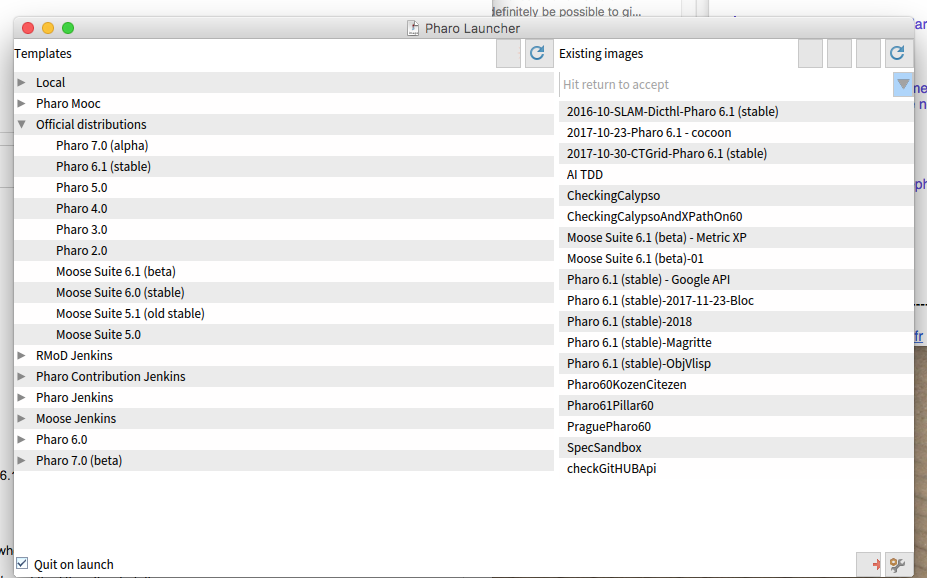
I donât really understand what Local means. Is there a difference between Local > Pharo 6.1 (stable) and Official distributions > Pharo 6.1 (stable)? And what is the difference between Local > Pharo6.1 (stable) and Local > latest? Hmm, when I launched Local > latest I got a debugger[1].
What also bothers me is that I cannot switch to the white theme in the settings. I just canât read the UI on the dark theme.
Cheers, Bernhard
Author: BernhardPieber
[1] UndefinedObject(Object)>>doesNotUnderstand: #, PhLVirtualMachineManager>>vmFileName [ :bar | bar label: 'Determining Image version'. vm := self availableVirtualMachines at: self vmFileName ifAbsent: [ bar label: 'Fetching VM to run Pharo ' , self imageVersion , ' images'; current: 25. self fetchVm. vm := self availableVirtualMachines at: self vmFileName. bar label: 'Fetching sources files for Pharo ' , self imageVersion; current: 50. self fetchSourcesFiles. bar label: 'Running the image'; current: 100. vm ] ] in PhLVirtualMachineManager>>vm [ :bar | aBlock value: bar ] in MorphicUIManager>>informUserDuring: BlockClosure>>cull: [ ^ block cull: self ] in [ self prepareForRunning. CurrentJob value: self during: [ ^ block cull: self ] ] in Job>>run [ activeProcess psValueAt: index put: anObject. aBlock value ] in CurrentJob(DynamicVariable)>>value:during: BlockClosure>>ensure: CurrentJob(DynamicVariable)>>value:during: CurrentJob class(DynamicVariable class)>>value:during: [ self prepareForRunning. CurrentJob value: self during: [ ^ block cull: self ] ] in Job>>run BlockClosure>>ensure: Job>>run MorphicUIManager(UIManager)>>displayProgress:from:to:during: MorphicUIManager>>informUserDuring: PhLVirtualMachineManager>>vm PhLImage>>launch PhLLaunchImageCommand>>execute PhLLaunchImageCommand(PhLCommand)>>executeIfApplicable PhLCommandButton>>performAction MorphicButtonAdapter>>action PluggableButtonMorph>>performAction: [ :m | (m containsPoint: evt cursorPoint) ifTrue: [ m enabled ifTrue: [ m performAction: evt ] ] ] in PluggableButtonMorph>>mouseUp: Array(SequenceableCollection)>>do: PluggableButtonMorph>>mouseUp: PluggableButtonMorph(Morph)>>handleMouseUp: MouseButtonEvent>>sentTo: PluggableButtonMorph(Morph)>>handleEvent: PluggableButtonMorph(Morph)>>handleFocusEvent: [ ActiveHand := self. ActiveEvent := anEvent. result := focusHolder handleFocusEvent: (anEvent transformedBy: (focusHolder transformedFrom: self)) ] in HandMorph>>sendFocusEvent:to:clear: BlockClosure>>on:do: WorldMorph(PasteUpMorph)>>becomeActiveDuring: HandMorph>>sendFocusEvent:to:clear: HandMorph>>sendEvent:focus:clear: HandMorph>>sendMouseEvent: HandMorph>>handleEvent: HandMorph>>processEventsFromQueue: HandMorph>>processEvents [ :h | self activeHand: h. h processEvents. self activeHand: nil ] in WorldState>>doOneCycleNowFor: Array(SequenceableCollection)>>do: WorldState>>handsDo: WorldState>>doOneCycleNowFor: WorldState>>doOneCycleFor: WorldMorph>>doOneCycle WorldMorph class>>doOneCycle [ [ WorldMorph doOneCycle. Processor yield. false ] whileFalse: [ ] ] in MorphicUIManager>>spawnNewProcess [ self value. Processor terminateActive ] in BlockClosure>>newProcess
Am 23.11.2017 um 09:51 schrieb Stephane Ducasse <stepharo.self@gmail.com :
Hi
I love the PharoLauncher. It helps me to manage my parallel development and projects.
We should put a link on the Pharo web site because
http://files.pharo.org/platform/launcher/
is arcane.
Stef
I do not know. Christophe will certainly reply. Do not take the blessed folder but the latest. We should clean the files.
I just found download links on this page: https://github.com/pharo-project/pharo-launcher They point to Jenkins build artefacts.
Thank you for implementing the launcher. As a newbie I ran into some questions:
I guess the launcher is not self-updating, right?
What do you mean by that. No you should donwload the latest version
If not, how can I find out if I already have the latest version?
I donât really understand what Local means. Is there a difference between Local > Pharo 6.1 (stable) and Official distributions > Pharo 6.1 (stable)?
Local measn that there are stored on your disc official distributions means that you download them from the web.
And what is the difference between Local > Pharo6.1 (stable) and Local > latest? Hmm, when I launched Local > latest I got a debugger[1].
What also bothers me is that I cannot switch to the white theme in the settings. I just canât read the UI on the dark theme.
You can click on the setting of Pharo launcher Now they do not list theme :( In the setting if you "enable dev" you get access to the full pharo and there you can chose the theme you want.
Hi Bernhard,
Le 25 nov. 2017 à 16:24, Bernhard Pieber <bernhard@pieber.com> a écrit :
Hi Stef,
I just found download links on this page: https://github.com/pharo-project/pharo-launcher They point to Jenkins build artefacts.
Thank you for implementing the launcher. As a newbie I ran into some questions:
I guess the launcher is not self-updating, right?
right.
If not, how can I find out if I already have the latest version?
There is no way for now: https://github.com/pharo-project/pharo-launcher/issues/23 What you can do is to open Monticello and see if you have latest versions of the Launcher packages. Latest version is available at: http://files.pharo.org/platform/launcher/Pharo_1.0.1.dmg (os X) http://files.pharo.org/platform/launcher/Pharo-linux-1.0.1.zip (linux) http://files.pharo.org/platform/launcher/pharo_installer-1.0.1.exe (win)
I donât really understand what Local means. Is there a difference between Local > Pharo 6.1 (stable) and Official distributions > Pharo 6.1 (stable)?
Local category lists templates you have on your machine.
And what is the difference between Local > Pharo6.1 (stable) and Local > latest? Hmm, when I launched Local > latest I got a debugger[1].
Probably you downloaded an image called Latest with the Launcher. It then has been added to the local category.
What also bothers me is that I cannot switch to the white theme in the settings. I just canât read the UI on the dark theme.
We could add these setting easily. Could you open an issue ? https://github.com/pharo-project/pharo-launcher/issues Regards, Christophe.

The PharoLauncher is really nice ... Is it possible to use a 64Bit VM run an Image (6.1 >)? Per default a 32bit VM is downloaded. BW, Volkert On 23.11.2017 09:51, Stephane Ducasse wrote:
Hi
I love the PharoLauncher. It helps me to manage my parallel development and projects.
We should put a link on the Pharo web site because
http://files.pharo.org/platform/launcher/
is arcane.
Stef
Hi,
Le 25 nov. 2017 à 21:45, Volkert <volkert@komponentenwerkstatt.de> a écrit :
The PharoLauncher is really nice ...
Is it possible to use a 64Bit VM run an Image (6.1 >)? Per default a 32bit VM is downloaded.
Yes, Pharo Launcher manages 32-bits and 64-bits VM. (https://github.com/pharo-project/pharo-launcher/issues/35) Maybe you do not have the latest version?

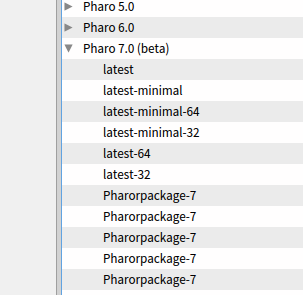
Hi, Launcher is a power tool and has helped many of us so far. Thanks to all who helped moving it forward, especially Christophe who is currently caring a lot. Unfortunately one primary issue is not yet solved: The downloadable files for Pharo 7 are not correctly displayed (see Screenshot attached). I guess this is because the image file names have changed (initially the build process was set up to include the git hash but now we also have the build number returned again, see [1]) So with the current Launcher one can not directly load a specific build number for Pharo 7 or see which build number is the latest available. So for Pharo 7 it is usable to download "latest", "latest-32" or "latest-64" but it is not possible to really distinguish all the "Pharorpackage-7" entries. It would be really a step forward if this could be fixed somehow and also for Pharo 7 display the image build number to make Launcher usable also for contributors to Pharo 7 again. Thanks T. [1] http://forum.world.st/SystemVersion-cleanup-or-the-return-of-the-explicit-bu...
Hi Torsten, I think I have a fix for your problem. I opened an issue fot it: https://github.com/pharo-project/pharo-launcher/issues/55. Could you confirm if it is ok now?
Le 28 nov. 2017 à 20:11, Torsten Bergmann <astares@gmx.de> a écrit :
Hi,
Launcher is a power tool and has helped many of us so far. Thanks to all who helped moving it forward, especially Christophe who is currently caring a lot.
Unfortunately one primary issue is not yet solved:
The downloadable files for Pharo 7 are not correctly displayed (see Screenshot attached).
I guess this is because the image file names have changed (initially the build process was set up to include the git hash but now we also have the build number returned again, see [1])
So with the current Launcher one can not directly load a specific build number for Pharo 7 or see which build number is the latest available. So for Pharo 7 it is usable to download "latest", "latest-32" or "latest-64" but it is not possible to really distinguish all the "Pharorpackage-7" entries.
It would be really a step forward if this could be fixed somehow and also for Pharo 7 display the image build number to make Launcher usable also for contributors to Pharo 7 again.
Thanks T.
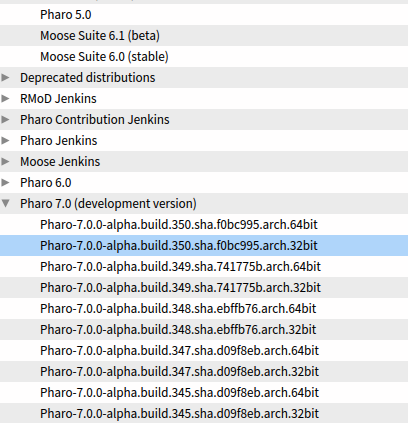
Unfortunately this fix did not work. Details are described in https://github.com/pharo-project/pharo-launcher/issues/55 Meanwhile I fixed it in an own commit: PharoLauncher-Core-TorstenBergmann.146 Launcher is now able to give the filter pattern not as global regex but now specific to the version: self name: 'Pharo 7.0 (development version)' url: 'http://files.pharo.org/image/70/' asZnUrl filterPattern: 'href="(Pharo-7.0.0-alpha.build.[^"]*.zip)"' and it works and filters the alpha version (see screenshot). So anyone who would like to test should give it a try. For sure it can be improved to support also the other images in the future. But at least one can download the standard release for Pharo 7 as it was for Pharo 6. Thx T.
Gesendet: Mittwoch, 29. November 2017 um 09:26 Uhr Von: "Christophe Demarey" <christophe.demarey@inria.fr> An: "Pharo Development List" <pharo-dev@lists.pharo.org> Betreff: Re: [Pharo-dev] I love the launcher!!!!
Hi Torsten,
I think I have a fix for your problem. I opened an issue fot it: https://github.com/pharo-project/pharo-launcher/issues/55. Could you confirm if it is ok now?
Le 28 nov. 2017 à 20:11, Torsten Bergmann <astares@gmx.de> a écrit :
Hi,
Launcher is a power tool and has helped many of us so far. Thanks to all who helped moving it forward, especially Christophe who is currently caring a lot.
Unfortunately one primary issue is not yet solved:
The downloadable files for Pharo 7 are not correctly displayed (see Screenshot attached).
I guess this is because the image file names have changed (initially the build process was set up to include the git hash but now we also have the build number returned again, see [1])
So with the current Launcher one can not directly load a specific build number for Pharo 7 or see which build number is the latest available. So for Pharo 7 it is usable to download "latest", "latest-32" or "latest-64" but it is not possible to really distinguish all the "Pharorpackage-7" entries.
It would be really a step forward if this could be fixed somehow and also for Pharo 7 display the image build number to make Launcher usable also for contributors to Pharo 7 again.
Thanks T.
On 28.11.2017 17:33, Christophe Demarey wrote:
Hi,
Le 25 nov. 2017 à 21:45, Volkert <volkert@komponentenwerkstatt.de> a écrit :
The PharoLauncher is really nice ...
Is it possible to use a 64Bit VM run an Image (6.1 >)? Per default a 32bit VM is downloaded. Yes, Pharo Launcher manages 32-bits and 64-bits VM. (https://github.com/pharo-project/pharo-launcher/issues/35) Maybe you do not have the latest version? i use PharoLauncher-user-stable-2017.11.24.
How do i choose the 64-bit image? In ~/Pharo/vms if find only xx-x86 vms
Le 28 nov. 2017 à 21:53, Volkert <volkert@komponentenwerkstatt.de> a écrit :
On 28.11.2017 17:33, Christophe Demarey wrote:
Hi,
Le 25 nov. 2017 à 21:45, Volkert <volkert@komponentenwerkstatt.de> a écrit :
The PharoLauncher is really nice ...
Is it possible to use a 64Bit VM run an Image (6.1 >)? Per default a 32bit VM is downloaded. Yes, Pharo Launcher manages 32-bits and 64-bits VM. (https://github.com/pharo-project/pharo-launcher/issues/35) Maybe you do not have the latest version? i use PharoLauncher-user-stable-2017.11.24.
How do i choose the 64-bit image? In ~/Pharo/vms if find only xx-x86 vms
You can choose, from Pharo 6.0 templates group, latest-64 by example. Pharo Launcher will then download a 64-bits vm to run this image

Your email made me try Pharo Launcher. I love it too! It replaces all my scripts to download the VM and the last images. Alexandre -- _,.;:~^~:;._,.;:~^~:;._,.;:~^~:;._,.;:~^~:;._,.;: Alexandre Bergel http://www.bergel.eu ^~:;._,.;:~^~:;._,.;:~^~:;._,.;:~^~:;._,.;:~^~:;.
On Nov 23, 2017, at 5:51 AM, Stephane Ducasse <stepharo.self@gmail.com> wrote:
Hi
I love the PharoLauncher. It helps me to manage my parallel development and projects.
We should put a link on the Pharo web site because
http://files.pharo.org/platform/launcher/
is arcane.
Stef
:) For me it helps me controlling my mess euh natural entropy On Tue, Dec 12, 2017 at 8:13 PM, Alexandre Bergel <alexandre.bergel@me.com> wrote:
Your email made me try Pharo Launcher. I love it too!
It replaces all my scripts to download the VM and the last images.
Alexandre -- _,.;:~^~:;._,.;:~^~:;._,.;:~^~:;._,.;:~^~:;._,.;: Alexandre Bergel http://www.bergel.eu ^~:;._,.;:~^~:;._,.;:~^~:;._,.;:~^~:;._,.;:~^~:;.
On Nov 23, 2017, at 5:51 AM, Stephane Ducasse <stepharo.self@gmail.com> wrote:
Hi
I love the PharoLauncher. It helps me to manage my parallel development and projects.
We should put a link on the Pharo web site because
http://files.pharo.org/platform/launcher/
is arcane.
Stef
participants (10)
-
 Alexandre Bergel
 -
 Ben Coman
 -
 Bernhard Pieber
 -
 Christophe Demarey
 -
 Eduardo de Oliveira Padoan
 -
 Norbert Hartl
 -
 Sean P. DeNigris
 -
 Stephane Ducasse
 -
 Torsten Bergmann
 -
 Volkert