Seeing class method template when there is no protocol

HI yesterday during my exercise session a student was puzzled because he could not see the method template on the class side when there is not protocol. I had to create first a protocol. I do not have the solution because I understand why it is like that. Because Nautilus displays the class definition first and when we click on protocol the template. But I would be interested to see if there is an alternative. Stef

Maybe add a "New Method" button somewhere that changes the class definition with a method template ? On Sun, Jan 17, 2016 at 8:42 AM, stepharo <stepharo@free.fr> wrote:
HI
yesterday during my exercise session a student was puzzled because he could not see the method template on the class side when there is not protocol. I had to create first a protocol.
I do not have the solution because I understand why it is like that. Because Nautilus displays the class definition first and when we click on protocol the template. But I would be interested to see if there is an alternative.
Stef

On 17 Jan 2016, at 15:52, Gabriel Cotelli <g.cotelli@gmail.com> wrote:
Maybe add a "New Method" button somewhere that changes the class definition with a method template ?
But only when it is needed. The overall Nautilus interface is becoming way too busy and distracting.
On Sun, Jan 17, 2016 at 8:42 AM, stepharo <stepharo@free.fr> wrote: HI
yesterday during my exercise session a student was puzzled because he could not see the method template on the class side when there is not protocol. I had to create first a protocol.
I do not have the solution because I understand why it is like that. Because Nautilus displays the class definition first and when we click on protocol the template. But I would be interested to see if there is an alternative.
Stef
Le 17/1/16 16:09, Sven Van Caekenberghe a écrit :
On 17 Jan 2016, at 15:52, Gabriel Cotelli <g.cotelli@gmail.com> wrote:
Maybe add a "New Method" button somewhere that changes the class definition with a method template ? But only when it is needed.
The overall Nautilus interface is becoming way too busy and distracting.
Where? Because we removed features so I'm surprised and we wanted to remove more but people use them. Stef
On Sun, Jan 17, 2016 at 8:42 AM, stepharo <stepharo@free.fr> wrote: HI
yesterday during my exercise session a student was puzzled because he could not see the method template on the class side when there is not protocol. I had to create first a protocol.
I do not have the solution because I understand why it is like that. Because Nautilus displays the class definition first and when we click on protocol the template. But I would be interested to see if there is an alternative.
Stef
On 17 Jan 2016, at 17:13, stepharo <stepharo@free.fr> wrote:
Le 17/1/16 16:09, Sven Van Caekenberghe a écrit :
On 17 Jan 2016, at 15:52, Gabriel Cotelli <g.cotelli@gmail.com> wrote:
Maybe add a "New Method" button somewhere that changes the class definition with a method template ? But only when it is needed.
The overall Nautilus interface is becoming way too busy and distracting.
Where? Because we removed features so I'm surprised and we wanted to remove more but people use them.
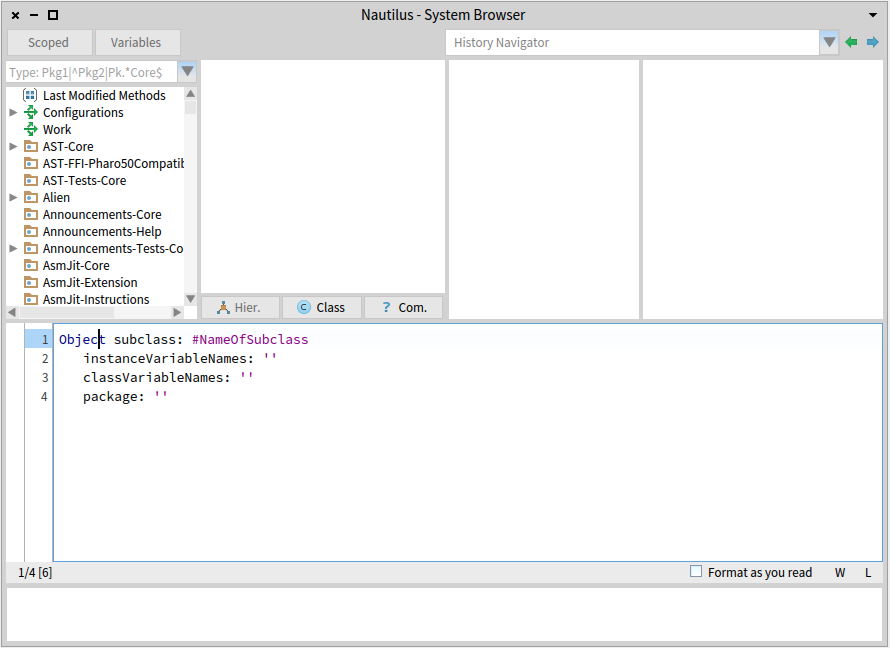
Let see (this is my personal opinion, not necessarily the most beginner friendly view): - I never use the history navigator, not the drop down, nor the arrows - The previous location of variables was better (small icon) - I never use the weird search/filter field with the pattern - I never use scoped browsing - I never use format as you read - I never want line numbers - I never want to know where the cursor is - I only want critics when I say so, not all the time Again, this is my POV. And I definitively still want to have these features around, I just don't want to *see* them all the time. Spotter gets me to classes & methods, the rest is command-click and short cuts.
Stef
On Sun, Jan 17, 2016 at 8:42 AM, stepharo <stepharo@free.fr> wrote: HI
yesterday during my exercise session a student was puzzled because he could not see the method template on the class side when there is not protocol. I had to create first a protocol.
I do not have the solution because I understand why it is like that. Because Nautilus displays the class definition first and when we click on protocol the template. But I would be interested to see if there is an alternative.
Stef

well, I disagree :)
On 17 Jan 2016, at 17:47, Sven Van Caekenberghe <sven@stfx.eu> wrote:
On 17 Jan 2016, at 17:13, stepharo <stepharo@free.fr <mailto:stepharo@free.fr>> wrote:
Le 17/1/16 16:09, Sven Van Caekenberghe a écrit :
On 17 Jan 2016, at 15:52, Gabriel Cotelli <g.cotelli@gmail.com <mailto:g.cotelli@gmail.com>> wrote:
Maybe add a "New Method" button somewhere that changes the class definition with a method template ? But only when it is needed.
The overall Nautilus interface is becoming way too busy and distracting.
Where? Because we removed features so I'm surprised and we wanted to remove more but people use them.
Let see (this is my personal opinion, not necessarily the most beginner friendly view):
<Screen Shot 2016-01-17 at 17.39.34.png>
- I never use the history navigator, not the drop down, nor the arrows - The previous location of variables was better (small icon) - I never use the weird search/filter field with the pattern - I never use scoped browsing - I never use format as you read - I never want line numbers - I never want to know where the cursor is - I only want critics when I say so, not all the time
- I never use history navigator neither - I like variables where they are now :) - I use âweirdâ search/filter all the time - I use very often scoped browsing (I do a lot of refactors) - I do not use format as you read neither, but I like to have it there⦠can be useful. - line numbers I do not care, but that space will be useful for breakpoints/etc. - I need to know where cursor is, or at least I feel myself more confident when I know. - I not only want critics *always*: I also want critics always for everybody: I spotted many bugs I could made just for having them there⦠and in particular newbies can find them useful :)
Again, this is my POV. And I definitively still want to have these features around, I just don't want to *see* them all the time.
And these are mine⦠:P Thatâs why we should not take *our* convenience as a model (we can, after all modify a lot of that just with settings or ignoring them :P) In my own feedback, Nautilus (and the IDE in general) has become a lot more attractive to newcomers now, and the visual contamination (again, as far as Iâve been told by newbies and students, etc.) is not that. Quite the contrary they feel it as âreassuringâ (because it resembles a bit more what they know from other IDEs). My idea is that newbies will welcome to see them all the time, and we (power users) can disable what we do not want in settings (and we can have a preference with our own⦠preferences :P. Is the same I do about Dark Theme for example: I activate it always by default. Or with the Growl notifications: I hate them in bottom-left corner, I would prefer it in top-right⦠or bottom right⦠then I just change it :) So +1 enhance configurability of the system, -100 to remove/hide features that are important specially for newbies. cheers, Esteban
Spotter gets me to classes & methods, the rest is command-click and short cuts.
Stef
On Sun, Jan 17, 2016 at 8:42 AM, stepharo <stepharo@free.fr <mailto:stepharo@free.fr>> wrote: HI
yesterday during my exercise session a student was puzzled because he could not see the method template on the class side when there is not protocol. I had to create first a protocol.
I do not have the solution because I understand why it is like that. Because Nautilus displays the class definition first and when we click on protocol the template. But I would be interested to see if there is an alternative.
Stef

Plus any self respecting IDE has some form of code critic enabled by default, it would be weird to disable it in pharo when Pharo boast that it has a powerful IDE. and generally I agree with Esteban post, except scoped browsing, I have not figure out its usefulness yet. On Sun, Jan 17, 2016 at 7:26 PM Esteban Lorenzano <estebanlm@gmail.com> wrote:
well, I disagree :)
On 17 Jan 2016, at 17:47, Sven Van Caekenberghe <sven@stfx.eu> wrote:
On 17 Jan 2016, at 17:13, stepharo <stepharo@free.fr> wrote:
Le 17/1/16 16:09, Sven Van Caekenberghe a écrit :
On 17 Jan 2016, at 15:52, Gabriel Cotelli <g.cotelli@gmail.com> wrote:
Maybe add a "New Method" button somewhere that changes the class definition with a method template ?
But only when it is needed.
The overall Nautilus interface is becoming way too busy and distracting.
Where? Because we removed features so I'm surprised and we wanted to remove more but people use them.
Let see (this is my personal opinion, not necessarily the most beginner friendly view):
<Screen Shot 2016-01-17 at 17.39.34.png>
- I never use the history navigator, not the drop down, nor the arrows - The previous location of variables was better (small icon) - I never use the weird search/filter field with the pattern - I never use scoped browsing - I never use format as you read - I never want line numbers - I never want to know where the cursor is - I only want critics when I say so, not all the time
- I never use history navigator neither - I like variables where they are now :) - I use âweirdâ search/filter all the time - I use very often scoped browsing (I do a lot of refactors) - I do not use format as you read neither, but I like to have it there⦠can be useful. - line numbers I do not care, but that space will be useful for breakpoints/etc. - I need to know where cursor is, or at least I feel myself more confident when I know. - I not only want critics *always*: I also want critics always for everybody: I spotted many bugs I could made just for having them there⦠and in particular newbies can find them useful :)
Again, this is my POV. And I definitively still want to have these features around, I just don't want to *see* them all the time.
And these are mine⦠:P Thatâs why we should not take *our* convenience as a model (we can, after all modify a lot of that just with settings or ignoring them :P)
In my own feedback, Nautilus (and the IDE in general) has become a lot more attractive to newcomers now, and the visual contamination (again, as far as Iâve been told by newbies and students, etc.) is not that. Quite the contrary they feel it as âreassuringâ (because it resembles a bit more what they know from other IDEs).
My idea is that newbies will welcome to see them all the time, and we (power users) can disable what we do not want in settings (and we can have a preference with our own⦠preferences :P. Is the same I do about Dark Theme for example: I activate it always by default. Or with the Growl notifications: I hate them in bottom-left corner, I would prefer it in top-right⦠or bottom right⦠then I just change it :)
So +1 enhance configurability of the system, -100 to remove/hide features that are important specially for newbies.
cheers, Esteban
Spotter gets me to classes & methods, the rest is command-click and short cuts.
Stef
On Sun, Jan 17, 2016 at 8:42 AM, stepharo <stepharo@free.fr> wrote: HI
yesterday during my exercise session a student was puzzled because he could not see the method template on the class side when there is not protocol. I had to create first a protocol.
I do not have the solution because I understand why it is like that. Because Nautilus displays the class definition first and when we click on protocol the template. But I would be interested to see if there is an alternative.
Stef
On 17 Jan 2016, at 18:24, Esteban Lorenzano <estebanlm@gmail.com> wrote:
well, I disagree :)
On 17 Jan 2016, at 17:47, Sven Van Caekenberghe <sven@stfx.eu> wrote:
On 17 Jan 2016, at 17:13, stepharo <stepharo@free.fr> wrote:
Le 17/1/16 16:09, Sven Van Caekenberghe a écrit :
On 17 Jan 2016, at 15:52, Gabriel Cotelli <g.cotelli@gmail.com> wrote:
Maybe add a "New Method" button somewhere that changes the class definition with a method template ? But only when it is needed.
The overall Nautilus interface is becoming way too busy and distracting.
Where? Because we removed features so I'm surprised and we wanted to remove more but people use them.
Let see (this is my personal opinion, not necessarily the most beginner friendly view):
<Screen Shot 2016-01-17 at 17.39.34.png>
- I never use the history navigator, not the drop down, nor the arrows - The previous location of variables was better (small icon) - I never use the weird search/filter field with the pattern - I never use scoped browsing - I never use format as you read - I never want line numbers - I never want to know where the cursor is - I only want critics when I say so, not all the time
- I never use history navigator neither - I like variables where they are now :) - I use âweirdâ search/filter all the time - I use very often scoped browsing (I do a lot of refactors) - I do not use format as you read neither, but I like to have it there⦠can be useful. - line numbers I do not care, but that space will be useful for breakpoints/etc. - I need to know where cursor is, or at least I feel myself more confident when I know. - I not only want critics *always*: I also want critics always for everybody: I spotted many bugs I could made just for having them there⦠and in particular newbies can find them useful :)
Again, this is my POV. And I definitively still want to have these features around, I just don't want to *see* them all the time.
And these are mine⦠:P Thatâs why we should not take *our* convenience as a model (we can, after all modify a lot of that just with settings or ignoring them :P)
In my own feedback, Nautilus (and the IDE in general) has become a lot more attractive to newcomers now, and the visual contamination (again, as far as Iâve been told by newbies and students, etc.) is not that. Quite the contrary they feel it as âreassuringâ (because it resembles a bit more what they know from other IDEs).
My idea is that newbies will welcome to see them all the time, and we (power users) can disable what we do not want in settings (and we can have a preference with our own⦠preferences :P. Is the same I do about Dark Theme for example: I activate it always by default. Or with the Growl notifications: I hate them in bottom-left corner, I would prefer it in top-right⦠or bottom right⦠then I just change it :)
So +1 enhance configurability of the system, -100 to remove/hide features that are important specially for newbies.
Like I said, it is my POV, I don't want to convince anybody else, that is why I did not say anything earlier. But, not all the things that I want are preferences now, ... Pharo should not only cater to beginners, or try to mimic other bloated IDE's like Eclipse or IntelliJ. Pharo is yours also means it should fit proficient users.
cheers, Esteban
Spotter gets me to classes & methods, the rest is command-click and short cuts.
Stef
On Sun, Jan 17, 2016 at 8:42 AM, stepharo <stepharo@free.fr> wrote: HI
yesterday during my exercise session a student was puzzled because he could not see the method template on the class side when there is not protocol. I had to create first a protocol.
I do not have the solution because I understand why it is like that. Because Nautilus displays the class definition first and when we click on protocol the template. But I would be interested to see if there is an alternative.
Stef
Indeed this is your POV.
- I never use the history navigator, not the drop down, nor the arrows Me neither I we removed it but people uses it. - The previous location of variables was better (small icon) I do not know I could never understand them. ;) - I never use the weird search/filter field with the pattern I use it all the time - I never use scoped browsing all the time - I never use format as you read all the time - I never want line numbers Indeed I do not care
- I never want to know where the cursor is - I only want critics when I say so, not all the time
Again, this is my POV. And I definitively still want to have these features around, I just don't want to *see* them all the time.
Spotter gets me to classes & methods, the rest is command-click and short cuts.
Stef
On Sun, Jan 17, 2016 at 8:42 AM, stepharo <stepharo@free.fr <mailto:stepharo@free.fr>> wrote: HI
yesterday during my exercise session a student was puzzled because he could not see the method template on the class side when there is not protocol. I had to create first a protocol.
I do not have the solution because I understand why it is like that. Because Nautilus displays the class definition first and when we click on protocol the template. But I would be interested to see if there is an alternative.
Stef

Le 17/01/2016 12:42, stepharo a écrit :
HI
yesterday during my exercise session a student was puzzled because he could not see the method template on the class side when there is not protocol. I had to create first a protocol.
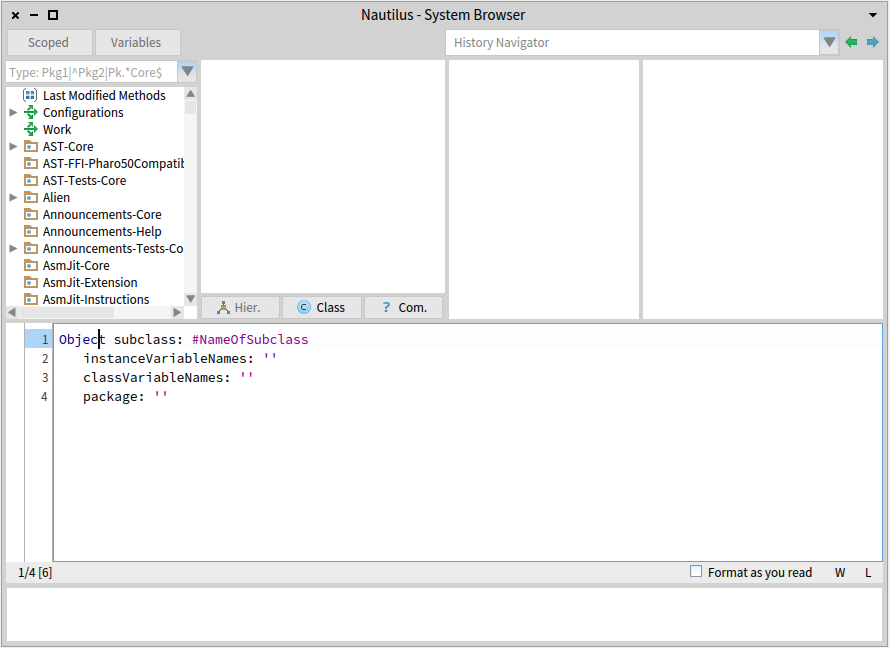
Hi, Nautilus should always have a protocol on class side. If there is none, there is the "no messages" one.
I do not have the solution because I understand why it is like that. Because Nautilus displays the class definition first and when we click on protocol the template. But I would be interested to see if there is an alternative.
Stef
-- Cyril Ferlicot http://www.synectique.eu 165 Avenue Bretagne Lille 59000 France

2016-01-17 12:42 GMT+01:00 stepharo <stepharo@free.fr>:
HI
yesterday during my exercise session a student was puzzled because he could not see the method template on the class side when there is not protocol. I had to create first a protocol.
But you can always select the "no messages" protocol entry to show up the method template. I think it was always like that.
I do not have the solution because I understand why it is like that. Because Nautilus displays the class definition first and when we click on protocol the template. But I would be interested to see if there is an alternative.
Stef
Le 17/1/16 19:08, Nicolai Hess a écrit :
2016-01-17 12:42 GMT+01:00 stepharo <stepharo@free.fr <mailto:stepharo@free.fr>>:
HI
yesterday during my exercise session a student was puzzled because he could not see the method template on the class side when there is not protocol. I had to create first a protocol.
But you can always select the "no messages" protocol entry to show up the method template.
I think it was always like that.
Ok sounds the good solution. I was busy with another student and not the time to check. I should have before sending this mail.
I do not have the solution because I understand why it is like that. Because Nautilus displays the class definition first and when we click on protocol the template. But I would be interested to see if there is an alternative.
Stef
2016-01-18 19:33 GMT+01:00 stepharo <stepharo@free.fr>:
Le 17/1/16 19:08, Nicolai Hess a écrit :
2016-01-17 12:42 GMT+01:00 stepharo <stepharo@free.fr>:
HI
yesterday during my exercise session a student was puzzled because he could not see the method template on the class side when there is not protocol. I had to create first a protocol.
But you can always select the "no messages" protocol entry to show up the method template.
I think it was always like that.
Ok sounds the good solution. I was busy with another student and not the time to check. I should have before sending this mail.
I think this is a problem with fast table. Since we use fast table, it often happens that the list item is selected and deselected on a single mouse click. This makes it difficult to select a class, protocol or method.
I do not have the solution because I understand why it is like that. Because Nautilus displays the class definition first and when we click on protocol the template. But I would be interested to see if there is an alternative.
Stef
participants (7)
-
 Cyril Ferlicot D.
 -
 Dimitris Chloupis
 -
 Esteban Lorenzano
 -
 Gabriel Cotelli
 -
 Nicolai Hess
 -
 stepharo
 -
 Sven Van Caekenberghe