
Dear community, As you may have seen, Roassal has entered a stabilization phase. The book AgileVisualization.com will soon be released. After its release, Roassal will go over a new development phase. In order to prepare it, I am asking this question: What are the 3 aspects you would like to see improved in Roassal? You can answer publicly or by sending private messages. Kind regards, Alexandre -- _,.;:~^~:;._,.;:~^~:;._,.;:~^~:;._,.;:~^~:;._,.;: Alexandre Bergel http://www.bergel.eu ^~:;._,.;:~^~:;._,.;:~^~:;._,.;:~^~:;._,.;:~^~:;.

Hi Alexandre, In a wonderful world, I would like: - a real graph layout (like in graphviz) that can take into account around hundred nodes and several hundred of edges and place the nodes in order to see something. Currently, I have to use the circle layout and it looks strange. - the possibility to place hangout of the edges on nodes (as box) more flexible. Indeed, I am reverse engineering a database containing around 80 tables and lot of foreign keys and the result is not readable since the edge are orthogonal starting from the top or the bottom of the box corresponding to the column name. I would like a real entity-relation diagram. For the remainder, I use only Telescope since I have just to specify my data and not to script the visualization taking into account the order of the instructions⦠So donât change the interface of the existing API in order we can continue to use Telescope on top on Roassal. If you want, I can show you the current stage of the visu (once again done in Telescope on top of Roassal) in order that you see on real data how uggly it is. Cheers, Anne
Le 24 févr. 2016 à 09:51, Alexandre Bergel <alexandre.bergel@me.com> a écrit :
Dear community,
As you may have seen, Roassal has entered a stabilization phase. The book AgileVisualization.com will soon be released. After its release, Roassal will go over a new development phase. In order to prepare it, I am asking this question:
What are the 3 aspects you would like to see improved in Roassal?
You can answer publicly or by sending private messages.
Kind regards, Alexandre -- _,.;:~^~:;._,.;:~^~:;._,.;:~^~:;._,.;:~^~:;._,.;: Alexandre Bergel http://www.bergel.eu ^~:;._,.;:~^~:;._,.;:~^~:;._,.;:~^~:;._,.;:~^~:;.
_______________________________________________ Moose-dev mailing list Moose-dev@list.inf.unibe.ch https://www.list.inf.unibe.ch/listinfo/moose-dev
- the possibility to place hangout of the edges on nodes (as box) more flexible. Indeed, I am reverse engineering a database containing around 80 tables and lot of foreign keys and the result is not readable since the edge are orthogonal starting from the top or the bottom of the box corresponding to the column name. I would like a real entity-relation diagram.
Do you have a screenshot showing the issue?
If you want, I can show you the current stage of the visu (once again done in Telescope on top of Roassal) in order that you see on real data how uggly it is.
Yes please, some screenshots would help Alexandre
Cheers, Anne
Le 24 févr. 2016 à 09:51, Alexandre Bergel <alexandre.bergel@me.com> a écrit :
Dear community,
As you may have seen, Roassal has entered a stabilization phase. The book AgileVisualization.com will soon be released. After its release, Roassal will go over a new development phase. In order to prepare it, I am asking this question:
What are the 3 aspects you would like to see improved in Roassal?
You can answer publicly or by sending private messages.
Kind regards, Alexandre -- _,.;:~^~:;._,.;:~^~:;._,.;:~^~:;._,.;:~^~:;._,.;: Alexandre Bergel http://www.bergel.eu ^~:;._,.;:~^~:;._,.;:~^~:;._,.;:~^~:;._,.;:~^~:;.
_______________________________________________ Moose-dev mailing list Moose-dev@list.inf.unibe.ch https://www.list.inf.unibe.ch/listinfo/moose-dev
-- _,.;:~^~:;._,.;:~^~:;._,.;:~^~:;._,.;:~^~:;._,.;: Alexandre Bergel http://www.bergel.eu ^~:;._,.;:~^~:;._,.;:~^~:;._,.;:~^~:;._,.;:~^~:;.

On Wed, Feb 24, 2016 at 10:28 AM, Anne Etien <anne.etien@univ-lille1.fr> wrote:
Hi Alexandre,
In a wonderful world, I would like: - a real graph layout (like in graphviz) that can take into account around hundred nodes and several hundred of edges and place the nodes in order to see something. Currently, I have to use the circle layout and it looks strange.
Unfortunately making real graph layouts is really hard issue⦠I've wrote my bachelor thesis about this and didn't get very far; it's bit of a nightmare if you don't have good foundations. :'( In any case, I wrote a simpler layout delegator in Roassal that delegates the layouting to graphviz and it works reasonably well, so I could probably add it to Roassal (you however need graphviz installed and it would add another dependency to Roassal, which I'm not so keen on). Maybe also OGDF (http://ogdf.net/doku.php) could be used if you are ok with GPL⦠they have their own graph format so there could be some interaction. Peter
Le 24 févr. 2016 à 10:35, Peter Uhnák <i.uhnak@gmail.com> a écrit :
On Wed, Feb 24, 2016 at 10:28 AM, Anne Etien <anne.etien@univ-lille1.fr <mailto:anne.etien@univ-lille1.fr>> wrote: Hi Alexandre,
In a wonderful world, I would like: - a real graph layout (like in graphviz) that can take into account around hundred nodes and several hundred of edges and place the nodes in order to see something. Currently, I have to use the circle layout and it looks strange.
Unfortunately making real graph layouts is really hard issue⦠I've wrote my bachelor thesis about this and didn't get very far; it's bit of a nightmare if you don't have good foundations. :â(
I know. I tried but my mathematical background and my time were not enough. I got the research paper explaining the algorithm of Graphviz but even with that, it was very complex. However, since some tools (as graphviz) do it, we should have it. Anne
In any case, I wrote a simpler layout delegator in Roassal that delegates the layouting to graphviz and it works reasonably well, so I could probably add it to Roassal (you however need graphviz installed and it would add another dependency to Roassal, which I'm not so keen on).
Maybe also OGDF (http://ogdf.net/doku.php <http://ogdf.net/doku.php>) could be used if you are ok with GPL⦠they have their own graph format so there could be some interaction.
Peter _______________________________________________ Moose-dev mailing list Moose-dev@list.inf.unibe.ch https://www.list.inf.unibe.ch/listinfo/moose-dev

Make it working with all graphviz tools and it will be wonderful already. BTW, there is already a tool generating graphviz things as this is what was used to document seaside dependencies. Here us thread: http://forum.world.st/GraphViz-renggli-repo-down-td4722561.html Seems that Roassal 1 had such a thing already. Phil On Wed, Feb 24, 2016 at 10:44 AM, Anne Etien <anne.etien@univ-lille1.fr> wrote:
Le 24 févr. 2016 à 10:35, Peter Uhnák <i.uhnak@gmail.com> a écrit :
On Wed, Feb 24, 2016 at 10:28 AM, Anne Etien <anne.etien@univ-lille1.fr> wrote:
Hi Alexandre,
In a wonderful world, I would like: - a real graph layout (like in graphviz) that can take into account around hundred nodes and several hundred of edges and place the nodes in order to see something. Currently, I have to use the circle layout and it looks strange.
Unfortunately making real graph layouts is really hard issue⦠I've wrote my bachelor thesis about this and didn't get very far; it's bit of a nightmare if you don't have good foundations. :â(
I know. I tried but my mathematical background and my time were not enough. I got the research paper explaining the algorithm of Graphviz but even with that, it was very complex. However, since some tools (as graphviz) do it, we should have it.
Anne
In any case, I wrote a simpler layout delegator in Roassal that delegates the layouting to graphviz and it works reasonably well, so I could probably add it to Roassal (you however need graphviz installed and it would add another dependency to Roassal, which I'm not so keen on).
Maybe also OGDF (http://ogdf.net/doku.php) could be used if you are ok with GPL⦠they have their own graph format so there could be some interaction.
Peter _______________________________________________ Moose-dev mailing list Moose-dev@list.inf.unibe.ch https://www.list.inf.unibe.ch/listinfo/moose-dev
On Wed, Feb 24, 2016 at 3:11 PM, phil@highoctane.be <phil@highoctane.be> wrote:
Make it working with all graphviz tools and it will be wonderful already. BTW, there is already a tool generating graphviz things as this is what was used to document seaside dependencies.
Yes, this is what I used to generate the GraphViz .dot file. http://smalltalkhub.com/#!/~hernan/GraphViz But I had to parse the results myself from SVG, because the default one had some precision issues (this was most likely GraphViz problems). Peter
In any case, I wrote a simpler layout delegator in Roassal that delegates the layouting to graphviz and it works reasonably well, so I could probably add it to Roassal (you however need graphviz installed and it would add another dependency to Roassal, which I'm not so keen on).
Where can we have it please? Alexandre -- _,.;:~^~:;._,.;:~^~:;._,.;:~^~:;._,.;:~^~:;._,.;: Alexandre Bergel http://www.bergel.eu ^~:;._,.;:~^~:;._,.;:~^~:;._,.;:~^~:;._,.;:~^~:;.

Anne did you publish the code you did with guillaume on reimplementing graphViz? Stef Le 24/2/16 10:28, Anne Etien a écrit :
Hi Alexandre,
In a wonderful world, I would like: - a real graph layout (like in graphviz) that can take into account around hundred nodes and several hundred of edges and place the nodes in order to see something. Currently, I have to use the circle layout and it looks strange. - the possibility to place hangout of the edges on nodes (as box) more flexible. Indeed, I am reverse engineering a database containing around 80 tables and lot of foreign keys and the result is not readable since the edge are orthogonal starting from the top or the bottom of the box corresponding to the column name. I would like a real entity-relation diagram.
For the remainder, I use only Telescope since I have just to specify my data and not to script the visualization taking into account the order of the instructions⦠So donât change the interface of the existing API in order we can continue to use Telescope on top on Roassal.
If you want, I can show you the current stage of the visu (once again done in Telescope on top of Roassal) in order that you see on real data how uggly it is.
Cheers, Anne
Le 24 févr. 2016 à 09:51, Alexandre Bergel <alexandre.bergel@me.com> a écrit :
Dear community,
As you may have seen, Roassal has entered a stabilization phase. The book AgileVisualization.com will soon be released. After its release, Roassal will go over a new development phase. In order to prepare it, I am asking this question:
What are the 3 aspects you would like to see improved in Roassal?
You can answer publicly or by sending private messages.
Kind regards, Alexandre -- _,.;:~^~:;._,.;:~^~:;._,.;:~^~:;._,.;:~^~:;._,.;: Alexandre Bergel http://www.bergel.eu ^~:;._,.;:~^~:;._,.;:~^~:;._,.;:~^~:;._,.;:~^~:;.
_______________________________________________ Moose-dev mailing list Moose-dev@list.inf.unibe.ch https://www.list.inf.unibe.ch/listinfo/moose-dev

This is very cool. We will all benefit from this documentation. One thing that I would still like to see fixed before the release is the edge building (this problem of not being able to properly specify random objects to be taken into account when building edges). Could we work on that? Cheers, Doru
On Feb 24, 2016, at 9:51 AM, Alexandre Bergel <alexandre.bergel@me.com> wrote:
Dear community,
As you may have seen, Roassal has entered a stabilization phase. The book AgileVisualization.com will soon be released. After its release, Roassal will go over a new development phase. In order to prepare it, I am asking this question:
What are the 3 aspects you would like to see improved in Roassal?
You can answer publicly or by sending private messages.
Kind regards, Alexandre -- _,.;:~^~:;._,.;:~^~:;._,.;:~^~:;._,.;:~^~:;._,.;: Alexandre Bergel http://www.bergel.eu ^~:;._,.;:~^~:;._,.;:~^~:;._,.;:~^~:;._,.;:~^~:;.
_______________________________________________ Moose-dev mailing list Moose-dev@list.inf.unibe.ch https://www.list.inf.unibe.ch/listinfo/moose-dev
-- www.tudorgirba.com www.feenk.com âLive like you mean it."
Do you have an example? I am not sure to understand. Alexandre
On Feb 25, 2016, at 12:40 PM, Tudor Girba <tudor@tudorgirba.com> wrote:
This is very cool. We will all benefit from this documentation.
One thing that I would still like to see fixed before the release is the edge building (this problem of not being able to properly specify random objects to be taken into account when building edges). Could we work on that?
Cheers, Doru
On Feb 24, 2016, at 9:51 AM, Alexandre Bergel <alexandre.bergel@me.com> wrote:
Dear community,
As you may have seen, Roassal has entered a stabilization phase. The book AgileVisualization.com will soon be released. After its release, Roassal will go over a new development phase. In order to prepare it, I am asking this question:
What are the 3 aspects you would like to see improved in Roassal?
You can answer publicly or by sending private messages.
Kind regards, Alexandre -- _,.;:~^~:;._,.;:~^~:;._,.;:~^~:;._,.;:~^~:;._,.;: Alexandre Bergel http://www.bergel.eu ^~:;._,.;:~^~:;._,.;:~^~:;._,.;:~^~:;._,.;:~^~:;.
_______________________________________________ Moose-dev mailing list Moose-dev@list.inf.unibe.ch https://www.list.inf.unibe.ch/listinfo/moose-dev
-- www.tudorgirba.com www.feenk.com
âLive like you mean it."
-- _,.;:~^~:;._,.;:~^~:;._,.;:~^~:;._,.;:~^~:;._,.;: Alexandre Bergel http://www.bergel.eu ^~:;._,.;:~^~:;._,.;:~^~:;._,.;:~^~:;._,.;:~^~:;.
Hi, We discussed this before. Try to draw a hierarchy using classes and inheritance objects (so, without using the class to superclass navigation). Something like this: view := RTMondrian new. view nodes: classes. view edges objects: inheritances; connectFrom: #superclass to: #subclass. view layout tree. view It wonât work. Cheers, Doru
On Feb 25, 2016, at 1:29 PM, Alexandre Bergel <alexandre.bergel@me.com> wrote:
Do you have an example? I am not sure to understand.
Alexandre
On Feb 25, 2016, at 12:40 PM, Tudor Girba <tudor@tudorgirba.com> wrote:
This is very cool. We will all benefit from this documentation.
One thing that I would still like to see fixed before the release is the edge building (this problem of not being able to properly specify random objects to be taken into account when building edges). Could we work on that?
Cheers, Doru
On Feb 24, 2016, at 9:51 AM, Alexandre Bergel <alexandre.bergel@me.com> wrote:
Dear community,
As you may have seen, Roassal has entered a stabilization phase. The book AgileVisualization.com will soon be released. After its release, Roassal will go over a new development phase. In order to prepare it, I am asking this question:
What are the 3 aspects you would like to see improved in Roassal?
You can answer publicly or by sending private messages.
Kind regards, Alexandre -- _,.;:~^~:;._,.;:~^~:;._,.;:~^~:;._,.;:~^~:;._,.;: Alexandre Bergel http://www.bergel.eu ^~:;._,.;:~^~:;._,.;:~^~:;._,.;:~^~:;._,.;:~^~:;.
_______________________________________________ Moose-dev mailing list Moose-dev@list.inf.unibe.ch https://www.list.inf.unibe.ch/listinfo/moose-dev
-- www.tudorgirba.com www.feenk.com
âLive like you mean it."
-- _,.;:~^~:;._,.;:~^~:;._,.;:~^~:;._,.;:~^~:;._,.;: Alexandre Bergel http://www.bergel.eu ^~:;._,.;:~^~:;._,.;:~^~:;._,.;:~^~:;._,.;:~^~:;.
_______________________________________________ Moose-dev mailing list Moose-dev@list.inf.unibe.ch https://www.list.inf.unibe.ch/listinfo/moose-dev
-- www.tudorgirba.com www.feenk.com "Value is always contextual."
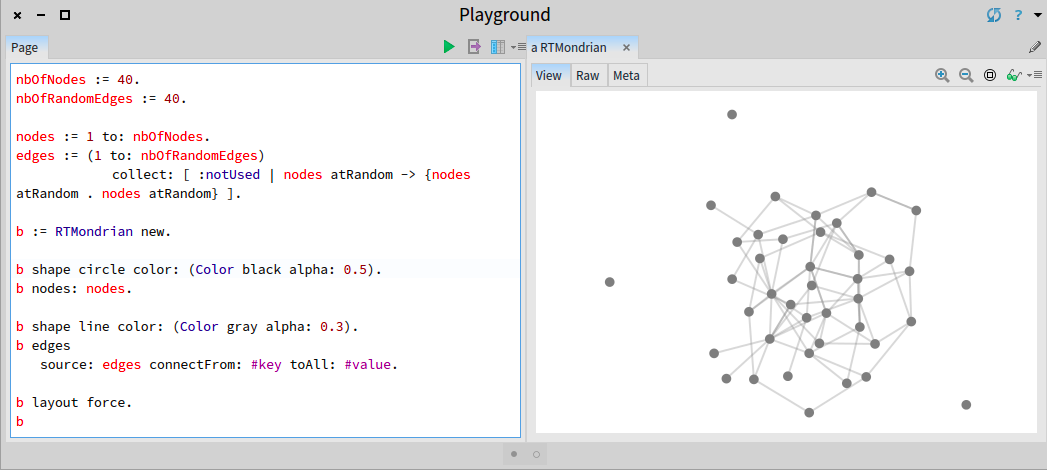
Oh, but this has been in Roassal for many months (I have implemented since right after ESUG). You need to use #source:connectFrom:toAll: Here is an example that randomly generate a graph and render it using this facility: -=-=-=-=-=-=-=-=-=-=-=-=-=-=-= nbOfNodes := 40. nbOfRandomEdges := 40. nodes := 1 to: nbOfNodes. edges := (1 to: nbOfRandomEdges) collect: [ :notUsed | nodes atRandom -> {nodes atRandom . nodes atRandom} ]. b := RTMondrian new. b shape circle color: (Color black alpha: 0.5). b nodes: nodes. b shape line color: (Color gray alpha: 0.3). b edges source: edges connectFrom: #key toAll: #value. b layout force. b -=-=-=-=-=-=-=-=-=-=-=-=-=-=-= Cheers, Alexandre
On Feb 25, 2016, at 1:37 PM, Tudor Girba <tudor@tudorgirba.com> wrote:
Hi,
We discussed this before. Try to draw a hierarchy using classes and inheritance objects (so, without using the class to superclass navigation). Something like this:
view := RTMondrian new. view nodes: classes. view edges objects: inheritances; connectFrom: #superclass to: #subclass. view layout tree. view
It wonât work.
Cheers, Doru
On Feb 25, 2016, at 1:29 PM, Alexandre Bergel <alexandre.bergel@me.com> wrote:
Do you have an example? I am not sure to understand.
Alexandre
On Feb 25, 2016, at 12:40 PM, Tudor Girba <tudor@tudorgirba.com> wrote:
This is very cool. We will all benefit from this documentation.
One thing that I would still like to see fixed before the release is the edge building (this problem of not being able to properly specify random objects to be taken into account when building edges). Could we work on that?
Cheers, Doru
On Feb 24, 2016, at 9:51 AM, Alexandre Bergel <alexandre.bergel@me.com> wrote:
Dear community,
As you may have seen, Roassal has entered a stabilization phase. The book AgileVisualization.com will soon be released. After its release, Roassal will go over a new development phase. In order to prepare it, I am asking this question:
What are the 3 aspects you would like to see improved in Roassal?
You can answer publicly or by sending private messages.
Kind regards, Alexandre -- _,.;:~^~:;._,.;:~^~:;._,.;:~^~:;._,.;:~^~:;._,.;: Alexandre Bergel http://www.bergel.eu ^~:;._,.;:~^~:;._,.;:~^~:;._,.;:~^~:;._,.;:~^~:;.
_______________________________________________ Moose-dev mailing list Moose-dev@list.inf.unibe.ch https://www.list.inf.unibe.ch/listinfo/moose-dev
-- www.tudorgirba.com www.feenk.com
âLive like you mean it."
-- _,.;:~^~:;._,.;:~^~:;._,.;:~^~:;._,.;:~^~:;._,.;: Alexandre Bergel http://www.bergel.eu ^~:;._,.;:~^~:;._,.;:~^~:;._,.;:~^~:;._,.;:~^~:;.
_______________________________________________ Moose-dev mailing list Moose-dev@list.inf.unibe.ch https://www.list.inf.unibe.ch/listinfo/moose-dev
-- www.tudorgirba.com www.feenk.com
"Value is always contextual."
-- _,.;:~^~:;._,.;:~^~:;._,.;:~^~:;._,.;:~^~:;._,.;: Alexandre Bergel http://www.bergel.eu ^~:;._,.;:~^~:;._,.;:~^~:;._,.;:~^~:;._,.;:~^~:;.
Oh, I missed this one :). So, now I can refactor the code that is still using the RTEdge class side methods :). Great! Thanks, Doru
On Feb 25, 2016, at 1:59 PM, Alexandre Bergel <alexandre.bergel@me.com> wrote:
Oh, but this has been in Roassal for many months (I have implemented since right after ESUG). You need to use #source:connectFrom:toAll:
Here is an example that randomly generate a graph and render it using this facility: -=-=-=-=-=-=-=-=-=-=-=-=-=-=-= nbOfNodes := 40. nbOfRandomEdges := 40.
nodes := 1 to: nbOfNodes. edges := (1 to: nbOfRandomEdges) collect: [ :notUsed | nodes atRandom -> {nodes atRandom . nodes atRandom} ].
b := RTMondrian new.
b shape circle color: (Color black alpha: 0.5). b nodes: nodes.
b shape line color: (Color gray alpha: 0.3). b edges source: edges connectFrom: #key toAll: #value.
b layout force. b -=-=-=-=-=-=-=-=-=-=-=-=-=-=-=
<Screen Shot 2016-02-25 at 1.57.24 PM.png>
Cheers, Alexandre
On Feb 25, 2016, at 1:37 PM, Tudor Girba <tudor@tudorgirba.com> wrote:
Hi,
We discussed this before. Try to draw a hierarchy using classes and inheritance objects (so, without using the class to superclass navigation). Something like this:
view := RTMondrian new. view nodes: classes. view edges objects: inheritances; connectFrom: #superclass to: #subclass. view layout tree. view
It wonât work.
Cheers, Doru
On Feb 25, 2016, at 1:29 PM, Alexandre Bergel <alexandre.bergel@me.com> wrote:
Do you have an example? I am not sure to understand.
Alexandre
On Feb 25, 2016, at 12:40 PM, Tudor Girba <tudor@tudorgirba.com> wrote:
This is very cool. We will all benefit from this documentation.
One thing that I would still like to see fixed before the release is the edge building (this problem of not being able to properly specify random objects to be taken into account when building edges). Could we work on that?
Cheers, Doru
On Feb 24, 2016, at 9:51 AM, Alexandre Bergel <alexandre.bergel@me.com> wrote:
Dear community,
As you may have seen, Roassal has entered a stabilization phase. The book AgileVisualization.com will soon be released. After its release, Roassal will go over a new development phase. In order to prepare it, I am asking this question:
What are the 3 aspects you would like to see improved in Roassal?
You can answer publicly or by sending private messages.
Kind regards, Alexandre -- _,.;:~^~:;._,.;:~^~:;._,.;:~^~:;._,.;:~^~:;._,.;: Alexandre Bergel http://www.bergel.eu ^~:;._,.;:~^~:;._,.;:~^~:;._,.;:~^~:;._,.;:~^~:;.
_______________________________________________ Moose-dev mailing list Moose-dev@list.inf.unibe.ch https://www.list.inf.unibe.ch/listinfo/moose-dev
-- www.tudorgirba.com www.feenk.com
âLive like you mean it."
-- _,.;:~^~:;._,.;:~^~:;._,.;:~^~:;._,.;:~^~:;._,.;: Alexandre Bergel http://www.bergel.eu ^~:;._,.;:~^~:;._,.;:~^~:;._,.;:~^~:;._,.;:~^~:;.
_______________________________________________ Moose-dev mailing list Moose-dev@list.inf.unibe.ch https://www.list.inf.unibe.ch/listinfo/moose-dev
-- www.tudorgirba.com www.feenk.com
"Value is always contextual."
-- _,.;:~^~:;._,.;:~^~:;._,.;:~^~:;._,.;:~^~:;._,.;: Alexandre Bergel http://www.bergel.eu ^~:;._,.;:~^~:;._,.;:~^~:;._,.;:~^~:;._,.;:~^~:;.
_______________________________________________ Moose-dev mailing list Moose-dev@list.inf.unibe.ch https://www.list.inf.unibe.ch/listinfo/moose-dev
-- www.tudorgirba.com www.feenk.com "Next time you see your life passing by, say 'hi' and get to know her."
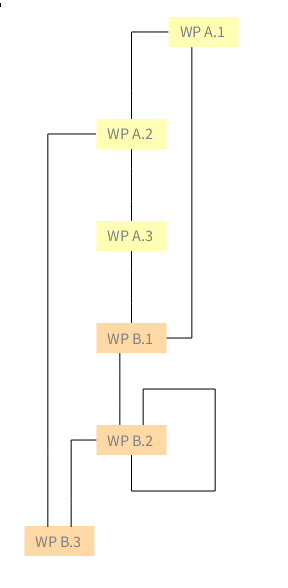
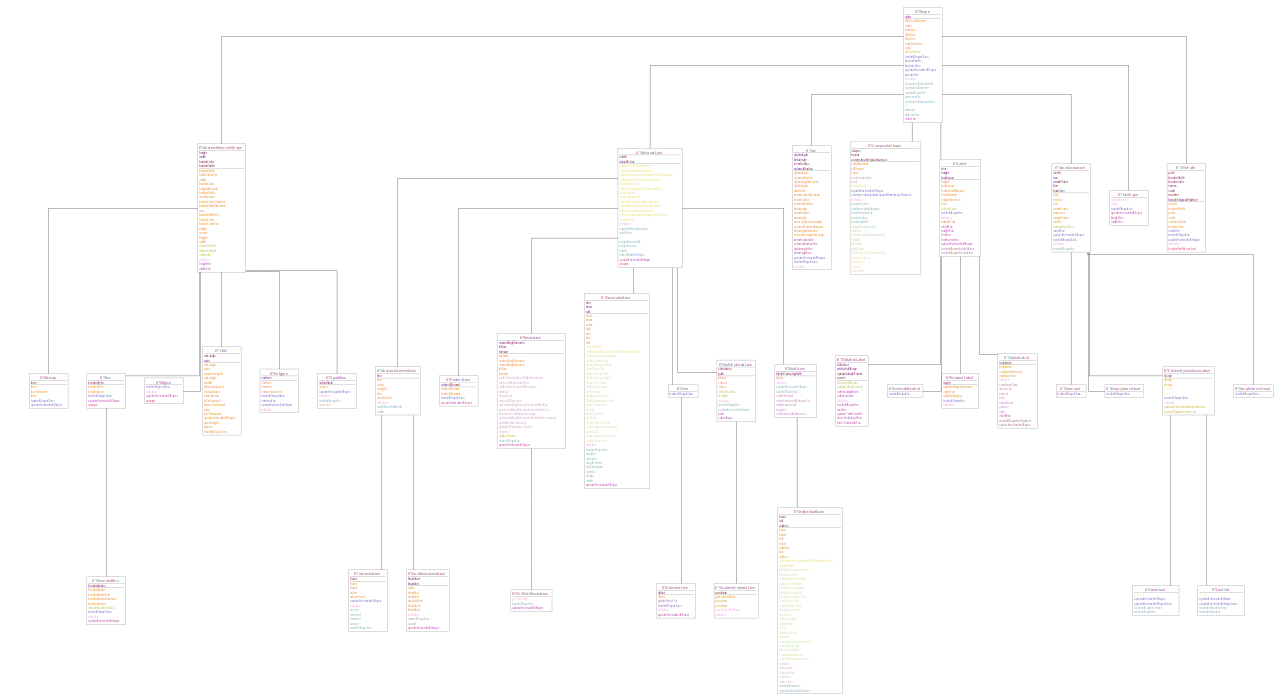
Hi Anne, I've just added a Roassal plugin with the GraphViz-based layout. Note that I had to hack it to work with RTMultiLine (it was originally designed for different lines which are currently not part of Roassal), so it's possible there will be some issues. You can load it (if you have latest Roassal installed) via the Roassal plugin menu, or by executing the following Metacello new baseline: 'GraphVizLayout'; repository: 'github://peteruhnak/graphviz-layout:master/repository'; load Then look at the class-side examples in RTGraphVizLayout. Finally if you use this, you shouldn't move elements within the layout (because graphviz layout hard-codes the pathing)⦠we could probably change this in the future, but I am not sure how (ideally the layout would have to be recomputed, but that's expensive to do live), So to summarize: * you must have GraphViz installed in your system * you must use RTMultiLine for lines (because only they support bending) Let me know how it goes, â â Peter On Thu, Feb 25, 2016 at 2:02 PM, Tudor Girba <tudor@tudorgirba.com> wrote:
Oh, I missed this one :). So, now I can refactor the code that is still using the RTEdge class side methods :).
Great!
Thanks, Doru
On Feb 25, 2016, at 1:59 PM, Alexandre Bergel <alexandre.bergel@me.com> wrote:
Oh, but this has been in Roassal for many months (I have implemented since right after ESUG). You need to use #source:connectFrom:toAll:
Here is an example that randomly generate a graph and render it using this facility: -=-=-=-=-=-=-=-=-=-=-=-=-=-=-= nbOfNodes := 40. nbOfRandomEdges := 40.
nodes := 1 to: nbOfNodes. edges := (1 to: nbOfRandomEdges) collect: [ :notUsed | nodes atRandom -> {nodes atRandom . nodes atRandom} ].
b := RTMondrian new.
b shape circle color: (Color black alpha: 0.5). b nodes: nodes.
b shape line color: (Color gray alpha: 0.3). b edges source: edges connectFrom: #key toAll: #value.
b layout force. b -=-=-=-=-=-=-=-=-=-=-=-=-=-=-=
<Screen Shot 2016-02-25 at 1.57.24 PM.png>
Cheers, Alexandre
On Feb 25, 2016, at 1:37 PM, Tudor Girba <tudor@tudorgirba.com> wrote:
Hi,
We discussed this before. Try to draw a hierarchy using classes and inheritance objects (so, without using the class to superclass navigation). Something like this:
view := RTMondrian new. view nodes: classes. view edges objects: inheritances; connectFrom: #superclass to: #subclass. view layout tree. view
It wonât work.
Cheers, Doru
On Feb 25, 2016, at 1:29 PM, Alexandre Bergel <alexandre.bergel@me.com> wrote:
Do you have an example? I am not sure to understand.
Alexandre
On Feb 25, 2016, at 12:40 PM, Tudor Girba <tudor@tudorgirba.com> wrote:
This is very cool. We will all benefit from this documentation.
One thing that I would still like to see fixed before the release is the edge building (this problem of not being able to properly specify random objects to be taken into account when building edges). Could we work on that?
Cheers, Doru
On Feb 24, 2016, at 9:51 AM, Alexandre Bergel < alexandre.bergel@me.com> wrote:
Dear community,
As you may have seen, Roassal has entered a stabilization phase. The book AgileVisualization.com will soon be released. After its release, Roassal will go over a new development phase. In order to prepare it, I am asking this question:
What are the 3 aspects you would like to see improved in Roassal?
You can answer publicly or by sending private messages.
Kind regards, Alexandre -- _,.;:~^~:;._,.;:~^~:;._,.;:~^~:;._,.;:~^~:;._,.;: Alexandre Bergel http://www.bergel.eu ^~:;._,.;:~^~:;._,.;:~^~:;._,.;:~^~:;._,.;:~^~:;.
_______________________________________________ Moose-dev mailing list Moose-dev@list.inf.unibe.ch https://www.list.inf.unibe.ch/listinfo/moose-dev
-- www.tudorgirba.com www.feenk.com
âLive like you mean it."
-- _,.;:~^~:;._,.;:~^~:;._,.;:~^~:;._,.;:~^~:;._,.;: Alexandre Bergel http://www.bergel.eu ^~:;._,.;:~^~:;._,.;:~^~:;._,.;:~^~:;._,.;:~^~:;.
_______________________________________________ Moose-dev mailing list Moose-dev@list.inf.unibe.ch https://www.list.inf.unibe.ch/listinfo/moose-dev
-- www.tudorgirba.com www.feenk.com
"Value is always contextual."
-- _,.;:~^~:;._,.;:~^~:;._,.;:~^~:;._,.;:~^~:;._,.;: Alexandre Bergel http://www.bergel.eu ^~:;._,.;:~^~:;._,.;:~^~:;._,.;:~^~:;._,.;:~^~:;.
_______________________________________________ Moose-dev mailing list Moose-dev@list.inf.unibe.ch https://www.list.inf.unibe.ch/listinfo/moose-dev
-- www.tudorgirba.com www.feenk.com
"Next time you see your life passing by, say 'hi' and get to know her."
_______________________________________________ Moose-dev mailing list Moose-dev@list.inf.unibe.ch https://www.list.inf.unibe.ch/listinfo/moose-dev
Peter, I cannot use your layout (last version of Moose on OS X). Your layouts uses NBMacShell, which uses NativeBoost. And since it is not supported anymore, I cannot run the layout. Alexandre
On Feb 26, 2016, at 3:42 PM, Peter Uhnák <i.uhnak@gmail.com> wrote:
Hi Anne,
I've just added a Roassal plugin with the GraphViz-based layout.
Note that I had to hack it to work with RTMultiLine (it was originally designed for different lines which are currently not part of Roassal), so it's possible there will be some issues.
You can load it (if you have latest Roassal installed) via the Roassal plugin menu, or by executing the following
Metacello new baseline: 'GraphVizLayout'; repository: 'github://peteruhnak/graphviz-layout:master/repository'; load
Then look at the class-side examples in RTGraphVizLayout.
Finally if you use this, you shouldn't move elements within the layout (because graphviz layout hard-codes the pathing)⦠we could probably change this in the future, but I am not sure how (ideally the layout would have to be recomputed, but that's expensive to do live),
So to summarize: * you must have GraphViz installed in your system * you must use RTMultiLine for lines (because only they support bending)
Let me know how it goes,
<graphviz-2.png><graphviz-1.png> â â
Peter
On Thu, Feb 25, 2016 at 2:02 PM, Tudor Girba <tudor@tudorgirba.com> wrote: Oh, I missed this one :). So, now I can refactor the code that is still using the RTEdge class side methods :).
Great!
Thanks, Doru
On Feb 25, 2016, at 1:59 PM, Alexandre Bergel <alexandre.bergel@me.com> wrote:
Oh, but this has been in Roassal for many months (I have implemented since right after ESUG). You need to use #source:connectFrom:toAll:
Here is an example that randomly generate a graph and render it using this facility: -=-=-=-=-=-=-=-=-=-=-=-=-=-=-= nbOfNodes := 40. nbOfRandomEdges := 40.
nodes := 1 to: nbOfNodes. edges := (1 to: nbOfRandomEdges) collect: [ :notUsed | nodes atRandom -> {nodes atRandom . nodes atRandom} ].
b := RTMondrian new.
b shape circle color: (Color black alpha: 0.5). b nodes: nodes.
b shape line color: (Color gray alpha: 0.3). b edges source: edges connectFrom: #key toAll: #value.
b layout force. b -=-=-=-=-=-=-=-=-=-=-=-=-=-=-=
<Screen Shot 2016-02-25 at 1.57.24 PM.png>
Cheers, Alexandre
On Feb 25, 2016, at 1:37 PM, Tudor Girba <tudor@tudorgirba.com> wrote:
Hi,
We discussed this before. Try to draw a hierarchy using classes and inheritance objects (so, without using the class to superclass navigation). Something like this:
view := RTMondrian new. view nodes: classes. view edges objects: inheritances; connectFrom: #superclass to: #subclass. view layout tree. view
It wonât work.
Cheers, Doru
On Feb 25, 2016, at 1:29 PM, Alexandre Bergel <alexandre.bergel@me.com> wrote:
Do you have an example? I am not sure to understand.
Alexandre
On Feb 25, 2016, at 12:40 PM, Tudor Girba <tudor@tudorgirba.com> wrote:
This is very cool. We will all benefit from this documentation.
One thing that I would still like to see fixed before the release is the edge building (this problem of not being able to properly specify random objects to be taken into account when building edges). Could we work on that?
Cheers, Doru
On Feb 24, 2016, at 9:51 AM, Alexandre Bergel <alexandre.bergel@me.com> wrote:
Dear community,
As you may have seen, Roassal has entered a stabilization phase. The book AgileVisualization.com will soon be released. After its release, Roassal will go over a new development phase. In order to prepare it, I am asking this question:
What are the 3 aspects you would like to see improved in Roassal?
You can answer publicly or by sending private messages.
Kind regards, Alexandre -- _,.;:~^~:;._,.;:~^~:;._,.;:~^~:;._,.;:~^~:;._,.;: Alexandre Bergel http://www.bergel.eu ^~:;._,.;:~^~:;._,.;:~^~:;._,.;:~^~:;._,.;:~^~:;.
_______________________________________________ Moose-dev mailing list Moose-dev@list.inf.unibe.ch https://www.list.inf.unibe.ch/listinfo/moose-dev
-- www.tudorgirba.com www.feenk.com
âLive like you mean it."
-- _,.;:~^~:;._,.;:~^~:;._,.;:~^~:;._,.;:~^~:;._,.;: Alexandre Bergel http://www.bergel.eu ^~:;._,.;:~^~:;._,.;:~^~:;._,.;:~^~:;._,.;:~^~:;.
_______________________________________________ Moose-dev mailing list Moose-dev@list.inf.unibe.ch https://www.list.inf.unibe.ch/listinfo/moose-dev
-- www.tudorgirba.com www.feenk.com
"Value is always contextual."
-- _,.;:~^~:;._,.;:~^~:;._,.;:~^~:;._,.;:~^~:;._,.;: Alexandre Bergel http://www.bergel.eu ^~:;._,.;:~^~:;._,.;:~^~:;._,.;:~^~:;._,.;:~^~:;.
_______________________________________________ Moose-dev mailing list Moose-dev@list.inf.unibe.ch https://www.list.inf.unibe.ch/listinfo/moose-dev
-- www.tudorgirba.com www.feenk.com
"Next time you see your life passing by, say 'hi' and get to know her."
_______________________________________________ Moose-dev mailing list Moose-dev@list.inf.unibe.ch https://www.list.inf.unibe.ch/listinfo/moose-dev
-- _,.;:~^~:;._,.;:~^~:;._,.;:~^~:;._,.;:~^~:;._,.;: Alexandre Bergel http://www.bergel.eu ^~:;._,.;:~^~:;._,.;:~^~:;._,.;:~^~:;._,.;:~^~:;.
On Mon, Feb 29, 2016 at 9:43 AM, Alexandre Bergel <alexandre.bergel@me.com> wrote:
Peter, I cannot use your layout (last version of Moose on OS X). Your layouts uses NBMacShell, which uses NativeBoost. And since it is not supported anymore, I cannot run the layout.
Hmm⦠that's GraphViz requirement (interface with the shell to execute graphviz)⦠I'll look into that, although without OS X it will be hard to test. Thanks for the report Peter

Better late than never :-) (working on the holidays backlog) I only have one request: better positioning on labels of nodes and edges. For example see the image: three of the four labels are badly positioned because the bounding box of their text is intersected by one or more edges. I know that to solve this generally is hard, but for simple cases like this it should be possible. Ah, and it should work well with animations and dragging of course ;-)
On Feb 24, 2016, at 05:51, Alexandre Bergel <alexandre.bergel@me.com> wrote:
Dear community,
As you may have seen, Roassal has entered a stabilization phase. The book AgileVisualization.com will soon be released. After its release, Roassal will go over a new development phase. In order to prepare it, I am asking this question:
What are the 3 aspects you would like to see improved in Roassal?
You can answer publicly or by sending private messages.
Kind regards, Alexandre -- _,.;:~^~:;._,.;:~^~:;._,.;:~^~:;._,.;:~^~:;._,.;: Alexandre Bergel http://www.bergel.eu ^~:;._,.;:~^~:;._,.;:~^~:;._,.;:~^~:;._,.;:~^~:;.
_______________________________________________ Moose-dev mailing list Moose-dev@list.inf.unibe.ch https://www.list.inf.unibe.ch/listinfo/moose-dev
---> Save our in-boxes! http://emailcharter.org <--- Johan Fabry - http://pleiad.cl/~jfabry PLEIAD and RyCh labs - Computer Science Department (DCC) - University of Chile
Thanks! Alexandre -- _,.;:~^~:;._,.;:~^~:;._,.;:~^~:;._,.;:~^~:;._,.;: Alexandre Bergel http://www.bergel.eu ^~:;._,.;:~^~:;._,.;:~^~:;._,.;:~^~:;._,.;:~^~:;.
On Mar 7, 2016, at 10:34 AM, Johan Fabry <jfabry@dcc.uchile.cl> wrote:
Better late than never :-) (working on the holidays backlog)
I only have one request: better positioning on labels of nodes and edges. For example see the image: three of the four labels are badly positioned because the bounding box of their text is intersected by one or more edges.
<Screen Shot 2016-03-07 at 10.31.24.png> I know that to solve this generally is hard, but for simple cases like this it should be possible.
Ah, and it should work well with animations and dragging of course ;-)
On Feb 24, 2016, at 05:51, Alexandre Bergel <alexandre.bergel@me.com <mailto:alexandre.bergel@me.com>> wrote:
Dear community,
As you may have seen, Roassal has entered a stabilization phase. The book AgileVisualization.com <http://agilevisualization.com/> will soon be released. After its release, Roassal will go over a new development phase. In order to prepare it, I am asking this question:
What are the 3 aspects you would like to see improved in Roassal?
You can answer publicly or by sending private messages.
Kind regards, Alexandre -- _,.;:~^~:;._,.;:~^~:;._,.;:~^~:;._,.;:~^~:;._,.;: Alexandre Bergel http://www.bergel.eu <http://www.bergel.eu/> ^~:;._,.;:~^~:;._,.;:~^~:;._,.;:~^~:;._,.;:~^~:;.
_______________________________________________ Moose-dev mailing list Moose-dev@list.inf.unibe.ch <mailto:Moose-dev@list.inf.unibe.ch> https://www.list.inf.unibe.ch/listinfo/moose-dev
---> Save our in-boxes! http://emailcharter.org <http://emailcharter.org/> <---
Johan Fabry - http://pleiad.cl/~jfabry <http://pleiad.cl/~jfabry> PLEIAD and RyCh labs - Computer Science Department (DCC) - University of Chile
_______________________________________________ Moose-dev mailing list Moose-dev@list.inf.unibe.ch https://www.list.inf.unibe.ch/listinfo/moose-dev
Hi Johan, I've just commited RTAnchorConstraint to latest Roassal, see class-side example there. I've been using it for my class diagrams where it works quite well, however class diagrams are usually orthogonal-ish, which makes it a bit nicer. The Anchor will avoid intersecting it's own line, and one of the end shapes (it should both but apparently I have a bug there...). It doesn't look at other lines, however you can specify on which side it should be. (You can also put the node label inside the circle with `el @ (RTLabelled new center)` but you probably know that.) â I have also a global edge labeling layout which produces good placement⦠but it's slow as hell⦠I need to write a fast flow alogrithm⦠Also the Anchor currently doesn't work with self-edges. On the other hand Roassal doesn't have self-edges yet so it shouldn't be a problem. :) Peter On Mon, Mar 7, 2016 at 2:34 PM, Johan Fabry <jfabry@dcc.uchile.cl> wrote:
Better late than never :-) (working on the holidays backlog)
I only have one request: better positioning on labels of nodes and edges. For example see the image: three of the four labels are badly positioned because the bounding box of their text is intersected by one or more edges.
I know that to solve this generally is hard, but for simple cases like this it should be possible.
Ah, and it should work well with animations and dragging of course ;-)
On Feb 24, 2016, at 05:51, Alexandre Bergel <alexandre.bergel@me.com> wrote:
Dear community,
As you may have seen, Roassal has entered a stabilization phase. The book AgileVisualization.com <http://agilevisualization.com> will soon be released. After its release, Roassal will go over a new development phase. In order to prepare it, I am asking this question:
What are the 3 aspects you would like to see improved in Roassal?
You can answer publicly or by sending private messages.
Kind regards, Alexandre -- _,.;:~^~:;._,.;:~^~:;._,.;:~^~:;._,.;:~^~:;._,.;: Alexandre Bergel http://www.bergel.eu ^~:;._,.;:~^~:;._,.;:~^~:;._,.;:~^~:;._,.;:~^~:;.
_______________________________________________ Moose-dev mailing list Moose-dev@list.inf.unibe.ch https://www.list.inf.unibe.ch/listinfo/moose-dev
---> Save our in-boxes! http://emailcharter.org <---
Johan Fabry - http://pleiad.cl/~jfabry PLEIAD and RyCh labs - Computer Science Department (DCC) - University of Chile
_______________________________________________ Moose-dev mailing list Moose-dev@list.inf.unibe.ch https://www.list.inf.unibe.ch/listinfo/moose-dev
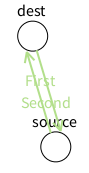
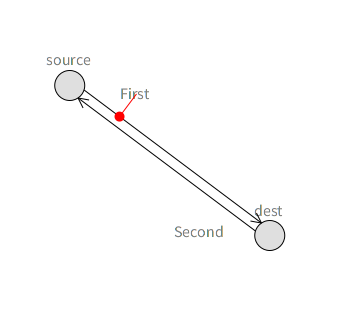
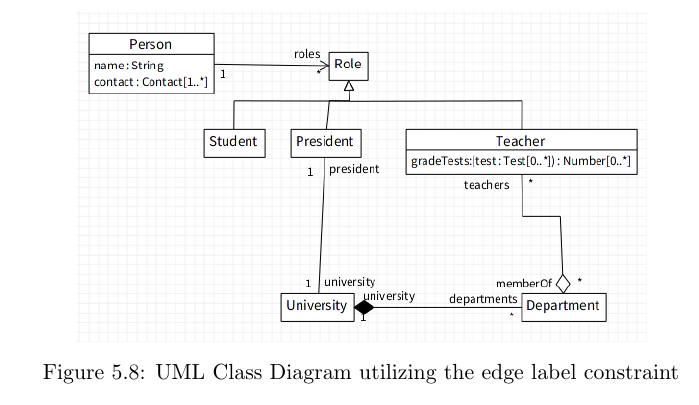
Excellent, thanks a lot! I will take a look at that tomorrow.
On Mar 7, 2016, at 11:34, Peter Uhnák <i.uhnak@gmail.com> wrote:
Hi Johan,
I've just commited RTAnchorConstraint to latest Roassal, see class-side example there.
I've been using it for my class diagrams where it works quite well, however class diagrams are usually orthogonal-ish, which makes it a bit nicer. <uml.png>
The Anchor will avoid intersecting it's own line, and one of the end shapes (it should both but apparently I have a bug there...). It doesn't look at other lines, however you can specify on which side it should be.
(You can also put the node label inside the circle with `el @ (RTLabelled new center)` but you probably know that.) <anchor.png> â I have also a global edge labeling layout which produces good placement⦠but it's slow as hell⦠I need to write a fast flow alogrithmâ¦
Also the Anchor currently doesn't work with self-edges. On the other hand Roassal doesn't have self-edges yet so it shouldn't be a problem. :)
Peter
On Mon, Mar 7, 2016 at 2:34 PM, Johan Fabry <jfabry@dcc.uchile.cl <mailto:jfabry@dcc.uchile.cl>> wrote:
Better late than never :-) (working on the holidays backlog)
I only have one request: better positioning on labels of nodes and edges. For example see the image: three of the four labels are badly positioned because the bounding box of their text is intersected by one or more edges.
<Screen Shot 2016-03-07 at 10.31.24.png> I know that to solve this generally is hard, but for simple cases like this it should be possible.
Ah, and it should work well with animations and dragging of course ;-)
On Feb 24, 2016, at 05:51, Alexandre Bergel <alexandre.bergel@me.com <mailto:alexandre.bergel@me.com>> wrote:
Dear community,
As you may have seen, Roassal has entered a stabilization phase. The book AgileVisualization.com <http://agilevisualization.com/> will soon be released. After its release, Roassal will go over a new development phase. In order to prepare it, I am asking this question:
What are the 3 aspects you would like to see improved in Roassal?
You can answer publicly or by sending private messages.
Kind regards, Alexandre -- _,.;:~^~:;._,.;:~^~:;._,.;:~^~:;._,.;:~^~:;._,.;: Alexandre Bergel http://www.bergel.eu <http://www.bergel.eu/> ^~:;._,.;:~^~:;._,.;:~^~:;._,.;:~^~:;._,.;:~^~:;.
_______________________________________________ Moose-dev mailing list Moose-dev@list.inf.unibe.ch <mailto:Moose-dev@list.inf.unibe.ch> https://www.list.inf.unibe.ch/listinfo/moose-dev <https://www.list.inf.unibe.ch/listinfo/moose-dev>
---> Save our in-boxes! http://emailcharter.org <http://emailcharter.org/> <---
Johan Fabry - http://pleiad.cl/~jfabry <http://pleiad.cl/~jfabry> PLEIAD and RyCh labs - Computer Science Department (DCC) - University of Chile
_______________________________________________ Moose-dev mailing list Moose-dev@list.inf.unibe.ch <mailto:Moose-dev@list.inf.unibe.ch> https://www.list.inf.unibe.ch/listinfo/moose-dev <https://www.list.inf.unibe.ch/listinfo/moose-dev>
---> Save our in-boxes! http://emailcharter.org <--- Johan Fabry - http://pleiad.cl/~jfabry PLEIAD and RyCh labs - Computer Science Department (DCC) - University of Chile
On Mar 7, 2016, at 11:34, Peter Uhnák <i.uhnak@gmail.com> wrote:
I've just commited RTAnchorConstraint to latest Roassal, see class-side example there.
I have been trying it, and there is a first version that works now, thanks! I even have a bug report for you ⦠before, when I removed the edge, the label was also removed automatically. Now this is no longer the case. :-( ---> Save our in-boxes! http://emailcharter.org <--- Johan Fabry - http://pleiad.cl/~jfabry PLEIAD and RyCh labs - Computer Science Department (DCC) - University of Chile
Heh, also a funny feature of your anchor constraints: they do not play well with layouts and animations. Try the code below (adapted from the example to use the layout and animation of LRP ) and you will see that the circles keep spinning around, they never stop. I think it would be better for them to stop ;-) | v lbls es e1 e2 a1 a2 layout stepping| v := RTView new. lbls := RTLabel new elementsOn: #(#First #Second). es := RTEllipse new size: 30; borderColor: Color black; elementsOn: #(#source #dest). v addAll: lbls; addAll: es. es @ RTDraggable. es @ RTLabeled. e1 := RTArrowedLine new withContinuousCircleAttachPoint; color: Color black; edgeFrom: es first to: es second. v add: e1. e2 := RTArrowedLine new withContinuousCircleAttachPoint; color: Color black; edgeFrom: es second to: es first. v add: e2. a1 := RTAnchorConstraint new. a1 anchorShape size: 10. a1 guideLine color: Color red. a1 element: lbls first; edge: e1; balance: 0.2; minDistance: 10; build. (a2 := RTAnchorConstraint new) element: lbls second; edge: e2; balance: 0.2; minDistance: 10; build. layout := RTForceBasedLayout new charge: -450; length: 100; doNotUseProgressBar; applyOn: es; yourself. layout initialLayout: RTSugiyamaLayout new. stepping := RTSpringLayoutStepping new view: v; layout: layout; afterBlock: [ v canvas camera focusOnCenter]. v addAnimation: stepping. ^ v
On Mar 9, 2016, at 17:56, Johan Fabry <jfabry@dcc.uchile.cl> wrote:
On Mar 7, 2016, at 11:34, Peter Uhnák <i.uhnak@gmail.com <mailto:i.uhnak@gmail.com>> wrote:
I've just commited RTAnchorConstraint to latest Roassal, see class-side example there.
I have been trying it, and there is a first version that works now, thanks!
I even have a bug report for you ⦠before, when I removed the edge, the label was also removed automatically. Now this is no longer the case. :-(
---> Save our in-boxes! http://emailcharter.org <http://emailcharter.org/> <---
Johan Fabry - http://pleiad.cl/~jfabry <http://pleiad.cl/~jfabry> PLEIAD and RyCh labs - Computer Science Department (DCC) - University of Chile
_______________________________________________ Moose-dev mailing list Moose-dev@list.inf.unibe.ch https://www.list.inf.unibe.ch/listinfo/moose-dev
---> Save our in-boxes! http://emailcharter.org <--- Johan Fabry - http://pleiad.cl/~jfabry PLEIAD and RyCh labs - Computer Science Department (DCC) - University of Chile
On Wed, Mar 9, 2016 at 10:02 PM, Johan Fabry <jfabry@dcc.uchile.cl> wrote:
Heh, also a funny feature of your anchor constraints: they do not play well with layouts and animations. Try the code below (adapted from the example to use the layout and animation of LRP ) and you will see that the circles keep spinning around, they never stop. I think it would be better for them to stop ;-)
can't help myself :) https://youtu.be/PGNiXGX2nLU?t=1m
stepping := RTSpringLayoutStepping new view: v; layout: layout; afterBlock: [ v canvas camera focusOnCenter].
The problem is that RTSpringLayoutStepping>>view sets in effect the layout on all elements in the view, which obviously won't work since they'll start competing. I'm not sure right now how to address it, but try this stepping := RTSpringLayoutStepping new view: RTView new; layout: layout; nodes: es; afterBlock: [ v canvas camera focusOnCenter].
I even have a bug report for you ⦠before, when I removed the edge, the label was also removed automatically. Now this is no longer the case. :-(
Ah right, thanks. I've extracted the class from my code and I have different removal mechanism... Please try the latest version, it should be fixed there. Peter
On Mar 9, 2016, at 18:51, Peter Uhnák <i.uhnak@gmail.com> wrote:
On Wed, Mar 9, 2016 at 10:02 PM, Johan Fabry <jfabry@dcc.uchile.cl <mailto:jfabry@dcc.uchile.cl>> wrote: Heh, also a funny feature of your anchor constraints: they do not play well with layouts and animations. Try the code below (adapted from the example to use the layout and animation of LRP ) and you will see that the circles keep spinning around, they never stop. I think it would be better for them to stop ;-)
can't help myself :)
https://youtu.be/PGNiXGX2nLU?t=1m <https://youtu.be/PGNiXGX2nLU?t=1m> Hehe, good one :-) https://youtu.be/uo0o8eQWfcI ! :-P
stepping := RTSpringLayoutStepping new view: v; layout: layout; afterBlock: [ v canvas camera focusOnCenter].
The problem is that RTSpringLayoutStepping>>view sets in effect the layout on all elements in the view, which obviously won't work since they'll start competing.
I'm not sure right now how to address it, but try this
stepping := RTSpringLayoutStepping new view: RTView new; layout: layout; nodes: es; afterBlock: [ v canvas camera focusOnCenter].
Sorry, I donât know enough of the internals to understand whatâs going on. The solution is not a solution for me, because it effectively removes the animation, we only see the the resulting layout. There is no other solution? Alex, do you have any idea?
Ah right, thanks. I've extracted the class from my code and I have different removal mechanism... Please try the latest version, it should be fixed there.
Fixed, thanks! But now there is a new bug RTAnchorConstraint>>computeExtraDistance that I cannot reliably reproduce, I only have a stack trace, sorry: Array(Object)>>errorSubscriptBounds: Array(Object)>>at: Array(SequenceableCollection)>>first Array(SequenceableCollection)>>anyOne Array(Collection)>>max RTAnchorConstraint>>computeExtraDistance [ :crossings | element translateBy: aSegment vector normal * (minDistance + self computeExtraDistance) negated ] in RTAnchorConstraint>>moveAwayFromSegment: BlockClosure>>cull: Set(Collection)>>ifNotEmpty: RTAnchorConstraint>>moveAwayFromSegment: RTAnchorConstraint>>moveElement RTAnchorConstraint>>update [ self update ] in RTAnchorConstraint>>build BlockClosure>>cull: BlockClosure>>cull:cull: TRTranslationCallback>>shape:step: [ :c | c isTranslationCallback ifTrue: [ c shape: self step: aStep ] ] in TREllipseShape(TRCallableObject)>>triggerCallbacksForStep: OrderedCollection>>do: TREllipseShape(TRCallableObject)>>triggerCallbacksForStep: TREllipseShape(TRAbstractBoxShape)>>fromRectangle: TREllipseShape(TRAbstractBoxShape)>>fromRectangle:color: RTEllipse>>updateFor:trachelShape: RTEllipse(RTShape)>>updateFor: RTElement(RTShapedObject)>>update ---> Save our in-boxes! http://emailcharter.org <--- Johan Fabry - http://pleiad.cl/~jfabry PLEIAD and RyCh labs - Computer Science Department (DCC) - University of Chile
On Mar 10, 2016, at 12:08, Alexandre Bergel <alexandre.bergel@me.com> wrote:
There is no other solution? Alex, do you have any idea?
To which problem?
Copy-paste from original mail: anchor constraints: they do not play well with layouts and animations. Try the code below (adapted from the example to use the layout and animation of LRP ) and you will see that the circles keep spinning around, they never stop. I think it would be better for them to stop ;-) | v lbls es e1 e2 a1 a2 layout stepping| v := RTView new. lbls := RTLabel new elementsOn: #(#First #Second). es := RTEllipse new size: 30; borderColor: Color black; elementsOn: #(#source #dest). v addAll: lbls; addAll: es. es @ RTDraggable. es @ RTLabeled. e1 := RTArrowedLine new withContinuousCircleAttachPoint; color: Color black; edgeFrom: es first to: es second. v add: e1. e2 := RTArrowedLine new withContinuousCircleAttachPoint; color: Color black; edgeFrom: es second to: es first. v add: e2. a1 := RTAnchorConstraint new. a1 anchorShape size: 10. a1 guideLine color: Color red. a1 element: lbls first; edge: e1; balance: 0.2; minDistance: 10; build. (a2 := RTAnchorConstraint new) element: lbls second; edge: e2; balance: 0.2; minDistance: 10; build. layout := RTForceBasedLayout new charge: -450; length: 100; doNotUseProgressBar; applyOn: es; yourself. layout initialLayout: RTSugiyamaLayout new. stepping := RTSpringLayoutStepping new view: v; layout: layout; afterBlock: [ v canvas camera focusOnCenter]. v addAnimation: stepping. ^ v ---> Save our in-boxes! http://emailcharter.org <--- Johan Fabry - http://pleiad.cl/~jfabry PLEIAD and RyCh labs - Computer Science Department (DCC) - University of Chile
To which problem?
The problem is that RTSpringLayoutStepping always uses all the elements in the view and ignores what you set to the layout. This is a problem, because it will try to also layout the anchor, but that will trigger the anchor to fix itself⦠and we get endless spinning. On Thu, Mar 10, 2016 at 4:21 PM, Johan Fabry <jfabry@dcc.uchile.cl> wrote:
On Mar 10, 2016, at 12:08, Alexandre Bergel <alexandre.bergel@me.com> wrote:
There is no other solution? Alex, do you have any idea?
To which problem?
Copy-paste from original mail:
anchor constraints: they do not play well with layouts and animations. Try the code below (adapted from the example to use the layout and animation of LRP ) and you will see that the circles keep spinning around, they never stop. I think it would be better for them to stop ;-)
| v lbls es e1 e2 a1 a2 layout stepping| v := RTView new. lbls := RTLabel new elementsOn: #(#First #Second). es := RTEllipse new size: 30; borderColor: Color black; elementsOn: #(#source #dest). v addAll: lbls; addAll: es. es @ RTDraggable. es @ RTLabeled. e1 := RTArrowedLine new withContinuousCircleAttachPoint; color: Color black; edgeFrom: es first to: es second. v add: e1. e2 := RTArrowedLine new withContinuousCircleAttachPoint; color: Color black; edgeFrom: es second to: es first. v add: e2. a1 := RTAnchorConstraint new. a1 anchorShape size: 10. a1 guideLine color: Color red. a1 element: lbls first; edge: e1; balance: 0.2; minDistance: 10; build. (a2 := RTAnchorConstraint new) element: lbls second; edge: e2; balance: 0.2; minDistance: 10; build. layout := RTForceBasedLayout new charge: -450; length: 100; doNotUseProgressBar; applyOn: es; yourself. layout initialLayout: RTSugiyamaLayout new. stepping := RTSpringLayoutStepping new view: v; layout: layout; afterBlock: [ v canvas camera focusOnCenter]. v addAnimation: stepping. ^ v
---> Save our in-boxes! http://emailcharter.org <---
Johan Fabry - http://pleiad.cl/~jfabry PLEIAD and RyCh labs - Computer Science Department (DCC) - University of Chile
_______________________________________________ Moose-dev mailing list Moose-dev@list.inf.unibe.ch https://www.list.inf.unibe.ch/listinfo/moose-dev
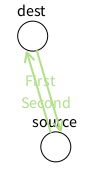
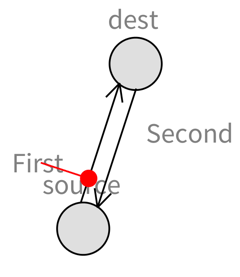
Hi! Thanks Peter for having spotted the problem. I have fixed it somehow (âsomehowâ because this is not an ideal solution, but good enough for now). Try this after having updated Roassal: -=-=-=-=-=-=-=-=-=-=-=-=-=-=-= | v lbls es e1 e2 a1 a2 layout stepping| v := RTView new. lbls := RTLabel new elementsOn: #(#First #Second). es := RTEllipse new size: 30; borderColor: Color black; elementsOn: #(#source #dest). v addAll: lbls; addAll: es. es @ RTDraggable. es @ RTLabeled. e1 := RTArrowedLine new withContinuousCircleAttachPoint; color: Color black; edgeFrom: es first to: es second. v add: e1. e2 := RTArrowedLine new withContinuousCircleAttachPoint; color: Color black; edgeFrom: es second to: es first. v add: e2. a1 := RTAnchorConstraint new. a1 anchorShape size: 10. a1 guideLine color: Color red. a1 element: lbls first; edge: e1; balance: 0.2; minDistance: 10; build. (a2 := RTAnchorConstraint new) element: lbls second; edge: e2; balance: 0.2; minDistance: 10; build. layout := RTForceBasedLayout new charge: -450; length: 100; doNotUseProgressBar; applyOn: es; yourself. layout initialLayout: RTSugiyamaLayout new. layout nodes: es. layout start: es. layout edges: { e1 . e2 }. stepping := RTSpringLayoutStepping new view: v; layoutWithoutPreparing: layout; afterBlock: [ v canvas camera focusOnCenter]. v addAnimation: stepping. ^ v -=-=-=-=-=-=-=-=-=-=-=-=-=-=-= Here is a screenshot: And this is all animated. Cool stuff! Alexandre -- _,.;:~^~:;._,.;:~^~:;._,.;:~^~:;._,.;:~^~:;._,.;: Alexandre Bergel http://www.bergel.eu ^~:;._,.;:~^~:;._,.;:~^~:;._,.;:~^~:;._,.;:~^~:;.
On Mar 10, 2016, at 12:42 PM, Peter Uhnák <i.uhnak@gmail.com> wrote:
To which problem?
The problem is that RTSpringLayoutStepping always uses all the elements in the view and ignores what you set to the layout.
This is a problem, because it will try to also layout the anchor, but that will trigger the anchor to fix itself⦠and we get endless spinning.
On Thu, Mar 10, 2016 at 4:21 PM, Johan Fabry <jfabry@dcc.uchile.cl <mailto:jfabry@dcc.uchile.cl>> wrote:
On Mar 10, 2016, at 12:08, Alexandre Bergel <alexandre.bergel@me.com <mailto:alexandre.bergel@me.com>> wrote:
There is no other solution? Alex, do you have any idea?
To which problem?
Copy-paste from original mail:
anchor constraints: they do not play well with layouts and animations. Try the code below (adapted from the example to use the layout and animation of LRP ) and you will see that the circles keep spinning around, they never stop. I think it would be better for them to stop ;-)
| v lbls es e1 e2 a1 a2 layout stepping| v := RTView new. lbls := RTLabel new elementsOn: #(#First #Second). es := RTEllipse new size: 30; borderColor: Color black; elementsOn: #(#source #dest). v addAll: lbls; addAll: es. es @ RTDraggable. es @ RTLabeled. e1 := RTArrowedLine new withContinuousCircleAttachPoint; color: Color black; edgeFrom: es first to: es second. v add: e1. e2 := RTArrowedLine new withContinuousCircleAttachPoint; color: Color black; edgeFrom: es second to: es first. v add: e2. a1 := RTAnchorConstraint new. a1 anchorShape size: 10. a1 guideLine color: Color red. a1 element: lbls first; edge: e1; balance: 0.2; minDistance: 10; build. (a2 := RTAnchorConstraint new) element: lbls second; edge: e2; balance: 0.2; minDistance: 10; build. layout := RTForceBasedLayout new charge: -450; length: 100; doNotUseProgressBar; applyOn: es; yourself. layout initialLayout: RTSugiyamaLayout new. stepping := RTSpringLayoutStepping new view: v; layout: layout; afterBlock: [ v canvas camera focusOnCenter]. v addAnimation: stepping. ^ v
---> Save our in-boxes! http://emailcharter.org <http://emailcharter.org/> <---
Johan Fabry - http://pleiad.cl/~jfabry <http://pleiad.cl/~jfabry> PLEIAD and RyCh labs - Computer Science Department (DCC) - University of Chile
_______________________________________________ Moose-dev mailing list Moose-dev@list.inf.unibe.ch <mailto:Moose-dev@list.inf.unibe.ch> https://www.list.inf.unibe.ch/listinfo/moose-dev <https://www.list.inf.unibe.ch/listinfo/moose-dev>
Any code I can have to reproduce the problem? Alexandre -- _,.;:~^~:;._,.;:~^~:;._,.;:~^~:;._,.;:~^~:;._,.;: Alexandre Bergel http://www.bergel.eu ^~:;._,.;:~^~:;._,.;:~^~:;._,.;:~^~:;._,.;:~^~:;.
On Mar 10, 2016, at 11:25 AM, Johan Fabry <jfabry@dcc.uchile.cl> wrote:
But now there is a new bug RTAnchorConstraint>>computeExtraDistance that I cannot reliably reproduce,
participants (7)
-
 Alexandre Bergel
 -
 Anne Etien
 -
 Johan Fabry
 -
 Peter Uhnák
 -
 phil@highoctane.be
 -
 stepharo
 -
 Tudor Girba