Re: [Pharo-project] New IDE alternative (was Misc. newbie questions)

On Feb 26, 2012, at 11:24 AM, Stéphane Ducasse wrote:
Hi hannes
I tried to understand the purpose of your emails but I could not. - So do you suggest that we all stop Smalltalk and move to javascript? - What is your motivation? - This is good for us to know that but then so what? - Does it help us anyhow to make pharo better? - Did you try to port the code to Squeak? - Do you know if the global handling of coordinates have been changed? We can spend our life looking why other people are doing or we can invent OUR future.
For the "Lets all just do JavaScript". There was a very, uhm , disappointed blog post by Gilad after they did the javascript implementation of NewSpeak... JavaScript is *not* a good implementation language for languages. Especially not if you want to do something new. If you build on top of JS, you will be very very contraint in what is possible... and the things *I* want to build in the future with Pharo are just impossible to do on top of javascript. Marcus -- Marcus Denker -- http://marcusdenker.de

On 26 February 2012 11:33, Marcus Denker <marcus.denker@inria.fr> wrote:
On Feb 26, 2012, at 11:24 AM, Stéphane Ducasse wrote:
Hi hannes
I tried to understand the purpose of your emails but I could not. Â Â Â - So do you suggest that we all stop Smalltalk and move to javascript? Â Â Â - What is your motivation? Â Â Â - This is good for us to know that but then so what? Â Â Â - Does it help us anyhow to make pharo better? Â Â Â - Did you try to port the code to Squeak? Â Â Â - Do you know if the global handling of coordinates have been changed? We can spend our life looking why other people are doing or we can invent OUR future.
yes, when you want to do something for real, you must CHOOSE concrete things which you will be using and after that you stick with it. or keep jumping between myriads of fancy and promising techs just losing time doing nothing..
For the "Lets all just do JavaScript". There was a very, uhm , disappointed blog post by Gilad after they did the javascript implementation of NewSpeak...
Well, his post was about how good js as an 'assembler language'.. and i agree not very good. But if you use js as-is (not to build a language on top of it), morphic fits well, even better than in smalltalk since SELF is also prototype-based and morphic exploits this feature everywhere.
JavaScript is *not* a good implementation language for languages. Especially not if you want to do something new. If you build on top of JS, you will be very very contraint in what is possible... and the things *I* want to build in the future with Pharo are just impossible to do on top of javascript.
    Marcus
-- Marcus Denker -- http://marcusdenker.de
-- Best regards, Igor Stasenko.

Hi folks! On 02/26/2012 11:33 AM, Marcus Denker wrote:
On Feb 26, 2012, at 11:24 AM, Stéphane Ducasse wrote:
Hi hannes
I tried to understand the purpose of your emails but I could not. - So do you suggest that we all stop Smalltalk and move to javascript? - What is your motivation? - This is good for us to know that but then so what? - Does it help us anyhow to make pharo better? - Did you try to port the code to Squeak? - Do you know if the global handling of coordinates have been changed? We can spend our life looking why other people are doing or we can invent OUR future.
Indeed - but one also needs to be "aware" of inspiration sources. Personally I am *not* interested in Morphic on js, other than a fun project. But it is still *interesting*. Does it help Pharo become better if we know stuff about the rest of the world? I hope so :)
For the "Lets all just do JavaScript". There was a very, uhm , disappointed blog post by Gilad after they did the javascript implementation of NewSpeak...
JavaScript is *not* a good implementation language for languages. Especially not if you want to do something new. If you build on top of JS, you will be very very contraint in what is possible... and the things *I* want to build in the future with Pharo are just impossible to do on top of javascript.
Definitely. If we take Amber for example, how is Amber interesting? To me it is about being able to build "HTML5 stuff" in Smalltalk but also "in a Smalltalk way" which means interactively in a Smalltalk "live" IDE. So is Amber the end-all-final-solution? Of course not! But it has its "niche" and coupled with Pharo on the server side etc, it gives us a new very interesting "Smalltalk all the way" application stack for the web. regards, Göran PS. Inspiration is everywhere - for example, in Amber (just to pick a source of inspiration) the "senders of" and "implementors of" is the same button: "references", and it then shows both senders and implementors at the same time. Simple, trivial and quite nice.

Definitely. If we take Amber for example, how is Amber interesting? To me it is about being able to build "HTML5 stuff" in Smalltalk but also "in a Smalltalk way" which means interactively in a Smalltalk "live" IDE.
So is Amber the end-all-final-solution? Of course not! But it has its "niche" and coupled with Pharo on the server side etc, it gives us a new very interesting "Smalltalk all the way" application stack for the web.
this is why we will have fun when nicolas arrives to lille to work with us :)
regards, Göran
PS. Inspiration is everywhere - for example, in Amber (just to pick a source of inspiration) the "senders of" and "implementors of" is the same button: "references", and it then shows both senders and implementors at the same time. Simple, trivial and quite nice.
Did you notice that in pharo Cmd + M also work on classes since long time ago and Cmd+ N also :) ?

Can take the latest of the package.. PackageTree-Browser-Experiment * Find class added and a crude/ workable expand for text morph.. As stated in the comments: will require a hack in Pharo 1.4 for now. Will work towards integrating TabbedPane with TWM/ this too as an addon with more complete features month ahead.
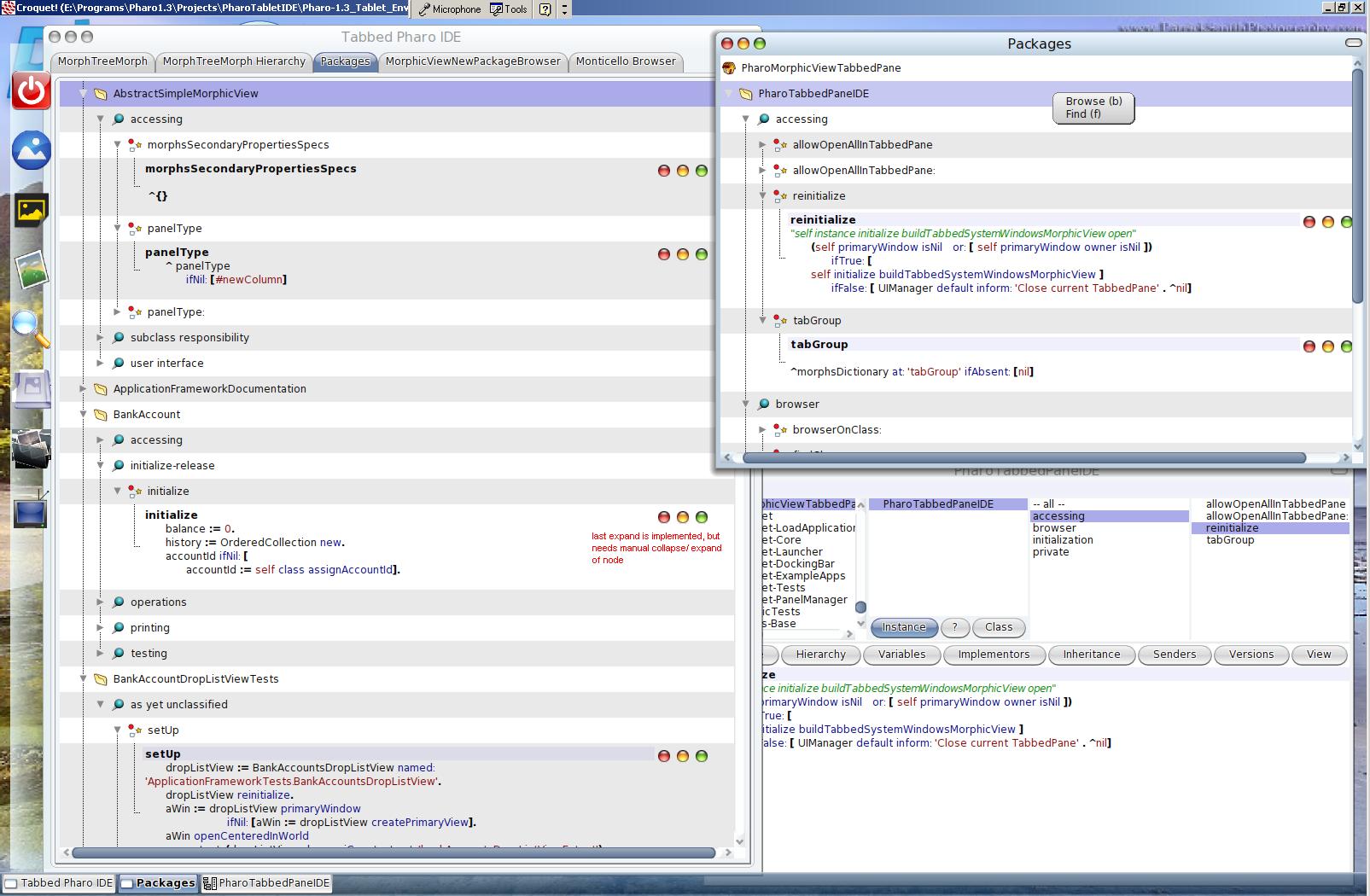
this looks really nice. I would really like to see if we cannot include a version so that people can browse change set and other code like that. I'm really happy to see that the work done by alain and ben around treeMorph pays off that well. Stef
Can take the latest of the package..
PackageTree-Browser-Experiment
* Find class added and a crude/ workable expand for text morph..
As stated in the comments: will require a hack in Pharo 1.4 for now.
Will work towards integrating TabbedPane with TWM/ this too as an addon with more complete features month ahead. <Pharo_CodeBrowser02.JPG>
How can I open it? (MorphicViewNewPackageBrowser new packageNames: 'UIManager'; yourself) openInWorld does not work Stef On Feb 27, 2012, at 6:42 PM, Stéphane Ducasse wrote:
this looks really nice. I would really like to see if we cannot include a version so that people can browse change set and other code like that. I'm really happy to see that the work done by alain and ben around treeMorph pays off that well.
Stef
Can take the latest of the package..
PackageTree-Browser-Experiment
* Find class added and a crude/ workable expand for text morph..
As stated in the comments: will require a hack in Pharo 1.4 for now.
Will work towards integrating TabbedPane with TWM/ this too as an addon with more complete features month ahead. <Pharo_CodeBrowser02.JPG>
MorphicViewNewPackageBrowser new packageNames: #('UIManager') ; open But it does not look that nice :) On Feb 27, 2012, at 6:42 PM, Stéphane Ducasse wrote:
this looks really nice. I would really like to see if we cannot include a version so that people can browse change set and other code like that. I'm really happy to see that the work done by alain and ben around treeMorph pays off that well.
Stef
Can take the latest of the package..
PackageTree-Browser-Experiment
* Find class added and a crude/ workable expand for text morph..
As stated in the comments: will require a hack in Pharo 1.4 for now.
Will work towards integrating TabbedPane with TWM/ this too as an addon with more complete features month ahead. <Pharo_CodeBrowser02.JPG>

Hi, I gave it a try. I am not necessarily looking for the looks as for the solution to make the text editor within the tree span horizontally and vertically with the size of the method. Unfortunately, this does not work in this example, either. Does anyone have ideas of how to make it work? :) Cheers, Doru On 27 Feb 2012, at 21:43, Stéphane Ducasse wrote:
MorphicViewNewPackageBrowser new packageNames: #('UIManager') ; open
But it does not look that nice :)
On Feb 27, 2012, at 6:42 PM, Stéphane Ducasse wrote:
this looks really nice. I would really like to see if we cannot include a version so that people can browse change set and other code like that. I'm really happy to see that the work done by alain and ben around treeMorph pays off that well.
Stef
Can take the latest of the package..
PackageTree-Browser-Experiment
* Find class added and a crude/ workable expand for text morph..
As stated in the comments: will require a hack in Pharo 1.4 for now.
Will work towards integrating TabbedPane with TWM/ this too as an addon with more complete features month ahead. <Pharo_CodeBrowser02.JPG>
-- www.tudorgirba.com "One cannot do more than one can do."
It does have the code to calculateTextExtent. You can modify it the way you want. The height is defaulted to a max 210 and fixed 600. But on expand it goes to max ht of 600 Modify the logic in that method as you want it to On Feb 28, 2012, at 2:42 AM, Tudor Girba <tudor@tudorgirba.com> wrote:
Hi,
I gave it a try. I am not necessarily looking for the looks as for the solution to make the text editor within the tree span horizontally and vertically with the size of the method. Unfortunately, this does not work in this example, either.
Does anyone have ideas of how to make it work? :)
Cheers, Doru
On 27 Feb 2012, at 21:43, Stéphane Ducasse wrote:
MorphicViewNewPackageBrowser new packageNames: #('UIManager') ; open
But it does not look that nice :)
On Feb 27, 2012, at 6:42 PM, Stéphane Ducasse wrote:
this looks really nice. I would really like to see if we cannot include a version so that people can browse change set and other code like that. I'm really happy to see that the work done by alain and ben around treeMorph pays off that well.
Stef
Can take the latest of the package..
PackageTree-Browser-Experiment
* Find class added and a crude/ workable expand for text morph..
As stated in the comments: will require a hack in Pharo 1.4 for now.
Will work towards integrating TabbedPane with TWM/ this too as an addon with more complete features month ahead. <Pharo_CodeBrowser02.JPG>
-- www.tudorgirba.com
"One cannot do more than one can do."
Hi, Thanks for the explanation. I took a look. calculateExtent is triggered when you create the TextMorph. This is nice, but I am interested in getting the TextMorph to always expand to fill the width of the surrounding element, and to expand vertically according to the text :). Here is a variation of what I am thinking about with just a simple list of morphs within a GeneralScrollPane: https://gist.github.com/1930477 Cheers, Doru On 28 Feb 2012, at 03:22, Krishsmalltalk wrote:
It does have the code to calculateTextExtent. You can modify it the way you want.
The height is defaulted to a max 210 and fixed 600. But on expand it goes to max ht of 600
Modify the logic in that method as you want it to
On Feb 28, 2012, at 2:42 AM, Tudor Girba <tudor@tudorgirba.com> wrote:
Hi,
I gave it a try. I am not necessarily looking for the looks as for the solution to make the text editor within the tree span horizontally and vertically with the size of the method. Unfortunately, this does not work in this example, either.
Does anyone have ideas of how to make it work? :)
Cheers, Doru
On 27 Feb 2012, at 21:43, Stéphane Ducasse wrote:
MorphicViewNewPackageBrowser new packageNames: #('UIManager') ; open
But it does not look that nice :)
On Feb 27, 2012, at 6:42 PM, Stéphane Ducasse wrote:
this looks really nice. I would really like to see if we cannot include a version so that people can browse change set and other code like that. I'm really happy to see that the work done by alain and ben around treeMorph pays off that well.
Stef
Can take the latest of the package..
PackageTree-Browser-Experiment
* Find class added and a crude/ workable expand for text morph..
As stated in the comments: will require a hack in Pharo 1.4 for now.
Will work towards integrating TabbedPane with TWM/ this too as an addon with more complete features month ahead. <Pharo_CodeBrowser02.JPG>
-- www.tudorgirba.com
"One cannot do more than one can do."
-- www.tudorgirba.com "Sometimes the best solution is not the best solution."

On 28 Feb 2012, at 09:03, Tudor Girba wrote:
Here is a variation of what I am thinking about with just a simple list of morphs within a GeneralScrollPane: https://gist.github.com/1930477
It was an innocent mistake. My apologies :) Doru On Tue, Feb 28, 2012 at 9:47 AM, Sven Van Caekenberghe <sven@beta9.be> wrote:
On 28 Feb 2012, at 09:03, Tudor Girba wrote:
Here is a variation of what I am thinking about with just a simple list of morphs within a GeneralScrollPane: https://gist.github.com/1930477
http://ws.stfx.eu/8OCB6Z56XGVI
;-)
-- www.tudorgirba.com "Every thing has its own flow"
On 28 February 2012 09:47, Sven Van Caekenberghe <sven@beta9.be> wrote:
On 28 Feb 2012, at 09:03, Tudor Girba wrote:
Here is a variation of what I am thinking about with just a simple list of morphs within a GeneralScrollPane: https://gist.github.com/1930477
http://ws.stfx.eu/8OCB6Z56XGVI
;-)
hey.. shared workspace.. kinda cool :)
-- Best regards, Igor Stasenko.
Sure.. that is fine.. for the use case you state Mine is quick n dirty hack to what I wanted: but my use case is I do wish to have more of these sources partially visible through the vertical pane. so I restrain it to max of 210.. and width of 600 to be able to to throw up another pane next to it.. for grouping methods I am interested in .. to view it more closely.. On Tue, Feb 28, 2012 at 1:33 PM, Tudor Girba <tudor@tudorgirba.com> wrote:
Hi,
Thanks for the explanation.
I took a look. calculateExtent is triggered when you create the TextMorph. This is nice, but I am interested in getting the TextMorph to always expand to fill the width of the surrounding element, and to expand vertically according to the text :).
Here is a variation of what I am thinking about with just a simple list of morphs within a GeneralScrollPane: https://gist.github.com/1930477
Cheers, Doru
On 28 Feb 2012, at 03:22, Krishsmalltalk wrote:
It does have the code to calculateTextExtent. You can modify it the way you want.
The height is defaulted to a max 210 and fixed 600. But on expand it goes to max ht of 600
Modify the logic in that method as you want it to
On Feb 28, 2012, at 2:42 AM, Tudor Girba <tudor@tudorgirba.com> wrote:
Hi,
I gave it a try. I am not necessarily looking for the looks as for the solution to make the text editor within the tree span horizontally and vertically with the size of the method. Unfortunately, this does not work in this example, either.
Does anyone have ideas of how to make it work? :)
Cheers, Doru
On 27 Feb 2012, at 21:43, Stéphane Ducasse wrote:
MorphicViewNewPackageBrowser new packageNames: #('UIManager') ; open
But it does not look that nice :)
On Feb 27, 2012, at 6:42 PM, Stéphane Ducasse wrote:
this looks really nice. I would really like to see if we cannot include a version so that people can browse change set and other code like that. I'm really happy to see that the work done by alain and ben around treeMorph pays off that well.
Stef
Can take the latest of the package..
PackageTree-Browser-Experiment
* Find class added and a crude/ workable expand for text morph..
As stated in the comments: will require a hack in Pharo 1.4 for now.
Will work towards integrating TabbedPane with TWM/ this too as an addon with more complete features month ahead. <Pharo_CodeBrowser02.JPG>
-- www.tudorgirba.com
"One cannot do more than one can do."
-- www.tudorgirba.com
"Sometimes the best solution is not the best solution."
Also on need basis expand to full size/ larger size is how I look at it.. but yours is a better code to adapt to.. even for the #calculateTextExtent for a) show minimal ht. b) show expanded state upto 600 and c) full expand as you explain this should be configurable.. and flexible on a button click.. On Tue, Feb 28, 2012 at 2:39 PM, S Krish <krishnamachari.sudhakar@gmail.com>wrote:
Sure.. that is fine.. for the use case you state
Mine is quick n dirty hack to what I wanted:
but my use case is I do wish to have more of these sources partially visible through the vertical pane. so I restrain it to max of 210.. and width of 600 to be able to to throw up another pane next to it.. for grouping methods I am interested in .. to view it more closely..
On Tue, Feb 28, 2012 at 1:33 PM, Tudor Girba <tudor@tudorgirba.com> wrote:
Hi,
Thanks for the explanation.
I took a look. calculateExtent is triggered when you create the TextMorph. This is nice, but I am interested in getting the TextMorph to always expand to fill the width of the surrounding element, and to expand vertically according to the text :).
Here is a variation of what I am thinking about with just a simple list of morphs within a GeneralScrollPane: https://gist.github.com/1930477
Cheers, Doru
On 28 Feb 2012, at 03:22, Krishsmalltalk wrote:
It does have the code to calculateTextExtent. You can modify it the way you want.
The height is defaulted to a max 210 and fixed 600. But on expand it goes to max ht of 600
Modify the logic in that method as you want it to
On Feb 28, 2012, at 2:42 AM, Tudor Girba <tudor@tudorgirba.com> wrote:
Hi,
I gave it a try. I am not necessarily looking for the looks as for the solution to make the text editor within the tree span horizontally and vertically with the size of the method. Unfortunately, this does not work in this example, either.
Does anyone have ideas of how to make it work? :)
Cheers, Doru
On 27 Feb 2012, at 21:43, Stéphane Ducasse wrote:
MorphicViewNewPackageBrowser new packageNames: #('UIManager') ; open
But it does not look that nice :)
On Feb 27, 2012, at 6:42 PM, Stéphane Ducasse wrote:
this looks really nice. I would really like to see if we cannot include a version so that people can browse change set and other code like that. I'm really happy to see that the work done by alain and ben around treeMorph pays off that well.
Stef
Can take the latest of the package..
PackageTree-Browser-Experiment
* Find class added and a crude/ workable expand for text morph..
As stated in the comments: will require a hack in Pharo 1.4 for now.
Will work towards integrating TabbedPane with TWM/ this too as an addon with more complete features month ahead. <Pharo_CodeBrowser02.JPG>
-- www.tudorgirba.com
"One cannot do more than one can do."
-- www.tudorgirba.com
"Sometimes the best solution is not the best solution."
Hi, I was not criticizing your solution. I was actually asking for help :). I would like to get a text morph in the tree and have it scale both horizontally to fill the available space, and vertically to accommodate the entire text. I show the example with the GeneralScrollPane because I managed to make it work there (with the help of Gary), but I cannot do it on MorphTreeMorph. So, if you, or someone else, have ideas I would be happy to hear them. Cheers, Doru On Tue, Feb 28, 2012 at 10:09 AM, S Krish <krishnamachari.sudhakar@gmail.com> wrote:
Sure.. that is fine.. for the use case you state
Mine is quick n dirty hack to what I wanted:
but my use case is I do wish to have more of these sources partially visible through the vertical pane. so I restrain it to max of 210.. and width of 600 to be able to to throw up another pane next to it.. for grouping methods I am interested in .. to view it more closely..
On Tue, Feb 28, 2012 at 1:33 PM, Tudor Girba <tudor@tudorgirba.com> wrote:
Hi,
Thanks for the explanation.
I took a look. calculateExtent is triggered when you create the TextMorph. This is nice, but I am interested in getting the TextMorph to always expand to fill the width of the surrounding element, and to expand vertically according to the text :).
Here is a variation of what I am thinking about with just a simple list of morphs within a GeneralScrollPane: https://gist.github.com/1930477
Cheers, Doru
On 28 Feb 2012, at 03:22, Krishsmalltalk wrote:
It does have the code to calculateTextExtent. You can modify it the way you want.
The height is defaulted to a max 210 and fixed 600. But on expand it goes to max ht of 600
Modify the logic in that method as you want it to
On Feb 28, 2012, at 2:42 AM, Tudor Girba <tudor@tudorgirba.com> wrote:
Hi,
I gave it a try. I am not necessarily looking for the looks as for the solution to make the text editor within the tree span horizontally and vertically with the size of the method. Unfortunately, this does not work in this example, either.
Does anyone have ideas of how to make it work? :)
Cheers, Doru
On 27 Feb 2012, at 21:43, Stéphane Ducasse wrote:
MorphicViewNewPackageBrowser new packageNames: #('UIManager') ; open
But it does not look that nice :)
On Feb 27, 2012, at 6:42 PM, Stéphane Ducasse wrote:
this looks really nice. I would really like to see if we cannot include a version so that people can browse change set and other code like that. I'm really happy to see that the work done by alain and ben around treeMorph pays off that well.
Stef
Can take the latest of the package..
PackageTree-Browser-Experiment
* Find class added and a crude/ workable expand for text morph..
As stated in the comments: will require a hack in Pharo 1.4 for now.
Will work towards integrating TabbedPane with TWM/ this too as an addon with more complete features month ahead. <Pharo_CodeBrowser02.JPG>
-- www.tudorgirba.com
"One cannot do more than one can do."
-- www.tudorgirba.com
"Sometimes the best solution is not the best solution."
-- www.tudorgirba.com "Every thing has its own flow"
On 29 February 2012 13:14, Tudor Girba <tudor@tudorgirba.com> wrote:
Hi,
I was not criticizing your solution. I was actually asking for help :).
I would like to get a text morph in the tree and have it scale both horizontally to fill the available space, and vertically to accommodate the entire text. I show the example with the GeneralScrollPane because I managed to make it work there (with the help of Gary), but I cannot do it on MorphTreeMorph. So, if you, or someone else, have ideas I would be happy to hear them.
Doru, i remember i was digging it some time before. But didn't found good solution to the above. The problem is that it is hard to figure out what happens in text morph.. its too complicated thingy. Then later, when i was implementing text rendering in Athens, i had to make own text morph class, because there are things which hard-wired. And now to the point about the problem: determining text dimensions is constraint-solving problem. I found the code there which actually takes initial bounds of morph and tries to lay out text within those bounds. Now if you want to make morph to stretch depending on text dimensions, you actually creating a dependency loop, because to lay out text you need bounds, but bounds are determined from text size.. So, i fear that without some refactoring of paragraph/display scanner /text morph, you simply cannot have a good solution.
Cheers, Doru
On Tue, Feb 28, 2012 at 10:09 AM, S Krish <krishnamachari.sudhakar@gmail.com> wrote:
Sure.. that is fine.. for the use case you state
Mine is quick n dirty hack to what I wanted:
but my use case is I do wish to have more of these sources partially visible through the vertical pane. so I restrain it to max of 210.. and width of 600 to be able to to throw up another pane next to it.. for grouping methods I am interested in .. to view it more closely..
On Tue, Feb 28, 2012 at 1:33 PM, Tudor Girba <tudor@tudorgirba.com> wrote:
Hi,
Thanks for the explanation.
I took a look. calculateExtent is triggered when you create the TextMorph. This is nice, but I am interested in getting the TextMorph to always expand to fill the width of the surrounding element, and to expand vertically according to the text :).
Here is a variation of what I am thinking about with just a simple list of morphs within a GeneralScrollPane: https://gist.github.com/1930477
Cheers, Doru
On 28 Feb 2012, at 03:22, Krishsmalltalk wrote:
It does have the code to calculateTextExtent. You can modify it the way you want.
The height is defaulted to a max 210 and fixed 600. But on expand it goes to max ht of 600
Modify the logic in that method as you want it to
On Feb 28, 2012, at 2:42 AM, Tudor Girba <tudor@tudorgirba.com> wrote:
Hi,
I gave it a try. I am not necessarily looking for the looks as for the solution to make the text editor within the tree span horizontally and vertically with the size of the method. Unfortunately, this does not work in this example, either.
Does anyone have ideas of how to make it work? :)
Cheers, Doru
On 27 Feb 2012, at 21:43, Stéphane Ducasse wrote:
MorphicViewNewPackageBrowser new packageNames: #('UIManager') ; open
But it does not look that nice :)
On Feb 27, 2012, at 6:42 PM, Stéphane Ducasse wrote:
this looks really nice. I would really like to see if we cannot include a version so that people can browse change set and other code like that. I'm really happy to see that the work done by alain and ben around treeMorph pays off that well.
Stef
Can take the latest of the package..
PackageTree-Browser-Experiment
* Find class added and a crude/ workable expand for text morph..
As stated in the comments: will require a hack in Pharo 1.4 for now.
Will work towards integrating TabbedPane with TWM/ this too as an addon with more complete features month ahead. <Pharo_CodeBrowser02.JPG>
-- www.tudorgirba.com
"One cannot do more than one can do."
-- www.tudorgirba.com
"Sometimes the best solution is not the best solution."
-- www.tudorgirba.com
"Every thing has its own flow"
-- Best regards, Igor Stasenko.
Sure I understood that, I am still just month and a half of dabbling in morphic, that i am still learning.... I do not take any comments amiss. Thx On Feb 29, 2012, at 5:44 PM, Tudor Girba <tudor@tudorgirba.com> wrote:
Hi,
I was not criticizing your solution. I was actually asking for help :).
I would like to get a text morph in the tree and have it scale both horizontally to fill the available space, and vertically to accommodate the entire text. I show the example with the GeneralScrollPane because I managed to make it work there (with the help of Gary), but I cannot do it on MorphTreeMorph. So, if you, or someone else, have ideas I would be happy to hear them.
Cheers, Doru
On Tue, Feb 28, 2012 at 10:09 AM, S Krish <krishnamachari.sudhakar@gmail.com> wrote:
Sure.. that is fine.. for the use case you state
Mine is quick n dirty hack to what I wanted:
but my use case is I do wish to have more of these sources partially visible through the vertical pane. so I restrain it to max of 210.. and width of 600 to be able to to throw up another pane next to it.. for grouping methods I am interested in .. to view it more closely..
On Tue, Feb 28, 2012 at 1:33 PM, Tudor Girba <tudor@tudorgirba.com> wrote:
Hi,
Thanks for the explanation.
I took a look. calculateExtent is triggered when you create the TextMorph. This is nice, but I am interested in getting the TextMorph to always expand to fill the width of the surrounding element, and to expand vertically according to the text :).
Here is a variation of what I am thinking about with just a simple list of morphs within a GeneralScrollPane: https://gist.github.com/1930477
Cheers, Doru
On 28 Feb 2012, at 03:22, Krishsmalltalk wrote:
It does have the code to calculateTextExtent. You can modify it the way you want.
The height is defaulted to a max 210 and fixed 600. But on expand it goes to max ht of 600
Modify the logic in that method as you want it to
On Feb 28, 2012, at 2:42 AM, Tudor Girba <tudor@tudorgirba.com> wrote:
Hi,
I gave it a try. I am not necessarily looking for the looks as for the solution to make the text editor within the tree span horizontally and vertically with the size of the method. Unfortunately, this does not work in this example, either.
Does anyone have ideas of how to make it work? :)
Cheers, Doru
On 27 Feb 2012, at 21:43, Stéphane Ducasse wrote:
MorphicViewNewPackageBrowser new packageNames: #('UIManager') ; open
But it does not look that nice :)
On Feb 27, 2012, at 6:42 PM, Stéphane Ducasse wrote:
this looks really nice. I would really like to see if we cannot include a version so that people can browse change set and other code like that. I'm really happy to see that the work done by alain and ben around treeMorph pays off that well.
Stef
Can take the latest of the package..
PackageTree-Browser-Experiment
* Find class added and a crude/ workable expand for text morph..
As stated in the comments: will require a hack in Pharo 1.4 for now.
Will work towards integrating TabbedPane with TWM/ this too as an addon with more complete features month ahead. <Pharo_CodeBrowser02.JPG>
-- www.tudorgirba.com
"One cannot do more than one can do."
-- www.tudorgirba.com
"Sometimes the best solution is not the best solution."
-- www.tudorgirba.com
"Every thing has its own flow"
Couple of screenshots of a usable code browser, does well for my use for now.. need to bring in the basic refactoring, variables text box under the class tree, in the middle. Feels lot more productive in combination with the standard browsers where needed. On 2/29/12, Krishsmalltalk <krishnamachari.sudhakar@gmail.com> wrote:
Sure I understood that, I am still just month and a half of dabbling in morphic, that i am still learning.... I do not take any comments amiss.
Thx
On Feb 29, 2012, at 5:44 PM, Tudor Girba <tudor@tudorgirba.com> wrote:
Hi,
I was not criticizing your solution. I was actually asking for help :).
I would like to get a text morph in the tree and have it scale both horizontally to fill the available space, and vertically to accommodate the entire text. I show the example with the GeneralScrollPane because I managed to make it work there (with the help of Gary), but I cannot do it on MorphTreeMorph. So, if you, or someone else, have ideas I would be happy to hear them.
Cheers, Doru
On Tue, Feb 28, 2012 at 10:09 AM, S Krish <krishnamachari.sudhakar@gmail.com> wrote:
Sure.. that is fine.. for the use case you state
Mine is quick n dirty hack to what I wanted:
but my use case is I do wish to have more of these sources partially visible through the vertical pane. so I restrain it to max of 210.. and width of 600 to be able to to throw up another pane next to it.. for grouping methods I am interested in .. to view it more closely..
On Tue, Feb 28, 2012 at 1:33 PM, Tudor Girba <tudor@tudorgirba.com> wrote:
Hi,
Thanks for the explanation.
I took a look. calculateExtent is triggered when you create the TextMorph. This is nice, but I am interested in getting the TextMorph to always expand to fill the width of the surrounding element, and to expand vertically according to the text :).
Here is a variation of what I am thinking about with just a simple list of morphs within a GeneralScrollPane: https://gist.github.com/1930477
Cheers, Doru
On 28 Feb 2012, at 03:22, Krishsmalltalk wrote:
It does have the code to calculateTextExtent. You can modify it the way you want.
The height is defaulted to a max 210 and fixed 600. But on expand it goes to max ht of 600
Modify the logic in that method as you want it to
On Feb 28, 2012, at 2:42 AM, Tudor Girba <tudor@tudorgirba.com> wrote:
Hi,
I gave it a try. I am not necessarily looking for the looks as for the solution to make the text editor within the tree span horizontally and vertically with the size of the method. Unfortunately, this does not work in this example, either.
Does anyone have ideas of how to make it work? :)
Cheers, Doru
On 27 Feb 2012, at 21:43, Stéphane Ducasse wrote:
MorphicViewNewPackageBrowser new packageNames: #('UIManager') ; open
But it does not look that nice :)
On Feb 27, 2012, at 6:42 PM, Stéphane Ducasse wrote:
this looks really nice. I would really like to see if we cannot include a version so that people can browse change set and other code like that. I'm really happy to see that the work done by alain and ben around treeMorph pays off that well.
Stef
Can take the latest of the package..
PackageTree-Browser-Experiment
* Find class added and a crude/ workable expand for text morph..
As stated in the comments: will require a hack in Pharo 1.4 for now.
Will work towards integrating TabbedPane with TWM/ this too as an addon with more complete features month ahead. <Pharo_CodeBrowser02.JPG>
-- www.tudorgirba.com
"One cannot do more than one can do."
-- www.tudorgirba.com
"Sometimes the best solution is not the best solution."
-- www.tudorgirba.com
"Every thing has its own flow"
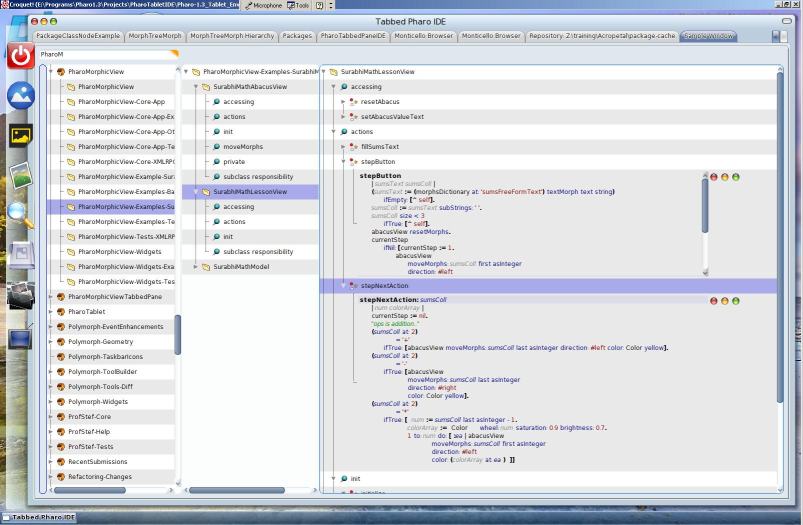
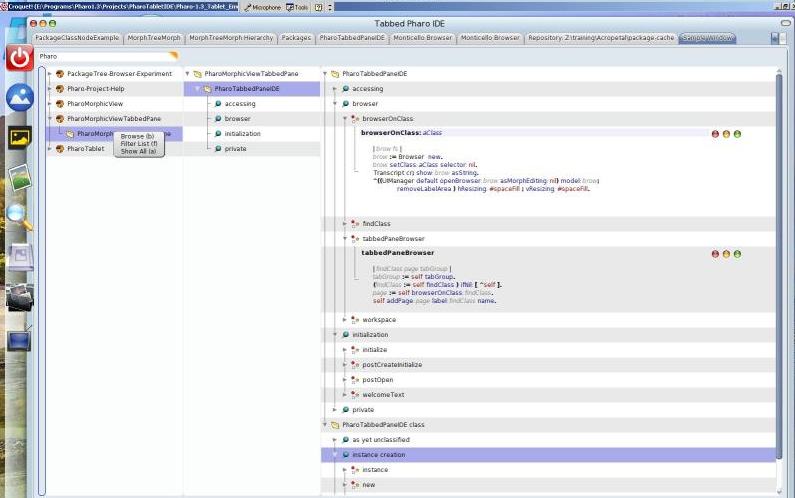
it looks cool. Continue to polish it because it could be a nice alternative. Stef On Mar 2, 2012, at 10:54 AM, S Krish wrote:
Couple of screenshots of a usable code browser, does well for my use for now.. need to bring in the basic refactoring, variables text box under the class tree, in the middle.
Feels lot more productive in combination with the standard browsers where needed.
On 2/29/12, Krishsmalltalk <krishnamachari.sudhakar@gmail.com> wrote:
Sure I understood that, I am still just month and a half of dabbling in morphic, that i am still learning.... I do not take any comments amiss.
Thx
On Feb 29, 2012, at 5:44 PM, Tudor Girba <tudor@tudorgirba.com> wrote:
Hi,
I was not criticizing your solution. I was actually asking for help :).
I would like to get a text morph in the tree and have it scale both horizontally to fill the available space, and vertically to accommodate the entire text. I show the example with the GeneralScrollPane because I managed to make it work there (with the help of Gary), but I cannot do it on MorphTreeMorph. So, if you, or someone else, have ideas I would be happy to hear them.
Cheers, Doru
On Tue, Feb 28, 2012 at 10:09 AM, S Krish <krishnamachari.sudhakar@gmail.com> wrote:
Sure.. that is fine.. for the use case you state
Mine is quick n dirty hack to what I wanted:
but my use case is I do wish to have more of these sources partially visible through the vertical pane. so I restrain it to max of 210.. and width of 600 to be able to to throw up another pane next to it.. for grouping methods I am interested in .. to view it more closely..
On Tue, Feb 28, 2012 at 1:33 PM, Tudor Girba <tudor@tudorgirba.com> wrote:
Hi,
Thanks for the explanation.
I took a look. calculateExtent is triggered when you create the TextMorph. This is nice, but I am interested in getting the TextMorph to always expand to fill the width of the surrounding element, and to expand vertically according to the text :).
Here is a variation of what I am thinking about with just a simple list of morphs within a GeneralScrollPane: https://gist.github.com/1930477
Cheers, Doru
On 28 Feb 2012, at 03:22, Krishsmalltalk wrote:
It does have the code to calculateTextExtent. You can modify it the way you want.
The height is defaulted to a max 210 and fixed 600. But on expand it goes to max ht of 600
Modify the logic in that method as you want it to
On Feb 28, 2012, at 2:42 AM, Tudor Girba <tudor@tudorgirba.com> wrote:
Hi,
I gave it a try. I am not necessarily looking for the looks as for the solution to make the text editor within the tree span horizontally and vertically with the size of the method. Unfortunately, this does not work in this example, either.
Does anyone have ideas of how to make it work? :)
Cheers, Doru
On 27 Feb 2012, at 21:43, Stéphane Ducasse wrote:
MorphicViewNewPackageBrowser new packageNames: #('UIManager') ; open
But it does not look that nice :)
On Feb 27, 2012, at 6:42 PM, Stéphane Ducasse wrote:
this looks really nice. I would really like to see if we cannot include a version so that people can browse change set and other code like that. I'm really happy to see that the work done by alain and ben around treeMorph pays off that well.
Stef
Can take the latest of the package..
PackageTree-Browser-Experiment
* Find class added and a crude/ workable expand for text morph..
As stated in the comments: will require a hack in Pharo 1.4 for now.
Will work towards integrating TabbedPane with TWM/ this too as an addon with more complete features month ahead. <Pharo_CodeBrowser02.JPG>
-- www.tudorgirba.com
"One cannot do more than one can do."
-- www.tudorgirba.com
"Sometimes the best solution is not the best solution."
-- www.tudorgirba.com
"Every thing has its own flow"
<Pharo_Tabbed_TreeCodeBrowser01.JPG><Pharo_Tabbed_TreeCodeBrowser02.JPG>

I like that! On Fri, Mar 2, 2012 at 1:54 AM, S Krish <krishnamachari.sudhakar@gmail.com> wrote:
Couple of screenshots of a usable code browser, does well for my use for now.. need to bring in the basic refactoring, variables text box under the class tree, in the middle.
Feels lot more productive in combination with the standard browsers where needed.
On 2/29/12, Krishsmalltalk <krishnamachari.sudhakar@gmail.com> wrote:
Sure I understood that, I am still just month and a half of dabbling in morphic, that i am still learning.... Â I do not take any comments amiss.
Thx
On Feb 29, 2012, at 5:44 PM, Tudor Girba <tudor@tudorgirba.com> wrote:
Hi,
I was not criticizing your solution. I was actually asking for help :).
I would like to get a text morph in the tree and have it scale both horizontally to fill the available space, and vertically to accommodate the entire text. I show the example with the GeneralScrollPane because I managed to make it work there (with the help of Gary), but I cannot do it on MorphTreeMorph. So, if you, or someone else, have ideas I would be happy to hear them.
Cheers, Doru
On Tue, Feb 28, 2012 at 10:09 AM, S Krish <krishnamachari.sudhakar@gmail.com> wrote:
Sure.. that is fine.. for the use case you state
Mine is quick n dirty hack to what I wanted:
but my use case is I do wish to have more of these sources partially visible through the vertical pane. so I restrain it to max of 210.. and width of 600 to be able to to throw up another pane next to it.. for grouping methods I am interested in .. to view it more closely..
On Tue, Feb 28, 2012 at 1:33 PM, Tudor Girba <tudor@tudorgirba.com> wrote:
Hi,
Thanks for the explanation.
I took a look. calculateExtent is triggered when you create the TextMorph. This is nice, but I am interested in getting the TextMorph to always expand to fill the width of the surrounding element, and to expand vertically according to the text :).
Here is a variation of what I am thinking about with just a simple list of morphs within a GeneralScrollPane: https://gist.github.com/1930477
Cheers, Doru
On 28 Feb 2012, at 03:22, Krishsmalltalk wrote:
It does have the code to calculateTextExtent. You can modify it the way you want.
The height is defaulted to a max 210 and fixed 600. But on expand it goes to max ht of 600
Modify the logic in that method as you want it to
On Feb 28, 2012, at 2:42 AM, Tudor Girba <tudor@tudorgirba.com> wrote:
Hi,
I gave it a try. I am not necessarily looking for the looks as for the solution to make the text editor within the tree span horizontally and vertically with the size of the method. Unfortunately, this does not work in this example, either.
Does anyone have ideas of how to make it work? :)
Cheers, Doru
On 27 Feb 2012, at 21:43, Stéphane Ducasse wrote:
MorphicViewNewPackageBrowser new packageNames: #('UIManager') ; open
But it does not look that nice :)
On Feb 27, 2012, at 6:42 PM, Stéphane Ducasse wrote:
this looks really nice. I would really like to see if we cannot include a version so that people can browse change set and other code like that. I'm really happy to see that the work done by alain and ben around treeMorph pays off that well.
Stef
Can take the latest of the package..
PackageTree-Browser-Experiment
* Find class added and a crude/ workable expand for text morph..
As stated in the comments: will require a hack in Pharo 1.4 for now.
Will work towards integrating TabbedPane with TWM/ this too as an addon with more complete features month ahead. <Pharo_CodeBrowser02.JPG>
-- www.tudorgirba.com
"One cannot do more than one can do."
-- www.tudorgirba.com
"Sometimes the best solution is not the best solution."
-- www.tudorgirba.com
"Every thing has its own flow"

it sounds like having a couple interesting features. In system browsers I always felt missing the feature of a good tree component (where the whole hierarchy is always available) while finding the packages pane a terrible use of screen's real state. How can I install this to play around? sebastian o/ On Mar 2, 2012, at 6:54 AM, S Krish wrote:
Couple of screenshots of a usable code browser, does well for my use for now.. need to bring in the basic refactoring, variables text box under the class tree, in the middle.
Feels lot more productive in combination with the standard browsers where needed.
On 2/29/12, Krishsmalltalk <krishnamachari.sudhakar@gmail.com> wrote:
Sure I understood that, I am still just month and a half of dabbling in morphic, that i am still learning.... I do not take any comments amiss.
Thx
On Feb 29, 2012, at 5:44 PM, Tudor Girba <tudor@tudorgirba.com> wrote:
Hi,
I was not criticizing your solution. I was actually asking for help :).
I would like to get a text morph in the tree and have it scale both horizontally to fill the available space, and vertically to accommodate the entire text. I show the example with the GeneralScrollPane because I managed to make it work there (with the help of Gary), but I cannot do it on MorphTreeMorph. So, if you, or someone else, have ideas I would be happy to hear them.
Cheers, Doru
On Tue, Feb 28, 2012 at 10:09 AM, S Krish <krishnamachari.sudhakar@gmail.com> wrote:
Sure.. that is fine.. for the use case you state
Mine is quick n dirty hack to what I wanted:
but my use case is I do wish to have more of these sources partially visible through the vertical pane. so I restrain it to max of 210.. and width of 600 to be able to to throw up another pane next to it.. for grouping methods I am interested in .. to view it more closely..
On Tue, Feb 28, 2012 at 1:33 PM, Tudor Girba <tudor@tudorgirba.com> wrote:
Hi,
Thanks for the explanation.
I took a look. calculateExtent is triggered when you create the TextMorph. This is nice, but I am interested in getting the TextMorph to always expand to fill the width of the surrounding element, and to expand vertically according to the text :).
Here is a variation of what I am thinking about with just a simple list of morphs within a GeneralScrollPane: https://gist.github.com/1930477
Cheers, Doru
On 28 Feb 2012, at 03:22, Krishsmalltalk wrote:
It does have the code to calculateTextExtent. You can modify it the way you want.
The height is defaulted to a max 210 and fixed 600. But on expand it goes to max ht of 600
Modify the logic in that method as you want it to
On Feb 28, 2012, at 2:42 AM, Tudor Girba <tudor@tudorgirba.com> wrote:
Hi,
I gave it a try. I am not necessarily looking for the looks as for the solution to make the text editor within the tree span horizontally and vertically with the size of the method. Unfortunately, this does not work in this example, either.
Does anyone have ideas of how to make it work? :)
Cheers, Doru
On 27 Feb 2012, at 21:43, Stéphane Ducasse wrote:
MorphicViewNewPackageBrowser new packageNames: #('UIManager') ; open
But it does not look that nice :)
On Feb 27, 2012, at 6:42 PM, Stéphane Ducasse wrote:
this looks really nice. I would really like to see if we cannot include a version so that people can browse change set and other code like that. I'm really happy to see that the work done by alain and ben around treeMorph pays off that well.
Stef
Can take the latest of the package..
PackageTree-Browser-Experiment
* Find class added and a crude/ workable expand for text morph..
As stated in the comments: will require a hack in Pharo 1.4 for now.
Will work towards integrating TabbedPane with TWM/ this too as an addon with more complete features month ahead. <Pharo_CodeBrowser02.JPG>
-- www.tudorgirba.com
"One cannot do more than one can do."
-- www.tudorgirba.com
"Sometimes the best solution is not the best solution."
-- www.tudorgirba.com
"Every thing has its own flow"
<Pharo_Tabbed_TreeCodeBrowser01.JPG><Pharo_Tabbed_TreeCodeBrowser02.JPG>
On 2 March 2012 17:53, Sebastian Sastre <sebastian@flowingconcept.com> wrote:
it sounds like having a couple interesting features.
In system browsers I always felt missing the feature of a good tree component (where the whole hierarchy is always available) while finding the packages pane a terrible use of screen's real state.
+100. We need package hierarchy on screen. Yes. But it is enough ONE on screen, but not in every open browser window. I think that if we measure how often we using each of the panes in 4-pane layout i spending 99% of time in rightmost two, and using leftmost mainly to search for a class (which would make it completely unnecessary if we could have a shortcut for searching class from anywhere), and second one (class list) only occasionally.
How can I install this to play around?
sebastian
o/
On Mar 2, 2012, at 6:54 AM, S Krish wrote:
Couple of screenshots of a usable code browser, does well for my use for now.. need to bring in the basic refactoring, variables text box under the class tree, in the middle.
Feels lot more productive in combination with the standard browsers where needed.
On 2/29/12, Krishsmalltalk <krishnamachari.sudhakar@gmail.com> wrote:
Sure I understood that, I am still just month and a half of dabbling in
morphic, that i am still learning.... Â I do not take any comments amiss.
Thx
On Feb 29, 2012, at 5:44 PM, Tudor Girba <tudor@tudorgirba.com> wrote:
Hi,
I was not criticizing your solution. I was actually asking for help :).
I would like to get a text morph in the tree and have it scale both
horizontally to fill the available space, and vertically to
accommodate the entire text. I show the example with the
GeneralScrollPane because I managed to make it work there (with the
help of Gary), but I cannot do it on MorphTreeMorph. So, if you, or
someone else, have ideas I would be happy to hear them.
Cheers,
Doru
On Tue, Feb 28, 2012 at 10:09 AM, S Krish
<krishnamachari.sudhakar@gmail.com> wrote:
Sure.. that is fine.. for the use case you state
Mine is quick n dirty hack to what I wanted:
but my use case is I do wish to have more of these sources partially
visible
through the vertical pane. so I restrain it to max of 210.. and width of
600
to be able to to throw up another pane next to it.. for grouping methods
I
am interested in .. to view it more closely..
On Tue, Feb 28, 2012 at 1:33 PM, Tudor Girba <tudor@tudorgirba.com>
wrote:
Hi,
Thanks for the explanation.
I took a look. calculateExtent is triggered when you create the
TextMorph.
This is nice, but I am interested in getting the TextMorph to always
expand
to fill the width of the surrounding element, and to expand vertically
according to the text :).
Here is a variation of what I am thinking about with just a simple list
of
morphs within a GeneralScrollPane:
https://gist.github.com/1930477
Cheers,
Doru
On 28 Feb 2012, at 03:22, Krishsmalltalk wrote:
It does have the code to calculateTextExtent. You can modify it the way
you want.
The height is defaulted to a max 210 and fixed 600. But on expand it
goes to max ht of 600
Modify the logic in that method as you want it to
On Feb 28, 2012, at 2:42 AM, Tudor Girba <tudor@tudorgirba.com> wrote:
Hi,
I gave it a try. I am not necessarily looking for the looks as for the
solution to make the text editor within the tree span horizontally and
vertically with the size of the method. Unfortunately, this does not
work in
this example, either.
Does anyone have ideas of how to make it work? :)
Cheers,
Doru
On 27 Feb 2012, at 21:43, Stéphane Ducasse wrote:
MorphicViewNewPackageBrowser new packageNames: #('UIManager') ; open
But it does not look that nice :)
On Feb 27, 2012, at 6:42 PM, Stéphane Ducasse wrote:
this looks really nice.
I would really like to see if we cannot include a version so that
people can browse change set and other code like that.
I'm really happy to see that the work done by alain and ben around
treeMorph pays off that well.
Stef
Can take the latest of the package..
PackageTree-Browser-Experiment
* Find class added and a crude/ workable expand for text morph..
As stated in the comments: will require a hack in Pharo 1.4 for
now.
Will work towards integrating TabbedPane with TWM/ this too as an
addon with more complete features month ahead.
<Pharo_CodeBrowser02.JPG>
--
www.tudorgirba.com
"One cannot do more than one can do."
--
www.tudorgirba.com
"Sometimes the best solution is not the best solution."
--
www.tudorgirba.com
"Every thing has its own flow"
<Pharo_Tabbed_TreeCodeBrowser01.JPG><Pharo_Tabbed_TreeCodeBrowser02.JPG>
-- Best regards, Igor Stasenko.
You can optionally hide any of the two panes to gain real estate the way I have laid out to maximize the code text area. The code text also expands by the last green expand button per method, very important on my 14inch laptop.. One can tweak the code to show the first tree right upto a class level and eliminate the middle morph.. but again I prefer it this way.. To play I will have to release the code along with its now umblical attachment to the PharoMorphicView and wee bit to the Tabbed Pane framework and also with some minimal clean up. Hopefully mid next week, I will have a minimally usable package with Configuration released.. though I would prefer the Applesque wait for two weeks for a more polished and more comprehensive browser.. that I am happy with, get it perfectly right, for my use scenario's, will be a goal on this one.. On Fri, Mar 2, 2012 at 10:30 PM, Igor Stasenko <siguctua@gmail.com> wrote:
On 2 March 2012 17:53, Sebastian Sastre <sebastian@flowingconcept.com> wrote:
it sounds like having a couple interesting features.
In system browsers I always felt missing the feature of a good tree component (where the whole hierarchy is always available) while finding the packages pane a terrible use of screen's real state.
+100.
We need package hierarchy on screen. Yes. But it is enough ONE on screen, but not in every open browser window. I think that if we measure how often we using each of the panes in 4-pane layout i spending 99% of time in rightmost two, and using leftmost mainly to search for a class (which would make it completely unnecessary if we could have a shortcut for searching class from anywhere), and second one (class list) only occasionally.
How can I install this to play around?
sebastian
o/
On Mar 2, 2012, at 6:54 AM, S Krish wrote:
Couple of screenshots of a usable code browser, does well for my use for now.. need to bring in the basic refactoring, variables text box under the class tree, in the middle.
Feels lot more productive in combination with the standard browsers where needed.
On 2/29/12, Krishsmalltalk <krishnamachari.sudhakar@gmail.com> wrote:
Sure I understood that, I am still just month and a half of dabbling in
morphic, that i am still learning.... I do not take any comments amiss.
Thx
On Feb 29, 2012, at 5:44 PM, Tudor Girba <tudor@tudorgirba.com> wrote:
Hi,
I was not criticizing your solution. I was actually asking for help :).
I would like to get a text morph in the tree and have it scale both
horizontally to fill the available space, and vertically to
accommodate the entire text. I show the example with the
GeneralScrollPane because I managed to make it work there (with the
help of Gary), but I cannot do it on MorphTreeMorph. So, if you, or
someone else, have ideas I would be happy to hear them.
Cheers,
Doru
On Tue, Feb 28, 2012 at 10:09 AM, S Krish
<krishnamachari.sudhakar@gmail.com> wrote:
Sure.. that is fine.. for the use case you state
Mine is quick n dirty hack to what I wanted:
but my use case is I do wish to have more of these sources partially
visible
through the vertical pane. so I restrain it to max of 210.. and width of
600
to be able to to throw up another pane next to it.. for grouping methods
I
am interested in .. to view it more closely..
On Tue, Feb 28, 2012 at 1:33 PM, Tudor Girba <tudor@tudorgirba.com>
wrote:
Hi,
Thanks for the explanation.
I took a look. calculateExtent is triggered when you create the
TextMorph.
This is nice, but I am interested in getting the TextMorph to always
expand
to fill the width of the surrounding element, and to expand vertically
according to the text :).
Here is a variation of what I am thinking about with just a simple list
of
morphs within a GeneralScrollPane:
https://gist.github.com/1930477
Cheers,
Doru
On 28 Feb 2012, at 03:22, Krishsmalltalk wrote:
It does have the code to calculateTextExtent. You can modify it the way
you want.
The height is defaulted to a max 210 and fixed 600. But on expand it
goes to max ht of 600
Modify the logic in that method as you want it to
On Feb 28, 2012, at 2:42 AM, Tudor Girba <tudor@tudorgirba.com> wrote:
Hi,
I gave it a try. I am not necessarily looking for the looks as for the
solution to make the text editor within the tree span horizontally and
vertically with the size of the method. Unfortunately, this does not
work in
this example, either.
Does anyone have ideas of how to make it work? :)
Cheers,
Doru
On 27 Feb 2012, at 21:43, Stéphane Ducasse wrote:
MorphicViewNewPackageBrowser new packageNames: #('UIManager') ; open
But it does not look that nice :)
On Feb 27, 2012, at 6:42 PM, Stéphane Ducasse wrote:
this looks really nice.
I would really like to see if we cannot include a version so that
people can browse change set and other code like that.
I'm really happy to see that the work done by alain and ben around
treeMorph pays off that well.
Stef
Can take the latest of the package..
PackageTree-Browser-Experiment
* Find class added and a crude/ workable expand for text morph..
As stated in the comments: will require a hack in Pharo 1.4 for
now.
Will work towards integrating TabbedPane with TWM/ this too as an
addon with more complete features month ahead.
<Pharo_CodeBrowser02.JPG>
--
www.tudorgirba.com
"One cannot do more than one can do."
--
www.tudorgirba.com
"Sometimes the best solution is not the best solution."
--
www.tudorgirba.com
"Every thing has its own flow"
<Pharo_Tabbed_TreeCodeBrowser01.JPG><Pharo_Tabbed_TreeCodeBrowser02.JPG>
-- Best regards, Igor Stasenko.
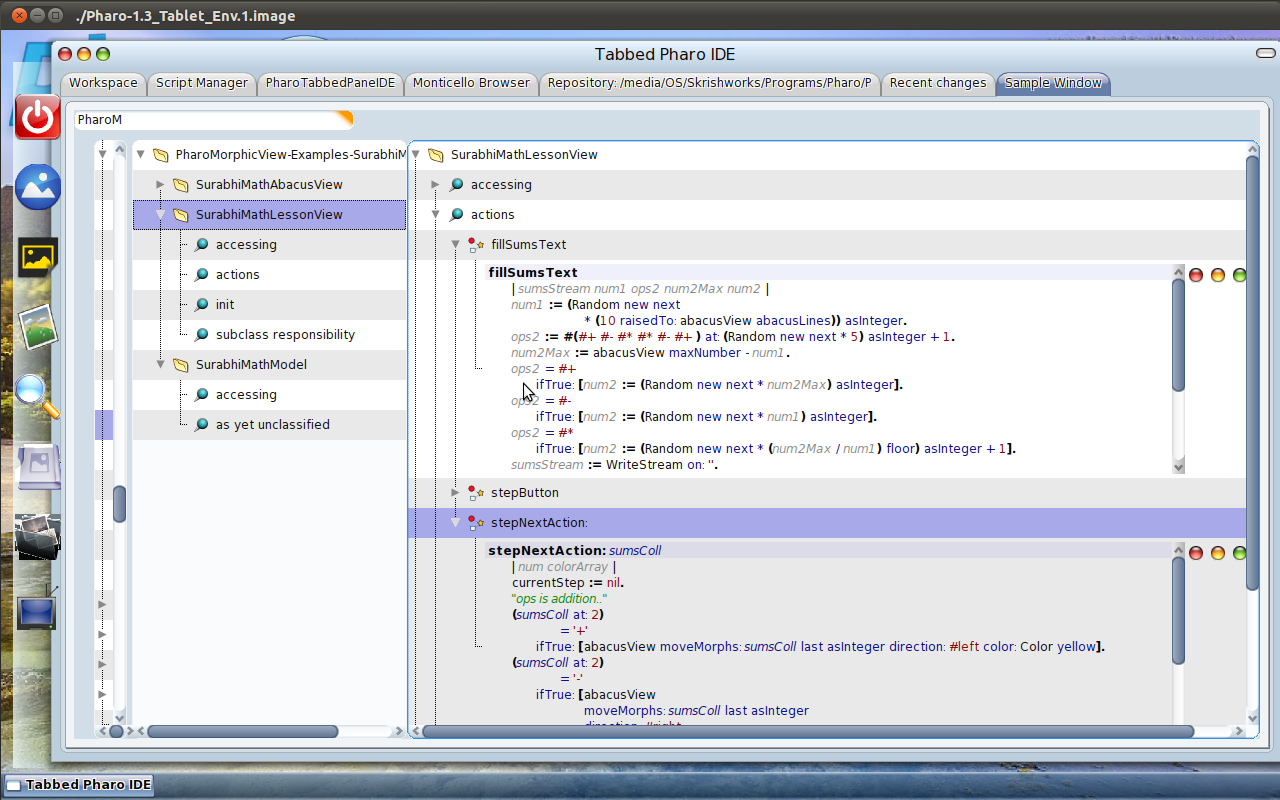
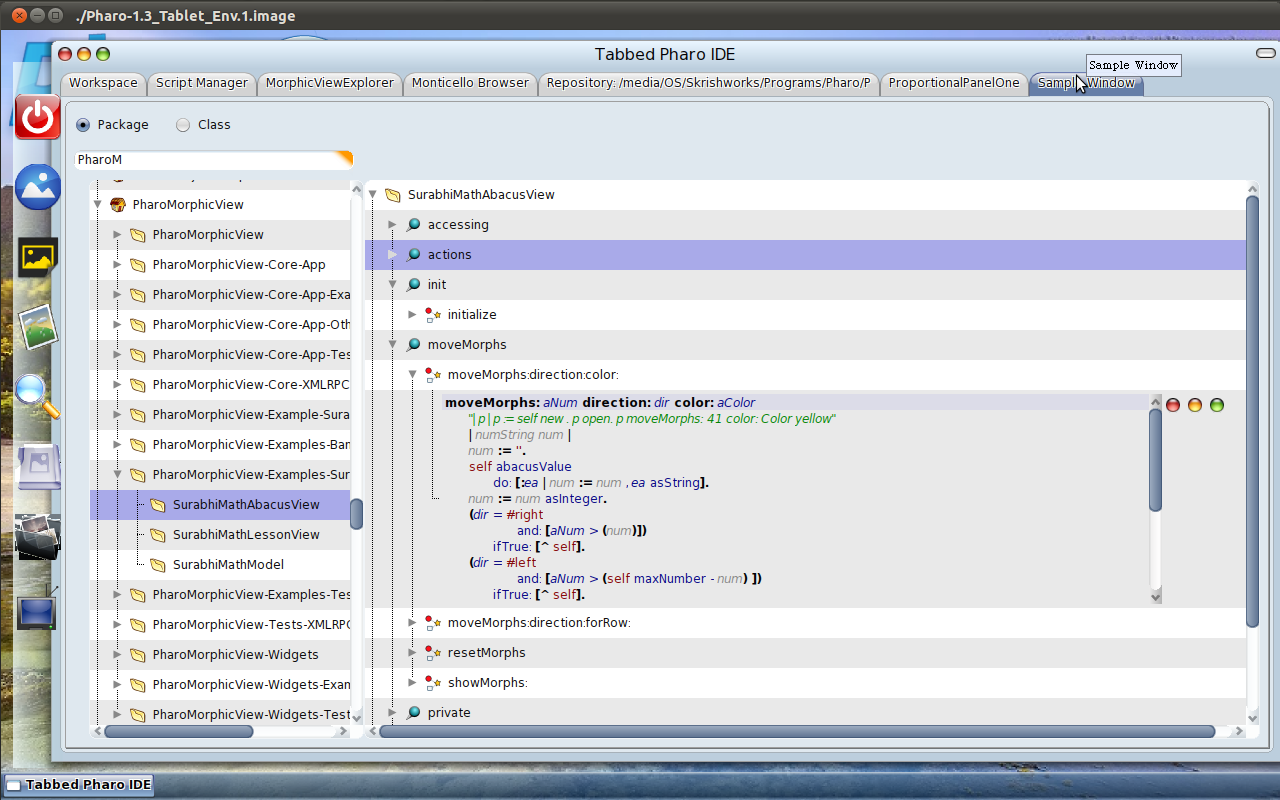
the three buttons right to code pane is takin too much space.. i'd rather put them as an overlay on top of text pane. On 2 March 2012 20:48, S Krish <krishnamachari.sudhakar@gmail.com> wrote:
...
One can tweak the code to show the first tree right upto a class level and eliminate the middle morph.. question of eliminating the unnecessary..!..
...
-- Best regards, Igor Stasenko.
The theme is set to Watery 2 Sudhakar krishnamachari Extn 91-40403012 Cell 9902104814 On Feb 28, 2012, at 2:13 AM, Stéphane Ducasse <stephane.ducasse@inria.fr> wrote:
MorphicViewNewPackageBrowser new packageNames: #('UIManager') ; open
But it does not look that nice :)
On Feb 27, 2012, at 6:42 PM, Stéphane Ducasse wrote:
this looks really nice. I would really like to see if we cannot include a version so that people can browse change set and other code like that. I'm really happy to see that the work done by alain and ben around treeMorph pays off that well.
Stef
Can take the latest of the package..
PackageTree-Browser-Experiment
* Find class added and a crude/ workable expand for text morph..
As stated in the comments: will require a hack in Pharo 1.4 for now.
Will work towards integrating TabbedPane with TWM/ this too as an addon with more complete features month ahead. <Pharo_CodeBrowser02.JPG>
Of course the other parts of Tabbed Pane and the side docking toolbar are part of the PharoTabletIDE and PharpMorphicView + PharoApplicationFramework modules. Will release a playable image shortly with all of it packaged, though not cleanly coded.. So once I have it cleaned will release those frameworks too.. On Feb 28, 2012, at 2:13 AM, Stéphane Ducasse <stephane.ducasse@inria.fr> wrote:
MorphicViewNewPackageBrowser new packageNames: #('UIManager') ; open
But it does not look that nice :)
On Feb 27, 2012, at 6:42 PM, Stéphane Ducasse wrote:
this looks really nice. I would really like to see if we cannot include a version so that people can browse change set and other code like that. I'm really happy to see that the work done by alain and ben around treeMorph pays off that well.
Stef
Can take the latest of the package..
PackageTree-Browser-Experiment
* Find class added and a crude/ workable expand for text morph..
As stated in the comments: will require a hack in Pharo 1.4 for now.
Will work towards integrating TabbedPane with TWM/ this too as an addon with more complete features month ahead. <Pharo_CodeBrowser02.JPG>
participants (10)
-
 blake
blake -
 Göran Krampe
 -
 Igor Stasenko
 -
 Krishsmalltalk
 -
 Marcus Denker
 -
S Krish
-
 Sebastian Sastre
 -
 Stéphane Ducasse
 -
 Sven Van Caekenberghe
 -
 Tudor Girba