Trying to scale and reposition the progress bar for PharoLauncher

Hello pharoers it has been almost a year since the last time I commited to PharoLauncher so I decided to go for it once again. The first time I added a progress bar for people to see the progress of the download of the image . Now I want to scale and reposition the progress bar as I am not happy at all in the way it looks , its too small and hard to read. So I created a question at stackoverflow with all the details of my problem http://stackoverflow.com/questions/25708970/trying-to-find-the-progressbar-m... I would not mind also some extra details on how I can fetch the Morphs used by UIManager or to even further customise UIManager. I tried to find the answer myself but after an hour of staring at the Pharo system browser I gave up.

Le 07/09/2014 11:53, kilon alios a écrit :
Hello pharoers it has been almost a year since the last time I commited to PharoLauncher so I decided to go for it once again. The first time I added a progress bar for people to see the progress of the download of the image . Now I want to scale and reposition the progress bar as I am not happy at all in the way it looks , its too small and hard to read.
So I created a question at stackoverflow with all the details of my problem
http://stackoverflow.com/questions/25708970/trying-to-find-the-progressbar-m...
I would not mind also some extra details on how I can fetch the Morphs used by UIManager or to even further customise UIManager. I tried to find the answer myself but after an hour of staring at the Pharo system browser I gave up. Hi Kilon,
I don't have a stackoverflow account, so here is what I found. From displayProgress: , asJob brings you to Job, which has no morph at all. But, on the class side of Job, you have a job announcer (instance class variable jobAnnouncer). Inspect that variable, search among the subscriptions of the announcer, and you'll find SystemProgressMorph. A good use case of a fairly good design which is a lot harder to unravel than it should be, due to the lack of tools to explore announcer / subscription relations. Thierry
yeah yeah I see it now, there actually many announcers (3 of them ) all seem to signal SystemProgressMorph , oh boy this will be a tricky one . Thanks for the pointer, now I have to find how to capture the instance of that SystemProgressMorph. If I find the instance sending a width: message should do the trick. Looks like I will need to investigate further but at least you are pointed me to the right direction so I no longer feel lost in space. On Sun, Sep 7, 2014 at 7:22 PM, Thierry Goubier <thierry.goubier@gmail.com> wrote:
Le 07/09/2014 11:53, kilon alios a écrit :
Hello pharoers it has been almost a year since the last time I commited
to PharoLauncher so I decided to go for it once again. The first time I added a progress bar for people to see the progress of the download of the image . Now I want to scale and reposition the progress bar as I am not happy at all in the way it looks , its too small and hard to read.
So I created a question at stackoverflow with all the details of my problem
http://stackoverflow.com/questions/25708970/trying-to- find-the-progressbar-morph-when-sending-the-message-displayprogress
I would not mind also some extra details on how I can fetch the Morphs used by UIManager or to even further customise UIManager. I tried to find the answer myself but after an hour of staring at the Pharo system browser I gave up.
Hi Kilon,
I don't have a stackoverflow account, so here is what I found.
From displayProgress: , asJob brings you to Job, which has no morph at all. But, on the class side of Job, you have a job announcer (instance class variable jobAnnouncer). Inspect that variable, search among the subscriptions of the announcer, and you'll find SystemProgressMorph.
A good use case of a fairly good design which is a lot harder to unravel than it should be, due to the lack of tools to explore announcer / subscription relations.
Thierry
ok with a bit of help I was able to figure things out, it turns out that it was simple to do difficult to understand :D so here is my answer http://stackoverflow.com/questions/25708970/trying-to-find-the-progressbar-m... I also attached the new progress bar i customised and the old for comparison as attached images â Personally I would make my code the default Progress Bar for entire Pharo including all operations because its annoying to be that small and up there. This should work well even if there are multiple Progress Bars displayed. But for not its PharoLauncher only progress bar. How I add this code to PharoLauncher ? do I use just the development mode of PharoLauncher and Commit ? I dont want to mess anything up. Next step would be to add an info box for each image so people know what they download before downloading it. On Sun, Sep 7, 2014 at 8:52 PM, kilon alios <kilon.alios@gmail.com> wrote:
yeah yeah I see it now, there actually many announcers (3 of them ) all seem to signal SystemProgressMorph , oh boy this will be a tricky one . Thanks for the pointer, now I have to find how to capture the instance of that SystemProgressMorph. If I find the instance sending a width: message should do the trick. Looks like I will need to investigate further but at least you are pointed me to the right direction so I no longer feel lost in space.
On Sun, Sep 7, 2014 at 7:22 PM, Thierry Goubier <thierry.goubier@gmail.com
wrote:
Le 07/09/2014 11:53, kilon alios a écrit :
Hello pharoers it has been almost a year since the last time I commited
to PharoLauncher so I decided to go for it once again. The first time I added a progress bar for people to see the progress of the download of the image . Now I want to scale and reposition the progress bar as I am not happy at all in the way it looks , its too small and hard to read.
So I created a question at stackoverflow with all the details of my problem
http://stackoverflow.com/questions/25708970/trying-to- find-the-progressbar-morph-when-sending-the-message-displayprogress
I would not mind also some extra details on how I can fetch the Morphs used by UIManager or to even further customise UIManager. I tried to find the answer myself but after an hour of staring at the Pharo system browser I gave up.
Hi Kilon,
I don't have a stackoverflow account, so here is what I found.
From displayProgress: , asJob brings you to Job, which has no morph at all. But, on the class side of Job, you have a job announcer (instance class variable jobAnnouncer). Inspect that variable, search among the subscriptions of the announcer, and you'll find SystemProgressMorph.
A good use case of a fairly good design which is a lot harder to unravel than it should be, due to the lack of tools to explore announcer / subscription relations.
Thierry

Nice, but did you see SystemProgressMorph class>>#settingsOn: ? In other words, there are preferences for the location of the progress bar, these should probably be honoured. A big or a small bar also depends a bit on taste I would say. On 08 Sep 2014, at 13:00, kilon alios <kilon.alios@gmail.com> wrote:
ok with a bit of help I was able to figure things out, it turns out that it was simple to do difficult to understand :D so here is my answer
http://stackoverflow.com/questions/25708970/trying-to-find-the-progressbar-m...
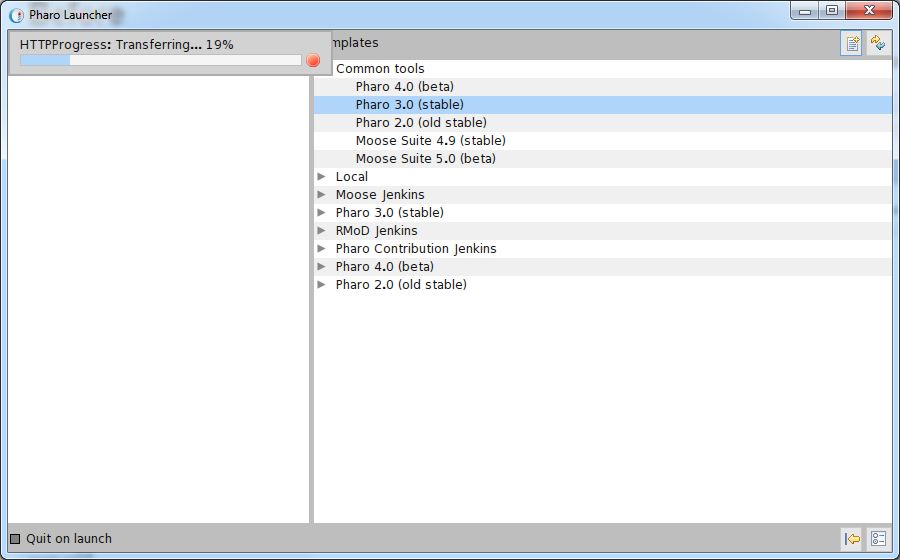
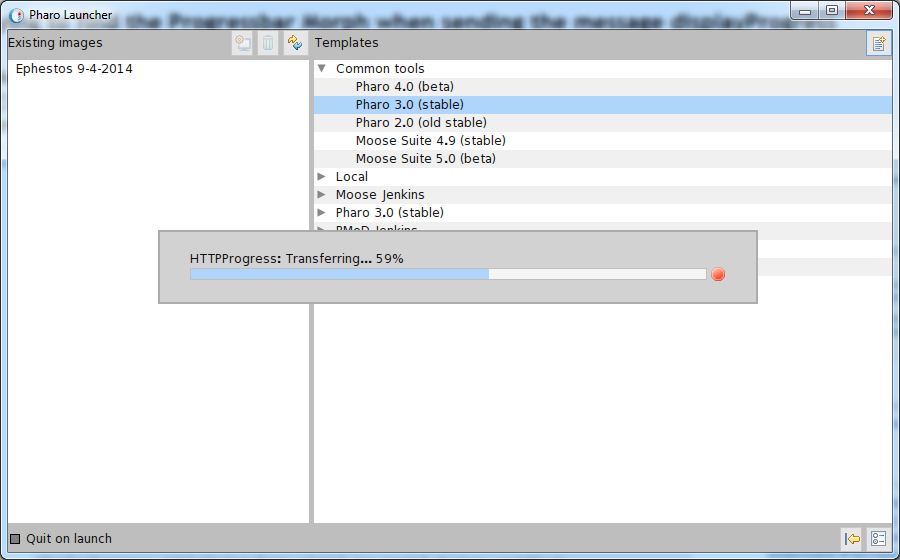
I also attached the new progress bar i customised and the old for comparison as attached images
<newProgressBar.JPG>
<oldProgressBar.JPG> â Personally I would make my code the default Progress Bar for entire Pharo including all operations because its annoying to be that small and up there. This should work well even if there are multiple Progress Bars displayed. But for not its PharoLauncher only progress bar.
How I add this code to PharoLauncher ? do I use just the development mode of PharoLauncher and Commit ? I dont want to mess anything up.
Next step would be to add an info box for each image so people know what they download before downloading it.
On Sun, Sep 7, 2014 at 8:52 PM, kilon alios <kilon.alios@gmail.com> wrote: yeah yeah I see it now, there actually many announcers (3 of them ) all seem to signal SystemProgressMorph , oh boy this will be a tricky one . Thanks for the pointer, now I have to find how to capture the instance of that SystemProgressMorph. If I find the instance sending a width: message should do the trick. Looks like I will need to investigate further but at least you are pointed me to the right direction so I no longer feel lost in space.
On Sun, Sep 7, 2014 at 7:22 PM, Thierry Goubier <thierry.goubier@gmail.com> wrote: Le 07/09/2014 11:53, kilon alios a écrit :
Hello pharoers it has been almost a year since the last time I commited to PharoLauncher so I decided to go for it once again. The first time I added a progress bar for people to see the progress of the download of the image . Now I want to scale and reposition the progress bar as I am not happy at all in the way it looks , its too small and hard to read.
So I created a question at stackoverflow with all the details of my problem
http://stackoverflow.com/questions/25708970/trying-to-find-the-progressbar-m...
I would not mind also some extra details on how I can fetch the Morphs used by UIManager or to even further customise UIManager. I tried to find the answer myself but after an hour of staring at the Pharo system browser I gave up. Hi Kilon,
I don't have a stackoverflow account, so here is what I found.
From displayProgress: , asJob brings you to Job, which has no morph at all. But, on the class side of Job, you have a job announcer (instance class variable jobAnnouncer). Inspect that variable, search among the subscriptions of the announcer, and you'll find SystemProgressMorph.
A good use case of a fairly good design which is a lot harder to unravel than it should be, due to the lack of tools to explore announcer / subscription relations.
Thierry
It should not be a problem because it affects only the PharoLauncher image and not the images you download with PharoLauncher so the old progress bar will remain in those images. Its personal taste of course but let remember here that a common complain about smalltalk is that it looks weird and for some people ugly. How many progress bars you have seen up left ? What advantage is there for a progress bar to be up left ? Also because when performing such jobs pharo freezes and does not allow for further interactions with the user until the job ends it makes more sense for the progress bar to be in the middle , bigger size so its very visible even from distance if the user decides to leave the screen to grab some coffee or fight with his light saber and if possible even display a "Please wait..." message so the user / beginner Pharoers knows this is not a bug or he /she did not brake Pharo. I am not saying Pharo should be an exact copy of the GUIs out there but at least we should respect the user habits and broke those habits only if it is necessary. Or else you will have more and more people looking at the GUI and going "Eeeewwww". On Mon, Sep 8, 2014 at 2:11 PM, Sven Van Caekenberghe <sven@stfx.eu> wrote:
Nice, but did you see SystemProgressMorph class>>#settingsOn: ? In other words, there are preferences for the location of the progress bar, these should probably be honoured. A big or a small bar also depends a bit on taste I would say.
On 08 Sep 2014, at 13:00, kilon alios <kilon.alios@gmail.com> wrote:
ok with a bit of help I was able to figure things out, it turns out that it was simple to do difficult to understand :D so here is my answer
http://stackoverflow.com/questions/25708970/trying-to-find-the-progressbar-m...
I also attached the new progress bar i customised and the old for
comparison as attached images
<newProgressBar.JPG>
<oldProgressBar.JPG> â Personally I would make my code the default Progress Bar for entire
Pharo including all operations because its annoying to be that small and up there. This should work well even if there are multiple Progress Bars displayed. But for not its PharoLauncher only progress bar.
How I add this code to PharoLauncher ? do I use just the development
mode of PharoLauncher and Commit ? I dont want to mess anything up.
Next step would be to add an info box for each image so people know what
they download before downloading it.
On Sun, Sep 7, 2014 at 8:52 PM, kilon alios <kilon.alios@gmail.com>
wrote:
yeah yeah I see it now, there actually many announcers (3 of them ) all seem to signal SystemProgressMorph , oh boy this will be a tricky one . Thanks for the pointer, now I have to find how to capture the instance of that SystemProgressMorph. If I find the instance sending a width: message should do the trick. Looks like I will need to investigate further but at least you are pointed me to the right direction so I no longer feel lost in space.
On Sun, Sep 7, 2014 at 7:22 PM, Thierry Goubier < thierry.goubier@gmail.com> wrote: Le 07/09/2014 11:53, kilon alios a écrit :
Hello pharoers it has been almost a year since the last time I commited to PharoLauncher so I decided to go for it once again. The first time I added a progress bar for people to see the progress of the download of the image . Now I want to scale and reposition the progress bar as I am not happy at all in the way it looks , its too small and hard to read.
So I created a question at stackoverflow with all the details of my problem
http://stackoverflow.com/questions/25708970/trying-to-find-the-progressbar-m...
I would not mind also some extra details on how I can fetch the Morphs
used by UIManager or to even further customise UIManager. I tried to find the answer myself but after an hour of staring at the Pharo system browser I gave up.
Hi Kilon,
I don't have a stackoverflow account, so here is what I found.
From displayProgress: , asJob brings you to Job, which has no morph at all. But, on the class side of Job, you have a job announcer (instance class variable jobAnnouncer). Inspect that variable, search among the subscriptions of the announcer, and you'll find SystemProgressMorph.
A good use case of a fairly good design which is a lot harder to unravel than it should be, due to the lack of tools to explore announcer / subscription relations.
Thierry
Yes, the blocking nature of the progress bars is an argument for putting it central. I just wanted to bring the preference to your attention. Now, doing away with unused preferences is a powerful way to simplify the system. Maybe the best strategy is to start using your new code in the launcher and see how it goes. If all goes well, people will start requesting that progress bar for the main image ;-) On 08 Sep 2014, at 13:37, kilon alios <kilon.alios@gmail.com> wrote:
It should not be a problem because it affects only the PharoLauncher image and not the images you download with PharoLauncher so the old progress bar will remain in those images.
Its personal taste of course but let remember here that a common complain about smalltalk is that it looks weird and for some people ugly. How many progress bars you have seen up left ? What advantage is there for a progress bar to be up left ?
Also because when performing such jobs pharo freezes and does not allow for further interactions with the user until the job ends it makes more sense for the progress bar to be in the middle , bigger size so its very visible even from distance if the user decides to leave the screen to grab some coffee or fight with his light saber and if possible even display a "Please wait..." message so the user / beginner Pharoers knows this is not a bug or he /she did not brake Pharo.
I am not saying Pharo should be an exact copy of the GUIs out there but at least we should respect the user habits and broke those habits only if it is necessary. Or else you will have more and more people looking at the GUI and going "Eeeewwww".
On Mon, Sep 8, 2014 at 2:11 PM, Sven Van Caekenberghe <sven@stfx.eu> wrote: Nice, but did you see SystemProgressMorph class>>#settingsOn: ? In other words, there are preferences for the location of the progress bar, these should probably be honoured. A big or a small bar also depends a bit on taste I would say.
On 08 Sep 2014, at 13:00, kilon alios <kilon.alios@gmail.com> wrote:
ok with a bit of help I was able to figure things out, it turns out that it was simple to do difficult to understand :D so here is my answer
http://stackoverflow.com/questions/25708970/trying-to-find-the-progressbar-m...
I also attached the new progress bar i customised and the old for comparison as attached images
<newProgressBar.JPG>
<oldProgressBar.JPG> â Personally I would make my code the default Progress Bar for entire Pharo including all operations because its annoying to be that small and up there. This should work well even if there are multiple Progress Bars displayed. But for not its PharoLauncher only progress bar.
How I add this code to PharoLauncher ? do I use just the development mode of PharoLauncher and Commit ? I dont want to mess anything up.
Next step would be to add an info box for each image so people know what they download before downloading it.
On Sun, Sep 7, 2014 at 8:52 PM, kilon alios <kilon.alios@gmail.com> wrote: yeah yeah I see it now, there actually many announcers (3 of them ) all seem to signal SystemProgressMorph , oh boy this will be a tricky one . Thanks for the pointer, now I have to find how to capture the instance of that SystemProgressMorph. If I find the instance sending a width: message should do the trick. Looks like I will need to investigate further but at least you are pointed me to the right direction so I no longer feel lost in space.
On Sun, Sep 7, 2014 at 7:22 PM, Thierry Goubier <thierry.goubier@gmail.com> wrote: Le 07/09/2014 11:53, kilon alios a écrit :
Hello pharoers it has been almost a year since the last time I commited to PharoLauncher so I decided to go for it once again. The first time I added a progress bar for people to see the progress of the download of the image . Now I want to scale and reposition the progress bar as I am not happy at all in the way it looks , its too small and hard to read.
So I created a question at stackoverflow with all the details of my problem
http://stackoverflow.com/questions/25708970/trying-to-find-the-progressbar-m...
I would not mind also some extra details on how I can fetch the Morphs used by UIManager or to even further customise UIManager. I tried to find the answer myself but after an hour of staring at the Pharo system browser I gave up. Hi Kilon,
I don't have a stackoverflow account, so here is what I found.
From displayProgress: , asJob brings you to Job, which has no morph at all. But, on the class side of Job, you have a job announcer (instance class variable jobAnnouncer). Inspect that variable, search among the subscriptions of the announcer, and you'll find SystemProgressMorph.
A good use case of a fairly good design which is a lot harder to unravel than it should be, due to the lack of tools to explore announcer / subscription relations.
Thierry
no you raised a valid point with preferences . I took a look at the method and preferences and found there is positions options for horizontal and vertical position. But even when both set to middle the progress go a bit to the right i assume the origin is in the middle and it does not take into account the width of the progress bar. That means I will have to hack the progress bar to make positioning in the middle better. I would also like to add a preference setting for progress bar size. "This is nice but I think that there should be an option." Yuiry as i said my code does not currently affect any other image than the actual PharoLauncher image. All images downloaded with PharoLauncher are unaffected. About the forking option in that case it would be better to reposition the progress bar yourself or go to preferences and change it back to default. I completely agree with you that this should added to Pharo as a preference option and that's my plan if people want me to add this new feature to Pharo. So what I did for now was to commit my code to PharoLauncher with my new progress bar and leave Pharo as it is. Try it yourselves and if you like it I can do the work and implement properly for pharo with system settings and options to locate anywhere you want , to make everyone happy. On Mon, Sep 8, 2014 at 2:43 PM, Sven Van Caekenberghe <sven@stfx.eu> wrote:
Yes, the blocking nature of the progress bars is an argument for putting it central. I just wanted to bring the preference to your attention. Now, doing away with unused preferences is a powerful way to simplify the system.
Maybe the best strategy is to start using your new code in the launcher and see how it goes. If all goes well, people will start requesting that progress bar for the main image ;-)
On 08 Sep 2014, at 13:37, kilon alios <kilon.alios@gmail.com> wrote:
It should not be a problem because it affects only the PharoLauncher image and not the images you download with PharoLauncher so the old progress bar will remain in those images.
Its personal taste of course but let remember here that a common complain about smalltalk is that it looks weird and for some people ugly. How many progress bars you have seen up left ? What advantage is there for a progress bar to be up left ?
Also because when performing such jobs pharo freezes and does not allow for further interactions with the user until the job ends it makes more sense for the progress bar to be in the middle , bigger size so its very visible even from distance if the user decides to leave the screen to grab some coffee or fight with his light saber and if possible even display a "Please wait..." message so the user / beginner Pharoers knows this is not a bug or he /she did not brake Pharo.
I am not saying Pharo should be an exact copy of the GUIs out there but at least we should respect the user habits and broke those habits only if it is necessary. Or else you will have more and more people looking at the GUI and going "Eeeewwww".
On Mon, Sep 8, 2014 at 2:11 PM, Sven Van Caekenberghe <sven@stfx.eu> wrote: Nice, but did you see SystemProgressMorph class>>#settingsOn: ? In other words, there are preferences for the location of the progress bar, these should probably be honoured. A big or a small bar also depends a bit on taste I would say.
On 08 Sep 2014, at 13:00, kilon alios <kilon.alios@gmail.com> wrote:
ok with a bit of help I was able to figure things out, it turns out that it was simple to do difficult to understand :D so here is my answer
http://stackoverflow.com/questions/25708970/trying-to-find-the-progressbar-m...
I also attached the new progress bar i customised and the old for
comparison as attached images
<newProgressBar.JPG>
<oldProgressBar.JPG> â Personally I would make my code the default Progress Bar for entire
Pharo including all operations because its annoying to be that small and up there. This should work well even if there are multiple Progress Bars displayed. But for not its PharoLauncher only progress bar.
How I add this code to PharoLauncher ? do I use just the development
mode of PharoLauncher and Commit ? I dont want to mess anything up.
Next step would be to add an info box for each image so people know
what they download before downloading it.
On Sun, Sep 7, 2014 at 8:52 PM, kilon alios <kilon.alios@gmail.com>
wrote:
yeah yeah I see it now, there actually many announcers (3 of them ) all seem to signal SystemProgressMorph , oh boy this will be a tricky one . Thanks for the pointer, now I have to find how to capture the instance of that SystemProgressMorph. If I find the instance sending a width: message should do the trick. Looks like I will need to investigate further but at least you are pointed me to the right direction so I no longer feel lost in space.
On Sun, Sep 7, 2014 at 7:22 PM, Thierry Goubier < thierry.goubier@gmail.com> wrote: Le 07/09/2014 11:53, kilon alios a écrit :
Hello pharoers it has been almost a year since the last time I commited to PharoLauncher so I decided to go for it once again. The first time I added a progress bar for people to see the progress of the download of the image . Now I want to scale and reposition the progress bar as I am not happy at all in the way it looks , its too small and hard to read.
So I created a question at stackoverflow with all the details of my problem
http://stackoverflow.com/questions/25708970/trying-to-find-the-progressbar-m...
I would not mind also some extra details on how I can fetch the Morphs
used by UIManager or to even further customise UIManager. I tried to find the answer myself but after an hour of staring at the Pharo system browser I gave up.
Hi Kilon,
I don't have a stackoverflow account, so here is what I found.
From displayProgress: , asJob brings you to Job, which has no morph at all. But, on the class side of Job, you have a job announcer (instance class variable jobAnnouncer). Inspect that variable, search among the subscriptions of the announcer, and you'll find SystemProgressMorph.
A good use case of a fairly good design which is a lot harder to unravel than it should be, due to the lack of tools to explore announcer / subscription relations.
Thierry

revise away, downloading in the background sounds very cool. I also have some more contributions to make. By the way my commit was successful http://www.smalltalkhub.com/#!/~Pharo/PharoLauncher/diff/PharoLauncher-Core-... The build was succesful https://ci.inria.fr/pharo-contribution/job/PharoLauncher/PHARO=30,VERSION=bl... but when I downloaded the new PharoLauncher image to my surprise the code was nowhere to be found. Its strange because the log says it loads the bleeding edge of PharoLauncher so that means it should pull in my change ? Am I correct ? Any idea what is wrong here ? On Mon, Sep 8, 2014 at 3:30 PM, Ben Coman <btc@openinworld.com> wrote:
kilon alios wrote:
It should not be a problem because it affects only the PharoLauncher image and not the images you download with PharoLauncher so the old progress bar will remain in those images.
Its personal taste of course but let remember here that a common complain about smalltalk is that it looks weird and for some people ugly. How many progress bars you have seen up left ? What advantage is there for a progress bar to be up left ?
Also because when performing such jobs pharo freezes and does not allow for further interactions with the user until the job ends it makes more sense for the progress bar to be in the middle , bigger size so its very visible even from distance if the user decides to leave the screen to grab some coffee or fight with his light saber and if possible even display a "Please wait..." message so the user / beginner Pharoers knows this is not a bug or he /she did not brake Pharo.
Thats cool, but I may revise it later if I actually get around to making PharoLauncher download images in the background. A few other things on my plate to clear first. cheers -ben
I am not saying Pharo should be an exact copy of the GUIs out there but at least we should respect the user habits and broke those habits only if it is necessary. Or else you will have more and more people looking at the GUI and going "Eeeewwww".
On Mon, Sep 8, 2014 at 2:11 PM, Sven Van Caekenberghe <sven@stfx.eu> <sven@stfx.eu> wrote:
Nice, but did you see SystemProgressMorph class>>#settingsOn: ? In other words, there are preferences for the location of the progress bar, these should probably be honoured. A big or a small bar also depends a bit on taste I would say.
On 08 Sep 2014, at 13:00, kilon alios <kilon.alios@gmail.com> <kilon.alios@gmail.com> wrote:
ok with a bit of help I was able to figure things out, it turns out that
it was simple to do difficult to understand :D so here is my answer
http://stackoverflow.com/questions/25708970/trying-to-find-the-progressbar-m...
I also attached the new progress bar i customised and the old for
comparison as attached images
<newProgressBar.JPG>
<oldProgressBar.JPG> â Personally I would make my code the default Progress Bar for entire
Pharo including all operations because its annoying to be that small and up there. This should work well even if there are multiple Progress Bars displayed. But for not its PharoLauncher only progress bar.
How I add this code to PharoLauncher ? do I use just the development
mode of PharoLauncher and Commit ? I dont want to mess anything up.
Next step would be to add an info box for each image so people know what
they download before downloading it.
On Sun, Sep 7, 2014 at 8:52 PM, kilon alios <kilon.alios@gmail.com> <kilon.alios@gmail.com>
wrote:
yeah yeah I see it now, there actually many announcers (3 of them ) all
seem to signal SystemProgressMorph , oh boy this will be a tricky one . Thanks for the pointer, now I have to find how to capture the instance of that SystemProgressMorph. If I find the instance sending a width: message should do the trick. Looks like I will need to investigate further but at least you are pointed me to the right direction so I no longer feel lost in space.
On Sun, Sep 7, 2014 at 7:22 PM, Thierry Goubier <
thierry.goubier@gmail.com> wrote:
Le 07/09/2014 11:53, kilon alios a écrit :
Hello pharoers it has been almost a year since the last time I commited
to PharoLauncher so I decided to go for it once again. The first time I added a progress bar for people to see the progress of the download of the image . Now I want to scale and reposition the progress bar as I am not happy at all in the way it looks , its too small and hard to read.
So I created a question at stackoverflow with all the details of my
problem
http://stackoverflow.com/questions/25708970/trying-to-find-the-progressbar-m...
I would not mind also some extra details on how I can fetch the Morphs
used by UIManager or to even further customise UIManager. I tried to find the answer myself but after an hour of staring at the Pharo system browser I gave up.
Hi Kilon,
I don't have a stackoverflow account, so here is what I found.
From displayProgress: , asJob brings you to Job, which has no morph at
all. But, on the class side of Job, you have a job announcer (instance class variable jobAnnouncer). Inspect that variable, search among the subscriptions of the announcer, and you'll find SystemProgressMorph.
A good use case of a fairly good design which is a lot harder to unravel
than it should be, due to the lack of tools to explore announcer / subscription relations.
Thierry

I can see your changes in the pharolauncher build 891 "Pharo Contribution Jenkins-PharoLauncher-#891" PharoLauncher-Core: Name: PharoLauncher-Core-kilonAlios.62 Author: kilonAlios Time: 8 September 2014, 3:09:22.87321 pm UUID: 368940aa-996d-e34a-989c-63c618316b37 Ancestors: PharoLauncher-Core-TimMackinnon.61 2014-09-09 10:15 GMT+02:00 kilon alios <kilon.alios@gmail.com>:
revise away, downloading in the background sounds very cool. I also have some more contributions to make.
By the way my commit was successful
http://www.smalltalkhub.com/#!/~Pharo/PharoLauncher/diff/PharoLauncher-Core-...
The build was succesful
https://ci.inria.fr/pharo-contribution/job/PharoLauncher/PHARO=30,VERSION=bl...
but when I downloaded the new PharoLauncher image to my surprise the code was nowhere to be found. Its strange because the log says it loads the bleeding edge of PharoLauncher so that means it should pull in my change ? Am I correct ? Any idea what is wrong here ?
On Mon, Sep 8, 2014 at 3:30 PM, Ben Coman <btc@openinworld.com> wrote:
kilon alios wrote:
It should not be a problem because it affects only the PharoLauncher image and not the images you download with PharoLauncher so the old progress bar will remain in those images.
Its personal taste of course but let remember here that a common complain about smalltalk is that it looks weird and for some people ugly. How many progress bars you have seen up left ? What advantage is there for a progress bar to be up left ?
Also because when performing such jobs pharo freezes and does not allow for further interactions with the user until the job ends it makes more sense for the progress bar to be in the middle , bigger size so its very visible even from distance if the user decides to leave the screen to grab some coffee or fight with his light saber and if possible even display a "Please wait..." message so the user / beginner Pharoers knows this is not a bug or he /she did not brake Pharo.
Thats cool, but I may revise it later if I actually get around to making PharoLauncher download images in the background. A few other things on my plate to clear first. cheers -ben
I am not saying Pharo should be an exact copy of the GUIs out there but at least we should respect the user habits and broke those habits only if it is necessary. Or else you will have more and more people looking at the GUI and going "Eeeewwww".
On Mon, Sep 8, 2014 at 2:11 PM, Sven Van Caekenberghe <sven@stfx.eu> <sven@stfx.eu> wrote:
Nice, but did you see SystemProgressMorph class>>#settingsOn: ? In other words, there are preferences for the location of the progress bar, these should probably be honoured. A big or a small bar also depends a bit on taste I would say.
On 08 Sep 2014, at 13:00, kilon alios <kilon.alios@gmail.com> <kilon.alios@gmail.com> wrote:
ok with a bit of help I was able to figure things out, it turns out that
it was simple to do difficult to understand :D so here is my answer
http://stackoverflow.com/questions/25708970/trying-to-find-the-progressbar-m...
I also attached the new progress bar i customised and the old for
comparison as attached images
<newProgressBar.JPG>
<oldProgressBar.JPG> â Personally I would make my code the default Progress Bar for entire
Pharo including all operations because its annoying to be that small and up there. This should work well even if there are multiple Progress Bars displayed. But for not its PharoLauncher only progress bar.
How I add this code to PharoLauncher ? do I use just the development
mode of PharoLauncher and Commit ? I dont want to mess anything up.
Next step would be to add an info box for each image so people know what
they download before downloading it.
On Sun, Sep 7, 2014 at 8:52 PM, kilon alios <kilon.alios@gmail.com> <kilon.alios@gmail.com>
wrote:
yeah yeah I see it now, there actually many announcers (3 of them ) all
seem to signal SystemProgressMorph , oh boy this will be a tricky one . Thanks for the pointer, now I have to find how to capture the instance of that SystemProgressMorph. If I find the instance sending a width: message should do the trick. Looks like I will need to investigate further but at least you are pointed me to the right direction so I no longer feel lost in space.
On Sun, Sep 7, 2014 at 7:22 PM, Thierry Goubier <
thierry.goubier@gmail.com> wrote:
Le 07/09/2014 11:53, kilon alios a écrit :
Hello pharoers it has been almost a year since the last time I commited
to PharoLauncher so I decided to go for it once again. The first time I added a progress bar for people to see the progress of the download of the image . Now I want to scale and reposition the progress bar as I am not happy at all in the way it looks , its too small and hard to read.
So I created a question at stackoverflow with all the details of my
problem
http://stackoverflow.com/questions/25708970/trying-to-find-the-progressbar-m...
I would not mind also some extra details on how I can fetch the Morphs
used by UIManager or to even further customise UIManager. I tried to find the answer myself but after an hour of staring at the Pharo system browser I gave up.
Hi Kilon,
I don't have a stackoverflow account, so here is what I found.
From displayProgress: , asJob brings you to Job, which has no morph at
all. But, on the class side of Job, you have a job announcer (instance class variable jobAnnouncer). Inspect that variable, search among the subscriptions of the announcer, and you'll find SystemProgressMorph.
A good use case of a fairly good design which is a lot harder to unravel
than it should be, due to the lack of tools to explore announcer / subscription relations.
Thierry
hmm my mistake, I must have mixed something up I can see now my progress bar On Tue, Sep 9, 2014 at 12:17 PM, Nicolai Hess <nicolaihess@web.de> wrote:
I can see your changes in the pharolauncher build 891
"Pharo Contribution Jenkins-PharoLauncher-#891"
PharoLauncher-Core:
Name: PharoLauncher-Core-kilonAlios.62 Author: kilonAlios Time: 8 September 2014, 3:09:22.87321 pm UUID: 368940aa-996d-e34a-989c-63c618316b37 Ancestors: PharoLauncher-Core-TimMackinnon.61
2014-09-09 10:15 GMT+02:00 kilon alios <kilon.alios@gmail.com>:
revise away, downloading in the background sounds very cool. I also have some more contributions to make.
By the way my commit was successful
http://www.smalltalkhub.com/#!/~Pharo/PharoLauncher/diff/PharoLauncher-Core-...
The build was succesful
https://ci.inria.fr/pharo-contribution/job/PharoLauncher/PHARO=30,VERSION=bl...
but when I downloaded the new PharoLauncher image to my surprise the code was nowhere to be found. Its strange because the log says it loads the bleeding edge of PharoLauncher so that means it should pull in my change ? Am I correct ? Any idea what is wrong here ?
On Mon, Sep 8, 2014 at 3:30 PM, Ben Coman <btc@openinworld.com> wrote:
kilon alios wrote:
It should not be a problem because it affects only the PharoLauncher image and not the images you download with PharoLauncher so the old progress bar will remain in those images.
Its personal taste of course but let remember here that a common complain about smalltalk is that it looks weird and for some people ugly. How many progress bars you have seen up left ? What advantage is there for a progress bar to be up left ?
Also because when performing such jobs pharo freezes and does not allow for further interactions with the user until the job ends it makes more sense for the progress bar to be in the middle , bigger size so its very visible even from distance if the user decides to leave the screen to grab some coffee or fight with his light saber and if possible even display a "Please wait..." message so the user / beginner Pharoers knows this is not a bug or he /she did not brake Pharo.
Thats cool, but I may revise it later if I actually get around to making PharoLauncher download images in the background. A few other things on my plate to clear first. cheers -ben
I am not saying Pharo should be an exact copy of the GUIs out there but at least we should respect the user habits and broke those habits only if it is necessary. Or else you will have more and more people looking at the GUI and going "Eeeewwww".
On Mon, Sep 8, 2014 at 2:11 PM, Sven Van Caekenberghe <sven@stfx.eu> <sven@stfx.eu> wrote:
Nice, but did you see SystemProgressMorph class>>#settingsOn: ? In other words, there are preferences for the location of the progress bar, these should probably be honoured. A big or a small bar also depends a bit on taste I would say.
On 08 Sep 2014, at 13:00, kilon alios <kilon.alios@gmail.com> <kilon.alios@gmail.com> wrote:
ok with a bit of help I was able to figure things out, it turns out that
it was simple to do difficult to understand :D so here is my answer
http://stackoverflow.com/questions/25708970/trying-to-find-the-progressbar-m...
I also attached the new progress bar i customised and the old for
comparison as attached images
<newProgressBar.JPG>
<oldProgressBar.JPG> â Personally I would make my code the default Progress Bar for entire
Pharo including all operations because its annoying to be that small and up there. This should work well even if there are multiple Progress Bars displayed. But for not its PharoLauncher only progress bar.
How I add this code to PharoLauncher ? do I use just the development
mode of PharoLauncher and Commit ? I dont want to mess anything up.
Next step would be to add an info box for each image so people know what
they download before downloading it.
On Sun, Sep 7, 2014 at 8:52 PM, kilon alios <kilon.alios@gmail.com> <kilon.alios@gmail.com>
wrote:
yeah yeah I see it now, there actually many announcers (3 of them ) all
seem to signal SystemProgressMorph , oh boy this will be a tricky one . Thanks for the pointer, now I have to find how to capture the instance of that SystemProgressMorph. If I find the instance sending a width: message should do the trick. Looks like I will need to investigate further but at least you are pointed me to the right direction so I no longer feel lost in space.
On Sun, Sep 7, 2014 at 7:22 PM, Thierry Goubier <
thierry.goubier@gmail.com> wrote:
Le 07/09/2014 11:53, kilon alios a écrit :
Hello pharoers it has been almost a year since the last time I commited
to PharoLauncher so I decided to go for it once again. The first time I added a progress bar for people to see the progress of the download of the image . Now I want to scale and reposition the progress bar as I am not happy at all in the way it looks , its too small and hard to read.
So I created a question at stackoverflow with all the details of my
problem
http://stackoverflow.com/questions/25708970/trying-to-find-the-progressbar-m...
I would not mind also some extra details on how I can fetch the Morphs
used by UIManager or to even further customise UIManager. I tried to find the answer myself but after an hour of staring at the Pharo system browser I gave up.
Hi Kilon,
I don't have a stackoverflow account, so here is what I found.
From displayProgress: , asJob brings you to Job, which has no morph at
all. But, on the class side of Job, you have a job announcer (instance class variable jobAnnouncer). Inspect that variable, search among the subscriptions of the announcer, and you'll find SystemProgressMorph.
A good use case of a fairly good design which is a lot harder to unravel
than it should be, due to the lack of tools to explore announcer / subscription relations.
Thierry

On Mon, Sep 8, 2014 at 1:00 PM, kilon alios <kilon.alios@gmail.com> wrote:
How I add this code to PharoLauncher ? do I use just the development mode of PharoLauncher and Commit ? I dont want to mess anything up.
yes, you can do that. Just make sure that your change does not override any Pharo: e.g., don't change existing Pharo code, use existing hooks instead of create new ones. -- Damien Cassou http://damiencassou.seasidehosting.st "Success is the ability to go from one failure to another without losing enthusiasm." Winston Churchill

This is nice but I think that there should be an option. Because if you #fork, you want to be able to interact with UI and just keep small bar in the corner. But when you donât fork it really makes sense to put it in the middle as you canât do anything anyway. Uko On 08 Sep 2014, at 13:00, kilon alios <kilon.alios@gmail.com> wrote:
ok with a bit of help I was able to figure things out, it turns out that it was simple to do difficult to understand :D so here is my answer
http://stackoverflow.com/questions/25708970/trying-to-find-the-progressbar-m...
I also attached the new progress bar i customised and the old for comparison as attached images
<newProgressBar.JPG>
<oldProgressBar.JPG> â Personally I would make my code the default Progress Bar for entire Pharo including all operations because its annoying to be that small and up there. This should work well even if there are multiple Progress Bars displayed. But for not its PharoLauncher only progress bar.
How I add this code to PharoLauncher ? do I use just the development mode of PharoLauncher and Commit ? I dont want to mess anything up.
Next step would be to add an info box for each image so people know what they download before downloading it.
On Sun, Sep 7, 2014 at 8:52 PM, kilon alios <kilon.alios@gmail.com> wrote: yeah yeah I see it now, there actually many announcers (3 of them ) all seem to signal SystemProgressMorph , oh boy this will be a tricky one . Thanks for the pointer, now I have to find how to capture the instance of that SystemProgressMorph. If I find the instance sending a width: message should do the trick. Looks like I will need to investigate further but at least you are pointed me to the right direction so I no longer feel lost in space.
On Sun, Sep 7, 2014 at 7:22 PM, Thierry Goubier <thierry.goubier@gmail.com> wrote: Le 07/09/2014 11:53, kilon alios a écrit :
Hello pharoers it has been almost a year since the last time I commited to PharoLauncher so I decided to go for it once again. The first time I added a progress bar for people to see the progress of the download of the image . Now I want to scale and reposition the progress bar as I am not happy at all in the way it looks , its too small and hard to read.
So I created a question at stackoverflow with all the details of my problem
http://stackoverflow.com/questions/25708970/trying-to-find-the-progressbar-m...
I would not mind also some extra details on how I can fetch the Morphs used by UIManager or to even further customise UIManager. I tried to find the answer myself but after an hour of staring at the Pharo system browser I gave up. Hi Kilon,
I don't have a stackoverflow account, so here is what I found.
From displayProgress: , asJob brings you to Job, which has no morph at all. But, on the class side of Job, you have a job announcer (instance class variable jobAnnouncer). Inspect that variable, search among the subscriptions of the announcer, and you'll find SystemProgressMorph.
A good use case of a fairly good design which is a lot harder to unravel than it should be, due to the lack of tools to explore announcer / subscription relations.
Thierry
participants (7)
-
 Ben Coman
 -
 Damien Cassou
 -
 kilon alios
 -
 Nicolai Hess
 -
 Sven Van Caekenberghe
 -
 Thierry Goubier
 -
 Yuriy Tymchuk