
Hi All, You may have noticed that Nautilus now has a search bar next to the list of packages. I personally find this extremely useful. This is the work of Juraj and he is interested in hearing your feedback. The textfield accepts regular expression. It means that entering âRoassalâ will display all the packages having the word âRoassalâ in it (e.g., RoassalExtra, ConfigurationOfRoassal). If I enter â^Roassalâ, it displays all the packages that begin with âRoassalâ. (e.g., RoassalExtra). Any idea how to make this feature more apparent? Anything else you want to see with the searching in the browser? Cheers, Alexandre -- _,.;:~^~:;._,.;:~^~:;._,.;:~^~:;._,.;:~^~:;._,.;: Alexandre Bergel http://www.bergel.eu ^~:;._,.;:~^~:;._,.;:~^~:;._,.;:~^~:;._,.;:~^~:;.

On Dec 8, 2013, at 4:33 PM, Alexandre Bergel <alexandre.bergel@me.com> wrote:
Hi All,
You may have noticed that Nautilus now has a search bar next to the list of packages. I personally find this extremely useful. This is the work of Juraj and he is interested in hearing your feedback.
The textfield accepts regular expression. It means that entering âRoassalâ will display all the packages having the word âRoassalâ in it (e.g., RoassalExtra, ConfigurationOfRoassal). If I enter â^Roassalâ, it displays all the packages that begin with âRoassalâ. (e.g., RoassalExtra).
Any idea how to make this feature more apparent? Anything else you want to see with the searching in the browser?
I would love to have the search bar searching also based on class name Maybe -Point could select the package that contains the class Point -Point* could select the package that contains the classes *Point*
Cheers, Alexandre -- _,.;:~^~:;._,.;:~^~:;._,.;:~^~:;._,.;:~^~:;._,.;: Alexandre Bergel http://www.bergel.eu ^~:;._,.;:~^~:;._,.;:~^~:;._,.;:~^~:;._,.;:~^~:;.

El 08-12-2013, a las 12:41, Stéphane Ducasse <stephane.ducasse@inria.fr> escribió:
On Dec 8, 2013, at 4:33 PM, Alexandre Bergel <alexandre.bergel@me.com> wrote:
Hi All,
You may have noticed that Nautilus now has a search bar next to the list of packages. I personally find this extremely useful. This is the work of Juraj and he is interested in hearing your feedback.
The textfield accepts regular expression. It means that entering âRoassalâ will display all the packages having the word âRoassalâ in it (e.g., RoassalExtra, ConfigurationOfRoassal). If I enter â^Roassalâ, it displays all the packages that begin with âRoassalâ. (e.g., RoassalExtra).
Any idea how to make this feature more apparent? Anything else you want to see with the searching in the browser?
I would love to have the search bar searching also based on class name Maybe -Point could select the package that contains the class Point -Point* could select the package that contains the classes *Point*
Sounds interesting but I see difficulties to use it. No one will remember this feature. Even the regular expressions are not apparent and people do not use it (I suppose). What about to have a new search dialog above classes which do this job? Thanks, Jura
Cheers, Alexandre -- _,.;:~^~:;._,.;:~^~:;._,.;:~^~:;._,.;:~^~:;._,.;: Alexandre Bergel http://www.bergel.eu ^~:;._,.;:~^~:;._,.;:~^~:;._,.;:~^~:;._,.;:~^~:;.
Hi All,
You may have noticed that Nautilus now has a search bar next to the list of packages. I personally find this extremely useful. This is the work of Juraj and he is interested in hearing your feedback.
The textfield accepts regular expression. It means that entering âRoassalâ will display all the packages having the word âRoassalâ in it (e.g., RoassalExtra, ConfigurationOfRoassal). If I enter â^Roassalâ, it displays all the packages that begin with âRoassalâ. (e.g., RoassalExtra).
Any idea how to make this feature more apparent? Anything else you want to see with the searching in the browser?
I would love to have the search bar searching also based on class name Maybe -Point could select the package that contains the class Point -Point* could select the package that contains the classes *Point*
Sounds interesting but I see difficulties to use it. No one will remember this feature. Even the regular expressions are not apparent and people do not use it (I suppose).
Give a try to see. Using the correct ghost text to remember the possibility can help.
What about to have a new search dialog above classes which do this job?
Thanks, Jura
Cheers, Alexandre -- _,.;:~^~:;._,.;:~^~:;._,.;:~^~:;._,.;:~^~:;._,.;: Alexandre Bergel http://www.bergel.eu ^~:;._,.;:~^~:;._,.;:~^~:;._,.;:~^~:;._,.;:~^~:;.
Another pponit about the search it would be good to have the following behavior I type TOOLS I see all the packages with TOOLS I select one then I removed TOOLS from the search bar -> the selected package stays selected Stef

Emacs employs fuzzy completion. That means that you only have to type a partial match that exists in anywhere in the result or even fragments of a partial match making for very flexible search. For example if I look for "filesystem" and yet I type"systemfile" or "sysfile" or "file-syse" etc, the search will still able to locate the "filesystem" packages and all its classes. I used this completion both for code completion and file path completion , but I am pretty sure it works everywhere inside emacs. That also mean a unified search for everything, classes, methods etc . Without of course ruling out focused search of any kind , regex and existing ways to search in Pharo. But I want to say that I am very happy we have this functionality in pharo. Thank you. On Sun, Dec 8, 2013 at 7:48 PM, Stéphane Ducasse <stephane.ducasse@inria.fr>wrote:
Another pponit about the search
it would be good to have the following behavior I type TOOLS
I see all the packages with TOOLS
I select one
then I removed TOOLS from the search bar
-> the selected package stays selected
Stef
El 08-12-2013, a las 15:04, kilon alios <kilon.alios@gmail.com> escribió:
Emacs employs fuzzy completion. That means that you only have to type a partial match that exists in anywhere in the result or even fragments of a partial match making for very flexible search. For example if I look for "filesystem" and yet I type"systemfile" or "sysfile" or "file-syse" etc, the search will still able to locate the "filesystem" packages and all its classes.
Do you know where it is implemented? A filename and function name? Thanks, Jura
I used this completion both for code completion and file path completion , but I am pretty sure it works everywhere inside emacs.
That also mean a unified search for everything, classes, methods etc . Without of course ruling out focused search of any kind , regex and existing ways to search in Pharo.
But I want to say that I am very happy we have this functionality in pharo. Thank you.
On Sun, Dec 8, 2013 at 7:48 PM, Stéphane Ducasse <stephane.ducasse@inria.fr> wrote: Another pponit about the search
it would be good to have the following behavior I type TOOLS
I see all the packages with TOOLS
I select one
then I removed TOOLS from the search bar
-> the selected package stays selected
Stef
This is fixed: https://pharo.fogbugz.com/f/cases/12383/Loose-package-selection-on-using-pac... El 08-12-2013, a las 14:48, Stéphane Ducasse <stephane.ducasse@inria.fr> escribió:
Another pponit about the search
it would be good to have the following behavior I type TOOLS
I see all the packages with TOOLS
I select one
then I removed TOOLS from the search bar
-> the selected package stays selected
Stef

On Sun, Dec 8, 2013 at 4:41 PM, Stéphane Ducasse <stephane.ducasse@inria.fr>wrote:
On Dec 8, 2013, at 4:33 PM, Alexandre Bergel <alexandre.bergel@me.com> wrote:
Hi All,
You may have noticed that Nautilus now has a search bar next to the list of packages. I personally find this extremely useful. This is the work of Juraj and he is interested in hearing your feedback.
The textfield accepts regular expression. It means that entering âRoassalâ will display all the packages having the word âRoassalâ in it (e.g., RoassalExtra, ConfigurationOfRoassal). If I enter â^Roassalâ, it displays all the packages that begin with âRoassalâ. (e.g., RoassalExtra).
Any idea how to make this feature more apparent? Anything else you want to see with the searching in the browser?
I would love to have the search bar searching also based on class name Maybe -Point could select the package that contains the class Point -Point* could select the package that contains the classes *Point*
+1. I could not get used to spotlight search (may be i am too lazy). But this would definitely help and I remember some earlier browser had it, and I used it so often. But then it was removed and I could never get accustomed to the new ways.
Cheers, Alexandre -- _,.;:~^~:;._,.;:~^~:;._,.;:~^~:;._,.;:~^~:;._,.;: Alexandre Bergel http://www.bergel.eu ^~:;._,.;:~^~:;._,.;:~^~:;._,.;:~^~:;._,.;:~^~:;.

What I would like, is a setting to remove it. I usually do not use the packages list, and once you end up tabbing in the search field, you can not escape without your mouse, and this is really grinding my gears :s So if I could just disable it, I would appreciate it :) Ben On 08 Dec 2013, at 19:45, Usman Bhatti <usman.bhatti@gmail.com> wrote:
On Sun, Dec 8, 2013 at 4:41 PM, Stéphane Ducasse <stephane.ducasse@inria.fr> wrote:
On Dec 8, 2013, at 4:33 PM, Alexandre Bergel <alexandre.bergel@me.com> wrote:
Hi All,
You may have noticed that Nautilus now has a search bar next to the list of packages. I personally find this extremely useful. This is the work of Juraj and he is interested in hearing your feedback.
The textfield accepts regular expression. It means that entering âRoassalâ will display all the packages having the word âRoassalâ in it (e.g., RoassalExtra, ConfigurationOfRoassal). If I enter â^Roassalâ, it displays all the packages that begin with âRoassalâ. (e.g., RoassalExtra).
Any idea how to make this feature more apparent? Anything else you want to see with the searching in the browser?
I would love to have the search bar searching also based on class name Maybe -Point could select the package that contains the class Point -Point* could select the package that contains the classes *Point*
+1. I could not get used to spotlight search (may be i am too lazy). But this would definitely help and I remember some earlier browser had it, and I used it so often. But then it was removed and I could never get accustomed to the new ways.
Cheers, Alexandre -- _,.;:~^~:;._,.;:~^~:;._,.;:~^~:;._,.;:~^~:;._,.;: Alexandre Bergel http://www.bergel.eu ^~:;._,.;:~^~:;._,.;:~^~:;._,.;:~^~:;._,.;:~^~:;.

On 09 Dec 2013, at 11:20, Benjamin <benjamin.vanryseghem.pharo@gmail.com> wrote:
What I would like, is a setting to remove it. I usually do not use the packages list, and once you end up tabbing in the search field, you can not escape without your mouse, and this is really grinding my gears :s
So if I could just disable it, I would appreciate it :)
The tabbing should be fixed in addition. Marcus
El 09-12-2013, a las 7:25, Marcus Denker <marcus.denker@inria.fr> escribió:
On 09 Dec 2013, at 11:20, Benjamin <benjamin.vanryseghem.pharo@gmail.com> wrote:
What I would like, is a setting to remove it. I usually do not use the packages list, and once you end up tabbing in the search field, you can not escape without your mouse, and this is really grinding my gears :s
So if I could just disable it, I would appreciate it :)
The tabbing should be fixed in addition.
Can I ask for a case, in order to understand? Thanks. Jura
Marcus
when the input has the keyboard focus, you can not do: (at least the last time I tried) - tab to switch to the package list - cmd+f, cmd+c to find a class (or any other Nautilus shortcut) It means that once the focus is there, you can not escape anymore (without the mouse) Ben On 10 Dec 2013, at 21:45, Juraj Kubelka <juraj.kubelka@gmail.com> wrote:
El 09-12-2013, a las 7:25, Marcus Denker <marcus.denker@inria.fr> escribió:
On 09 Dec 2013, at 11:20, Benjamin <benjamin.vanryseghem.pharo@gmail.com> wrote:
What I would like, is a setting to remove it. I usually do not use the packages list, and once you end up tabbing in the search field, you can not escape without your mouse, and this is really grinding my gears :s
So if I could just disable it, I would appreciate it :)
The tabbing should be fixed in addition.
Can I ask for a case, in order to understand? Thanks. Jura
Marcus
I see. I have just found out we can use shift+tab :-) But it is not expected. OK, and the solution is to have all the shortcuts which are available in package list also available in filter dialog? Or implement that tab or - for example - down key will jump to package list? Jura El 10-12-2013, a las 19:40, Benjamin <Benjamin.VanRyseghem.Pharo@gmail.com> escribió:
when the input has the keyboard focus, you can not do: (at least the last time I tried) - tab to switch to the package list - cmd+f, cmd+c to find a class (or any other Nautilus shortcut)
It means that once the focus is there, you can not escape anymore (without the mouse)
Ben
On 10 Dec 2013, at 21:45, Juraj Kubelka <juraj.kubelka@gmail.com> wrote:
El 09-12-2013, a las 7:25, Marcus Denker <marcus.denker@inria.fr> escribió:
On 09 Dec 2013, at 11:20, Benjamin <benjamin.vanryseghem.pharo@gmail.com> wrote:
What I would like, is a setting to remove it. I usually do not use the packages list, and once you end up tabbing in the search field, you can not escape without your mouse, and this is really grinding my gears :s
So if I could just disable it, I would appreciate it :)
The tabbing should be fixed in addition.
Can I ask for a case, in order to understand? Thanks. Jura
Marcus

On 09 Dec 2013, at 11:19, Benjamin <Benjamin.VanRyseghem.Pharo@gmail.com> wrote:
What I would like, is a setting to remove it. I usually do not use the packages list, and once you end up tabbing in the search field, you can not escape without your mouse, and this is really grinding my gears :s
So if I could just disable it, I would appreciate it :)
+1 I donât like it that (the clutter) much either. If I search for something, I always Shift-Enter and that works super. For the rest, there are menus and keyboard shortcuts.
Ben
On 08 Dec 2013, at 19:45, Usman Bhatti <usman.bhatti@gmail.com> wrote:
On Sun, Dec 8, 2013 at 4:41 PM, Stéphane Ducasse <stephane.ducasse@inria.fr> wrote:
On Dec 8, 2013, at 4:33 PM, Alexandre Bergel <alexandre.bergel@me.com> wrote:
Hi All,
You may have noticed that Nautilus now has a search bar next to the list of packages. I personally find this extremely useful. This is the work of Juraj and he is interested in hearing your feedback.
The textfield accepts regular expression. It means that entering âRoassalâ will display all the packages having the word âRoassalâ in it (e.g., RoassalExtra, ConfigurationOfRoassal). If I enter â^Roassalâ, it displays all the packages that begin with âRoassalâ. (e.g., RoassalExtra).
Any idea how to make this feature more apparent? Anything else you want to see with the searching in the browser?
I would love to have the search bar searching also based on class name Maybe -Point could select the package that contains the class Point -Point* could select the package that contains the classes *Point*
+1. I could not get used to spotlight search (may be i am too lazy). But this would definitely help and I remember some earlier browser had it, and I used it so often. But then it was removed and I could never get accustomed to the new ways.
Cheers, Alexandre -- _,.;:~^~:;._,.;:~^~:;._,.;:~^~:;._,.;:~^~:;._,.;: Alexandre Bergel http://www.bergel.eu ^~:;._,.;:~^~:;._,.;:~^~:;._,.;:~^~:;._,.;:~^~:;.
What I would like, is a setting to remove it. I usually do not use the packages list, and once you end up tabbing in the search field, you can not escape without your mouse, and this is really grinding my gears :s
So if I could just disable it, I would appreciate it :)
this is fun because I use it all the time.
+1
I donât like it that (the clutter) much either.
If I search for something, I always Shift-Enter and that works super. For the rest, there are menus and keyboard shortcuts.
Ben
On 08 Dec 2013, at 19:45, Usman Bhatti <usman.bhatti@gmail.com> wrote:
On Sun, Dec 8, 2013 at 4:41 PM, Stéphane Ducasse <stephane.ducasse@inria.fr> wrote:
On Dec 8, 2013, at 4:33 PM, Alexandre Bergel <alexandre.bergel@me.com> wrote:
Hi All,
You may have noticed that Nautilus now has a search bar next to the list of packages. I personally find this extremely useful. This is the work of Juraj and he is interested in hearing your feedback.
The textfield accepts regular expression. It means that entering âRoassalâ will display all the packages having the word âRoassalâ in it (e.g., RoassalExtra, ConfigurationOfRoassal). If I enter â^Roassalâ, it displays all the packages that begin with âRoassalâ. (e.g., RoassalExtra).
Any idea how to make this feature more apparent? Anything else you want to see with the searching in the browser?
I would love to have the search bar searching also based on class name Maybe -Point could select the package that contains the class Point -Point* could select the package that contains the classes *Point*
+1. I could not get used to spotlight search (may be i am too lazy). But this would definitely help and I remember some earlier browser had it, and I used it so often. But then it was removed and I could never get accustomed to the new ways.
Cheers, Alexandre -- _,.;:~^~:;._,.;:~^~:;._,.;:~^~:;._,.;:~^~:;._,.;: Alexandre Bergel http://www.bergel.eu ^~:;._,.;:~^~:;._,.;:~^~:;._,.;:~^~:;._,.;:~^~:;.
El 09-12-2013, a las 17:28, Stéphane Ducasse <stephane.ducasse@inria.fr> escribió:
What I would like, is a setting to remove it. I usually do not use the packages list, and once you end up tabbing in the search field, you can not escape without your mouse, and this is really grinding my gears :s
So if I could just disable it, I would appreciate it :)
this is fun because I use it all the time.
I use it also. It is possible to have settings of System / Settings. There is a Nautilus group. I will do it. I am just playing with package selection. It should keep selected package. Thank for all the suggestions, Jura
+1
I donât like it that (the clutter) much either.
If I search for something, I always Shift-Enter and that works super. For the rest, there are menus and keyboard shortcuts.
Ben
On 08 Dec 2013, at 19:45, Usman Bhatti <usman.bhatti@gmail.com> wrote:
On Sun, Dec 8, 2013 at 4:41 PM, Stéphane Ducasse <stephane.ducasse@inria.fr> wrote:
On Dec 8, 2013, at 4:33 PM, Alexandre Bergel <alexandre.bergel@me.com> wrote:
Hi All,
You may have noticed that Nautilus now has a search bar next to the list of packages. I personally find this extremely useful. This is the work of Juraj and he is interested in hearing your feedback.
The textfield accepts regular expression. It means that entering âRoassalâ will display all the packages having the word âRoassalâ in it (e.g., RoassalExtra, ConfigurationOfRoassal). If I enter â^Roassalâ, it displays all the packages that begin with âRoassalâ. (e.g., RoassalExtra).
Any idea how to make this feature more apparent? Anything else you want to see with the searching in the browser?
I would love to have the search bar searching also based on class name Maybe -Point could select the package that contains the class Point -Point* could select the package that contains the classes *Point*
+1. I could not get used to spotlight search (may be i am too lazy). But this would definitely help and I remember some earlier browser had it, and I used it so often. But then it was removed and I could never get accustomed to the new ways.
Cheers, Alexandre -- _,.;:~^~:;._,.;:~^~:;._,.;:~^~:;._,.;:~^~:;._,.;: Alexandre Bergel http://www.bergel.eu ^~:;._,.;:~^~:;._,.;:~^~:;._,.;:~^~:;._,.;:~^~:;.
If I search for something, I always Shift-Enter and that works super. For the rest, there are menus and keyboard shortcuts.
Actually, this is quite different. Shift-Enter this is for searching. The textfield in Nautilus is for filtering packages Alexandre -- _,.;:~^~:;._,.;:~^~:;._,.;:~^~:;._,.;:~^~:;._,.;: Alexandre Bergel http://www.bergel.eu ^~:;._,.;:~^~:;._,.;:~^~:;._,.;:~^~:;._,.;:~^~:;.
El 10-12-2013, a las 9:12, Alexandre Bergel <alexandre.bergel@me.com> escribió:
If I search for something, I always Shift-Enter and that works super. For the rest, there are menus and keyboard shortcuts.
Actually, this is quite different. Shift-Enter this is for searching. The textfield in Nautilus is for filtering packages
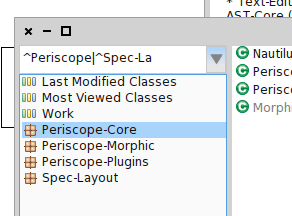
Yes, the package filter allows to see only packages you are interested. See the attachment. Cheers, Jura
Alexandre
-- _,.;:~^~:;._,.;:~^~:;._,.;:~^~:;._,.;:~^~:;._,.;: Alexandre Bergel http://www.bergel.eu ^~:;._,.;:~^~:;._,.;:~^~:;._,.;:~^~:;._,.;:~^~:;.
I like it! use it all the time. I was not aware that we could use |
El 10-12-2013, a las 9:12, Alexandre Bergel <alexandre.bergel@me.com> escribió:
If I search for something, I always Shift-Enter and that works super. For the rest, there are menus and keyboard shortcuts.
Actually, this is quite different. Shift-Enter this is for searching. The textfield in Nautilus is for filtering packages
Yes, the package filter allows to see only packages you are interested. See the attachment. Cheers, Jura
<Captura de pantalla 2013-12-10 a la(s) 18.24.33.png>
Alexandre
-- _,.;:~^~:;._,.;:~^~:;._,.;:~^~:;._,.;:~^~:;._,.;: Alexandre Bergel http://www.bergel.eu ^~:;._,.;:~^~:;._,.;:~^~:;._,.;:~^~:;._,.;:~^~:;.
We can use any regular expression. For that reason I am thinking how to do the filter feature more apparent. Maybe a ghost text is enough. I will play with it. Jura El 10-12-2013, a las 19:14, Stéphane Ducasse <stephane.ducasse@inria.fr> escribió:
I like it! use it all the time. I was not aware that we could use |
El 10-12-2013, a las 9:12, Alexandre Bergel <alexandre.bergel@me.com> escribió:
If I search for something, I always Shift-Enter and that works super. For the rest, there are menus and keyboard shortcuts.
Actually, this is quite different. Shift-Enter this is for searching. The textfield in Nautilus is for filtering packages
Yes, the package filter allows to see only packages you are interested. See the attachment. Cheers, Jura
<Captura de pantalla 2013-12-10 a la(s) 18.24.33.png>
Alexandre
-- _,.;:~^~:;._,.;:~^~:;._,.;:~^~:;._,.;:~^~:;._,.;: Alexandre Bergel http://www.bergel.eu ^~:;._,.;:~^~:;._,.;:~^~:;._,.;:~^~:;._,.;:~^~:;.
On Dec 10, 2013, at 11:42 PM, Juraj Kubelka <juraj.kubelka@gmail.com> wrote:
We can use any regular expression. For that reason I am thinking how to do the filter feature more apparent. Maybe a ghost text is enough. I will play with it.
ghosttext is simple and working.
Jura
El 10-12-2013, a las 19:14, Stéphane Ducasse <stephane.ducasse@inria.fr> escribió:
I like it! use it all the time. I was not aware that we could use |
El 10-12-2013, a las 9:12, Alexandre Bergel <alexandre.bergel@me.com> escribió:
If I search for something, I always Shift-Enter and that works super. For the rest, there are menus and keyboard shortcuts.
Actually, this is quite different. Shift-Enter this is for searching. The textfield in Nautilus is for filtering packages
Yes, the package filter allows to see only packages you are interested. See the attachment. Cheers, Jura
<Captura de pantalla 2013-12-10 a la(s) 18.24.33.png>
Alexandre
-- _,.;:~^~:;._,.;:~^~:;._,.;:~^~:;._,.;:~^~:;._,.;: Alexandre Bergel http://www.bergel.eu ^~:;._,.;:~^~:;._,.;:~^~:;._,.;:~^~:;._,.;:~^~:;.
El 11-12-2013, a las 4:09, Stéphane Ducasse <stephane.ducasse@inria.fr> escribió:
On Dec 10, 2013, at 11:42 PM, Juraj Kubelka <juraj.kubelka@gmail.com> wrote:
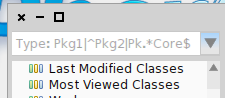
We can use any regular expression. For that reason I am thinking how to do the filter feature more apparent. Maybe a ghost text is enough. I will play with it.
ghosttext is simple and working.
OK, I did it this way and we will see :-) https://pharo.fogbugz.com/f/cases/12384/Package-filter-dialog-Make-the-featu... Thanks, Jura
Jura
El 10-12-2013, a las 19:14, Stéphane Ducasse <stephane.ducasse@inria.fr> escribió:
I like it! use it all the time. I was not aware that we could use |
El 10-12-2013, a las 9:12, Alexandre Bergel <alexandre.bergel@me.com> escribió:
If I search for something, I always Shift-Enter and that works super. For the rest, there are menus and keyboard shortcuts.
Actually, this is quite different. Shift-Enter this is for searching. The textfield in Nautilus is for filtering packages
Yes, the package filter allows to see only packages you are interested. See the attachment. Cheers, Jura
<Captura de pantalla 2013-12-10 a la(s) 18.24.33.png>
Alexandre
-- _,.;:~^~:;._,.;:~^~:;._,.;:~^~:;._,.;:~^~:;._,.;: Alexandre Bergel http://www.bergel.eu ^~:;._,.;:~^~:;._,.;:~^~:;._,.;:~^~:;._,.;:~^~:;.

On Dec 10, 2013, at 1:12 PM, Alexandre Bergel <alexandre.bergel@me.com> wrote:
If I search for something, I always Shift-Enter and that works super. For the rest, there are menus and keyboard shortcuts.
Actually, this is quite different. Shift-Enter this is for searching. The textfield in Nautilus is for filtering packages
yes this is exactly the way I use it. Seaside and I get all seaside + configuration + mooseSeaside packages and I work happily. Stef
Alexandre
-- _,.;:~^~:;._,.;:~^~:;._,.;:~^~:;._,.;:~^~:;._,.;: Alexandre Bergel http://www.bergel.eu ^~:;._,.;:~^~:;._,.;:~^~:;._,.;:~^~:;._,.;:~^~:;.

setting is already there, since one week or so On Dec 9, 2013, at 11:19 AM, Benjamin <Benjamin.VanRyseghem.Pharo@gmail.com> wrote:
What I would like, is a setting to remove it. I usually do not use the packages list, and once you end up tabbing in the search field, you can not escape without your mouse, and this is really grinding my gears :s
So if I could just disable it, I would appreciate it :)
Ben
On 08 Dec 2013, at 19:45, Usman Bhatti <usman.bhatti@gmail.com> wrote:
On Sun, Dec 8, 2013 at 4:41 PM, Stéphane Ducasse <stephane.ducasse@inria.fr> wrote:
On Dec 8, 2013, at 4:33 PM, Alexandre Bergel <alexandre.bergel@me.com> wrote:
Hi All,
You may have noticed that Nautilus now has a search bar next to the list of packages. I personally find this extremely useful. This is the work of Juraj and he is interested in hearing your feedback.
The textfield accepts regular expression. It means that entering âRoassalâ will display all the packages having the word âRoassalâ in it (e.g., RoassalExtra, ConfigurationOfRoassal). If I enter â^Roassalâ, it displays all the packages that begin with âRoassalâ. (e.g., RoassalExtra).
Any idea how to make this feature more apparent? Anything else you want to see with the searching in the browser?
I would love to have the search bar searching also based on class name Maybe -Point could select the package that contains the class Point -Point* could select the package that contains the classes *Point*
+1. I could not get used to spotlight search (may be i am too lazy). But this would definitely help and I remember some earlier browser had it, and I used it so often. But then it was removed and I could never get accustomed to the new ways.
Cheers, Alexandre -- _,.;:~^~:;._,.;:~^~:;._,.;:~^~:;._,.;:~^~:;._,.;: Alexandre Bergel http://www.bergel.eu ^~:;._,.;:~^~:;._,.;:~^~:;._,.;:~^~:;._,.;:~^~:;.
err... or *should* be there since a week or so :) On Dec 10, 2013, at 11:09 AM, Esteban Lorenzano <estebanlm@gmail.com> wrote:
setting is already there, since one week or so
On Dec 9, 2013, at 11:19 AM, Benjamin <Benjamin.VanRyseghem.Pharo@gmail.com> wrote:
What I would like, is a setting to remove it. I usually do not use the packages list, and once you end up tabbing in the search field, you can not escape without your mouse, and this is really grinding my gears :s
So if I could just disable it, I would appreciate it :)
Ben
On 08 Dec 2013, at 19:45, Usman Bhatti <usman.bhatti@gmail.com> wrote:
On Sun, Dec 8, 2013 at 4:41 PM, Stéphane Ducasse <stephane.ducasse@inria.fr> wrote:
On Dec 8, 2013, at 4:33 PM, Alexandre Bergel <alexandre.bergel@me.com> wrote:
Hi All,
You may have noticed that Nautilus now has a search bar next to the list of packages. I personally find this extremely useful. This is the work of Juraj and he is interested in hearing your feedback.
The textfield accepts regular expression. It means that entering âRoassalâ will display all the packages having the word âRoassalâ in it (e.g., RoassalExtra, ConfigurationOfRoassal). If I enter â^Roassalâ, it displays all the packages that begin with âRoassalâ. (e.g., RoassalExtra).
Any idea how to make this feature more apparent? Anything else you want to see with the searching in the browser?
I would love to have the search bar searching also based on class name Maybe -Point could select the package that contains the class Point -Point* could select the package that contains the classes *Point*
+1. I could not get used to spotlight search (may be i am too lazy). But this would definitely help and I remember some earlier browser had it, and I used it so often. But then it was removed and I could never get accustomed to the new ways.
Cheers, Alexandre -- _,.;:~^~:;._,.;:~^~:;._,.;:~^~:;._,.;:~^~:;._,.;: Alexandre Bergel http://www.bergel.eu ^~:;._,.;:~^~:;._,.;:~^~:;._,.;:~^~:;._,.;:~^~:;.
El 10-12-2013, a las 7:09, Esteban Lorenzano <estebanlm@gmail.com> escribió:
setting is already there, since one week or so
I cannot find it. Do you remember slice number? Thanks. Jura
On Dec 9, 2013, at 11:19 AM, Benjamin <Benjamin.VanRyseghem.Pharo@gmail.com> wrote:
What I would like, is a setting to remove it. I usually do not use the packages list, and once you end up tabbing in the search field, you can not escape without your mouse, and this is really grinding my gears :s
So if I could just disable it, I would appreciate it :)
Ben
On 08 Dec 2013, at 19:45, Usman Bhatti <usman.bhatti@gmail.com> wrote:
On Sun, Dec 8, 2013 at 4:41 PM, Stéphane Ducasse <stephane.ducasse@inria.fr> wrote:
On Dec 8, 2013, at 4:33 PM, Alexandre Bergel <alexandre.bergel@me.com> wrote:
Hi All,
You may have noticed that Nautilus now has a search bar next to the list of packages. I personally find this extremely useful. This is the work of Juraj and he is interested in hearing your feedback.
The textfield accepts regular expression. It means that entering âRoassalâ will display all the packages having the word âRoassalâ in it (e.g., RoassalExtra, ConfigurationOfRoassal). If I enter â^Roassalâ, it displays all the packages that begin with âRoassalâ. (e.g., RoassalExtra).
Any idea how to make this feature more apparent? Anything else you want to see with the searching in the browser?
I would love to have the search bar searching also based on class name Maybe -Point could select the package that contains the class Point -Point* could select the package that contains the classes *Point*
+1. I could not get used to spotlight search (may be i am too lazy). But this would definitely help and I remember some earlier browser had it, and I used it so often. But then it was removed and I could never get accustomed to the new ways.
Cheers, Alexandre -- _,.;:~^~:;._,.;:~^~:;._,.;:~^~:;._,.;:~^~:;._,.;: Alexandre Bergel http://www.bergel.eu ^~:;._,.;:~^~:;._,.;:~^~:;._,.;:~^~:;._,.;:~^~:;.
Hi Stef, I am thinking about the -Point suggestion. Why this? Why not to use Cmd+f,cmd+c (find class), or shift+enter (spotlight)? Thanks for the discussion. Jura El 08-12-2013, a las 12:41, Stéphane Ducasse <stephane.ducasse@inria.fr> escribió:
On Dec 8, 2013, at 4:33 PM, Alexandre Bergel <alexandre.bergel@me.com> wrote:
Hi All,
You may have noticed that Nautilus now has a search bar next to the list of packages. I personally find this extremely useful. This is the work of Juraj and he is interested in hearing your feedback.
The textfield accepts regular expression. It means that entering âRoassalâ will display all the packages having the word âRoassalâ in it (e.g., RoassalExtra, ConfigurationOfRoassal). If I enter â^Roassalâ, it displays all the packages that begin with âRoassalâ. (e.g., RoassalExtra).
Any idea how to make this feature more apparent? Anything else you want to see with the searching in the browser?
I would love to have the search bar searching also based on class name Maybe -Point could select the package that contains the class Point -Point* could select the package that contains the classes *Point*
Cheers, Alexandre -- _,.;:~^~:;._,.;:~^~:;._,.;:~^~:;._,.;:~^~:;._,.;: Alexandre Bergel http://www.bergel.eu ^~:;._,.;:~^~:;._,.;:~^~:;._,.;:~^~:;._,.;:~^~:;.
Does it means, when I start to type â-Pâ it will display all the packages which contain class with character âpâ or âPâ? In order to be consists we should use the same regular expressions as for packages. So, If I want all packages which contain class beginning with âpâ, it should be â-^pâ. Regular expressions are case insensitive. Thanks, Jura El 11-12-2013, a las 4:48, Stéphane Ducasse <stephane.ducasse@inria.fr> escribió:
No in fact this is about filtering classes directly without opening the finder
Hi Stef,
I am thinking about the -Point suggestion. Why this? Why not to use Cmd+f,cmd+c (find class), or shift+enter (spotlight)?
Indeed we do not need it :)
Hi, I think to do package filter feature apparent by adding âinfo buttonâ. See the attached picture. When clicked on the info button, help dialog will appear. What do you think? Can someone give me ideas how to implement it? What classes I should be interested, etc. Thanks, Jura El 08-12-2013, a las 12:33, Alexandre Bergel <alexandre.bergel@me.com> escribió:
Hi All,
You may have noticed that Nautilus now has a search bar next to the list of packages. I personally find this extremely useful. This is the work of Juraj and he is interested in hearing your feedback.
The textfield accepts regular expression. It means that entering âRoassalâ will display all the packages having the word âRoassalâ in it (e.g., RoassalExtra, ConfigurationOfRoassal). If I enter â^Roassalâ, it displays all the packages that begin with âRoassalâ. (e.g., RoassalExtra).
Any idea how to make this feature more apparent? Anything else you want to see with the searching in the browser?
Cheers, Alexandre -- _,.;:~^~:;._,.;:~^~:;._,.;:~^~:;._,.;:~^~:;._,.;: Alexandre Bergel http://www.bergel.eu ^~:;._,.;:~^~:;._,.;:~^~:;._,.;:~^~:;._,.;:~^~:;.

On 10 Dec 2013, at 22:14, Juraj Kubelka <juraj.kubelka@gmail.com> wrote:
Hi, I think to do package filter feature apparent by adding âinfo buttonâ. See the attached picture. When clicked on the info button, help dialog will appear. What do you think?
Can someone give me ideas how to implement it? What classes I should be interested, etc.
Morph :P Ben
<Help button for package filter input box.png>
Thanks, Jura
El 08-12-2013, a las 12:33, Alexandre Bergel <alexandre.bergel@me.com> escribió:
Hi All,
You may have noticed that Nautilus now has a search bar next to the list of packages. I personally find this extremely useful. This is the work of Juraj and he is interested in hearing your feedback.
The textfield accepts regular expression. It means that entering âRoassalâ will display all the packages having the word âRoassalâ in it (e.g., RoassalExtra, ConfigurationOfRoassal). If I enter â^Roassalâ, it displays all the packages that begin with âRoassalâ. (e.g., RoassalExtra).
Any idea how to make this feature more apparent? Anything else you want to see with the searching in the browser?
Cheers, Alexandre -- _,.;:~^~:;._,.;:~^~:;._,.;:~^~:;._,.;:~^~:;._,.;: Alexandre Bergel http://www.bergel.eu ^~:;._,.;:~^~:;._,.;:~^~:;._,.;:~^~:;._,.;:~^~:;.
El 10-12-2013, a las 19:38, Benjamin <Benjamin.VanRyseghem.Pharo@gmail.com> escribió:
On 10 Dec 2013, at 22:14, Juraj Kubelka <juraj.kubelka@gmail.com> wrote:
Hi, I think to do package filter feature apparent by adding âinfo buttonâ. See the attached picture. When clicked on the info button, help dialog will appear. What do you think?
Can someone give me ideas how to implement it? What classes I should be interested, etc.
Morph :P
Ok, I was curious if there is something specialized I can reuse :-) Thanks :-) Jura
Ben
<Help button for package filter input box.png>
Thanks, Jura
El 08-12-2013, a las 12:33, Alexandre Bergel <alexandre.bergel@me.com> escribió:
Hi All,
You may have noticed that Nautilus now has a search bar next to the list of packages. I personally find this extremely useful. This is the work of Juraj and he is interested in hearing your feedback.
The textfield accepts regular expression. It means that entering âRoassalâ will display all the packages having the word âRoassalâ in it (e.g., RoassalExtra, ConfigurationOfRoassal). If I enter â^Roassalâ, it displays all the packages that begin with âRoassalâ. (e.g., RoassalExtra).
Any idea how to make this feature more apparent? Anything else you want to see with the searching in the browser?
Cheers, Alexandre -- _,.;:~^~:;._,.;:~^~:;._,.;:~^~:;._,.;:~^~:;._,.;: Alexandre Bergel http://www.bergel.eu ^~:;._,.;:~^~:;._,.;:~^~:;._,.;:~^~:;._,.;:~^~:;.
participants (10)
-
 Alexandre Bergel
 -
 Benjamin
 -
 btc@openinworld.com
 -
 Esteban Lorenzano
 -
 Juraj Kubelka
 -
 kilon alios
 -
 Marcus Denker
 -
 Stéphane Ducasse
 -
 Sven Van Caekenberghe
 -
 Usman Bhatti