[GTInspector] Showing object state using a tree

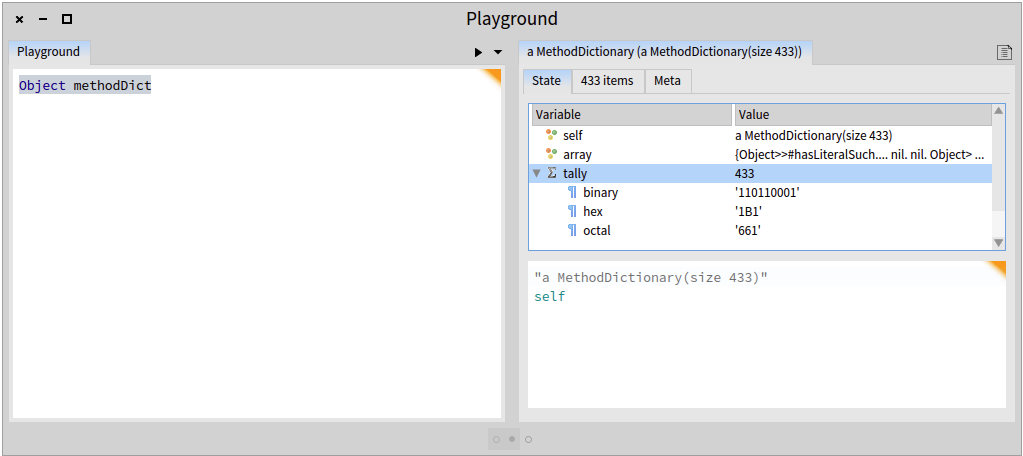
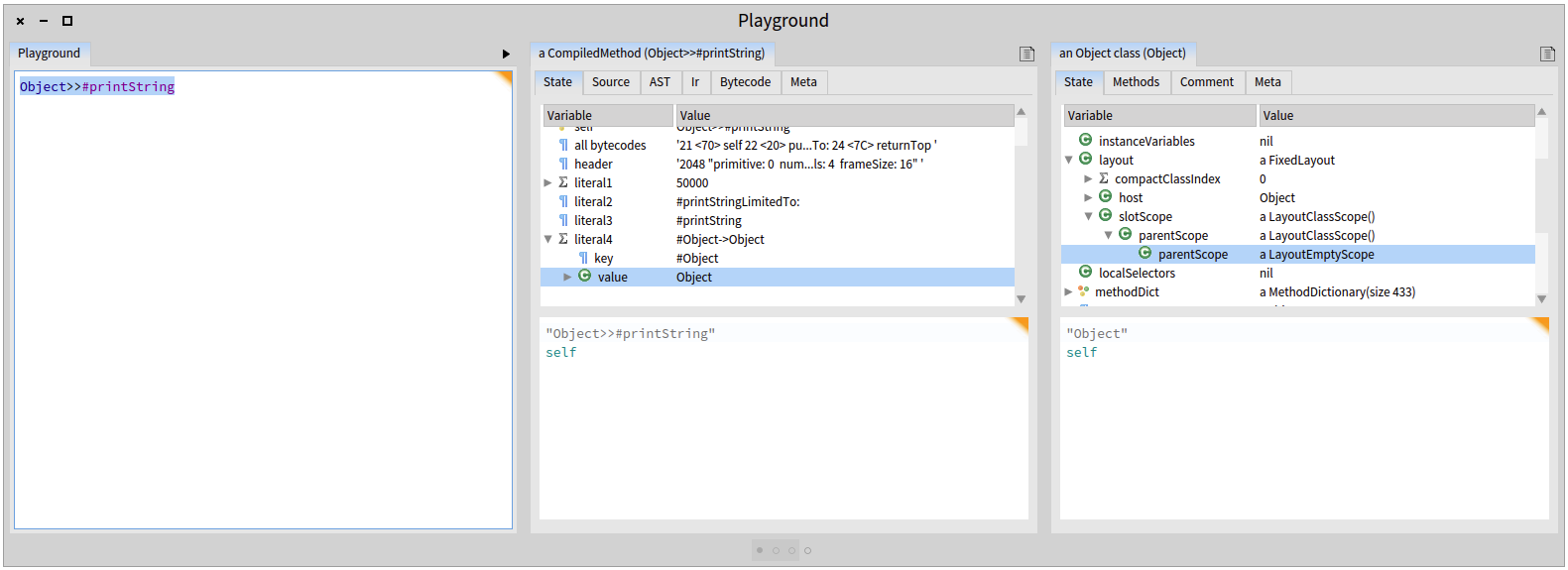
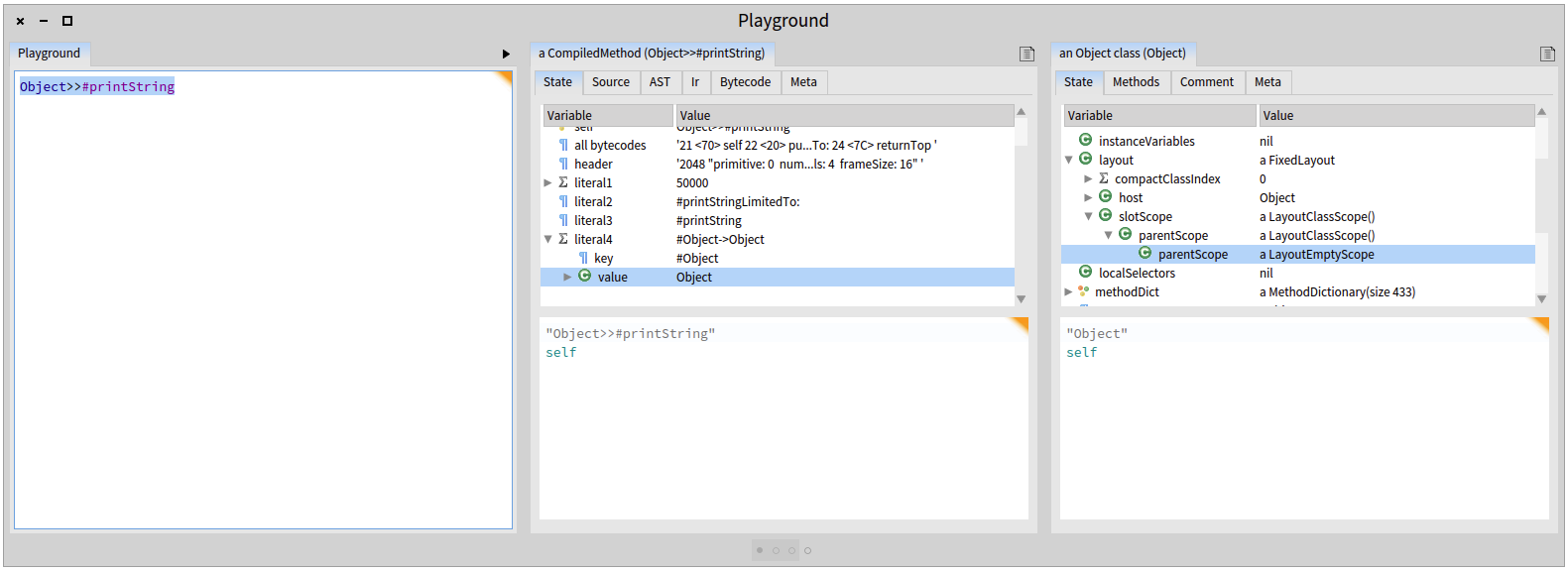
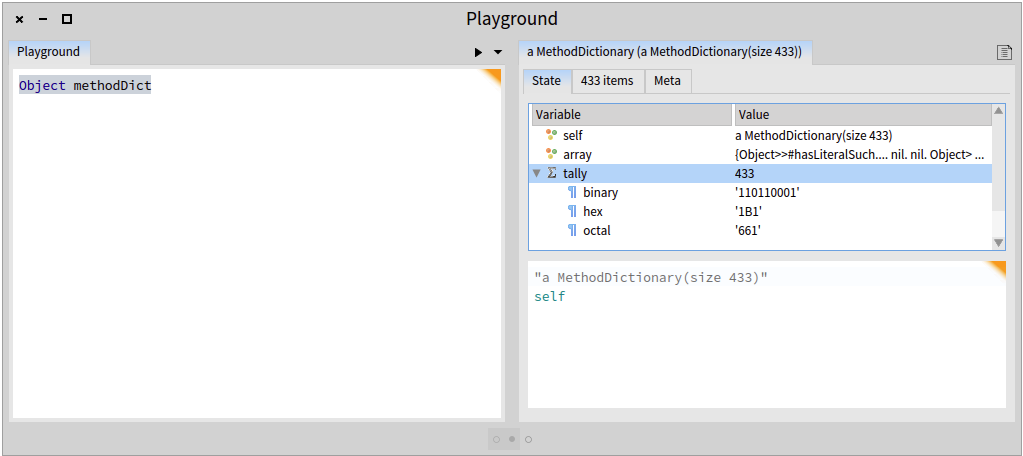
Hi, The GTInspector now shows the state of an object in a tree view (screenshots below). This tree view focuses on the internal structure of an object. For example, when looking at a dictionary object you will see the "array" and the "tally" attributes and not the key value pairs. Those can be accessed from another presentation of a dictionary object. So the tree is meant to be used together with the finder and the other presentations of on object. Let us know what you think. Cheers, Andrei & Doru [image: Inline image 1] [image: Inline image 2] -- www.tudorgirba.com "Every thing has its own flow"

Great!. How can i install GtInspector in a pharo image? TIA Ing. Pablo Digonzelli Software Solutions IP-Solutiones SRL Metrotec SRL 25 de Mayo 521 Email: pdigonzelli@softsargentina.com pdigonzelli@gmail.com Cel: 5493815982714 ----- Mensaje original ----- De: "Tudor Girba" <tudor@tudorgirba.com> Para: "Discusses Development of Pharo" <pharo-dev@lists.pharo.org> Enviados: Martes, 5 de Agosto 2014 11:06:21 Asunto: [Pharo-dev] [GTInspector] Showing object state using a tree Hi, The GTInspector now shows the state of an object in a tree view (screenshots below). This tree view focuses on the internal structure of an object. For example, when looking at a dictionary object you will see the "array" and the "tally" attributes and not the key value pairs. Those can be accessed from another presentation of a dictionary object. So the tree is meant to be used together with the finder and the other presentations of on object. Let us know what you think. Cheers, Andrei & Doru -- www.tudorgirba.com "Every thing has its own flow"
You can install GToolkit in a Pharo 3.0 image like this: http://www.humane-assessment.com/blog/installing-gtoolkit Doru On Wed, Aug 6, 2014 at 5:30 AM, Pablo R. Digonzelli <pdigonzelli@gmail.com> wrote:
Great!. How can i install GtInspector in a pharo image?
TIA
------------------------------ *Ing. Pablo Digonzelli* Software Solutions IP-Solutiones SRL Metrotec SRL 25 de Mayo 521 Email: pdigonzelli@softsargentina.com pdigonzelli@gmail.com Cel: 5493815982714
------------------------------ *De: *"Tudor Girba" <tudor@tudorgirba.com> *Para: *"Discusses Development of Pharo" <pharo-dev@lists.pharo.org> *Enviados: *Martes, 5 de Agosto 2014 11:06:21 *Asunto: *[Pharo-dev] [GTInspector] Showing object state using a tree
Hi,
The GTInspector now shows the state of an object in a tree view (screenshots below).
This tree view focuses on the internal structure of an object. For example, when looking at a dictionary object you will see the "array" and the "tally" attributes and not the key value pairs. Those can be accessed from another presentation of a dictionary object.
So the tree is meant to be used together with the finder and the other presentations of on object.
Let us know what you think.
Cheers, Andrei & Doru
[image: Inline image 1]
[image: Inline image 2]
-- www.tudorgirba.com
"Every thing has its own flow"
-- www.tudorgirba.com "Every thing has its own flow"
Thanks Ing. Pablo Digonzelli Software Solutions IP-Solutiones SRL Metrotec SRL 25 de Mayo 521 Email: pdigonzelli@softsargentina.com pdigonzelli@gmail.com Cel: 5493815982714 ----- Mensaje original ----- De: "Tudor Girba" <tudor@tudorgirba.com> Para: "Pharo Development List" <pharo-dev@lists.pharo.org> Enviados: Miércoles, 6 de Agosto 2014 2:09:32 Asunto: Re: [Pharo-dev] [GTInspector] Showing object state using a tree You can install GToolkit in a Pharo 3.0 image like this: http://www.humane-assessment.com/blog/installing-gtoolkit Doru On Wed, Aug 6, 2014 at 5:30 AM, Pablo R. Digonzelli < pdigonzelli@gmail.com > wrote: Great!. How can i install GtInspector in a pharo image? TIA Ing. Pablo Digonzelli Software Solutions IP-Solutiones SRL Metrotec SRL 25 de Mayo 521 Email: pdigonzelli@softsargentina.com pdigonzelli@gmail.com Cel: 5493815982714 De: "Tudor Girba" < tudor@tudorgirba.com > Para: "Discusses Development of Pharo" < pharo-dev@lists.pharo.org > Enviados: Martes, 5 de Agosto 2014 11:06:21 Asunto: [Pharo-dev] [GTInspector] Showing object state using a tree Hi, The GTInspector now shows the state of an object in a tree view (screenshots below). This tree view focuses on the internal structure of an object. For example, when looking at a dictionary object you will see the "array" and the "tally" attributes and not the key value pairs. Those can be accessed from another presentation of a dictionary object. So the tree is meant to be used together with the finder and the other presentations of on object. Let us know what you think. Cheers, Andrei & Doru -- www.tudorgirba.com "Every thing has its own flow" -- www.tudorgirba.com "Every thing has its own flow"

Hi Doru, Have you tried using GT with the Pharo dark team? Does it work? Last time I tried using them together, it did not look very well ;-) It's not really important. Just a question... cheers Johan On 06 Aug 2014, at 07:09, Tudor Girba <tudor@tudorgirba.com> wrote:
You can install GToolkit in a Pharo 3.0 image like this: http://www.humane-assessment.com/blog/installing-gtoolkit
Doru
On Wed, Aug 6, 2014 at 5:30 AM, Pablo R. Digonzelli <pdigonzelli@gmail.com> wrote: Great!. How can i install GtInspector in a pharo image?
TIA
Ing. Pablo Digonzelli Software Solutions IP-Solutiones SRL Metrotec SRL 25 de Mayo 521 Email: pdigonzelli@softsargentina.com pdigonzelli@gmail.com Cel: 5493815982714
De: "Tudor Girba" <tudor@tudorgirba.com> Para: "Discusses Development of Pharo" <pharo-dev@lists.pharo.org> Enviados: Martes, 5 de Agosto 2014 11:06:21 Asunto: [Pharo-dev] [GTInspector] Showing object state using a tree
Hi,
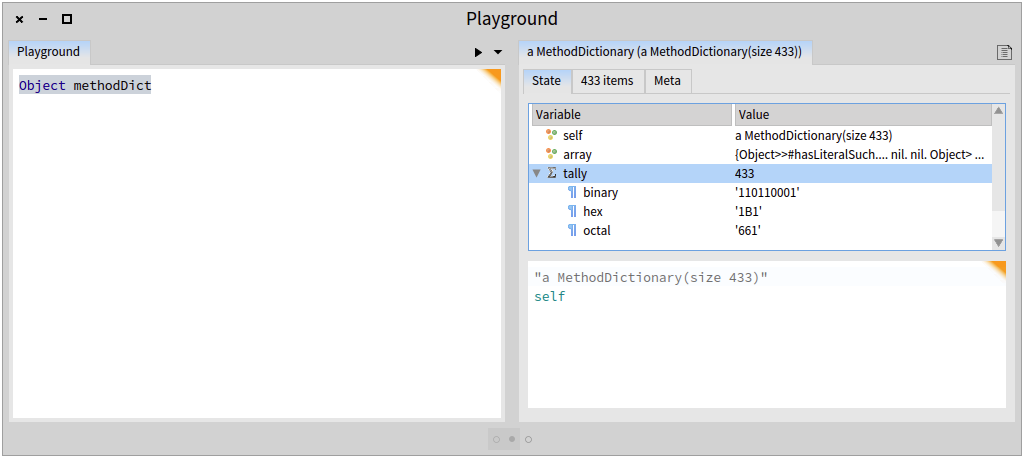
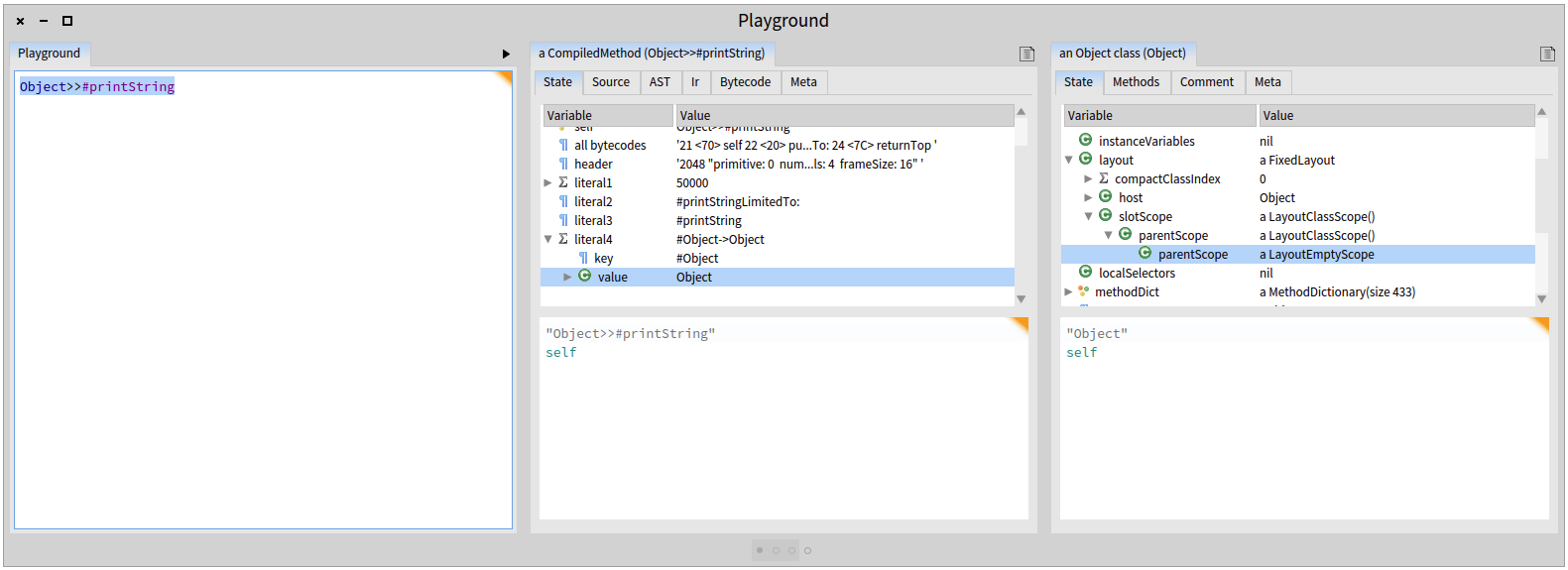
The GTInspector now shows the state of an object in a tree view (screenshots below).
This tree view focuses on the internal structure of an object. For example, when looking at a dictionary object you will see the "array" and the "tally" attributes and not the key value pairs. Those can be accessed from another presentation of a dictionary object.
So the tree is meant to be used together with the finder and the other presentations of on object.
Let us know what you think.
Cheers, Andrei & Doru
<GTInspector_Tree_View2.png>
<GTInspector_Tree_View1.png>
-- www.tudorgirba.com
"Every thing has its own flow"
-- www.tudorgirba.com
"Every thing has its own flow"

I have been trying to install the tools in Pharo 3 (Dark/Dawn Theme). GTInspector loads and works pretty ok at first sight. Gofer new url: 'http://www.smalltalkhub.com/mc/Moose/GToolkit/main'; configuration; load. (Smalltalk globals at: #ConfigurationOfGToolkit) loadDevelopment. "Works but with a warning" (Smalltalk globals at: #GTInspector) registerToolsOn: Smalltalk tools. "Ok" (Smalltalk globals at: #GTDebugger) registerToolsOn: Smalltalk tools. "Gives: KeyNotFound: key #GTDebugger not found in SystemDictionary" Indeed there is no GTDebugger class but a set of other things. What to use ? TIA âPhil

Use GTGenericStackDebugger instead of GTDebugger. (it was renamed some time ago). Cheers, Andrei On Fri, Aug 8, 2014 at 11:51 AM, phil@highoctane.be <phil@highoctane.be> wrote:
I have been trying to install the tools in Pharo 3 (Dark/Dawn Theme).
GTInspector loads and works pretty ok at first sight.
Gofer new url: 'http://www.smalltalkhub.com/mc/Moose/GToolkit/main'; configuration; load. (Smalltalk globals at: #ConfigurationOfGToolkit) loadDevelopment. "Works but with a warning" (Smalltalk globals at: #GTInspector) registerToolsOn: Smalltalk tools. "Ok" (Smalltalk globals at: #GTDebugger) registerToolsOn: Smalltalk tools. "Gives: KeyNotFound: key #GTDebugger not found in SystemDictionary"
Indeed there is no GTDebugger class but a set of other things.
What to use ?
TIA
âPhil
It works. Now, following Johan point, the debugger is hard to read in a dark theme. See attached screenshot. Phil On Fri, Aug 8, 2014 at 11:55 AM, Andrei Chis <chisvasileandrei@gmail.com> wrote:
Use GTGenericStackDebugger instead of GTDebugger. (it was renamed some time ago).
Cheers, Andrei
On Fri, Aug 8, 2014 at 11:51 AM, phil@highoctane.be <phil@highoctane.be> wrote:
I have been trying to install the tools in Pharo 3 (Dark/Dawn Theme).
GTInspector loads and works pretty ok at first sight.
Gofer new url: 'http://www.smalltalkhub.com/mc/Moose/GToolkit/main'; configuration; load. (Smalltalk globals at: #ConfigurationOfGToolkit) loadDevelopment. "Works but with a warning" (Smalltalk globals at: #GTInspector) registerToolsOn: Smalltalk tools. "Ok" (Smalltalk globals at: #GTDebugger) registerToolsOn: Smalltalk tools. "Gives: KeyNotFound: key #GTDebugger not found in SystemDictionary"
Indeed there is no GTDebugger class but a set of other things.
What to use ?
TIA
âPhil
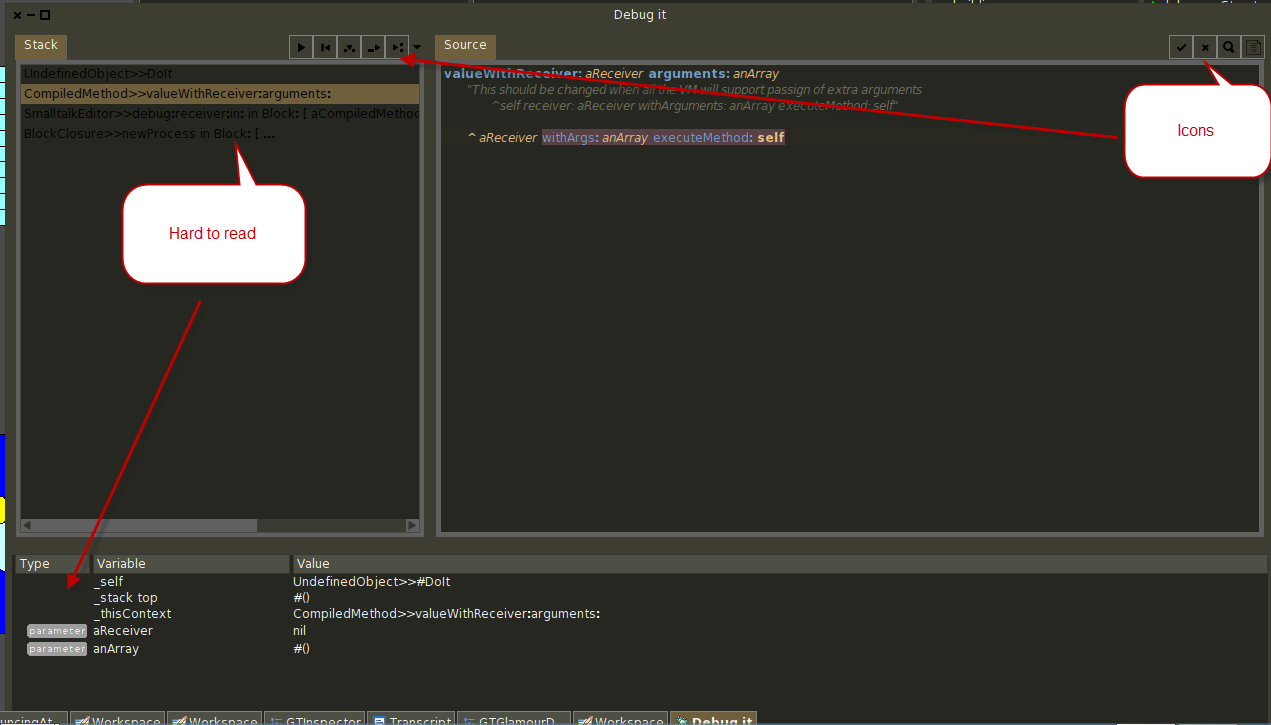
I just installed the Dark Theme with the GT Tools in a Pharo3 and they seem to work well now. Great great! The Dawn theme has difficult contrasts in other tools as well (even without GT installed). Try using the merge tool with it.... Johan On 08 Aug 2014, at 13:02, phil@highoctane.be wrote:
It works.
Now, following Johan point, the debugger is hard to read in a dark theme. See attached screenshot.
Phil
On Fri, Aug 8, 2014 at 11:55 AM, Andrei Chis <chisvasileandrei@gmail.com> wrote: Use GTGenericStackDebugger instead of GTDebugger. (it was renamed some time ago).
Cheers, Andrei
On Fri, Aug 8, 2014 at 11:51 AM, phil@highoctane.be <phil@highoctane.be> wrote: I have been trying to install the tools in Pharo 3 (Dark/Dawn Theme).
GTInspector loads and works pretty ok at first sight.
Gofer new url: 'http://www.smalltalkhub.com/mc/Moose/GToolkit/main'; configuration; load. (Smalltalk globals at: #ConfigurationOfGToolkit) loadDevelopment. "Works but with a warning" (Smalltalk globals at: #GTInspector) registerToolsOn: Smalltalk tools. "Ok" (Smalltalk globals at: #GTDebugger) registerToolsOn: Smalltalk tools. "Gives: KeyNotFound: key #GTDebugger not found in SystemDictionary"
Indeed there is no GTDebugger class but a set of other things.
What to use ?
TIA
âPhil
<GT08-08-14 13-00-52.png>
Yes, I have a local little patch for that. Maybe Dark was updated and Dawn has to follow. Sebastian? Phil On Sat, Aug 9, 2014 at 10:01 AM, Johan Brichau <johan@inceptive.be> wrote:
I just installed the Dark Theme with the GT Tools in a Pharo3 and they seem to work well now. Great great!
The Dawn theme has difficult contrasts in other tools as well (even without GT installed). Try using the merge tool with it....
Johan
On 08 Aug 2014, at 13:02, phil@highoctane.be wrote:
It works.
Now, following Johan point, the debugger is hard to read in a dark theme. See attached screenshot.
Phil
On Fri, Aug 8, 2014 at 11:55 AM, Andrei Chis <chisvasileandrei@gmail.com> wrote: Use GTGenericStackDebugger instead of GTDebugger. (it was renamed some time ago).
Cheers, Andrei
On Fri, Aug 8, 2014 at 11:51 AM, phil@highoctane.be <phil@highoctane.be> wrote: I have been trying to install the tools in Pharo 3 (Dark/Dawn Theme).
GTInspector loads and works pretty ok at first sight.
Gofer new url: 'http://www.smalltalkhub.com/mc/Moose/GToolkit/main'; configuration; load. (Smalltalk globals at: #ConfigurationOfGToolkit) loadDevelopment. "Works but with a warning" (Smalltalk globals at: #GTInspector) registerToolsOn: Smalltalk tools. "Ok" (Smalltalk globals at: #GTDebugger) registerToolsOn: Smalltalk tools. "Gives: KeyNotFound: key #GTDebugger not found in SystemDictionary"
Indeed there is no GTDebugger class but a set of other things.
What to use ?
TIA
âPhil
<GT08-08-14 13-00-52.png>
participants (5)
-
 Andrei Chis
 -
 Johan Brichau
 -
 Pablo R. Digonzelli
 -
 phil@highoctane.be
 -
 Tudor Girba