[Pharo-project] A lil simplification of MorphTreeNodeMorph

Cut out some code and extra morphs. It speeds up rendering to 60% of original. @Benjamin Please verify if it positioning stuff correctly. Because in my image Settings are now OK. @all I need your feedback to know if it works correctly in other places, where tree morph used. -- Best regards, Igor Stasenko AKA sig.

**TX!!** :) It was cool to see you both hacking to speed it up. Stef
Cut out some code and extra morphs. It speeds up rendering to 60% of original.
@Benjamin Please verify if it positioning stuff correctly. Because in my image Settings are now OK.
@all I need your feedback to know if it works correctly in other places, where tree morph used.
-- Best regards, Igor Stasenko AKA sig. <theTreee.2.cs>

Le 05/04/2011 20:08, Igor Stasenko a écrit :
Cut out some code and extra morphs. It speeds up rendering to 60% of original. cool thanks for reviewing this code! @Benjamin Please verify if it positioning stuff correctly. Because in my image Settings are now OK.
@all I need your feedback to know if it works correctly in other places, where tree morph used. you need to remove all references to spacers inst var since it seems to be not used anymore now.
another point, try all examples in Morphic-MorphTreeWidget-Examples. now, the height of each row is constant. It is because of the RowLayout that is used for MorphTreeNodeMorph instead of a ProportionalLayout. see ClassTreeExample before and after your changes. ClassTreeExample new openOn: Object cheers Alain
On 5 April 2011 21:39, Alain Plantec <alain.plantec@yahoo.com> wrote:
Le 05/04/2011 20:08, Igor Stasenko a écrit :
Cut out some code and extra morphs. It speeds up rendering to 60% of original.
cool thanks for reviewing this code!
@Benjamin Please verify if it positioning stuff correctly. Because in my image Settings are now OK.
@all I need your feedback to know if it works correctly in other places, where tree morph used.
you need to remove all references to spacers inst var since it seems to be not used anymore now.
another point, try all examples in Morphic-MorphTreeWidget-Examples. now, the height of each row is constant.
Yes, so what it should be instead?
It is because of the RowLayout that is used for MorphTreeNodeMorph instead of a ProportionalLayout. see ClassTreeExample before and after your changes.
ClassTreeExample new openOn: Object
i will
cheers Alain
-- Best regards, Igor Stasenko AKA sig.

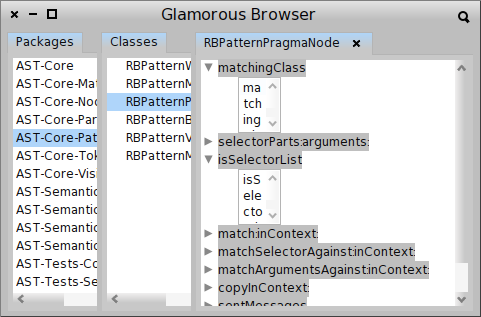
Hi, 60% sounds excellent! If you are looking into MorphTreeMorph, would it be possible to look into the problem of making the submorphs fill the entire horizontal space? Let me give you an example: - download the Glamorous Toolkit image: http://hudson.moosetechnology.org/job/glamorous-toolkit-latest-dev/lastSucce... - run GTCoder open - select a package, select a class, expand a method and you will see that the text submorph does not scale either horizontally, or vertically I also attached a screenshot. Would it be possible to fix that, too? :) Cheers, Doru On 6 Apr 2011, at 08:57, Igor Stasenko wrote:
On 5 April 2011 21:39, Alain Plantec <alain.plantec@yahoo.com> wrote:
Le 05/04/2011 20:08, Igor Stasenko a écrit :
Cut out some code and extra morphs. It speeds up rendering to 60% of original.
cool thanks for reviewing this code!
@Benjamin Please verify if it positioning stuff correctly. Because in my image Settings are now OK.
@all I need your feedback to know if it works correctly in other places, where tree morph used.
you need to remove all references to spacers inst var since it seems to be not used anymore now.
another point, try all examples in Morphic-MorphTreeWidget-Examples. now, the height of each row is constant.
Yes, so what it should be instead?
It is because of the RowLayout that is used for MorphTreeNodeMorph instead of a ProportionalLayout. see ClassTreeExample before and after your changes.
ClassTreeExample new openOn: Object
i will
cheers Alain
-- Best regards, Igor Stasenko AKA sig.
-- www.tudorgirba.com "Reasonable is what we are accustomed with."
Le 06/04/2011 09:30, Tudor Girba a écrit :
Hi,
60% sounds excellent!
If you are looking into MorphTreeMorph, would it be possible to look into the problem of making the submorphs fill the entire horizontal space? arrrh! yes sorry, it is on my todo list and the intergration of the cleaner Gary's ScrollPane also. but no time for this now :( Cheers Alain
Let me give you an example: - download the Glamorous Toolkit image: http://hudson.moosetechnology.org/job/glamorous-toolkit-latest-dev/lastSucce...
- run GTCoder open
- select a package, select a class, expand a method and you will see that the text submorph does not scale either horizontally, or vertically
I also attached a screenshot.
Would it be possible to fix that, too? :)
Cheers, Doru
On 6 Apr 2011, at 08:57, Igor Stasenko wrote:
On 5 April 2011 21:39, Alain Plantec<alain.plantec@yahoo.com> wrote:
Le 05/04/2011 20:08, Igor Stasenko a écrit :
Cut out some code and extra morphs. It speeds up rendering to 60% of original. cool thanks for reviewing this code! @Benjamin Please verify if it positioning stuff correctly. Because in my image Settings are now OK.
@all I need your feedback to know if it works correctly in other places, where tree morph used. you need to remove all references to spacers inst var since it seems to be not used anymore now.
another point, try all examples in Morphic-MorphTreeWidget-Examples. now, the height of each row is constant. Yes, so what it should be instead?
It is because of the RowLayout that is used for MorphTreeNodeMorph instead of a ProportionalLayout. see ClassTreeExample before and after your changes.
ClassTreeExample new openOn: Object
i will
cheers Alain
-- Best regards, Igor Stasenko AKA sig.
-- www.tudorgirba.com
"Reasonable is what we are accustomed with."
Le 06/04/2011 08:57, Igor Stasenko a écrit :
another point, try all examples in Morphic-MorphTreeWidget-Examples. now, the height of each row is constant. Yes, so what it should be instead?
it should be dependent on the content height, so as it was before. another problem is the spacers removal. now, the horizontal positioning is broken (they was here to take into account the vertical resizers width) see the screen shots. try SimpleGridExample new open before and after the changes. to exhibit the problem, change the resizerWidth from 2 to 12 as an example (just set it to 12 in SimpleGridExample>>treeMorph) I think that MorphTreeMorph can't be efficient for very big lists because each row may contain a lot of morphs. This is why I've also implemented LazyMorphTreeMorph. Try it, it is very much efficient but badly implemented. I think it should use a background process to build the list (something like what you did for the annotation pane). Cheers Alain
It is because of the RowLayout that is used for MorphTreeNodeMorph instead of a ProportionalLayout. see ClassTreeExample before and after your changes.
ClassTreeExample new openOn: Object
i will
cheers Alain


On 6 April 2011 09:45, Alain Plantec <alain.plantec@yahoo.com> wrote:
Le 06/04/2011 08:57, Igor Stasenko a écrit :
another point, try all examples in Morphic-MorphTreeWidget-Examples. now, the height of each row is constant.
Yes, so what it should be instead?
it should be dependent on the content height, so as it was before. another problem is the spacers removal. now, the horizontal positioning is broken (they was here to take into account the vertical resizers width) see the screen shots.
yes, positioning is not quite correct. But the idea is to use layouts instead of morphs to adjust positioning. Because having 3 extra morphs per list item which sitting there only for markup is not fun. And it affects a rendering speed considerably.
try SimpleGridExample new open before and after the changes. to exhibit the problem, change the resizerWidth from 2 to 12 as an example (just set it to 12 in SimpleGridExample>>treeMorph)
I think that MorphTreeMorph can't be efficient for very big lists because each row may contain a lot of morphs.
Yes, but you can use morphs only for those items which are shown on screen, while for those which outside you don't need to use morphs at all. The idea is that You could keep in memory all morphs which representing the tree, but don't iterate over them every time. Just add to submorphs only those which currently visible.
This is why I've also implemented LazyMorphTreeMorph. Try it, it is very much efficient but badly implemented. I think it should use a background process to build the list (something like what you did for the annotation pane).
What could be done is to simplify things even more, so creating a list item will be cheaper and skip many initialization, unless it is necessary.
Cheers Alain
-- Best regards, Igor Stasenko AKA sig.
Hi guys this is ***REALLLYYYYY*** important that we get scalable List and Tree so thanks a lot for your effort. Please continue Stef On Apr 6, 2011, at 10:02 AM, Igor Stasenko wrote:
On 6 April 2011 09:45, Alain Plantec <alain.plantec@yahoo.com> wrote:
Le 06/04/2011 08:57, Igor Stasenko a écrit :
another point, try all examples in Morphic-MorphTreeWidget-Examples. now, the height of each row is constant.
Yes, so what it should be instead?
it should be dependent on the content height, so as it was before. another problem is the spacers removal. now, the horizontal positioning is broken (they was here to take into account the vertical resizers width) see the screen shots.
yes, positioning is not quite correct. But the idea is to use layouts instead of morphs to adjust positioning. Because having 3 extra morphs per list item which sitting there only for markup is not fun. And it affects a rendering speed considerably.
try SimpleGridExample new open before and after the changes. to exhibit the problem, change the resizerWidth from 2 to 12 as an example (just set it to 12 in SimpleGridExample>>treeMorph)
I think that MorphTreeMorph can't be efficient for very big lists because each row may contain a lot of morphs.
Yes, but you can use morphs only for those items which are shown on screen, while for those which outside you don't need to use morphs at all.
The idea is that You could keep in memory all morphs which representing the tree, but don't iterate over them every time. Just add to submorphs only those which currently visible.
This is why I've also implemented LazyMorphTreeMorph. Try it, it is very much efficient but badly implemented. I think it should use a background process to build the list (something like what you did for the annotation pane).
What could be done is to simplify things even more, so creating a list item will be cheaper and skip many initialization, unless it is necessary.
Cheers Alain
-- Best regards, Igor Stasenko AKA sig.
Indeed. For example, in the context of Moose, we sometimes have lists in the order of 100k elements. The LazyMorphTreeMorph offers pagination and it works well, but it would be super cool to have a stronger solution. Cheers, Doru On 6 Apr 2011, at 10:08, Stéphane Ducasse wrote:
Hi guys
this is ***REALLLYYYYY*** important that we get scalable List and Tree so thanks a lot for your effort. Please continue Stef
On Apr 6, 2011, at 10:02 AM, Igor Stasenko wrote:
On 6 April 2011 09:45, Alain Plantec <alain.plantec@yahoo.com> wrote:
Le 06/04/2011 08:57, Igor Stasenko a écrit :
another point, try all examples in Morphic-MorphTreeWidget-Examples. now, the height of each row is constant.
Yes, so what it should be instead?
it should be dependent on the content height, so as it was before. another problem is the spacers removal. now, the horizontal positioning is broken (they was here to take into account the vertical resizers width) see the screen shots.
yes, positioning is not quite correct. But the idea is to use layouts instead of morphs to adjust positioning. Because having 3 extra morphs per list item which sitting there only for markup is not fun. And it affects a rendering speed considerably.
try SimpleGridExample new open before and after the changes. to exhibit the problem, change the resizerWidth from 2 to 12 as an example (just set it to 12 in SimpleGridExample>>treeMorph)
I think that MorphTreeMorph can't be efficient for very big lists because each row may contain a lot of morphs.
Yes, but you can use morphs only for those items which are shown on screen, while for those which outside you don't need to use morphs at all.
The idea is that You could keep in memory all morphs which representing the tree, but don't iterate over them every time. Just add to submorphs only those which currently visible.
This is why I've also implemented LazyMorphTreeMorph. Try it, it is very much efficient but badly implemented. I think it should use a background process to build the list (something like what you did for the annotation pane).
What could be done is to simplify things even more, so creating a list item will be cheaper and skip many initialization, unless it is necessary.
Cheers Alain
-- Best regards, Igor Stasenko AKA sig.
-- www.tudorgirba.com "Relationships are of two kinds: those we choose and those that happen. They both matter."
Le 06/04/2011 10:02, Igor Stasenko a écrit :
yes, positioning is not quite correct. But the idea is to use layouts instead of morphs to adjust positioning. Because having 3 extra morphs per list item which sitting there only for markup is not fun. And it affects a rendering speed considerably.
yes, it is a workaround. take the current implementation as a functional requirement. MorphTreeMorph is cool because it can be used for lists, trees and tables, but I agree, it is badly implemented. So I fully agree with you, the positioning logic should placed be in the layout managing
I think that MorphTreeMorph can't be efficient for very big lists because each row may contain a lot of morphs. Yes, but you can use morphs only for those items which are shown on screen, while for those which outside you don't need to use morphs at all.
The idea is that You could keep in memory all morphs which representing the tree, but don't iterate over them every time. Just add to submorphs only those which currently visible.
this is the idea behind LazyMorphTreeMorph, Morphs added only when they become visible.
What could be done is to simplify things even more, so creating a list item will be cheaper and skip many initialization, unless it is necessary. yes, thanks a lot Igor! Cheers Alain
Cheers Alain
yes, it is a workaround. take the current implementation as a functional requirement.
Good point! Yes igor we want the same, simpler and faster :D
MorphTreeMorph is cool because it can be used for lists, trees and tables, but I agree, it is badly implemented. So I fully agree with you, the positioning logic should placed be in the layout managing
I think that MorphTreeMorph can't be efficient for very big lists because each row may contain a lot of morphs. Yes, but you can use morphs only for those items which are shown on screen, while for those which outside you don't need to use morphs at all.
The idea is that You could keep in memory all morphs which representing the tree, but don't iterate over them every time. Just add to submorphs only those which currently visible.
this is the idea behind LazyMorphTreeMorph, Morphs added only when they become visible.
What could be done is to simplify things even more, so creating a list item will be cheaper and skip many initialization, unless it is necessary. yes, thanks a lot Igor! Cheers Alain
Cheers Alain
Okay, here the updated version. GTCoder open looks fine Settings look fine. and SimpleGridExample new open looking fine as well -- Best regards, Igor Stasenko AKA sig.
and a little more cleanup (should be applied after theTreee) now a block which responsible for providing an icon for concrete item, actually could provide a morph, which means that one could put there an iconic button instead of simple image. -- Best regards, Igor Stasenko AKA sig.
Le 06/04/2011 15:14, Igor Stasenko a écrit :
and a little more cleanup (should be applied after theTreee)
now a block which responsible for providing an icon for concrete item, actually could provide a morph, which means that one could put there an iconic button instead of simple image. super. I've tested and it seems ok for MorphTreeMorph
LazyMorphTreeMorph seems to have row refresh/building problem now. try with LazyClassListExample new openOn: Object. then move the scrollbar to the bottom, then click on the arrow button to get the entire list and then scroll manually. I've observed that some rows are not built correctly now. I can't be sure that it is due to your improvements Alain
On 6 April 2011 15:52, Alain Plantec <alain.plantec@yahoo.com> wrote:
Le 06/04/2011 15:14, Igor Stasenko a écrit :
and a little more cleanup (should be applied after theTreee)
now a block which responsible for providing an icon for concrete item, actually could provide a morph, which means that one could put there an iconic button instead of simple image.
super. I've tested and it seems ok for MorphTreeMorph
LazyMorphTreeMorph seems to have row refresh/building problem now. try with LazyClassListExample new openOn: Object. then move the scrollbar to the bottom, then click on the arrow button to get the entire list and then scroll manually. I've observed that some rows are not built correctly now. I can't be sure that it is due to your improvements
hmm.. on my image it works fine. maybe i didn't included something into changeset... let me take a look
Alain
-- Best regards, Igor Stasenko AKA sig.
On 6 April 2011 17:22, Igor Stasenko <siguctua@gmail.com> wrote:
On 6 April 2011 15:52, Alain Plantec <alain.plantec@yahoo.com> wrote:
Le 06/04/2011 15:14, Igor Stasenko a écrit :
and a little more cleanup (should be applied after theTreee)
now a block which responsible for providing an icon for concrete item, actually could provide a morph, which means that one could put there an iconic button instead of simple image.
super. I've tested and it seems ok for MorphTreeMorph
LazyMorphTreeMorph seems to have row refresh/building problem now. try with LazyClassListExample new openOn: Object. then move the scrollbar to the bottom, then click on the arrow button to get the entire list and then scroll manually. I've observed that some rows are not built correctly now. I can't be sure that it is due to your improvements
hmm.. on my image it works fine.
maybe i didn't included something into changeset... let me take a look
no, it works fine.
Alain
-- Best regards, Igor Stasenko AKA sig.
-- Best regards, Igor Stasenko AKA sig.
okay.. i found one bug forgot to add cellPositioning: #leftCenter; for colum wrapper morph -- Best regards, Igor Stasenko AKA sig.
so can you open an issue with all the stuff that the slaveMasters = me or marcus or igor or alain :) should integrate. Stef On Apr 6, 2011, at 6:01 PM, Igor Stasenko wrote:
okay.. i found one bug
forgot to add cellPositioning: #leftCenter; for colum wrapper morph
-- Best regards, Igor Stasenko AKA sig. <Tree2.3.cs>
This is great! I tested it on Glamour and it looks pretty cool. And, it is definitely snappier. I tested LazyMorphTreeMorph it on a list with 1 million items in the context of Glamour with a pagination of 50 items I got: - before: 6414 ms - after: 3526 ms The code I used is (works in a Moose image, or after you load Glamour): Time millisecondsToRun: [ | browser | browser := GLMTabulator new. browser column: #one. browser transmit to: #one; andShow: [ :a | a tree tags: [ :each | {each even printString} ]; showOnly: 50 ]. browser openOn: (1 to: 1000000) ] Cheers, Doru On 6 Apr 2011, at 18:01, Igor Stasenko wrote:
okay.. i found one bug
forgot to add cellPositioning: #leftCenter; for colum wrapper morph
-- Best regards, Igor Stasenko AKA sig. <Tree2.3.cs>
-- www.tudorgirba.com "What we can governs what we wish."
Good! I'm happy. Igor and Ben are doing a great job. Stef
This is great!
I tested it on Glamour and it looks pretty cool. And, it is definitely snappier.
I tested LazyMorphTreeMorph it on a list with 1 million items in the context of Glamour with a pagination of 50 items I got: - before: 6414 ms - after: 3526 ms
The code I used is (works in a Moose image, or after you load Glamour):
Time millisecondsToRun: [ | browser | browser := GLMTabulator new. browser column: #one. browser transmit to: #one; andShow: [ :a | a tree tags: [ :each | {each even printString} ]; showOnly: 50 ]. browser openOn: (1 to: 1000000) ]
Cheers, Doru
On 6 Apr 2011, at 18:01, Igor Stasenko wrote:
okay.. i found one bug
forgot to add cellPositioning: #leftCenter; for colum wrapper morph
-- Best regards, Igor Stasenko AKA sig. <Tree2.3.cs>
-- www.tudorgirba.com
"What we can governs what we wish."
Excellent job :). And very highly appreciated. Cheers, Doru On 6 Apr 2011, at 22:06, Stéphane Ducasse wrote:
Good! I'm happy. Igor and Ben are doing a great job.
Stef
This is great!
I tested it on Glamour and it looks pretty cool. And, it is definitely snappier.
I tested LazyMorphTreeMorph it on a list with 1 million items in the context of Glamour with a pagination of 50 items I got: - before: 6414 ms - after: 3526 ms
The code I used is (works in a Moose image, or after you load Glamour):
Time millisecondsToRun: [ | browser | browser := GLMTabulator new. browser column: #one. browser transmit to: #one; andShow: [ :a | a tree tags: [ :each | {each even printString} ]; showOnly: 50 ]. browser openOn: (1 to: 1000000) ]
Cheers, Doru
On 6 Apr 2011, at 18:01, Igor Stasenko wrote:
okay.. i found one bug
forgot to add cellPositioning: #leftCenter; for colum wrapper morph
-- Best regards, Igor Stasenko AKA sig. <Tree2.3.cs>
-- www.tudorgirba.com
"What we can governs what we wish."
-- www.tudorgirba.com "Yesterday is a fact. Tomorrow is a possibility. Today is a challenge."
Indeed this is really important to improve key infrastructure widgets. They are enablers of the future. This is why SM and polymorph are important. Stef On Apr 6, 2011, at 10:30 PM, Tudor Girba wrote:
Excellent job :). And very highly appreciated.
Cheers, Doru
On 6 Apr 2011, at 22:06, Stéphane Ducasse wrote:
Good! I'm happy. Igor and Ben are doing a great job.
Stef
This is great!
I tested it on Glamour and it looks pretty cool. And, it is definitely snappier.
I tested LazyMorphTreeMorph it on a list with 1 million items in the context of Glamour with a pagination of 50 items I got: - before: 6414 ms - after: 3526 ms
The code I used is (works in a Moose image, or after you load Glamour):
Time millisecondsToRun: [ | browser | browser := GLMTabulator new. browser column: #one. browser transmit to: #one; andShow: [ :a | a tree tags: [ :each | {each even printString} ]; showOnly: 50 ]. browser openOn: (1 to: 1000000) ]
Cheers, Doru
On 6 Apr 2011, at 18:01, Igor Stasenko wrote:
okay.. i found one bug
forgot to add cellPositioning: #leftCenter; for colum wrapper morph
-- Best regards, Igor Stasenko AKA sig. <Tree2.3.cs>
-- www.tudorgirba.com
"What we can governs what we wish."
-- www.tudorgirba.com
"Yesterday is a fact. Tomorrow is a possibility. Today is a challenge."
And if we are at it, how would it be possible to get vertical resizers between rows? For example, in the case of GTCoder, I would like to be able to resize the pane with code inside. Cheers, Doru On 6 Apr 2011, at 18:01, Igor Stasenko wrote:
okay.. i found one bug
forgot to add cellPositioning: #leftCenter; for colum wrapper morph
-- Best regards, Igor Stasenko AKA sig. <Tree2.3.cs>
-- www.tudorgirba.com "There are no old things, there are only old ways of looking at them."
On 6 April 2011 22:54, Tudor Girba <tudor.girba@gmail.com> wrote:
And if we are at it, how would it be possible to get vertical resizers between rows?
between rows..
For example, in the case of GTCoder, I would like to be able to resize the pane with code inside.
i think you'd better do a little different thing. You can put a resizer 'grip' into a corner of code pane, and then resize code using that grip, and parent morph(s) will(or should) adjust themselves accordingly. For example you can take a look how gmail web interface works: for text areas where i currently typing a message there is a resizer grip, using which i can resize the text pane. But there is no sizers every row which representing a separate mail in this thread. I guess you got an idea.
Cheers, Doru
On 6 Apr 2011, at 18:01, Igor Stasenko wrote:
okay.. i found one bug
forgot to add  cellPositioning: #leftCenter;  for colum wrapper morph
-- Best regards, Igor Stasenko AKA sig. <Tree2.3.cs>
-- www.tudorgirba.com
"There are no old things, there are only old ways of looking at them."
-- Best regards, Igor Stasenko AKA sig.
Hi, On 6 Apr 2011, at 23:03, Igor Stasenko wrote:
On 6 April 2011 22:54, Tudor Girba <tudor.girba@gmail.com> wrote:
And if we are at it, how would it be possible to get vertical resizers between rows?
between rows..
For example, in the case of GTCoder, I would like to be able to resize the pane with code inside.
i think you'd better do a little different thing. You can put a resizer 'grip' into a corner of code pane, and then resize code using that grip, and parent morph(s) will(or should) adjust themselves accordingly.
For example you can take a look how gmail web interface works: for text areas where i currently typing a message there is a resizer grip, using which i can resize the text pane.
But there is no sizers every row which representing a separate mail in this thread. I guess you got an idea.
I got the idea. I mentioned splitters, because I do not know how to get grips to work. I tried to poke around a bit but I cannot seem to get the grips work on any morph other than window. Do you happen to have an example that makes it work? Cheers, Doru
Cheers, Doru
On 6 Apr 2011, at 18:01, Igor Stasenko wrote:
okay.. i found one bug
forgot to add cellPositioning: #leftCenter; for colum wrapper morph
-- Best regards, Igor Stasenko AKA sig. <Tree2.3.cs>
-- www.tudorgirba.com
"There are no old things, there are only old ways of looking at them."
-- Best regards, Igor Stasenko AKA sig.
-- www.tudorgirba.com "Every successful trip needs a suitable vehicle."
Hi, In this thread, there were several cs proposed. I thought they were integrated in 1.3, but they do not seem to be there. I was so looking forward to using them :). Igor, could you take a look? Cheers, Doru On 6 Apr 2011, at 13:43, Igor Stasenko wrote:
Okay, here the updated version.
GTCoder open looks fine
Settings look fine. and
SimpleGridExample new open looking fine as well
-- Best regards, Igor Stasenko AKA sig. <theTreee.8.cs>
-- www.tudorgirba.com "Be rather willing to give than demanding to get."
On 18 May 2011 14:14, Tudor Girba <tudor.girba@gmail.com> wrote:
Hi,
In this thread, there were several cs proposed. I thought they were integrated in 1.3, but they do not seem to be there.
I was so looking forward to using them :). Igor, could you take a look?
hmm.. strange.. i thought we are integrated it.
Cheers, Doru
-- Best regards, Igor Stasenko AKA sig.
I just tried to load Glamorous Toolkit and run "GTCoder open" in a Pharo 1.3 and the tree does not fill the space horizontally. This prompted my mail. Cheers, Doru On 18 May 2011, at 17:10, Igor Stasenko wrote:
On 18 May 2011 14:14, Tudor Girba <tudor.girba@gmail.com> wrote:
Hi,
In this thread, there were several cs proposed. I thought they were integrated in 1.3, but they do not seem to be there.
I was so looking forward to using them :). Igor, could you take a look?
hmm.. strange.. i thought we are integrated it.
Cheers, Doru
-- Best regards, Igor Stasenko AKA sig.
-- www.tudorgirba.com "To lead is not to demand things, it is to make them happen."
On 18 May 2011 17:15, Tudor Girba <tudor.girba@gmail.com> wrote:
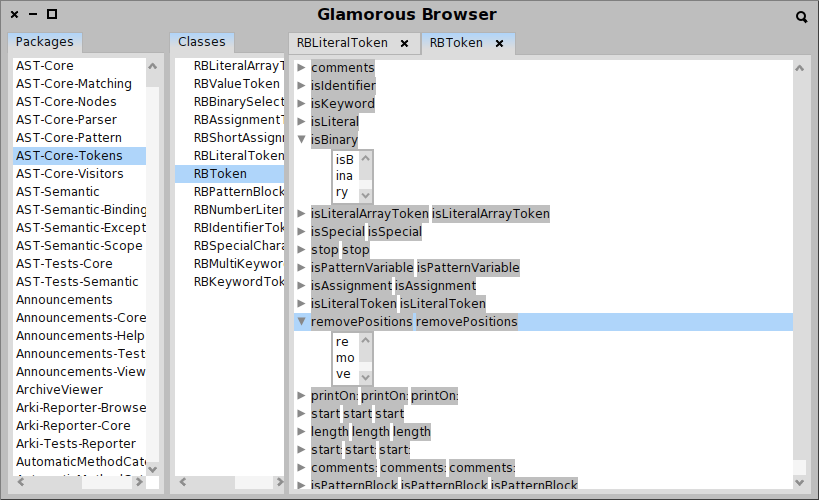
I just tried to load Glamorous Toolkit and run "GTCoder open" in a Pharo 1.3 and the tree does not fill the space horizontally. This prompted my mail.
We just checked it with Marcus, and yes, this stuff are already integrated into 1.3. About bugs you mentioning, it is hard to say. I remember there was a little piece of code which i forced to remove because it worked well in 1.2 images but caused complete layout mess in 1.3. Maybe it is because of it. Can you send a screenshot?
Cheers, Doru
-- Best regards, Igor Stasenko AKA sig.
Hi, On 18 May 2011, at 17:28, Igor Stasenko wrote:
On 18 May 2011 17:15, Tudor Girba <tudor.girba@gmail.com> wrote:
I just tried to load Glamorous Toolkit and run "GTCoder open" in a Pharo 1.3 and the tree does not fill the space horizontally. This prompted my mail.
We just checked it with Marcus, and yes, this stuff are already integrated into 1.3.
About bugs you mentioning, it is hard to say. I remember there was a little piece of code which i forced to remove because it worked well in 1.2 images but caused complete layout mess in 1.3. Maybe it is because of it.
Can you send a screenshot?
I attached the screenshot here. To reproduce it: 1. Download the Glamorous Toolkit based on Pharo 1.3 #13204 http://ci.moosetechnology.org/job/glamorous-toolkit-latest-dev/lastSuccessfu... 2. Run GTCoder open Cheers, Doru
Cheers, Doru
-- Best regards, Igor Stasenko AKA sig.
-- www.tudorgirba.com "One cannot do more than one can do."
On 18 May 2011 17:43, Tudor Girba <tudor.girba@gmail.com> wrote:
Hi,
On 18 May 2011, at 17:28, Igor Stasenko wrote:
On 18 May 2011 17:15, Tudor Girba <tudor.girba@gmail.com> wrote:
I just tried to load Glamorous Toolkit and run "GTCoder open" in a Pharo 1.3 and the tree does not fill the space horizontally. This prompted my mail.
We just checked it with Marcus, and yes, this stuff are already integrated into 1.3.
About bugs you mentioning, it is hard to say. I remember there was a little piece of code which i forced to remove because it worked well in 1.2 images but caused complete layout mess in 1.3. Maybe it is because of it.
Can you send a screenshot?
I attached the screenshot here.
Okay.. looks not very good :) Can you give a description (or screenshot) of appearance which you expected to see. The problem with these things, that it is hard to make it fit for every possible use of different kinds of layout. Mainly i was making sure that Settings and other treemorph examples in 1.3 are looking ok.
To reproduce it: 1. Download the Glamorous Toolkit based on Pharo 1.3 #13204 http://ci.moosetechnology.org/job/glamorous-toolkit-latest-dev/lastSuccessfu... 2. Run GTCoder open
Thanks, Doru i will check it.
Cheers, Doru
-- Best regards, Igor Stasenko AKA sig.
Hi, On 18 May 2011, at 17:53, Igor Stasenko wrote:
On 18 May 2011 17:43, Tudor Girba <tudor.girba@gmail.com> wrote:
Hi,
On 18 May 2011, at 17:28, Igor Stasenko wrote:
On 18 May 2011 17:15, Tudor Girba <tudor.girba@gmail.com> wrote:
I just tried to load Glamorous Toolkit and run "GTCoder open" in a Pharo 1.3 and the tree does not fill the space horizontally. This prompted my mail.
We just checked it with Marcus, and yes, this stuff are already integrated into 1.3.
About bugs you mentioning, it is hard to say. I remember there was a little piece of code which i forced to remove because it worked well in 1.2 images but caused complete layout mess in 1.3. Maybe it is because of it.
Can you send a screenshot?
I attached the screenshot here.
Okay.. looks not very good :) Can you give a description (or screenshot) of appearance which you expected to see.
The rows with text with a gray background should span the entire horizontal space. Actually, the reason why there is the gray background is to reveal the bounds of the morphs for debugging :). Also the text morphs that are the children of the gray root items should also span the horizontal space (now you see from the border that it has a very small extent) Cheers, Doru
The problem with these things, that it is hard to make it fit for every possible use of different kinds of layout. Mainly i was making sure that Settings and other treemorph examples in 1.3 are looking ok.
To reproduce it: 1. Download the Glamorous Toolkit based on Pharo 1.3 #13204 http://ci.moosetechnology.org/job/glamorous-toolkit-latest-dev/lastSuccessfu... 2. Run GTCoder open
Thanks, Doru i will check it.
Cheers, Doru
-- Best regards, Igor Stasenko AKA sig.
-- www.tudorgirba.com "Value is always contextual."
On 18 May 2011 17:57, Tudor Girba <tudor.girba@gmail.com> wrote:
Hi,
The rows with text with a gray background should span the entire horizontal space. Actually, the reason why there is the gray background is to reveal the bounds of the morphs for debugging :).
Also the text morphs that are the children of the gray root items should also span the horizontal space (now you see from the border that it has a very small extent)
Now i'd like to ask you , if this is a general requirement for all morphs placed in treemorph node? Or it should be controlled by morph which you placing? This should be controlled by #hResizing: , but not all morphs actually honor this. I can mistake, but string morph which is used for labels just paints the string and any extra width is ignored.. It is also, a good question what to do if you have multiple morphs which has #spaceFill placed in a row? Consider following: <column1> | <column2> <m1> <m2 spacefill .......> <m3 spacfill ... > | <mx ... > <my ... > < mz>
Cheers, Doru
-- Best regards, Igor Stasenko AKA sig.
Hi, On 18 May 2011, at 18:17, Igor Stasenko wrote:
On 18 May 2011 17:57, Tudor Girba <tudor.girba@gmail.com> wrote:
Hi,
The rows with text with a gray background should span the entire horizontal space. Actually, the reason why there is the gray background is to reveal the bounds of the morphs for debugging :).
Also the text morphs that are the children of the gray root items should also span the horizontal space (now you see from the border that it has a very small extent)
Now i'd like to ask you , if this is a general requirement for all morphs placed in treemorph node? Or it should be controlled by morph which you placing?
I think that having this work for any morph should be fine. But, the other would work as well.
This should be controlled by #hResizing: , but not all morphs actually honor this. I can mistake, but string morph which is used for labels just paints the string and any extra width is ignored..
Aha. Ok. in any case, we should be able to get a PluggableTextMorph fill the space.
It is also, a good question what to do if you have multiple morphs which has #spaceFill placed in a row?
Consider following:
<column1> | <column2> <m1> <m2 spacefill .......> <m3 spacfill ... > | <mx ... > <my ... > < mz>
I think that the best way is to require a root morph that controls the layout of the children. On a related note, Gary made the GeneralScrollPane to scroll on one dimension and stretch on another. The problem is that MorphTreeMorph inherits from ScrollPane. Alain proposed that perhaps it would be a solution to get it work with the GeneralScrollPane. Cheers, Doru
Cheers, Doru
-- Best regards, Igor Stasenko AKA sig.
-- www.tudorgirba.com "Be rather willing to give than demanding to get."
On 6 April 2011 09:45, Alain Plantec <alain.plantec@yahoo.com> wrote:
Le 06/04/2011 08:57, Igor Stasenko a écrit :
another point, try all examples in Morphic-MorphTreeWidget-Examples. now, the height of each row is constant.
Yes, so what it should be instead?
it should be dependent on the content height, so as it was before. another problem is the spacers removal. now, the horizontal positioning is broken (they was here to take into account the vertical resizers width) see the screen shots.
try SimpleGridExample new open before and after the changes. to exhibit the problem, change the resizerWidth from 2 to 12 as an example (just set it to 12 in SimpleGridExample>>treeMorph)
Btw, why in this grid example it uses tree morph? As to me it sounds a bit of abuse. Tree morph widget should focus on displaying trees, but not grids. I think it would be better to use separate widget for representing the grids, because obviously a data model for grids is not quite same as for tree, and thus it could use different strategy to generate/represent grid data.
I think that MorphTreeMorph can't be efficient for very big lists because each row may contain a lot of morphs. This is why I've also implemented LazyMorphTreeMorph. Try it, it is very much efficient but badly implemented. I think it should use a background process to build the list (something like what you did for the annotation pane).
Cheers Alain
It is because of the RowLayout that is used for MorphTreeNodeMorph instead of a ProportionalLayout. see ClassTreeExample before and after your changes.
ClassTreeExample new openOn: Object
i will
cheers Alain
-- Best regards, Igor Stasenko AKA sig.
Le 06/04/2011 10:23, Igor Stasenko a écrit :
Btw, why in this grid example it uses tree morph?
As to me it sounds a bit of abuse.
Tree morph widget should focus on displaying trees, but not grids. I think it would be better to use separate widget for representing the grids, because obviously a data model for grids is not quite same as for tree, and thus it could use different strategy to generate/represent grid data.
ah ah! yes, I agree again that it is not appropriate. lists and trees are very similar but not grid. these examples are here to show how to use the widget and for testing purpose. btw, It make me remember that nullpointer's solution for grid was much more efficient. I don't know for the rest but maybe it could be interesting to look at it's widgets. maybe all we need is there. Alain
participants (4)
-
 Alain Plantec
 -
 Igor Stasenko
 -
 Stéphane Ducasse
 -
 Tudor Girba