[Compiler] Variables in DoIts

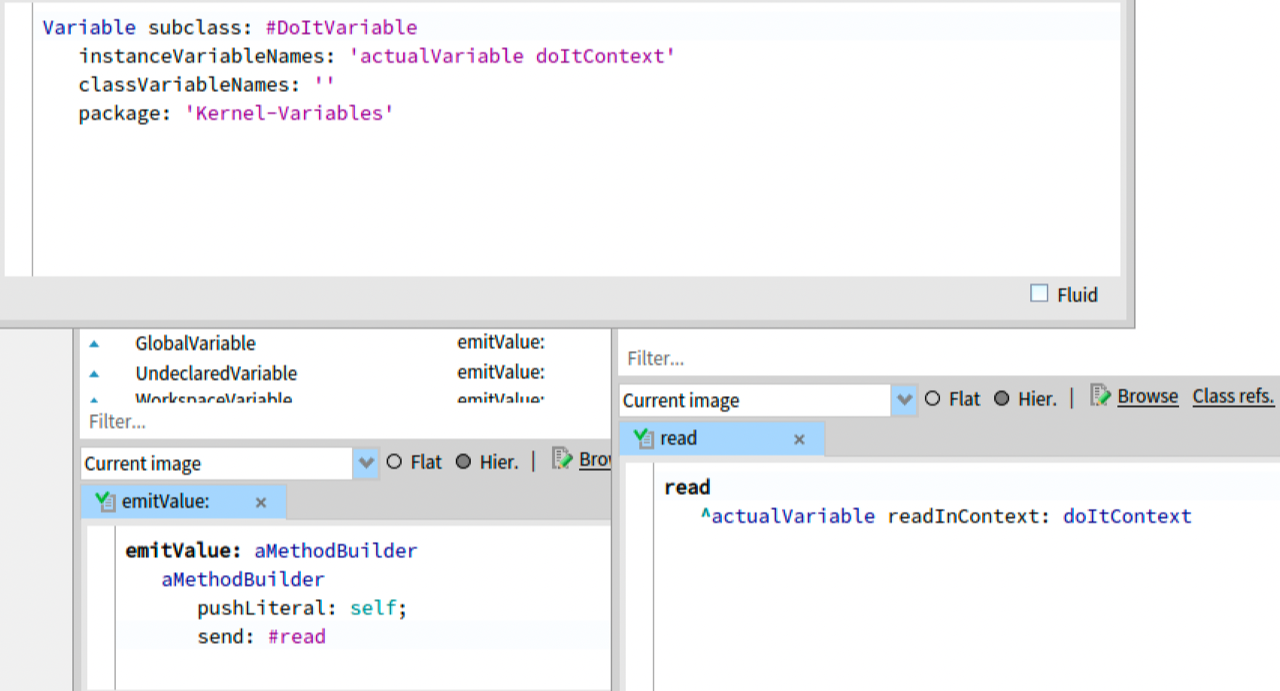
Hi, We finally merged a PR form Denis (Sorry for taking too longâ¦) that enables the use of DoitVariable in DoItIn: methods: Denis: #pharo has finally transparent variables in the debugger doIts. No ThisContext readVariable trick And we could even get rid of #DoItIn:, after merging another small cleanup, both methods now is just #DoIt as a selector. How does it work? Denis: It is the power of first class variables. There is DoItVariable fully integrated now which represents variables from different context Marcus: DoitVariable has the original Variable instance and the context (what used to the ThisContext parameter of DoItIn:). It can be read reflectively by sending #read, compiler delegates code generation to the Variables (#emitValue:)
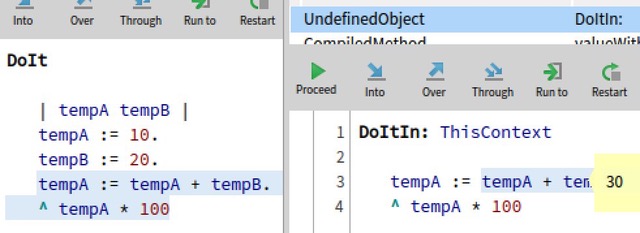

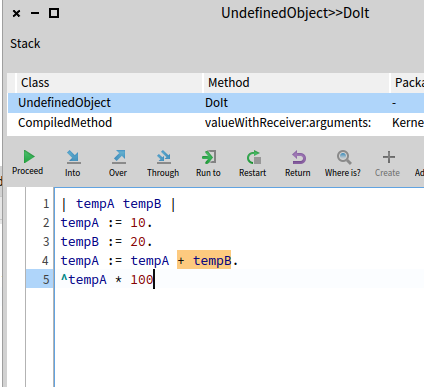
Now we can play with other interesting options. We can completely remove reformatting of code for DoIts and make the debugging more "transparent" for users: [image: simpleDoIt.png] Notice there is no DoIt header anymore . What is selected for the DebugIt command is what the user really sees in the debugger. I remember when for the first time I tried the smalltalk environment DoIt methods were a real magic for me. With this view I would have much less questions. What do you think?

El 25 jun 2022, a las 14:38, Denis Kudriashov <dionisiydk@gmail.com> escribió:
Now we can play with other interesting options. We can completely remove reformatting of code for DoIts and make the debugging more "transparent" for users:
<simpleDoIt.png>
Notice there is no DoIt header anymore . What is selected for the DebugIt command is what the user really sees in the debugger. I remember when for the first time I tried the smalltalk environment DoIt methods were a real magic for me. With this view I would have much less questions.
What do you think?
I like this much much better than what was that before!! Iâd suggest, for further improvement (but not blocking), that Iâd like to see the entire code and context of the do-it context. Just showing the selected text makes one lose context. Instead, it would be super cool to show the entire context + code of where the selection was done, and that the program counter is set where the selection was set. Of course, now that Iâm thinking about it, I would wonder how to resolve when to *stop*. Only showing the selected code solves visually the *stopping*. It is clear that evaluation stops when we arrive at the end. G
Hi. Ñб, 25 иÑн. 2022 г. в 13:48, Guillermo Polito <guillermopolito@gmail.com>:
Iâd suggest, for further improvement (but not blocking), that Iâd like to see the entire code and context of the do-it context. Just showing the selected text makes one lose context. Instead, it would be super cool to show the entire context + code of where the selection was done, and that the program counter is set where the selection was set.
Of course, now that Iâm thinking about it, I would wonder how to resolve when to *stop*.
In theory we can highlight the code from the full outer context as something inactive or we can try to draw the border over a selection. I did a little experiment but it does not look good. And I am not sure how useful it will be: [image: shadowDoIt.png]
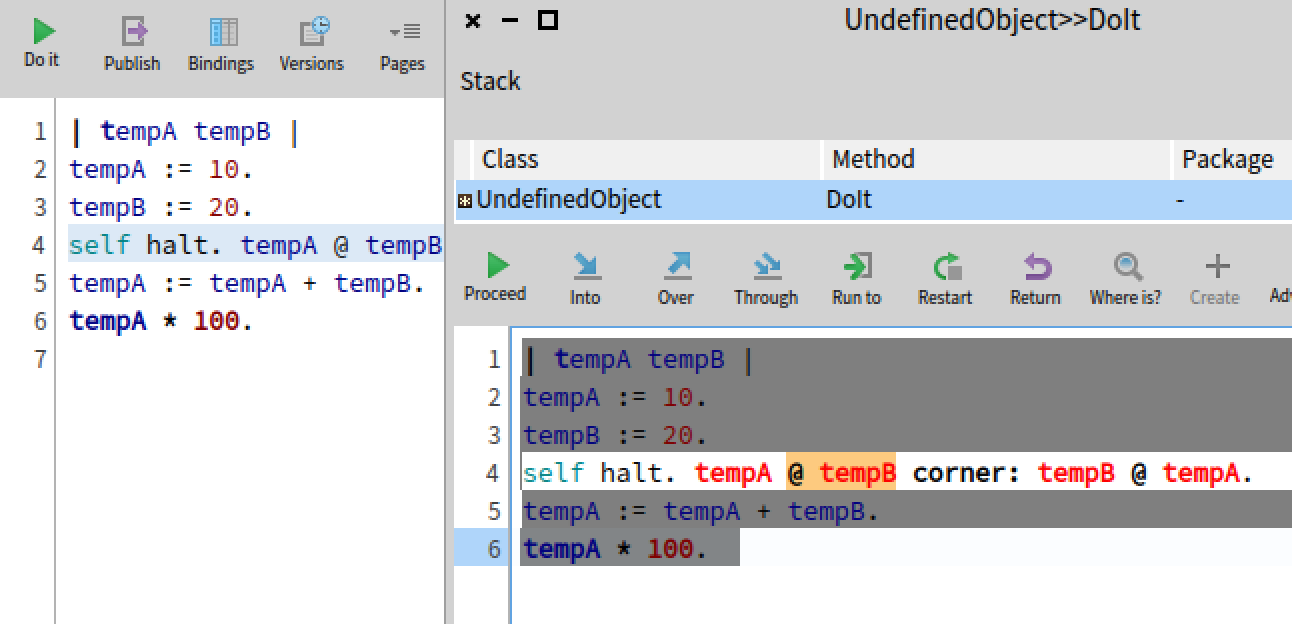
Wow, I think thatâs super cool!! And a worthy direction to explore. Having the surrounding code would give developers a lot more context!!
El 24 jul 2022, a las 20:47, Denis Kudriashov <dionisiydk@gmail.com> escribió:
Hi.
Ñб, 25 иÑн. 2022 г. в 13:48, Guillermo Polito <guillermopolito@gmail.com <mailto:guillermopolito@gmail.com>>: Iâd suggest, for further improvement (but not blocking), that Iâd like to see the entire code and context of the do-it context. Just showing the selected text makes one lose context. Instead, it would be super cool to show the entire context + code of where the selection was done, and that the program counter is set where the selection was set.
Of course, now that Iâm thinking about it, I would wonder how to resolve when to *stop*.
In theory we can highlight the code from the full outer context as something inactive or we can try to draw the border over a selection. I did a little experiment but it does not look good. And I am not sure how useful it will be:
<shadowDoIt.png>
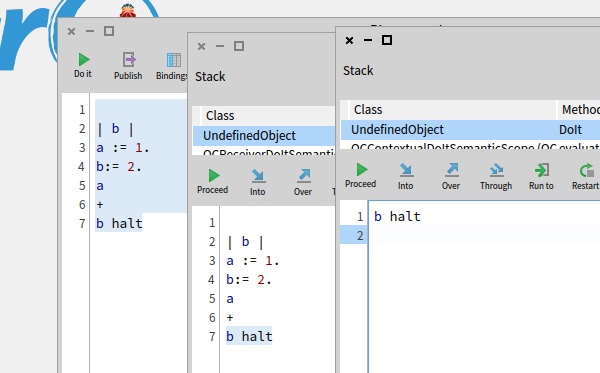
The next steo of this has been merged: we now evaluate DoIt methods in a way that we do not - need a method header - need to transfrom the AST for adding a return See the (now merged) PR of Denis here: https://github.com/pharo-project/pharo/pull/11463 This means that DoiT evaluation does not rely on the parse tree rewriter and does not need to be pretty-printed anymore. (which dies speed up #evaluate:, too). The screenshot shows code from a Playground, setting a playground binding a to 1, then a temp b to 2, then it enters the debugger due to the #halt. In the debugger we can read a and b, and we can eval âb haltâ to see that what used to be a âDoItIn:â accessing b via the context now looks just like the code that we executed from the first debugger:
On 24 Jun 2022, at 13:51, Marcus Denker <marcus.denker@inria.fr> wrote:
Hi,
We finally merged a PR form Denis (Sorry for taking too longâ¦) that enables the use of DoitVariable in DoItIn: methods:
<Dionisiydk_2022-Jun-23.jpeg> Denis: #pharo has finally transparent variables in the debugger doIts. No ThisContext readVariable trick
And we could even get rid of #DoItIn:, after merging another small cleanup, both methods now is just #DoIt as a selector.
How does it work?
Denis: It is the power of first class variables. There is DoItVariable fully integrated now which represents variables from different context
Marcus: DoitVariable has the original Variable instance and the context (what used to the ThisContext parameter of DoItIn:). It can be read reflectively by sending #read, compiler delegates code generation to the Variables (#emitValue:)
<DoItVariable.png>
participants (3)
-
 Denis Kudriashov
 -
 Guillermo Polito
 -
 Marcus Denker