PG
Phil Gray
Wed, Oct 15, 2025 12:49 PM
Hi
I’m having trouble reinstalling PharoLauncher on an M3 MacBook Air running
Sequoia 15.6.1.
I uninstalled a working version of PharoLauncher (long story) and then
downloaded and installed a new version. On launch, a Pharo window opens and
then it hangs trying to connect to ‘files.pharo.org’.
I’d be grateful for any help.
Phil
Hi
I’m having trouble reinstalling PharoLauncher on an M3 MacBook Air running
Sequoia 15.6.1.
I uninstalled a working version of PharoLauncher (long story) and then
downloaded and installed a new version. On launch, a Pharo window opens and
then it hangs trying to connect to ‘files.pharo.org’.
I’d be grateful for any help.
Phil

IM
IDEGUTI Masaya
Wed, Oct 15, 2025 4:05 PM
Hi Phil,
I understand you’re having trouble with PharoLauncher on your M3 MacBook Air, hanging when trying to connect to files.pharo.org. Here are several steps that usually help resolve this issue:
-
Check your network connection
Open Terminal and run:
curl -I https://files.pharo.org
• If it returns HTTP/2 200, the connection is fine.
• If it fails, try switching Wi-Fi networks or disconnecting from VPN.
• Also check that you can open https://files.pharo.org in your browser.
-
Clear PharoLauncher cache
Old settings or caches can cause the launcher to hang:
mv ~/Library/Application\ Support/PharoLauncher ~/Library/Application\ Support/PharoLauncher.bak
Then restart PharoLauncher. It will create fresh settings.
-
Manually download a Pharo image
• Go to https://files.pharo.org and download the image you need (e.g., Pharo 10 latest stable).
• Unzip the .zip file, which will contain a .image and .changes file.
• In PharoLauncher, use Add Local Image to select the .image file and start it.
-
Check macOS security & firewall
• Go to System Settings → Network → Firewall.
• Make sure PharoLauncher is allowed to connect.
• If using Intel (x86) binaries on Apple Silicon, consider using the native ARM64 version.
-
Apple Silicon specific note
• Make sure you downloaded the ARM64 version of PharoLauncher for your M3 Mac.
• You can test by launching from Terminal:
arch -arm64 /Applications/PharoLauncher.app/Contents/MacOS/PharoLauncher
-
Debugging
Launch PharoLauncher from Terminal to see logs and connection errors:
/Applications/PharoLauncher.app/Contents/MacOS/PharoLauncher
If network issues persist, manually downloading the image and using the local image option is a reliable workaround.
I hope this helps! Let me know if you run into any further issues.
Best regards,
Masaya
On Oct 15, 2025, at 21:49, Phil Gray via Pharo-users pharo-users@lists.pharo.org wrote:
Hi
I’m having trouble reinstalling PharoLauncher on an M3 MacBook Air running Sequoia 15.6.1.
I uninstalled a working version of PharoLauncher (long story) and then downloaded and installed a new version. On launch, a Pharo window opens and then it hangs trying to connect to ‘files.pharo.org’.
I’d be grateful for any help.
Phil
Hi Phil,
I understand you’re having trouble with PharoLauncher on your M3 MacBook Air, hanging when trying to connect to files.pharo.org. Here are several steps that usually help resolve this issue:
1. Check your network connection
Open Terminal and run:
curl -I https://files.pharo.org
• If it returns HTTP/2 200, the connection is fine.
• If it fails, try switching Wi-Fi networks or disconnecting from VPN.
• Also check that you can open https://files.pharo.org in your browser.
2. Clear PharoLauncher cache
Old settings or caches can cause the launcher to hang:
mv ~/Library/Application\ Support/PharoLauncher ~/Library/Application\ Support/PharoLauncher.bak
Then restart PharoLauncher. It will create fresh settings.
3. Manually download a Pharo image
• Go to https://files.pharo.org and download the image you need (e.g., Pharo 10 latest stable).
• Unzip the .zip file, which will contain a .image and .changes file.
• In PharoLauncher, use Add Local Image to select the .image file and start it.
4. Check macOS security & firewall
• Go to System Settings → Network → Firewall.
• Make sure PharoLauncher is allowed to connect.
• If using Intel (x86) binaries on Apple Silicon, consider using the native ARM64 version.
5. Apple Silicon specific note
• Make sure you downloaded the ARM64 version of PharoLauncher for your M3 Mac.
• You can test by launching from Terminal:
arch -arm64 /Applications/PharoLauncher.app/Contents/MacOS/PharoLauncher
6. Debugging
Launch PharoLauncher from Terminal to see logs and connection errors:
/Applications/PharoLauncher.app/Contents/MacOS/PharoLauncher
If network issues persist, manually downloading the image and using the local image option is a reliable workaround.
I hope this helps! Let me know if you run into any further issues.
Best regards,
Masaya
> On Oct 15, 2025, at 21:49, Phil Gray via Pharo-users <pharo-users@lists.pharo.org> wrote:
>
> Hi
>
> I’m having trouble reinstalling PharoLauncher on an M3 MacBook Air running Sequoia 15.6.1.
>
> I uninstalled a working version of PharoLauncher (long story) and then downloaded and installed a new version. On launch, a Pharo window opens and then it hangs trying to connect to ‘files.pharo.org’.
>
> I’d be grateful for any help.
>
> Phil
PG
Phil Gray
Thu, Oct 16, 2025 10:44 AM
Hi Masaya,
Many thanks for your message. I’ve gone through the steps you suggest, but
I still have problems.
Here’s what happened with each of your numbered steps:
(1) Curl returned ‘HTTP/1.1 200 OK’. I assume version 1.1 is ok. I was able
to access files.pharo.org ok.
(2) When I looked for the PharoLauncher file in /Library/Application
Support, no file was there. I tried launching PharoLauncher again, but
still no file.
(3) This wasn’t relevant as PharoLauncher never reached a state where I
could select an image file.
(4) I set the firewall to allow PharoLauncher to accept connections.
(5) I was able to execute using the ‘arch -arm64’ command. Same result as
before.
(6) Launching from a command line generated no errors. The application just
hangs. I’ve attached a screen dump of the PharoLauncher window.
I hope you can help!
Thanks, Phil
On 15 Oct 2025 at 17:05:20, IDEGUTI Masaya via Pharo-users <
pharo-users@lists.pharo.org> wrote:
Hi Phil,
I understand you’re having trouble with PharoLauncher on your M3 MacBook
Air, hanging when trying to connect to files.pharo.org. Here are several
steps that usually help resolve this issue:
-
Check your network connection
Open Terminal and run:
curl -I https://files.pharo.org
• If it returns HTTP/2 200, the connection is fine.
• If it fails, try switching Wi-Fi networks or disconnecting from VPN.
• Also check that you can open https://files.pharo.org in your browser.
-
Clear PharoLauncher cache
Old settings or caches can cause the launcher to hang:
mv ~/Library/Application\ Support/PharoLauncher ~/Library/Application
Support/PharoLauncher.bak
Then restart PharoLauncher. It will create fresh settings.
-
Manually download a Pharo image
• Go to https://files.pharo.org and download the image you need (e.g.,
Pharo 10 latest stable).
• Unzip the .zip file, which will contain a .image and .changes file.
• In PharoLauncher, use Add Local Image to select the .image file and
start it.
-
Check macOS security & firewall
• Go to System Settings → Network → Firewall.
• Make sure PharoLauncher is allowed to connect.
• If using Intel (x86) binaries on Apple Silicon, consider using the
native ARM64 version.
-
Apple Silicon specific note
• Make sure you downloaded the ARM64 version of PharoLauncher for your
M3 Mac.
• You can test by launching from Terminal:
arch -arm64 /Applications/PharoLauncher.app/Contents/MacOS/PharoLauncher
-
Debugging
Launch PharoLauncher from Terminal to see logs and connection errors:
/Applications/PharoLauncher.app/Contents/MacOS/PharoLauncher
If network issues persist, manually downloading the image and using the
local image option is a reliable workaround.
I hope this helps! Let me know if you run into any further issues.
Best regards,
Masaya
On Oct 15, 2025, at 21:49, Phil Gray via Pharo-users <
pharo-users@lists.pharo.org> wrote:
Hi
I’m having trouble reinstalling PharoLauncher on an M3 MacBook Air running
Sequoia 15.6.1.
I uninstalled a working version of PharoLauncher (long story) and then
downloaded and installed a new version. On launch, a Pharo window opens and
then it hangs trying to connect to ‘files.pharo.org’.
I’d be grateful for any help.
Phil
Hi Masaya,
Many thanks for your message. I’ve gone through the steps you suggest, but
I still have problems.
Here’s what happened with each of your numbered steps:
(1) Curl returned ‘HTTP/1.1 200 OK’. I assume version 1.1 is ok. I was able
to access files.pharo.org ok.
(2) When I looked for the PharoLauncher file in /Library/Application
Support, no file was there. I tried launching PharoLauncher again, but
still no file.
(3) This wasn’t relevant as PharoLauncher never reached a state where I
could select an image file.
(4) I set the firewall to allow PharoLauncher to accept connections.
(5) I was able to execute using the ‘arch -arm64’ command. Same result as
before.
(6) Launching from a command line generated no errors. The application just
hangs. I’ve attached a screen dump of the PharoLauncher window.
I hope you can help!
Thanks, Phil
On 15 Oct 2025 at 17:05:20, IDEGUTI Masaya via Pharo-users <
pharo-users@lists.pharo.org> wrote:
> Hi Phil,
>
> I understand you’re having trouble with PharoLauncher on your M3 MacBook
> Air, hanging when trying to connect to files.pharo.org. Here are several
> steps that usually help resolve this issue:
>
> 1. Check your network connection
> Open Terminal and run:
> curl -I https://files.pharo.org
>
> • If it returns HTTP/2 200, the connection is fine.
> • If it fails, try switching Wi-Fi networks or disconnecting from VPN.
> • Also check that you can open https://files.pharo.org in your browser.
>
> 2. Clear PharoLauncher cache
> Old settings or caches can cause the launcher to hang:
> mv ~/Library/Application\ Support/PharoLauncher ~/Library/Application\
> Support/PharoLauncher.bak
>
> Then restart PharoLauncher. It will create fresh settings.
>
> 3. Manually download a Pharo image
> • Go to https://files.pharo.org and download the image you need (e.g.,
> Pharo 10 latest stable).
> • Unzip the .zip file, which will contain a .image and .changes file.
> • In PharoLauncher, use Add Local Image to select the .image file and
> start it.
>
> 4. Check macOS security & firewall
> • Go to System Settings → Network → Firewall.
> • Make sure PharoLauncher is allowed to connect.
> • If using Intel (x86) binaries on Apple Silicon, consider using the
> native ARM64 version.
>
> 5. Apple Silicon specific note
> • Make sure you downloaded the ARM64 version of PharoLauncher for your
> M3 Mac.
> • You can test by launching from Terminal:
> arch -arm64 /Applications/PharoLauncher.app/Contents/MacOS/PharoLauncher
>
> 6. Debugging
> Launch PharoLauncher from Terminal to see logs and connection errors:
> /Applications/PharoLauncher.app/Contents/MacOS/PharoLauncher
>
> If network issues persist, manually downloading the image and using the
> local image option is a reliable workaround.
> I hope this helps! Let me know if you run into any further issues.
>
> Best regards,
> Masaya
>
>
> On Oct 15, 2025, at 21:49, Phil Gray via Pharo-users <
> pharo-users@lists.pharo.org> wrote:
>
>
> Hi
>
>
> I’m having trouble reinstalling PharoLauncher on an M3 MacBook Air running
> Sequoia 15.6.1.
>
>
> I uninstalled a working version of PharoLauncher (long story) and then
> downloaded and installed a new version. On launch, a Pharo window opens and
> then it hangs trying to connect to ‘files.pharo.org’.
>
>
> I’d be grateful for any help.
>
>
> Phil
>
>
>
IM
IDEGUTI Masaya
Thu, Oct 16, 2025 5:53 PM
Hi Phil,
Thanks for your message. I’m afraid I don’t have a perfect solution at the moment, but I can share what I’ve observed:
- The latest PharoLauncher 3.4.1 seems to have an issue: it hangs immediately on startup, both on Sequoia (your environment) and Tahoe (my environment).
- PharoLauncher 3.2-2024.05.24 starts up, but trying to launch a Pharo 12.0 image produces a PhLTranslatedModeWarning and fails to open (tested on Tahoe).
- Selecting a Pharo 13.0 image with 3.2-2024.05.24 works (tested on Tahoe).
So unfortunately, the “general solutions” I mentioned earlier don’t really help in the current situation. I wish I could offer a clearer fix, but for now this is all I’ve observed.
Sorry I can’t be more helpful at the moment!
Best, Masaya
On Oct 16, 2025, at 19:44, Phil Gray via Pharo-users pharo-users@lists.pharo.org wrote:
Hi Masaya,
Many thanks for your message. I’ve gone through the steps you suggest, but I still have problems.
Here’s what happened with each of your numbered steps:
(1) Curl returned ‘HTTP/1.1 200 OK’. I assume version 1.1 is ok. I was able to access files.pharo.org http://files.pharo.org/ ok.
(2) When I looked for the PharoLauncher file in /Library/Application Support, no file was there. I tried launching PharoLauncher again, but still no file.
(3) This wasn’t relevant as PharoLauncher never reached a state where I could select an image file.
(4) I set the firewall to allow PharoLauncher to accept connections.
(5) I was able to execute using the ‘arch -arm64’ command. Same result as before.
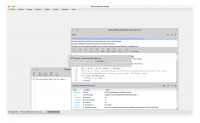
(6) Launching from a command line generated no errors. The application just hangs. I’ve attached a screen dump of the PharoLauncher window.
I hope you can help!
Thanks, Phil
On 15 Oct 2025 at 17:05:20, IDEGUTI Masaya via Pharo-users <pharo-users@lists.pharo.org mailto:pharo-users@lists.pharo.org> wrote:
Hi Phil,
I understand you’re having trouble with PharoLauncher on your M3 MacBook Air, hanging when trying to connect to files.pharo.org http://files.pharo.org/. Here are several steps that usually help resolve this issue:
-
Check your network connection
Open Terminal and run:
curl -I https://files.pharo.org https://files.pharo.org/
• If it returns HTTP/2 200, the connection is fine.
• If it fails, try switching Wi-Fi networks or disconnecting from VPN.
• Also check that you can open https://files.pharo.org https://files.pharo.org/ in your browser.
-
Clear PharoLauncher cache
Old settings or caches can cause the launcher to hang:
mv ~/Library/Application\ Support/PharoLauncher ~/Library/Application\ Support/PharoLauncher.bak
Then restart PharoLauncher. It will create fresh settings.
-
Manually download a Pharo image
• Go to https://files.pharo.org https://files.pharo.org/ and download the image you need (e.g., Pharo 10 latest stable).
• Unzip the .zip file, which will contain a .image and .changes file.
• In PharoLauncher, use Add Local Image to select the .image file and start it.
-
Check macOS security & firewall
• Go to System Settings → Network → Firewall.
• Make sure PharoLauncher is allowed to connect.
• If using Intel (x86) binaries on Apple Silicon, consider using the native ARM64 version.
-
Apple Silicon specific note
• Make sure you downloaded the ARM64 version of PharoLauncher for your M3 Mac.
• You can test by launching from Terminal:
arch -arm64 /Applications/PharoLauncher.app/Contents/MacOS/PharoLauncher
-
Debugging
Launch PharoLauncher from Terminal to see logs and connection errors:
/Applications/PharoLauncher.app/Contents/MacOS/PharoLauncher
If network issues persist, manually downloading the image and using the local image option is a reliable workaround.
I hope this helps! Let me know if you run into any further issues.
Best regards,
Masaya
On Oct 15, 2025, at 21:49, Phil Gray via Pharo-users <pharo-users@lists.pharo.org mailto:pharo-users@lists.pharo.org> wrote:
Hi
I’m having trouble reinstalling PharoLauncher on an M3 MacBook Air running Sequoia 15.6.1.
I uninstalled a working version of PharoLauncher (long story) and then downloaded and installed a new version. On launch, a Pharo window opens and then it hangs trying to connect to ‘files.pharo.org http://files.pharo.org/’.
I’d be grateful for any help.
Phil
<PharoLauncherScreenDump.jpg>
Hi Phil,
Thanks for your message. I’m afraid I don’t have a perfect solution at the moment, but I can share what I’ve observed:
- The latest PharoLauncher 3.4.1 seems to have an issue: it hangs immediately on startup, both on Sequoia (your environment) and Tahoe (my environment).
- PharoLauncher 3.2-2024.05.24 starts up, but trying to launch a Pharo 12.0 image produces a PhLTranslatedModeWarning and fails to open (tested on Tahoe).
- Selecting a Pharo 13.0 image with 3.2-2024.05.24 works (tested on Tahoe).
So unfortunately, the “general solutions” I mentioned earlier don’t really help in the current situation. I wish I could offer a clearer fix, but for now this is all I’ve observed.
Sorry I can’t be more helpful at the moment!
Best, Masaya
> On Oct 16, 2025, at 19:44, Phil Gray via Pharo-users <pharo-users@lists.pharo.org> wrote:
>
> Hi Masaya,
>
> Many thanks for your message. I’ve gone through the steps you suggest, but I still have problems.
> Here’s what happened with each of your numbered steps:
> (1) Curl returned ‘HTTP/1.1 200 OK’. I assume version 1.1 is ok. I was able to access files.pharo.org <http://files.pharo.org/> ok.
> (2) When I looked for the PharoLauncher file in /Library/Application Support, no file was there. I tried launching PharoLauncher again, but still no file.
> (3) This wasn’t relevant as PharoLauncher never reached a state where I could select an image file.
> (4) I set the firewall to allow PharoLauncher to accept connections.
> (5) I was able to execute using the ‘arch -arm64’ command. Same result as before.
> (6) Launching from a command line generated no errors. The application just hangs. I’ve attached a screen dump of the PharoLauncher window.
>
> I hope you can help!
> Thanks, Phil
>
>
> On 15 Oct 2025 at 17:05:20, IDEGUTI Masaya via Pharo-users <pharo-users@lists.pharo.org <mailto:pharo-users@lists.pharo.org>> wrote:
>> Hi Phil,
>>
>> I understand you’re having trouble with PharoLauncher on your M3 MacBook Air, hanging when trying to connect to files.pharo.org <http://files.pharo.org/>. Here are several steps that usually help resolve this issue:
>>
>> 1. Check your network connection
>> Open Terminal and run:
>> curl -I https://files.pharo.org <https://files.pharo.org/>
>>
>> • If it returns HTTP/2 200, the connection is fine.
>> • If it fails, try switching Wi-Fi networks or disconnecting from VPN.
>> • Also check that you can open https://files.pharo.org <https://files.pharo.org/> in your browser.
>>
>> 2. Clear PharoLauncher cache
>> Old settings or caches can cause the launcher to hang:
>> mv ~/Library/Application\ Support/PharoLauncher ~/Library/Application\ Support/PharoLauncher.bak
>>
>> Then restart PharoLauncher. It will create fresh settings.
>>
>> 3. Manually download a Pharo image
>> • Go to https://files.pharo.org <https://files.pharo.org/> and download the image you need (e.g., Pharo 10 latest stable).
>> • Unzip the .zip file, which will contain a .image and .changes file.
>> • In PharoLauncher, use Add Local Image to select the .image file and start it.
>>
>> 4. Check macOS security & firewall
>> • Go to System Settings → Network → Firewall.
>> • Make sure PharoLauncher is allowed to connect.
>> • If using Intel (x86) binaries on Apple Silicon, consider using the native ARM64 version.
>>
>> 5. Apple Silicon specific note
>> • Make sure you downloaded the ARM64 version of PharoLauncher for your M3 Mac.
>> • You can test by launching from Terminal:
>> arch -arm64 /Applications/PharoLauncher.app/Contents/MacOS/PharoLauncher
>>
>> 6. Debugging
>> Launch PharoLauncher from Terminal to see logs and connection errors:
>> /Applications/PharoLauncher.app/Contents/MacOS/PharoLauncher
>>
>> If network issues persist, manually downloading the image and using the local image option is a reliable workaround.
>> I hope this helps! Let me know if you run into any further issues.
>>
>> Best regards,
>> Masaya
>>
>>
>>> On Oct 15, 2025, at 21:49, Phil Gray via Pharo-users <pharo-users@lists.pharo.org <mailto:pharo-users@lists.pharo.org>> wrote:
>>>
>>> Hi
>>>
>>> I’m having trouble reinstalling PharoLauncher on an M3 MacBook Air running Sequoia 15.6.1.
>>>
>>> I uninstalled a working version of PharoLauncher (long story) and then downloaded and installed a new version. On launch, a Pharo window opens and then it hangs trying to connect to ‘files.pharo.org <http://files.pharo.org/>’.
>>>
>>> I’d be grateful for any help.
>>>
>>> Phil
>>
> <PharoLauncherScreenDump.jpg>

TO
Tomohiro Oda
Fri, Oct 17, 2025 1:03 AM
Phil and Masaya,
I also tried PharoLauncher 3.4.1 on my Tahoe 26.0.1.
When I open PharoLauncher 3.4.1 alone, it runs as I expect.
When I open an older version (3.2) and try to open also 3.4.1, 3.4.1
fails to connect to files.pharo.org.
I don't know what's the cause nor how to fix it, but I hope this info
could help digging the issue.
tomo
2025年10月17日(金) 2:53 IDEGUTI Masaya via Pharo-users
pharo-users@lists.pharo.org:
Hi Phil,
Thanks for your message. I’m afraid I don’t have a perfect solution at the moment, but I can share what I’ve observed:
- The latest PharoLauncher 3.4.1 seems to have an issue: it hangs immediately on startup, both on Sequoia (your environment) and Tahoe (my environment).
- PharoLauncher 3.2-2024.05.24 starts up, but trying to launch a Pharo 12.0 image produces a PhLTranslatedModeWarning and fails to open (tested on Tahoe).
- Selecting a Pharo 13.0 image with 3.2-2024.05.24 works (tested on Tahoe).
So unfortunately, the “general solutions” I mentioned earlier don’t really help in the current situation. I wish I could offer a clearer fix, but for now this is all I’ve observed.
Sorry I can’t be more helpful at the moment!
Best, Masaya
On Oct 16, 2025, at 19:44, Phil Gray via Pharo-users pharo-users@lists.pharo.org wrote:
Hi Masaya,
Many thanks for your message. I’ve gone through the steps you suggest, but I still have problems.
Here’s what happened with each of your numbered steps:
(1) Curl returned ‘HTTP/1.1 200 OK’. I assume version 1.1 is ok. I was able to access files.pharo.org ok.
(2) When I looked for the PharoLauncher file in /Library/Application Support, no file was there. I tried launching PharoLauncher again, but still no file.
(3) This wasn’t relevant as PharoLauncher never reached a state where I could select an image file.
(4) I set the firewall to allow PharoLauncher to accept connections.
(5) I was able to execute using the ‘arch -arm64’ command. Same result as before.
(6) Launching from a command line generated no errors. The application just hangs. I’ve attached a screen dump of the PharoLauncher window.
I hope you can help!
Thanks, Phil
On 15 Oct 2025 at 17:05:20, IDEGUTI Masaya via Pharo-users pharo-users@lists.pharo.org wrote:
Hi Phil,
I understand you’re having trouble with PharoLauncher on your M3 MacBook Air, hanging when trying to connect to files.pharo.org. Here are several steps that usually help resolve this issue:
-
Check your network connection
Open Terminal and run:
curl -I https://files.pharo.org
• If it returns HTTP/2 200, the connection is fine.
• If it fails, try switching Wi-Fi networks or disconnecting from VPN.
• Also check that you can open https://files.pharo.org in your browser.
-
Clear PharoLauncher cache
Old settings or caches can cause the launcher to hang:
mv ~/Library/Application\ Support/PharoLauncher ~/Library/Application\ Support/PharoLauncher.bak
Then restart PharoLauncher. It will create fresh settings.
-
Manually download a Pharo image
• Go to https://files.pharo.org and download the image you need (e.g., Pharo 10 latest stable).
• Unzip the .zip file, which will contain a .image and .changes file.
• In PharoLauncher, use Add Local Image to select the .image file and start it.
-
Check macOS security & firewall
• Go to System Settings → Network → Firewall.
• Make sure PharoLauncher is allowed to connect.
• If using Intel (x86) binaries on Apple Silicon, consider using the native ARM64 version.
-
Apple Silicon specific note
• Make sure you downloaded the ARM64 version of PharoLauncher for your M3 Mac.
• You can test by launching from Terminal:
arch -arm64 /Applications/PharoLauncher.app/Contents/MacOS/PharoLauncher
-
Debugging
Launch PharoLauncher from Terminal to see logs and connection errors:
/Applications/PharoLauncher.app/Contents/MacOS/PharoLauncher
If network issues persist, manually downloading the image and using the local image option is a reliable workaround.
I hope this helps! Let me know if you run into any further issues.
Best regards,
Masaya
On Oct 15, 2025, at 21:49, Phil Gray via Pharo-users pharo-users@lists.pharo.org wrote:
Hi
I’m having trouble reinstalling PharoLauncher on an M3 MacBook Air running Sequoia 15.6.1.
I uninstalled a working version of PharoLauncher (long story) and then downloaded and installed a new version. On launch, a Pharo window opens and then it hangs trying to connect to ‘files.pharo.org’.
I’d be grateful for any help.
Phil
<PharoLauncherScreenDump.jpg>
Phil and Masaya,
I also tried PharoLauncher 3.4.1 on my Tahoe 26.0.1.
When I open PharoLauncher 3.4.1 alone, it runs as I expect.
When I open an older version (3.2) and try to open also 3.4.1, 3.4.1
fails to connect to files.pharo.org.
I don't know what's the cause nor how to fix it, but I hope this info
could help digging the issue.
---
tomo
2025年10月17日(金) 2:53 IDEGUTI Masaya via Pharo-users
<pharo-users@lists.pharo.org>:
>
> Hi Phil,
>
> Thanks for your message. I’m afraid I don’t have a perfect solution at the moment, but I can share what I’ve observed:
>
> - The latest PharoLauncher 3.4.1 seems to have an issue: it hangs immediately on startup, both on Sequoia (your environment) and Tahoe (my environment).
> - PharoLauncher 3.2-2024.05.24 starts up, but trying to launch a Pharo 12.0 image produces a PhLTranslatedModeWarning and fails to open (tested on Tahoe).
> - Selecting a Pharo 13.0 image with 3.2-2024.05.24 works (tested on Tahoe).
>
> So unfortunately, the “general solutions” I mentioned earlier don’t really help in the current situation. I wish I could offer a clearer fix, but for now this is all I’ve observed.
>
> Sorry I can’t be more helpful at the moment!
>
> Best, Masaya
>
>
> On Oct 16, 2025, at 19:44, Phil Gray via Pharo-users <pharo-users@lists.pharo.org> wrote:
>
> Hi Masaya,
>
> Many thanks for your message. I’ve gone through the steps you suggest, but I still have problems.
> Here’s what happened with each of your numbered steps:
> (1) Curl returned ‘HTTP/1.1 200 OK’. I assume version 1.1 is ok. I was able to access files.pharo.org ok.
> (2) When I looked for the PharoLauncher file in /Library/Application Support, no file was there. I tried launching PharoLauncher again, but still no file.
> (3) This wasn’t relevant as PharoLauncher never reached a state where I could select an image file.
> (4) I set the firewall to allow PharoLauncher to accept connections.
> (5) I was able to execute using the ‘arch -arm64’ command. Same result as before.
> (6) Launching from a command line generated no errors. The application just hangs. I’ve attached a screen dump of the PharoLauncher window.
>
> I hope you can help!
> Thanks, Phil
>
>
> On 15 Oct 2025 at 17:05:20, IDEGUTI Masaya via Pharo-users <pharo-users@lists.pharo.org> wrote:
>>
>> Hi Phil,
>>
>> I understand you’re having trouble with PharoLauncher on your M3 MacBook Air, hanging when trying to connect to files.pharo.org. Here are several steps that usually help resolve this issue:
>>
>> 1. Check your network connection
>> Open Terminal and run:
>> curl -I https://files.pharo.org
>>
>> • If it returns HTTP/2 200, the connection is fine.
>> • If it fails, try switching Wi-Fi networks or disconnecting from VPN.
>> • Also check that you can open https://files.pharo.org in your browser.
>>
>> 2. Clear PharoLauncher cache
>> Old settings or caches can cause the launcher to hang:
>> mv ~/Library/Application\ Support/PharoLauncher ~/Library/Application\ Support/PharoLauncher.bak
>>
>> Then restart PharoLauncher. It will create fresh settings.
>>
>> 3. Manually download a Pharo image
>> • Go to https://files.pharo.org and download the image you need (e.g., Pharo 10 latest stable).
>> • Unzip the .zip file, which will contain a .image and .changes file.
>> • In PharoLauncher, use Add Local Image to select the .image file and start it.
>>
>> 4. Check macOS security & firewall
>> • Go to System Settings → Network → Firewall.
>> • Make sure PharoLauncher is allowed to connect.
>> • If using Intel (x86) binaries on Apple Silicon, consider using the native ARM64 version.
>>
>> 5. Apple Silicon specific note
>> • Make sure you downloaded the ARM64 version of PharoLauncher for your M3 Mac.
>> • You can test by launching from Terminal:
>> arch -arm64 /Applications/PharoLauncher.app/Contents/MacOS/PharoLauncher
>>
>> 6. Debugging
>> Launch PharoLauncher from Terminal to see logs and connection errors:
>> /Applications/PharoLauncher.app/Contents/MacOS/PharoLauncher
>>
>> If network issues persist, manually downloading the image and using the local image option is a reliable workaround.
>> I hope this helps! Let me know if you run into any further issues.
>>
>> Best regards,
>> Masaya
>>
>>
>> On Oct 15, 2025, at 21:49, Phil Gray via Pharo-users <pharo-users@lists.pharo.org> wrote:
>>
>>
>> Hi
>>
>>
>> I’m having trouble reinstalling PharoLauncher on an M3 MacBook Air running Sequoia 15.6.1.
>>
>>
>> I uninstalled a working version of PharoLauncher (long story) and then downloaded and installed a new version. On launch, a Pharo window opens and then it hangs trying to connect to ‘files.pharo.org’.
>>
>>
>> I’d be grateful for any help.
>>
>>
>> Phil
>>
>>
> <PharoLauncherScreenDump.jpg>
>
>